
Our readers keep the lights on and the weekend projects moving. As an Amazon Associate, I earn from qualifying purchases.
Bluetooth monitor speakers bridge the gap between basic desktop audio and professional studio monitoring, giving you reference-grade sound without anchoring you to a cable. For content creators, gamers, and music lovers who spend hours at a desk, the difference between muddy computer speakers and a pair of active monitors with a flat frequency response is the difference between guessing and knowing exactly what your ears are hearing.
I’m Rikta — the co-founder and writer behind FitlyFast. My research process involves dissecting driver materials, amplifier topologies, and input flexibility across dozens of models to identify which monitor speakers deliver genuinely accurate sound reproduction for desktop and near-field use.
This guide is built for anyone searching for the best bluetooth monitor speakers and needing a clear breakdown of specs, connectivity, and real-world performance without marketing fluff.
How To Choose The Best Bluetooth Monitor Speakers
Choosing the right Bluetooth monitor speakers means looking past wattage ratings and focusing on what actually defines accurate sound reproduction. The key specs are driver configuration, crossover design, input options, and the type of amplifier powering the system. Below are the essential factors to consider.
Driver Configuration and Crossover Design
The most important component is the combination of woofer and tweeter. A dedicated tweeter (usually a silk dome or carbon fiber dome) handles high frequencies, while the woofer manages mid and low frequencies. A well-designed electronic crossover ensures a smooth transition between the two drivers without phase cancellation. For near-field use, 3.5-inch to 5-inch woofers are the sweet spot for balanced bass extension without overwhelming a desktop.
Input Connectivity: Balanced vs. Unbalanced
True monitor speakers offer balanced inputs (TRS or XLR) in addition to unbalanced RCA and AUX. Balanced connections reject electromagnetic interference over longer cable runs, preserving signal integrity — a necessity for music production and critical listening. If you plan to connect to an audio interface or mixing console, ensure the speakers have TRS or XLR inputs. Bluetooth is a convenience layer, not a replacement for wired fidelity.
Amplifier Topology and Power Handling
Active monitors have built-in amplifiers matched specifically to the drivers. Look for Class-D amplifiers with low distortion figures and adequate RMS power for your room size. More watts don’t always mean better sound — clean headroom and low noise floor matter more. A 30W RMS amplifier in a well-designed monitor will outperform a 100W amplifier in a poorly designed consumer speaker.
Quick Comparison
On smaller screens, swipe sideways to see the full table.
| Model | Category | Best For | Key Spec | Amazon |
|---|---|---|---|---|
| Yamaha HS3 Pair | Premium Monitor | Professional near-field mixing | 3.5″ cone woofer / 0.75″ dome tweeter | Amazon |
| Ortizan C7 (Black) | Studio Monitor | Content creation & monitoring | 3.5″ carbon fiber woofer / 0.75″ silk tweeter | Amazon |
| Ortizan C7 (White) | Studio Monitor | Desk aesthetic & content creation | 3.5″ carbon fiber woofer / 0.75″ silk tweeter | Amazon |
| Pioneer DJ DM-50D-BT | DJ Monitor | DJing & music production | 5″ woofer / 2-way DSP modes | Amazon |
| Bluedee 2.1 System | Multimedia 2.1 | Immersive gaming & movies | 80W peak / dedicated subwoofer | Amazon |
| OHAYO 60W | Bookshelf | Versatile desktop audio | 30Wx2 / 3″ carbon fiber driver | Amazon |
| LONPOO 30W RMS | Entry-Level | Budget desktop upgrade | 30W RMS / 3″ aluminum drivers | Amazon |
In‑Depth Reviews
1. Yamaha HS3 Powered Studio Monitor Pair (Black)

The Yamaha HS3 is the gold standard for desktop studio monitoring in a compact form factor. Its 3.5-inch cone woofer and 0.75-inch dome tweeter deliver a flat, uncolored frequency response from 70 Hz to 22 kHz, allowing you to hear mix imperfections without guesswork. The wood enclosure reduces unwanted resonance, and the room control / high trim switches let you adjust for placement near walls — a rare feature at this tier.
Input flexibility is robust with XLR/TRS combo jacks, RCA, and a stereo mini input, making it compatible with audio interfaces, mixers, and consumer devices alike. The included anti-slip pads and cables mean you’re set up out of the box. Users consistently note that details buried in the mix become audible, which is exactly what accurate monitoring should do.
A couple of trade-offs: the 26W power rating means it won’t fill a large room with deafening volume, and there’s no built-in Bluetooth (you’ll need a separate adapter for wireless streaming). But for anyone serious about near-field mixing or critical listening, the HS3 pair is the reference point this guide measures everything else against.
Why it’s great
- Reference-grade flat frequency response for accurate mixing
- Professional balanced XLR/TRS inputs with room control switches
- Wood enclosure reduces cabinet resonance
Good to know
- No built-in Bluetooth; requires external adapter for wireless use
- 26W output is best for near-field desktop use, not large rooms
2. Ortizan C7 Studio Monitors (Black)

The Ortizan C7 in black brings pro-level connectivity — including 6.35mm TRS balanced inputs — to a price point that undercuts most studio monitor pairs. The 3.5-inch carbon fiber woofer and 0.75-inch silk dome tweeter, paired with a 24-bit USB DAC, deliver a near-flat response curve that reviewers compare favorably to far more expensive monitors. The Monitor/Music mode toggle lets you switch between a flat reference sound and a slightly more consumer-friendly voicing.
What really sets the C7 apart is the input variety: Bluetooth 5.3, USB-C with built-in DAC, RCA, AUX, and the aforementioned TRS balanced input. This makes it a true all-in-one monitoring solution for desktop creators who need to connect to an audio interface, a laptop, and a phone simultaneously. The front-panel headphone output is a welcome addition for quiet sessions.
On the downside, the bass extension only reaches around 45-50 Hz, so deep sub-bass requires an external subwoofer. Some users also report a faint idle hiss and a volume knob that jumps from silent to audible. Still, for the feature set, the Ortizan C7 is the best budget-friendly monitor speaker pair on the market right now.
Why it’s great
- Balanced TRS input for pro audio interface connectivity
- Three input channels (Bluetooth, USB-C, RCA/AUX) for multi-device setups
- Monitor/Music toggle for flat vs. enhanced sound
Good to know
- Bass drops off below ~45Hz; subwoofer recommended for full range
- Volume knob has coarse steps, not a smooth analog curve
3. Ortizan C7 Studio Monitors (White)
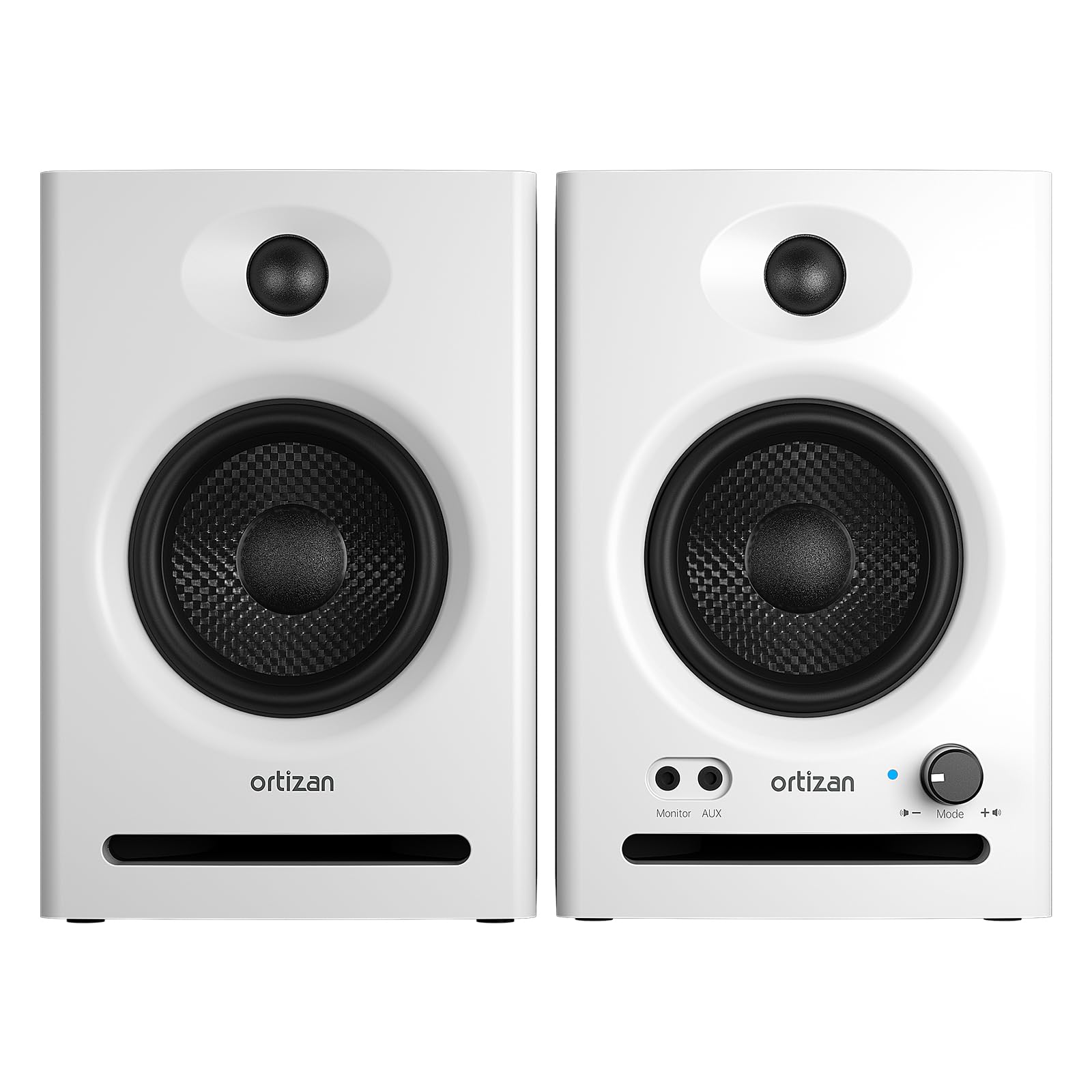
The white variant of the Ortizan C7 offers the exact same internal architecture as its black counterpart — same 3.5-inch carbon fiber woofer, same 0.75-inch silk dome tweeter, same 24-bit DAC, same TRS balanced inputs. The difference is purely aesthetic, but for many desktop users, the clean white finish with wood side panels integrates better into bright, minimalist setups or white monitor stands.
Functionally, this is still a near-field monitor with a flat response curve tuned through dozens of laboratory adjustments. The dual-mode switch (Monitor vs. Music) remains, and the connectivity suite includes Bluetooth 5.3, USB-C, RCA, AUX, and 6.35mm TRS. The front headphone jack and independent volume control make daily use seamless.
The same quirks apply: the bass needs a subwoofer for deep extension, and the volume knob’s step-like behavior can be annoying when dialing in precise levels. But for the price, you’re getting studio-grade input flexibility and driver quality in a package that actually looks like it belongs on a designer desk.
Why it’s great
- Same pro-level TRS inputs and DAC as the black model
- White wood cabinet suits light-toned desk setups
- Bluetooth 5.3 with 18m range for wireless convenience
Good to know
- Identical performance to black C7 — base color is the only difference
- Subwoofer needed for sub-45Hz frequencies
4. Pioneer DJ DM-50D-BT 5-Inch Desktop Monitor System

Pioneer DJ’s DM-50D-BT is built specifically for DJs and producers who need a monitor that can handle both mixing and casual listening. The 5-inch woofer provides noticeably deeper bass extension than 3.5-inch alternatives, and the 2-way DSP mode switch lets you toggle between a DJ-focused voicing (punchier, more energetic) and a producer-friendly flat mode. The Class-D amplifier with 96kHz sampling DSP keeps the signal clean across the 30Hz–30kHz range.
Connectivity includes RCA and mini-jack inputs plus front-panel headphone output. Bluetooth is onboard for wireless streaming from a phone or laptop, and the DECO convex diffusers on the tweeter help maintain stereo imaging off-axis. Time alignment between the woofer and tweeter minimizes phase cancellation, which is critical for accurate beatmatching and track arrangement.
The main downside is that the speakers power off after a period of silence, and take a few seconds to wake up — annoying if you’re referencing audio intermittently. Also, the paper-based composite enclosure doesn’t have the same resonance-dampening qualities as wood. But for electronic music producers and DJs, the DM-50D-BT is a tuned tool that understands its audience.
Why it’s great
- 5-inch woofer delivers real low-end punch for DJ monitoring
- Switchable DSP modes for DJ vs. production workflows
- DECO diffuser improves off-axis high-frequency dispersion
Good to know
- Auto power-off can be disruptive during reference sessions
- Paper enclosure less resonant-dampening than MDF wood
5. Bluedee Computer Speakers with Subwoofer (2.1 System)
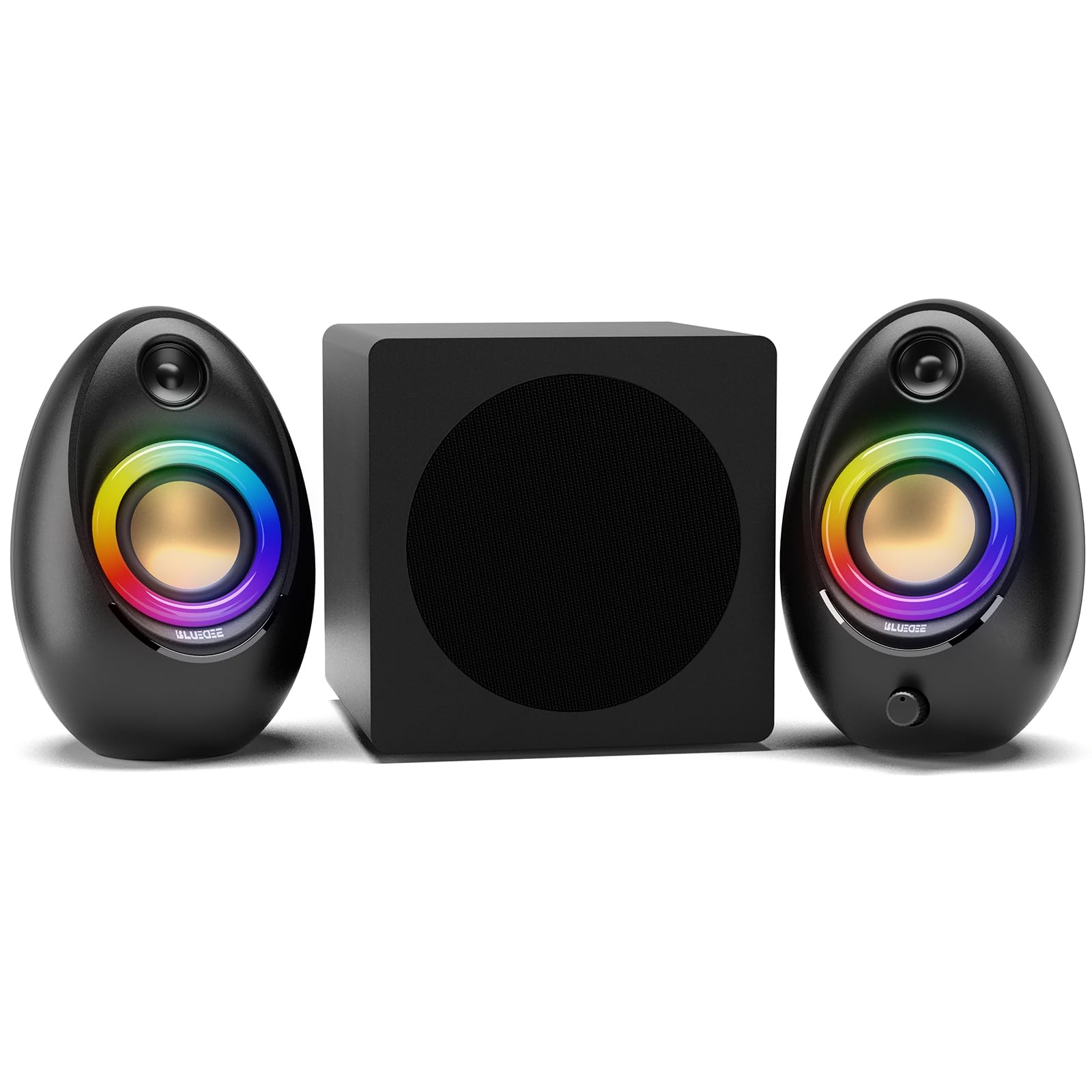
The Bluedee 2.1 system is not a studio monitor pair — it’s a dedicated multimedia setup with a separate subwoofer for deep, tactile bass. With 80W peak power and a DSP-tuned amplifier, it delivers clean vocals and punchy low-end without the harshness that plagues cheaper computer speakers. The satellite speakers stay clear of muddy frequencies, letting the subwoofer handle everything below the crossover point.
Connectivity is modern and extensive: Bluetooth 5.4 (the newest consumer standard), USB-A, USB-C, and 3.5mm AUX. The adapter-powered design means you plug it into the wall rather than relying on USB bus power, giving you consistent output regardless of your computer’s power delivery. The RGB lighting can be cycled through dynamic colors or set to a static glow — tasteful enough not to distract.
The physical build is plastic, which won’t satisfy purists who prefer wood cabinets, and the subwoofer enclosure is compact enough that you won’t get the room-shaking rumble of a large home theater sub. But for a desktop gaming and movie setup where immersion matters more than flat response, the Bluedee 2.1 punches way above its weight class.
Why it’s great
- Dedicated subwoofer provides deep bass that 2.0 monitors can’t match
- Bluetooth 5.4 and multiple wired inputs (USB-A, USB-C, AUX)
- DSP tuning keeps vocals clear even at higher volumes
Good to know
- Plastic enclosure lacks the acoustic dampening of wood monitors
- Not designed for flat studio monitoring — optimized for immersion
6. OHAYO 60W Computer Speakers

The OHAYO 60W speakers sit in an interesting middle ground — they use a premium MDF wooden enclosure to reduce cabinet resonance, and include independent treble and bass adjustment knobs on the front panel. This gives you tonal control that typical monitors lack. The driver configuration pairs a 0.75-inch carbon fiber silk dome tweeter with a 3-inch carbon fiber full-range driver, and the rear bass port extends low-end depth without making the sound boomy.
Input options are generous: Bluetooth 5.3, RCA, AUX, and USB. The frequency response stretches from 20Hz to 22.8kHz, giving you sub-bass extension that many budget monitors skip. Energy efficiency is a highlight — users report less than 1W power draw at full output, which is remarkable for a 30W-per-channel amplifier. The compact footprint fits easily beside a monitor without dominating your desk.
The 3-inch driver limitation means the low-end, while present, doesn’t have the authority of a 5-inch woofer. Audiophiles with 40+ years of listening experience have noted that the USB input sounds cleaner than the 3.5mm aux. For the price, you’re getting wood construction, tonal adjustment, and multi-input flexibility that most entry-level options skip entirely.
Why it’s great
- MDF wooden enclosure reduces resonance for clearer sound
- Separate treble and bass knobs give on-the-fly tonal control
- Extremely energy efficient even at full volume
Good to know
- 3-inch woofers limit bass authority compared to larger drivers
- USB input sounds better than 3.5mm aux connection
7. LONPOO 30W RMS Computer Speakers
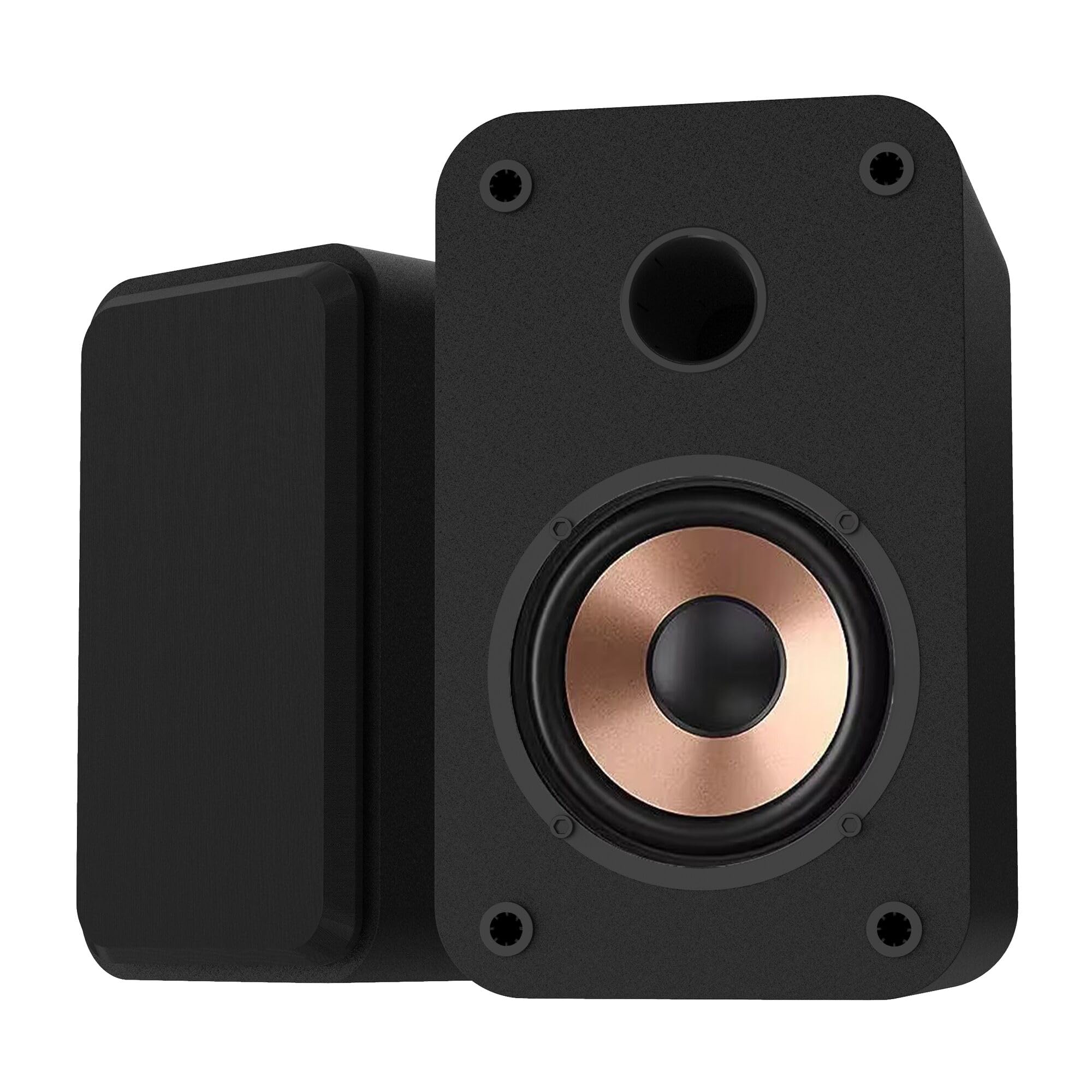
The LONPOO 30W RMS pair is the entry-level champion for anyone looking to ditch built-in laptop speakers without spending heavily. Driven by a Class-D amplifier with 50W peak output, the dual 3-inch aluminum drivers deliver surprisingly clear highs and mids with minimal distortion up to about 65% of their maximum volume. The wood enclosure (not the plastic you’d expect at this price) helps keep the sound warm and avoids the hollow resonance of budget all-plastic designs.
Connectivity covers the basics well: Bluetooth 5.3, AUX, and USB, plus a front 3.5mm headphone jack for private listening. Setup takes less than two minutes — plug in the power adapter, connect your source, and you’re good. The compact size (roughly smartphone-height) means they fit under a monitor or on a narrow shelf without blocking your screen.
The main compromise is consistency: some users report Bluetooth pairing issues with certain iPhones and iPads, though wired connections work flawlessly. The bass is decent for the driver size but won’t satisfy anyone looking for punchy low-end without a subwoofer. For the budget, though, these LONPOO speakers outperform most similarly priced options in clarity and build.
Why it’s great
- Class-D amplifier keeps distortion low at moderate volumes
- Compact footprint fits tight desk spaces below monitors
- Wood enclosure instead of plastic for warmer acoustic profile
Good to know
- Bluetooth pairing can be unreliable with some iOS devices
- Bass is adequate but won’t replace a dedicated subwoofer
FAQ
Why do monitor speakers need balanced inputs for music production?
Can I use Bluetooth monitor speakers for video editing without latency issues?
What does a flat frequency response actually sound like vs. consumer speakers?
Final Thoughts: The Verdict
For most users, the best bluetooth monitor speakers winner is the Yamaha HS3 Pair because it delivers reference-grade flat response, professional balanced inputs, and room compensation controls in a compact near-field package. If you want balanced TRS inputs and built-in Bluetooth at a value price, grab the Ortizan C7 (Black). And for deep bass and immersive gaming or movie audio with a dedicated subwoofer, nothing beats the Bluedee 2.1 System.