
Our readers keep the lights on and the weekend projects moving. As an Amazon Associate, I earn from qualifying purchases.
Your laptop speakers sound thin and muffled. You want richer voices, deeper bass, and the option to stream from your phone without reaching for a cable. The right set of Bluetooth PC speakers transforms your desktop into a mini soundstage. This guide picks seven models for different budgets and setups, so you find the pair that fits your desk and your ears.
I’m Rikta — the co-founder and writer behind FitlyFast. This guide is built by comparing the manufacturers’ published specifications and the patterns across verified customer reviews, so you get each pick’s real strengths and trade-offs instead of marketing spin.
Whether you need a compact soundbar that clamps under your monitor, a set with a dedicated subwoofer for deep bass, or studio-grade monitors for work and play, the right bluetooth pc speakers can turn your desk into a mini soundstage without breaking your budget.
How To Choose The Best Bluetooth PC Speakers
Picking the right set comes down to matching the speaker’s power, connectivity, and size to your desktop space and listening habits. Here are the most important factors to weigh before you click buy.
Power Output and Sound Profile
Total wattage (RMS) tells you how loud the speakers can get without distortion, but it isn’t everything. A set with 60W RMS and carbon-fiber woofers, like the H1, will sound fuller than a 20W soundbar with smaller drivers. Pay attention to driver size — 3-inch woofers deliver noticeably better mid-bass than smaller ones, and silk-dome tweeters produce smoother highs than basic paper cones.
Bluetooth Version and Wired Options
Bluetooth 5.3 or 5.4 means a more stable connection and lower latency (delay between what you see on screen and what you hear). But for serious gaming or music production, always have a wired fallback: USB-C, optical, or 3.5mm AUX ports give you lag-free, uncompressed audio. Multi-point Bluetooth — the ability to connect to your PC and phone at the same time — is a convenience you will use daily.
Size, Fit, and Desk Setup
Measure your desk space. A compact soundbar like the Cyber Acoustics CA-2890PRO clamps to your monitor, saving every inch of desk real estate. A 2.1 system with a separate subwoofer, on the other hand, takes up floor or desk space but adds chest-thumping bass for movies and games. Also check monitor thickness if clamping — some clamps only work on screens up to 2 inches thick, and reviewers warn they slide off curved monitors.
Extra Features That Matter
Front-panel bass and treble knobs let you tune the sound without opening any software. A wireless control pod or touch-sensitive panel makes adjusting volume from across the room easy. RGB lighting is purely cosmetic but can match your setup’s vibe, and a built-in DSP (digital signal processor) helps keep the sound clean at all volume levels by reducing distortion automatically.
Quick Comparison
On smaller screens, swipe sideways to see the full table.
| Model | Category | Best For | Key Spec | Amazon |
|---|---|---|---|---|
| Cyber Acoustics CA-2890PRO | Soundbar | Ultra-clean desk setup | 20W power, clamp mount | Amazon |
| KEiiD KD-C02 | 2.0 Stereo | Style and convenience | 20m Bluetooth range | Amazon |
| H1 by IBALL·BOX | 2.0 Stereo | Rich wired + wireless sound | 60W power, 24-bit USB-C | Amazon |
| OHAYO 60W | 2.0 Stereo | Budget bookshelf quality | 60W power, wood enclosure | Amazon |
| Bluedee 2.1 | 2.1 System | Deep bass and RGB style | 80W peak, subwoofer | Amazon |
| Edifier MR3 | Studio Monitor | Accurate audio work | 52Hz-40kHz, Hi-Res Audio | Amazon |
| Edifier M60 | Premium Compact | Hi-Res wireless streaming | 66W RMS, LDAC codec | Amazon |
In‑Depth Reviews
1. Edifier M60

66W RMS total output in a frame barely bigger than a smartphone makes the Edifier M60 the top pick for anyone who wants to stop hunting for better PC audio.
This set uses 3-inch long-throw aluminum diaphragm mid-low drivers and 1-inch silk dome tweeters, delivering a balanced soundstage with surprising bass depth. Buyers report it is so clear at 30-50% volume that no subwoofer is needed. The included aluminum stands tilt the speakers upward at a 15-degree angle, so the sound hits your ears directly and reduces desktop distortion. It also supports LDAC codec (a high-bitrate Bluetooth codec for streaming up to 24-bit/96kHz resolution) on Android devices running version 8.0 or later, which is rare at this level.
Owners mention that the touch controls can be a bit finicky — the sleep mode requires a swipe gesture to wake, and the instructions aren’t very clear — but the sound quality is so impressive that most call it “fit for purpose” and praise its ability to “punch way above their weight.” Pick this over the Edifier MR3 if you want more raw power and are fine with fewer wired inputs. skip it if you need professional-grade balanced inputs for studio gear. This is the all-around Bluetooth PC speaker that delivers power, detail, and a tiny footprint in one confident package.
Why it’s great
- 66W RMS with LDAC support for hi-res wireless streaming
- Included aluminum stands tilt the speakers for clearer sound
- Compact size fits any desk space
Good to know
- Touch controls can be unresponsive at first
- Bluetooth only supports 10 meters of range
2. Edifier MR3

The Edifier MR3 falls short of the M60 on total power (36W RMS vs. 66W RMS), but beats it on sheer connectivity flexibility — you get balanced TRS inputs (for studio gear like audio interfaces), plus RCA and AUX, alongside Bluetooth 5.4 with multi-point connection (you can pair your PC and phone at the same time), making it the better choice for anyone who needs accurate, neutral sound for audio work or video editing.
The MR3 delivers a flat frequency response from 52Hz to 40kHz, which means you hear recordings without the bass boost or treble hype that consumer speakers add. It also includes a headphone output on the front panel, so you can switch between speakers and headphones without reaching behind your desk. Reviewers describe the sound as “clean, neutral, and detailed” with “tight bass and sparkling highs,” and they appreciate the zero hiss even at low volumes.
Customers note that finding the Bluetooth pairing mode can be tricky — you may need to check the manual — but once connected, it works flawlessly even 20 feet away. If you produce music, edit videos, or just want the most honest sound reproduction in this price range, choose the MR3 over the top pick.
Where it shines
- Flat, neutral response across 52Hz to 40kHz for accurate monitoring
- Balanced TRS inputs for professional studio gear
- Headphone output and multi-point Bluetooth
Worth noting
- Bluetooth pairing method is not obvious
- Lower total wattage than the M60
3. Bluedee 2.1

Picture yourself settling in for a late-night action movie or a competitive gaming session, craving chest-thumping bass that standard desktop speakers simply cannot deliver — the Bluedee 2.1 system is built for that exact moment.
It uses Bluetooth 5.4 for wireless streaming and also supports wired connections via USB, USB-C, and 3.5mm AUX, so you can plug into any device without delay. An all-in-one control knob handles volume, play/pause, lighting effects, and input switching, keeping your desk clean. Reviewers point out the subwoofer produces “deep, punchy bass” and that the setup is quick — one buyer had it running in just 10 minutes with clearly labeled cables.
The catch is that the satellite speakers and subwoofer are made of plastic, which doesn’t feel as premium as the wood enclosures on the OHAYO or Edifier models. Choose this over the Edifier M60 for bass impact. pass on it if you want a clean, minimalist desk — the subwoofer takes up extra floor space. For the price, no other 2.1 system this compact shakes a room like this one does.
What stands out
- Dedicated subwoofer for deep, clear bass
- Bluetooth 5.4 plus USB, USB-C, and AUX inputs
- Customizable RGB lighting
The trade-offs
- Enclosure is plastic, not wood
- Bluetooth range is limited to 10 meters
4. H1 by IBALL·BOX
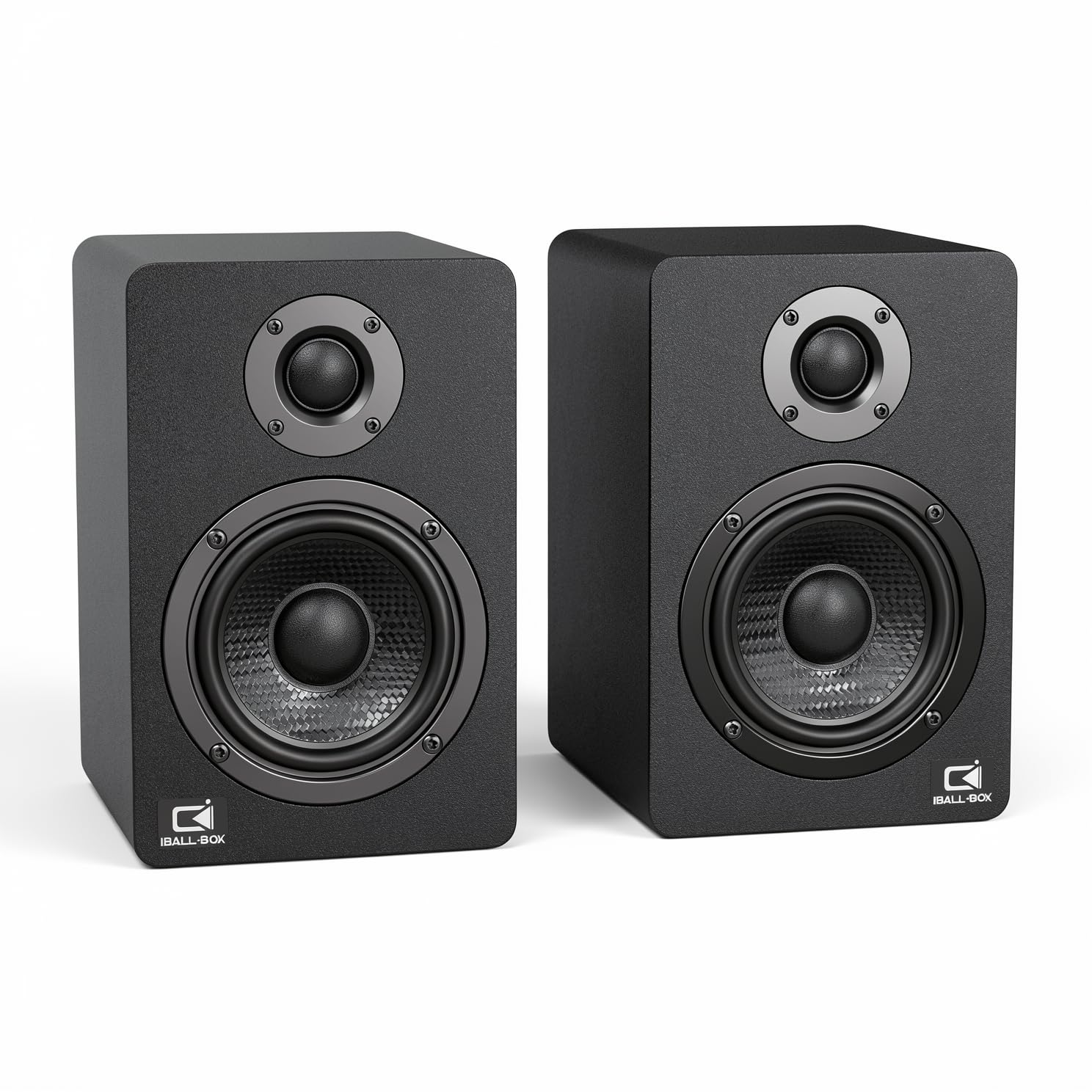
The single number that matters most in this category is connectivity options, and the H1 scores a rare four: USB-C DAC, optical, 3.5mm AUX, and Bluetooth, plus front-panel bass and treble knobs for software-free tuning at a mid-range price point.
The downside is that the H1 lacks the premium wood cabinet of the OHAYO or the subwoofer of the Bluedee, but its dual 3-inch carbon-fiber woofers and dual 1-inch silk-dome tweeters deliver a frequency response down to 40Hz (so you hear deeper bass notes than speakers that stop at 80Hz). One reviewer flatly states they are “Loud as heck!” and advises keeping the volume turned way down to avoid being heard through the house — a testament to the fact that the 60W RMS output is real.
Reviewers also note that the optical cable alignment can be tricky, and you need to push the volume knob to cycle through input modes. For the price-to-feature ratio, the H1 is the smartest choice for anyone who wants versatile wired and wireless sound without paying for extra features they won’t use, delivering strong price-to-value.
The upsides
- Four input options: USB-C, optical, AUX, and Bluetooth
- Front-panel bass and treble knobs for easy tuning
- 60W RMS with carbon-fiber woofers
Keep in mind
- Optical cable alignment can be fiddly
- No dedicated subwoofer output
5. OHAYO 60W

What you actually get at this lower price is an MDF wood enclosure that reduces internal resonance noticeably better than plastic cabinets, delivering cleaner, more precise sound that reviewers describe as “better than average PC speakers” with a “clear 3D soundstage.”
What you give up is sub-bass response — the 3-inch carbon fiber full-range drivers and 0.75-inch silk dome tweeter produce excellent mid-bass and clear highs, but there is no dedicated subwoofer, and shoppers say the low-end is “minimal” with “no sub-response.” Connectivity covers Bluetooth 5.3, plus RCA, AUX, and USB inputs, and energy efficiency is impressive, drawing less than 1 watt at full volume.
One reviewer found the 3.5mm input sounds “slightly hollow and quieter” than Bluetooth and USB, so you may want to use the wireless connection most of the time. Choose this over the H1 if wood build quality matters to you; it’s not for you if you want deep bass for movies — the Bluedee 2.1 is a better choice for that. This is the exact budget buyer it is perfect for: someone who prioritizes a premium wood enclosure and clear mid/high detail over sub-bass rumble.
Why we’d pick it
- Premium MDF wood enclosure reduces resonance
- Bluetooth 5.3 with low latency and good range
- Very energy efficient — less than 1W at full volume
A few caveats
- Minimal bass response; no subwoofer
- 3.5mm input quality is weaker than Bluetooth or USB
6. KEiiD KD-C02

The KEiiD KD-C02 is perfect for the buyer who values desk aesthetics and wireless convenience over raw audio performance. Its unique wireless touch control pod works like a computer mouse, letting you adjust volume, mute, and switch EQ modes from anywhere in the room. Its Bluetooth range of 20 meters is double that of the Cyber Acoustics CA-2890PRO (which tops out at 10 meters), so your audio stays stable even in a larger workspace.
The speakers look modern with metal and wood detailing, and they offer four EQ modes (News, Music, Movie, Game) to tailor the sound. The Game EQ mode provides a 3D surround effect that enhances spatial awareness in shooters. However, reviewers consistently say the sound is “flat and tinny” out of the box, and one buyer bluntly calls the bass “subpar” with clipping at low volume, adding that the EQ presets are “poor.”
If you prioritize clean looks and a unique control method over high-fidelity sound, the KEiiD delivers on style and convenience. But if accurate audio is your priority, the H1 or OHAYO give you significantly better sound for similar money. Just be aware that if you listen to bass-heavy music, you will be disappointed.
Strong points
- Wireless touch control pod works from anywhere in the room
- 20-meter Bluetooth range — 2x the Cyber Acoustics CA-2890PRO
- Four EQ modes including 3D surround for gaming
Before you buy
- Sound quality is flat and tinny out of the box
- Bass clips at low volume even after EQ adjustment
7. Cyber Acoustics CA-2890PRO

The Cyber Acoustics CA-2890PRO is the most space-efficient option in this guide, offering a budget-friendly price point with USB-C/USB-A connectivity to your PC and Bluetooth for your phone, all while clamping directly to your monitor (up to 2 inches thick) to take up zero desk space.
What that money actually gets you is a 20W soundbar with a rear-facing bass radiator that delivers “clear, balanced sound” for music and calls, plus a built-in microphone with Smart Voice Enhancement Technology that minimizes background noise during meetings. The controls are simple: a multi-function button for play/pause, volume, and mic mute with an LED indicator. Plug-and-play setup means you can be up and running in seconds.
The value is clear: no other speaker in the list saves as much desk space. However, one major catch is the clamp — multiple reviewers report that it fails on curved monitors and slides off easily, and it covers about half an inch of the screen. If you have a flat monitor and want a clutter-free desk, this is a solid bet; if your screen is curved, skip it and go with a standard desktop pair like the H1. The one clear reason to choose it is that it is the only speaker in this guide that frees up your entire desk surface by clamping directly to your monitor.
What we like
- Clamps to monitor, saving all desk space
- USB-C, USB-A, and Bluetooth in one unit
- Built-in mic for clear calls
The downsides
- Clamp slides off curved monitors easily
- Limited to 10-meter Bluetooth range
Understanding the Specs
Total RMS Power vs. Peak Power
RMS (Root Mean Square) power is the continuous wattage a speaker can handle without distortion — it is the honest rating. Peak power is the short burst a speaker can handle for a split second. When comparing speakers, ignore peak numbers and look for RMS: a 60W RMS speaker like the H1 will play louder and cleaner than a 20W RMS model like the Cyber Acoustics soundbar. For a typical desk setup, 30W to 60W RMS is enough to fill a room.
Bluetooth Codecs and Latency
A codec is the method your Bluetooth signal uses to compress and send audio. SBC is the standard codec found on all devices — it works but offers lower quality. LDAC (found on the Edifier M60) transmits up to 990 kbps of data, allowing for near-lossless 24-bit/96kHz audio on Android devices. For gaming, low latency matters more than bitrate — wired USB-C or optical connections always beat wireless for avoiding audio delay (lip-sync issues).
Driver Configuration: 2.0 vs. 2.1
A 2.0 system has two speakers (left and right) handling all frequencies. A 2.1 system adds a separate subwoofer that handles only low frequencies (bass), letting the main speakers focus on mids and highs. If you watch action movies or play bass-heavy games, a 2.1 like the Bluedee is worth the extra desk space. If you listen to podcasts, vocal music, or work in an office, a good 2.0 set like the Edifier MR3 delivers more than enough clarity.
Frequency Response and Signal-to-Noise Ratio
Frequency response (measured in Hz to kHz) shows the range of sounds a speaker can reproduce — a speaker that reaches down to 40Hz can produce deeper bass notes than one that only reaches 80Hz. Signal-to-noise ratio (SNR), measured in dB, tells you how much background hiss you get: 95dB or higher (like the H1 achieves) means very clean audio. A lower SNR below 80dB will sound noisy during quiet passages.
FAQ
Can I use Bluetooth PC speakers for gaming without audio lag?
Do I need a separate subwoofer for good bass from my PC speakers?
What is the advantage of Bluetooth 5.3 or 5.4 over older versions?
Can I connect Bluetooth PC speakers to my TV or console?
Final Thoughts: The Verdict
Across the board, the bluetooth pc speakers winner is the Edifier M60 because it delivers 66W RMS, LDAC hi-res streaming, and compact design that fits any desk. If you need accurate monitoring for music production or video editing, grab the Edifier MR3. And for deep bass with a dedicated subwoofer and RGB style, the standout is the Bluedee 2.1.