
Our readers keep the lights on and the weekend projects moving. As an Amazon Associate, I earn from qualifying purchases.
The tiny dongle in your USB port is often the weakest link in your wireless chain. A cheap Bluetooth adapter can introduce audio stutter, drop keyboard inputs mid-sentence, and cap your range at an embarrassing 10 feet through a single wall. Upgrading to a properly engineered adapter transforms your desktop or laptop from a wireless liability into a reliable hub for headphones, controllers, keyboard, and mouse.
I’m Rikta — the co-founder and writer behind FitlyFast. I’ve spent countless hours analyzing the real-world performance data, chipset specifications, and Linux compatibility matrix of dozens of USB Bluetooth adapters to cut through the marketing noise and identify the models that actually deliver on their range and stability claims.
Whether you’re adding Bluetooth to an older tower, replacing a flaky internal card, or outfitting a Linux workstation for wireless peripherals, this guide to the best bluetooth usb adapter will help you find the right dongle for your exact use case without wasting money on underperforming hardware.
How To Choose The Best Bluetooth USB Adapter
Bluetooth USB adapters appear simple, but the wrong choice can mean constant re-pairing, audio dropouts, and devices that refuse to connect. Focus on three pillars: the radio class and antenna, the Bluetooth version and chipset, and the operating system support. Each pillar directly impacts how well the adapter will serve you in your actual home or office environment.
Class 1 vs. Class 2 Radio: The Real Range Decider
A Class 2 radio (common in nano dongles) is rated for roughly 10 meters / 33 feet in open air. A Class 1 radio with an external antenna can reach up to 100 meters. In practical terms, the difference is whether your Bluetooth headphones stay connected when you walk to the next room. If your desktop sits under a desk or behind a metal case, even a premium nano dongle may struggle. Adapters with a 5dBi detachable antenna offer the best real-world coverage through walls and across floors.
Bluetooth Version: What the Number Actually Tells You
Bluetooth 5.0, 5.3, and 5.4 all operate on the same 2.4GHz band. The version number primarily indicates feature support: BLE (Bluetooth Low Energy), LE Audio, and broadcast capabilities. For pairing a mouse, keyboard, or headset, Bluetooth 5.0 is sufficient. The chipset inside the adapter — Realtek, Broadcom, or CSR — matters more for stability than the version number. A well-implemented Bluetooth 5.0 adapter can outperform a buggy Bluetooth 5.4 adapter in real-world drop rates.
Linux Compatibility: The Single Biggest Gotcha
Many adapters claim Linux support but require manual driver compilation or firmware loading. Adapters using Realtek chipsets (like the RTL8761BU or RTL8761BUE) tend to work out of the box with Linux kernels 5.19 and above, especially on Ubuntu and Mint. Adapters with Broadcom or CSR chips may need driver downloads from obscure websites. If you run Arch, Debian, or Fedora, check user reviews specifically for your distro before buying — Bluetooth audio on Linux is fragile enough without adding a non-standard adapter.
Quick Comparison
On smaller screens, swipe sideways to see the full table.
| Model | Category | Best For | Key Spec | Amazon |
|---|---|---|---|---|
| StarTech.com BT Adapter | Premium | Maximum range & multi-controller | Bluetooth 5.3, Class 1, 328ft range | Amazon |
| ASUS USB-BT500 | Premium | Audio quality & ultra-compact form | Bluetooth 5.0, 4 Mbps transfer rate | Amazon |
| hakimonoe BT548 | Mid-Range | 5.4 features at a fair price | Bluetooth 5.4, 5dBi detachable antenna | Amazon |
| Techkey BT 5.4 | Mid-Range | Windows plug-and-play long range | Bluetooth 5.4, 500ft range, 5dBi antenna | Amazon |
| Kinivo BTD500 | Mid-Range | Budget Linux & Windows compatible | Bluetooth 5.0, 66ft range, 2-year warranty | Amazon |
| Edimax BT-8500 | Entry-Level | Linux plug-and-play in nano form | Bluetooth 5.0, 3 Mbps, nano size | Amazon |
| Panda PBU40 | Legacy | Broad legacy OS support (XP to 11) | Bluetooth 4.0, 80ft range, wide OS support | Amazon |
In-Depth Reviews
1. StarTech.com AV53C1-USB-BLUETOOTH

The StarTech.com adapter earns the top spot through a balanced combination of Bluetooth 5.3 capability, a genuine Class 1 radio, and a detachable antenna that delivers a theoretical 328-foot range. The RTL8761BUE chipset provides native support for Windows 7 through 11 and Linux kernels 5.19.0+, which means Ubuntu, Mint, and even Arch users report plug-and-play detection without firmware gymnastics. Real-world tests show an RSSI improvement from -59 dBm to -8 dBm compared to nano adapters when paired with a Raspberry Pi, translating to connections that survive three drywall barriers without stutter.
For gamers, the adapter supports simultaneous pairing of up to three Xbox controllers over a 65-foot powered USB extension cable with no perceptible lag. Audio quality is handled by the A2DP profile, and the Personal Area Network profile enables wireless file sharing and internet tethering. The omnidirectional antenna reduces 2.4GHz noise interference noticeably better than the internal antennas found on most laptops or nano dongles, making this a reliable choice for streaming high-bitrate audio to speakers or headphones.
Some users report that the adapter does not register as Bluetooth 5.3 in Windows device manager, instead showing as a generic Bluetooth Radio — this appears to be a driver enumeration issue rather than a performance one. On the support side, StarTech offers a two-year warranty and responsive customer service. The unit weighs 22.68 grams and measures roughly 1.8 by 0.7 inches, making it slightly bulkier than a nano dongle but small enough to leave plugged in permanently on the back of a desktop.
Why it’s great
- Genuine 328ft Class 1 range with detachable antenna
- Native Linux plug-and-play support on kernel 5.19+
- Handles multiple Xbox controllers without lag at distance
Good to know
- May show as generic Bluetooth Radio in Windows Device Manager
- Slightly larger form factor than nano adapters
- Limited to 2 Mbps data transfer rate
2. ASUS USB-BT500

The ASUS USB-BT500 is the gold standard for users who prioritize audio quality above raw range. Its Bluetooth 5.0 implementation delivers a 4 Mbps data transfer rate, which is notably faster than the 3 Mbps ceiling of most competing adapters in this category. This higher throughput translates to cleaner streaming when paired with high-resolution audio codecs: users report dramatically better sound quality with Google Pixel Buds and Sony WH-1000XM4 headphones compared to cheaper dongles that add compression artifacts or occasional dropouts within 15 feet of the adapter.
The physical design is the most refined of any adapter here — it measures just 0.59 by 0.28 by 0.69 inches, which is nearly flush when plugged into a USB port on a laptop. This nano form factor means it can stay installed permanently without protruding far enough to be knocked or bent. On Windows 10 and 11, it is truly plug-and-play; on Linux, the setup is more involved and requires blacklisting default Bluetooth drivers, compiling the driver from source, and copying firmware files to /lib/firmware/. Once configured, it operates reliably, but the install process is the most demanding of any adapter in this guide.
Customer reports indicate a real-world range of roughly 15 feet for high-quality audio streaming, which is shorter than Class 1 adapters but expected for a Class 2 nano design. The adapter is TAA compliant, which matters for government and enterprise purchasers. Users who have used the adapter daily for years describe it as a “set and forget” device — once plugged in, it requires no maintenance, no re-pairing, and no troubleshooting. That reliability, combined with the best audio fidelity in this category, justifies the premium positioning.
Why it’s great
- Superior audio fidelity with 4 Mbps throughput
- Ultra-compact, nearly flush-fit design
- TAA compliant for enterprise purchase
Good to know
- Range limited to ~15 feet for quality audio streaming
- Complex driver compilation required for Linux
- Bluetooth 5.0 only (no 5.3 or 5.4 features)
3. hakimonoe BT548
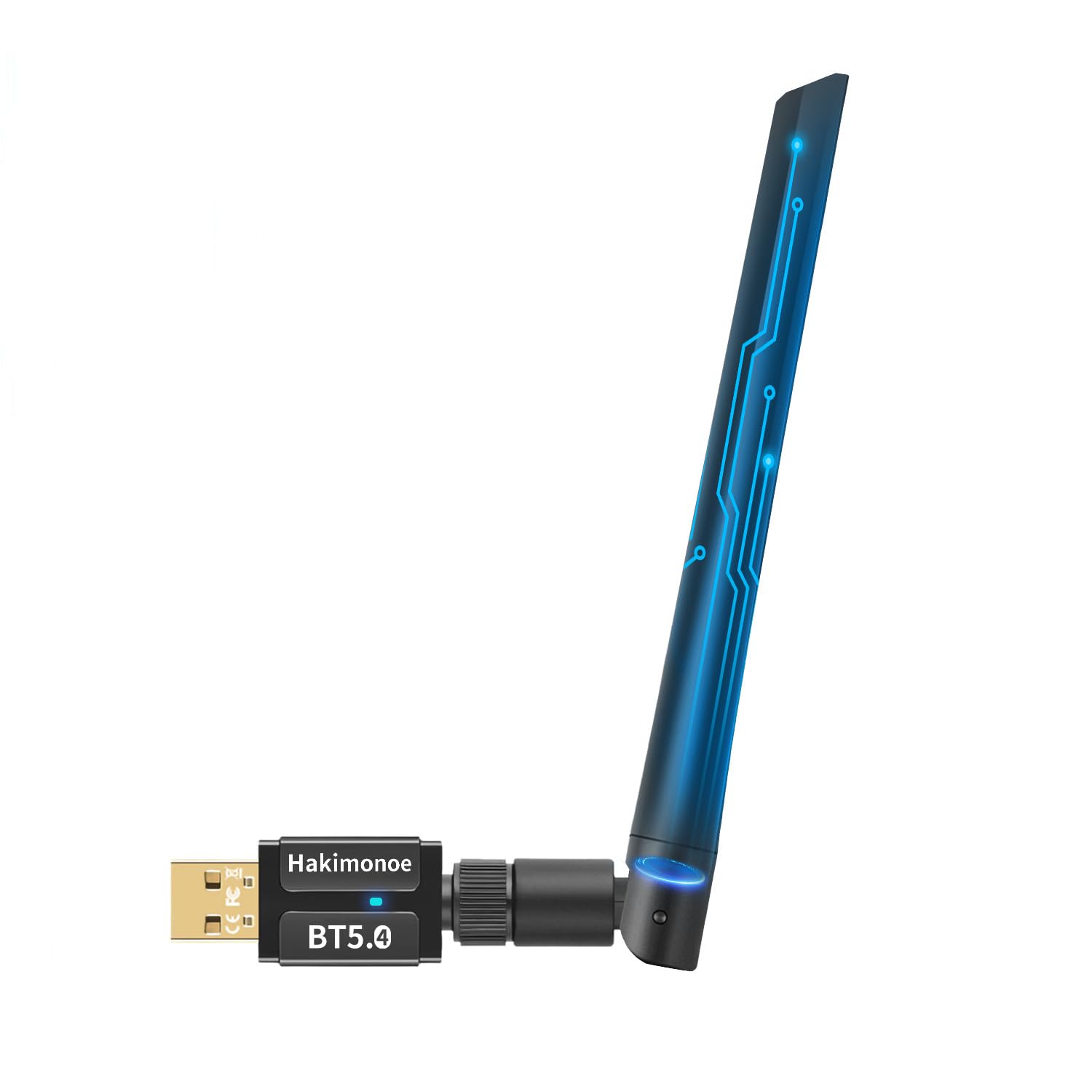
The hakimonoe BT548 brings Bluetooth 5.4 technology to the mid-range segment with a 5dBi detachable antenna and a Realtek chipset that Linux users will appreciate. On Ubuntu 24.04 and 25.10, the adapter works flawlessly without any special setup — the Realtek RTL8761BU chip is recognized natively by modern kernels. The sound quality through Bluetooth headphones is described as excellent, with one user reporting a tested range of up to 400 feet in open conditions before signal degradation became noticeable. This makes it one of the longest-reaching adapters available without jumping to a premium Class 1 solution.
The 5.4 version brings improvements in connection stability and reduced 2.4GHz band interference. The adapter supports dual mode (BR/EDR + BLE) and can connect up to seven devices simultaneously. A practical advantage is the ability to listen to music through headphones while using a Bluetooth keyboard and mouse without any input lag or audio stutter. The detachable antenna also allows the adapter to be positioned for optimal reception using a USB extension cable, which solves the common problem of a desktop case blocking the signal path.
Performance consistency receives mixed feedback. Some users report that the range does not improve over built-in adapters, and occasional disconnects require the device to be unplugged and reinserted. These issues seem dependent on the specific USB controller and physical environment — users with USB 3.0 ports sometimes experience 2.4GHz RF interference that can be resolved by switching to a USB 2.0 port. The unit includes a user manual and requires disabling any built-in Bluetooth adapter in Device Manager before use. For the combination of Bluetooth 5.4, detachable antenna, and Linux compatibility at a mid-range price, the BT548 represents strong value.
Why it’s great
- Bluetooth 5.4 with Realtek chip for native Linux support
- Detachable 5dBi antenna for flexible placement
- Reported open-range performance up to 400 feet
Good to know
- Intermittent disconnects reported on some systems
- Requires disabling built-in Bluetooth on host PC
- Not compatible with Mac, TV, or car stereo
4. Techkey Bluetooth 5.4 Adapter
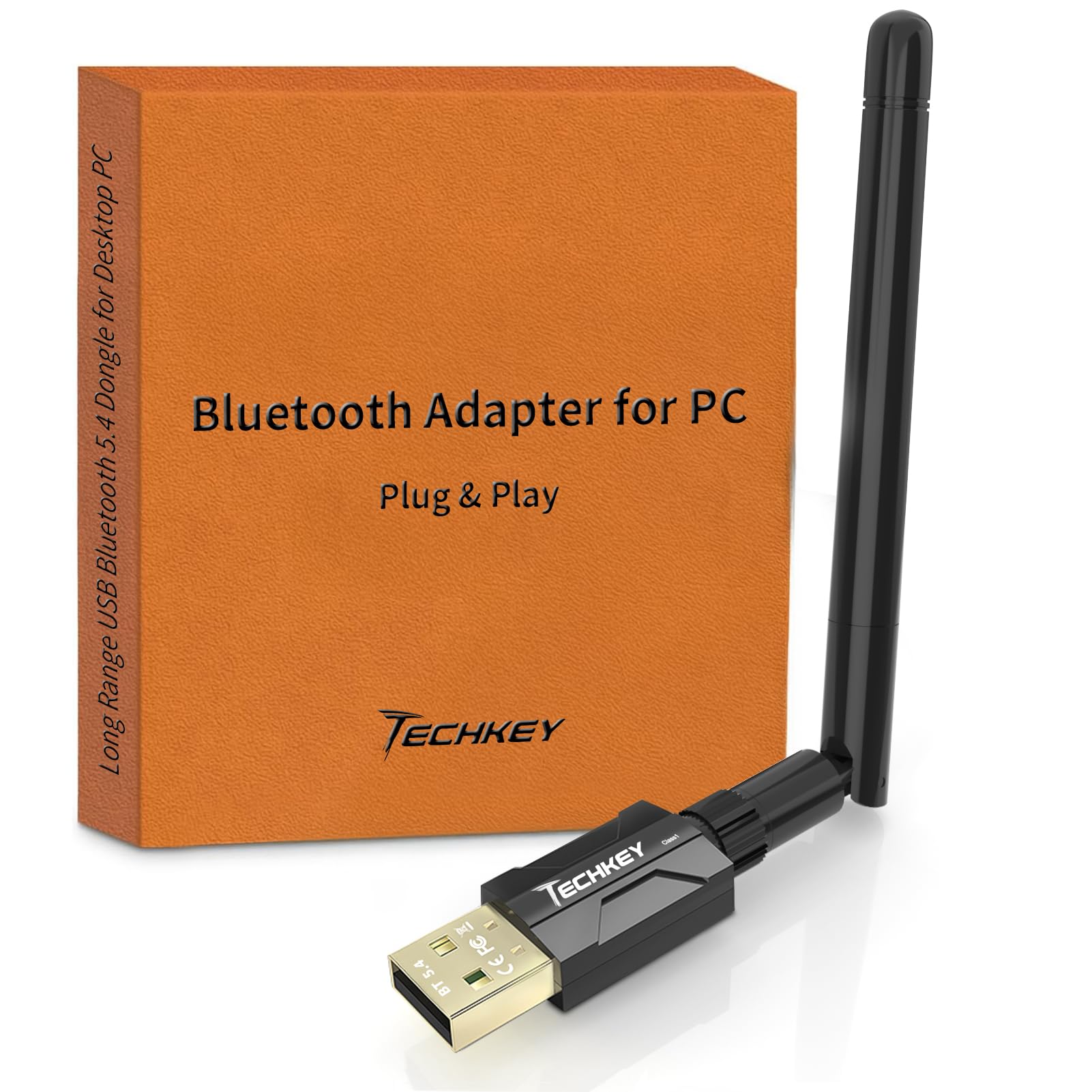
The Techkey Bluetooth 5.4 adapter is the most aggressively marketed long-range option, claiming up to 500 feet (150 meters) in open areas through its Class 1 radio and 5dBi antenna design. On Windows 11 and 10, setup is genuinely plug-and-play — users report pairing headphones, speakers, keyboards, and printers within three minutes without downloading any drivers. The stability at distance is the standout feature: multiple customer accounts describe maintaining a clear connection throughout an entire house, with no song dropouts when walking from an office to a living room. One user paired it with a legacy Bose Wave Soundtouch system from a PC across the house with zero interruptions.
The adapter supports simultaneous connections with up to seven devices and uses EDR (Enhanced Data Rate) technology to maintain 3 Mbps throughput even in congested 2.4GHz environments. For Windows-only users, this is arguably the best combination of range and ease of use. The compact black design does not protrude excessively, and the 5dBi antenna can be angled to improve line-of-sight to peripherals. Out of the box, it works with Bluetooth 5.4, 5.3, 5.2, 4.2, 4.0, and 2.1+EDR devices.
The critical limitation is that this adapter supports Windows 11, 10, and 8.1 exclusively. It explicitly does not support Mac OS, Linux, car stereos, gaming consoles, or smart TVs. For Linux users, this is a hard stop. Additionally, the adapter requires disabling any onboard Bluetooth in the Device Manager before use, which is standard practice but may confuse first-time users. The build quality is adequate for desktop use, though the antenna connection feels less robust than the hakimonoe or StarTech offerings. For a pure Windows home or office setup that demands maximum range at a low entry point, the Techkey delivers exceptional value.
Why it’s great
- Industry-leading 500ft range claim with proven real-world coverage
- True plug-and-play on Windows without any driver downloads
- Supports up to seven simultaneous device connections
Good to know
- No Linux, Mac, or console support whatsoever
- Antenna feels slightly less robust than premium competitors
- Requires disabling built-in Bluetooth before use
5. Kinivo BTD500

The Kinivo BTD500 is the adapter many Linux users turn to when their built-in Bluetooth chipset causes endless headaches. It uses Bluetooth 5.0 Class 2 technology with BLE support and is fully plug-and-play on Ubuntu, Kubuntu, Linux Mint, and other mainstream distributions without sourcing drivers from sketchy third-party sites. Customer reviews specifically highlight resolving weeks of Bluetooth frustration instantly after inserting the dongle — the Blueman Bluetooth Manager detects it immediately and pairing takes seconds. On Windows 11 and 10, setup is equally simple with no driver installation needed.
The adapter provides a range of up to 66 feet (20 meters) and a 3 Mbps data transfer rate. It is backward compatible with Bluetooth 4.0 and supports a wide range of peripherals including headphones, speakers, keyboards, mice, printers, and Xbox/PS4/PS5 controllers when connected to a PC. The Kinivo BTD500 is notably small — its nano form factor minimizes the risk of breakage from accidental bumps, and several users with older Dell laptops (which lack built-in Bluetooth entirely) report it works as a permanent solution without interference.
There are important caveats. The adapter does not work with TWS earbuds, which is a notable omission for users wanting to cut wires completely. It is also incompatible with Mac, smart TVs, and cars. Some users report that on Linux Mint, the connection only establishes several minutes after boot — manually initiating pairing is faster. The one-year warranty combined with lifetime US-based customer support adds some peace of mind, but the lack of TWS support limits the use case for modern headphone users. The range is shorter than antenna-equipped models, but for a desktop within 15-20 feet of its peripherals, the BTD500 is a reliable, frustration-free option.
Why it’s great
- True plug-and-play on Ubuntu, Mint, and Kubuntu
- Nano form factor reduces risk of physical damage
- Two-year warranty with US-based customer support
Good to know
- Does not support TWS earbuds
- Limited 66ft range compared to Class 1 adapters
- Requires manual pairing after boot on some Linux distros
6. Edimax BT-8500

The Edimax BT-8500 is the smallest Bluetooth 5.0 USB adapter on Amazon that still delivers full dual-mode BR/EDR + BLE performance. It measures barely over half an inch in any dimension and weighs only 0.04 kilograms, making it ideal for laptops or mini PCs where every millimeter of protrusion is a liability. The single-chip design integrates the Bluetooth baseband, modem, and RF into a package that draws minimal power while supporting Bluetooth 5.0 EDR for data transfer speeds up to 3 Mbps — roughly four times faster than Bluetooth 4.2.
Linux compatibility is this adapter’s calling card. It works plug-and-play on Linux kernel 5.8 and above, as well as Mint 21, with no driver installation. For older systems using kernels 2.6.32 through 5.8, Edimax provides downloadable drivers for Ubuntu and Fedora. Customer reviews confirm flawless operation on Ubuntu 24.10, Proxmox 9.2.3, Debian 13 (trixie), and Windows 11/10. Users highlight that it dramatically improves connection quality over built-in Intel modules, maintaining stable connections at 20 feet where internal adapters fail.
The trade-off for the tiny size is range. The BT-8500 is a Class 2 adapter with a real-world range of roughly 12 to 15 feet, and some users report intermittent audio cutting when the connection is pushed to its limits. On Linux, the Realtek RTL8761BU chip requires firmware installation on some distros, and users of older Linux kernels may need to manually install the Realtek firmware package. For users who need a compact, Linux-friendly adapter to add basic Bluetooth to a close-proximity desktop, the Edimax BT-8500 is a reliable choice, though budget-tier performance is noticeable when compared to antenna-equipped models.
Why it’s great
- Smallest Bluetooth 5.0 adapter on the market
- Plug-and-play on modern Linux kernels without extra drivers
- Bluetooth SIG Certified for reliable performance
Good to know
- Range limited to roughly 12-15 feet in real-world use
- May require firmware installation on some Linux distros
- Audio cutouts reported at the edge of its range
7. Panda PBU40

The Panda PBU40 is the legacy champion of Bluetooth USB adapters, supporting operating systems from Windows XP through Windows 11 and a wide swath of Linux distributions including Mint, Ubuntu, Fedora, openSUSE, Kali Linux, and even OpenELEC. Its Bluetooth 4.0 LE+EDR technology is dated by modern standards, but the adapter remains popular precisely because it works reliably on older hardware that modern Bluetooth 5.x adapters ignore. The 80-foot operating range when paired with Bluetooth Smart devices is competitive even by current standards, and the adapter’s Bluetooth Smart Ready certification ensures low-energy compatibility with modern peripherals.
On Linux, the adapter works plug-and-play on distributions like Manjaro KDE and Linux Mint 22.3 without any driver installation. Users report excellent sound quality with Sony WH-1000XM4 headphones with no lip-sync lag after switching from a USB 3.0 port to a USB 2.0 port — a critical tip, as USB 3.0 ports emit 2.4GHz RF interference that can disrupt Bluetooth signals. The Panda includes a Bluetooth software stack for Windows, though customer reports strongly advise against installing the drivers from the included CD, recommending instead that users rely on Windows’ built-in Bluetooth stack to avoid registry conflicts.
The main drawbacks are the dated Bluetooth 4.0 standard and the potentially frustrating driver installation process on Windows 7. Users report that the driver must be manually downloaded from the Panda website (a 407 MB file) and that the CSR Harmony drivers on the included CD can cause system conflicts requiring registry key deletion. Customer support — particularly a representative named Alan — receives consistently positive mentions for helping resolve these installation issues via email. For users running legacy operating systems on older hardware who simply need basic Bluetooth connectivity for a keyboard, mouse, or phone pairing, the Panda PBU40 is the most widely compatible option available.
Why it’s great
- Supports Windows XP through 11 and a dozen Linux distros
- 80-foot range with Bluetooth Smart devices
- Responsive customer support for driver troubleshooting
Good to know
- Limited to Bluetooth 4.0 — no BLE 5.x features
- Driver installation on Win 7 is difficult and requires manual download
- USB 3.0 port interference may require switching to USB 2.0
FAQ
Do I need to install drivers for a Bluetooth USB adapter on Windows 11?
Will a Bluetooth 5.4 adapter work with my older Bluetooth 4.0 devices?
Why does my Bluetooth adapter disconnect when I use a USB 3.0 port?
Can I use a Bluetooth USB adapter on Linux without terminal commands?
Final Thoughts: The Verdict
For most users, the bluetooth usb adapter winner is the StarTech.com AV53C1 because it combines a genuine Class 1 radio with Bluetooth 5.3, Linux-native plug-and-play support, and a detachable antenna that delivers real-world range far beyond nano adapters. If you want the best audio quality in a nearly invisible form factor, grab the ASUS USB-BT500. And for a pure Windows environment where range is the highest priority at a budget-friendly entry point, nothing beats the Techkey Bluetooth 5.4 Adapter.