
Our readers keep the lights on and the weekend projects moving. As an Amazon Associate, I earn from qualifying purchases.
Specs are compiled from manufacturer listings and verified buyer reviews and can change over time — please confirm the key details on the product page before buying.
The biggest mistake first-time 3D scanner buyers make is assuming they need to spend thousands to get workable models. That is simply not true. The real challenge with budget 3D scanners is matching the right light source and size range to your objects, your PC’s specs, and your tolerance for software quirks.
I’m Rikta — the founder and writer behind FitlyFast. This guide is built by comparing the manufacturers’ published specifications and the patterns across verified customer reviews, so you get each pick’s real strengths and trade-offs instead of marketing spin.
These seven handheld scanners deliver usable models without a pro budget. This budget 3d scanner roundup sorts the genuinely useful from the frustrating, so you start with the right tool.
Our Picks at a Glance


How To Choose The Best Budget 3D Scanner
Each scanner here produces usable models, but they serve different object sizes and light conditions. Your pick depends on whether you scan faces, car parts, or small figurines, and how much software troubleshooting you can handle.
Match the Light Source to Your Objects
Scanners use different light to capture geometry. Blue LED light (like the Seal Lite) shines a very fine pattern to catch tiny dents on small objects. NIR light (like the Moose Lite) works at a longer range for medium items. Blue laser light (like the Raptor) is the most precise for tiny mechanical parts. The catch? Shiny, black, or transparent surfaces are trouble for almost every budget unit — several require a matte spray or sticky dots to get a lock.
Check Your Computer Before You Buy
The software does the heavy math, so your laptop matters as much as the scanner. The Creality Ferret Pro needs an 8th-gen Intel i5 or newer with more than 8GB of RAM on Windows. The Revopoint Inspire 2 asks for an i7 13th Gen or Ryzen 7 5800 with at least 16GB of RAM and an RTX 3060 GPU. If your PC is older than these requirements, expect slow scans or crashes no matter which scanner you pick.
Know the Real Size Limits
Match the scanner’s object size range to your typical subjects to avoid poor results. The Seal Lite handles objects from 10mm to 300mm, so it suits tiny-to-medium items like coins or small parts. The Moose Lite stretches from 15mm to 1500mm, covering larger objects like furniture or car panels. The Ferret Pro goes from 50mm up to 2000mm, ideal for big projects. A scanner that nails faces will still fail on a tiny 0.5-inch flag, so choose the range that fits your usual work.
Quick Comparison
| Model | Best For | Accuracy | Light Source | Object Size Range | Amazon |
|---|---|---|---|---|---|
| Creality Ferret Pro★ Best Overall | Beginners wanting wireless freedom | 0.1mm | 24-bit color | 50mm to 2000mm | Amazon |
| 3DMakerpro Seal LiteDetail King | Small objects needing fine detail | 0.02mm | Blue LED | 10mm to 300mm | Amazon |
| 3DMakerpro Moose Lite | Medium objects at a value price | 0.05mm | NIR | 15mm to 1500mm | Amazon |
| Revopoint Inspire 2 | Outdoor scans without spray | 0.03mm | Multi-line laser | Small to medium | Amazon |
| Revopoint POP3 Plus | Full-color medium object scans | 0.04mm | IR + RGB camera | 20mm to 2000mm | Amazon |
| Shining 3D Einstar | Large objects and faces | 0.1mm point distance | 3x IR VCSEL | Flexible working distance | Amazon |
| Creality Raptor | Metrology-grade tiny parts | 0.02mm | Blue laser + NIR | 5mm to 2000mm | Amazon |
In-Depth Reviews
1. Creality 3D Scanner CR-Scan Ferret Pro
The entry point that drops the cable, at 105g it travels anywhere.
The Ferret Pro’s standout feature is its freedom: built-in Wi-Fi means you scan wirelessly with your phone or PC, which is rare at this level. It captures full-color 24-bit models at 0.1mm accuracy, good enough for objects from 50mm up to 2000mm. It handles typical home lighting well, even outdoors up to 30,000 lux, as long as you skip reflective, transparent, or very dark surfaces.
Your computer does the heavy lifting here. The software demands an 8th-gen Intel i5 or newer with over 8GB of RAM on Windows, or an Apple M1/M2/M3/M4 chip on macOS. The kit is generous — you get a WiFi box, tripod, power bank, phone holder, and carrying case — so you don’t need to buy extras to start.
Buyers report the tracking can slip and the software is the weakest link: “Limited software; STL export only, no negative/mating parts. Mac connection fails despite calibration prompt.” One reviewer noted it “cannot scan red/white; only 75% scan success on black.” But for beginners, the fast start and cross-platform flexibility win people over. It is the most balanced pick for a first scanner.
What wins people over
- Wireless scanning over Wi-Fi 6 works with Android, iOS, and PC
- Featherlight at 105g, easy to hold steady for long sessions
- Full-color 24-bit capture with anti-shake built in
Where it trips up
- Software is limited — STL export only, no negative or mating parts
- Struggles on red, white, and dark surfaces per owner reports
- Mac connection can fail despite the calibration prompt
The crowd favorite: this is the one to buy if you want wireless freedom and a forgiving learning curve for entry-level projects.
Reach for it if: you scan mostly medium-to-large objects with varied colors and want to use your phone or laptop without being tethered.
Think twice if: your projects are tiny, shiny, or precision mechanical parts — the 0.1mm accuracy and software limits show there.
2. 3DMakerpro 3D Scanner Seal Lite
A blue LED beam that resolves the tiny dents other scanners skip.
The Seal Lite trades wireless freedom for raw precision. Its blue LED light source, with a shorter wavelength of 400–500nm, projects a finer structured light pattern that hits 0.02mm accuracy — the finest in this roundup alongside the Raptor. That level of detail matters when you need to capture tiny dents and edge textures on small objects from 10mm to 300mm in size.
This is a tethered tool. It needs 65W wall power and a relatively powerful PC to run the JMStudio software, which offers visual tracking, error correction, auto-alignment, and exports in OBJ/STL/PLY/ASC. The 10fps frame rate forces slow, deliberate sweeps, but the scan-back and anti-shake features help keep tracking locked.
Beginners like the software’s clean layout and “forgiving” basic scans, but the manual frustrates them. One buyer mentioned: “Frustrating initial setup due to missing instructions on positioning scanner/object; wasted many scans.” The scanner also struggles with shiny, dark, or tiny objects — one owner “could not scan black bow at all,” and a 0.5-inch flag failed. Spray a matte coating on tricky surfaces, and you can still get impressive detail.
Precision pick: the finest detail resolution in the budget tier, best for small objects where every dent counts.
The honest trade: tethered to a wall outlet and a strong PC, with a steeper learning curve than the wireless Ferret Pro.
3. 3DMakerpro 3D Scanner Moose Lite
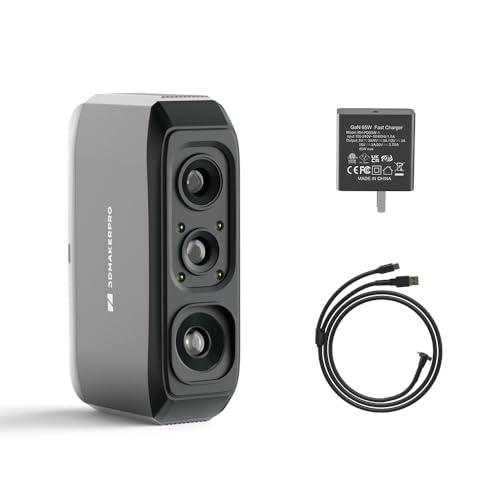
A wider scan window for medium objects, at a friendlier price than its sibling.
The Moose Lite uses an NIR light source to deliver 0.05mm accuracy with 0.1mm resolution, a solid middle ground for objects sized 15mm to 1500mm. Its ideal working distance of 150–400mm makes it more forgiving of hand movement than the Seal Lite, and the 10fps frame rate with anti-shake keeps things stable indoors.
It is noticeably more precise than the Ferret Pro at 0.05mm vs 0.1mm — a 2.5x gap that shows up on detailed mechanical parts. The JMStudio software is free with lifetime updates, compatible with both Windows and macOS, and exports to OBJ/STL/PLY/ASC for 3D printing. Like its sibling, it needs a relatively powerful PC and a 65W charger.
Experienced users find the software intuitive and quick to calibrate, with one noting the “anti-glare coating reduces reflections.” But this unit is polarizing. Owners mention “It cannot ‘see’ dark objects and did not work as videos made it out to,” and another called the software “cheap and difficult” after two hours of struggle. A full day spent scanning a regular glass that “still came out all wrong” is the cautionary tale here.
Best for CAD users: if you already know 3D modeling software, the learning curve is roughly 30 minutes and the speed-to-accuracy ratio is strong.
Skip if you are brand new: novices report a steep, frustrating start with dark and glossy objects — this is not plug-and-play.
4. Revopoint Inspire 2

Eleven infrared laser lines that cut through reflective and dark surfaces without spray.
The Inspire 2 is the outdoor specialist of the group. It scans reliably in shaded or semi-bright conditions up to 20,000 lux, and its 11 infrared laser lines capture reflective and dark surfaces with no scanning spray needed. Dual scanning modules — infrared structured light plus multi-line laser — let you switch modes by material and size.
Precision here is excellent: up to 0.05mm accuracy and 0.03mm precision, with a high-precision calibration board that boosts point cloud accuracy by 75%. At just 190g with an aerospace-grade aluminum alloy front panel, it is as light as the POP3 Plus but built tougher. Wireless Wi-Fi 6 scanning works with iOS, Android, Windows, and macOS.
The hardware impresses, but the software is the main friction point. The free Revo Metro software is powerful yet finicky, and the included tripod “can’t support camera weight, drifts.” Calibration was described as a 30-minute sensitive process. The sticky dots for calibration “suck and don’t stay stuck” per one owner, so stock up on backups. For a tech-savvy user, it delivers “great value” against -plus competitors.
What stands out
- Scans dark and reflective surfaces without spray, thanks to 11 IR laser lines
- Dual scanning modules handle different materials and sizes
- Full-color texture capture with adjustable 1.5x and 2x optical zoom
What holds it back
- Calibration is precise but frustrating — a 30-minute sensitive process
- Included tripod drifts under the camera’s weight
- Sticky calibration dots peel off, so keep backups handy
Who it beats: anyone scanning outdoors or fighting reflective parts will find this more capable than the Ferret Pro’s 0.1mm limit.
Who it does not: impatient beginners — the setup and calibration demand a steady hand and tech comfort.
5. Revopoint POP3 Plus

Fast 18fps sweeps with full-color capture, built for medium objects and body parts.
The POP3 Plus is the speed demon of this list, scanning up to 18fps (frames per second, or how many images it captures each second). That speed lets it capture lifelike full-color models of medium objects, from 20 x 20 x 20 mm up to 2 x 2 x 2 m, using an HD RGB camera, advanced pixel mapping, and a Flash LED lighting system. A 9-axis IMU (inertial measurement unit, a sensor that tracks movement and rotation) steadies the scan, so shaky hands won’t ruin a pass.
At 0.04mm accuracy, it edges out the Moose Lite’s 0.05mm, and its optical zoom (1.5x and 2x magnification) delivers 30% more point cloud detail on fine textures. It exports to PLY, OBJ, STL, ASC, 3MF, GLTF, and FBX — the widest file compatibility here. The free Revo Scan software includes a Global marker tracking mode for improved scans.
Owner feedback is genuinely split. Some call it a “love this handheld 3d scanner” with awesome support, while others find getting a reliable scan “really difficult” despite varying tools and lighting. It pairs perfectly with Revopoint’s two-year warranty and 24/7 support.
Speed with color: the 18fps capture plus full-color output makes it the best choice for scanning people and medium-sized objects quickly.
The catch: expects a learning curve and a PC meeting the x86_64 software requirement; dots are mandatory for reliable tracking.
6. Shining 3D Einstar

Three IR projectors that make light work of large objects and even hair.
The Einstar is the big-canvas specialist. It uses 3 infrared VCSEL projectors, 2 stereo depth cameras, and 1 RGB camera to capture high-density point clouds at up to 14fps, with point distance up to 0.1mm. Its built-in detail enhancement technology tune the point cloud for complete data acquisition, and a dedicated “Hair Mode” helps human scans capture sufficient hair data.
Owners rave most about scan quality, especially on large surfaces. One owner reported it “vastly outperforms Revopoint Range at similar price” and scanned a “dark shiny bumper without powder in poor light.” Another scanned a black SUV interior without dots or spray and got results “dimensionally accurate to ±0.5mm.” That outdoor stability comes from the 3 infrared VCSEL projectors (vertical-cavity surface-emitting lasers, which project a stable pattern for the camera to read).
The trade-off is the software, which earns mixed reviews. The EXstar software offers automatic alignment and smart tracking, but some call it “a complete buggy mess” with no tutorial. An occasional unit arrives with awkward ergonomics — no tripod mount and a 3-wire tangle. It is best for large objects over five inches and people, not tiny toys or action figures.
Why owners pick it
- Captures dark shiny surfaces like car bumpers without powder or spray
- Hair Mode delivers complete head scans including hair data
- Stable outdoor performance from 3 IR VCSEL projectors
What to expect
- Software lacks a tutorial and can feel unintuitive at first
- Best for objects larger than five inches, not small figures
- Ergonomics are awkward — no tripod mount, 3-wire tangle
Reach for this if: you scan car parts, people, or large mechanical assemblies where detail on dark surfaces is the priority.
Look elsewhere if: your work is all small objects under five inches — the Einstar’s tracking gets frustrated there.
7. Creality Raptor

Metrology-grade blue laser precision for parts as small as 5mm.
The Raptor is the precision flagship, hitting 0.02mm maximum precision via a blue parallel 7-line laser and a 2.3-megapixel camera. It scans objects from 5mm to 2000mm — the widest range in this roundup — with all-glass lenses that offer a large depth of field and low distortion. This is the scanner to reach for when a tiny mechanical part needs exact geometry.
It is also the most versatile, pairing blue laser mode (marker-point assisted, high precision) with infrared structured light mode (marker-free, for faces, bodies, and cultural relics). The infrared mode directly scans many black and metal objects with low dependence on powder spraying, and 12 white LED supplemental lights capture full-color texture. Scanning speed reaches up to 60fps in blue light mode.
Owners with a Creality K2 Plus printer report it scans objects under 2mm with high accuracy and merges scans easily. But reliability concerns surface: one owner reported “lost tracking frequently despite IR/laser, dots, spray, lighting changes” plus “random USB disconnects on all ports,” and the Spanish review is blunt about difficulty. At 372g with an all-metal lens barrel for thermal stability, it handles well — but it demands patience with distance control.
Precision mic-drop: 0.02mm accuracy plus a 5mm minimum scan size beats every other budget unit for tiny mechanical parts.
The single caveat: tracking can drop on tricky surfaces, and USB disconnects have been reported — keep a steady sweep distance.
Understanding the Specs
Accuracy vs Resolution
Accuracy tells you how close the scanned model is to the real object’s true dimensions — 0.02mm is tighter than 0.05mm. Resolution (sometimes called point distance, like 0.1mm) tells you how densely the scanner samples the surface. Higher density means finer detail on textures and edges. For large objects, 0.1mm accuracy is plenty; for tiny jewelry or mechanical parts, you want the 0.02mm class.
Light Source Types
Blue LED light projects a fine pattern to capture small dents on small objects (Seal Lite). NIR light works at a longer range for medium items (Moose Lite). Blue laser light is the most precise for tiny parts and can often scan black and metal objects directly (Raptor). Multi-line laser setups add infrared lines to handle reflective surfaces without spray (Inspire 2). Shiny, black, or transparent surfaces are trouble for almost all of them — a matte spray or sticky dots fixes it.
PC Requirements
The scanner captures data, but your computer turns it into a model. Minimum specs vary: the Ferret Pro asks for an 8th-gen i5 with over 8GB RAM, while the Inspire 2 wants an i7 13th Gen or Ryzen 7 5800 with 16GB RAM and an RTX 3060. If your PC is older than the requirement, expect slow scans or crashes. Always check the system requirements before buying.
Frame Rate and Tracking
Frame rate (fps) is how many scans per second the device captures. Higher is better because it grabs more detail as you move. The POP3 Plus hits 18fps, the Einstar 14fps, and the Seal/Moose Lite 10fps. Anti-shake and scan-back features help keep tracking locked when your hand wobbles. A lower frame rate just means you sweep more slowly.
FAQ
Will a budget 3D scanner work with my laptop?
Can these scanners scan dark or black objects?
What is the difference between 0.02mm and 0.1mm accuracy?
Do I need a turntable or tripod?
Can I scan a person’s face with a budget scanner?
What file formats do these scanners export for 3D printing?
Is a 3D scanner hard to learn?
Why does my scanner keep losing tracking?
Which scanners work wirelessly without a cable?
Is an NIR or blue LED scanner better for small objects?
Final Thoughts: The Verdict
For most buyers, the budget 3d scanner winner is the Creality Ferret Pro because it combines wireless freedom, a featherlight 105g body, and the gentlest learning curve at this price. If you want the finest detail on small parts, grab the Seal Lite with its 0.02mm blue LED precision. And for outdoor scans of dark or reflective surfaces without spray, the Revopoint Inspire 2 is the one to reach for. Every unit here demands practice, but the right match for your objects and your PC makes that practice worthwhile.
How We Picked
We do not accept paid placement. Every pick is matched to a real buyer and a real use-case; we do not hands-on test units.
Sources & Methodology
Specifications: manufacturer listings and product documentation. Review insights: verified customer reviews, as of August 2026. Pricing: not shown on this page (it changes often); check the current price via the retailer link.
As an Amazon Associate, FitlyFast earns from qualifying purchases. This does not affect which products we feature.