
Our readers keep the lights on and the weekend projects moving. As an Amazon Associate, I earn from qualifying purchases.
Specs are compiled from manufacturer listings and verified buyer reviews and can change over time — please confirm the key details on the product page before buying.
Finding a budget 4K projector that delivers a true, crisp 4K picture without a painful price tag used to mean picking through a maze of fake specs and marketing hype. You want a real 3840 x 2160 native resolution, enough brightness to actually see the picture, and a set of smart features that don’t make you fight the thing every time you turn it on. This guide cuts through the noise to find the three projectors that actually deliver on that promise for a reasonable cost.
I’m Rikta — the founder and writer behind FitlyFast. This guide is built by comparing the manufacturers’ published specifications and the patterns across verified customer reviews, so you get each pick’s real strengths and trade-offs instead of marketing spin.
Whether you are setting up a home theater or a gaming den, the right budget 4K projector balances brightness, contrast, and ease of use. We have compared the best options for a budget 4k projector that offers native 4K resolution and real-world performance.
Our Picks at a Glance

How To Choose The Best Budget 4K Projector
A budget 4K projector doesn’t mean you have to settle for a blurry picture. The real challenge is separating a “4K compatible” projector from a true native 4K projector that displays 8.29 million pixels. Here are the three specs that define the real performers.
Brightness Is Your Room’s Reality Check
Measured in lumens, this tells you how much light the projector throws. A higher lumen number means you can watch with a lamp on or some indirect sunlight. For a dedicated home theater room with blackout curtains, you can go lower, around 1000-1500 lumens. For a living room with any ambient light, you want closer to 3000 lumens.
Contrast Ratio Gives Depth To Dark Scenes
This number describes the difference between the brightest white and the darkest black the projector can produce. A higher ratio (like 12000:1) means you see more detail in shadows during a night scene instead of a washed-out grey blob. This is crucial for horror movies or any dark, atmospheric content.
Auto Setup Features Save Your Patience
Auto keystone and auto focus save you from manual setup headaches. Look for auto keystone correction (which squares up the image if the projector is off-angle) and auto focus. These features let you plop the projector on a shelf, press a button, and get a perfect picture in seconds.
Quick Comparison
| Model | Best For | Brightness | Contrast Ratio | Display Type | Amazon |
|---|---|---|---|---|---|
| XGIMI Horizon Pro★ Best Overall | Smart Setup & Living Room | 1500 ISO Lumens | 10000:1 | DLP | Amazon |
| Epson Flex Plus | Bedroom & Portable Cinema | 1000 Lumens | High | LCD (3-Chip 3LCD) | Amazon |
| ViewSonic PX701-4K | Serious Gaming & Home Theater | 3200 ANSI Lumens | 12000:1 | DLP | Amazon |
In‑Depth Reviews
1. XGIMI Horizon Pro 4K Projector
The hands-off projector that practically sets itself up in your living room.
You get sharp, detailed images with the XGIMI Horizon Pro because it uses a true 4K DLP engine (a chip that creates a native 3840 x 2160 resolution with 8.29 million pixels), all lit by 1500 ISO Lumens of brightness. Buyers report the picture quality is the standout feature, delivering well for a living room setup. The built-in Android TV 10.0 and Chromecast let you stream apps wirelessly without a separate dongle — a big convenience — though Netflix is not natively supported, so you will need an external stick for that.
The dual 8W Harman Kardon speakers deliver standout sound. Dual 8W Harman Kardon speakers fill a room with DTS-HD and Dolby Digital audio, removing the immediate need for an external soundbar for daily TV viewing. Its Intelligent Screen Adaption Technology includes auto keystone correction up to ±40 degrees both vertically and horizontally, auto screen alignment, auto focus, and even obstacle avoidance. Reviewers report daily use for 5 years with no dead pixels or color degradation. The contrast ratio of 10000:1 is decent, though not as high as the ViewSonic’s 12000:1, so you might notice slightly less detail in the deepest shadows during a very dark movie scene. For most daytime and evening viewing in a living room, this is a non-issue.
Why It Stands Out
- True native 4K resolution (3840 x 2160) with 8.29 million pixels.
- Integrated Harman Kardon speakers (dual 8W) sound excellent.
- Auto keystone, focus, and screen alignment make setup a breeze.
One Thing To Know
- Does not stream Netflix natively; requires an external streaming device for that app.
Your best match: If you want a smart, almost easy projector for a living room or media space and value built-in sound quality.
Think twice if: You absolutely need native Netflix app support without any extra hardware.
2. Epson Lifestudio Flex Plus 4K PRO-UHD
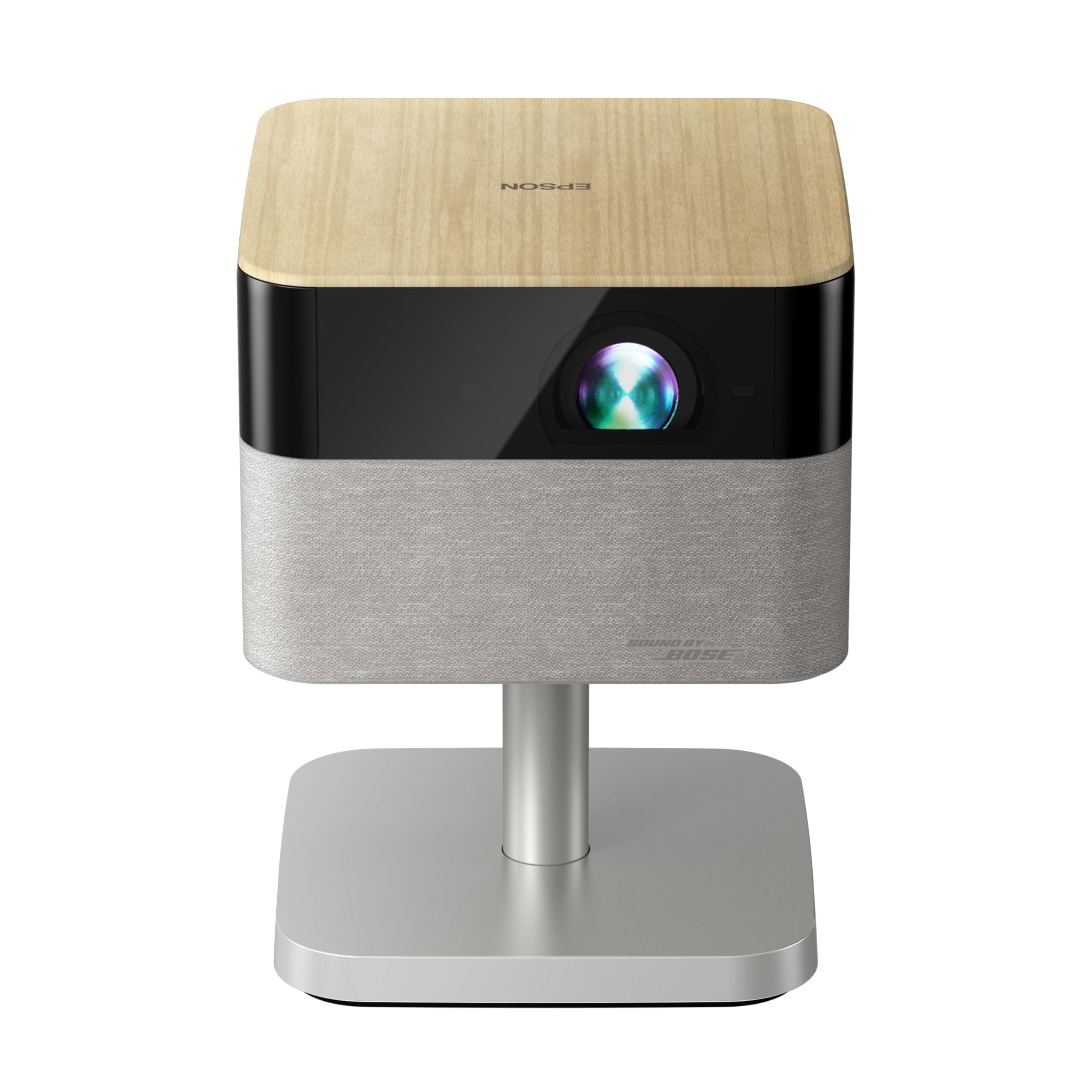
The portable cinema that dodges rainbow artifacts with 3-chip LCD technology.
The Epson Flex Plus uses a three-chip 3LCD design (three liquid-crystal panels) instead of a single DLP chip, so it delivers color and white brightness at the same 1000 lumens — and it completely avoids the “rainbow effect” (brief flashes of color) that some people see on DLP projectors. The image is crisp, with picture quality and sound quality earning top marks from reviewers. The built-in Bose audio is genuinely good enough for a bedroom or party setup, saving you from needing external speakers for most content.
This is a portable form factor that is easy to move around, and its auto-setup via the EpiqSense 2.0 system handles focus, color, and alignment in seconds. Google TV is built-in, giving you native Netflix, Disney+, and YouTube — a big advantage over the XGIMI. However, the 1000 lumens of brightness is low compared to the ViewSonic’s 3200 lumens, so this is strictly a dark-room projector. Buyers also report that it must be placed 8 to 10 feet away to avoid activating the digital zoom, which can degrade resolution. It is a premium, high-quality piece of kit, but its niche is smaller spaces and controlled lighting.
No rainbow, real Google TV: The 3LCD display means zero rainbow effect, which is a huge deal if you are sensitive to it, and the native Google TV platform means Netflix works right from the start.
Small-room specialist: At 1000 lumens, this projector demands darkness. It shines brightest as a dedicated bedroom or portable party projector where you control the light.
Reach for this if: You are sensitive to the rainbow effect on DLP projectors or you want a portable, smart projector with native Netflix support for a dark room.
Look elsewhere if: Your setup has any ambient light, or you plan to place the projector closer than 8 feet from the wall.
3. ViewSonic PX701-4K 3200 Lumens Projector

The 3,200-lumen beast that makes gaming on a 120-inch screen feel buttery smooth.
The ViewSonic PX701-4K is the brightness champion here, pumping out 3,200 ANSI lumens — more than double the XGIMI’s 1500 lumens and over triple the Epson’s 1000 lumens. This means you can actually watch it with a lamp on or during the day without pulling all the curtains shut. It resolves 3840×2160 pixels (though it uses pixel-shifting, a common technique in this price range for 4K) and packs a contrast ratio of 12000:1, which is 20% richer than the XGIMI’s 10000:1, giving deeper blacks in night scenes.
Where this projector truly dominates is gaming. It offers a 240Hz refresh rate and a low input lag of just 4.2ms, making fast-paced shooters and racing games feel snappy on a huge screen. The HDR and HLG support combined with SuperColor tech produce vibrant, punchy colors. Setup is flexible with H/V keystone, 4-corner adjustment, and a 1.1x optical zoom. The fair trade-off is bulb life — the lamp is rated for a certain lifespan and some owners mention it needing replacement sooner than expected (around for a replacement). At this price point, you trade the convenience of a smart OS (there is no Android TV here) for raw, uncompromising performance and brightness. The power cord is also on the short side, so plan your outlet placement.
Where It Wins
- 3200 ANSI lumens is bright enough for daytime living room use.
- 240Hz refresh rate and 4.2ms low input lag for serious gaming.
- 12000:1 contrast ratio provides excellent black levels for a budget unit.
What To Note
- No smart OS built in — you need an external streaming stick.
- Lamp bulb life can be shorter than hoped; replacement.
Ideal for: The gamer or movie fan who wants a massive, bright image in a room with some ambient light and values low input lag above all.
Not ideal if: You want a fully smart, all-in-one projector with built-in streaming apps and don’t want to deal with lamp replacements down the line.
Understanding the Specs
Brightness (Lumens)
This is the measurement of how much light the projector throws at the screen. It is the single most important spec for deciding where you can use the projector. A higher lumen count (like 3200 ANSI lumens on the ViewSonic) lets you use the projector with ambient light — a lamp on, open curtains, a daytime living room. A lower count (1000 lumens on the Epson) demands a dark or blacked-out room for the image to look crisp. For a budget 4K projector, look for at least 1500 lumens for a dedicated home theater room, or 3000+ for a general living space.
Contrast Ratio
This spec tells you how well the projector can display a pure white next to a pure black. A higher ratio (like the ViewSonic’s 12000:1) means deeper blacks and more detail in the dark parts of a movie scene. A lower ratio (like 10000:1 on the XGIMI) will still look good, but you might lose some shadow detail in very dark scenes. For a night-time horror movie, the higher contrast is a real upgrade.
FAQ
Is native 4K the same as pixel-shifted 4K?
Do I need a screen or can I use a white wall?
What is the rainbow effect on a DLP projector?
How loud is the fan on a budget 4K projector?
Can I use a 4K projector for gaming?
What does auto keystone correction do?
How far back does the projector need to be for a 100-inch image?
Does a budget 4K projector work outdoors for movie nights?
How long do the bulbs last on these projectors?
Can I use Bluetooth headphones with these projectors?
Final Thoughts: The Verdict
For the majority of shoppers, the best budget 4k projector winner is the XGIMI Horizon Pro because it combines a true native 4K resolution with the most easy setup, great built-in sound, and a smart OS that gets you watching fast. If you want the brightest possible image for a living room or gaming den where you play competitive shooters, grab the ViewSonic PX701-4K. And for a portable, no-rainbow-effect cinema experience ideal for a dark bedroom, the Epson Flex Plus is the one to reach for.
How We Picked
We do not accept paid placement. Every pick is matched to a real buyer and a real use-case; we do not hands-on test units.
Sources & Methodology
Specifications: manufacturer listings and product documentation. Review insights: verified customer reviews, as of July 2026. Pricing: not shown on this page (it changes often); check the current price via the retailer link.
As an Amazon Associate, FitlyFast earns from qualifying purchases. This does not affect which products we feature.