
Our readers keep the lights on and the weekend projects moving. As an Amazon Associate, I earn from qualifying purchases.
Specs are compiled from manufacturer listings and verified buyer reviews and can change over time — please confirm the key details on the product page before buying.
Your first podcast camera should make you look sharp and sound clear without forcing you to learn a cinema camera menu system. The good news is that a wave of smart webcams and compact recorders now deliver genuine 4K video, fast autofocus, and usable built-in audio for what a proper mirrorless rig would cost you many times over. This guide cuts straight to the seven models worth your money when you are building a budget podcasting setup that still looks professional.
I’m Rikta — the founder and writer behind FitlyFast. This guide is built by comparing the manufacturers’ published specifications and the patterns across verified customer reviews, so you get each pick’s real strengths and trade-offs instead of marketing spin.
Whether you are streaming, recording interviews, or creating content, the right budget camera for podcasting balances an affordable price with crisp video, reliable autofocus, and simple connectivity for your studio.
Our Picks at a Glance


How To Choose The Best Budget Camera For Podcasting
Before you click buy, you need to know which specifications actually change your on-screen result. The spec sheet is full of numbers, but only a few of them decide whether your video looks like a professional studio or a fuzzy laptop webcam.
Sensor Size: The Real Low-Light Hero
The sensor is the part of the camera that captures light. A bigger sensor, measured in inches, captures more light cleanly. This means less grainy, noisy video when you record in a dim home office. Some of the best webcams now use a 1/1.5-inch or 1/1.3-inch sensor, which is significantly larger than the tiny sensors in older webcams and gives you that naturally blurred background look without needing a fancy lens.
Autofocus: Keep Yourself Sharp
Podcasters move. You lean in to make a point, you gesture, you reach for a water bottle. A camera with slow autofocus will leave you looking blurry for seconds at a time. Look for Phase Detection Autofocus (PDAF), which is the same fast-focusing technology found in DSLR cameras. It locks onto your face quickly so you stay crisp and sharp even as you rock back and forth.
Connectivity: Webcam vs. Memory Card
Before you buy, pick your workflow: plug into a computer or record files directly. USB webcams are plug-and-play, so you connect them with a USB cable and they instantly work in Zoom, OBS, or StreamYard. Other models, like handheld recorders, store video on a MicroSD memory card, which is great for location recording but adds a file-transfer step to your workflow.
Quick Comparison
| Model | Best For | Video Resolution | Autofocus | Form Factor | Amazon |
|---|---|---|---|---|---|
| Hollyland Lyra 4K★ Best Overall | Best Overall | 4K at 30fps | PDAF | Webcam | Amazon |
| OBSBOT Tiny 2 LiteAI Tracker | AI Auto-Tracking | 4K | Autofocus | PTZ Gimbal | Amazon |
| YOLOLIV YoloCam S3 | Large Sensor Clarity | 4K/30fps | PDAF | Webcam | Amazon |
| Elgato Facecam 4K | DSLR-Like Control | 4K at 60fps | Auto/Manual | Webcam | Amazon |
| PANOCORE360 | Room-Wide Meetings | 1080p Output | Auto Focus | Conference Cam | Amazon |
| Zoom Q2n-4K | Musicians & Location | 4K Ultra HD | Fixed Focus | Handy Recorder | Amazon |
| Canon PowerShot V10 | Portable Vlogging | 4K at 30fps | Auto Focus | Compact Camera | Amazon |
In‑Depth Reviews
1. Hollyland Lyra 4K Webcam
A 4K studio setup that brings its own wireless lavalier mic and locks focus faster than you can gesture.
The Lyra is the rare webcam that arrives close to podcast-ready from the start. Its headline feature is audio: the direct wireless LARK A1 microphone pairs without a receiver, so you can roam up to 33 feet (10m) from the lens while 20dB intelligent noise cancellation filters out humming and keyboard clicks..
The image side is powered by a 1/1.5-inch CMOS sensor, which is about 3x larger than a standard webcam sensor. That larger sensor helps the camera capture true 4K at 30fps even in dim rooms, producing that natural, softly blurred background you usually need a DSLR for. The 50MP effective still resolution gives you headroom for cropping, and buyers report the autofocus “locks quickly without hunting,” meaning you stay sharp even with fast movement.
What makes this a genuine podcasting tool is the software. The HollyStudio app adds one-click skin smoothing, a green screen mode that preserves fine details like hair strands, and support for up to 10 preset camera angles you can switch with one click. The magnetic base flips you from landscape for Zoom and OBS to portrait for TikTok and Reels. Owners mention the built-in mic is decent and the camera performs well in varied lighting, with image quality and camera quality leading the praise.
What Wins Owners Over
- Excellent PDAF autofocus that locks fast without hunting
- Included wireless lavalier mic beats most desktop mics
- Large sensor produces natural background blur
What to Watch
- Runs very hot during use, even idle
- Mac software lacks advanced features like green screen
The smart studio pick: Choose the Lyra if you want a complete video-plus-audio package with wireless freedom.
Consider the heat: It runs very hot, so unplug it after long sessions if that worries you.
2. OBSBOT Tiny 2 Lite 4K Webcam
A tiny gimbal-mounted 4K camera that physically follows you as you move, keeping you centered without any manual adjusting.
The Tiny 2 Lite solves the biggest problem for solo podcasters and streamers: staying in frame. Its motorized PTZ (pan-tilt-zoom) gimbal uses AI auto-tracking to keep you perfectly centered, and the crowd favorite feature is the tracking — customers note the AI keeps them centered reliably while delivering 4K image that stays sharp and bright even in poor light. You can even customize tracking areas or set non-tracking zones so the camera ignores distractions behind you.
The gesture control adds a slick layer of convenience. You can flash a “🖐” palm to lock the tracking target or an “👆” index finger to control the 4x digital zoom, no software touch needed. It supports 60 FPS continuous shooting, and its 8MP effective still resolution pales compared to the Lyra’s 50MP, but for video it delivers the clean, premium look. The app supports SDK, OSC, Stream Deck, and Global Hotkeys for advanced streamers.
Owners praise the premium build and easy plug-and-play setup, and note the Lite version delivers nearly identical performance to the flagship at a lower cost. The trade-off is the microphone: reviewers point out it is fine for chats but not for actual podcasting, so plan to use a dedicated mic. Also note it needs a PC connection for the remote, and lacks wireless Bluetooth.
The take: A slick performer that tracks you for you, with a microphone that is only a placeholder for your real audio setup.
3. YOLOLIV YoloCam S3

A huge 1/1.3-inch sensor gives this webcam DSLR-like depth of field for a truly cinematic podcast frame.
The YoloCam S3 is built around what the maker calls “likely the largest ever in a webcam” — a 1/1.3-inch sensor. This is a class-leading spec that captures crisp detail and vibrant color, delivering uncompressed 4K at 30fps and 1080p at 60fps. Shoppers say a crisp image with vivid color and natural background blur, which is exactly the premium look you want when talking into a lens.
For moving podcasters, the fast PDAF autofocus keeps you sharp without the hunt. AI Enhanced Imaging claims 2.5x clearer faces in low light., with smart exposure, white balance, and HDR auto-tuned by the camera. The 82° field of view (FOV) is wide enough to keep you and a co-host framed without any fisheye distortion.
A major differentiator is the all-aluminum body. YOLOLIV guarantees no overheating thanks to its aluminum heat sink., using the metal chassis as a heat sink for 24/7 non-stop streaming. Owners call it a major upgrade from older webcams, praising its snappy autofocus and sturdy software for tuning exposure, color, and focus. Note the advanced Picasso Resolve color grading is only available on Windows, and the connectivity has drawn mixed feedback from some buyers, so test your USB port first.
Why It Shines
- Huge sensor for cinematic depth of field
- Fast PDAF autofocus with face tracking
- All-aluminum body with no overheating guarantee
Keep in Mind
- Picasso color grading is Windows-only for now
- No SD card recording built in
Reach for this if: You want the most cinematic image quality from a webcam for your talking-head format.
Look elsewhere if: You need internal recording; the S3 requires a live-box accessory for that.
4. Elgato Facecam 4K

The streamer-favorite brand brings 4K60 smoothness and manual DSLR controls to your podcast video feed.
The Facecam 4K is the most “pro adjustment” webcam here, offering 4K resolution at 60fps for buttery-smooth motion — a spec only the budget shooters above can’t match. It uses the premium Sony STARVIS 2 CMOS sensor paired with Elgato Prime Lens technology for sharp detail and vibrant color. Buyers call it better than older Elgato and Logitech flagships, with excellent light handling and a crisp picture that holds up even when streaming software downscales to 1080p.
what separates it is genuine creative control. The free Camera Hub software lets you manually tune exposure, white balance, and color grading, so you can dial in your exact look. The unmistakable feature is the 49mm lens filter support — you can screw on a physical lens filter just like a DSLR, which is a huge deal for managing glare or adding cinematic effects to your frame.
There are two caveats from owners. First, it can be picky about USB cables, so you need a high-speed USB-C connection. Second, buyers report it starts malfunctioning for some after two months of use, and it must connect directly to your PC rather than a hub. It also has no built-in mic, so a dedicated podcast microphone is an absolute must.
The pro pick: The best choice for a podcaster who wants manual control and 60fps motion, at the cost of needing your own mic and careful USB handling.
5. PANOCORE360 All-in-One Meeting Camera
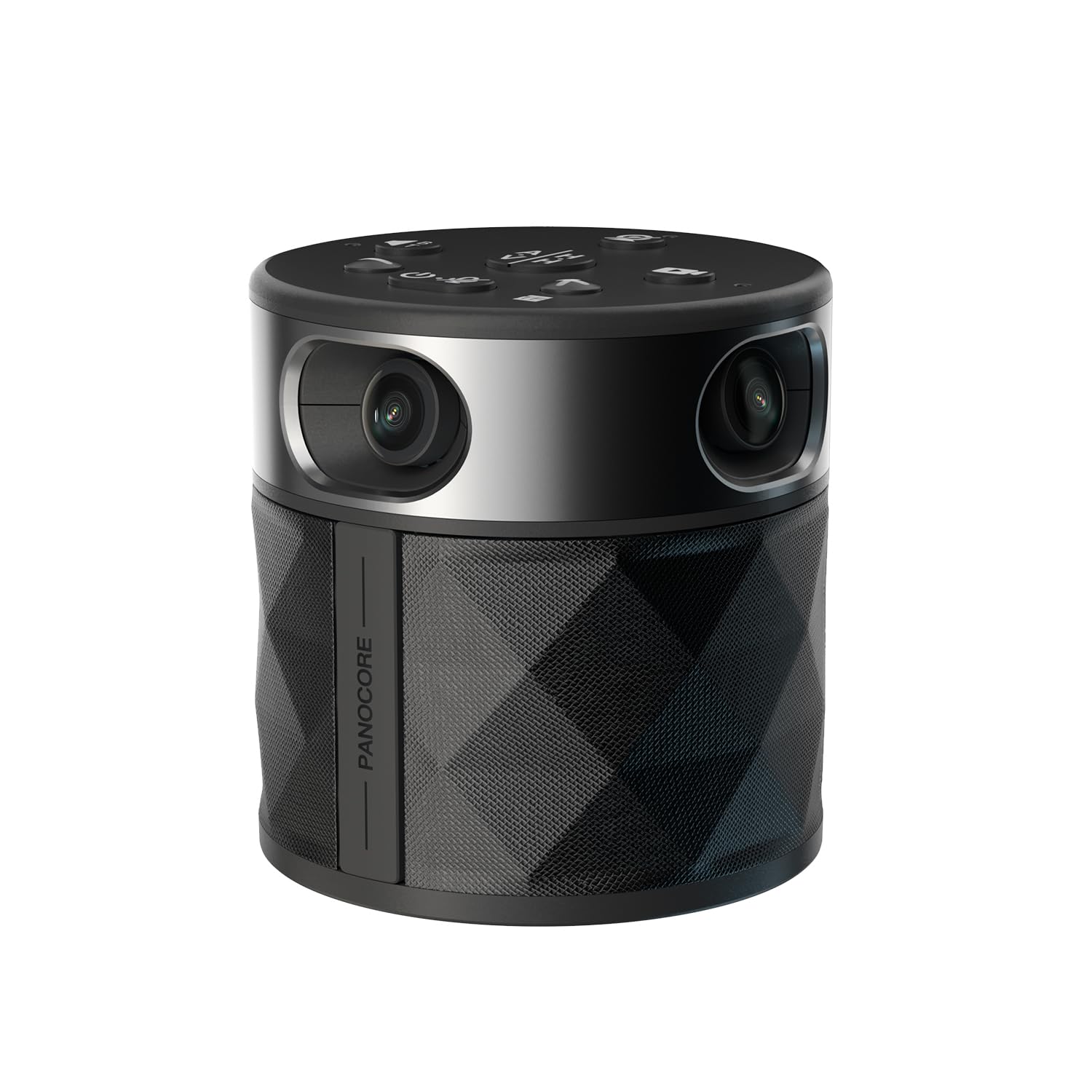
For group podcast roundtables, this 360° camera captures the whole room and focuses on whoever is speaking.
The PANOCORE360 is the odd one out on this list, and that is exactly its appeal. Instead of pointing one lens at one face, it fuses four cameras into a full 4K 360° capture that outputs a 1080p stream. This makes it a powerful tool for a group podcast or live panel where multiple people sit around a table. Its adaptive dual vision modes let you auto-focus on the active speaker or show the room in dual 180° widescreen.
The built-in omnidirectional 3-mic array picks up audio up to 10 feet (3m) away., and AI voice processing isolates the active speaker.. That means you do not need separate mics for a small roundtable of up to 12 participants. It is a genuine all-in-one meeting solution, evidenced by its CES Innovation Award. It also records locally — long-press the record button and it captures video and audio to a MicroSD card.
Owners confirm it fits small to medium conference rooms perfectly, with video and audio quality very acceptable for business use. One buyer notes the aspect ratio runs a bit “tall,” and an occasional unit can arrive with a lens defect. The main trade-off is that its 1080p output is lower resolution than the 4K webcams above, and it is really made for capturing a full room, not a tight solo close-up.
Built for Group Shows
- Fully captures a 360° room view
- Built-in speaker and 3-mic array
- Local MicroSD recording for backups
Who It Isn’t For
- 1080p output is softer than 4K rivals
- Not ideal for tight solo close-ups
Choose it for roundtables: This is the pick for a multi-person podcast panel, not a single-host shot.
Quality control note: A rare unit can arrive with a lens defect, so check your footage on arrival.
6. Zoom Q2n-4K Handy Video Recorder

A musician-grade handheld recorder that captures studio-quality stereo audio alongside 4K video for location shoots.
The Zoom Q2n-4K flips the priority from video to audio, and that makes it perfect for a specific kind of podcaster. Its X/Y stereo mics capture everything from saxophone to heavy metal., so if your podcast is actually a live jam session or a field recording, this captures the sound accurately. Buyers praise the excellent sound quality and great picture quality, calling it a must-have for musicians.
On the video side, a 150-degree lens lets you fit a full band or a solo act into the frame, choosing from five fields of view settings. HDR automatically adjusts exposure to prevent stage lighting blowouts.. It can stream live to Facebook, YouTube, and Twitch as a musician’s webcam, or output audio to an iOS device for mobile podcasting. This bundle also includes a 128GB memory card, a card reader, and a table tripod.
However, the consensus notes two key trade-offs. The battery life draws negative feedback among buyers, so plan on using an AC adapter or rechargeable batteries for long sessions. And the digital zoom only has three settings, meaning if one zoom level is too close and the next too far, you have to physically move the camera. The bundled tripod also drew a specific complaint about quality when handling heavier setups.
The location pick: For musician podcasts, field recordings, and on-the-go sessions where acoustic capture matters more than a razor-sharp pixel count.
7. Canon PowerShot V10

A real Canon compact camera that slips in a pocket or fanny pack, with a flip screen and built-in stand for instant framing.
The PowerShot V10 is the only true camera body on this list, and it brings the reliability of a dedicated 1-inch back-illuminated CMOS sensor. With a 15.2-megapixel effective still resolution, it is a genuine step up in image quality from the phone you might be using now. Buyers specifically praise its excellent video and audio quality, ease of use, and the compact size with one noting it fits in a fanny pack.
Its defining feature is the built-in stand that folds in both the front or back, letting you set it on a table for hands-free operation anywhere. The fixed 19mm wide-angle lens (35mm equivalent) is ideal for a desk setup, and the retractable front-facing flip screen lets you see yourself while recording. Three image stabilization modes (IS Off, IS On, IS Enhanced) keep your handheld shots steady, and Stereo mics plus a center mic reduce background noise..
The main limits for podcasters are the battery and the lens. Owners mention the battery dies quickly, and the lack of a zoom feature means it is designed specifically for fixed-frame vlogging. Also the exposed lens is prone to fingerprints. It records 4K at up to 30fps or Full HD at up to 60fps, and supports USB-C charging plus an external mic auxiliary port, so you can still plug in a proper podcast microphone.
Portable Advantage
- True 1-inch sensor for premium image quality
- Built-in stand for hands-free table use
- Flip screen to frame yourself perfectly
Practical Limits
- Battery life is short for long recordings
- No zoom while filming — fixed wide-angle shot
Best for the roving creator: Grab the V10 if you want a true pocket camera for on-the-go shows rather than a fixed desktop webcam.
Budget for extras: Plan on a power bank or spare battery, and treat the exposed lens carefully.
Understanding the Specs
4K Resolution Explained
4K means the camera captures about 3840 pixels across the image, which is four times the detail of 1080p Full HD. Even if you stream in 1080p, a 4K sensor records extra detail that lets you crop in and zoom digitally without losing sharpness. This is why buyers value 4K cameras as a future-proof choice for growing your podcast setup.
Autofocus and AI Tracking
Basic webcams use slow contrast detection that hunts and blurs. Phase Detection Autofocus (PDAF) is a faster system that locks onto your face instantly and keeps you sharp when you move. AI tracking goes further — the camera uses software to follow you around the frame, sometimes with a motorized gimbal, so you always stay centered without adjusting the camera manually.
Built-in Microphone Reality
No webcam microphone can match a dedicated podcast microphone. The built-in mics on these cameras are fine for casual calls, but for a professional-sounding podcast you should plan on a separate USB or XLR mic. Some models, like the Hollyland Lyra, include a wireless lavalier mic that is a happy exception, but always test your audio before going live.
Field of View and Framing
Field of view (FOV) determines how much of the room appears in the shot, measured in degrees. A wider FOV around 82° keeps you and a co-host in frame comfortably. A 150-degree or 360° lens captures an entire room, which suits group roundtables but can make a solo host look small in the frame. Choose your FOV based on how many people you host.
FAQ
Can a webcam really replace a DSLR for podcasting?
Is the built-in microphone on a webcam good enough for a podcast?
What does a larger sensor do for my podcast video?
Will an AI tracking camera work if I stand up during my show?
What is the difference between a 4K webcam and a 4K camera recorder like the Zoom Q2n-4K?
How long does the battery last on these cameras?
Do I need special software to use these cameras?
What is a privacy shutter and should my podcast camera have one?
Final Thoughts: The Verdict
The best budget camera for podcasting is the Hollyland Lyra 4K because it pairs a large 50MP sensor and fast PDAF autofocus with a wireless lavalier mic, forming a complete starter studio. If you want AI that physically tracks you while you move, the OBSBOT Tiny 2 Lite is the crowd-pleasing pick. For a true pocket camera with a 1-inch sensor that you can take anywhere, the Canon PowerShot V10 is the one to reach for when your show needs portability over a fixed webcam setup.
How We Picked
We do not accept paid placement. Every pick is matched to a real buyer and a real use-case; we do not hands-on test units.
Sources & Methodology
Specifications: manufacturer listings and product documentation. Review insights: verified customer reviews, as of August 2026. Pricing: not shown on this page (it changes often); check the current price via the retailer link.
As an Amazon Associate, FitlyFast earns from qualifying purchases. This does not affect which products we feature.