
Our readers keep the lights on and the weekend projects moving. As an Amazon Associate, I earn from qualifying purchases.
Specs are compiled from manufacturer listings and verified buyer reviews and can change over time — please confirm the key details on the product page before buying.
Streaming on a budget used to mean accepting fuzzy, dark, unwatchable video. The real challenge is choosing between a webcam that clips to your monitor and a camcorder that needs a tripod and USB connection.
I’m Rikta — the founder and writer behind FitlyFast. This guide is built by comparing the manufacturers’ published specifications and the patterns across verified customer reviews, so you get each pick’s real strengths and trade-offs instead of marketing spin.
Whether you are a Twitch beginner, a remote worker, or a first-time vlogger, this breakdown of the budget camera for streaming separates genuine value from inflated specs so you can start broadcasting with confidence.
Our Picks at a Glance

How To Choose The Best Budget Camera For Streaming
Start by deciding where you will stream. A dedicated webcam clips to your monitor, plugs into your laptop, and just works. A camcorder adds a screen, batteries, and a mic input, but it usually needs a tripod and a USB connection to your computer to act as a webcam. Both work, but each fits a different streaming setup.
Frame Rate Matters More Than You Think
Look for 1080p at 30 or 60 frames per second. At 60 fps, fast motion — like gameplay or hand gestures — looks fluid instead of choppy. Many budget camcorders advertise 4K but only manage 25 or 30 fps, which is fine for talking-head videos but poor for action. For gaming streams, a 1080p/60fps webcam often beats a 4K/30fps camcorder in smoothness.
Check the Sensor, Not Just the Megapixels
A larger sensor lets in more light, so a 4K webcam with a 1/2-inch sensor will look cleaner in a dim room than a 48MP phone-style sensor in a cheap camcorder. Megapixel counts like 42MP or 64MP describe photo resolution, not video quality. For streaming, the sensor size and autofocus type (phase detection is faster and more reliable than contrast detection) matter far more for how you look on screen.
Quick Comparison
| Model | Best For | Max Video | Still Photos | Form Factor | Amazon |
|---|---|---|---|---|---|
| CAMWORLD 4K 42MP★ Best Overall | First-time streamers | 4K/30fps | 42 MP | Camcorder | Amazon |
| Logitech C922xTop Performer | Desk & gaming streams | 1080p/30fps or 720p/60fps | 2 MP | Webcam | Amazon |
| OBSBOT Meet Flip | Travel & meetings | 4K UHD | 48 MP | Foldable webcam | Amazon |
| OBSBOT Meet 2 | 4K AI auto-framing | 4K/30fps or 1080p/60fps | — | Cube webcam | Amazon |
| ZYDIIE 64MP | Vlogging & travel | 4K UHD | 64 MP | Camcorder | Amazon |
| CAMWORLD 5K 56MP | Complete kit value | 5K UHD | 56 MP | Camcorder | Amazon |
| FlyFrost 8K 88MP | WiFi sharing & 8K | 8K UHD | 88 MP | Camcorder | Amazon |
In‑Depth Reviews
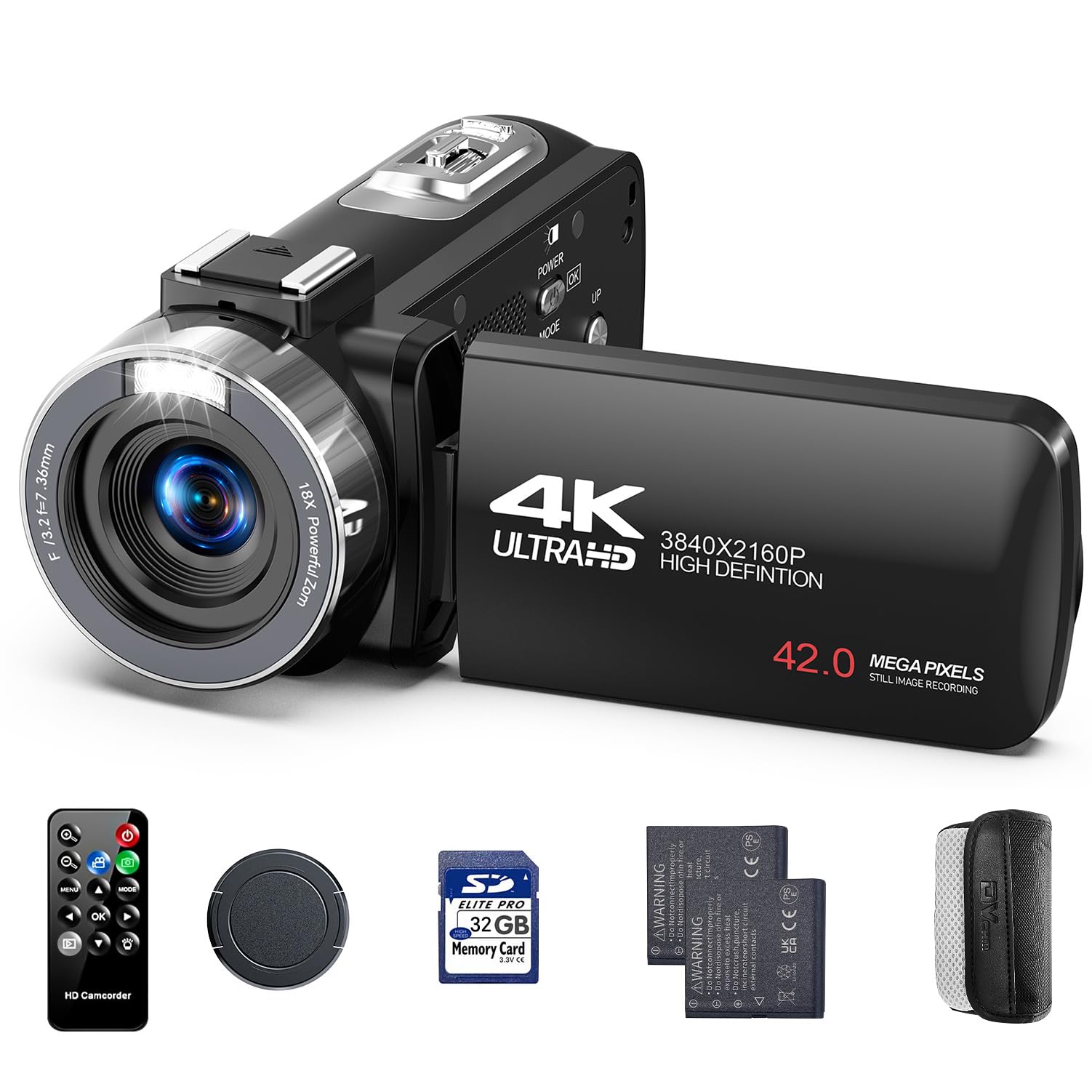
1. CAMWORLD 4K Video Camera Camcorder, 42MP
The feature-packed first camcorder for teens and new streamers that arrives ready to record with zero extras to buy.
CAMWORLD built this around a single idea: unbox it and start creating within minutes. The kit includes two rechargeable batteries, a 32GB SD card, a wireless remote, a USB-C charging cable, a lens cap, and a protective carrying bag — literally everything a first-time buyer needs. The built-in manual LED fill light brightens dim environments, so your footage stays clear without extra lighting gear. At 1.15 lbs, it is light enough for a teen to carry all day.
Buyers describe it as an “easy-to-use camcorder with quality video and surprising built-in sound” — the sort of praise that explains why it is recommended as a starter camera for aspiring YouTubers. The 3-inch screen rotates 270 degrees for selfie framing, the 18x digital zoom reaches distant subjects, and creative modes like time-lapse, slow motion, and burst are built right in. The remote works from up to 20 feet away, perfect for group shots.
The honest limits: this is a fun, learning-focused camera, not a professional tool. Owners admit the 4K is upscaled rather than true native 4K, and low-light video gets soft. It is best for kids, teens, and complete beginners who want to learn framing and editing before upgrading.
beginner friendly: the complete kit and intuitive controls remove every barrier to pressing record the minute it arrives.
mediocre low light: leaning on your phone for comparison — it records better — but this teaches the discipline of a real camera.
2. Logitech C922x HD Pro PC Webcam
The desk-streaming workhorse that plugs in, points, and performs without a single settings menu.
The C922x wins on simplicity: it plugs into any USB port and works instantly with OBS, Zoom, and Teams. You get Full HD 1080p at 30fps with HD light correction that automatically adjusts brightness in dim rooms, so your face stays visible during a late-night stream without any extra lighting gear. For fast motion like gameplay, you can drop to 720p at a smoother 60fps, a choice that makes this the stronger pick for action-heavy content than a 4K/30fps camcorder.
Buyers report the video is sharp and the colors look natural right from the start, and setup takes about 60 seconds — plug it into any USB port and it works with Zoom, Teams, Meet, and OBS. The dual microphones capture natural stereo sound, which means many owners skip buying a separate mic for casual calls. It also works with the Nintendo Switch 2’s GameChat mode, a rare bonus for console streamers.
The one honest trade-off: it has no privacy shutter, and a few buyers mention Mac compatibility quirks. If you only stream from a laptop or desktop, this is the most reliable, least fiddly option on the list — a genuine “plug it in and go” experience that budget camcorders simply cannot match.
sharp autofocus
- True plug-and-play that works instantly with major streaming apps
- 720p at 60fps keeps fast gameplay smooth and fluid
- HD light correction saves you from buying a ring light
needs good light
- No built-in privacy shutter for when you step away
- A few buyers hit compatibility issues with Macs
streamers: you stream from a desk on a laptop or PC and want a camera that works the moment you plug it in.
low light: you need a physical camera you can carry to locations — that is a camcorder job, not this webcam’s.
3. OBSBOT Meet Flip Foldable 4K Webcam
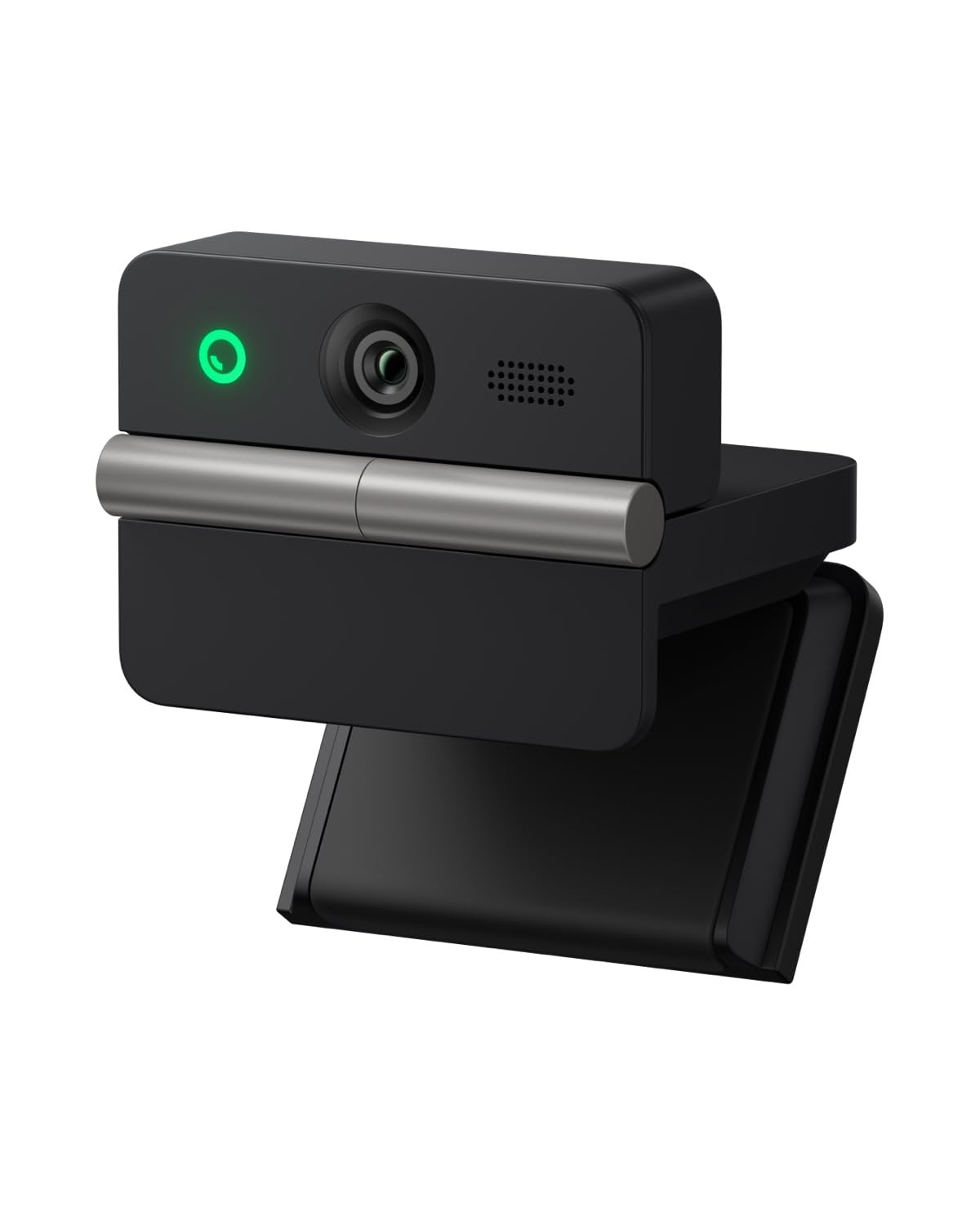
A ridiculously tiny 37.7g webcam that unfolds into a 4K studio-grade picture for on-the-go creators.
If your streams happen in hotel rooms, coffee shops, and coworking spaces, the Meet Flip is the lightest serious option here. Owners were stunned by how small it is — one FIT exactly on top of a Dell monitor without taking up space — yet the image stays “very clear and sharp.”
The AI auto framing is the standout feature for solo streamers. It keeps you perfectly composed as you move, and gesture controls let you zoom with a pointed finger or enable framing with an open palm — no touching the device mid-stream. Phase-detection autofocus (a fast focus system that snaps subjects into sharpness quickly) works from 6 inches to across the room. A dual-microphone system with four audio modes keeps your voice clear in different environments.
The trade-off is value: a few buyers feel comparable cheaper cameras get close on raw image quality, and you pay more for the AI extras. For a streamer who moves between desks and wants zero setup friction, this is the smart money. The fold design also triggers sleep mode for instant physical privacy.
travelers: traveling streamers and remote workers who want a premium picture in a package that disappears into a pocket.
budget buyers: streamers who never move their camera — the AI features would go unused for them.
4. OBSBOT Meet 2 4K Webcam

A cube the size of earbuds that packs 4K clarity, a magnetic cover, and AI framing in a premium shell.
The Meet 2 is what happens when AI framing gets refined into its second generation. Weighing just 40.5g, it is smaller than most earbuds cases, yet the 1/2-inch CMOS sensor and UHD 4K resolution deliver brighter, clearer images than typical webcams. It runs at 4K at 30fps or a smoother 1080p at 60fps, giving you the same high-speed option the C922x offers but in higher overall resolution. The 2.0 dynamic gesture control lets you toggle AI framing and zoom with hand signals, so you never touch the camera mid-stream.
Owners rate the video quality as high-fidelity and praise the premium metal build, magnetic base, and magnetic privacy cover. The dual omnidirectional noise-canceling mics filter out keyboard typing and wind, which means clear audio for calls. A green recording LED and quick USB-C plug-and-play round out a genuinely polished package.
There are two honest caveats. The monitor stand is the weak point — multiple owners mention it falls constantly and needs replacing. And the unit runs warm during long streams, which the maker states is normal. The mic is also merely decent, so serious streamers will still want a dedicated one. The AI framing and compact design justify the price for creators who move around.
desk minimalists: a 4K AI-driven stream setup in a tiny, carry-anywhere body that feels premium in the hand.
podcasters: your monitor has an awkward mount point — plan a replacement stand into your budget.
5. ZYDIIE 4K Video Camera Camcorder UHD 64MP
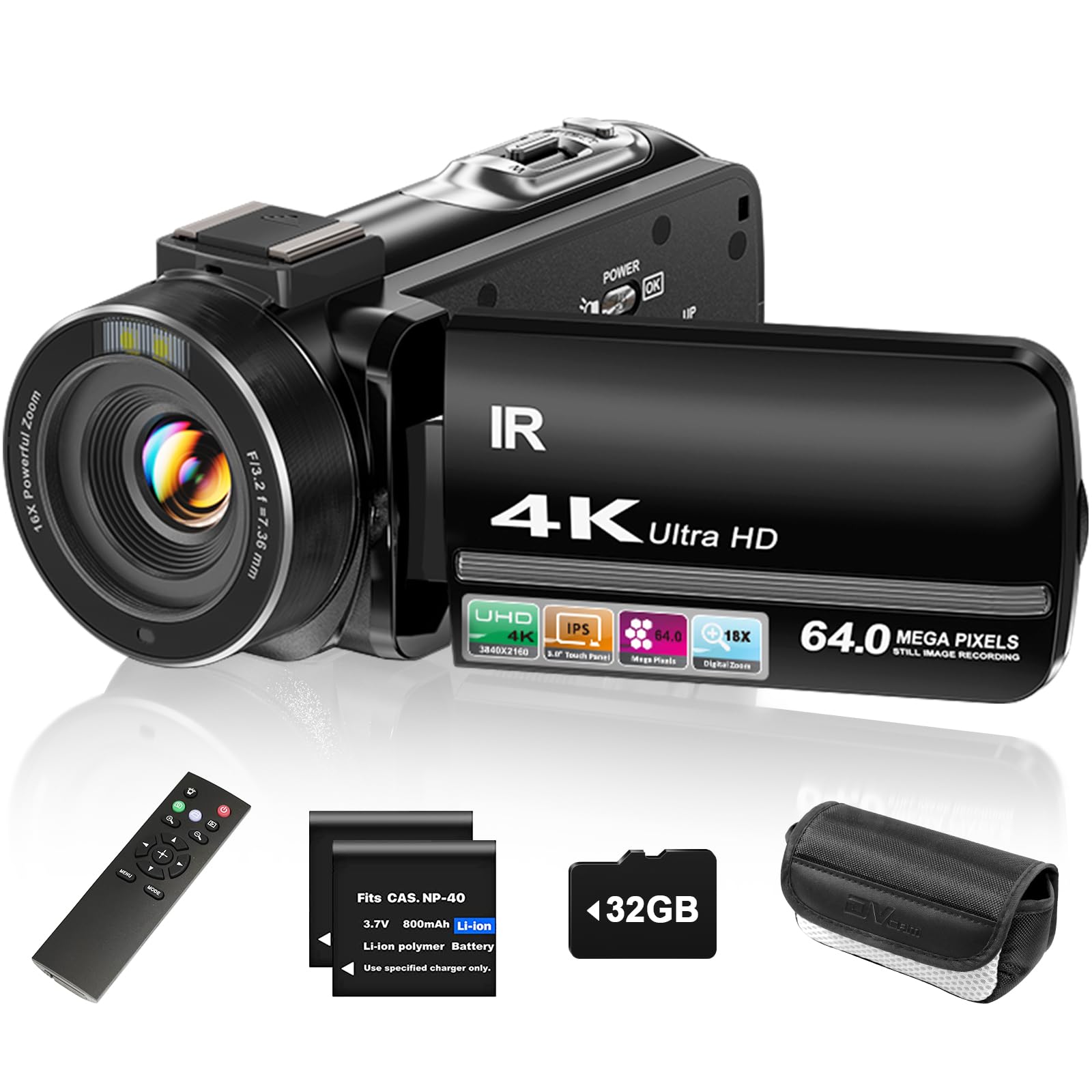
A palm-sized 4K camcorder with a rotating touchscreen and night vision that treats beginners as the target, not an afterthought.
The ZYDIIE is the beginner vlogger’s best friend, and the proof is in the numbers: it holds 64MP still resolution — a 52% higher effective still resolution than the 42MP CAMWORLD camcorder below — so your stream thumbnails and photos stay crisp and detailed. The 4K Ultra HD recording runs on a high-sensitivity CMOS sensor that owners say delivers clear, sharp video, especially in good lighting, and the built-in infrared night vision switches on with one button for high-contrast black-and-white footage in total darkness.
The 3-inch touchscreen rotates a full 270 degrees, making self-framing easy for solo vlogs, and the 18x digital zoom pulls distant subjects closer. Everything you need ships in the box: two long-lasting batteries, a 32GB micro SD card, remote control, case, and charging cable. Buyers consistently praise it as excellent value and note how lightweight it is — one called it “one of the best things” for reliable, affordable recording.
The realistic caveat is low light. While the night vision is effective, regular color footage in dim rooms is merely adequate, and this is not a professional tool. But for a first camera that streams via USB webcam mode, vlogs outdoors, and films family moments, it is the strongest all-rounder value on this list.
budget 4k power: 64MP stills and a rotating touchscreen make this the most versatile beginner kit — a camera that genuinely switches between vlogging and desk streaming.
bulky body: keep it in bright light for color clarity; heavy low-light shooting belongs to the IR mode.
6. CAMWORLD 5K 56MP Vlogging Camera with Stabilizer & Tripod
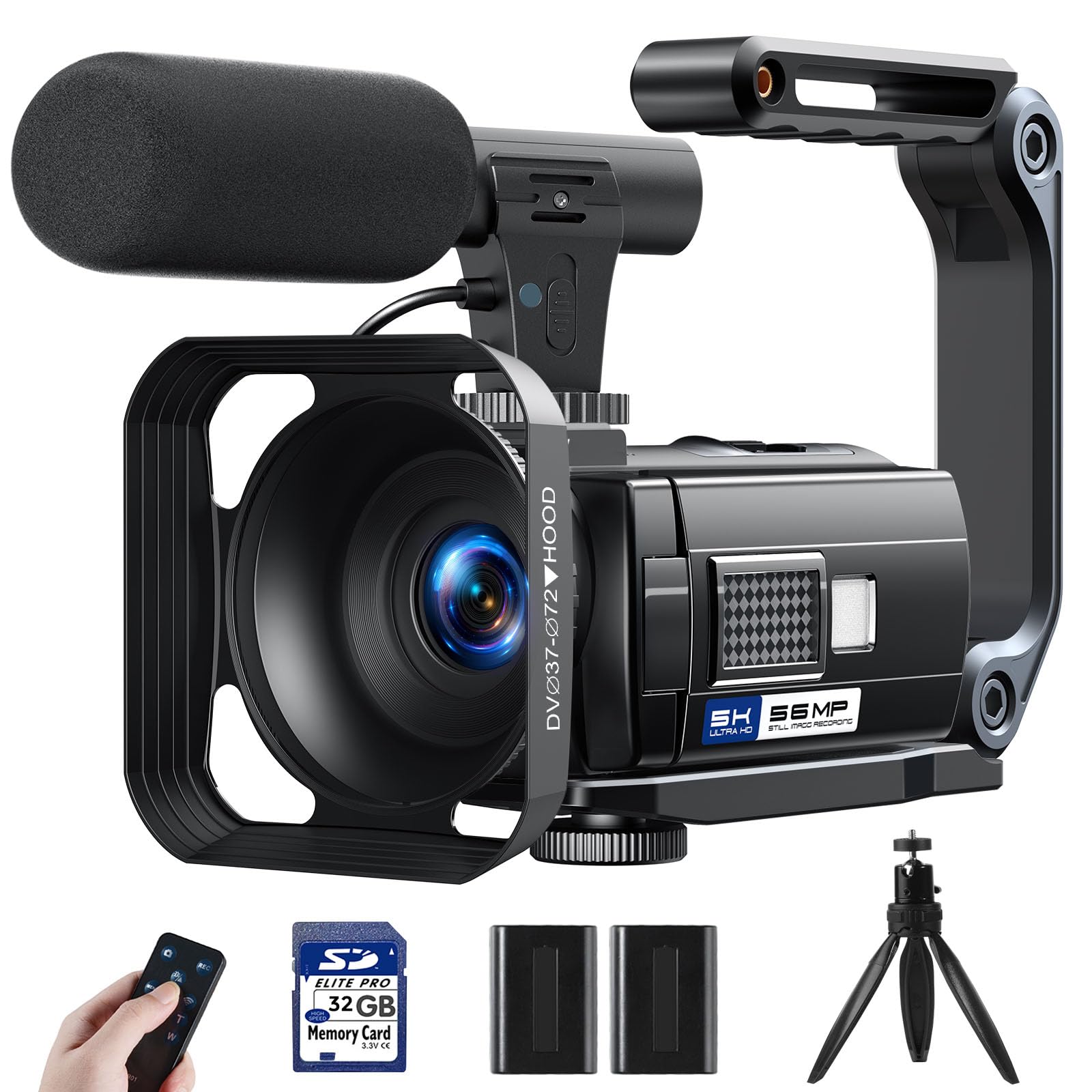
The box that keeps giving — a 5K camcorder bundled with a mic, stabilizer, tripod, and two batteries for true out-of-the-box streaming.
No other pick on this list hands you a complete production kit like this one. Beyond the 5K UHD camcorder itself, the box includes an external microphone for clear stereo audio, a foldable handheld stabilizer to steady your shots, a full tripod, a remote control, an HDMI cable, and two 2400mAh batteries that record for 120–150 minutes each. The 56MP still resolution and 270-degree rotating touchscreen round out a genuinely generous package.
The camera supports WiFi for quick phone sharing and a dedicated PC Camera mode that switches it into a live-streaming webcam via USB — the exact function budget streamers need. Owners highlight how lightweight and easy it is: “simple,” “very lightweight and portable,” with recording quality that beats expectations for the price. The maker even notes it is built for beginners and amateurs rather than professionals, so expectations stay honest.
Know the limits before buying. There is no autofocus or manual focus, so the best shooting distance is 0.6 meters or more, and long recordings split into 15–20 minute clips due to the FAT32 file system. Turning on electronic stabilization caps you at 4K at 60fps instead of full 5K. For a beginner content creator who wants every accessory included, this is exceptional value.
action vloggers: you want one box with every accessory needed to start vlogging and streaming today, no second shopping trip.
still shooters: you need autofocus — this camera keeps the subject at a fixed focus distance.
7. FlyFrost 8K Video Camera 88MP UHD WiFi
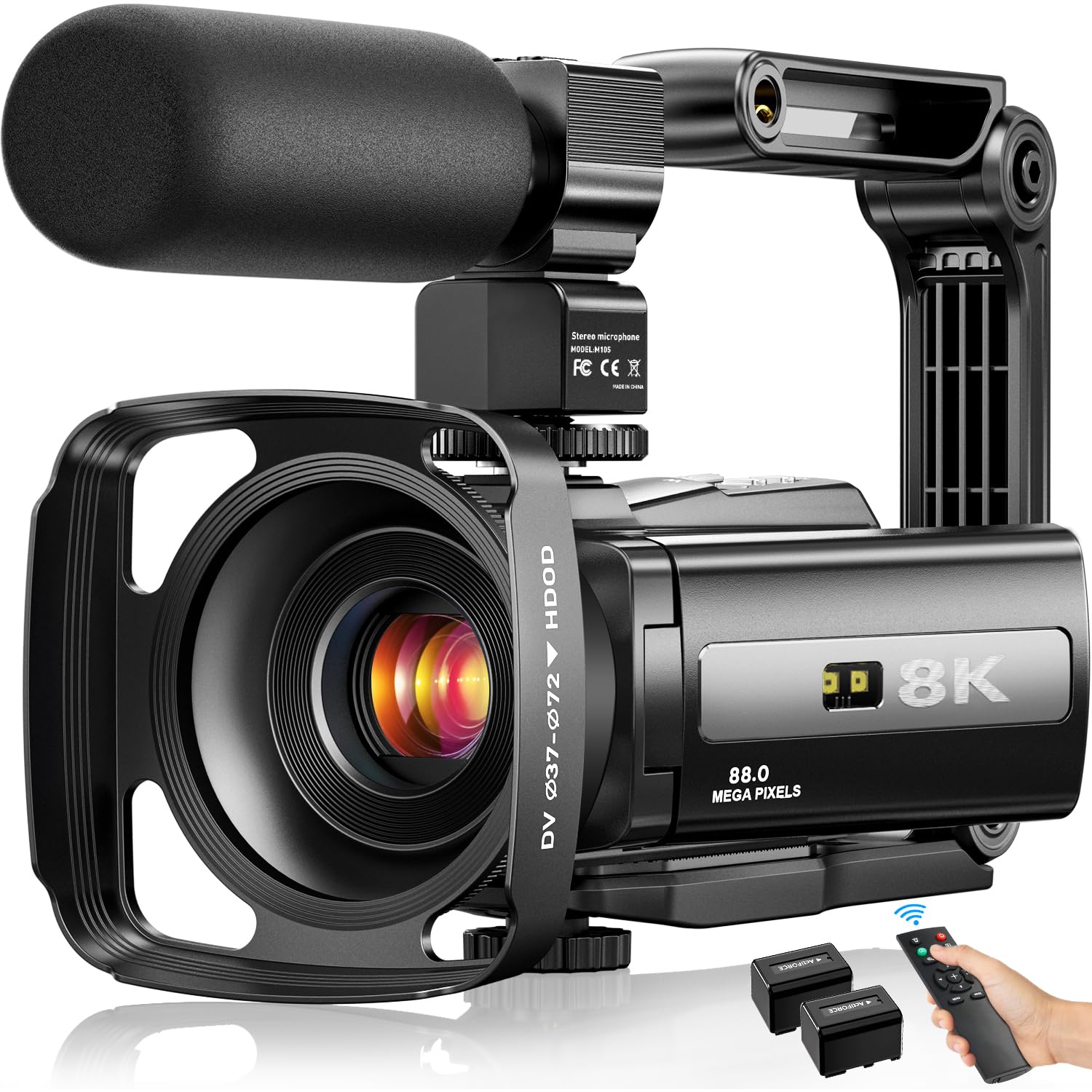
The spec-sheet monster — 8K recording and 88MP photos in a WiFi-connected body for creators who want maximum resolution on a budget.
For buyers who chase the biggest numbers, the FlyFrost delivers: 8K UHD video at a 7680-pixel effective resolution and 88MP photo capability, the highest specifications on this list. The 3-inch touchscreen, 18x digital zoom, and IR night vision give it genuine creative range. Customers note crisp, vibrant video that exceeds expectations for the price — one described it as sharp and detailed with vibrant colors.
The WiFi function sets this apart. Using the iSmart DV2 app, you can view, browse, share, and transfer footage to your phone instantly without cables, and even remote-control the camera. A 2.4G wireless remote works from 60 feet away, so you can frame wide shots and start recording from across the room. The external microphone reduces wind and background noise, and the foldable stabilizer keeps handheld shots steady.
The fixed-focus lens is the practical trade-off — this is listed clearly as Fixed Focus, so keep the subject at distance and rely on the stabilizer for motion. The SD card (up to 256GB) is not included, so budget for one. As a casual recorder or first vlogging camera with far-reaching specs and a strong accessory bundle, it is an easy recommendation.
8k resolution: 8K resolution and instant WiFi sharing make this a future-proof pick for traveling creators who want the highest numbers possible.
software quirks: fixed focus and a missing SD card mean a small learning curve and one extra purchase before you stream.
Understanding the Specs
Frame Rate (fps)
Frames per second measures how many full images the camera captures each second. Standard streaming runs at 30 fps, which looks smooth for talking-head content. For fast movement — gameplay, dance, sports — 60 fps eliminates the choppy, stuttering look. A camera that offers 1080p at 60fps often serves gamers better than a 4K camera stuck at 30fps.
Sensor vs Megapixels
Sensor size (like 1/2-inch) tells you how much light the camera can physically collect. A bigger sensor means cleaner, brighter video in dim rooms. Megapixels (42MP, 56MP, 64MP) describe the still-photo resolution — useful for thumbnails but nearly irrelevant to streaming quality. Prioritize sensor size over megapixels when you will stream indoors.
Autofocus Type
Phase-detection autofocus (PDAF) snaps into sharp focus quickly and tracks motion reliably. Contrast-detection autofocus is slower and hunts for focus in low light. Some budget camcorders skip autofocus entirely and use fixed focus, which means you must set the right distance from the lens. For streaming while you move, PDAF is the feature to seek.
Webcam Mode
Many camcorders double as a streaming camera by connecting to your PC via USB and switching to a “PC Camera” mode. If your workflow is Twitch, Zoom, or OBS, confirm the camera supports this before buying. Dedicated webcams are plug-and-play by design; camcorders vary — some work instantly, others need a software download.
FAQ
Is a 4K camcorder or a 1080p webcam better for streaming?
Will a budget camcorder work as a webcam for Twitch?
How many frames per second do I need for streaming?
Is a built-in microphone good enough for streaming?
What does IR night vision do on a budget camera?
Why is sensor size more important than megapixels for streaming?
How long do budget camera batteries last for streaming?
Do these cameras work with Mac computers?
Final Thoughts: The Verdict
For most streamers on a budget, the budget camera for streaming that delivers the best combination of reliability and image quality is the Logitech C922x because it needs zero setup and captures crisp 1080p or smooth 720p at 60fps for gaming. If you want a tiny 4K camera with AI framing you can carry anywhere, grab the OBSBOT Meet Flip. And for a complete vlogging kit with a mic, stabilizer, and tripod included, the CAMWORLD 5K is the one to reach for. The Logitech C922x is the crowd favorite, earning 4.6 stars from thousands of owners for its plug-and-play reliability.
How We Picked
We do not accept paid placement. Every pick is matched to a real buyer and a real use-case; we do not hands-on test units.
Sources & Methodology
Specifications: manufacturer listings and product documentation. Review insights: verified customer reviews, as of August 2026. Pricing: not shown on this page (it changes often); check the current price via the retailer link.
As an Amazon Associate, FitlyFast earns from qualifying purchases. This does not affect which products we feature.