
Our readers keep the lights on and the weekend projects moving. As an Amazon Associate, I earn from qualifying purchases.
Specs are compiled from manufacturer listings and verified buyer reviews and can change over time — please confirm the key details on the product page before buying.
Upgrading your gaming rig shouldn’t require a second mortgage, and the most critical component for stability doesn’t have to be the most expensive. The real challenge is finding a unit that delivers clean, consistent power without tripping protections or sounding like a jet engine under load. This guide cuts through the specs to find the budget power supplies that actually protect your hardware while keeping your wallet intact.
I’m Rikta — the founder and writer behind FitlyFast. This guide is built by comparing the manufacturers’ published specifications and the patterns across verified customer reviews, so you get each pick’s real strengths and trade-offs instead of marketing spin.
We’ve examined the market to bring you the best budget computer power supply options that balance efficiency, reliability, and price for your next build or upgrade.
Our Picks at a Glance


How To Choose The Best Budget Computer Power Supply
Picking the right power supply doesn’t require an electrical engineering degree, but it does mean ignoring a few misleading claims. The sticker wattage on the box is only part of the story; you want to know how much of that power is actually usable and how cleanly it’s delivered to your components.
Understand the 80 Plus Rating
You want a power supply that won’t waste electricity or heat up your case, and the 80 Plus certification tells you how efficient it is. A Bronze-rated unit is certified for 85% efficiency or higher under typical loads., so less energy turns into heat and your electricity bill stays lower. For a budget build, Bronze is the balance; Gold offers a bit more efficiency but commands a higher price.
Check the +12V Rail Specs
The single most important spec for modern systems is the +12V rail, as it powers your CPU and GPU. Look for the amperage on this rail; a single +12V rail with around 40A to 45A is more than enough for a mid-range gaming setup. On a 600W unit, a +12V rail listed at 45A (which translates to roughly 540W of usable power) is a strong indicator of a capable budget PSU.
Focus on Protections and Form Factor
Protection circuits are your first line of defense. At minimum, you want Over-Voltage Protection (OVP, which shuts down the unit if voltage spikes) and Short-Circuit Protection (SCP, which prevents damage if a wire shorts out). Also, confirm the form factor is ATX to fit standard cases, and keep an eye on the physical size — a compact 125mm length is easier to fit in most modern towers than a longer unit.
Quick Comparison
| Model | Best For | Wattage | Efficiency | Fan Size | Amazon |
|---|---|---|---|---|---|
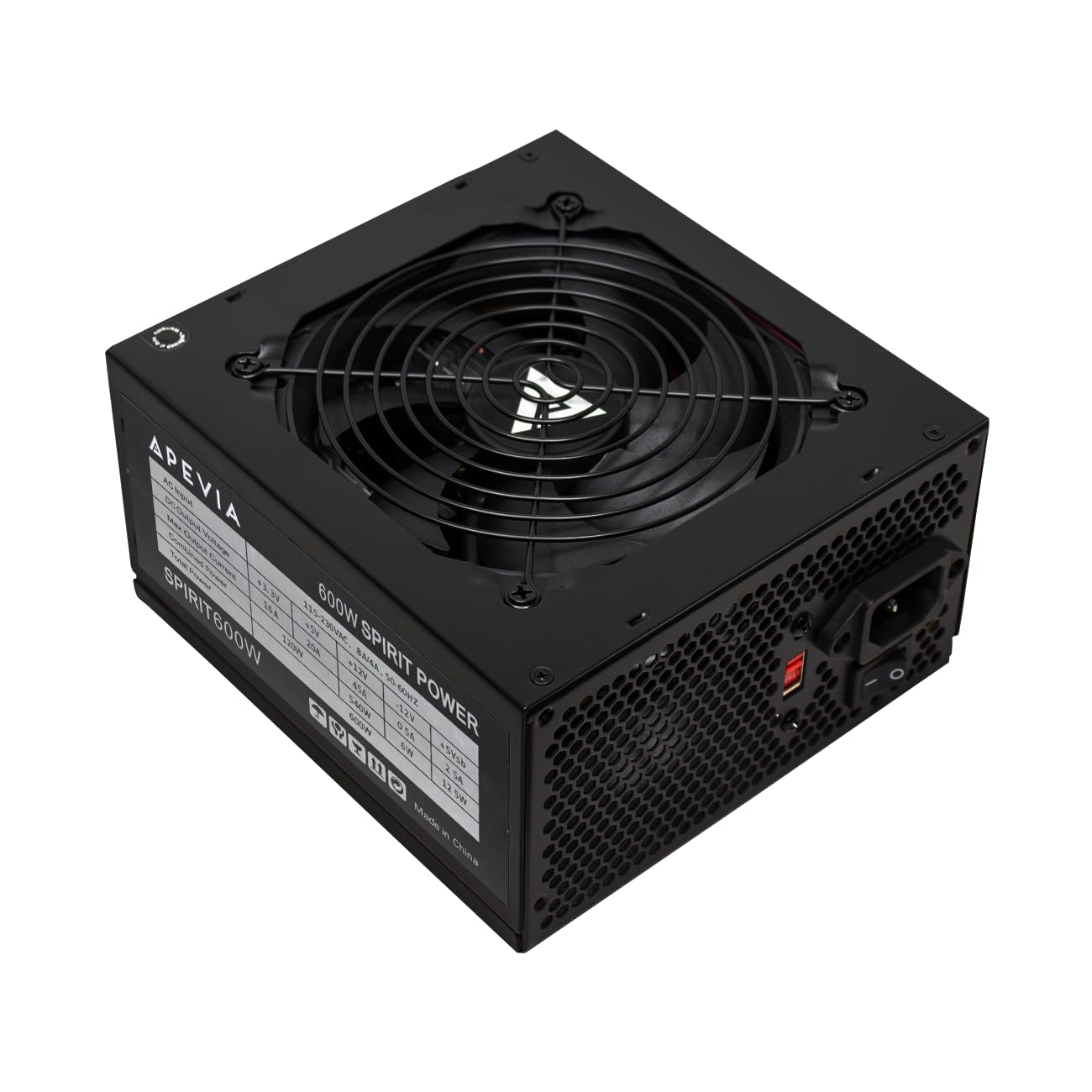
| Apevia Spirit 600W★ Best Overall | Reviving old PCs on a tight budget | 600W | None | 120mm | Amazon |
| Corsair CX650Also Great | Reliable full-load power | 650W | 80 Plus Bronze | 120mm | Amazon |
| MSI MAG A650BEClean Builds | Semi-modular simplicity | 650W | 80 Plus Bronze | 120mm | Amazon |
| Segotep GN-650 | Gold efficiency on a budget | 650W | 80 Plus Gold | 120mm | Amazon |
| Apevia Jupiter 600W | Quiet operation, big cooling | 600W | 80 Plus Bronze | 135mm | Amazon |
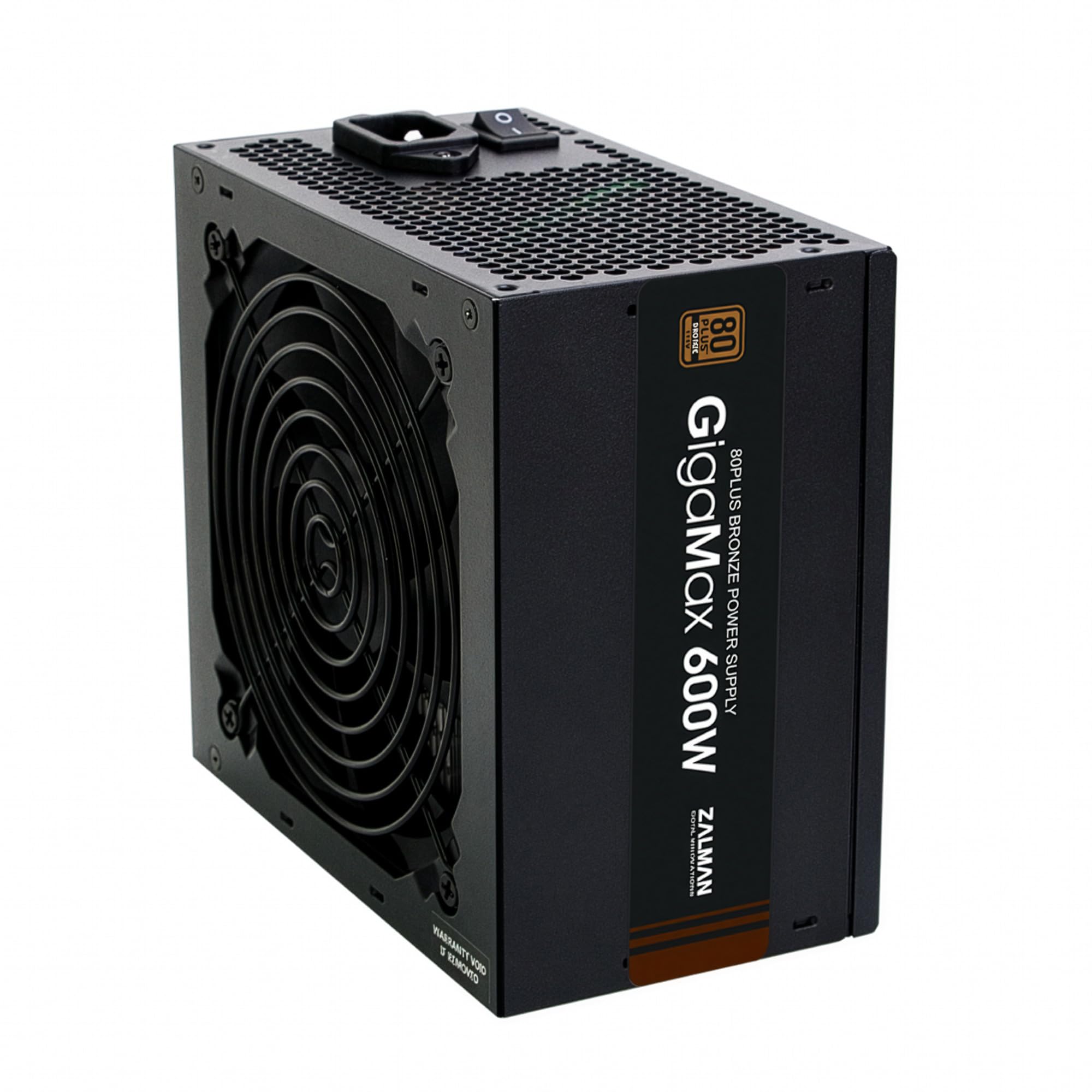
| Zalman GigaMax 600W | Stable output, 5-year warranty | 600W | 80 Plus Bronze | 120mm | Amazon |
| Corsair CX550 | Simple builds and pre-builts | 550W | 80 Plus Bronze | 120mm | Amazon |
| ARESGAME AGV 650W | Budget builds with headroom | 650W | 80 Plus Bronze | 120mm | Amazon |
| ARESGAME AGW550 | Solid 2-year track record | 550W | 80 Plus Bronze | 120mm | Amazon |
In‑Depth Reviews
1. Apevia Spirit 600W
The cheapest reliable 600W that shines brightest when breathing life back into old office PCs.
This is the budget champion for a very specific job: reviving vintage computers and cheap builds. The Apevia Spirit 600W is praised by owners for being “great for BUDGET vintage builds and new builds,” with plenty of power to run an RX580 graphics card paired with an i7-2600K. If you have an old Dell or Acer sitting around, this is the unit to bring it back to life.
It delivers a solid +12V output of 45A (about 540W of usable power) on a single rail, which is excellent for the price. The 120mm auto-thermally controlled fan runs quietly, with one owner noting it’s quieter than the case fans. It includes all the necessary connectors — 1 x 20/24pin main, 1 x 4+4pin CPU, 2 x PCI 6+2pin for GPUs, 4 x SATA, and 4 x Molex — so compatibility is broad.
The main limitation buyers report is the CPU power cable is about 3 inches too short for large cases like the HAF-X, requiring some creative routing over the GPU. It also lacks an 80 Plus efficiency rating, so it’s less energy-efficient than Bronze-rated units. But if you’re on the tightest budget and need a 600W unit, this is a functional, reliable choice that won’t break the bank.
Budget revival power
- Excellent watt-per-dollar value at 600W
- Strong 45A +12V rail for GPU support
- Quiet 120mm auto-thermal fan
Know before you buy
- No 80 Plus efficiency certification
- CPU cable short for large cases
- Non-modular with excess cables
Grab it if: you’re on the strictest budget, reviving an old PC, or building a casual rig where efficiency ratings take a back seat to price.
Pass it up if: you’re building in a large full-tower case with a far-mounted motherboard, or you want an 80 Plus certified unit for lower power bills.
2. CORSAIR CX650
The rock-solid 650W foundation that delivers on its rated wattage without breaking a sweat.
This is the unit you choose when you want zero worry about whether your components get enough juice. The CX650 is guaranteed to deliver its full rated wattage of continuous power, which means a mid-range rig with a demanding GPU won’t experience the random shutdowns that plague cheaper units. It’s a non-modular design, so you’ll have extra cables to tuck away, but that’s the trade-off for its reliability.
The noise profile is managed by a 120mm thermally controlled fan, which only spins at high speed when the PSU is under heavy stress. That means quieter operation at lower loads, perfect for when you’re just browsing or streaming. At 125mm in length, the compact casing ensures an easy fit in almost all modern PC cases, so you won’t be wrestling with clearance issues during installation.
What powers your system matters, and the consensus is that this unit is a high-quality piece. The power quality is the most-praised aspect by far, with owners noting it handles a Ryzen 2600 and 5700 XT without issue. The main caveat is the cable length — buyers report the drive cables split into three short connectors can take a bit of “mangling” to connect all drives, so plan your routing if you have a full tower.
What solid power looks like
- Delivers full 650W of continuous power reliably
- 80 Plus Bronze certified for up to 88% efficiency.
- Compact 125mm length fits nearly any case
Where the savings show
- Non-modular wiring means managing unused cables
- Drive cables can be short for large cases
Reach for it if: you want a low-maintenance, dependable 650W unit for a mid-range gaming PC where stability is non-negotiable.
Look elsewhere if: you’re building in a full-tower case and need extra-long SATA cables for drives mounted far from the PSU bay.
3. MSI MAG A650BE
The semi-modular design that declutters your case while delivering premium build quality on a budget.
If your biggest pet peeve is a rat’s nest of unused cables, this is the pick for you. The semi-modular design means the essential 24-pin and CPU cables are fixed, but you only connect the SATA and PCIe cables you actually need, helping to declutter your build and improve airflow. It’s a feature you’d expect on a more premium unit, and it’s part of why owners praise its clean cable management.
Under the hood, the 120mm low-noise fan is practically silent, even in demanding scenarios. The industrial-level protection suite — OVP, OCP, OPP, OTP, SCP — covers your hardware against voltage spikes, overcurrent, and overheating. The DC-DC circuit design and Active PFC design contribute to stable power delivery, which buyers confirm handles a 5600X and Arc B580 build nicely.
The quality here is the story. It’s compact enough for micro ATX cases, with the flexible cables making installation straightforward. The only honest note is that it’s rated for 80 Plus Bronze efficiency, not the Gold you’d get on a pricier MSI model, but for the price, the build quality and reliability are hard to argue with.
Editor’s take: The best semi-modular option on this list, offering a premium feel and quieter operation than many competitors at a similar price point.
Who it’s for: Builders using mATX or ITX cases who value tidy interiors and easy installation without paying a premium for a fully modular flagship.
4. Segotep GN-650

The rare budget pick that brings 80 Plus Gold efficiency, slashing your electricity bill without the premium price tag.
Most budget units stop at Bronze, but this one goes a step further. With an 80 Plus Gold rating, the Segotep GN-650 boasts exceptional efficiency, which translates to less wasted heat and lower operating costs over time. Owners mention real-world efficiency around 87%., making it a smart long-term investment even if the upfront cost is a few dollars more.
It uses a single +12V output, which means all the amperage is available to your CPU and GPU without being split across multiple rails. This results in reliable, stable power even in demanding situations. The non-modular design ensures all the cables are there, but the abundance of internal peripheral connectors means you won’t run short for SATA drives or fans, which owners appreciate.
The included 120mm silent fan keeps things quiet, and the global voltage adaptation means it works anywhere in the world without a switch. It’s proven itself in systems running an RX 9060 and Ryzen 5 5600, with owners noting solid power delivery and sturdy cables. The only gripe is the non-modular design makes cable management a bit harder than a modular unit, a fair trade-off for the efficiency gain.
Gold efficiency payoff
- 80 Plus Gold certified for exceptional efficiency
- Single 12V output for stable high-current delivery
- Global voltage adaptation for worldwide use
Wiring trade-off
- Non-modular design makes cable management harder
- Not as visually clean as a modular unit
The efficient choice: An ideal pick if you want Gold-rated efficiency and lower power bills on a mid-range build, and don’t mind managing fixed cables.
Think twice if: you prioritize neat interiors for a show-case build where modular cabling is a must.
5. Apevia Jupiter 600W

The 600W unit with a bigger 135mm fan that stays whisper-quiet even when your GPU is screaming.
Fan size matters more than most people think. This Apevia Jupiter packs a 135mm auto-thermally controlled fan, which is significantly larger than the 120mm fans on its sibling Apevia model (a 12% larger cooling surface.). A bigger fan spins slower to move the same amount of air, which means less noise. Owners consistently note the quiet operation and the absence of coil whine, a high-pitched electronic noise that can be annoying.
It’s 80 Plus Bronze certified with Active PFC, a feature that improves power factor and reduces electrical waste. The all-sleeved cables look clean inside a build, and with connectors including 1 x P8(4+4P) ESP 12V for your CPU, 2 x 8(6+2)pin PCI-E for graphics cards, and 4 x SATA, it covers most modern mid-range setups. It powered an overclocked Ryzen system with a GTX 1660 without issue, per buyers.
Reliability is the top thing owners praise about this unit, alongside its value for money. The blue LED light feature is also well-received for those wanting a bit of aesthetic flair. The one honest caveat from a user running speakers: it can be “decently loud, with some of the loudest coil whine I’ve heard in anything,” so if you’re extremely sensitive to noise and use open speakers, proceed with that in mind. It also carries a 3-year warranty for confidence.
The bigger-fan advantage: The 135mm fan offers superior cooling headroom over 120mm rivals, translating to quieter operation in most cases.
Reliability focus: Built for those who want a dependable, feature-rich 600W unit with sleeved cables and a 3-year warranty at a mid-range price.
6. Zalman GigaMax 600W
A stable 600W workhorse with premium 105°C capacitors and a confidence-inspiring 5-year manufacturer warranty.
The components inside matter as much as the wattage rating. The Zalman GigaMax uses 105°C capacitors, a durability spec that ensures stability even at high voltage and temperature, which is a sign of better build quality than cheaper units. It’s 80 Plus Bronze certified for up to 87% efficiency., reducing both power consumption and heat generation in your case.
With Active PFC and a maximum power factor of 99%, it provides consistent and stable energy outputs. The 120mm fan with a sleeved bearing is designed for quiet operation, and customers note it’s one of the quietest they’ve used, even in an i9 build. The all-black cables with a sleeved motherboard connector help with cable management, a nice touch for a non-modular unit.
Power quality is the most-praised aspect here. It’s recommended for basic to mid-level systems, but one important note: it lacks a 6-pin PCIe GPU connector, so it’s not suitable for graphics cards that require that external power plug. For anything else, the 5-year warranty is the standout feature, offering far more protection than the typical 1-3 year coverage on budget units.
The durability angle
- 105°C capacitors for long-term stability
- 5-year manufacturer warranty for confidence
- Active PFC with 99% max power factor
Compatibility check
- No 6-pin PCIe GPU connector limits graphics card options
- Non-modular design with fixed cables
Select it for: a basic or mid-level system without a power-hungry GPU, where the long warranty and capacitor quality provide lasting value.
skip it if: your graphics card needs a 6-pin or 8-pin PCIe power cable, as this unit won’t support it.
7. CORSAIR CX550

The ideal drop-in replacement for a dead pre-built PSU, offering reliable power for simple builds.
If your pre-built PC has a failing power supply, this is the safest, simplest swap you can make. The CX550 is a 550W unit that guarantees full continuous power delivery, which is more than enough for the typical office or light-gaming pre-built. It’s perfect for when you don’t need headroom for future upgrades, just a dependable unit that works.
Like its bigger sibling, It’s 80 Plus Bronze certified for up to 88% efficiency. and a 120mm thermally controlled fan that stays quiet under normal loads. At 125mm in length, it fits easily into the tight confines of most pre-built cases, which often have limited space. Reviewers point out it works “really well” and is easy to install, with one noting it’s been running without issues for around 4 months.
Power quality and reliability are the most-mentioned positives, and it’s considered good value for money, particularly for simple computer builds. The honest trade-off is that 550W won’t power a high-end gaming rig with a top-tier GPU, and the non-modular design means more cables to tuck away in a small case. But for what it’s designed to do, it’s a solid, trustworthy choice.
The pre-built fix: Specifically praised by owners as a reliable replacement for the sub-par power supplies found in many pre-built desktop PCs.
Simple and steady: Best suited for builds that don’t require massive power draw, where longevity and quiet operation are the priorities.
8. ARESGAME AGV 650W

A 650W workhorse that gives your mid-range build a 20-25% power headroom cushion for stability.
Having extra wattage headroom is a smart strategy. This ARESGAME AGV 650W provides sufficient power for most builds with a comfortable 20-25% headroom, which means your PSU isn’t working at maximum capacity and generates less heat and stress. Shoppers say it handles mid-range setups well, and the 650W rating provides a nice buffer if you decide to upgrade your GPU later.
It’s 80 Plus Bronze certified for remarkable energy efficiency, and the silent 120mm fan offers excellent cooling performance. The all-black cables are a welcome sight, as the listing humorously notes they’re “not ketchup and mustard colored” — a complaint you’ll see about cheap budget PSUs. It includes a 24-pin tester, a handy tool for checking your motherboard connections, and owners rate the customer service highly, with support sending a replacement within about a week for one buyer.
Reliability is the aspect owners praise most, with 48 positive mentions, and it’s considered easy to install. The only downside flagged by a few is durability concerns, with some reporting it lasted around 3 months, though customer service reportedly handles replacements smoothly. The non-modular design is also the only other real downside, but for a budget-conscious gamer, the value proposition is strong.
Headroom and service
- 650W with 20-25% headroom for stability and upgrades
- 5-year warranty with praised customer support
- All-black cables and included 24-pin tester
Be aware of
- Non-modular design adds cable clutter
- Occasional durability concerns reported
Best for: budget gamers who want extra headroom for a future GPU upgrade and value responsive customer service if something goes wrong.
Not for: those who need a modular PSU for a clean, showcase-quality build.
9. ARESGAME AGW550

A budget 550W unit with a proven track record, running smoothly for over two years in many systems.
Sometimes the best proof is time. This ARESGAME AGW550 has a track record of longevity, with buyers reporting it working reliably for over 2 years straight with zero issues. One owner running a 9060 XT with a Ryzen 7 5700X notes it “performs really well,” proof of its capability beyond mere office duty. It’s a budget unit that has earned its keep.
It’s 80 Plus Bronze certified for 85% efficiency or higher under typical loads., and the 120mm ultra-quiet fan provides excellent cooling performance. The heavy-duty protections include OVP, UVP, OPP, and SCP, covering the essentials for safe operation. The cables are all black with good length, described as “easy to manage” and looking “premium,” a nice touch at this tier.
Performance is the most-praised aspect, followed closely by build quality and value for money. The honest feedback is mixed on noise levels — some report it runs quietly, while others mention it started making noise over time. There are also occasional durability concerns, with one buyer reporting a failure after 2 months. Weighing the price against the potential for long service, it remains a value pick.
Proven performer: Boasts a strong track record of running stable for over 2 years in multiple systems, backed by positive feedback on build quality.
The budget context: An excellent entry-level choice where the price allows for a reasonable expectation of service life, with the caveat that noise can vary.
Understanding the Specs
80 Plus Certification Levels
The 80 Plus rating tells you how efficiently a PSU converts AC power from your wall into DC power for your components. Bronze units run at 85% efficiency under typical loads., which means less heat and a smaller electricity bill than uncertified units. Gold units push that to around 90%, making them a smarter long-term investment if you run your PC for many hours daily, though they cost more upfront.
The +12V Rail and Wattage
Your CPU and GPU — the two hungriest components — draw power from the +12V rail. A single +12V rail with high amperage is preferable for modern builds. For instance, a 600W PSU with a 45A +12V rail delivers roughly 540W of usable power for these parts. Ensure the wattage leaves at least 20-25% headroom over your system’s peak draw to keep the PSU running cool and efficient.
FAQ
Is a non-modular power supply a dealbreaker?
What is the ideal wattage for a mid-range gaming PC?
What do the protection features like OVP and SCP mean?
Will a 550W power supply run an RTX 5060 Ti?
What is the difference between 80 Plus Bronze and Gold?
Can I use a modern power supply in an older pre-built PC?
What do the 6+2 pin PCIe connectors do?
How do I know if a power supply will fit in my case?
Is a silent power supply actually silent?
Final Thoughts: The Verdict
For most people, the budget computer power supply winner is the CORSAIR CX650 because it pairs the dependability of a trusted brand with full continuous 650W output. If you want a tidy build with easy cable management, grab the MSI MAG A650BE. And for the top efficiency that cuts your power bill, the Segotep GN-650 is the one to reach for.
How We Picked
We do not accept paid placement. Every pick is matched to a real buyer and a real use-case; we do not hands-on test units.
Sources & Methodology
Specifications: manufacturer listings and product documentation. Review insights: verified customer reviews, as of August 2026. Pricing: not shown on this page (it changes often); check the current price via the retailer link.
As an Amazon Associate, FitlyFast earns from qualifying purchases. This does not affect which products we feature.