
Our readers keep the lights on and the weekend projects moving. As an Amazon Associate, I earn from qualifying purchases.
Specs are compiled from manufacturer listings and verified buyer reviews and can change over time — please confirm the key details on the product page before buying.
A budget CPU cooler has one job: keep your processor from choking on its own heat without emptying your wallet. The good news is you no longer have to choose between a loud, inadequate stock cooler and a pricey liquid system. The current crop of affordable air coolers handles everything from a quiet office PC to a Ryzen 7 gaming rig, often for around the cost of a takeout dinner. This guide cuts through the noise to find the ones that actually deliver on that promise.
I’m Rikta — the founder and writer behind FitlyFast. This guide is built by comparing the manufacturers’ published specifications and the patterns across verified customer reviews, so you get each pick’s real strengths and trade-offs instead of marketing spin.
Whether you are building your first PC or just want to silence that whining stock fan, here are the best options for a budget cpu cooler that delivers real performance without demanding a premium price.
Our Picks at a Glance


How To Choose The Best Budget CPU Cooler
Picking the right budget cooler depends on matching three things: your CPU’s heat output, the physical space inside your case, and your tolerance for fan noise. Here is what to check first.
Match the TDP to Your Processor
TDP stands for thermal design power, measured in watts. It tells you how much heat a cooler can move away from the CPU. A cooler rated for 150W TDP is plenty for most mid-range chips, while a high-power Intel i7 or AMD Ryzen 9 may need something closer to 220W or more. Overshooting the TDP by a decent margin means your fans stay quieter because they do not have to work as hard.
Count the Heat Pipes and Check the Tower
Heat pipes are the copper tubes that pull heat from the CPU base into the fins. More pipes generally mean better heat transfer — four is the minimum for a decent budget cooler, six is what you want for a dual-tower model that handles heavier loads. Dual-tower coolers have two fin stacks and two fans, which roughly doubles the surface area for dumping heat compared to a single-tower design.
Check Clearance for Your Case and RAM
CPU coolers are tall. A standard tower cooler is around 155mm, which fits most mid-tower cases but may be too tall for slim or small-form-factor builds. Also check RAM clearance — some wide coolers hang over the memory slots and block tall RAM sticks. Many modern coolers are offset to avoid this, but it is worth measuring before you buy.
Quick Comparison
| Model | Best For | Max Fan Speed | Noise Level | Height | Amazon |
|---|---|---|---|---|---|
| Thermalright Assassin Spirit 120 EVO★ Best Overall | Best Overall | 2000 RPM | 28.2 dB | 156 mm | Amazon |
| ID-COOLING FROZN A620 PRO SEBest Dual-Tower Value | Dual-Tower Value | 2000 RPM | 27.2 dB | 157 mm | Amazon |
| Thermalright Phantom Spirit 120SEPremium Budget Pick | Premium Budget Pick | 1500 RPM | 25.6 dB | 154 mm | Amazon |
| ID-COOLING SE-225-XT Black | Compact Dual-Fan | 1800 RPM | 35.2 dB | 150 mm | Amazon |
| Cooler Master Hyper 212 Black | Classic Single-Tower | 2500 RPM | 32.8 dB | 152 mm | Amazon |
| ARCTIC Freezer 36 | Quiet Single-Tower | 1800 RPM | N/A | 159 mm | Amazon |
| be quiet! Pure Rock 3 Black | Near-Silent Operation | 2000 RPM | 34.8 dB | 155 mm | Amazon |
| UpHere Dual Tower CPU Cooler | Budget Dual-Tower | 1650 RPM | 25 dB | N/A | Amazon |
| Cooler Master Hyper 620S | RGB Dual-Tower | 1750 RPM | 27.2 dB | 155 mm | Amazon |
In‑Depth Reviews
1. Thermalright Assassin Spirit 120 EVO
The quiet keeper that drops gaming temps by 11°C without rattling your desk.
Buyers report replacing the stock AMD Wraith Prism on a Ryzen 7 5700X and watching gaming temperatures tumble from 79°C to 68°C in a Florida room with the AC set to 78°F. That real-world drop is exactly what this 120mm tower was built for. Its four 6mm heat pipes use AGHP 4th generation technology, which prevents the gravity-related performance loss that can happen when a cooler is mounted vertically or horizontally. The included TL-S12-S PWM fan spins up to 2000 RPM while staying at 28.2 dB — barely a whisper in a closed case.
The anodized black brushed top cover and bright ARGB LEDs give it a clean look that matches most modern builds. Installation is straightforward on Intel LGA1700 and AMD AM4/AM5 sockets, and the 156mm height fits nearly every mid-tower case. The thing owners praise most is the cooling performance — 27 owners single it out — and value for money is a close second. People running an i5 on modern games report temps never get high enough to notice, nor does the fan noise creep into a session.
The trade-off is that this is a single-tower design with one fan, so it is best matched to CPUs under 125W. It is a stellar partner for a Ryzen 5 or a Core i5, but if you are driving a high-core-count chip that pulls more power, you may want to step up to a dual-tower model. For the vast majority of builders, this is the one that gets it right.
Why It Wins
- Real-world gaming temp drop of 11°C (79°C to 68°C) on a Ryzen 7 5700X.
- AGHP 4th-gen heat pipes eliminate orientation-based performance loss.
- Ultra-quiet 28.2 dB operation at 2000 RPM — barely audible in a closed case.
Who Should Look Elsewhere
- Single-tower, single-fan design caps out at around 125W — not ideal for high-power i7/i9 or Ryzen 9 chips.
- RGB lighting may conflict with iCUE software on ASUS boards according to some owners.
Reach for this if: you have a mid-range CPU like a Ryzen 5 or Core i5 and want silent, reliable cooling that costs less than a game.
Think twice if: you are running a high-core-count processor over 125W — you need the extra headroom of a dual-tower cooler.
2. ID-COOLING FROZN A620 PRO SE
A dual-tower beast that handles 260W CPUs for the price of a single-tower lunch cooler.
This is the cooler that makes you wonder why anyone pays more for air cooling. Six 6mm copper heat pipes pull heat into a dual-tower fin stack, while two 120mm PWM fans push air through it at up to 2000 RPM. Owners mention dropping a Ryzen 5 5600X from 90°C under gaming load down to 40-50°C, which is a phenomenal swing. On an Intel Core Ultra 7 270K, idle sits at 30-35°C and load stays under 65°C.
At 157mm tall, it fits most standard cases without issue. The offset fin design gives you 40mm of clearance for standard RAM, and up to 63mm if you use the cut-out section. Noise is rated at 27.2 dB(A) max, which owners consistently describe as very quiet. The build quality is excellent for the price — one long-term owner called it a “solid, cost effective air cooling option for higher TDP processors.”
The catch is size. This is a chunky cooler at 1190 grams, so it needs a case with at least 7.5 inches of depth. It will not fit slim or small-form-factor builds. But if your case has the room, this dual-tower unit out-cools coolers that cost twice as much, making it the best value for anyone running a Ryzen 7, Core i7, or even a moderate i9.
Why It Stands Out
- Rated for 260W TDP — enough for most high-end CPUs without breaking a sweat.
- Massive real-world temp drops: 90°C down to 40-50°C on a Ryzen 5 5600X.
- Very quiet operation at 27.2 dB max despite dual 2000 RPM fans.
Consider This
- Large footprint (1190g, 157mm tall) won’t fit slim cases or micro-ATX builds.
Grab this for: a mid-to-high-power CPU in a standard mid-tower case where you want dual-tower cooling without the dual-tower price tag.
Not for: small-form-factor or narrow cases — the 157mm height and 1190g weight need real estate.
3. Thermalright Phantom Spirit 120SE
The air cooler that makes liquid cooling feel unnecessary for most high-end builds.
Seven 6mm heat pipes — more than any other cooler in this roundup — feed a dense dual-tower fin stack cooled by two TL-C12B V2 PWM fans. The cooling performance is the most-praised feature by a landslide, with 223 owners singling it out. Customers note that it rivals AIO liquid coolers like the NZXT Kraken X63, sometimes beating them on idle temps. On a Ryzen 7800X3D, idle sits in the 40s and gaming stays at 50-60°C. Even a 9950X3D at 170W idles at 28°C and games at 67°C.
The fans spin at a relaxed 1500 RPM max and produce just 25.6 dB(A) — genuinely quiet even under load. The 154mm height is shorter than many single-tower coolers, so it fits a wider range of cases. Value for money is the second-most praised aspect, with 124 owners calling it out. One owner summed it up: the “undisputed king of budget air cooling.”
The main downside is size width. At 5.31 inches wide, it can block access to the M.2 slot on some motherboards, making drive swaps a motherboard-removal job. Some owners also note that the fans develop a turbine-like noise at max RPM, though this is fixable by swapping to quieter aftermarket fans like the Arctic P12. If you have the clearance and want near-AIO performance at a fraction of the cost, this is the one.
what separates it
- Seven heat pipes — the most in this category — for exceptional heat transfer.
- Rivals high-end AIO liquid coolers in performance per the owner consensus.
- Very quiet 25.6 dB operation at a low 1500 RPM max fan speed.
What to Know
- Wide 135mm footprint can block M.2 slots and motherboard headers.
- Stock fans can get noisy at max RPM; some owners swap them for quieter units.
Best for: anyone building a high-performance PC who wants air-cooling reliability with liquid-cooling-level performance.
Not for: tight builds where motherboard access is limited — the width is a genuine fit consideration.
4. ID-COOLING SE-225-XT Black

A short, dual-fan tower that slips into tighter cases without sacrificing cooling.
Most dual-fan coolers are tall, but the SE-225-XT stands just 5.9 inches high, making it among the most compact dual-fan options around. Five direct-contact heat pipes and two 120mm PWM fans in a push-pull configuration push 76.16 CFM of airflow — the highest raw airflow in this roundup. The result is real: owners upgrading from a stock AMD cooler on a Ryzen 5 5500 saw temps drop from 80°C to below 56°C under full load in Cinebench and 3DMark.
The compact height means it clears nearly every case, and the design offers full memory clearance — even on mini-ITX boards. The included thermal paste and straightforward mounting make it a simple afternoon upgrade. That said, the fans can get noticeably loud at 35.2 dB under heavy load, which is the trade-off for the high airflow. Some owners swap the stock fans for quieter aftermarket units and report idle temps around 28°C and gaming temps around 52°C.
If your case has limited vertical space but you still want dual-fan performance, this cooler hits a balance that taller options cannot reach. It is a smart pick for upgrading a prebuilt or a compact mid-tower.
Why It Fits
- Compact 150mm height fits smaller cases where 155mm+ coolers won’t.
- Highest raw airflow in the roundup at 76.16 CFM from the push-pull config.
- Full RAM clearance with no overhang — works on mini-ITX boards.
One Caveat
- Stock fans hit 35.2 dB under load — audible in a quiet room; fan-swap reviewers point out quieter operation.
Choose this for: a compact case that needs dual-fan cooling but lacks vertical space for a taller tower.
Consider another if: absolute silence at full load is your priority — the stock fans are audible under stress.
5. Cooler Master Hyper 212 Black
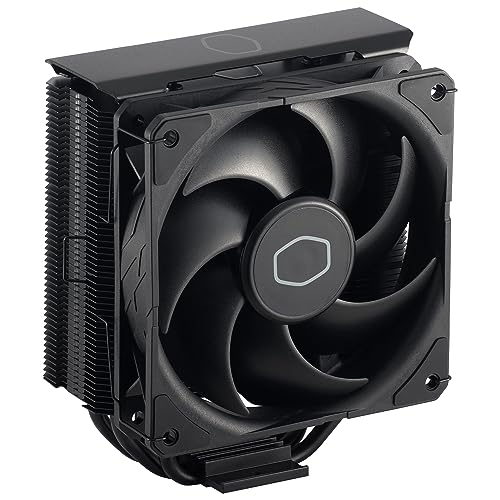
The legendary budget cooler gets a blacked-out refresh with a faster, quieter fan.
Four continuous direct-contact heat pipes and grooved aluminum fins handle the heat transfer. Owners confirm it is a reliable upgrade for budget and mid-range PCs, with one noting it works fine for Intel i9 normal use but recommending against it for anything above an i5 under sustained load due to throttling.
The brushed black aluminum finish looks clean in any modern build. It includes brackets for Intel LGA1700 and AMD AM5/AM4 from the start, plus a tube of thermal paste. That said, the 2500 RPM fan spins louder than most rivals — 32.8 dB — and the included thermal paste is considered mediocre by owners who recommend using a separate brand. Installation is also mixed: some find it straightforward, while others note it requires motherboard removal for the backplate bracket, which adds to the time.
For a first-time builder on a tight budget upgrading from a stock cooler, the Hyper 212 Black still delivers a noticeable temperature drop. It is a proven design that just works.
Still a Solid Choice
- Proven Hyper 212 platform with a faster 2500 RPM SickleFlow fan.
- Brushed black finish looks clean and fits modern all-black builds.
- Includes LGA1700 and AM5 brackets plus thermal paste for immediate install.
Know Before You Buy
- 32.8 dB noise level is louder than most rivals at full speed.
- Install can require motherboard removal for the backplate — not a quick swap.
Best for: budget builders who want a reliable, well-known cooler and do not mind a bit of fan noise.
Think twice if: quiet operation is a priority — the Assassin Spirit 120 EVO is quieter and cheaper.
6. ARCTIC Freezer 36
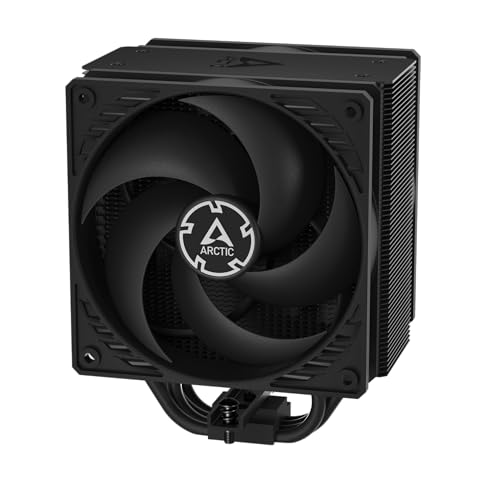
A single-tower with dual fans in push-pull that stays whisper-quiet through long sessions.
ARCTIC took a clever approach: instead of making the Freezer 36 bigger, they gave it two pressure-tune 120mm P fans in a push-pull configuration on a single-tower heatsink. The pull fan has a side-flow design that draws additional cool air from the case through the fins, improving efficiency without adding height. The result is a cooler that keeps a Ryzen 5 5500 at around 30°C idle and 55°C max load, all while staying quiet enough that owners call it “better than most AIO models.”
The innovative click-install fan mounting system makes fan swaps tool-free — a nice touch for maintenance. It includes ARCTIC’s MX-6 thermal compound, which owners confirm is enough for two applications. A contact frame for Intel LGA1851 and LGA1700 improves pressure distribution across the CPU for better heat transfer. AM5 mounting is straightforward: one owner on a first PC build kept a Ryzen 5 7500X3D under 70°C during extreme gaming.
One quirk: the 3-way mounting frame can twist if bumped during installation, so you need to be gentle pressing the fans into the heatsink. Also, at 6.25 inches tall, it is on the taller side for a single-tower, so check your case clearance. But if silence matters more than pure thermal headroom, this is a top contender.
Why It Shines
- Innovative push-pull on a single-tower with side-flow design for extra cooling.
- Includes premium MX-6 thermal paste — enough for two applications.
- Click-install fan mounting for tool-free fan swaps and maintenance.
Heads Up
- 159mm height is taller than many single-towers — verify case clearance.
- 3-way mounting frame can twist if bumped during install; handle carefully.
Choose this for: a quiet gaming or productivity build where you want dual-fan performance without a dual-tower footprint.
Check fit if: your case has less than 160mm of CPU cooler clearance — this one is tall.
7. be quiet! Pure Rock 3 Black

The name says it all — silent cooling that still handles a Ryzen 9 under stress.
be quiet! lives up to its branding with the Pure Rock 3 Black. It uses four 6mm heat pipes with HDT (heat-pipe direct-touch) technology and a Pure Wings 3 120mm PWM fan that boost air pressure through a funnel-shaped outlet. Despite a 2000 RPM max speed, owners consistently describe it as “very quiet” and “super quiet.” On a Ryzen 9 5900X, idle settles at 40°C and stress stays around 70°C — impressive for a single-tower 190W TDP cooler.
The slim 5.4-inch width and offset design mean it does not block RAM slots at all, a genuine advantage if you have tall memory sticks. The preinstalled mounting bridge makes attachment straightforward, and AM5 users get an offset mount option to center the heat pipes over the CPU’s hottest spots. The all-black aesthetic with no RGB fits clean builds perfectly. Performance is rated for 190W TDP, which covers most mainstream and gaming CPUs.
The mixed feedback lands on installation — some owners find it tricky, particularly the cable management for the long fan cable. It also ships without pre-applied thermal paste, so you will need to buy or supply your own. But if your priority is a cooler that disappears audibly while handling a powerful chip, this is the one.
What Makes It Special
- Funnel-shaped air outlet boost airflow over the fins for better cooling.
- Zero RAM clearance issues — the slim design leaves every slot open.
- Offset mounting for AM5 CPUs centers heat pipes over hotspot areas.
One Thing to Note
- No pre-applied thermal paste included — you will need to buy or supply your own.
Reach for this if: near-silent operation is non-negotiable and you have high-profile RAM that other coolers block.
Consider another if: you prefer the convenience of pre-applied thermal paste for a quick out-of-box install.
8. UpHere Dual Tower CPU Cooler

A dual-tower with six heat pipes that costs less than most single-tower coolers.
This UpHere cooler throws the value-for-money rulebook out the window. For entry-level pricing, you get a dual-tower aluminum heatsink with six heat pipes and two 120mm PWM fans that spin at 1650 RPM with a noise level of just 25 dB — quieter than many single-fan competitors. Owners confirm it tames an FX-8350 without issue and keeps a Ryzen 9 5900X at 50-60°C in an ATX mid-tower case. One owner running a 9800X3D simply said it “keeps my 9800X3D nice cool, even under full load.”
The off-center design avoids RAM slots, so all four memory slots remain accessible. It includes a long screwdriver in the box, which owners note is essential for the install. The dual fans and ARGB lighting add a visual flair that rivals more expensive units. Older socket support is a bonus — it works with AM3/AM3+ and Intel LGA2011/2066 in addition to modern LGA1700 and AM5.
It is very large. Owners warn it will not fit micro-ATX or narrow cases. The included fans are functional but not premium; some owners find them adequate while others note they are “fairly quiet” rather than silent. For the price, though, the sheer amount of metal and airflow is tough to top. This is the pick for maximum cooling per dollar spent.
Why It Overdelivers
- Six heat pipes and dual-tower design for extreme entry-level value.
- Very quiet 25 dB operation despite dual 120mm fans — quieter than most single-fan models.
- Includes a long screwdriver and supports legacy sockets like AM3 and LGA2011.
Size Warning
- Large dual-tower footprint will not fit micro-ATX or slim cases — measure your case first.
Best for: builders on the tightest budget who want dual-tower cooling and have a full-size mid-tower case.
Not for: compact or micro-ATX builds — this cooler needs the space of a standard mid-tower.
9. Cooler Master Hyper 620S

A dual-tower with ARGB that cools an R9 or i7 while looking the part.
Cooler Master has its own answer to the dual-tower revolution. The Hyper 620S uses six heat pipes and a nickel-plated copper base to pull heat into a dual-tower aluminum fin stack, cooled by a single 120mm PWM fan with ARGB lighting. The fan spins from 650 to 1750 RPM, allowing it to run slow and quiet at idle and ramp up only when the CPU demands it. Shoppers say it is “very quiet under load” and “reliable after two years of heavy use.”
At 154.9mm tall, it fits mid-tower cases well. The redesigned brackets simplify installation on AM5 and LGA1851/1700 platforms. ARGB syncs with motherboard software for lighting control. The single-fan design keeps the price and noise down, but it does mean less raw airflow than dual-fan competitors. Owners note that the fan may need to be offset slightly to clear tall RAM sticks on one side — a minor installation tweak.
If you want a dual-tower cooler with ARGB lighting from a brand you know, the Hyper 620S delivers reliable, quiet performance for high-end chips. The single fan limits it compared to dual-fan dual-towers, but for most gaming builds, it has plenty of headroom.
What Works
- Six heat pipes and a nickel-plated copper base for efficient heat transfer.
- ARGB fan syncs with motherboard software for coordinated lighting.
- Redesigned brackets simplify mounting on AM5 and LGA1851/1700.
What to Know
- Single fan on a dual-tower limits airflow compared to dual-fan dual-tower rivals.
- May need to offset the fan to clear tall RAM sticks on one side.
Pick this if: you want a dual-tower cooler with ARGB lighting and prefer a reliable brand-name option.
Compare to: ID-COOLING FROZN A620 PRO SE if you want dual fans for more airflow at a similar price.
Understanding the Specs
Thermal Design Power (TDP)
TDP is a rating in watts that tells you how much heat a cooler can safely move away from the CPU. A cooler rated for 150W TDP is a good match for most mid-range processors like a Ryzen 5 or Core i5. High-end chips like a Ryzen 9 or Core i7/i9 often need 200W or more. It is always better to have a cooler rated higher than your CPU’s TDP — that extra headroom keeps the fans spinning slower and quieter.
Heat Pipes and Direct Contact
Heat pipes are sealed copper tubes that carry heat from the CPU base up into the aluminum fins, where the fan blows it away. More heat pipes generally mean better heat transfer — four is the minimum for a decent budget cooler, six is what you see on dual-tower designs. Direct-contact technology (HDT) means the heat pipes touch the CPU directly without an extra nickel plate between them, which can improve thermal transfer slightly.
PWM Fans and Noise Levels
PWM stands for pulse-width modulation, which is a fancy way of saying the fan speed adjusts automatically based on CPU temperature. A PWM fan can spin slowly at idle (keeping noise down) and speed up only when your CPU gets hot during gaming or rendering. Noise is measured in decibels (dB). Numbers below 30 dB are generally considered quiet, between 30 and 35 dB is moderate, and above 35 dB is noticeable in a quiet room.
Clearance: Height and RAM
CPU cooler height is the single most important fit measurement. Most mid-tower cases accept coolers up to 155-160mm tall. Measure from the CPU surface to the side panel before buying. RAM clearance matters too — some wide coolers overhang the memory slots and block tall RAM sticks with large heat spreaders. Many modern coolers are offset to avoid this, but it is worth checking your motherboard layout.
FAQ
Will a budget CPU cooler work with my AMD Ryzen 7 or Intel i7 processor?
How do I know if a CPU cooler fits my computer case?
Will a budget cooler block my RAM slots?
Is a dual-tower cooler always better than a single-tower cooler?
How quiet should a budget CPU cooler be?
How long does a budget air CPU cooler last?
Does a budget CPU cooler come with thermal paste?
Is a budget air cooler better than the stock cooler that came with my CPU?
Final Thoughts: The Verdict
For the majority of shoppers, the budget cpu cooler winner is the Thermalright Assassin Spirit 120 EVO because it combines quiet operation, strong real-world cooling performance, and broad compatibility at a price that undercuts almost everything else. If you want dual-tower cooling for a high-power CPU, grab the ID-COOLING FROZN A620 PRO SE — it handles 260W for barely any more money. And for near-silent operation with zero RAM clearance issues, the be quiet! Pure Rock 3 Black is the one to reach for.
How We Picked
We do not accept paid placement. Every pick is matched to a real buyer and a real use-case; we do not hands-on test units.
Sources & Methodology
Specifications: manufacturer listings and product documentation. Review insights: verified customer reviews, as of July 2026. Pricing: not shown on this page (it changes often); check the current price via the retailer link.
As an Amazon Associate, FitlyFast earns from qualifying purchases. This does not affect which products we feature.