
Our readers keep the lights on and the weekend projects moving. As an Amazon Associate, I earn from qualifying purchases.
Specs are compiled from manufacturer listings and verified buyer reviews and can change over time — please confirm the key details on the product page before buying.
A mechanical keyboard with a “creamy” sound used to mean spending well over a hundred dollars on foam, tape, and aftermarket switches. That has changed. The latest budget boards deliver that satisfying, marble-like clack straight from the start, and picking the right one depends on layout, wireless needs, and how much tinkering you actually want to do.
I’m Rikta — the founder and writer behind FitlyFast. This guide is built by comparing the manufacturers’ published specifications and the patterns across verified customer reviews, so you get each pick’s real strengths and trade-offs instead of marketing spin.
Whether you are after a compact 60% board or a full-size workhorse with a number pad, these picks represent the best of what the budget tier has to offer. The goal here is simple: help you find a solid budget creamy keyboard that sounds great without stretching your wallet.
Our Picks at a Glance


How To Choose The Best Budget Creamy Keyboard
The key to a creamy board is internal engineering, not luck. You want a design that dampens the hollow echo and produces that soft, round thock. Look for terms like “gasket mount” or “multi-layer foam” in the specs — those are the markers of a board tuned for sound. Layout is the next big call. A 60% board saves maximum desk space but drops the function row and arrow keys. A 75% or 96% layout keeps the arrows and sometimes the number pad, giving you a better balance of space and utility without going full-size.
Hot-Swappable vs. Pre-Soldered
If you can see yourself changing the switch feel down the road, a hot-swappable board is the better buy. It lets you pull out any switch and plug in a new one without a soldering iron. Pre-soldered boards are often slightly cheaper, but you are stuck with the stock switches forever. On a budget keyboard, hot-swappable boards usually cost only a few dollars more, and the flexibility is worth it.
PBT vs. ABS Keycaps
The keycaps are the part your fingers touch every single keystroke. PBT (polybutylene terephthalate) is the harder, more textured plastic that resists the shiny “grease” you see on cheap keyboards after a few months. ABS (acrylonitrile butadiene styrene) is softer and cheaper but wears down quickly. Most boards on this list use PBT keycaps, and that alone makes a big difference in the long-term feel.
Quick Comparison
| Model | Best For | Layout / Keys | Connectivity | Keycap Material | Amazon |
|---|---|---|---|---|---|
| Womier 60% WK61 V2★ Best Overall | Budget Entry | 60% / 61 Keys | Wired (USB-C) | PBT (Pudding) | Amazon |
| RK ROYAL KLUDGE R98 ProAlso Great | Best Overall | 96% / 98 Keys | Wired (USB-C) | PBT (MDA Profile) | Amazon |
| Redragon K673 PROTop Performer | Wireless Value | 80% / 81 Keys | Tri-Mode (2.4Ghz/BT/USB-C) | PBT | Amazon |
| AULA S75 PRO | Best Screen + Sound | 75% / — | Tri-Mode (2.4Ghz/BT5.0/USB-C) | PBT (Side Printed) | Amazon |
| EPOMAKER TH108 PRO | Full-Size All-Rounder | 100% / 104 Keys | Tri-Mode (2.4Ghz/BT/USB-C) | PBT (Double-Shot) | Amazon |
| KiiBoom Phantom98 Lite | VIA Programmable | 96% / 97 Keys | Tri-Mode (2.4Ghz/BT/USB-C) | PBT | Amazon |
| LEOBOG x Aula HI75C Pro | Aluminum Build | 75% / 81 Keys | Tri-Mode (BT5.0/2.4GHz/USB-C) | PBT | Amazon |
| SOLAKAKA A99 Pro | Large Battery | 96% / 97 Keys | Tri-Mode (BT5.0/2.4GHz/USB-C) | PBT | Amazon |
| RedThunder K75 | Gamer on a Budget | 75% / 80 Keys | Tri-Mode (2.4GHz/BT5.0/Wired) | PBT (Side Engraved) | Amazon |
In‑Depth Reviews
1. Womier 60% WK61 V2
The lowest entry price for a creamy typing feel, with a unique anime aesthetic.
The Womier WK61 V2 is the most affordable path to a creamy sound. It uses multi-layer sound-dampening material inside a 60% plastic frame to reduce hollow resonance, and the POM linear red switches provide a smooth, soft keystroke. The 61-key layout is ideal for small desks or minimalist setups, saving significant space over a full-size board. It comes with PBT pudding keycaps that give the RGB lighting a vibrant, evenly distributed glow — a visual upgrade that is rare at this price.
Owners consistently mention the premium feel, quality, and value for the money. The Kanagawa anime motifs on the case add a distinctive look. It is hot-swappable, and the package includes three extra keycaps and a keycap puller. The board works with PC, PS4, and Xbox. One buyer did find a faulty switch on arrival (a common risk at this price tier), but the included backup switch made it a simple fix.
What Impresses
- Multi-layer dampening delivers a creamy sound at the lowest cost on this list
- Hot-swappable PCB lets you upgrade switches without soldering
- PBT pudding keycaps and RGB create a striking visual for the price
Consider This
- 60% layout drops the arrow keys and function row, so you rely on layers for navigation
For you if: budget is the primary concern, and you work with a small desk or want a dedicated gaming pad that sounds creamy.
pass on it if: you need arrow keys, a number pad, or wireless capability for daily work.
2. RK ROYAL KLUDGE R98 Pro
The rare board that sounds fully built without needing a single modification.
This is the crowd favorite for a reason. The R98 Pro uses five layers of sound-absorbing foam inside a gasket-mounted frame, and the result is a creamy, thocky sound that buyers report handily beats keyboards they had already modified with extra foam. It comes with pre-lubed beige tactile switches and MDA-profile PBT keycaps — a profile that wraps around your fingers more naturally than standard OEM shapes, making long typing sessions noticeably more comfortable. With 98 keys, it keeps the number pad and arrow keys while trimming the extra width of a full-size board.
The volume knob is CNC-machined aluminum and detachable, and the four indicator lights (Num Lock, Caps Lock, Win Lock, Mac Mode) make the statuses obvious at a glance. Owners mention the sound is exactly what they wanted straight from the start, describing it as perfect and creamy with no modifications needed. The wired USB-C connection is reliable for both gaming and work. The only catch is the USB cable is a bit short, and the volume knob, while premium, is smooth enough that a few owners find it hard to grip.
What Wins People Over
- Five-layer foam and gasket mount deliver creamy sound stock — no modding required
- MDA-profile PBT keycaps are noticeably more comfortable for long typing sessions
- Compact 96% layout keeps the numpad without wasting desk space
One Thing to Know
- Wired-only connectivity; the USB cable is relatively short, so you may need an extender
Grab it if: you want a creamy sound straight from the box with a sturdy layout that works for both typing and gaming.
Look elsewhere if: you need wireless connectivity or a very long cable reach without an extender.
3. Redragon K673 PRO Wireless
A creamy wireless board that sounds quiet enough for an open office.
The K673 PRO brings a 5-layer noise-dampening gasket build into the wireless realm without pushing the price into premium territory. The 81-key layout (roughly 80%) trims the numpad but keeps the arrow cluster and function row, making it a balanced middle ground for gamers and office workers. The Mint Mambo linear switches are factory-lubed and produce what owners describe as a soft thok — quiet enough that you can use it without disturbing others in the same room. The board is also noticeably heavy and stable, reducing the sliding you get with lighter plastic shells.
Connectivity covers all three bases: USB-C, Bluetooth, and 2.4GHz. Customers note a flawless Bluetooth connection to phones and tablets. The single control knob manages both backlight brightness and media playback, which saves you from memorizing extra key combos. The mixed-color PBT keycaps resist the shiny wear that ABS develops over time. About one-fifth of the feedback flags an occasional key failure after several months, but the overwhelming majority (over 160 reviews) praise its quality and value.
Standout Strengths
- 5-layer noise dampening gives a quiet, creamy thok — ideal for shared spaces
- Tri-mode wireless (USB-C, Bluetooth, 2.4GHz) works with PC, laptop, and tablet
- Solid, weighted build stays planted on the desk during intense use
Worth Noting
- A small number of owners experienced key failures after a few months of use
For you if: you need a quiet, creamy mechanical keyboard that works wirelessly across your PC, phone, and tablet.
Think twice if: you need a full number pad, or you want maximum durability guarantees at this price point.
4. AULA S75 PRO

A creamy thocky keyboard with a color LCD screen that rivals boards twice its price.
The S75 PRO is one of those rare budget boards that makes you do a double-take. The integrated LCD screen shows battery status, time, date, and even custom GIFs, and owners consistently call it the nicest thing on the keyboard. The knob controls volume or backlight effects, and the gasket-mount structure with five layers of filling produces a sound owners describe as thocky — a crisp, creamy tone that sits between clacky and soft. The stock switches are light and responsive, with one reviewer noting typing speeds of 120-135 wpm.
Tri-mode connectivity (2.4GHz, BT5.0, USB-C) works with PCs, Macs, tablets, and consoles. The side-printed PBT keycaps look clean and hold up well over time. The battery lasts around 20 hours with full RGB on, and up to a week with sleep mode enabled. The screen configuration does require a Windows PC in wired mode, and a few owners note that the switches are on the lighter side from the start. With over 450 ratings and a 4.7-star average, this is the most-popular board on the list for a reason.
The Creamy Verdict: The S75 PRO delivers a premium feature set — LCD screen, gasket mount, tri-mode wireless — at a price where most competitors still skip the screen. It is the best pick if you want a visual centerpiece that sounds as good as it looks. The only real limit is that the screen software works only on Windows.
Reach for this if… you want a creamy, thocky keyboard with a customizable LCD screen and reliable wireless across multiple devices.
skip it if… you do not use Windows, since the screen and driver software require a PC to customize.
5. EPOMAKER TH108 PRO
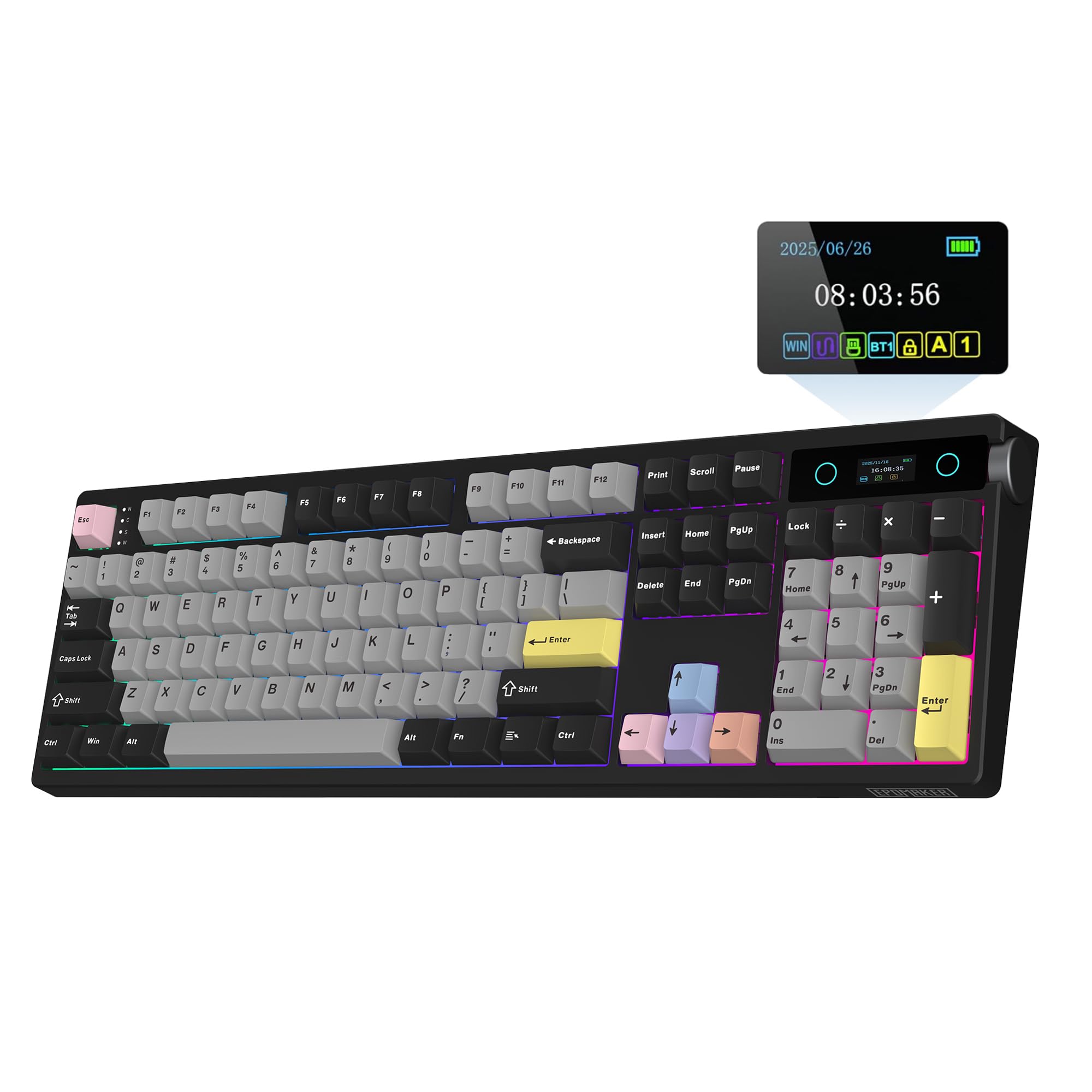
Full-size layout, creamy Jade switches, and a battery that outlasts the competition.
If you refuse to give up your number pad, the TH108 PRO is the full-sized creamy board to beat. It packs 104 keys, a 10,000mAh battery that delivers roughly 200 hours of wire-free use, and Creamy Jade switches that produce what owners call a marbly, thocky sound. The 5-layer sound-dampening formula (sandwich foam, IXPE switch pad, sound-enhancement PET, EPDM foam, and bottom silicone) gives it a deep, resonant tone that makes typing feel substantial. The keyboard weighs over 1.1kg, so it stays solidly planted during frantic gaming sessions.
The smart screen shows the time, battery level, and custom GIFs. Owners say the Creamy Jade switches are smooth and responsive, making typing faster. The hot-swappable PCB accepts 5-pin switches, so you can experiment with different sounds later. The only recurring note from owners is that the driver download for the clock was a small hassle for some, and the connectivity is rated as mixed by a minority of buyers.
The Long Haul: With a 10,000mAh battery and full-size layout, the TH108 PRO is built for those who want a creamy full-sizer that barely ever needs charging. The Creamy Jade switches are a standout — owners love the sound — but the occasional driver gripe gives it a slight rough edge for pure plug-and-play.
Best if: you require a full number pad and a massive battery, and you like the idea of marbly Creamy Jade switches.
Consider alternatives if: you want the easiest out-of-box experience without any software tinkering.
6. KiiBoom Phantom98 Lite
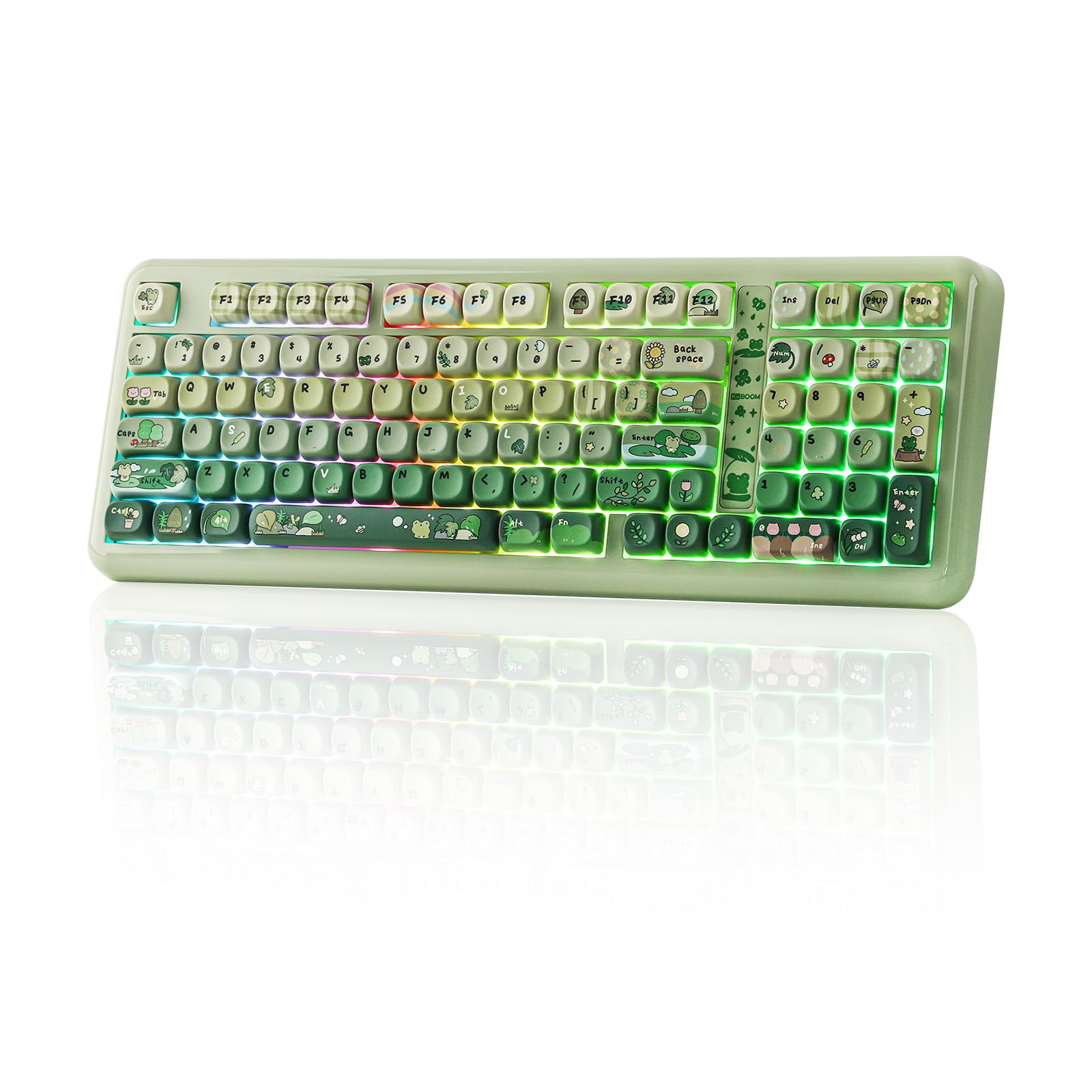
VIA compatibility at this price is rare — and it sounds creamy from the start, too.
The Phantom98 Lite stands out for its VIA programmability, which gives you unlimited control over key mapping, macros, and lighting without needing proprietary software. The 97-key layout (96%) keeps the number pad while staying compact. It uses a gasket-mounted structure with multiple dampening layers — including latex sandwich foam, IXPE switch pad, PET film, bottom foam, and bottom silicone — to produce a creamy typing foundation. The Mochi switches are pre-lubed linear switches that deliver a marble-like sound owners describe as thocky-creamy.
The build quality is solid; it weighs 1.9kg, so it has a reassuring heft. The 8,000mAh battery provides long wireless run times via 2.4GHz, Bluetooth, or USB-C. Owners praise the design, light controls, and smooth keycaps. The keycaps are PBT with a smooth texture. The only real caveat is the keycap profile — one owner found them too high for personal preference, and the 96% layout means you are close to full-size but not quite there.
Why It Stands Out
- VIA-compatible — remap every key and macro with total freedom
- Gasket mount with 5-layer dampening delivers creamy, thocky sound stock
- Large 8,000mAh battery and tri-mode wireless for long unplugged sessions
Keep in Mind
- The keycap profile runs high, which may not suit everyone’s typing posture
Reach for it if: you want VIA programmability in a creamy-sounding board without spending over a hundred dollars.
Think twice if: you prefer low-profile keycaps or the most compact layout possible.
7. LEOBOG x Aula HI75C Pro
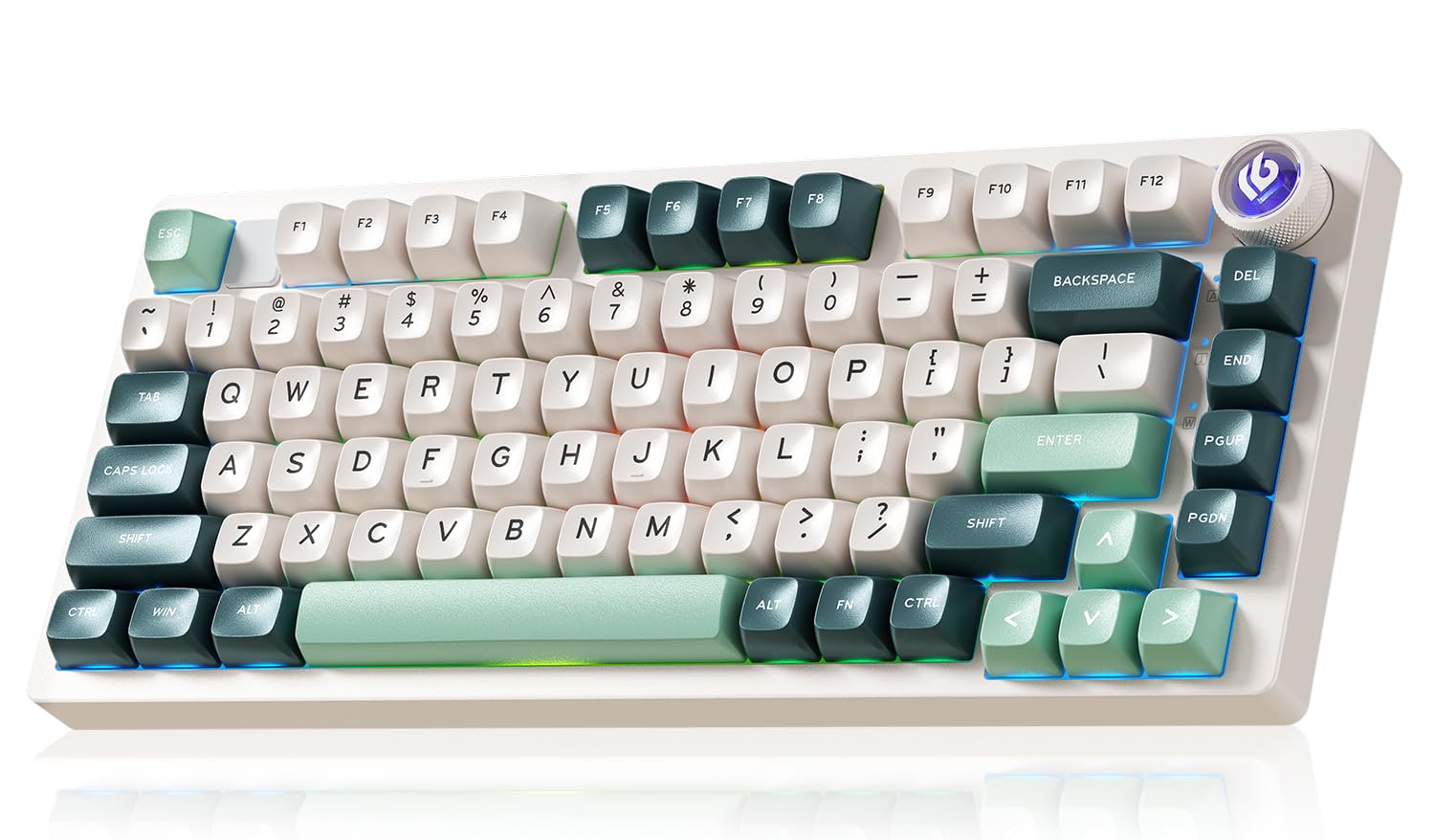
Aluminum build quality that feels like an enthusiast board, at a fraction of the cost.
This is the one to pick if you want a board that feels premium in your hands. The top and bottom covers are powder-coated aluminum, giving it a sturdy, fingerprint-resistant shell that dissipates heat well and looks luxurious. The gasket design greatly reduces cavity noise, and the stock Turquoise switches (or Ice Vein switches, depending on variant) produce a creamy, satisfying sound from the start — owners call it “thocky” and compare it favorably to higher-priced boards from Yunzii and Monsgeek. The 75% layout has 81 keys, balancing compactness with arrow-key access.
Tri-mode connectivity (Bluetooth 5.0, 2.4GHz, USB-C) works smoothly across up to five devices. The 4,000mAh battery delivers about 20 hours with default lighting and up to 333 hours with the lights off. The software is the weakest link — some reviewers point out it is difficult to find and occasionally fails to recognize the keyboard. But the hardware itself is widely praised as the best sub- aluminum board available.
The Material Difference: The aluminum chassis is the star here — it transforms the feel of the board entirely. The creamy sound and solid weight justify the price easily. The catch is the software; it works, but you may need to hunt for it, and its features are minimal compared to the board’s hardware quality.
Best for: anyone who values a dense, premium-feeling chassis and a creamy, pre-modded sound.
Not ideal if: you rely heavily on sturdy, easy-to-find driver software for customization.
8. SOLAKAKA A99 Pro
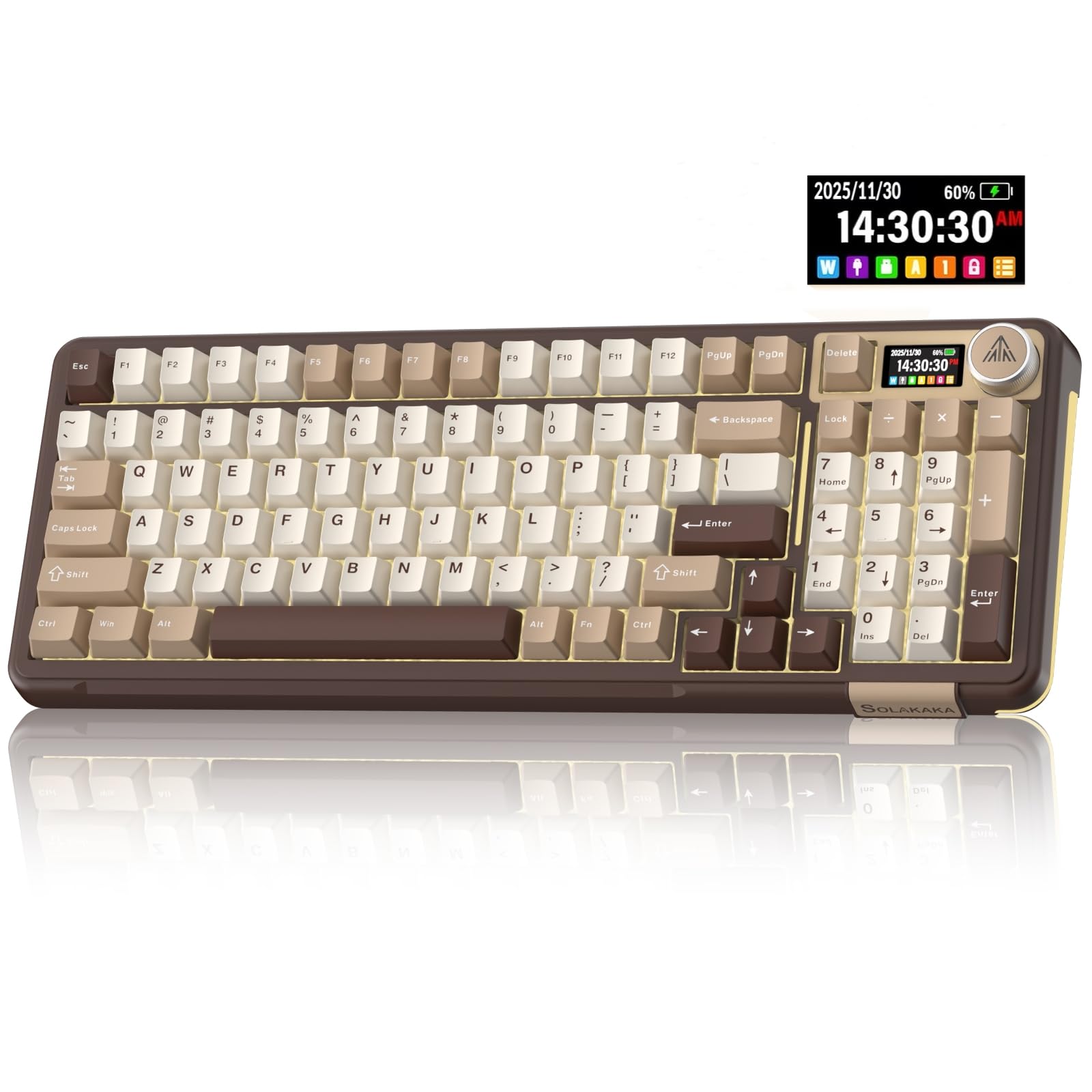
An 8,000mAh battery and a creamy sound that owners describe as buttery smooth.
The A99 Pro is built around endurance and comfort. Its 8,000mAh battery delivers roughly 61 hours of use with the backlight on and approximately 170 hours with the backlight off. The 96% layout with 97 keys keeps the number pad, making it a natural choice for data entry and accounting work. The gasket structure uses five layers of cushioning pads and PCB single-key slotting to produce a creamy sound that owners find satisfying and smooth.
The standout feature is the integrated LCD screen, which shows the date, time, battery level, and connection mode. The metal knob controls volume, lighting, and system switching. Owners praise the keyboard quality and sound quality, with the latter earning the most positive mentions after build quality. The board uses LEOBOG star vector switches that are pre-lubed for smooth keystrokes. The software (web-based at solakakadriver.com) allows key mapping and macro configuration. The only real concern is that the responsiveness is rated as mixed by a segment of owners.
The Endurance Pick: The 8,000mAh battery dominates this category, and the creamy sound holds its own against pricier boards. The screen and knob are genuinely useful. If you need a board that rarely needs a charge and sounds great, this is a strong contender. The responsiveness feedback is note if you are a competitive gamer.
Reach for it if: battery life is your priority, and you want a creamy, full-featured board with a screen.
Think twice if: you need the absolute lowest possible input latency for competitive gaming.
9. RedThunder K75
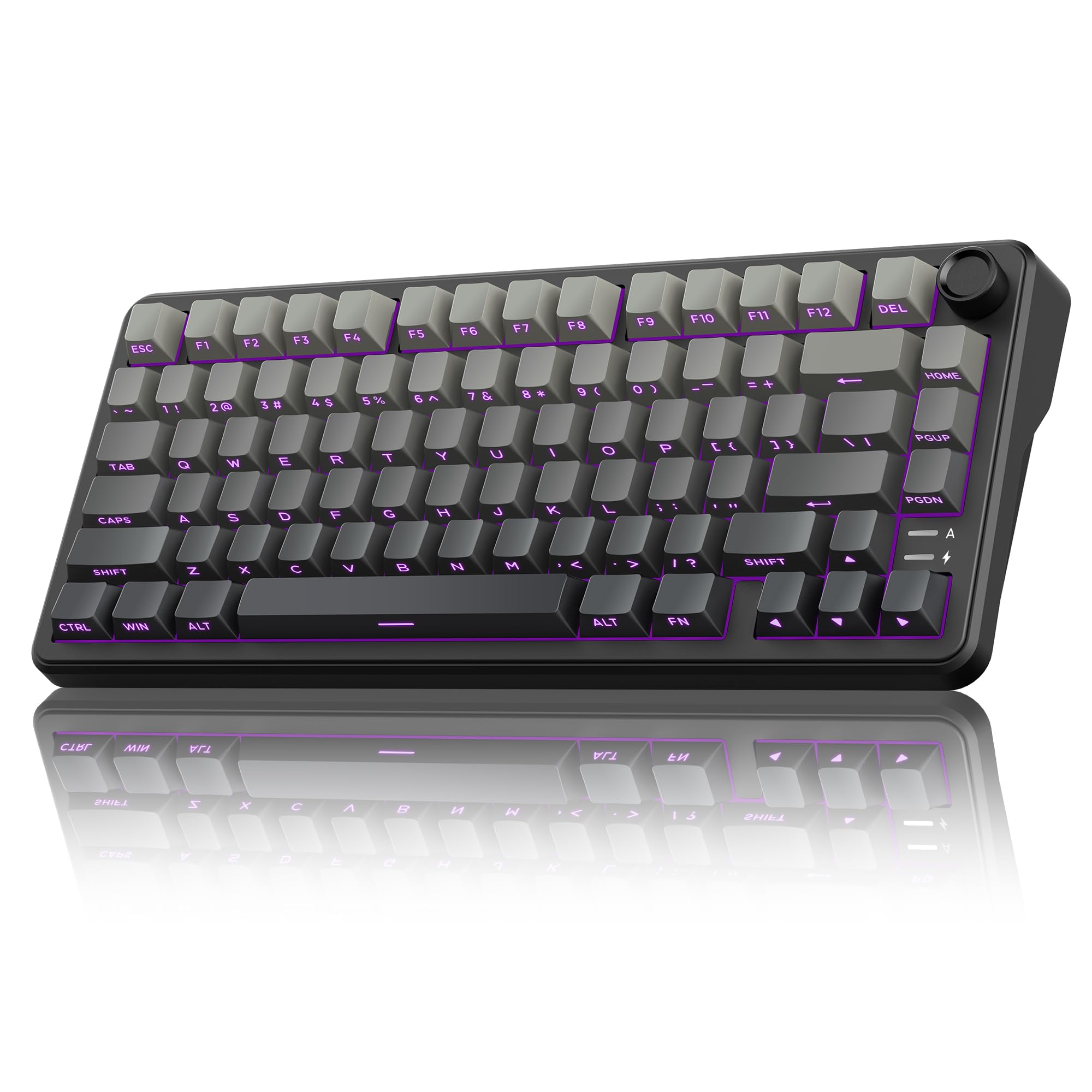
A creamy, hot-swappable 75% board that fits in a backpack without sacrificing arrow keys.
The K75 uses a gasket design with five-layer shock absorption to produce a soft, creamy sound that owners describe as clicky and responsive. The stock switches are pre-lubed linear switches (nicknamed “coconut shafts”), and the hot-swappable PCB accepts both 3-pin and 5-pin switches for future upgrades. The 80-key layout keeps the arrow cluster and function row while shedding the numpad, making it a strong portable option for gamers and typists. The 4,000mAh battery provides solid wireless run time via 2.4GHz, Bluetooth, or USB-C. The south-facing LEDs work well with the side-engraved PBT keycaps, which are ideal for low-light typing.
Owners praise its stable performance and easy connectivity. The CNC knob switches between lighting and volume modes with a long press, making adjustments easy without software. The programmable driver (downloadable for Windows in wired or 2.4GHz mode) allows key mapping, macro definition, and backlight effects including music-rhythm sync. The manufacturer does not recommend this board for first-time keyboard buyers, and the note is fair — the feature set is rich but the learning curve is real.
Strong Points
- Gasket mount with 5-layer dampening gives a creamy, soft sound
- Hot-swappable PCB supports 3-pin and 5-pin switches for endless customization
- Side-engraved PBT keycaps are excellent for typing in dim lighting
One Flag
- Not the most beginner-friendly board; configuration can take some time
Best suited for: keyboard enthusiasts on a budget who want portability, wireless flexibility, and future upgrade paths.
Less suited for: complete beginners who want a truly simple plug-and-play setup.
Understanding the Specs
Gasket Mount vs. Tray Mount
Gasket mount means the PCB and plate are suspended between soft silicone or foam pads inside the case, rather than screwed directly onto metal standoffs. This creates a bouncier, cushioned feel when you type and significantly reduces the hollow ping sound common in cheaper boards. If you want that creamy, thocky sound, a gasket-mounted board is the short path to getting there on a budget.
Hot-Swappable Switches
This feature lets you pull out a switch with a simple tool and replace it with a different one without any soldering. It matters because the switch is the biggest factor in how a keyboard sounds and feels. A hot-swappable board future-proofs your purchase: you can start with linear switches for a smooth feel and later swap in tactiles for a bump, or even try specialty switches for a different tone profile.
Layout Sizes (60%, 75%, 96%)
The percentage tells you roughly how many keys you keep compared to a full 100% board. A 60% board (about 61 keys) drops everything except the main typing area — no arrow keys, no function row, no number pad. A 75% board (about 80-84 keys) keeps the function row and arrows. A 96% board (about 98-100 keys) keeps the number pad and arrows, trimming only small gaps between sections. Choose based on if you need dedicated navigation keys for work or want maximum space for mouse movement.
PBT vs. ABS Keycaps
PBT is a harder, more durable plastic that resists the greasy shine that develops on cheaper ABS keycaps after a few months of daily use. PBT also has a slightly textured surface that feels drier and more grip-friendly. Every board on this list uses PBT keycaps, which is a big reason why they feel high-quality despite the budget price tag.
FAQ
What does “creamy” mean on a mechanical keyboard?
Can I use a 60% keyboard for work?
How do I make my cheap keyboard sound creamier?
Is wireless gaming keyboard latency noticeable?
What is the difference between linear and tactile switches?
How long do the keycaps on a budget keyboard last?
Does a metal case make a keyboard sound creamier?
What does NKRO mean?
Do I need to lube my switches?
Final Thoughts: The Verdict
Across the board, the budget creamy keyboard winner is the RK ROYAL KLUDGE R98 Pro because it delivers a creamy, thocky sound straight from the start with zero modifications needed, uses comfortable MDA-profile PBT keycaps, and keeps the number pad in a compact 96% layout. If you want a wireless board with the same gasket sound at a similar price, the AULA S75 PRO beats expectations with its LCD screen and solid thock. And for the pure entry-level shopper, the Womier WK61 V2 offers a creamy typing feel for the lowest cost on this list.
How We Picked
We do not accept paid placement. Every pick is matched to a real buyer and a real use-case; we do not hands-on test units.
Sources & Methodology
Specifications: manufacturer listings and product documentation. Review insights: verified customer reviews, as of July 2026. Pricing: not shown on this page (it changes often); check the current price via the retailer link.
As an Amazon Associate, FitlyFast earns from qualifying purchases. This does not affect which products we feature.