
Our readers keep the lights on and the weekend projects moving. As an Amazon Associate, I earn from qualifying purchases.
Specs are compiled from manufacturer listings and verified buyer reviews and can change over time — please confirm the key details on the product page before buying.
Finding a keyboard and mouse set that doesn’t feel like a toy is the real challenge on a budget. The good news is that the entry-level tier has matured — you no longer have to sacrifice a responsive feel or decent lighting just to stay affordable. This guide separates the sets that genuinely perform from those that just look the part, so you can spend your money on what actually improves your gaming.
I’m Rikta — the founder and writer behind FitlyFast. This guide is built by comparing the manufacturers’ published specifications and the patterns across verified customer reviews, so you get each pick’s real strengths and trade-offs instead of marketing spin.
Squeezing top-tier performance out of a tight wallet starts here, and this breakdown of the best budget gaming keyboard and mouse options cuts through the noise to find your perfect match.
Our Picks at a Glance


How To Choose The Best Budget Gaming Keyboard And Mouse
Two components, one decision. The keyboard determines your typing feel and input accuracy, while the mouse dictates your aiming precision and comfort during long sessions. Getting both right from a combo set is the fastest way to upgrade your setup while staying affordable.
Switch Type: Membrane vs. Mechanical
The single biggest factor in how a keyboard feels is its switch type. Membrane keys use a rubber dome, which is softer and quieter but often mushier — fine for typing, less ideal for rapid gaming inputs. Mechanical switches use individual springs and mechanisms for a crisp, tactile response that registers faster and feels more satisfying. Many budget sets now offer mechanical or “mechanical-feel” options, so check the description carefully before you buy.
Mouse DPI and Sensor Quality
DPI (dots per inch) measures how far the cursor moves on screen for every inch you move the mouse. A higher DPI means faster cursor movement, which is useful for flick shots in shooters, but it isn’t everything — a quality optical sensor tracks movement smoothly across your mouse pad. Look for a set with adjustable DPI levels so you can switch between fast aiming and precise menu navigation on the fly.
Layout and Key Rollover
Before you pick a keyboard, decide if you need the number pad on the right. Full-size keyboards include it, while compact 60% and 65% layouts drop it to free up desk space for mouse movement. If you play fast-paced shooters, that extra room lets you swipe your mouse without hitting the keyboard. Also look for anti-ghosting (also called key rollover), which lets you press several keys at once and have every one register — crucial for games where you’re holding W, A, Shift, and Space simultaneously. So first ask yourself: numeric keypad or extra mouse room? Then narrow your search.
Quick Comparison
| Model | Best For | Switch Type | Keyboard Layout | Max Mouse DPI | Amazon |
|---|---|---|---|---|---|
| Redragon S101-3 PRO★ Best Overall | First-time gamers and office use | Membrane | Full-size | — | Amazon |
| RedThunder 60% ComboCompact Pick | FPS players needing desk space | Membrane | 60% (61 keys) | 7200 | Amazon |
| Taiahiro 98-Key Mechanical | Tactile feel on a budget | Mechanical | 98 keys | 3200 | Amazon |
| Taiahiro Typewriter Style | Nostalgic aesthetics with a click | Mechanical (Blue) | Full-size (104 keys) | — | Amazon |
| MSI Forge GK110 Combo | Quiet office and casual play | Membrane | Full-size | 12800 | Amazon |
| ZIYOU LANG T8 Pro | Compact desk, modern look | Mechanical (Red) | 65% (68 keys) | 6400 | Amazon |
| Logitech G413 SE + G502 | Premium performance, top-tier mouse | Mechanical (Tactile) | Full-size | 25600 | Amazon |
In‑Depth Reviews
1. Redragon S101-3 PRO Gaming Keyboard and Mouse
The crowd-pleasing combo that brings RGB flair and quiet, soft keys to any desk without the premium price tag.
This set wins the top spot because it nails the essentials for most players. The soft-touch membrane keys stay remarkably quiet during late-night sessions, and the full-size layout includes dedicated macro keys you can program for complex command sequences. With 6 backlight modes on the keyboard and 10 lighting effects on the mouse, you get plenty of customization for a set at this level.
What really separates it is its staying power. Buyers report flawless performance after a year of use — no key fading, no connection drops, and a mouse that survived multiple falls. The included ergonomic wrist rest cushions your palms during marathon sessions, keeping fatigue at bay.
The one thing to know is the mouse is more budget-oriented than the keyboard itself. Owners note the mouse needs recharging more often than they’d like, and the RGB effects between the two devices don’t always sync perfectly. For a first-time gamer or a student upgrading from basic peripherals, this is the most balanced value you’ll find.
What wins people over
- Quiet, soft-touch keys that feel comfortable for hours
- 5 dedicated macro keys for competitive game commands
- Ergonomic wrist rest included in the box
The honest trade-offs
- RGB effects don’t sync perfectly between devices
- Membrane keys need more force than mechanical ones
Reach for this if: you want the safest, most proven all-rounder for gaming, work, and study in one box.
Keep in mind: competitive shooters might eventually crave a mechanical switch feel for faster response.
2. RedThunder 60% Mini Gaming Keyboard and Mouse Combo
A tiny 61-key layout that frees up serious mouse room for fast FPS flicks.
If your mousepad is constantly bumping into your keyboard, this compact set solves that instantly. The 60% layout drops the number pad entirely, giving your mouse arm the space it needs for low-sensitivity aiming in shooters. The bundled mouse is an ultralight honeycomb design at roughly 65 grams, with a 7200 DPI optical sensor for swift cursor movement.
Build quality gets a boost from thoughtful touches like a water-resistant design that protects against spilled drinks, plus a gold-plated interface and waterproof braided USB cable for stable, durable data transfer. The RGB is fully adjustable — you can change brightness and breathing speed to match your mood or your setup.
The reliability is where opinions split. Many owners say it works great for their PS5 or as a gift for kids, but a few report keys that don’t work at all. As one buyer put it, when plugged into an Xbox it “kinda glitches a little so I have to unplug and replug it sometimes.” It’s a capable compact option, but quality control can vary between units.
Why it stands out
- Ultra-light ~65g honeycomb mouse reduces wrist fatigue
- Water-resistant design shrugs off spills
- Breathing and permanent RGB modes for night play
Watch out for
- Some units arrive with non-functional keys
- Xbox connection can glitch and need a replug
- No number pad for spreadsheet work or MMOs
Best suited for: FPS-focused players and minimalists who want a clean desktop and maximum mouse travel.
Think twice if: you need a number pad for work or play games that rely on one.
3. Taiahiro 98-Key Mechanical Gaming Keyboard and Mouse

A true mechanical feel with clicky blue switches, plus a mouse and pad, for less than most keyboards alone.
This is the set that proves mechanical doesn’t have to mean expensive. The 98-key layout keeps a compact footprint while the tactile, audible feedback of the mechanical switches gives you that satisfying click with every keystroke. Its double-shot-molded ABS keycaps resist wear and pop off with the included tool for easy cleaning or swapping.
Gamers who bought it for titles like GTA RP report it works “without missing a beat,” and the full anti-ghosting ensures rapid key combinations register correctly. The mouse offers 4 adjustable DPI levels (800/1600/2400/3200) and 7-color breathing RGB, while the included big mouse pad gives you a smooth, consistent surface for precise control.
The bundled mouse and pad are serviceable, though the pad’s glide is too slow for twitch shooters. As one owner noted, the mouse pad lacks glide for fast-paced shooters like Fortnite or Call of Duty, so competitive players will want to upgrade it. Also, the Windows key may be disabled from the start — a quick Fn + Win press fixes it, but the instruction booklet is barebones.
The mechanical perks
- Satisfying clicky feedback on every keystroke
- Removable, wear-resistant keycaps with tool included
- Full anti-ghosting for accurate multi-key presses
What to expect
- Included mouse pad lacks glide for twitch shooters
- Windows key may need a Fn + Win open up combo
- Blue switches are loud for shared spaces
Grab this if: you want the authentic mechanical click without the premium price and don’t mind a loud keyboard.
Pass it up if: you type in a quiet office where the blue-switch clack would annoy everyone nearby.
4. Taiahiro Typewriter Style Mechanical Gaming Keyboard

A metallic typewriter throwback that makes every keystroke feel like a satisfying trip to the past.
This is the keyboard that turns heads. The aluminum alloy panel and round, typewriter-style keycaps give it a distinctive industrial look that draws compliments — one owner noted it attracts coworkers’ interest, and another said it looks like a musical instrument. Underneath the retro exterior, blue mechanical switches deliver a crisp, satisfying click that some owners mention makes them type faster.
It’s a full-size layout with 104 anti-ghosting keys, including 12 multimedia keys and a number pad, so it works for both high-end gaming and heavy typing sessions. Double-shot-injected keycaps keep the backlight crisp and resist wear, while adjustable double kickstand feet tilt the board for comfort. The included mouse is responsive with 4 DPI levels and a 7-color breathing RGB that matches the aesthetic.
The trade-offs are minor but real. The RGB lighting can only be toggled on or off — you can’t cycle through custom colors — and the dark keycaps can be hard to read when the backlight is off. One owner found the CAPSLOCK key easy to press by accident, annoying enough to remove the keycap entirely at work.
The standout features
- Striking aluminum and typewriter design that gets compliments
- Satisfying blue switch click with smooth key presses
- 104 anti-ghosting keys with 12 multimedia shortcuts
Before you commit
- RGB colors are not customizable, just on or off
- Keycaps are hard to read without the backlight
- Frequent accidental CAPSLOCK presses reported
Choose this for: the nostalgic typist or gamer who wants a statement piece that performs well and sparks conversation.
Know before buying: if you need full RGB color control, this limited on/off lighting will frustrate you.
5. MSI Forge GK110 Combo US
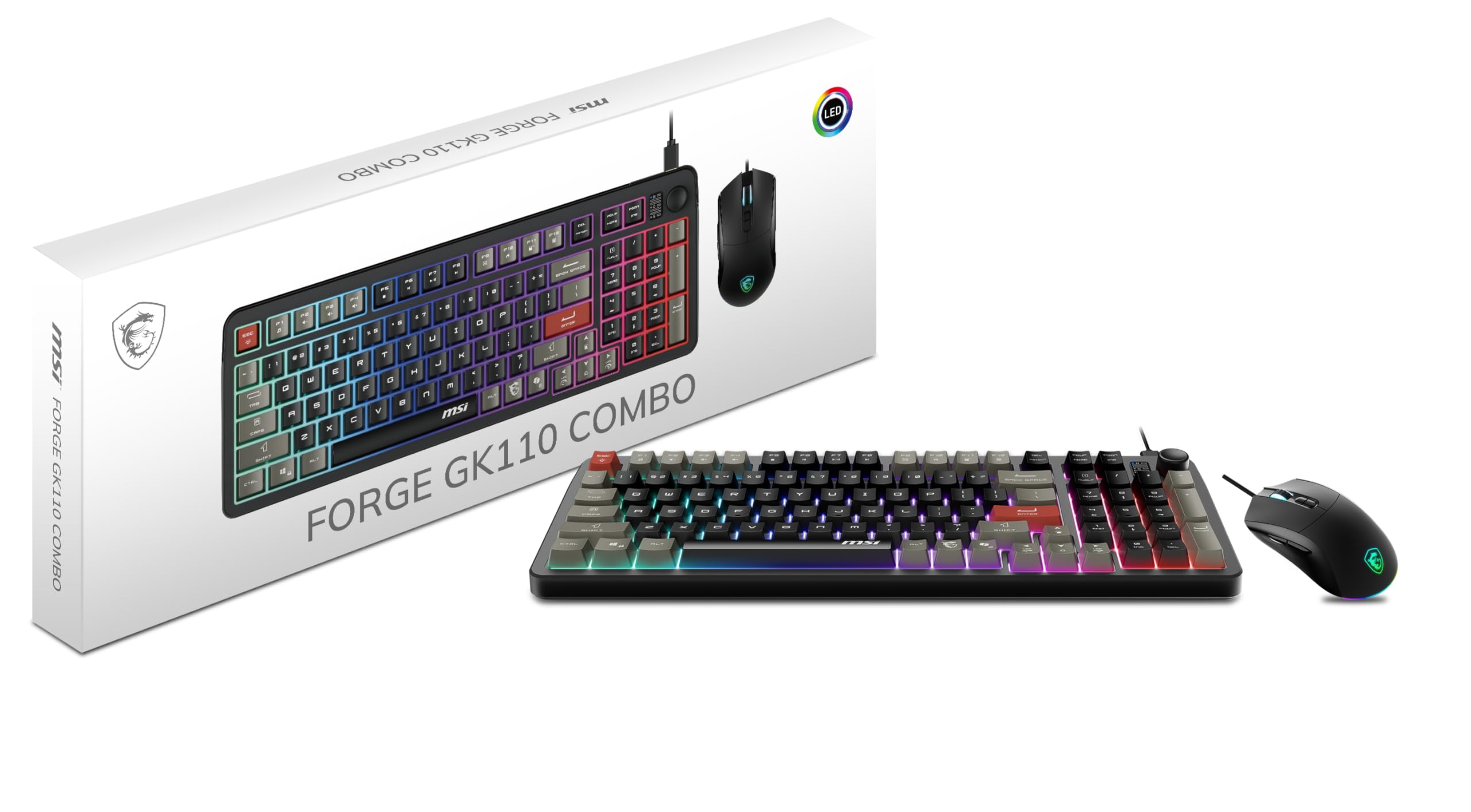
A quiet, well-built set with a standout volume wheel and a mouse that tracks up to 12800 DPI.
This combo from a trusted gaming brand punches above its weight on build quality. The membrane keyboard offers a soft, consistent feel that’s quiet enough for shared offices, while the keys are well-spaced with taller caps for comfortable typing. Owners say it feels “pricier than it is,” with a solid construction that belies its budget positioning.
Its standout feature is a dedicated volume scroll wheel with a mute button for instant audio control. The mouse tracks accurately up to 12800 DPI, and its switches are rated for over 20 million clicks for long-term durability.
One quirk to note: the keycaps use a unique font that one buyer described as “Spider-Man” style — check if you like the look before buying. Also, the RGB lighting is controlled via hotkeys only, not through MSI’s Armory Crate software, which means you can’t create fully custom lighting profiles. It’s a great starter set that handles casual and mid-level gaming without latency issues.
What impresses
- Unique volume scroll wheel for quick audio control
- High-precision mouse sensor up to 12800 DPI
- Sturdy build that feels more premium than the price suggests
The details
- RGB lighting isn’t customizable via software
- Distinctive keycap font won’t suit everyone’s taste
- Membrane switches lack the tactile click of mechanical
Ideal for: gamers who want a reliable, quiet, well-built set from a reputable brand and love the volume wheel convenience.
Look elsewhere if: you want deep RGB customization or the crisp feel of mechanical switches.
6. ZIYOU LANG T8 Pro 65% Mechanical Gaming Combo
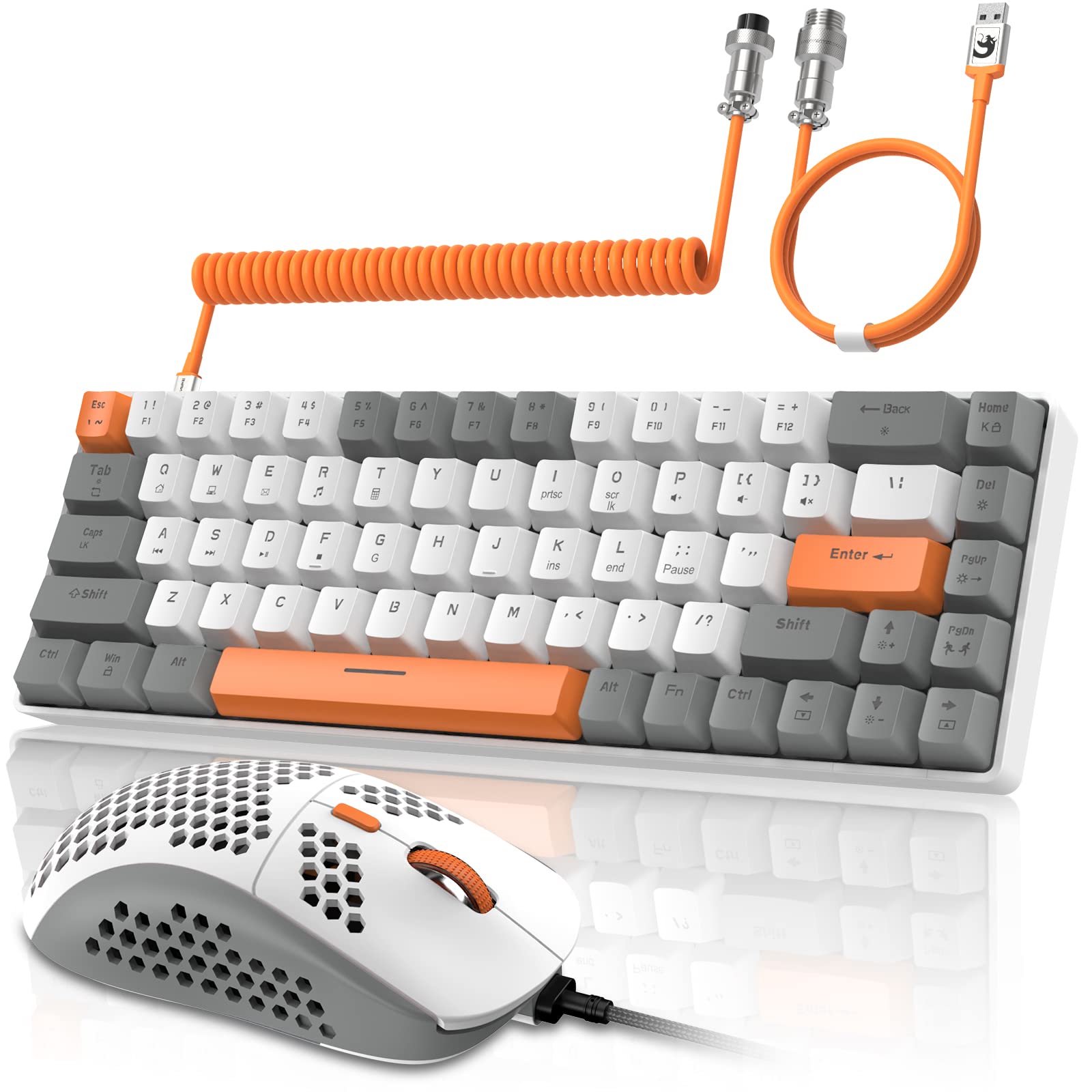
A 68-key compact with smooth red switches and a coiled cable that improve the whole desktop look.
This set brings a premium aesthetic to a compact form. The 65% layout with 68 keys keeps the arrow keys and essential shortcuts while freeing up desk space, and the gray-white-orange color scheme plus coiled aviator-style cable gives it a custom-built vibe that stands out. It’s designed as much for visual enjoyment as for function.
Linear red switches offer a smooth, quiet press with lower actuation force, suiting both gaming and noise-sensitive offices. The keyboard supports NKRO (full key non-conflict), so every key registers correctly even during intense combinations in FPS or TPS games. The mouse offers 6 adjustable DPI levels from 800 up to 6400.
Customization is a big draw here — the keyboard has 18 preset backlight modes and 9 color choices, with software available to build macros and set per-key lighting. Owners who’ve had it for nearly a year report zero issues, praising the lightweight mouse and the clickiness. The occasional negative review mentions the number keys being a bit hard to see, and a few units had reliability problems. Also, don’t shake the mouse too fast, or the sensor can glitch.
What makes it special
- Silent linear red switches for smooth, quiet typing
- 18 preset RGB modes with customizable software
- Unique coiled cable and color theme for a custom look
Consider this
- Some units have had reliability issues from the start
- Number keys can be hard to see in low light
- Mouse sensor is sensitive to very fast shaking
Pick this up for: the gamer who wants a compact, good-looking desk setup with quiet mechanical performance and deep RGB customization.
Be aware: if you need a number pad or want a louder, clickier typing sound, this silent linear set won’t deliver either.
7. Logitech G413 SE + G502 HERO Bundle

The serious upgrade that pairs a durable tactile keyboard with among the most beloved gaming mice ever made — the Logitech G502 HERO, a mouse that gamers have praised for years.
This is the set you step up to when you’re done with budget compromises. The G502 HERO mouse is the headline act, featuring the next-generation HERO sensor with precision tracking up to 25600 DPI and zero smoothing, filtering, or acceleration. It also packs 11 programmable buttons and a dual-mode hyper-fast scroll wheel that can switch between free-spinning and notched scrolling with a button click — a feature owners genuinely love.
The G413 SE keyboard matches with tactile mechanical switches for uncompromising performance, and its PBT keycaps are the most durable material used in keycap design, resisting heat and wear far better than cheaper ABS plastic. The full-size layout is built on a metal enclosure, giving it a solid, premium feel. Both devices support Logitech’s LIGHTSYNC RGB, which can synchronize with your games.
The experience isn’t flawless for everyone. One owner noted a defective backlight on the X key, and the mouse software settings can take a moment to kick in after waking the PC. These are minor quirks against a bundle that one buyer called a “great step up from basic keyboard and mice.” The individual G502 HERO alone justifies the price for many — as one fan put it, “I love this mouse!!” So if you’re upgrading from a basic set, this bundle is a clear step forward, but be ready for occasional software hiccups.
Why it’s worth it
- G502 HERO tracks up to 25600 DPI with zero smoothing
- 11 programmable mouse buttons for full control
- Durable PBT keycaps and tactile mechanical switches
What to know
- Occasional defects like a dead backlight on a single key
- Mouse settings need a moment after PC wake
- Premium price means it’s not for the most frugal budget
Step up to this if: you want a high-performance mouse with legendary tracking and a durable keyboard that will outlast several cheap combos.
Wait if: your budget is strictly entry-level — this bundle costs meaningfully more than the other picks here, though you’re paying for genuine quality.
Understanding the Specs
DPI on a Gaming Mouse
DPI, or dots per inch, tells you how far the cursor travels for each inch the mouse moves. A higher number (like 7200 or 12800) means faster cursor movement, which helps with quick flicks in shooters. But more isn’t always better — most players settle into a comfortable sensitivity and rarely touch the maximum. Adjustable DPI levels let you switch between fast aiming and precise menu work without changing system settings.
Anti-Ghosting and Key Rollover
Anti-ghosting, also called key rollover, is the keyboard’s ability to register multiple simultaneous key presses. In games, you often hold several keys at once — moving, sprinting, and reloading all together. Without anti-ghosting, some presses get “ghosted” or ignored. Full anti-ghosting means every key registers correctly no matter how many you press at once, which is essential for competitive play.
FAQ
What is the difference between membrane and mechanical switches?
Is a higher DPI mouse always better for gaming?
What does a 60% or 65% keyboard layout mean?
Will these keyboard and mouse combos work with my console?
How important is anti-ghosting for gaming?
What is the difference between linear, tactile, and clicky switches?
Are PBT keycaps worth paying extra for?
Can I change the RGB lighting on these budget combos?
How long do budget gaming mice last?
Should I get a set with a number pad or go compact?
Final Thoughts: The Verdict
For most people, the budget gaming keyboard and mouse winner is the Redragon S101-3 PRO because it delivers the most balanced combination of quiet comfort, RGB customization, and proven long-term reliability at an entry-level cost. If you want the authentic mechanical click and don’t mind the noise, grab the Taiahiro 98-Key. And for the gamer ready to spend a bit more for premium tracking and legendary durability, the Logitech G413 SE + G502 HERO Bundle is the one to reach for — it pairs the beloved G502 mouse with a tough, tactile keyboard built to last for years.
How We Picked
We do not accept paid placement. Every pick is matched to a real buyer and a real use-case; we do not hands-on test units.
Sources & Methodology
Specifications: manufacturer listings and product documentation. Review insights: verified customer reviews, as of August 2026. Pricing: not shown on this page (it changes often); check the current price via the retailer link.
As an Amazon Associate, FitlyFast earns from qualifying purchases. This does not affect which products we feature.