
Our readers keep the lights on and the weekend projects moving. As an Amazon Associate, I earn from qualifying purchases.
Specs are compiled from manufacturer listings and verified buyer reviews and can change over time — please confirm the key details on the product page before buying.
You don’t have to overspend to get a gaming mouse that keeps you competitive. The key is knowing which specs actually matter — your DPI range (how sensitive the mouse is to your hand motion), the switch durability (how many clicks the buttons can handle), and how many programmable buttons you need. This guide compares seven of the best budget options, using the manufacturer’s specs and patterns from buyer reviews, so you can find the right fit for your grip style and the games you play most.
I’m Rikta — the founder and writer behind FitlyFast. This guide is built by comparing the manufacturers’ published specifications and the patterns across verified customer reviews, so you get each pick’s real strengths and trade-offs instead of marketing spin.
If you need a lightweight FPS mouse with a fast sensor or an MMO powerhouse , this breakdown of the best budget gaming mouse options will steer you right.
Quick Picks
- Logitech G502 Hero High Performance Wired — Best Overall
- SteelSeries Rival 3 Gen 2 Gaming Mouse — Fastest Clicks
- Redragon M908 Impact RGB LED MMO Gaming Mouse — MMO Powerhouse
- Redragon M811 Aatrox MMO Gaming Mouse — Ergonomic Grip
- Logitech G203 Wired Gaming Mouse — Budget Champion
- Razer DeathAdder Essential Gaming Mouse — Large Hand Fit
- AFUNTA C12 Programmable Gaming Mouse — Max Budget Value
How To Choose The Best Budget Gaming Mouse
Picking a solid gaming mouse under a tight budget gets easier when you focus on three things: the sensor, the switches, and the button layout. The sensor (measured in DPI — dots per inch, which tells you how many pixels your cursor moves for every inch you move the mouse) determines how precisely your hand movement translates to the screen. A higher DPI isn’t always better, but having a wide, adjustable range lets you fine-tune your sensitivity for different games. Switch durability, measured in millions of clicks, tells you how long the left and right buttons will feel crisp before they start to wear out. And your button count — 5 buttons for a simple FPS mouse versus 12+ for an MMO mouse — will define how much macro power you have in-game.
Sensor and DPI Range
The optical sensor is the heart of a gaming mouse. A budget mouse with a good sensor will track your movements without skipping or jittering, even during fast flicks. Look for a DPI range that starts low (around 400-800 DPI) for precise aiming in tactical shooters and scales up high (over 6,000 DPI) if you prefer fast cursor movement on a large monitor. The best picks here use sensors from Pixart or TrueMove, which buyers report track reliably at a 1-to-1 ratio — meaning your crosshair matches your hand exactly with no lag or acceleration.
Switch Durability and Build Quality
Gaming mice use mechanical switches under the main buttons that are rated for a specific number of clicks — anywhere from 10 million to 60 million. A higher rating generally means the mouse will last longer before the clicks start feeling mushy or double-clicking. Also pay attention to the cable: a braided-fiber cable is more durable and creates less drag than a standard rubber cord, which makes a real difference in fast-paced games.
Programmable Buttons and Ergonomics
Your game choice decides your button count. For first-person shooters (FPS), a simple 5-6 button design keeps things clutter-free and comfortable. For MMOs or MOBAs, the 12-button side panel is essential for binding all your abilities. But watch out for button layout — a side panel that’s too cramped can be hard to use by touch. Also consider your hand size. A large mouse for a full palm grip feels very different from a smaller fingertip-grip design.
Quick Comparison
| Model | Best For | Max DPI | Programmable Buttons | Weight | Amazon |
|---|---|---|---|---|---|
| Logitech G502 Hero | Versatile Performance | 25,600 | 11 | Adjustable (5x 3.6g) | Amazon |
| SteelSeries Rival 3 Gen 2 | Lightweight FPS | 8,500 | 5 | 77g | Amazon |
| Redragon M908 Impact | MMO Powerhouse | 12,400 | 18 | Adjustable (8x 2.4g) | Amazon |
| Redragon M811 Aatrox | Ergonomic MMO | 12,400 | 15 | — | Amazon |
| Logitech G203 | Reliable All-Around | 8,000 | 6 | — | Amazon |
| Razer DeathAdder Essential | Large Hands & Comfort | 6,400 | 5 | — | Amazon |
| AFUNTA C12 | Max Budget MMO | 8,000 | 12 | Adjustable (8 weights) | Amazon |
In‑Depth Reviews
1. Logitech G502 Hero High Performance Wired Gaming Mouse

The genre-defying all-rounder that packs a flagship sensor into a mid-range price.
If you want one mouse that can handle anything from competitive shooters to spreadsheets, this is the pick that beats the rest on sensor alone. The HERO 25K sensor delivers tracking up to 25,600 DPI with zero smoothing — so your in-game crosshair mirrors your hand exactly with no jitter or acceleration. Reviewers praise its build quality and call it a noticeable upgrade from entry-level options like the G203.
You get 11 programmable buttons and a dual-mode hyper-fast scroll wheel that switches between notched scrolling for weapon selection and free-spin for flying through long web pages. The adjustable weight system lets you arrange up to five 3.6g weights inside the mouse, so you can dial in exactly the heft you prefer. Owners mention that the metal spring tensioning in the primary buttons gives a crisp, clean click that stays consistent over time.
It is heavier than many pure FPS mice, which is the main trade-off. While the Hero 25K sensor is incredible, the G502’s weight makes it less ideal for twitchy, low-sensitivity aim in games like Valorant or CS2 compared to the lighter 77g SteelSeries Rival 3 Gen 2.
What improve It
- Top-tier HERO 25K sensor with 25,600 DPI for pixel-perfect tracking
- 11 programmable buttons and a hyper-fast scroll wheel
- Customizable weight and balance (up to five 3.6g weights)
The Trade-Off
- Heavier chassis — less nimble for very low-sensitivity FPS play
- Logitech G Hub software can feel bloated to some users
The Mid-Range Champ: Pick the G502 Hero if you want a do-everything mouse with a sensor that rivals mice costing twice as much.
A Note on Weight: For competitive FPS players who rely on ultra-light flicks, the SteelSeries Rival 3 Gen 2 is a better fit.
2. SteelSeries Rival 3 Gen 2 Gaming Mouse
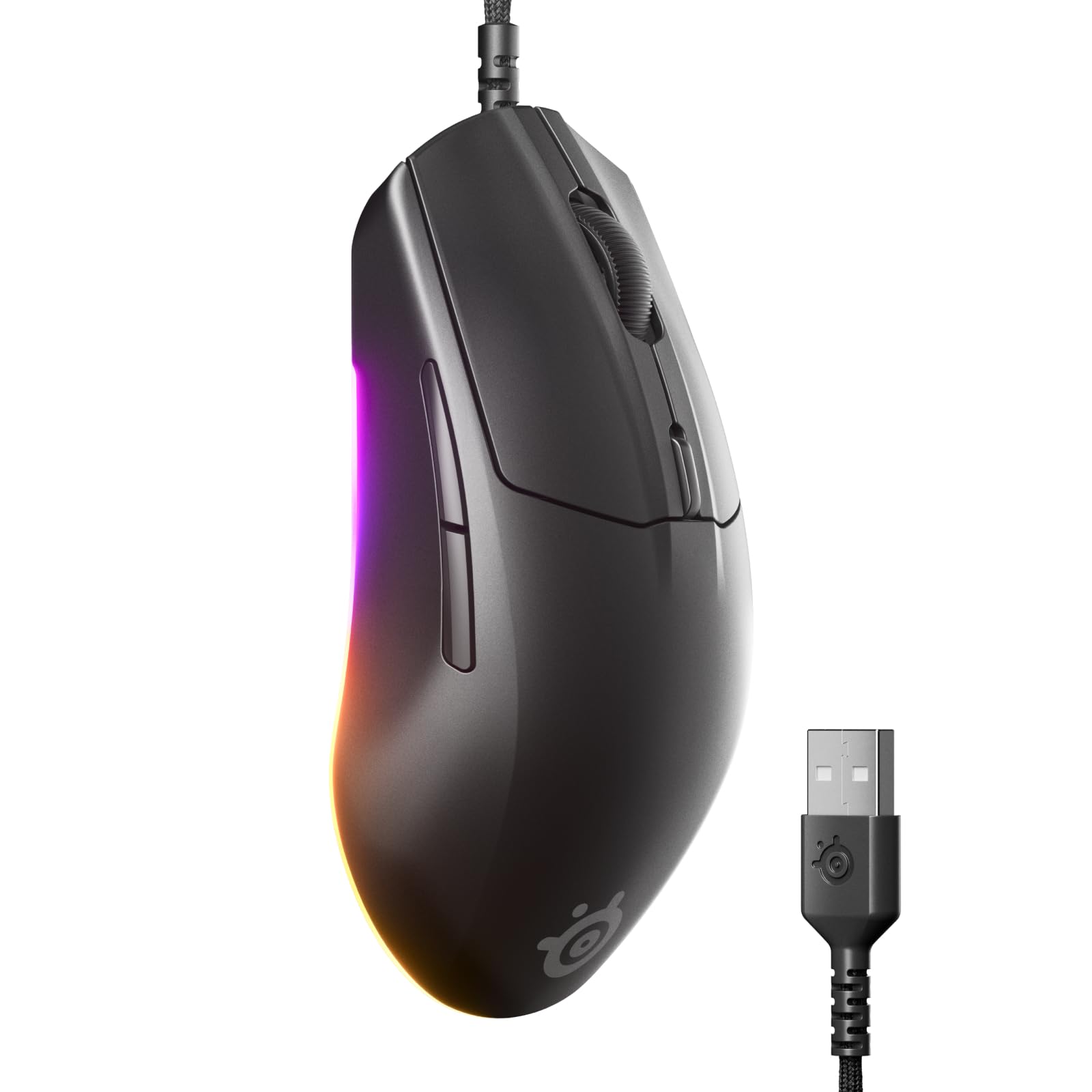
A featherweight FPS weapon that fires faster than most premium mice.
Speed is the entire story here. The Rival 3 Gen 2 achieves a near-instant 1.35ms click latency — that’s faster than some mice that cost double. This is possible because of the TrueMove Core 8,500 DPI optical sensor combined with ultra-responsive mechanical switches rated for 60 million clicks, which buyers confirm feel crisp and satisfying right from the start. One reviewer, upgrading from a Gen 1, noted the Gen 2’s improved finish and braided cord.
At just 77 grams, it’s much lighter than the Logitech G502 Hero, so your wrist stays fresh during long gaming sessions, and it’s a major plus for players who use low sensitivity and need to make large swipes across the mousepad. The 100% PTFE feet (a low-friction plastic called polytetrafluoroethylene) let it glide almost easily. The super mesh Paracord cable also reduces drag compared to standard rubber cables, further eliminating resistance. You get 3-zone RGB, but customers note the lighting is mostly under the mouse rather than on top.
Unlike the AFUNTA C12 or the Redragon M908, this is a pure FPS mouse with only 5 programmable buttons. It lacks the side-button grid needed for MMOs. But for a competitive shooter fan, that minimalist design is actually an advantage — nothing accidental to press during a clutch moment.
Built for Speed
- Ultra-light 77g chassis reduces fatigue
- 1.35ms click latency for near-instant response
- 60 million click durability on primary switches
Limited Scope
- Only 5 programmable buttons — not suited for MMOs
- No side scroll or infinite scroll wheel
Competitive FPS First: Grab the Rival 3 Gen 2 if you main shooters and prioritize lightning-fast reaction times and a light, fatigue-free feel.
MMO Players Look Elsewhere: If you need a 12-button side panel for ability macros, the Redragon M908 below is a much better fit.
3. Redragon M908 Impact RGB LED MMO Gaming Mouse

The side-button king that gives you 18 programmable shortcuts without the premium price.
The Redragon M908 is designed for MMO players who need a lot of hotkeys at their thumb. It offers 18 programmable buttons, including 12 side buttons — the Razer DeathAdder Essential has 5 programmable buttons. This lets you bind every ability, potion, and macro without ever reaching for the keyboard. The Pixart PAW3327 sensor tracks up to 12,400 DPI, versus the DeathAdder Essential’s 6,400 DPI, so you have more room to dial in your perfect in-game sensitivity.
Reviewers point out the mouse is extremely durable. One reviewer noted it held up well after 6 years of use, though the middle click did eventually fail. It comes with an 8-piece weight tuning set (2.4g each) so you can customize how heavy it feels. The smooth TEFLON feet glide well, and the 6ft braided-fiber cable with a gold-plated USB connector is built to last. The 16.8 million RGB colors can be completely disabled if you prefer a stealthy look, which the AFUNTA C12 does not allow.
Compared to the Redragon M811 Aatrox, the M908 has more programmable buttons (18 vs 15) and has been on the market longer, meaning more user feedback. However, some reviewers mention the side buttons are placed a bit close together, and the scroll wheel feels very smooth with less tactile feedback than some prefer.
The MMO Advantage
- 18 programmable buttons with 12 side keys for macros
- Max 12,400 DPI with 5 adjustable levels via software
- 8-piece weight tuning for personalized feel
Minor Quirks
- Side buttons are close together — takes time to learn by touch
- Scroll wheel lacks tactile bumps some users prefer
For the MMO Grinder: Pick the M908 if your gaming life revolves around hotbars and ability rotations. The 18-button layout is a genuine competitive edge.
FPS Purists Beware: The extra buttons can get in the way during fast aiming; consider the SteelSeries Rival 3 for a cleaner setup.
4. Redragon M811 Aatrox MMO Gaming Mouse

A natural palm-filling shape that won’t cramp your hand during marathon MMO sessions.
While the Redragon M908 packs more buttons, the M811 Aatrox focuses on a more refined ergonomic shape. Its design follows the natural curve of the human hand, and buyers confirm it’s comfortable for long gaming parties and overtime work. You get 15 programmable buttons, including a 2+8 side button layout that reviewers find easy to distinguish by touch, so you make fewer misclicks during intense moments. The default 5 DPI levels (500/1000/2000/3000/6200) are adjustable up to 12,400 via the dedicated software.
One major advantage of the M811 is its onboard memory — it stores your command configurations locally, so you can plug it into any PC and your button binds work immediately without needing to install the software again. The AFUNTA C12 and Logitech G203 do not offer this. Shoppers say the side buttons are easy to press but not accidentally triggered, which solves a common complaint with many MMO mice. The 5 decent backlit modes offer 16.8 million color options to match your setup.
The main drawback cited by users is the software, which some find unintuitive — the macro creator can’t reorder macros, and it forces 5 profiles. The matte coating also tends to collect oil and can rub off over time, a complaint that doesn’t appear for the glossy AFUNTA C12. For the price, however, the hardware itself is solid and reliable.
Comfort First
- Shaped for natural hand posture, reducing fatigue
- 15 programmable buttons with clear haptic feedback
- Onboard memory saves profiles without software running
Software Hurdles
- Dedicated software is clunky and unintuitive
- Matte coating can show wear and oil over time
Comfort MMO Choice: Choose the M811 Aatrox if long gaming sessions and a natural palm grip matter more to you than having the absolute maximum number of buttons.
Power Users Note: If you need 18 programmable buttons and don’t mind a slightly less ergonomic shape, the M908 is the better pick.
5. Logitech G203 Wired Gaming Mouse

The entry-level icon that proves you don’t need to spend big for reliable precision.
The Logitech G203 is the classic fallback pick for a reason: it packs an 8,000 DPI optical sensor with zero filtering into a simple, 6-button design that feels solid in hand. Buyers consistently call it the best value mouse in its price range, praising its solid build and mechanical primary buttons that are tensioned with durable metal springs for crisp, reliable clicks. The LIGHTSYNC RGB lighting is fully customizable via Logitech G Hub and can react to on-screen color shifts or sync with other Logitech gear.
Unlike the heavier, button-laden Redragon M908, the G203 is a straightforward no-nonsense mouse. It’s a great pick for gamers who just want a step up from a basic office mouse without any complexity. The 6.89ft braided cable is long enough for any setup, though some buyers report it’s less flexible than a Paracord and suggest using a mouse bungee to reduce drag. The 5 DPI settings are cycled via a dedicated button behind the scroll wheel, which is convenient for switching between gaming and desktop use.
The honest trade-off is long-term durability of the scroll wheel. Multiple reviewers report that after about 1.5 years of heavy use, the scroll wheel can develop issues — though they still consider it a good mouse for the price. Compared to the Razer DeathAdder Essential, the G203 is a bit smaller and lighter, making it a better fit for medium or smaller hands.
Reliable Foundation
- 8,000 DPI optical sensor with zero smoothing for accurate tracking
- Mechanical spring-tensioned buttons for crisp, consistent clicks
- Full LIGHTSYNC RGB customization via Logitech G Hub
Wear Over Time
- Scroll wheel can develop issues after extended heavy use
- Cable is less flexible than modern Paracord designs
The Smart Starter: Get the G203 if you want a trusted brand with great build quality and a low price. It excels as a first gaming mouse or a reliable backup.
Heavy Users: If you play daily and want the highest click durability, the SteelSeries Rival 3 Gen 2 has a higher 60 million click rating.
6. Razer DeathAdder Essential Gaming Mouse

A legendary shape that larger hands love, backed by a proven track record of value.
The DeathAdder Essential is an entry-level version of Razer’s iconic DeathAdder shape, which has been a favorite for years. It’s built for comfort: the right-handed ergonomic design with rubber side grips is noticeably larger and more contoured than the Logitech G203, making it the go-to pick for gamers with bigger hands. It uses a 6,400 DPI optical sensor and mechanical switches rated for 10 million clicks. One buyer mentioned their first unit lasted about 4 years before the left click wore out — a solid lifespan for a budget mouse.
You get 5 programmable buttons via Razer Synapse, which lets you remap controls and assign complex macros. The ridged, rubberized scroll wheel has small tactile bumps that increase grip and provide controlled scrolling during high-stakes moments. Buyers who have purchased multiple units praise the responsive clicks, smooth scroll wheel, and consistent tracking. It’s a wired connection, so there’s no battery to worry about, and the glide is excellent even on basic mousepads.
Compared to the G203, the DeathAdder Essential has a more premium-feeling rubberized texture and a larger palm-filling profile, but it offers a lower max DPI (6,400 vs 8,000) and a shorter click durability rating (10 million vs the G203’s metal-spring mechanism). It also lacks RGB zone lighting — just a simple Razer logo glow. The main recurring complaint from reviewers is that the scroll wheel can malfunction after 6-12 months, a pattern that mirrors the G203’s scroll wheel issue.
Big Hands Welcome
- Large, contoured ergonomic shape perfect for palm grip
- Durable mechanical switches with 10 million click rating
- Ridged rubberized scroll wheel for controlled scrolling
Entry-Level Specifics
- 6,400 DPI is lower than many competitors in this list
- Some users report scroll wheel issues after months of use
The Safe Comfort Pick: Choose the DeathAdder Essential if you have large hands and want a proven, comfortable shape from a top brand at a low entry point.
Higher DPI Needed: For a higher 12,400 DPI sensor and more buttons, the Redragon M908 offers more power for a similar price.
7. AFUNTA C12 Programmable Gaming Mouse

An absurd amount of features for the price if you can live with a large chassis and tricky software.
The AFUNTA C12 is the budget champ for gamers who want a 12-button MMO mouse without spending much. It supports 4-level DPI switching (1000-1500-2000-4000) with a double-speed adjustment up to 8,000 DPI. It also has a triple-click fire button on the right and 8 internal weights for adjusting the feel. Buyers who have used it heavily report that after 2 years of heavy use, the mouse is still strong with no issues — impressive for the price.
The body is large and contoured, with smooth TEFLON feet pads that glide easily. It features 7-color cycle breathing LED effects and a high-end 6ft braided-fiber cable with a gold-plated USB connector. The 6 side buttons on the left are designed for thumb operation and can be programmed via the included software. This makes it a direct alternative to the Redragon M908, but at a significantly lower entry cost.
There are compromises. The biggest one is that the software is hard to find — owners mention the company website is non-functional, and you may need to hunt for it. The mouse is also massive and can feel awkward for smaller hands. Pinky rest is missing, and the glossy plastic finish shows fingerprints. While the Redragon M908 offers a higher 12,400 DPI sensor and a more refined software experience, the AFUNTA C12 wins on raw value-to-button-count ratio.
Feature Density
- 12 programmable buttons with adjustable DPI up to 8,000
- Built-in 8 weights for customizable heft
- Triple-click fire button for rapid-fire in games
Caveats
- Large body is uncomfortable for small hands
- Customization software is difficult to locate and download
Absolute Budget MMO: Pick the AFUNTA C12 if your budget is very tight and you need a 12-button MMO mouse. The feature set for the price is class-leading.
Better Experience: For a smoother experience with better software and a higher 12,400 DPI sensor, spend a little more on the Redragon M908.
Understanding the Specs
DPI and Sensor Quality
DPI (dots per inch) measures how far your cursor moves on screen for every inch you move the mouse physically. A higher DPI means faster cursor movement. For gaming you want a sensor with a wide DPI range (like 400 to 12,400) so you can choose a slow, precise speed for sniping and a fast one for quick turns. The sensor brand also matters — Pixart (in the Redragon M908) and TrueMove (in the SteelSeries Rival 3) are known for reliable 1-to-1 tracking without jitter.
Polling Rate
The polling rate (measured in Hz) is how often the mouse reports its position to your computer. A standard mouse polls at 125 Hz (8 times per second). A gaming mouse like the Redragon M908 polls at 1000 Hz (reporting 1000 times per second), which reduces the delay between your movement and the on-screen action to just 1 millisecond. Higher polling rates make fast flicks and tracking feel more immediate and responsive.
Switch Durability (Million Clicks)
The main left and right buttons use mechanical switches that have a rated lifespan. A switch rated for 10 million clicks (like in the Razer DeathAdder Essential) will last years under normal use, while a 60 million click rating (like in the SteelSeries Rival 3 Gen 2) is built for extreme durability. When switches wear out, they can start double-clicking or feel mushy. Higher-rated switches also often feel crisper when new.
Cable Type
The cable that connects your mouse to your PC creates drag that resists your movement. A braided-fiber cable (found on most mice in this guide) is more durable and creates slightly less friction than a standard rubber cable. The SteelSeries Rival 3 Gen 2 uses a Super Mesh Paracord cable, which is the most flexible and creates the least drag, making your mouse feel almost wireless.
FAQ
What does DPI mean for a budget gaming mouse?
Is a wired gaming mouse better than a wireless one for budget options?
How many programmable buttons do I really need?
Will a budget gaming mouse fit my large or small hand?
What is the difference between an optical and a laser sensor?
How long does a budget gaming mouse typically last?
What is a polling rate and why does it matter?
Can I use a gaming mouse for work and productivity?
What is a braided cable and why is it better?
What is the difference between the Redragon M908 and the Redragon M811 Aatrox?
Final Thoughts: The Verdict
Across the board, the clear winner for a budget gaming mouse is the Logitech G502 Hero because it pairs a flagship-grade HERO 25K sensor with adjustable weights and 11 buttons in a versatile package that handles any genre. If you want the lightest, fastest clicks for competitive FPS, grab the SteelSeries Rival 3 Gen 2. And for maximum MMO macro power at a low price, the standout is the Redragon M908 Impact.
How We Picked
We do not accept paid placement. Every pick is matched to a real buyer and a real use-case; we do not hands-on test units.
Sources & Methodology
Specifications: manufacturer listings and product documentation. Review insights: verified customer reviews, as of July 2026. Pricing: not shown on this page (it changes often); check the current price via the retailer link.
As an Amazon Associate, FitlyFast earns from qualifying purchases. This does not affect which products we feature.