
Our readers keep the lights on and the weekend projects moving. As an Amazon Associate, I earn from qualifying purchases.
Specs are compiled from manufacturer listings and verified buyer reviews and can change over time — please confirm the key details on the product page before buying.
Setting up a home golf simulator used to mean spending as much as a used car. That has changed. Launch monitors (devices that track your swing and ball flight) that were once only for pros and deep-pocketed enthusiasts now fit a far more realistic budget, giving you real shot data — ball speed (how fast the ball leaves the clubface), spin rate (how fast the ball rotates in the air, measured in rpm), launch angle (the angle the ball takes off at) — without needing a second mortgage. The catch is picking the right one from the dozen-plus options, because accuracy and features vary wildly between models at similar price points.
I’m Rikta — the founder and writer behind FitlyFast. This guide is built by comparing the manufacturers’ published specifications and the patterns across verified customer reviews, so you get each pick’s real strengths and trade-offs instead of marketing spin.
To find your best budget golf sim, focus on the Garmin Approach R10 (Renewed) if you want the best all-around value for home simulator play. It gives you accurate shot data and access to 42,000 virtual courses without the highest price tag. If you are cramped in a small garage, the SkyTrak’s camera-based system (photometric, meaning it uses high-speed cameras to photograph the ball) is your better fit.
Our Picks at a Glance



How To Choose The Best Budget Golf Sim
Finding a good budget golf sim is about balancing data accuracy with the space you actually have. These four factors will steer you right more than any spec sheet number alone.
Doppler Radar Versus Photometric Camera Systems
Doppler radar monitors (devices that bounce radio waves off the ball to measure its movement), like the Izzo and FlightScope, track the ball by bouncing radio waves off it. They work well indoors and out, but in tight spaces (like a single-car garage) the radar beam can bounce off walls and throw off readings. Photometric units (devices that use high-speed cameras to photograph the ball at impact), like the SkyTrak, use high-speed cameras to photograph the ball at impact. They are often more accurate in small spaces, but need good lighting and a clear line of sight to the ball.
Data Metrics — What You Actually Need
A monitor might boast 18 data parameters, but you really only need carry distance (how far the ball flies through the air before hitting the ground), ball speed, launch angle, and spin rate to see real improvement. Club path and face angle are nice extras, but if the core numbers are off by 10 yards, the extra data is just noise.
Space Requirements and Setup
Every budget sim needs a certain amount of room between the monitor and the ball, and between the ball and a net or screen. Doppler units often require 8–10 feet of ball-flight distance (the space the ball travels before being measured). Photometric units can work with as little as 3–4 feet behind the ball. Measure your space before you buy — nothing kills a simulator faster than a “not enough room” realization after unboxing.
Software Subscriptions and Hidden Costs
The launch monitor is just the start. Most budget sims need a separate app subscription to open up simulator games, course play, or advanced analytics. Some require special marked golf balls that wear out. Check the total cost of ownership for your first two years, not just the purchase price.
Quick Comparison
| Model | Best For | Core Tech | Battery Life | Key Metrics | Amazon |
|---|---|---|---|---|---|
| Izzo Swami Launch Master Pro★ Best Overall | Budget entry / outdoor range | Doppler Radar | — | 9 measurements | Amazon |
| Garmin Approach R10 (Renewed)Also Great | Best value / home simulator | Doppler Radar | 10 hours | 8+ metrics | Amazon |
| Garmin R10 + Charger BundleTop Value | Extended play / portable sim | Doppler Radar | 10 hours | 8+ metrics | Amazon |
| Garmin R10 + Alignment Stand Bundle | Accuracy-focused / alignment | Doppler Radar | 10 hours | 14+ metrics | Amazon |
| Rapsodo MLM2PRO | Video analysis / dual-camera | Doppler + Camera | — | 15 metrics | Amazon |
| SkyTrak Launch Monitor | Garage / small spaces | Photometric | 4 hours | Ball & Club data | Amazon |
| SkyTrak + Metal Case Bundle | Durable indoor setup | Photometric | 4 hours | Ball & Club data | Amazon |
| FlightScope Mevo Gen2 | Full-featured / no subs | Doppler + Camera | 6 hours | 18 parameters | Amazon |
In‑Depth Reviews
1. Izzo Golf Swami Launch Master Pro
The Izzo Swami Launch Master Pro displays carry distance, ball speed, and spin rate on its built-in screen with no app or subscription required.
The Izzo Swami Launch Master Pro is the cheapest entry point on this list, and it wears that label honestly. It uses Doppler radar to capture a full swing data suite: total distance, carry distance, swing speed, ball speed, smash factor (the ratio of ball speed to club head speed, indicating how solidly you struck the ball), launch angle, attack angle (the direction the club head is moving at impact), spin rate, and apex (the maximum height of the ball flight). It measures across a wide range of 30 to 420 yards, covering chips all the way to driver bombs. Built-in live weather sensors automatically adjust for temperature, humidity, and altitude — a thoughtful feature for range sessions in changing conditions.
Owners find the numbers to be “good numbers” — the consensus is that it works well for giving correct output, especially for driver. But the accuracy is not perfect: a buyer who compared it to a more expensive launch monitor at the range found the distance off by about 10 yards (though all other readings were “really close”). Irons can be less reliable; one owner returned it because 7-iron through wedge were off by 10–15 yards. The design is well-packaged and easy to use, making it a fine tool for quick feedback without fuss. It trades raw iron accuracy for a lower price than the Garmin R10.
No-app simplicity: the Swami is refreshingly straightforward. Turn it on, hit balls, read the numbers. No smartphone setup, no app downloads, no subscriptions — just raw practice data.
Irons are the weak spot: the most consistent owner complaint is that short-iron and wedge readings are less reliable than driver readings. If you mostly work on your long game, this is fine. For wedge precision, look higher up the list.
Buy this if: you want the absolute lowest-cost way to get carry distance and ball speed numbers on the driving range, and you are not a stickler for perfect iron accuracy.
Pass this up if: you plan to use it primarily for iron and wedge practice — the gap in short-iron accuracy is the trade-off for the low price.
2. Garmin Approach R10 (Renewed)
The Garmin Approach R10 (Renewed) open up 42,000 virtual courses at a price that undercuts most competitors.
The Garmin Approach R10 is the crowd-pleaser in this category for a reason. It uses Doppler radar (radio waves that bounce off the ball to measure its movement) to track club head speed, ball speed, swing tempo, ball spin, and launch angle. That data feeds into the Garmin Golf app, showing a shot dispersion chart (a visual map of where your shots land) based on estimated ball flight. Buyers report the numbers land within a few yards of units costing five times more — a buyer comparing it to a 5-thousand-dollar unit found it “~98% accurate.” That kind of real-world trust is rare at this price point.
What really seals the deal is the ecosystem. With an active subscription you can play virtual rounds on over 42,000 courses worldwide, plus enter a weekly tournament with a global leaderboard. The battery lasts a full 10 hours, so you never cut a session short. Owners mention the setup needs careful alignment down the target line for best accuracy, but once dialed in, it outperforms the cheaper Izzo Swami on consistency, especially with iron shots.
What wins people over
- Functionality and performance are the top praise points — the device “works better than expected” per the customer consensus
- Battery life of 10 hours means multiple range sessions without recharging
- 43,000+ course library (with subscription) covers real courses worldwide
- Lightweight and compact at 340 grams for true portability
The honest trade-off
- Accuracy is mixed — many find it spot-on, others note it’s not perfectly precise (sensitivity alignment matters)
- Does not measure club face angle at impact, which matters for serious path work
- Setup requires perfect alignment down the target line for best results
Who this suits: you want the most dependable, portable launch monitor for both range practice and full simulator play without spending premium money.
Who should skip it: anyone needing total out-of-the-box precision without any calibration fuss — you will need to dial in the setup angle carefully.
3. Garmin Approach R10 Golf Launch Monitor & Simulator Charger Bundle
This bundle pairs the Garmin R10 with a 5000mAh portable charger, effectively doubling its runtime for extended practice sessions.
This bundle takes everything that makes the R10 great and adds a PlayBetter 5000mAh (milliampere-hour — a measure of battery capacity) portable charger. That extra juice means the monitor’s 10-hour battery is backed up by a full recharge on the go — a real advantage when you are at the range for hours or on a golf trip. The core experience is identical: Doppler radar tracks swing speed, ball speed, tempo, spin, and launch angle, and the data flows into the Garmin Golf app with support for 43,000+ virtual courses via the Home Tee Hero subscription.
Owners consistently highlight the accuracy and ease of use as the standouts — the top positive aspects by a strong margin. The consensus is that the unit delivers “great information” and makes it simple to download stats into a spreadsheet. One buyer who tried multiple launch monitors before settling on this one called it “exactly what I was looking for” and praised the excellent battery life. The only catch is the functionality is occasionally called mixed — a few found certain features less polished, though the majority are very satisfied.
Why this bundle stands out
- Bundled 5000mAh power bank effectively doubles your runtime for off-grid practice
- Accuracy (8 positive mentions) and ease of use (7 positive mentions) lead the reviews
- Easy spreadsheet export for tracking progress over time
What to keep in mind
- Functionality is a mixed bag — some features feel less refined depending on your setup
- The primary unit is the same R10; a phone with good screen brightness is still needed for on-course use
Who this fits: you plan to take your sim to the range, a friend’s house, or anywhere without a wall outlet nearby — that extra charger is a real life-saver.
Skip this if: you only hit balls in one spot at home where the power cable is always within reach; the base unit alone saves you the money.
4. PlayBetter Garmin Approach R10 + Alignment Stand Bundle
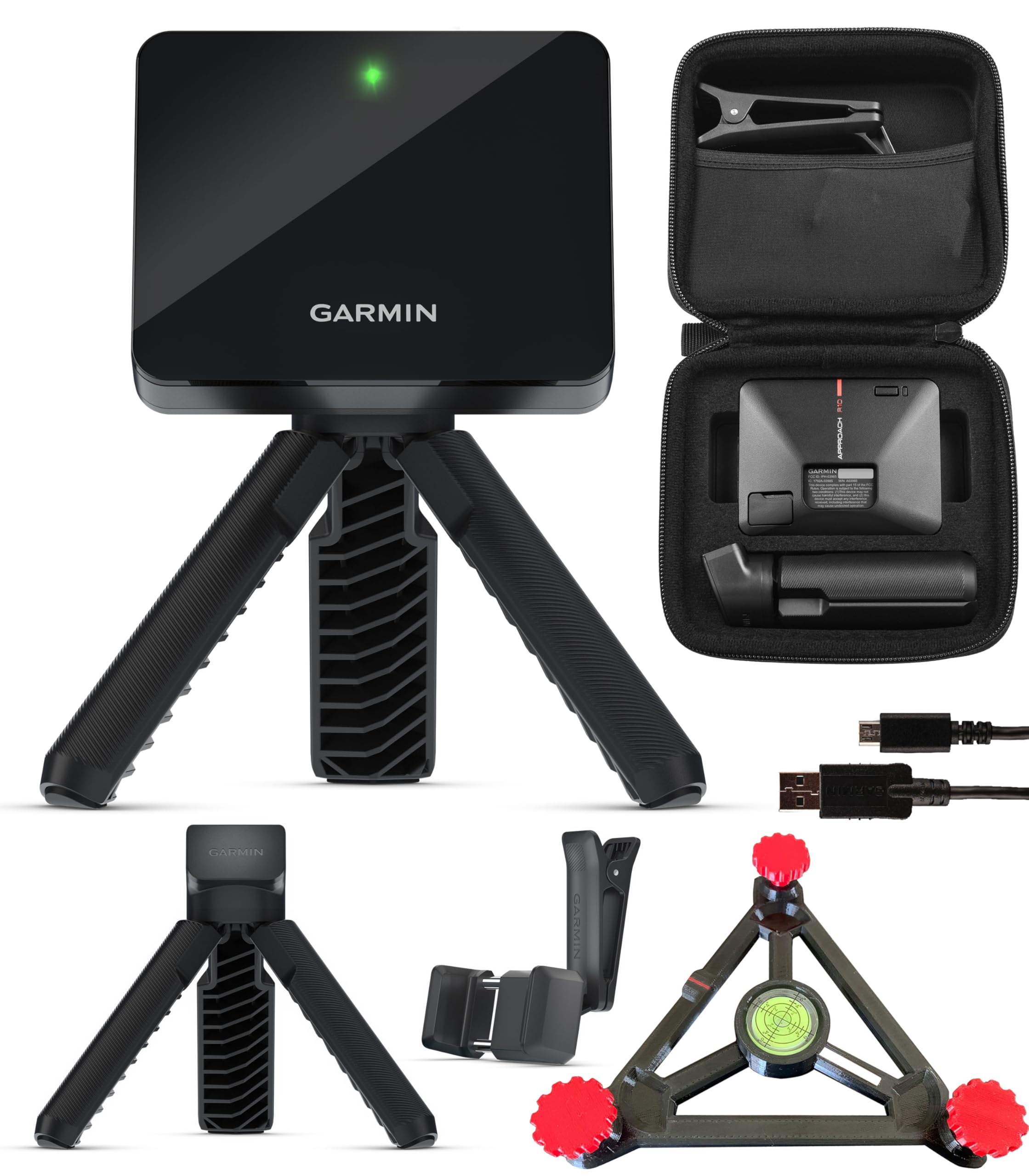
The PlayBetter Alignment Stand locks the Garmin R10 into the correct plane, solving the alignment issues that can affect accuracy.
The R10 is accurate, but to get the best results you need it perfectly aligned down the target line. This bundle solves that by including the PlayBetter R10 Alignment Stand, which locks the monitor into the correct plane and angle. The result is noticeably more consistent read-to-read data. Beyond that, it tracks 14+ metrics — including club head speed, ball speed, swing tempo, ball spin, and launch angle — and offers the same 43,000+ course library through Home Tee Hero.
Value for money and functionality are the top-rated aspects here — owners call it “the best swing monitor for the money.” The alignment stand is especially appreciated by those who had trouble dialing in the standard tripod setup. A few note that distances can read short (about 10 yards for irons and 30+ for woods) if the unit is not perfectly level, so the included stand largely fixes that issue. The consensus is that this is a “great simulator for the money” that is both easy to use and fun to play virtual rounds on.
Stand-up improvement: the alignment stand is a small add-on that delivers big consistency gains over the standard R10 tripod — worth the bundle premium if precise yardage matters to you.
The caveat: a minority of owners still find distance readings off by 10–30 yards even with the stand, so you may need to play with elevation and leveling settings.
Get this for: the most consistent alignment possible from a portable setup — the stand is a genuine upgrade, not a throw-in.
Think twice if: you trust your eye to aim the standard tripod perfectly every time; the unbundled unit is more affordable.
5. Rapsodo MLM2PRO Mobile Launch Monitor

The Rapsodo MLM2PRO combines Doppler radar with a dual-camera setup to record slow-motion impact video, making it the top choice for swing analysis.
The MLM2PRO combines Doppler radar with a dual-camera setup (two cameras recording from different angles). That means it tracks 15 key metrics — spin rate, spin axis (the tilt of the spin, which determines shot shape), carry distance, club speed, club path (the direction the club head travels at impact), and launch angle — while also recording your swing from two angles. The killer feature is the zoomed impact video you can review in slow motion. Owners consistently call this the favorite part of the device. Accuracy lands within a few yards of real distances, with a miss rate under 1% after firmware updates.
The experience is not flawless. The unit requires special balls (the included ProV1s have printed markings that wear off after about 70 swings, and replacements cost a premium). A subscription is needed to open up the full simulator library of 30,000+ courses. And there are occasional WiFi connection glitches. But for the price, the MLM2PRO is the strongest tool available for analyzing swing mechanics and ball flight in detail. The customer consensus is that it is a “great tool for improving game and having fun.”
Slow-mo secret weapon: the dual-camera impact capture is the standout feature no other budget sim offers — it alone is worth the upgrade for serious students of the swing.
Subscription and ball costs add up: factor in a yearly subscription and per 12-pack of special balls. Over two years, the total ownership cost is significantly higher than the initial price tag.
Pick this if: you care more about analyzing your swing mechanics and face impact than just getting distance numbers — the video integration is class-leading here.
Skip this if: you want a low-maintenance unit with no recurring costs; the proprietary balls and subscription are real ongoing expenses.
6. FlightScope Mevo Gen2

The FlightScope Mevo Gen2 includes 8 E6 Connect courses with lifetime access and no subscription fees.
The FlightScope Mevo Gen2 is the only unit on this list that comes with lifetime ownership of an E6 Connect simulation bundle — 8 world-renowned courses (including Kiawah Ocean Course and Torrey Pines) with no subscription fees, no annual license, and no hidden charges ever. It uses patented Fusion Tracking technology, combining 3D Doppler radar with synchronized high-speed image processing for consistent indoor and outdoor data. You get 18 swing data parameters covering full swings, chipping, and putting.
A front-facing camera records every swing and overlays data — clubhead speed, ball speed, carry distance — directly onto the video. You can even connect up to three mobile devices for multi-cam coaching. Battery life runs 6 hours on a single charge. The catch is the setup: owners say it is “difficult” and requires a firmware update and a larger graphics card for some PCs. A few report the unit only tracks 1 in 10 shots during initial calibration. Once dialed in, though, the data is accurate, and the app experience is solid. The consensus is that it delivers “pro-level data without the hefty price tag.”
Why it wins: no annual subscription. You pay once and get 8 courses, a driving range, skills challenges, and shot tracer video forever — nobody else offers that at this price point.
Setup is not plug-and-play: expect to spend time on firmware updates, elevation calibration, and device alignment. Tech-savvy users manage; pure beginners may find it frustrating.
Buy this for: avoiding that nagging annual fee — the total cost of ownership over three years is lower than most rivals despite the higher entry price.
Pass this up if: you want a 15-minute unbox-to-swing experience; this one demands patience during initial setup.
7. SkyTrak Golf Launch Monitor

The SkyTrak’s photometric camera system reads ball data within a few feet of impact, making it ideal for tight indoor spaces.
If you are working with a compact space — think single garage bay or basement stall — the SkyTrak’s photometric (high-speed camera) system has a real edge over Doppler radar. It does not need a long ball-flight window to read the shot. It simply photographs the ball at impact and calculates the data. That means it works well in spaces where radar-based units like the Garmin R10 struggle with signal reflections. The SkyTrak measures ball speed, carry distance, launch angle, club speed, and spin rates (both backspin and sidespin).
Owners say the shot tracking is accurate, with distances and apex matching real-game numbers. The battery lasts 4 continuous hours, which is shorter than the Garmin but typically enough for a focused session. The base unit only includes a driving range; to open up the improvement software or course play, you need annual subscriptions (for the Game Improvement plan). A few customers note occasional misreads — about 1 in 20 shots — and the unit does require a well-lit, level surface. The consensus: “absolutely amazing for the money” despite not being Trackman-level. In tight garages, it is far more reliable than the Garmin R10.
Garage hero: the camera system is the best choice for small, enclosed spaces where radar-based monitors routinely fail. If your Garmin R10 drops shots, this will likely solve it.
The library costs extra: the driving range is included, but simulation and course play require paid subscriptions, which pushes the real cost closer to the mid-range options above.
Choose this for: a garage or basement with limited ball-flight room — the photometric tech is the most reliable option in tight confines.
Look elsewhere if: you want all features included from the start; the subscription costs for full simulator access add up fast.
8. SkyTrak Golf Launch Monitor with Metal Protective Case

This SkyTrak bundle adds a metal protective case with leveling legs for durability and consistent reads on uneven surfaces.
This bundle takes the standard SkyTrak launch monitor and adds a metal protective case with built-in leveling legs. If you are using the unit indoors near a hitting mat, the case does two things: it protects the SkyTrak from an accidental shank, and the leveling legs help you get the unit perfectly flat on any garage or basement floor — a critical step for consistent photometric reads. The core device is identical to the standard SkyTrak: ball speed, launch angle, distance, club speed, and spin rates.
Owners who bought this bundle call the protective case “essential” for indoor use. The setup does have a learning curve — the unit is picky about the exact ball position relative to the laser dot. Software costs run per year for the basic improvement package, plus per year for third-party course play. One vocal owner had a very negative experience with read reliability (1 in 10 shots tracked), but others call it a “great system” for garage practice and note it beats cheaper alternatives. The reviews are the most mixed on this list, so buyer diligence is warranted.
Shank-proof upgrade: the metal case with adjustable feet is a smart addition for anyone hitting into a net indoors — it saves you from an expensive accidental repair.
Mixed reliability: a higher-than-typical share of reviewers point out frustration with read consistency and required subscription costs. Make sure your return window is generous.
Best for: the budget-conscious buyer who wants photometric accuracy but also needs the durability and leveling convenience of the metal case.
Not for: anyone who wants a simple, low-maintenance setup — the software subscriptions and occasional read issues add complexity that some owners find frustrating.
Understanding the Specs
Doppler Radar vs. Photometric
The two main technologies inside a budget launch monitor. Doppler radar (used by Garmin, Izzo, FlightScope) sends out radio waves and measures how they bounce back off the ball. It works well outdoors and in open indoor spaces, but in tight rooms the waves can bounce off walls and cause inaccurate readings. Photometric (used by SkyTrak) uses high-speed cameras to literally photograph the ball at impact. It is more reliable in small spaces but requires good, consistent lighting and a clear line of sight to the ball.
Spin Rate and Launch Angle
These two numbers matter most for real course improvement. Spin rate tells you how much the ball is spinning (in rpm). Too little spin and you lose stopping power on greens; too much spin and you balloon the ball and lose distance. Launch angle (in degrees) tells you how high the ball leaves the clubface. The relationship between these two determines your trajectory and carry distance. A good budget sim measures both reliably for every club in the bag.
Ball Flight Window and Space Requirements
Every launch monitor needs a clear area between the unit and the ball, and between the ball and a net or screen. Doppler units generally need the ball to travel 8–10 feet before they can get a clean read, so you need at least 10 feet of total space from the monitor to the impact screen. Photometric units can work with as little as 3–4 feet of ball flight, making them better for cramped garages. Always measure your space before choosing a monitor type.
Battery Life and Portability
Battery life varies widely — from 4 hours (SkyTrak) to 10 hours (Garmin R10) to 6 hours (FlightScope Mevo Gen2). A longer battery means you can take the unit to the driving range or a friend’s house without hunting for an outlet. If you only practice at home with a power cord nearby, battery life matters less. But for portable use, the Garmin’s 10-hour battery is a clear edge over the SkyTrak’s 4-hour limit.
FAQ
Will a budget golf sim work in a small garage (8 ft x 10 ft)?
How accurate are budget launch monitors compared to a Trackman?
Do I need a subscription to use a budget golf sim?
Can I use a budget golf sim outdoors at the driving range?
How much room do I need between the launch monitor and the ball?
Do I need special golf balls for a budget launch monitor?
Can I use a budget golf sim to play full rounds of golf at home?
How long do budget golf sims typically last?
Which budget sim is best for a left-handed golfer?
What is the real difference between the Garmin Approach R10 and the SkyTrak?
Final Thoughts: The Verdict
For the majority of shoppers, the budget golf sim winner is the Garmin Approach R10 (Renewed) because it delivers the best balance of accuracy, battery life, and course library depth at a price that genuinely undercuts the competition. If you want slow-motion video analysis of your impact and swing mechanics, grab the {“@context”: “https://schema.org”, “@graph”: [{“@type”: “ItemList”, “name”: “8 Best Budget Golf Sim”, “url”: “https://fitlyfast.com/best-budget-golf-sim/”, “numberOfItems”: 8, “itemListElement”: [{“@type”: “ListItem”, “position”: 1, “name”: “Izzo Golf Swami Launch Master Pro”, “url”: “https://fitlyfast.com/best-budget-golf-sim/#product-8”}, {“@type”: “ListItem”, “position”: 2, “name”: “Garmin Approach R10 (Renewed)”, “url”: “https://fitlyfast.com/best-budget-golf-sim/#product-1”}, {“@type”: “ListItem”, “position”: 3, “name”: “Garmin Approach R10 Golf Launch Monitor & Simulator Charger Bundle”, “url”: “https://fitlyfast.com/best-budget-golf-sim/#product-2”}, {“@type”: “ListItem”, “position”: 4, “name”: “PlayBetter Garmin Approach R10 + Alignment Stand Bundle”, “url”: “https://fitlyfast.com/best-budget-golf-sim/#product-3”}, {“@type”: “ListItem”, “position”: 5, “name”: “Rapsodo MLM2PRO Mobile Launch Monitor”, “url”: “https://fitlyfast.com/best-budget-golf-sim/#product-4”}, {“@type”: “ListItem”, “position”: 6, “name”: “FlightScope Mevo Gen2”, “url”: “https://fitlyfast.com/best-budget-golf-sim/#product-5”}, {“@type”: “ListItem”, “position”: 7, “name”: “SkyTrak Golf Launch Monitor”, “url”: “https://fitlyfast.com/best-budget-golf-sim/#product-6”}, {“@type”: “ListItem”, “position”: 8, “name”: “SkyTrak Golf Launch Monitor with Metal Protective Case”, “url”: “https://fitlyfast.com/best-budget-golf-sim/#product-7”}]}, {“@type”: “Product”, “position”: 1, “name”: “Izzo Golf Swami Launch Master Pro”, “image”: “https://m.media-amazon.com/images/I/61KgyqgXX4L.jpg”, “brand”: {“@type”: “Brand”, “name”: “Izzo”}, “url”: “https://www.amazon.com/dp/B0FJ4D5T7T/?tag=fitlyfast00-20”, “offers”: {“@type”: “Offer”, “url”: “https://www.amazon.com/dp/B0FJ4D5T7T/?tag=fitlyfast00-20”}}, {“@type”: “Product”, “position”: 2, “name”: “Garmin Approach R10 (Renewed)”, “image”: “https://m.media-amazon.com/images/I/61POLvv99xS.jpg”, “brand”: {“@type”: “Brand”, “name”: “Garmin”}, “url”: “https://www.amazon.com/dp/B0C768V92W/?tag=fitlyfast00-20”, “offers”: {“@type”: “Offer”, “url”: “https://www.amazon.com/dp/B0C768V92W/?tag=fitlyfast00-20”}}, {“@type”: “Product”, “position”: 3, “name”: “Garmin Approach R10 Golf Launch Monitor & Simulator Charger Bundle”, “image”: “https://m.media-amazon.com/images/I/81nouVLSOLL.jpg”, “brand”: {“@type”: “Brand”, “name”: “Garmin”}, “url”: “https://www.amazon.com/dp/B097D8C3K4/?tag=fitlyfast00-20”, “offers”: {“@type”: “Offer”, “url”: “https://www.amazon.com/dp/B097D8C3K4/?tag=fitlyfast00-20”}}, {“@type”: “Product”, “position”: 4, “name”: “PlayBetter Garmin Approach R10 + Alignment Stand Bundle”, “image”: “https://m.media-amazon.com/images/I/811PwFhwoiL.jpg”, “brand”: {“@type”: “Brand”, “name”: “PlayBetter”}, “url”: “https://www.amazon.com/dp/B0BLSNZ4QS/?tag=fitlyfast00-20”, “offers”: {“@type”: “Offer”, “url”: “https://www.amazon.com/dp/B0BLSNZ4QS/?tag=fitlyfast00-20”}}, {“@type”: “Product”, “position”: 5, “name”: “Rapsodo MLM2PRO Mobile Launch Monitor”, “image”: “https://m.media-amazon.com/images/I/610POMQ4I9L.jpg”, “brand”: {“@type”: “Brand”, “name”: “Rapsodo”}, “url”: “https://www.amazon.com/dp/B0F2GPHBLC/?tag=fitlyfast00-20”, “offers”: {“@type”: “Offer”, “url”: “https://www.amazon.com/dp/B0F2GPHBLC/?tag=fitlyfast00-20”}}, {“@type”: “Product”, “position”: 6, “name”: “FlightScope Mevo Gen2”, “image”: “https://m.media-amazon.com/images/I/61KYt83CGHL.jpg”, “brand”: {“@type”: “Brand”, “name”: “FlightScope”}, “url”: “https://www.amazon.com/dp/B0FK8M3VLB/?tag=fitlyfast00-20”, “offers”: {“@type”: “Offer”, “url”: “https://www.amazon.com/dp/B0FK8M3VLB/?tag=fitlyfast00-20”}}, {“@type”: “Product”, “position”: 7, “name”: “SkyTrak Golf Launch Monitor”, “image”: “https://m.media-amazon.com/images/I/51WepKPF6pL.jpg”, “brand”: {“@type”: “Brand”, “name”: “SkyTrak”}, “url”: “https://www.amazon.com/dp/B01KZNMS2Y/?tag=fitlyfast00-20”, “offers”: {“@type”: “Offer”, “url”: “https://www.amazon.com/dp/B01KZNMS2Y/?tag=fitlyfast00-20”}}, {“@type”: “Product”, “position”: 8, “name”: “SkyTrak Golf Launch Monitor with Metal Protective Case”, “image”: “https://m.media-amazon.com/images/I/612Q5FAGMWL.jpg”, “brand”: {“@type”: “Brand”, “name”: “SkyTrak”}, “url”: “https://www.amazon.com/dp/B07JFL81JZ/?tag=fitlyfast00-20”, “offers”: {“@type”: “Offer”, “url”: “https://www.amazon.com/dp/B07JFL81JZ/?tag=fitlyfast00-20”}}, {“@type”: “FAQPage”, “mainEntity”: [{“@type”: “Question”, “name”: “Will a budget golf sim work in a small garage (8 ft x 10 ft)?”, “acceptedAnswer”: {“@type”: “Answer”, “text”: “Yes, but the type of monitor matters. A photometric camera unit like the SkyTrak typically needs only 3–4 feet of ball flight, so it works in tighter spaces where radar-based units may struggle. For a Doppler radar unit like the Garmin R10 or FlightScope Mevo Gen2, you need a clear 8–10 feet between the monitor and the net for accurate reads. Measure your actual hitting lane before buying.”}}, {“@type”: “Question”, “name”: “How accurate are budget launch monitors compared to a Trackman?”, “acceptedAnswer”: {“@type”: “Answer”, “text”: “They are surprisingly close on the core metrics — carry distance, ball speed, and launch angle — often within a few yards or a degree of a Trackman (a high-end professional launch monitor). The biggest difference is in spin axis and club face data, which high-end units nail but budget units estimate. For a mid-handicap golfer working on distances and consistency, a good budget sim (like the Garmin R10 or SkyTrak) provides all the data you need. The consensus among owners is that these units are \”~98% accurate vs k units.\””}}, {“@type”: “Question”, “name”: “Do I need a subscription to use a budget golf sim?”, “acceptedAnswer”: {“@type”: “Answer”, “text”: “Some units require a subscription for full simulator features (course play, advanced analytics). The Rapsodo MLM2PRO and Garmin R10 need an active subscription to access their 30,000+ or 42,000+ course libraries. The FlightScope Mevo Gen2 is the standout exception — it comes with 8 courses and lifetime access to the E6 Connect bundle with no annual fees. The SkyTrak base model includes a driving range but charges a yearly fee for the Game Improvement package. The Izzo Swami has no subscription at all — it simply displays the numbers on its screen. Always check the total cost for your first two years.”}}, {“@type”: “Question”, “name”: “Can I use a budget golf sim outdoors at the driving range?”, “acceptedAnswer”: {“@type”: “Answer”, “text”: “Absolutely — this is one of the main use cases. Most units (Garmin R10, FlightScope Mevo Gen2, SkyTrak) are portable and designed for outdoor range work. The Garmin R10 has a 10-hour battery and the FlightScope Mevo Gen2 has a 6-hour battery, so both last a full session. The SkyTrak’s 4-hour battery is enough for most range sessions but needs a recharge for a second outing. The Izzo Swami runs on its own display with no phone needed, making it the simplest grab-and-go option for the range.”}}, {“@type”: “Question”, “name”: “How much room do I need between the launch monitor and the ball?”, “acceptedAnswer”: {“@type”: “Answer”, “text”: “For Doppler radar units (Garmin R10, Izzo, FlightScope), the monitor should be placed 6–8 feet behind the ball for full club tracking. For photometric units (SkyTrak), the unit sits about 12–18 inches behind the ball, pointing at the hitting area. The SkyTrak’s tight ball-to-unit distance is a major advantage for cramped garages. Always check the manufacturer’s recommended setup distance — placing a unit too close or too far is the #1 cause of bad readings.”}}, {“@type”: “Question”, “name”: “Do I need special golf balls for a budget launch monitor?”, “acceptedAnswer”: {“@type”: “Answer”, “text”: “Most budget sims work with standard golf balls. The big exception is the Rapsodo MLM2PRO, which requires specially printed Callaway Rapsodo balls to read spin. These wear out after about 70 swings and cost roughly for a 12-pack. The SkyTrak, Garmin R10, FlightScope Mevo Gen2, and Izzo Swami all work with any standard ball, though premium urethane-covered balls generally give the most consistent data due to their consistent construction.”}}, {“@type”: “Question”, “name”: “Can I use a budget golf sim to play full rounds of golf at home?”, “acceptedAnswer”: {“@type”: “Answer”, “text”: “Yes, with the right software subscription. The Garmin R10 connects to apps like E6 Connect, Awesome Golf, and Home Tee Hero for virtual rounds on 42,000+ courses. The FlightScope Mevo Gen2 includes 8 E6 Connect courses from the start with no extra cost. The SkyTrak needs a third-party software subscription for course play. The Rapsodo MLM2PRO also requires a premium subscription for its library of 30,000+ courses. The Izzo Swami is strictly a data monitor — it does not support simulator apps or virtual play.”}}, {“@type”: “Question”, “name”: “How long do budget golf sims typically last?”, “acceptedAnswer”: {“@type”: “Answer”, “text”: “There is no industry durability rating for this category, but owner reports suggest 3–5 years of regular use is typical before issues like battery degradation or sensor drift appear. The SkyTrak is known for longer lifespan among owners, with some reporting five years of consistent use with only minor alignment recalibrations. The Garmin R10 and FlightScope Mevo Gen2 are newer to the market, so long-term data is thinner, but the brand reputations are strong. The Izzo is the newest and least-proven. Protective cases and careful storage extend lifespan for all models.”}}, {“@type”: “Question”, “name”: “Which budget sim is best for a left-handed golfer?”, “acceptedAnswer”: {“@type”: “Answer”, “text”: “All of the units listed in this guide work for both left- and right-handed golfers — swing direction is detected automatically by the radar or camera system. You do not need a special model. The catch is setup: for Doppler radar units, you need to place the monitor directly behind your stance along the target line. If you switch between left and right in one session, you may need to reposition the monitor each time. The SkyTrak’s photometric alignment is less sensitive to left/right switching, making it the easiest option for households with both left- and right-handed players.”}}, {“@type”: “Question”, “name”: “What is the real difference between the Garmin Approach R10 and the SkyTrak?”, “acceptedAnswer”: {“@type”: “Answer”, “text”: “The core difference is the technology. The Garmin uses Doppler radar, which needs about 8 feet of ball flight and can struggle in small enclosed spaces where radar waves bounce off walls. The SkyTrak uses high-speed photometric cameras that read the ball within a few feet of impact, making it better for tight garages. The Garmin has a longer battery (10 hours vs 4 hours for the SkyTrak) and supports more third-party simulator apps. The SkyTrak is often praised for better accuracy on spin and shot shape in small spaces. The Garmin is generally considered easier to set up and more portable. For most buyers, the choice depends on your space: tight = SkyTrak; open = Garmin.”}}]}]}