
Our readers keep the lights on and the weekend projects moving. As an Amazon Associate, I earn from qualifying purchases.
Specs are compiled from manufacturer listings and verified buyer reviews and can change over time — please confirm the key details on the product page before buying.
You want a powerful gaming PC without blowing your budget, but the real trick is knowing where that money buys the most speed — and which specs actually matter for smooth 1080p and 1440p gaming without getting buyer’s remorse six months later.
I’m Rikta — the founder and writer behind FitlyFast. This guide is built by comparing the manufacturers’ published specifications and the patterns across verified customer reviews, so you get each pick’s real strengths and trade-offs instead of marketing spin.
Whether you are upgrading an old office PC or building your first rig, these cards represent the smartest ways to stretch your dollar. This breakdown of the best budget gpu for gaming covers everything from VRAM capacity to cooling performance, so you can pick with confidence.
Our Picks at a Glance


How To Choose The Best Budget GPU For Gaming
A budget graphics card is a balancing act between price, performance, and the games you actually play. Skimping on the wrong spec — like VRAM — can leave you unable to run newer titles even if the core chip is fast. Here is what matters most.
VRAM Capacity — Your Game Texture Budget
Video memory is where your GPU stores textures, shaders, and frame data. Modern AAA games often need 6GB or more for comfortable 1080p play. A 4GB card like the RX 6400 will run older titles and esports games fine but will hit a wall with newer releases. Aim for 6GB as a baseline and 8GB or more if you want headroom for 1440p or texture-heavy mods.
Clock Speed and Architecture
The GPU clock speed (measured in MHz) partly determines how many frames per second a card can push. But raw clock numbers only tell half the story — the underlying architecture matters a lot. Newer designs like AMD RDNA 3 or Intel Xe2-HPG deliver more work per clock cycle than older models, meaning a card with a lower clock can still outperform an older, higher-clocked card in many games.
Cooling and Physical Size
Budget cards often use dual-fan or single-fan designs that are compact enough for small cases. However, if you are upgrading a prebuilt like a Dell Optiplex or an HP office PC, you need a low-profile card that fits the chassis and does not require extra power connectors your power supply may lack. Check the card’s length and the type of power cable it needs before you buy.
Ray Tracing and Upscaling
Ray tracing for realistic lighting effects is still tough on budget hardware. If ray tracing matters to you, a card with NVIDIA DLSS or Intel XeSS can upscale a lower internal resolution to make ray tracing playable. Otherwise, many buyers disable ray tracing entirely and rely on raw raster performance for smooth frame rates.
Quick Comparison
| Model | Best For | VRAM | GPU Clock (MHz) | Memory Type | Amazon |
|---|---|---|---|---|---|
| AISURIX RX 5500 XT 8GB★ Best Overall | Ultra-budget 1080p with 8GB VRAM | 8GB GDDR6 | 1750 MHz | GDDR6 | Amazon |
| ASRock Arc B570 Challenger 10GBAlso Great | 1440p gaming at a steal | 10GB GDDR6 | 2600 MHz | GDDR6 | Amazon |
| PNY RTX 5060 Dual FanDLSS 4 Power | DLSS 4 + ray tracing on a budget | 8GB GDDR7 | 2535 MHz | GDDR7 | Amazon |
| ASUS Dual RTX 5060 OC | Premium build and quiet cooling | 8GB GDDR7 | 2565 MHz (OC) | GDDR7 | Amazon |
| ASRock RX 7600 Challenger 8GB | 1080p with RDNA 3 efficiency | 8GB GDDR6 | 2695 MHz | GDDR6 | Amazon |
| XFX Speedster SWFT210 RX 7600 | Quiet dual-fan 1080p setup | 8GB GDDR6 | 2655 MHz | GDDR6 | Amazon |
| MSI RTX 3050 LP 6G OC | Small form factor builds | 6GB GDDR6 | 1492 MHz | GDDR6 | Amazon |
| ZER-LON GTX 1660 Super 6GB | Reliable 1080p on older platforms | 6GB GDDR6 | 1530 MHz | GDDR6 | Amazon |
| XFX Speedster SWFT105 RX 6400 | Plug-and-play Optiplex upgrades | 4GB GDDR6 | 2321 MHz (Boost) | GDDR6 | Amazon |
In‑Depth Reviews
1. AISURIX RX 5500 XT 8GB GDDR6
8GB VRAM at an entry-level price that punches above its weight
The AISURIX RX 5500 XT gives you 8GB of GDDR6 memory — matching cards that cost significantly more — with a GPU clock of 1750 MHz on AMD’s RDNA architecture. That VRAM count is crucial for running modern texture packs without stuttering. Owners mention it runs BeamNG.Drive near 60 fps on Ultra settings, which is impressive for this price tier.
It is a dual-slot card that draws power from a single 8-pin connector with a maximum power draw of 130W. The semi-automatic intelligent fans stop spinning when the GPU temperature is low, keeping your desk quiet during less demanding tasks. However, one owner reported the card arrived with a bent bracket that needed manual bending, and only one of the three DisplayPorts worked on their unit — so inspect it carefully on arrival and consider an extended warranty.
Why it stands out
- 8GB VRAM at this price is rare and future-proofs you for modern textures
- Runs BeamNG.Drive near 60fps on Ultra, per real buyer reports
- Fans stop under low load for silent operation during office work
Potential flaws
- Build quality concerns — some units arrive with bent brackets or faulty DisplayPorts
- 1750 MHz clock is lower than newer budget cards in this lineup
Your best bet if: every dollar counts and you absolutely need 8GB VRAM for modern games at 1080p — the capacity makes it a smart bargain.
Avoid if: you cannot risk potential build quality issues or want a card that works reliably from the start without inspection.
2. ASRock Intel Arc B570 Challenger 10GB OC
The 1440p card that rewrites the budget rulebook
ASRock’s Arc B570 Challenger packs a massive 10GB of GDDR6 memory — a 2.5x gap over the 4GB on the XFX RX 6400 — letting you load modern textures without stuttering. That kind of performance at this price point is rare.
The dual striped axial fans run silently with a 0dB mode under light load, and the metal backplate prevents the card from sagging inside your case. It supports DisplayPort 2.1 and HDMI 2.1a, so you can connect high-refresh-rate monitors at 1440p or even 4K for media. One thing to know: the RGB lighting is not customizable through software, so if a fixed glow bothers you, a piece of tape handles it quietly.
Why it wins
- 10GB VRAM provides texture headroom even the RTX 4060 lacks at this price
- 2600 MHz GPU clock and 19 Gbps memory deliver smooth 1440p gaming
- Intel XeSS 2 AI upscaling boosts frame rates in supported titles
The trade-offs
- Some older or niche games may have driver teething issues
- RGB color is fixed and cannot be changed with software
Reach for this if: you want to game at 1440p without spending premium-tier money — the 10GB VRAM and 2600 MHz clock make this a standout pick for mid-range builds.
Look elsewhere if: you rely on games that have poor Intel Arc driver support, or if a fixed-color RGB light would annoy you.
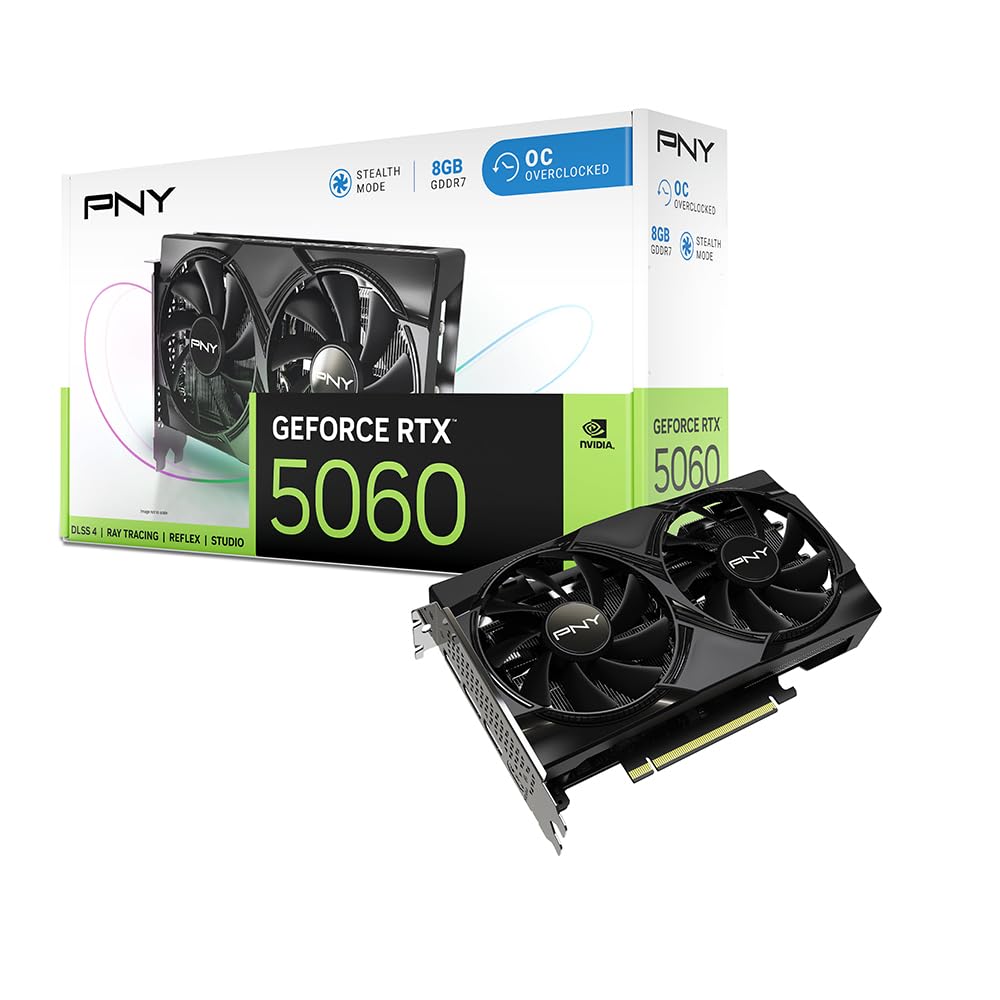
3. PNY NVIDIA GeForce RTX 5060 OC Dual Fan
Next-gen Blackwell with GDDR7 at a truly fair price
The PNY RTX 5060 is the first card here to use GDDR7 memory, which boosts bandwidth noticeably over the GDDR6 found on the ASRock B570. That extra memory speed helps deliver 100+ fps on high settings in almost every game, as buyers have reported. It also supports DLSS 4 — NVIDIA’s AI upscaling suite — so you can turn on ray tracing in supported titles and still keep playable frame rates.
At 2535 MHz core clock and a PCIe 5.0 interface, this card is built for longevity. It stays quiet and runs efficiently; one reviewer noted it pulled about 100W typical and fit easily into a mid-tower case. The dual-fan design keeps temperatures in check without extra noise. If you want modern features like Fourth-Gen Ray Tracing Cores and Reflex latency reduction, this is your entry point.
Major strengths
- GDDR7 memory provides faster bandwidth than any GDDR6 card on this list
- DLSS 4 makes ray tracing playable at 1080p and 1440p
- Compact dual-fan design fits most mid-tower cases with room to spare
Watch out for
- 8GB VRAM may feel limiting in a few years as game textures grow
- Needs a driver update from the start, per some buyer reports
Best for you if: DLSS and ray tracing matter — the GDDR7 memory and Blackwell architecture make this the most future-ready budget pick.
Skip if: your games do not benefit from upscaling and you prefer to boost raw VRAM and clock speed for the same money.
4. ASUS Dual NVIDIA GeForce RTX 5060 8GB GDDR7 OC Edition

Factory-overclocked silence that punches above its class
ASUS takes the RTX 5060 and pushes the GPU clock to 2565 MHz in OC mode, edging the PNY version slightly on speed. The Axial-tech fan design uses a smaller hub and longer blades to push more air downward, keeping the card cool while the 0dB Technology stops the fans entirely under low load — so your PC stays silent during web browsing or video playback.
One buyer mentioned the card is efficient, drawing only about 100W typically with a 150W TDP, and delivers rasterization performance close to an RTX 2080 Ti or RTX 3070. With 8GB of GDDR7 and PCIe 5.0 support, this card is ready for high-refresh-rate 1080p and smooth 1440p gaming. The 2.5-slot design is slightly thicker than the PNY’s 2-slot, so check your case clearance if space is tight.
Why choose it
- Factory OC at 2565 MHz gives you extra speed from the start
- Axial-tech fans with 0dB mode make it near-silent during light use
- Strong raster performance — near RTX 2080 Ti levels, according to buyers
Consider first
- 2.5-slot design may not fit slim or ITX cases
- No RGB lighting if you want customizable aesthetics
Your pick if: you want the quietest possible gaming experience with factory overclocking — the Axial-tech fans and 0dB mode make this a silent champion.
Think twice if: your case has limited space for a wider card, or if customizable lighting is a must-have for your build.
5. ASRock Radeon RX 7600 Challenger 8GB OC

RDNA 3 efficiency with a 2695 MHz boost that flies
The ASRock RX 7600 Challenger hits the highest boost clock on this list at 2695 MHz, running on AMD’s RDNA 3 architecture with 32 Compute Units and 2048 stream processors. That raw speed translates to smooth 1080p gaming at high settings, and buyers report it keeps up to 180 fps in popular titles. It also handles 1440p well in less demanding games.
It uses a single 8-pin power connector and recommends a 550W power supply, making it a straightforward upgrade for most builds. The dual-fan setup with 0dB Silent cooling stops the fans under light load, so your system stays quiet when you are not gaming. One thing that stands out: Linux users report plug-and-play support with the standard kernel, which is a nice bonus if you run Ubuntu or Bazzite.
What it does well
- 2695 MHz boost clock offers the highest raw speed in this lineup
- RDNA 3 architecture provides strong performance-per-watt
- Excellent Linux support from the start, per multiple buyer reviews
Worth noting
- 8GB VRAM is fine now but may limit future AAA titles at higher textures
- Ray tracing performance trails similarly priced NVIDIA cards
Grab it if: you want the fastest raw 1080p performance at this price point — the 2695 MHz boost clock delivers the best value for pure frame rates.
Pass if: you prioritize ray tracing or need more VRAM for heavy texture mods and 1440p gaming.
6. XFX Speedster SWFT210 Radeon RX 7600 8GB

A compact 1080p workhorse with dual-fan composure
XFX gives the RX 7600 a boost clock of up to 2655 MHz with 8GB of GDDR6 memory — nearly the same core as the ASRock version but in a slightly different cooling package. The SWFT Dual Fan solution keeps temperatures in check, and buyers who updated their drivers report stable performance with max temps in the upper 70s Celsius and fan speeds around 60% under load.
It measures 9.49 inches long, so it fits comfortably in most mid-tower cases. The card also plays well with Linux: one reviewer swapped from an Nvidia GTX 1070 on Arch Linux and had all three displays working immediately after installing mesa and vulkan-radeon. Do note that some buyers experienced random crashes in games like Overwatch 2 before a driver update, so updating right away is a good habit.
Strong points
- Stays cool and quiet after driver update, with temps in the upper 70s under load
- Easy swap from Nvidia on Linux with full multi-display support
- 100+ fps with FSR in most modern games, per buyers
Heads up
- Some games may crash initially until drivers are updated
- Ray tracing performance is modest compared to NVIDIA alternatives
Choose it when: you want a reliable 1080p card with strong Linux compatibility — the compact size and quiet cooling make it an easy fit for most builds.
skip it if: you want low-maintenance plug-and-play gaming from the start without needing to update drivers immediately.
7. MSI Gaming RTX 3050 LP 6G OC

The low-profile card that slides into tiny cases without mods
At just 6.9 inches long and 2.7 inches wide, the MSI RTX 3050 LP (low profile) is built for small form factor machines and prebuilt office PCs. It fits the Dell Inspiron 3471 SFF without any modifications — no drilling, no bending, no adapter needed. Buyers confirm it is a solid 1080p entry-level card that delivers 60+ fps on medium to high settings in most games.
It uses 6GB of GDDR6 memory on a 96-bit interface with a boost clock of 1492 MHz. The Twin Frozr cooling keeps the GPU around 78°C under load, and the fans stop entirely at idle for zero noise. It requires no extra power adapter beyond the PCIe slot, making it the easiest upgrade path for older desktops. The included low-profile bracket lets you mount it in slim cases right away.
Its best features
- Fits SFF cases like Dell Inspiron 3471 without any modifications
- Zero RPM idle keeps the card silent during light use
- No extra power cables needed — runs off the PCIe slot alone
Limitations
- 6GB VRAM and 96-bit memory bus limit performance in VRAM-heavy games
- Not suitable for 1440p gaming at high settings
Reach for this if: you are upgrading an old office PC or building a tiny gaming rig — the low-profile design and no extra power requirement make it the easiest drop-in upgrade.
Pass on it if: you want to game at 1440p or need more VRAM for texture-heavy titles like modern shooters.
8. ZER-LON GeForce GTX 1660 Super 6GB

The proven 1080p warrior that keeps delivering years later
The GTX 1660 Super is a well-known classic, and ZER-LON’s version gives you 6GB of GDDR6 memory on a 192-bit bus with a 1530 MHz core clock. It may lack ray tracing, but for pure 1080p gaming at high frame rates, it still holds up. Customers note it runs Diablo IV on high settings smoothly and upgrades old machines like a Lenovo M720T (with a Gold G5400 i3) dramatically better than the integrated graphics.
It supports up to 8K display output via HDMI, DP, and DVI ports, and the dual freeze fans run quietly — stopping entirely under light load. One important note: the card requires an 8-pin power adapter, and some buyers needed to modify their case or drilling to fit the card in smaller chassis. The 2-year limited warranty adds confidence for a budget pick.
What holds up
- 6GB GDDR6 on a 192-bit bus delivers strong 1080p performance for the price
- Reliable driver support with NVIDIA’s Game Ready drivers
- Great for casual starter builds and older PC upgrades
Consider these
- No ray tracing capabilities at all
- May require case modifications or a power adapter for installation
- No accessories included — just the card in generic packaging
Pick this if: you want a proven, reliable 1080p card for esports and older games without the need for ray tracing — the 6GB VRAM and 192-bit bus are a solid combo.
pass on it if: you want modern features like DLSS or ray tracing, or if you need a card that fits without any case modifications.
9. XFX Speedster SWFT105 Radeon RX 6400 4GB

The PCIe-powered savior for dead-slot office PC upgrades
The XFX Speedster SWFT105 RX 6400 is the smallest card here at just 6.3 inches long and weighing 240 grams. It requires no extra power cable — it draws all its power from the PCIe slot — which makes it the go-to option for upgrading old Dell Optiplex, HP, or Lenovo office PCs that lack spare PSU connectors. Reviewers point out it works on AM3+ boards with an FX-8350 and improves gameplay in Mortal Kombat 11 and Tekken 7.
It packs 4GB of GDDR6 memory and a boost clock up to 2321 MHz on AMD’s RDNA 2 architecture. The low-profile bracket is included, but switching from the pre-installed full-height bracket requires removing about 10 screws — a tedious design quirk buyers have noted. At this price, the value feels slightly high for 4GB of VRAM, but it remains the cheapest way to turn an old PC into a casual gaming machine.
Why this card exists
- No extra power cables needed — purely PCIe-powered, ideal for prebuilts
- Fits in compact cases at 6.3 inches and includes a low-profile bracket
- RDNA 2 architecture delivers competent 1080p performance for older titles
Notable drawbacks
- 4GB VRAM is the minimum and limits modern game compatibility
- Switching the mounting bracket requires removing many small screws
Best for: turning an old office PC into a casual gaming machine without touching the power supply — the plug-and-play low-profile design is perfect for Optiplex upgrades.
Look elsewhere if: you want to play modern AAA games or need more than 4GB VRAM for current titles.
Understanding the Specs
VRAM — Video Memory
Your GPU’s video memory (measured in GB) stores the textures and assets a game needs to render quickly. More VRAM lets you run higher-resolution textures without stuttering. 4GB is the bare minimum for 1080p modern gaming, 6GB is a comfortable baseline, and 8GB or more gives you headroom for future titles and mods.
GPU Clock Speed
Measured in MHz, the clock speed tells you how many cycles per second the GPU core can process. A higher boost clock generally means higher frame rates, but architecture matters too: a newer chip like RDNA 3 or Blackwell does more work per cycle than an older design. Always compare clock speeds within the same generation.
Memory Bus Width
The memory bus (128-bit, 192-bit, 160-bit) determines how much data can move between the GPU and its VRAM at once. A wider bus means the card can feed its processor more texture data quickly, which matters at higher resolutions and detail settings.
Ray Tracing vs Rasterization
Rasterization is the traditional method of rendering graphics; ray tracing simulates realistic light. Budget cards can handle ray tracing but often need upscaling tech (DLSS, XeSS) to maintain playable frame rates. If ray tracing is not important to you, prioritize raster performance and VRAM capacity instead.
FAQ
Will a budget GPU fit in my Dell Optiplex or HP office PC?
Is 4GB of VRAM enough for modern gaming in 2025?
What is the difference between GDDR6 and GDDR7 memory?
Can a budget GPU handle 1440p gaming?
Do I need to upgrade my power supply for a budget GPU?
Is ray tracing worth it on a budget GPU?
What does PCIe 4.0 or PCIe 5.0 mean for my GPU?
How important is dual-fan cooling on a budget GPU?
Which is better for Linux — AMD or NVIDIA budget GPUs?
Final Thoughts: The Verdict
For most buyers, the best budget gpu for gaming winner is the ASRock Intel Arc B570 Challenger 10GB OC because it offers massive 10GB VRAM, a 2600 MHz GPU clock, and strong 1440p performance at a price that redefines the category. If you want DLSS 4 and ray tracing in a compact package, grab the PNY RTX 5060 Dual Fan. And for the absolute best value in raw 1080p frame rates, the standout is the ASRock Radeon RX 7600 Challenger 8GB OC.
How We Picked
We do not accept paid placement. Every pick is matched to a real buyer and a real use-case; we do not hands-on test units.
Sources & Methodology
Specifications: manufacturer listings and product documentation. Review insights: verified customer reviews, as of July 2026. Pricing: not shown on this page (it changes often); check the current price via the retailer link.
As an Amazon Associate, FitlyFast earns from qualifying purchases. This does not affect which products we feature.