
Our readers keep the lights on and the weekend projects moving. As an Amazon Associate, I earn from qualifying purchases.
Specs are compiled from manufacturer listings and verified buyer reviews and can change over time — please confirm the key details on the product page before buying.
Dropping your mouse weight below 60 grams changes everything — your arm stops tiring mid-match, flicks feel quicker, and that nagging wrist fatigue vanishes. The challenge is finding one that stays light without feeling hollow or cutting corners on sensor quality. This guide lines up five genuine budget-friendly contenders that prove sub-60g doesn’t have to cost a fortune.
I’m Rikta — the founder and writer behind FitlyFast. This guide is built by comparing the manufacturers’ published specifications and the patterns across verified customer reviews, so you get each pick’s real strengths and trade-offs instead of marketing spin.
At under 60 grams each, these mice all hit the lightweight balance, but their sensors, battery life, and connectivity differ dramatically — here is how to pick the right budget light mouse for your grip and gaming style without wasting a dollar.
Our Picks at a Glance

How To Choose The Best Budget Light Mouse
A lightweight mouse is only as good as its weakest link — a great shell with a mediocre sensor or a short battery can ruin the experience. Here is what actually matters when you are shopping on a budget.
Sensor and DPI: The Engine Under the Button
The sensor determines how accurately the mouse tracks your movement. A premium optical sensor like the PAW3395 tracks at up to 26,000 DPI (dots per inch — the measure of how far the cursor moves per inch of physical mouse movement) with 650 inches-per-second tracking speed, meaning it barely ever loses its lock. Older sensors like the PAW3311 top out lower but still feel crisp for most gamers. High DPI alone isn’t the goal — consistency and a 1000Hz polling rate (how often the mouse reports its position to your PC, measured in hertz) are what make aim feel connected.
Weight and Shape: How It Meets Your Hand
Every gram you shave off reduces the inertia your wrist has to overcome. Mice between 42g and 59g feel dramatically different in flick shots. Shape is just as critical — an ergonomic right-handed curve supports palm grips for hours, while an ambidextrous shell suits claw and fingertip styles. A mouse that is too small for your hand forces you to pinch rather than glide.
Connectivity and Battery: Wireless vs. Wired Trade-offs
A tri-mode mouse (2.4GHz, Bluetooth, USB-C wired) gives you flexibility — 2.4GHz for lag-free gaming, Bluetooth for office browsing, wired if you forget to charge. Battery life varies from 19 hours to 78 hours per charge, so a 500mAh cell can last weeks of daily use. Rechargeable designs save you from buying AA batteries, but some cheaper mice use older micro-USB ports rather than modern USB-C.
Quick Comparison
| Model | Best For | Weight | Max DPI | Connectivity | Amazon |
|---|---|---|---|---|---|
| Redragon M725 Wireless★ Best Overall | Tri-mode honeycomb for palm comfort | 49g | 8,000 | 2.4G / BT / USB-C | Amazon |
| ATTACK SHARK X3Also Great | Top-tier sensor on a budget | 49g | 26,000 | 2.4G / BT / USB-C | Amazon |
| Redragon M724 Wired | Lowest weight, zero battery worry | 42g | 12,400 | USB wired | Amazon |
| RK ROYAL KLUDGE RK M30 | High DPI, fast polling wireless | 43g | 24,000 | 2.4G / BT / USB-C | Amazon |
| EPOMAKER Click Lite | Longest battery life in the group | 59g | 12,000 | 2.4G / BT / USB-C | Amazon |
In‑Depth Reviews
1. Redragon M725 Honeycomb Shell Gaming Mouse Wireless
A honeycomb 49g wireless mouse that keeps your palm dry during hour-long sessions.
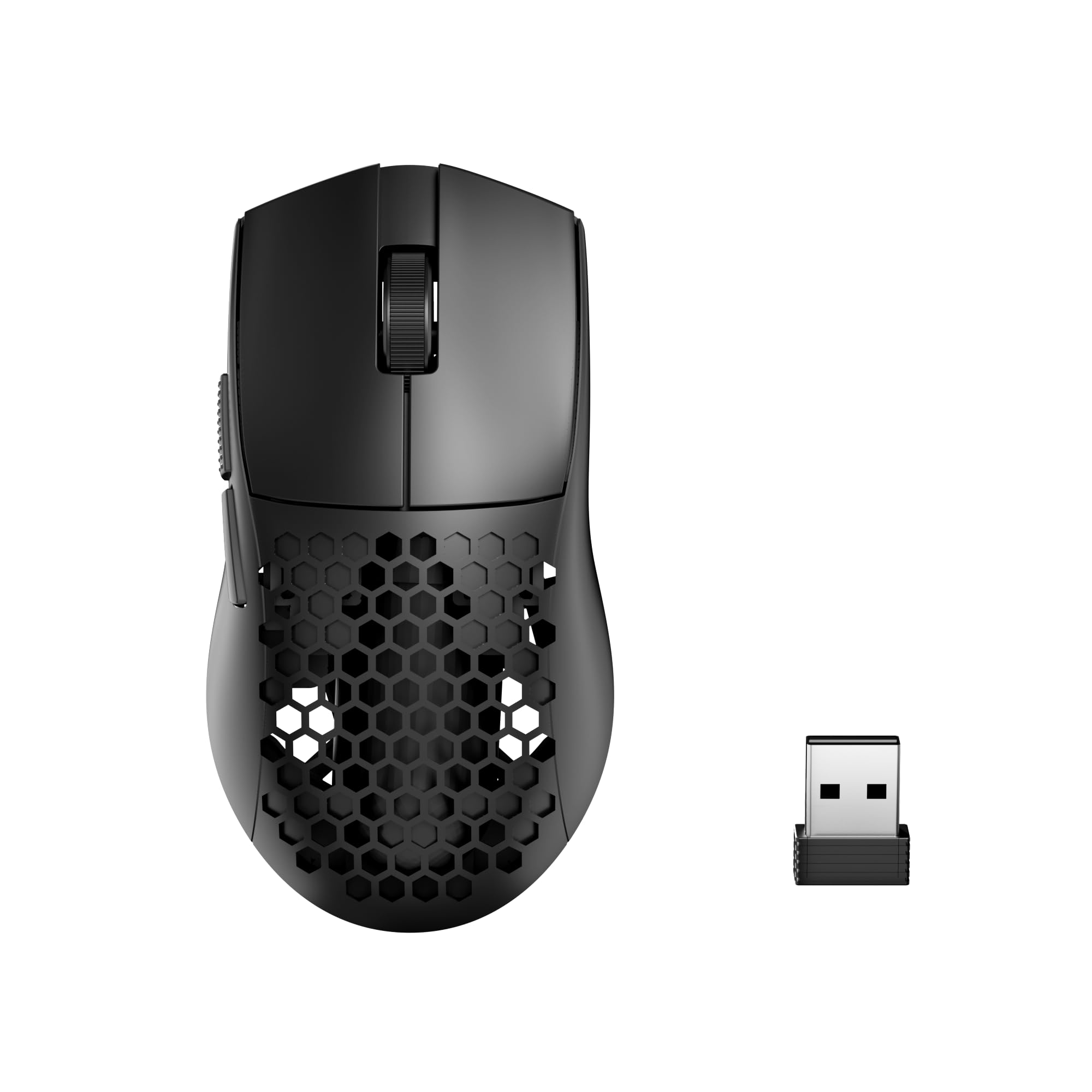
Your palm stays cooler because the M725’s honeycomb hollow shell serves two real purposes: it drops the weight to 49 grams and vents hot air so your palm stays dry during sweat-heavy gaming marathons. The tri-mode connectivity (wired via USB-C, Bluetooth 5.1, and 2.4GHz) works within a 10-meter range and switches smoothly between devices. The sensor offers 5 adjustable DPI levels (400 / 800 / 1600 / 2400 / 4000 DPI as defaults, up to 8,000 DPI total) — enough for most gamers, though well behind the 24,000 DPI of the RK M30 or the 26,000 DPI of the ATTACK SHARK X3.
Owners consistently praise it as a responsive, quiet, and lightweight mouse that performs well for the price, with one noting it survived drops without damage. The symmetrical right-handed grip works well for claw and fingertip styles, and the 5 programmable buttons can be configured via Redragon’s software. A few careful notes: the plastic material reflects the low price point but does not hold the mouse back functionally, and the wired mode uses USB-C, which is convenient for modern laptops.
What it does well
- 49g honeycomb design improves airflow to keep hands dry and cool
- Tri-mode wireless (2.4G / BT 5.1 / USB-C wired) with 10-meter range
- Symmetrical shape suits both left and right use despite right-handed branding
- Owners mention it is durable after drops and performs well after months of use
The honest trade-off
- Max DPI of 8,000 is the lowest in this lineup — a meaningful gap versus the 24,000 DPI RK M30 and 26,000 DPI ATTACK SHARK X3
- Plastic build feels budget-tier, though it does not affect performance or reliability
The honeycomb shell is unique in this list and genuinely keeps palms drier.
Not for: high-DPI enthusiasts — if you play at 8,000+ DPI or want future-proof headroom, the RK M30 or ATTACK SHARK X3 give you 24,000 DPI and 26,000 DPI respectively.
2. ATTACK SHARK X3 Wireless Gaming Mouse
Flagship PAW3395 sensor in a 49g shell that rivals mice costing twice as much.
You get smooth, lag-free cursor movement because the X3 packs the Pixart PAW3395 optical sensor — the same chip used in premium esports mice — giving you up to 26,000 DPI (dots per inch), a 1000Hz polling rate (reporting position to your PC every millisecond), and a 650 inches-per-second tracking speed. In plain terms, the cursor follows your hand with zero visible delay or spin-out, even during fast flicks. The Kailh GM8.0 Black Mamba switches underneath each button are rated for 80 million clicks, so the crisp, tactile feel should last years beyond the price tag.
At 49 grams, this orange shell is lighter than your average egg, and the ergonomic curve supports palm and claw grips equally well. Buyers report charging it once every couple of months with moderate use, thanks to solid power management. The tri-mode connectivity (2.4GHz dongle, Bluetooth, or USB-C wired) covers every scenario from competitive gaming to office browsing, though the shape is compact enough that larger-handed palm grippers may find it a bit snug.
what separates it
- Flagship PAW3395 sensor with 26,000 DPI and 650 IPS tracking
- 49g ultra-lightweight build with Kailh GM8.0 switches for crisp clicks
- Tri-mode connectivity (2.4G / Bluetooth / USB-C) offers full flexibility
- Reviewers praise excellent battery life on 2.4G mode
The honest trade-off
- Compact shape may feel too small for comfortable palm grip with larger hands
- Some units report mixed consistency on responsiveness and durability
Grab it for: the best sensor-to-dollar ratio in this list — the X3’s PAW3395 tracking and 49g weight deliver competitive-grade performance that easily beats the Redragon M724 on precision with 26,000 DPI versus the Redragon M724’s 12,400 DPI. The crowd favorite, with over 700 ratings reflecting near-universal approval.
Think twice if: your hands are on the larger side and you prefer a full palm rest — the X3’s modest length favors claw or fingertip grips.
3. Redragon M724 Wired Gaming Mouse

The lightest of the bunch at 42 grams, with no battery to ever recharge.
If your priority is absolute minimum weight and zero concern about charging, the M724 delivers. At 42 grams, it slices 7 full grams off the ATTACK SHARK X3 — a difference you feel in long gaming sessions where every gram of inertia adds up. The wired USB connection eliminates input lag entirely and means you never have to think about battery levels. The default DPI presets (1200 / 2400 / 3500 / 5500 / 12,400) are accessible without launching software, so you can switch sensitivity mid-round instantly.
Reviewers consistently call it functional, lightweight, and solid for the price. The shape follows the natural curve of a right hand, which reduces fatigue over many hours.
Why it stands out
- 42g — the lightest Redragon mouse and the lightest pick in this guide
- No battery, no charging, no latency — pure plug-and-play wired performance
- 5 DPI presets and programmable buttons via Redragon software
- Ergonomic right-handed shape reduces wrist strain over long sessions
The honest trade-off
- Wired only — no wireless freedom if you prefer a clean desk setup
- Max DPI of 12,400 is lower than the RK M30’s 24,000 DPI and the X3’s 26,000 DPI
- Some owners find the white lettering on the mouse visually distracting
Who it suits: if you want the lowest weight possible and never want to charge a mouse, the M724’s 42g wired design is the ultimate no-compromise lightweight for competitive players who value a stable cord over battery anxiety.
Who should skip it: pick the Redragon M725 or RK M30 if you need wireless flexibility or a higher DPI ceiling — they give you tri-mode connectivity and more headroom.
4. RK ROYAL KLUDGE RK M30 Wireless Gaming Mouse

43 grams of tri-mode wireless with DPI that trashes every other budget pick except the X3.
Your flicks feel precise and connected because the RK M30 hits a stunning 24,000 DPI (dots per inch) using its PAW3311 sensor — compared to the Redragon M725’s 8,000 DPI ceiling. The 1000Hz polling rate (adjustable down to 125Hz in software) ensures your clicks register in 1 millisecond during gaming. At 43 grams, it is nearly as light as the wired Redragon M724 but packs tri-mode connectivity (2.4GHz, Bluetooth 5.1, and USB-C wired) into the same feathery package. The 250mAh rechargeable battery delivers up to 36 hours at the lower 125Hz polling rate, or 24 hours at the full 1000Hz rate — enough for several days of mixed use.
Weight is the most-discussed positive aspect — 24 reviews single it out as the standout feature — and owners describe it as extremely lightweight, durable, and responsive for both gaming and work. The ergonomic fit receives more mixed feedback: some find it easy to move around, while others say the shape feels slightly unusual in hand. Battery life splits opinions as well — the rechargeable cell needs topping up every couple of days under heavy use, though charging via USB-C is quick.
What wins people over
- 24,000 DPI — triple the ceiling of the Redragon M725 (8,000 DPI), giving you finer control at high sensitivities
- 43g ultra-lightweight shell with tri-mode wireless (2.4G / BT / USB-C)
- Rechargeable 250mAh battery eliminates AA battery waste
- 5 programmable buttons via RK software for macros and shortcuts
The honest trade-off
- Battery life is the biggest compromise — only 24 hours at 1000Hz polling rate
- Ergonomics are mixed: some find the shape comfortable, others call it weird
- A few owners note the plastic feels cheap and hollow
Best for: players who want wireless freedom and the second-highest DPI here without paying a premium — the RK M30 undercuts the ATTACK SHARK X3 on price while keeping a high-ceiling sensor in a 43g body.
Look elsewhere if: you game for long marathons daily and don’t want to charge every other day — the EPOMAKER Click Lite’s 78-hour battery suits you better.
5. EPOMAKER Click Lite Wireless Gaming Mouse
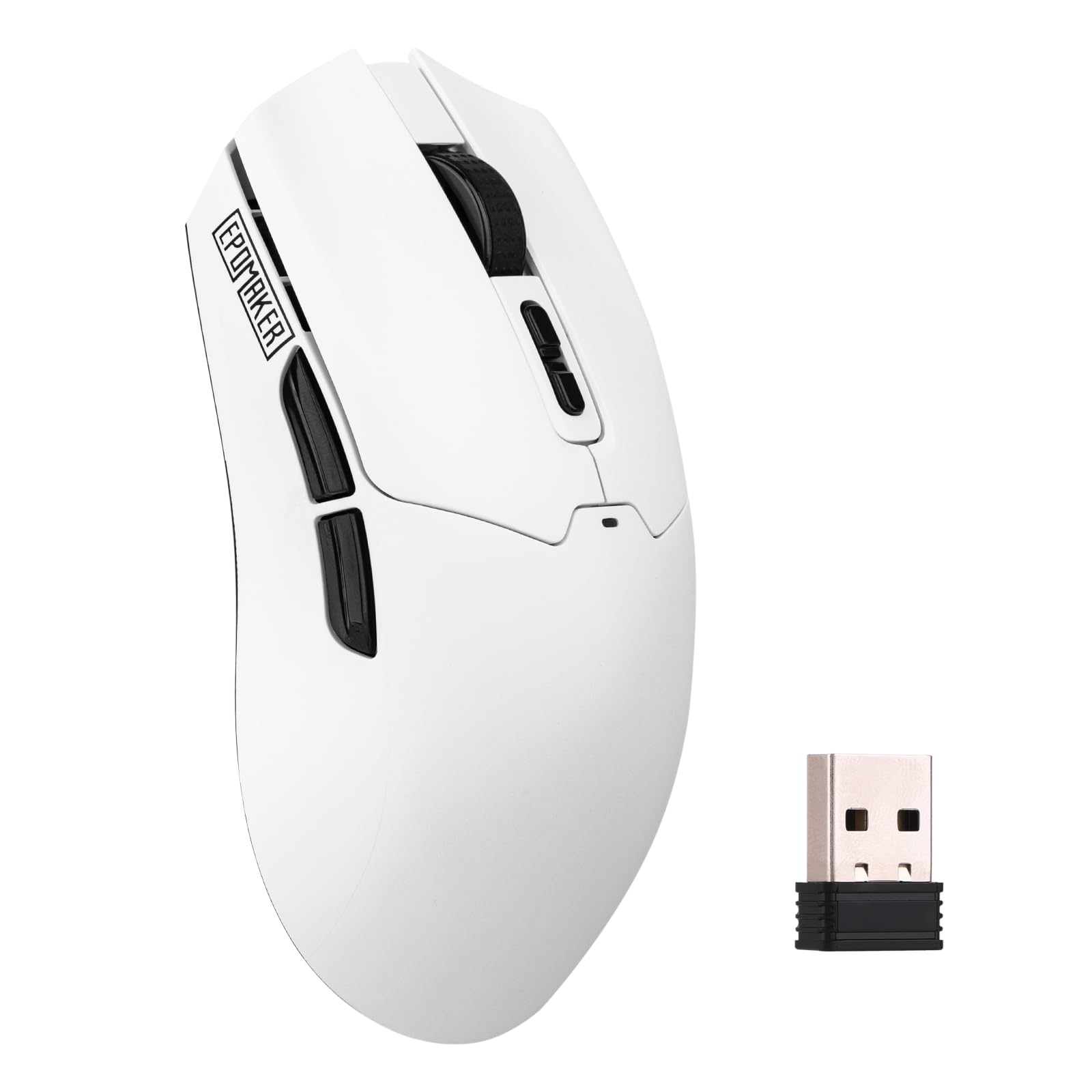
A 500mAh battery delivers 78-hour runtimes that outlast every other mouse here combined.
You charge far less often because the Click Lite’s 59-gram weight is the heaviest in this roundup, but the trade-off is a massive 500mAh battery that runs for 78 hours on a single charge — that is compared to the RK M30’s 36-hour max and a full work month of daily gaming. The PAW3311 sensor delivers up to 12,000 DPI (dots per inch) with a stable 1000Hz polling rate (1 millisecond response time) and 300 inches-per-second tracking speed, making it precise enough for competitive shooters. Tri-mode connectivity (2.4GHz, Bluetooth, or USB-C wired) lets you hop between desktop, laptop, and tablet without re-pairing.
Owners consistently praise the build quality, light weight relative to the battery capacity, and the fact that it feels fast and cheap in a good way. A few note that the mouse feels somewhat plastic and disposable compared to an entry-level Razer, and the responsiveness receives mixed feedback — some find it super responsive, others report occasional lag, though the majority land on the positive side. The included braided USB-C cable and extra PTFE (polytetrafluoroethylene — a low-friction material used for mouse feet) stickers add nice touches at this price.
Its biggest strengths
- 78-hour battery life from a 500mAh cell — best in class for this price range
- PAW3311 sensor with 12,000 DPI and 1000Hz polling rate for responsive gaming
- Tri-mode connectivity (2.4G / BT / USB-C) with a convenient toggle switch
- Includes extra PTFE stickers and a braided USB-C cable
The honest trade-off
- 59g is not as featherlight as the 42g Redragon M724 or 43g RK M30 — you feel the difference in fast flicks
- Build feels less premium than the ATTACK SHARK X3, with a plastic shell that contrasts with budget Razer alternatives
Reach for this if: battery anxiety ruins your sessions — the Click Lite charges once a month with heavy use and still delivers 12,000 DPI precision, making it ideal for gamers who want wireless freedom without plugging in every night.
skip it if: weight is your absolute top priority — the 59g frame is the heaviest here, and the Redragon M724 or RK M30 will feel noticeably snappier in rapid aim adjustments.
Understanding the Specs
DPI (Dots Per Inch)
This measures how far your cursor moves for each inch you slide the mouse. A higher DPI means the cursor zips further with a small hand movement — useful for high-speed shooters where you rarely lift the mouse. Low DPI (400-1600) suits precise aiming with arm sweeps. Most budget light mice offer adjustable DPI so you can find your balance between speed and control.
Polling Rate (Hz)
This is how often your mouse reports its position to your PC per second. A 1000Hz polling rate means it reports every 1 millisecond — essentially zero perceptible delay. Lower rates like 125Hz (8ms delay) save battery but can feel sluggish in fast-paced games. For competitive gaming, 1000Hz is ideal; for casual use or office work, 500Hz is plenty.
Mouse Weight and Shape
Every gram you remove reduces the force needed to start or stop a flick motion. Sub-60g mice (like all five here) feel dramatically lighter than traditional 80-100g mice. Shape divides into ergonomic (curved for right-hand palm grip) and ambidextrous (symmetrical for claw/fingertip). A lightweight mouse with the wrong shape for your grip will still cause fatigue — match the shape to how you hold it.
Sensor Generation (PAW3311 vs PAW3395)
The sensor is the optical eye inside the mouse. PAW3311 is a solid budget-mid sensor found in the RK M30 and EPOMAKER Click Lite — it tracks well up to 12,000-24,000 DPI with 300-400 IPS. PAW3395 is a flagship sensor (in the ATTACK SHARK X3) with up to 26,000 DPI, 650 IPS, and 50G acceleration — it is more consistent across different surfaces and less prone to spin-out during fast swipes.
FAQ
Do budget light mice use standard AA or AAA batteries?
Is a 59g mouse actually light enough for competitive gaming?
How long do rechargeable mouse batteries last before needing replacement?
Will a budget light mouse work with a Mac or Linux computer?
What is the difference between 2.4GHz wireless and Bluetooth for gaming?
Why do some budget light mice have honeycomb holes and others are solid?
Can I use a budget light mouse for work, not just gaming?
Is a wired mouse better than a wireless one for latency?
What does a mouse’s IPS tracking speed mean?
How do I clean a honeycomb mouse without damaging it?
Final Thoughts: The Verdict
If you want one dependable pick, the budget light mouse winner is the Redragon M725 because its honeycomb 49g shell keeps your hand cool, tri-mode connectivity offers flexibility, and it delivers reliable performance at a budget price. If you want the absolute lightest weight with zero battery worry, grab the Redragon M724 at 42g wired. And for marathon sessions where battery endurance is the deciding factor, the EPOMAKER Click Lite and its 78-hour runtime is the one to reach for.
How We Picked
We do not accept paid placement. Every pick is matched to a real buyer and a real use-case; we do not hands-on test units.
Sources & Methodology
Specifications: manufacturer listings and product documentation. Review insights: verified customer reviews, as of July 2026. Pricing: not shown on this page (it changes often); check the current price via the retailer link.
As an Amazon Associate, FitlyFast earns from qualifying purchases. This does not affect which products we feature.