
Our readers keep the lights on and the weekend projects moving. As an Amazon Associate, I earn from qualifying purchases.
Specs are compiled from manufacturer listings and verified buyer reviews and can change over time — please confirm the key details on the product page before buying.
Finding a budget mechanical gaming keyboard that doesn’t feel like a toy is the real challenge—most cheap boards sound hollow, register missed presses, or skip the features that actually improve your aim and typing speed. This guide narrows the field to nine boards that offer genuine mechanical switches, solid frames, and gaming-grade response without the premium price. You’ll see which boards prioritize speed, which favor a creamy typing feel, and which suit a quiet office.
I’m Rikta — the founder and writer behind FitlyFast. This guide is built by comparing the manufacturers’ published specifications and the patterns across verified customer reviews, so you get each pick’s real strengths and trade-offs instead of marketing spin.
The best budget mechanical gaming keyboard balances responsive switches, sturdy build, and essential features at a fair price.
Our Picks at a Glance


How To Choose The Best Budget Mechanical Gaming Keyboard
The first thing to nail down is the switch type, because it dictates how the board feels and sounds. Clicky switches (like Blue) give a loud, tactile bump for every press—satisfying for typing but distracting for teammates on voice chat. Tactile switches (like Brown) give a noticeable bump without the loud click, making them a solid middle ground for gaming and work. Linear switches (like Red) move straight down with no bump and are the favorite for rapid double-taps in fast games.
Pick a layout that fits your desk and your games
Full-size (100%) boards keep the number pad, which is essential for spreadsheet work but eats desk space and pushes your mouse further away. Tenkeyless (TKL or 87-key) drops the number pad to free up mouse room while keeping arrow keys—the most popular choice for gamers who also type. Compact 75% and 60% layouts shrink things further, but you lose dedicated function keys or arrow keys, which only works if you don’t rely on them.
Don’t overlook build quality and customization
A metal top plate or heavy frame keeps the board from flexing and sliding during intense matches, while a cheap plastic shell can creak and wobble. Hot-swappable sockets let you pull out the switches and drop in a different feel without soldering, which is a huge upgrade path on a budget. Check the keycap material too—PBT resists the shiny wear that cheaper ABS develops after months of use.
Quick Comparison
| Model | Best For | Layout | Switches | Polling Rate | Amazon |
|---|---|---|---|---|---|
| Redragon K552★ Best Overall | Budget first-timers | 87-Key TKL | Linear Red | — | Amazon |
| AJAZZ AK820Best Value | Quiet typing & media control | 82-Key 75% | Linear Red | — | Amazon |
| Aula WIN60 HETop Performer | Competitive FPS | 60% | Magnetic Hall Effect | 8000 Hz | Amazon |
| Keychron C2 | Mac & Windows productivity | 104-Key Full | Tactile Brown | — | Amazon |
| Redragon Typewriter | Retro style & wireless freedom | 104-Key Full | Clicky Blue | — | Amazon |
| SOLAKAKA KI99 Pro | Wireless all-rounder | 96% | Pre-Lubed Linear | — | Amazon |
| RK R98 Pro | Creamy feel & thocky sound | 98-Key 96% | Pre-Lubed Cream Linear | — | Amazon |
| ASUS ROG Strix Scope II X | Premium full-size build | 100% Full | ROG NX Snow V2 Linear | — | Amazon |
| Razer BlackWidow V4 X | Macro keys & quiet linear speed | 104-Key Full | Razer Yellow Linear | — | Amazon |
In-Depth Reviews
1. Redragon K552 Mechanical Gaming Keyboard
The crowd-pleasing tenkeyless that proves real mechanical feel doesn’t need a triple-digit price tag
You get a stable, fast-typing board that stays put during intense gaming sessions, thanks to its metal top plate and anti-slip feet. This 87-key keyboard uses linear red switches (switches that move straight down with no bump) for smooth, rapid keystrokes, unlike the tactile bump of blue or brown variants. The tenkeyless layout (no number pad) saves desk space while keeping arrow keys and the function row, making it the most-discussed pick here for both gaming and daily typing.
Typing speed is where buyers report this board shines: a software engineer found his speed jumped by 15 WPM versus his Apple wireless, noting it felt identical to Cherry switches—solid, heavy, and compact. The trade-off everyone agrees on is the noise; the clicky blue-style switches are genuinely loud, and shared offices or living rooms will hear every keystroke. A few owners added foam inside the case and keycaps, cutting noise by roughly 75%—proof that even a budget board is highly customizable.
Full anti-ghosting with N-key rollover across all 87 keys means simultaneous presses register correctly in competitive games, and the braided USB cable with plug-and-play connectivity works on Windows, macOS, and Linux. The rainbow backlighting offers 6 preset modes including breathing and wave effects, though it’s fixed-pattern with no software customization—you adjust brightness by keyboard shortcuts.
What wins people over
- True mechanical feel with smooth linear red switches at a budget price
- Sturdy metal frame and heavy build that won’t slide mid-match
- N-key rollover across all 87 keys for reliable multi-key inputs
The honest trade-offs
- Genuinely loud clacky sound, amplified by the plastic base
- Rainbow LEDs are fixed patterns with no per-key software control
Start here if: you want a proven, affordable mechanical with a solid frame and don’t mind a loud, clicky voice.
Think twice if: you share a quiet space or need per-key RGB—this board cannot be software-customized.
2. AJAZZ AK820 Mechanical Gaming Keyboard
A gasket-mounted 75% board with a CNC aluminum knob that brings office-quiet typing to the budget tier
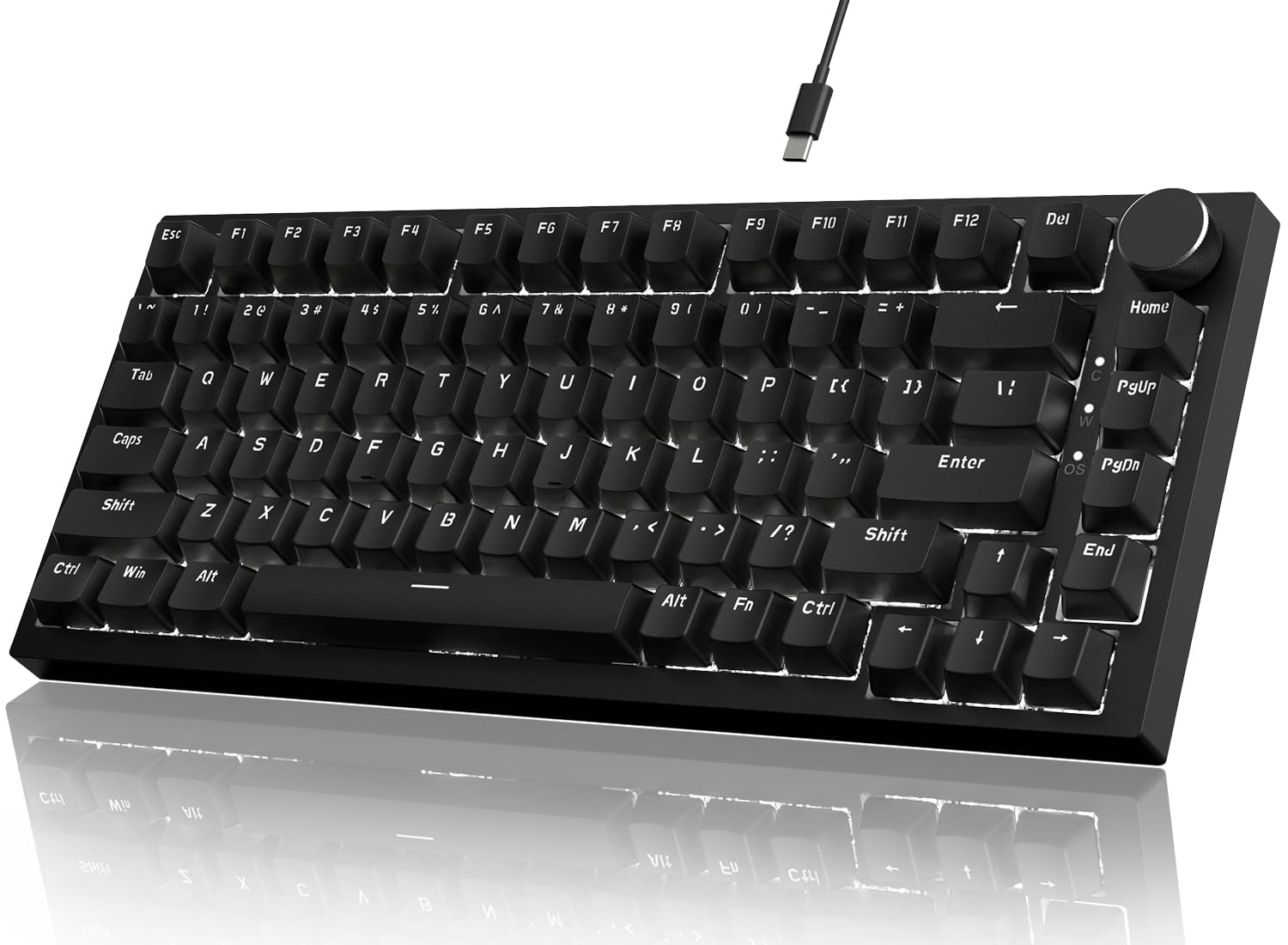
You get all the F keys that a 60% board (a board without a function row) drops, plus an aluminum volume knob that owners rave about for quick media control. The 82-key layout stays compact without losing keys you use. A gasket mount structure (a flexible mounting system) with five layers of sound-absorbing foam—EVA cotton, IXPE foam, PET sound pad, filler cotton, and silicone—kills the hollow echo cheap boards suffer from.
The 82-key layout adds a full function row, which owners mention feels better than a 60% for everyday work. The pre-lubed linear red switches are fully hot-swappable for both 3-pin and 5-pin switches, so upgrading the feel later is a no-solder job. White LED backlighting offers 20 lighting effects with adjustable brightness and speed, customizable through the downloadable AJAZZ driver on Windows 7 through 11, macOS, and Android.
The catch is the stock keycaps—a few owners call them cheap and ugly, and note the light plastic case feels less premium than the price suggests, though it stays torsionally rigid. One owner praised the “great keyboard with all F keys, better than 60%” and called the volume knob the favorite feature, while another noted the sound is more chattery than deep and thocky. It’s an ideal starter board for tinkerers: no screws when you pry it open, hot-swappable everything, and a smooth aluminum roller that makes volume control feel genuinely premium.
Quiet achiever: the five-layer foam stack makes this one of the calmest-sounding boards near its price, with a soft bounce that gasket-mount fans appreciate.
Keycap caveat: you’ll likely want to swap the stock caps, which most owners treat as the first upgrade.
3. Aula WIN60 HE Mechanical Gaming Keyboard
The 8000 Hz magnetic-switch marvel that brings Wooting-style rapid trigger to a fraction of the cost
This is the speed king of the list—the hall effect magnetic switches use no physical contact, eliminating the wear of traditional mechanical switches while delivering an 8000 Hz polling rate for ultra-fast response times. Designed explicitly for FPS titles like Valorant and CS2, the rapid trigger mode with a 0.02mm step distance gives you faster peeking and quick-stop shooting that players describe as “like a wooting if it was WAY cheaper.”
Quality is the most-praised aspect by far, with owners calling the build high-grade and the LEOBOG Gray Wood switches low-pressure and ideal for fast typing—smooth, satisfying, and not noisy. A custom Wooting build costing far more felt nearly identical in practice, which explains the strong budget recommendation from competitive gear enthusiasts. The 60% layout saves real desk space for mouse movement, and the lower light position illuminates PBT keycaps with 16.8 million customizable RGB colors.
Customization runs through a web-based driver, accessible from any internet-connected device, so you can remap keys, build macros, and tune RGB without bulky software. The honest friction is the software itself—owners call it unpolished and note occasional connectivity drops, though it’s rarely needed after initial setup. This is not for casual use or someone who needs a number pad; it’s a pure competitive tool, and it doesn’t work with PlayStation 5/4.
Reach for this if: you play competitive FPS and want near-zero-latency rapid trigger without paying flagship prices.
Look elsewhere if: you need wireless, a number pad, or a polished software experience for daily work.
4. Keychron C2 Full Size Mechanical Gaming Keyboard

The Mac-first full-size with Gateron Brown tactility that’s quietly become an office favorite for its low noise
Owners repeatedly praise the solid build and lower noise levels versus typical mechanicals, thanks to tactile Gateron G Pro Brown switches (switches with a noticeable bump partway down) that give feedback without a loud clack. If you split time between a MacBook and a Windows PC, this is your pick: the layout is tune for Mac, includes a dedicated Siri or Cortana key, and ships with extra keycaps for both operating systems so you can switch without hassle.
The full 104-key layout with number pad boost productivity, and the double-shot ABS keycaps let the white LED backlight shine through the legends clearly. A braided USB-C cable provides constant power, and the inclined bottom frame with 2-level adjustable feet makes long typing sessions more comfortable. The Gateron switches are rated for 50 million keystrokes, so this wired board should deliver years of reliable daily use.
The quirks are minor but real: a few owners note you can’t wake the computer with the spacebar, the NumLock light stays on during sleep, and the F-key labels are poorly lit. Despite those small gripes, the consensus is that it’s the best basic high-quality full-size at this price—wired USB-C keeps costs down versus wireless models while delivering the same strong build.
The strong points
- Noticeably quieter than typical mechanicals—office-friendly
- Dedicated Mac layout with Windows keycaps included
- Solid build quality and comfortable 2-level adjustable feet
Minor annoyances
- Can’t wake computer with spacebar; NumLock light stays on in sleep
- Black keycap legends are dim and hard to read
Grab it for: Mac and Windows hybrid desks where quiet tactility and a full number pad matter more than flashy RGB.
Pass if: you want per-key colorful backlighting—this board is single-color white only.
5. Redragon Wireless Typewriter Style Mechanical Gaming Keyboard

The retro round-keycap board that turns every typing session into a satisfying ASMR experience
The nostalgic typewriter sound is the star here—owners describe it as a satisfying 90s IBM-style click, and the round keycaps deliver a tactile feel that’s “very satisfying to hear when typing” with vibrant backlighting. The visual appeal sparks real conversation, with several owners noting coworkers bought one after seeing it on their desk. It’s a full 104-key board with a tank-solid metal panel, so it stays heavy and stable while looking like a vintage steampunk piece.
Connectivity is the other highlight: triple-mode with USB-C wired, Bluetooth 3.0/5.0, and 2.4GHz wireless, letting you swap between devices with FN key combos. A rechargeable 4000mAh battery keeps it running for days between charges, and the 104-key anti-ghosting ensures multi-key presses register cleanly. The RGB offers up to 16 presets and 7 solid colors, with brightness and flow speed adjustable on board.
There are two honest friction points. First, the software link for deeper customization is broken per several owners, so you’re limited to the onboard lighting modes. Second, durability shows mixed results—a few report keys stopping working and the silver key rings cracking over time, so it’s best treated with care rather than slammed. If you want a wireless board that looks stunning and makes every keystroke feel like an event, this delivers.
Characterful performer: the retro sound and look make daily typing genuinely fun, and the tri-mode wireless is genuinely flexible.
Handle with care: a few owners hit durability issues, and the customization software is currently unreliable.
6. SOLAKAKA KI99 Pro Wireless Mechanical Keyboard

A creamy, gasket-mounted wireless board with a 10,000mAh battery that owners compare to boards triple the price
Quality and sound are the twin engines here—owners describe the typing as smooth and creamy with a crisp click, and more than one compares it to premium boards costing far more. The 96% layout keeps the number pad and most function keys while trimming the fat, and the gasket structure with five layers of noise-reducing material delivers that soft, bouncy feel enthusiasts chase. A multifunctional knob handles volume, media playback, and light brightness without reaching for the mouse.
You charge this keyboard far less often thanks to its 10,000mAh battery (a unit of energy storage), with owners reporting roughly 4% daily drain—that’s 20-30 days of typical use. Triple-mode connectivity (Bluetooth 5.0, 2.4GHz, USB-C wired) pairs instantly to Mac, PC, and even PS5 with smooth switching, and the signal holds steady up to 10 meters. The hot-swappable 1.2mm flex-cut PCB (a circuit board you can replace switches on without soldering) supports 3/5-pin switches and comes with pre-lubed switches that feel smooth from day one.
Owners praise the PBT keycaps with dual-color injection molding that resist wear and fading, plus full-key RGB with side light bars offering 16.8 million colors controlled via driver software or shortcuts. The honest downsides: the hard plastic case feels less premium than the price suggests (though it’s heavy and stable), and one owner noted the RGB is customizable only through the app. For a wireless board this quiet, this responsive, and this long-lasting, it’s remarkably close to a no-compromise pick.
Choose this for: a wireless-first desk where long battery life, creamy sound, and a volume knob are the priorities.
Skip if: a metal chassis matters to you—the plastic case is the main gap versus pricier boards.
7. RK ROYAL KLUDGE R98 Pro Wired Mechanical Keyboard

The gasket-mounted board with pre-lubed cream switches that owners literally describe as buttery
Build quality leads the conversation here, with the gasket mount delivering what owners call a “thocky” feel and a delightful click-clack sound. The pre-lubed linear cream switches stand out for their unique look, creamy sound, and exceptionally smooth keystrokes—owners describe them as “buttery smooth” and note they can’t stop using the board. It’s a 98-key 96% layout that keeps the numpad, arrow keys, and most functions while saving desk space, making it equally at home for writers and gamers.
Five layers of sound-absorbing foam ensure that satisfying creaminess without the hollow ping of cheaper boards. The MDA profile PBT keycaps are double-shot with a matte surface that fits fingers better and resists fading, and the detachable aluminum CNC knob gives quick volume control. Four indicator lights clearly show Num Lock, Caps Lock, Win Lock, and Mac Mode status at a glance, and an online driver lets you redefine keys, set macros, and customize RGB across more than 20 modes.
Two specific trade-offs: the wired connection’s USB port sits on the left side, routing the cord across your desk, and the keycaps lack per-key backlighting—the letters stay dark, which owners call the main drawback if you want illuminated legends. A couple of owners also note dimmer-than-expected backlighting, while describing the build as very heavy, which they love.
Why it’s beloved
- Buttery-smooth pre-lubed cream linear switches
- Thocky, creamy gasket-mount sound with five foam layers
- 98-key layout keeps numpad without full-size footprint
Watch for these
- Keycap legends don’t light up—dark letters on backlit board
- Left-side USB port routes the cable across your desk
Best for: typing enthusiasts who want that creamy, thocky sound and buttery feel in a compact layout with a numpad.
Not for: anyone who needs illuminated key legends in a dark room.
8. ASUS ROG Strix Scope II X Wired Mechanical Gaming Keyboard

A weighty aluminum-topped full-size with pre-lubed ROG NX switches and a detachable wrist rest for long sessions
This is the premium full-size pick—an aluminum top plate and PBT doubleshot keycaps give it a weighty, durable presence that owners describe as heavy and stable with no flex. The hot-swappable, pre-lubed ROG NX Snow V2 linear switches deliver smooth, thocky keystrokes, and the wall-stem design adds dust-proofing plus an LED lens for enhanced RGB illumination. A detachable wrist rest positions your hands right for marathon play or work sessions.
Acoustics get real attention here: integrated sound-dampening foam and switch-dampening pads absorb pinging and echo, and owners note the soft pleasant click is quieter than brown switches. Pre-programmed hotkeys (F1-F5) give one-touch control over Xbox Game Bar and recording functions, while a multi-function wheel handles media and lighting adjustments intuitively. All keys are fully macro-programmable, and the three angle adjustments let you dial in the perfect tilt.
Owners consistently call it one of the best keyboards for the price, noting the responsive keys, comfortable layout, and sturdy no-flex build. The minor frictions: lighting control requires the ASUS software for full customization, though onboard controls are adequate, and a couple of owners hit sticky spacebar or left shift keys—spares are included. The 2.1-pound weight and firm wrist rest earn praise in reviews, with most calling the pad comfortable and right-sized.
Built to last: the aluminum plate, PBT caps, and dampened acoustics make this feel genuinely premium, not just priced that way.
Worth noting: full RGB control lives in the ASUS software, and an occasional sticky key arrives—spares are boxed in.
9. Razer BlackWidow V4 X Mechanical Gaming Keyboard

Six dedicated macro keys and silent yellow switches make this the command-center keyboard for serious gamers
Razer’s Yellow linear switches (switches that move straight down with no bump) are the defining feature—with zero distance between actuation and reset at a 1.2mm actuation point and only 45g of force, you get instant, rapid-fire inputs that owners call super quiet thanks to built-in sound dampeners. That’s a meaningful difference from clicky switches, and it’s why owners praise the blackout-quiet operation. The six dedicated macro keys along the left edge let you program complex combos or repeated actions to single presses.
The multi-function roller and secondary media keys handle everything from volume to brightness without leaving the keyboard, and the Chroma RGB per-key lighting casts 16.8 million colors with effects that sync to hundreds of Chroma-integrated games. Doubleshot ABS keycaps use injection molding so the legends never wear off, with extra-thick walls to handle intense use. A layer of foam under the circuit board plus lubricated stabilizers keep the typing sound satisfying instead of clacky.
The recurring note from owners is the left macro keys—they take getting used to and can block your hand’s natural orientation without looking down, requiring retraining. That’s the one real adjustment for this board. Durability gets strong marks, with one owner recounting that the board survived two coffee spills after an alcohol rinse and compressed air, thanks to the solid metal backplate. For gamers who want macro firepower, silent speed, and deep RGB in one package, this is the one.
The highlights
- Super quiet yellow linear switches with instant 1.2mm actuation
- Six dedicated macro keys for advanced command mapping
- Per-key Chroma RGB with 16.8 million colors and game sync
The adjustment period
- Left macro keys disrupt hand orientation until you retrain
- Bulky keycaps that some find heavy during fast typing
Pick this for: gamers who live in macros and want silent linear speed with deep per-key RGB.
Pass if: you don’t want to retrain your hand position around the left macro column.
Understanding the Specs
Switch Types and What They Feel Like
Linear switches (Red or Yellow) move straight down with no bump and are the quietest, favored for rapid double-taps in fast games. Tactile switches (Brown) give a noticeable bump partway down, offering feedback without a loud click—great for typing and gaming hybrid use. Clicky switches (Blue) add an audible click on top of the tactile bump, delivering that satisfying old-school sound but annoying anyone nearby. Your choice depends on whether you prioritize speed, feedback, or silence.
Polling Rate and Key Rollover
Polling rate measures how often the keyboard reports its state to your PC, with 8000 Hz meaning it checks 8,000 times per second for near-instant response—most budget boards run at 1000 Hz, which is already fine for most gamers. N-key rollover (NKRO) means every key press registers independently, even when you’re mashing multiple keys at once, preventing the “ghosting” where extra inputs appear or presses get dropped. Both matter most in competitive games where a single missed input can cost a round.
FAQ
Are budget mechanical keyboards actually mechanical or just membrane?
What is the difference between linear and tactile switches for gaming?
Does a 60% keyboard work for gaming if it has no arrow keys or F row?
Why do some gaming keyboards have an 8000 Hz polling rate and does it matter?
What does hot-swappable mean and why should I care?
How long does a budget mechanical keyboard last?
Will a budget mechanical keyboard work with my Mac or console?
Is a louder keyboard a sign of better quality?
Do I need software to use a budget mechanical keyboard?
What is the best switch color for both gaming and office typing?
Final Thoughts: The Verdict
Across the board, the best budget mechanical gaming keyboard winner is the Redragon K552 because it pairs true mechanical feel with a metal frame and N-key rollover at a price that leaves room for upgrades. If you want a quiet, creamy typing experience with a volume knob, grab the AJAZZ AK820. And for competitive FPS play where every millisecond counts, the Aula WIN60 HE brings an 8000 Hz magnetic-switch rapid trigger that rivals boards many times its cost.
How We Picked
We do not accept paid placement. Every pick is matched to a real buyer and a real use-case; we do not hands-on test units.
Sources & Methodology
Specifications: manufacturer listings and product documentation. Review insights: verified customer reviews, as of July 2026. Pricing: not shown on this page (it changes often); check the current price via the retailer link.
As an Amazon Associate, FitlyFast earns from qualifying purchases. This does not affect which products we feature.