
Our readers keep the lights on and the weekend projects moving. As an Amazon Associate, I earn from qualifying purchases.
Specs are compiled from manufacturer listings and verified buyer reviews and can change over time — please confirm the key details on the product page before buying.
Choosing a budget multifunction printer means balancing the up-front price against the ongoing cost of ink or toner — and most people pick wrong by focusing only on the sticker. The real question is which machine delivers sharp prints, reliable wireless, and affordable refills without constant frustration. This guide cuts through the noise to rank the seven best value-packed all-in-ones for homes, students, and small offices.
I’m Rikta — the founder and writer behind FitlyFast. This guide is built by comparing the manufacturers’ published specifications and the patterns across verified customer reviews, so you get each pick’s real strengths and trade-offs instead of marketing spin.
From fast laser workhorses to cartridge-free eco-tanks, here is the definitive ranking of the best budget multifunction printer options to keep your home office running smoothly while staying affordable.
Our Picks at a Glance


How To Choose The Best Budget Multifunction Printer
Picking a budget all-in-one is less about the machine and more about your printing habits. A printer that is perfect for a student printing 20 pages a week is a terrible fit for a small office churning out hundreds. Match the technology and features to your actual print volume first.
Prioritize Cost Per Page Over Sticker Price
Cartridge-based inkjets often have the lowest up-front cost but the highest running costs. If you print a lot, look for a machine with high-yield toner or a refillable ink tank system. These options cost more upfront but can slash your long-term spending dramatically.
Choose Your Technology: Inkjet vs. Laser
For homes and students printing a mix of documents and the occasional photo, a color inkjet is the natural choice. For small offices that primarily print black-and-white text, a monochrome laser is faster, sharper, and usually cheaper per page. Laser printers also handle heavy monthly volumes without breaking a sweat.
Look for Automatic Duplex and an ADF
Automatic duplex printing lets you print on both sides of the page without flipping the paper yourself, which cuts your paper bill in half. An Auto Document Feeder (ADF) lets you scan or copy a whole stack of pages at once instead of feeding each sheet by hand — a quality-of-life feature you will appreciate quickly.
Quick Comparison
| Model | Best For | Print Speed | Color Output | Duplex | Amazon |
|---|---|---|---|---|---|
| Canon PIXMA TR7120★ Best Overall | Home users & hybrid workers | 14 ppm B&W / 9 ppm Color | Yes (Inkjet) | Automatic | Amazon |
| HP Envy 6155Best Value | Everyday home printing | 10 ppm B&W / 7 ppm Color | Yes (Inkjet) | Automatic | Amazon |
| Brother MFC-J1410DW | Home & small office | 16 ppm B&W / 9 ppm Color | Yes (Inkjet) | Automatic | Amazon |
| Brother DCP-L2640DW | Small businesses (B&W) | 36 ppm B&W | No (Monochrome Laser) | Automatic | Amazon |
| HP LaserJet M234sdw | Small teams (B&W) | 30 ppm B&W | No (Monochrome Laser) | Automatic | Amazon |
| Epson EcoTank ET-2400 | High-volume, low-running-cost homes | 10 ppm B&W / 5 ppm Color | Yes (Supertank Inkjet) | Manual | Amazon |
| Canon imageCLASS MF465dw II | Busy offices (B&W) | 42 ppm B&W | No (Monochrome Laser) | Automatic | Amazon |
In-Depth Reviews
1. Canon PIXMA TR7120
The compact all-in-one that nails crisp quality and a painless setup for the home office.
Sharp, vibrant text and photos are the first thing people notice here, and the 2-cartridge hybrid ink system (a design that combines two cartridges for black and color, rather than four separate ones) delivers that quality affordably. At 14 pages per minute for black-and-white and 9 pages per minute for color, it keeps up with the pace of a busy household without making you wait.
Setup is where this printer wins fans — buyers report a quick connection to Wi-Fi, with many praising the guided prompts and easy 10-minute print times. The 1.42” Monochrome OLED screen (a small display that shows ink levels and status clearly) means you are not hunting through a phone app just to check if you are low on ink.
The Auto Document Feeder (ADF, which lets you load a stack of pages for hands-free scanning or copying) makes multi-page jobs easy. Automatic 2-sided printing (duplex) cuts paper use in half, and dual-band Wi-Fi (2.4GHz or 5GHz) keeps the connection stable across your home. Owners mention the paper tray is a little on the small side but manageable for most workflows.
What Wins People Over
- Print quality is the top praise — 84 owners single it out
- Setup earns high marks too, with 66 highlighting easy prompts
- Compact footprint fits tight desks without sacrificing function
Where It Falls Short
- Paper tray capacity is small for heavy workloads
- Wireless connectivity shows occasional hiccups on some devices
- High ink usage reported by some light-use home office owners
the balance: If you work from home or in a hybrid setup, this printer gives you crisp prints, a painless setup, and automatic duplex (two-sided printing) without the high price of premium models.
Think twice if: You print hundreds of pages weekly — the small tray and cartridge costs will become a bottleneck.
2. HP Envy 6155
A colorful home hub with an intuitive touchscreen that keeps printing simple and economical.
Everyday high-quality color documents, homework, and borderless photos are this machine’s bread and butter, guided by HP’s 2.4″ color touchscreen (a small interactive screen that makes menu navigation easy). It prints up to 10 pages per minute in black and 7 pages per minute in color, which is slower than the Canon above but perfectly adequate for casual home use.
The 3-month trial of HP Instant Ink (a subscription that mails you new cartridges before you run out, and the brand claims it can cut ink costs by up to 50%) is a real money-saver—just remember to cancel or continue after the trial. Because it’s made with at least 60% recycled plastic, it’s a greener pick if you care about sustainability.
Buyers find setup refreshingly simple — mostly praising the app-guided installation. The recurring gripe is the software: some customers note the computer loses contact and needs constant reconnection, so you may need patience with the drivers. As one said, “I printed was taxpayer 30/5 and needed new ink after that,” a reminder that starter cartridges run out fast.
Why People Like It
- Setup is the top praise — 38 owners highlight easy installation
- Print quality follows closely with 36 positive mentions
- Compact width and height fit small counters and desks
The Catch
- Software connectivity issues are the most common complaint
- Print speed gets mixed feedback — some find it slow
- Starter ink cartridges deplete quickly with heavy use
Grab it for: A family or student who wants an affordable, easy-to-use color printer with touchscreen convenience and the option of subscription ink savings.
Look elsewhere if: You cannot tolerate occasional software reconnections and need rock-solid network stability.
3. Brother MFC-J1410DW

The fastest color inkjet here, with a bright touchscreen and cloud app connections built in.
At 16 pages per minute black-and-white and 9 pages per minute color, this is speedier than the Canon PIXMA TR7120 (which manages 14 ppm B&W) — a 14% advantage for print jobs that matter. Print, copy, scan, and fax on one compact machine, making it a true 4-in-1 for the home office or small office.
The clear 2.7″ color touchscreen connects directly to popular cloud apps like Google Drive, Dropbox, Box, and OneDrive, so you can print or scan straight to your cloud storage without touching a computer. A 20-sheet Automatic Document Feeder (ADF) and 150-sheet paper tray handle multi-page jobs and moderate paper volumes comfortably.
Buyers consistently praise the sharp, smudge-free print quality and fast setup — with one noting it connects well with an iPhone 15 and is “perfect for the quick jobs” that students and small-job users face daily. The main hesitation is ink availability: some report difficulty finding genuine replacement cartridges, so check stock before committing.
Clear winner on speed: The fastest color inkjet in this lineup at 16 ppm B&W, with the crisp output and quiet operation owners rave about.
Reliability caveat: A few reviewers point out the unit stops working after a few months, and proprietary ink can be hard to source — treat this as a consideration, not a dealbreaker.
Perfect for: Small offices and students who want a fast, feature-packed color all-in-one with cloud printing and fax capability.
skip it if: You prefer to buy ink at any local store — genuine cartridges may not always be on the shelf.
4. Brother DCP-L2640DW
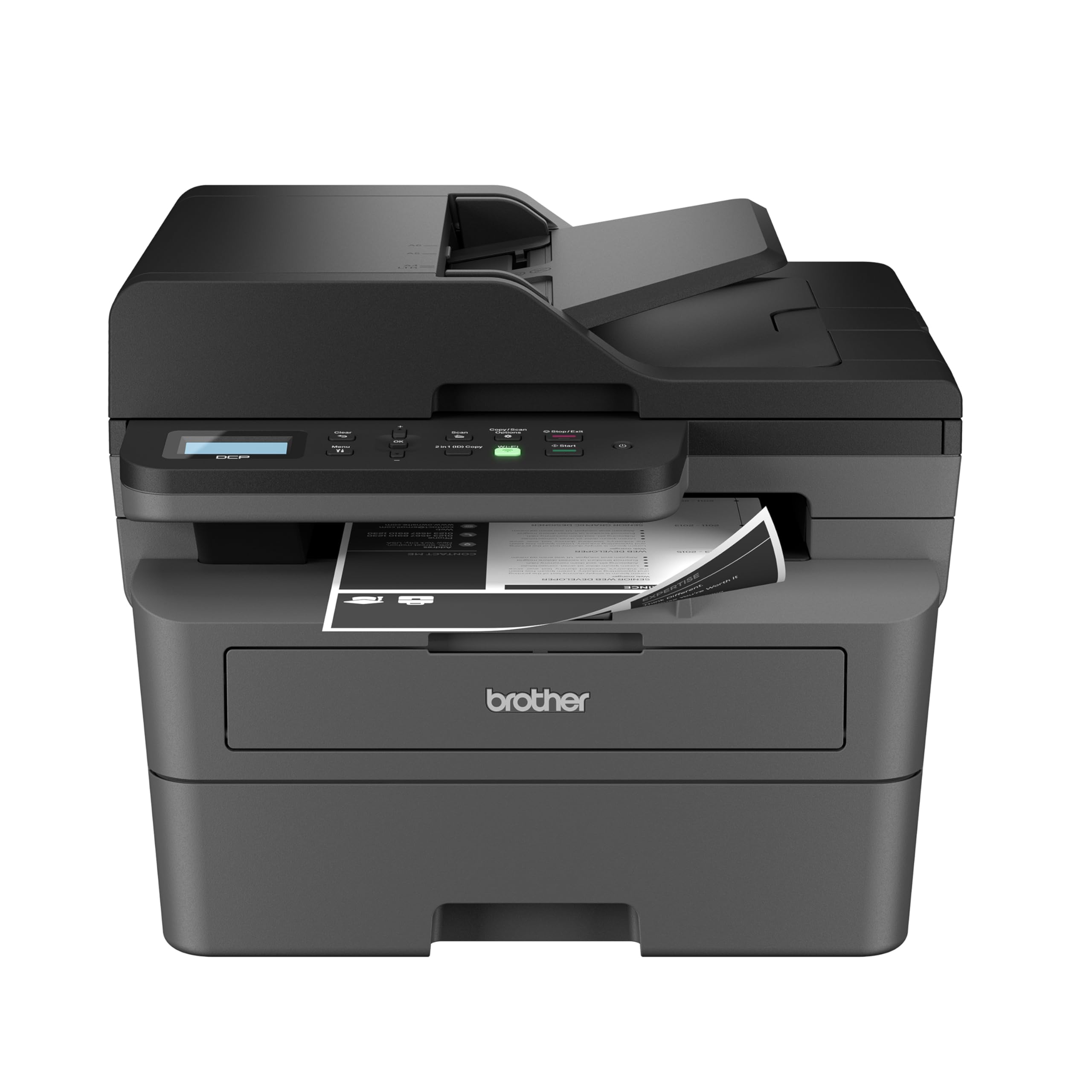
A speedy monochrome laser that turns documents around at 36 pages per minute for serious small businesses.
When your day is full of forms, contracts, and reports, this 3-in-1 laser printer, scanner, and copier delivers high-quality black-and-white output at an impressive 36 pages per minute. Shoppers say it outperforms inkjet for day-to-day B&W printing needs, with a 50-page auto document feeder (ADF) that makes multi-page scanning and copying fast and hands-free.
Setup is the easiest many owners have experienced — one noted it was the “easiest wireless setup I’ve ever experienced for a printer” on Windows 11, with auto Wi-Fi detection and native drivers that need no downloads. The dual-band wireless (2.4GHz / 5GHz) and Ethernet options give you flexible, secure multi-device connectivity for a busy office.
As a Renewed Premium unit, it arrives looking and feeling like new. The toner (Brother Genuine TN830 or TN830XL) is inexpensive, and buyers report it lasts well — one found toner at roughly 50% remaining after a month of use. The startup power draw can flicker lights on a weak circuit, so give it its own outlet.
Efficiency machine: Sharp prints, smooth duplex, and quick copy/scan — with an easy setup that wins over even non-technical users.
Power note: The initial power draw can trip a UPS or flicker lights on shared circuits; use a dedicated outlet for reliability.
Reach for this if: You run a small business that needs fast, cheap, sharp black-and-white printing and simple wireless setup.
Not for: Anyone who needs color output — this is strictly monochrome, so keep a color inkjet for photos.
5. HP LaserJet M234sdw

The small-team laser with the fastest two-sided printing in its class — up to 19 images per minute duplex.
Built for teams of 1-5 people, this monochrome laser prints professional-quality black-and-white documents and reports at up to 30 pages per minute single-sided. Its automatic duplex printing (two-sided) hits up to 19 black-and-white images per minute, making it the fastest two-sided printer in its class and a genuine paper-saver for busy offices.
Owners are emphatic about the quality and speed — one praised it as “one of the best home/office printers I’ve ever owned,” connecting four PCs, an iPad, and three iPhones in under 20 minutes. The auto document feeder (ADF) handles scanning and copying hands-free, and dual-band Wi-Fi with self-reset automatically detects and resolves connectivity issues.
Print quality is the standout here, with 192 owners praising it — the most of any aspect on this list. The compact footprint fits home office desks, and the included HP Black LaserJet Toner Cartridge (~700 page yield) gets you started immediately. Some note the control panel sits on a wobbly paper tray, but it works reliably even with gloves.
What Owners Rave About
- Print quality is praised by 192 owners — the top aspect by far
- Ease of use follows with 101 mentions for simple setup and operation
- Speed earns 67 mentions for fast, reliable output
The Honest Trade-Off
- Control panel on the paper tray can be finicky with button recognition
- Wireless connectivity gets mixed feedback for some units
- No color output — this is strictly black-and-white laser
The standout: The crowd favorite for small teams needing fast, sharp black-and-white prints with the best duplex speed in its class.
Who should pass: Households that occasionally print photos or color documents — this laser is monochrome only.
6. Epson EcoTank ET-2400

The cartridge-free supertank that turns 4,500 black pages into a rounding error on your budget.
Ink costs vanish with this supertank design — each ink bottle set is equivalent to about 80 individual cartridges, letting you print up to 4,500 black-and-white pages and 7,200 color pages before refilling. With up to 2 years of ink in the box, this printer is the undisputed champion for high-volume homes that are tired of cartridge sticker shock.
Print, scan, and copy in one compact unit, with vibrant colors and deep blacks that owners consistently praise for notes, figures, and assignments. The unique Micro Piezo Heat Free technology produces sharp text and impressive color photos on virtually any paper type, making it a favorite for students and families.
The trade-off is speed and automation: at 10 pages per minute black and 5 pages per minute color, it is slower than rivals, and the duplex is manual (you flip pages yourself). There is no screen — just LED indicators — and setup can be unintuitive. Owners mention the free wireless setup sometimes needs a YouTube tutorial for the passcode, but once running, the ink savings are remarkable.
Cost-per-page king: Refillable tanks and 4,500-page capability make this the most economical color printer here for heavy users.
The slow lane: At 5 ppm color with manual duplex and no display, it prioritizes savings over speed and convenience.
Perfect for: Students, families, and any home printing large volumes who want to stop buying cartridges forever.
pass on it if: You need fast, automatic double-sided printing or a large touchscreen to navigate settings.
7. Canon imageCLASS MF465dw II

The 42-page-per-minute monochrome laser that turns a full office queue into a memory.
This 4-in-1 (print, scan, copy, fax) is the fastest printer in this entire lineup, hitting up to 42 pages per minute for black-and-white output. It also leads on first-page speed — just 4.9 seconds to the first print — so even quick jobs feel instantaneous. The standard toner cartridge delivers approximately 3,000 pages, with the 070H high-yield option bringing your cost per page down further.
A 5-inch touchscreen (the largest display of any printer here) makes navigating menus, scan-to-email, and network settings straightforward. Setup is quick, with owners reporting Wi-Fi connection in minutes and sharp, fast print quality. The automatic duplex (two-sided) printing adds to its efficiency for office documents.
Buyers praise the enterprise-grade networking (the kind of sturdy wired and wireless connections offices rely on) and the scan-to-email feature, calling it “true enterprise networking value without the predatory HP or Xerox price premium.” The downsides: one owner reported the scanner ADF (Auto Document Feeder, which feeds multiple pages for scanning) jammed after months of use, and the touchscreen sometimes needs fingernail pressure on certain inputs. The included Cartridge 070 Black Standard prints about 3,000 pages right from the start.
Speed demon: At 42 ppm with a 4.9-second first-page time, this is the fastest and most productive machine here for busy office teams.
Fragility note: The ADF feeder mechanism broke for one owner after a few months; treat it gently and report any shipping damage immediately.
Choose this if: You run a busy office needing fast, high-volume monochrome printing with fax, scan, and copy in one reliable unit.
Not ideal for: Budget-conscious home users who only print occasionally — the premium price and monochrome-only output exceed their needs.
Understanding the Specs
Print Speed (ppm)
Pages per minute (ppm) tells you how fast a printer produces documents. Higher numbers mean less waiting on big jobs — a 42 ppm laser will blow through a 50-page report in about a minute, while a 10 ppm inkjet takes five minutes for the same task. For occasional home printing, 10-16 ppm is plenty; for offices, aim for 30 ppm or higher.
Duplex Printing
Automatic duplex means the printer flips the paper itself to print on both sides, saving half your paper on multi-page documents. Manual duplex (found on the Epson EcoTank ET-2400) requires you to re-feed the pages yourself — a minor inconvenience that becomes annoying on large jobs. It is a feature worth prioritizing.
Ink vs Toner vs Supertank
Cartridge inkjets (like the Canon and HP) have low up-front costs but pricier refills. Laser printers (like the Brother and HP workhorses) use toner that lasts longer and costs less per page, ideal for text-heavy offices. Supertank printers (like the Epson EcoTank) hold liquid ink in refillable tanks, cutting per-page costs dramatically for high-volume color printing.
Auto Document Feeder (ADF)
The ADF is a slot on top of the scanner that holds a stack of pages and feeds them through automatically, letting you scan or copy multi-page documents hands-free. Without it, you must lift the lid and place each page individually — fine for a 2-page form, painful for a 20-page contract. It retains fax capability too, where included.
FAQ
What is the real cost difference between inkjet and laser printers over time?
Which budget multifunction printer is the most economical for high-volume color printing?
Is a monochrome laser printer worth it for a home office?
Will my phone or tablet work with these printers?
What does the Auto Document Feeder (ADF) actually do for me?
Can I print double-sided automatically on a budget printer?
Why do starter cartridges run out so quickly?
Is a supertank printer better than a cartridge printer?
Final Thoughts: The Verdict
For most buyers, the budget multifunction printer winner is the Canon PIXMA TR7120 because it blends sharp print quality, easy setup, automatic duplex, and a compact design at a crowd-pleasing value. If you want the fastest color inkjet with a touchscreen and cloud apps, grab the Brother MFC-J1410DW. And for a small business that prints mostly text, the HP LaserJet M234sdw is the one to reach for — its 30 ppm speed and duplex output are tough to beat at this level.
How We Picked
We do not accept paid placement. Every pick is matched to a real buyer and a real use-case; we do not hands-on test units.
Sources & Methodology
Specifications: manufacturer listings and product documentation. Review insights: verified customer reviews, as of August 2026. Pricing: not shown on this page (it changes often); check the current price via the retailer link.
As an Amazon Associate, FitlyFast earns from qualifying purchases. This does not affect which products we feature.