
Our readers keep the lights on and the weekend projects moving. As an Amazon Associate, I earn from qualifying purchases.
Specs are compiled from manufacturer listings and verified buyer reviews and can change over time — please confirm the key details on the product page before buying.
Stepping up to a modern OLED monitor without emptying your wallet used to be a pipe dream — the tech was always reserved for the high-end crowd with big budgets. But that has changed dramatically. A new wave of panels brings the deep blacks, instant response, and vibrant colors of OLED down to a price that actually makes sense for the everyday gamer and desktop user. The hard part now is figuring out which model delivers genuine performance and which one cuts corners you will notice.
I’m Rikta — the founder and writer behind FitlyFast. This guide is built by comparing the manufacturers’ published specifications and the patterns across verified customer reviews, so you get each pick’s real strengths and trade-offs instead of marketing spin.
You want a great OLED monitor without overspending, so you need to know which one delivers the best brightness, color accuracy, burn-in prevention, and refresh rate for the price. Here are the top budget oled monitor picks, backed by real specs and owner feedback.
Our Picks at a Glance



How To Choose The Best Budget OLED Monitor
Jumping into OLED for the first time is notable, but the tech differs from standard LCDs in practical ways that matter daily. Focus on the panel type, the ports, and the anti-burn-in kit — these three factors define how good the monitor will look in your room and for how long.
WOLED vs. QD-OLED: The Panel Choice
This is the biggest fork in the road. WOLED (white OLED, used by LG and ASUS in some models) uses a white subpixel with color filters. It delivers flawless blacks and generally handles bright rooms better without washing out. QD-OLED (used by Samsung, MSI, Alienware, and others) adds a quantum-dot layer for wider color volume and often higher peak brightness in HDR. The trade-off is that QD-OLED can show a slight purple tint on black areas in bright ambient light. If you game in a dark room, QD-OLED is stunning. If your desk is near a window, WOLED is the safer bet.
Refresh Rate and Response Time
All modern OLED monitors respond nearly instantly — typically 0.03ms gray-to-gray (the time it takes a pixel to shift from one shade of gray to another), which is far faster than any LCD. That speed kills motion blur completely. Refresh rate (Hz, or hertz) tells you how many frames per second the screen can show. 240Hz feels very smooth for most games. 360Hz is even better for competitive esports (fast-paced tournaments). For most buyers, 240Hz is the balance that balances performance and cost.
Burn-in Prevention and Warranty
Burn-in (permanent ghost images from static elements like taskbars or HUDs) is a real consideration. Look for monitors with pixel refresh cycles, logo detection that dims static areas, and automatic screen savers. A good warranty that explicitly covers burn-in — some brands offer three years with burn-in coverage — is the strongest safety net. This is the single most important long-term reliability factor in an OLED monitor.
Quick Comparison
| Model | Best For | Resolution | Refresh Rate | Panel Type | Amazon |
|---|---|---|---|---|---|
| LG 27GX700A-B★ Best Overall | Best Overall Value | 2560 x 1440 (QHD) | 280Hz | WOLED (4th Gen) | Amazon |
| ASUS ROG Strix XG27AQDMGTop Performer | Glossy Clarity | 2560 x 1440 (QHD) | 240Hz | WOLED (Gen 3) | Amazon |
| MSI MPG 321URXPro Grade | Premium 4K Workhorse | 3840 x 2160 (UHD) | 240Hz | QD-OLED | Amazon |
| MSI MAG 272QP QD-OLED | QD-OLED Entry Point | 2560 x 1440 (WQHD) | 240Hz | Quantum Dot OLED | Amazon |
| LG 27GS93QE | Highest Rated 240Hz | 2560 x 1440 (QHD) | 240Hz | WOLED | Amazon |
| Alienware AW2725DF | 360Hz Esports | 2560 x 1440 (WQHD) | 360Hz | QD-OLED | Amazon |
| ASUS ROG Strix XG27ACDNG | 360Hz QD-OLED | 2560 x 1440 (QHD) | 360Hz | QD-OLED | Amazon |
| GIGABYTE MO27U2 | 4K QD-OLED Value | 3840 x 2160 (UHD) | 240Hz | QD-OLED (5-Layer) | Amazon |
| Samsung Odyssey OLED G6 (G60SD) | Bright Room Fighter | 2560 x 1440 (QHD) | 360Hz | QD-OLED | Amazon |
| Acer Predator X32 | Curved 4K OLED | 3840 x 2160 (UHD) | 240Hz | Quantum Dot OLED | Amazon |
In‑Depth Reviews
1. LG 27GX700A-B 27-inch Ultragear QHD OLED Gaming Monitor
The OLED that sets the budget benchmark by blending speed, brightness, and rock-solid reliability.
This LG Ultragear uses LG’s 4th-generation WOLED panel with Primary RGB Tandem technology, making it the brightest OLED gaming monitor LG has made so far — reaching up to 1500 nits for highlights. That brightness matters in real life: you get deep contrast and vivid colors even in a lit room, without the washed-out look that plagues dimmer OLEDs. The 280Hz refresh rate is a step above the 240Hz standard, giving you a smoother edge in competitive shooters and racing games.
The colors cover 99.5% of the DCI-P3 spectrum, which is excellent for HDR gaming and media consumption. Buyers report that this is the “Best OLED in its price range,” noting the smooth 280Hz performance and vibrant colors that just need a bit of tuning from the start. The anti-glare coating on this unit is a unique semi-glossy matte finish — it cuts reflections without dulling the image the way a heavy matte layer sometimes does. Some owners mention a minor VRR flicker, so if that bothers you, locking the refresh rate at 280Hz solves it cleanly.
This monitor is also VESA DisplayHDR True Black 500 certified, which means it hits a higher brightness standard for deep blacks with pinpoint highlight detail. The stand is fully adjustable (height, tilt, swivel, pivot), and LG’s Switch app lets you split the screen into 11 different layouts for multitasking. The crowd favorite here is clear — over 100 ratings put it north of 4.2 stars, and positive owner experiences far outweigh the occasional defect reports.
Why It Wins
- The 280Hz refresh rate (17% higher than 240Hz rivals) feels noticeably slicker in fast games.
- DCI-P3 99.5% color gamut delivers rich, accurate HDR visuals.
- DisplayHDR True Black 500 certification ensures high brightness and inky blacks simultaneously.
- The 4th-gen WOLED panel offers reduced burn-in risk and improved longevity.
The Trade-Offs
- A few units exhibit horizontal banding on static white or light-colored screens.
- VRR flicker is present; some owners disable VRR and lock at 280Hz for a flawless experience.
- The RGB backlighting on the rear is basic and static — not a showpiece for your battlestation.
Grab this if: you want the best overall balance of refresh rate, color volume, and price in a 27-inch QHD OLED — the 280Hz speed combined with 99.5% DCI-P3 (a wide color standard used in film) and True Black 500 (a VESA certification for deep blacks) is a combination you rarely find at this level.
Think twice if: you are highly sensitive to VRR flicker and don’t want to disable it, or if you need a perfectly uniform panel for color-critical static work.
2. ASUS ROG Strix 27” 1440P OLED Gaming Monitor (XG27AQDMG)
The glossy finish champion that makes colors pop without a trace of haze.
This ASUS ROG Strix uses a glossy WOLED panel (third-generation), and that one surface choice changes everything. A glossy OLED delivers the purest colors and the deepest blacks because there is no matte diffusion layer scattering the light. Over 750 owners have rated it at 4.5 stars, and the #1 thing they praise is the display quality — 116 people single it out. The glossy screen makes HDR content look almost three-dimensional, and you get a 240Hz refresh rate with a fast 0.03ms response time that keeps motion crisp.
ASUS has built a custom heatsink and advanced airflow design into this monitor, which helps reduce the risk of burn-in over the long haul. The anti-flicker technology is ROG-exclusive and helps smooth out the flicker that can appear during refresh-rate fluctuations. Owners mention that the colors and contrast are incredible and that registering the monitor open up a 3-year warranty with burn-in coverage — a strong safety net for a purchase of this type. Some owners note that the auto-dimming feature can be annoying, but it is easily disabled in the on-screen display menu.
Color quality is the second-most praised aspect with 84 mentions, which makes sense given the 99% DCI-P3 coverage and the third-gen WOLED’s ability to avoid the purple-black tint that some QD-OLED panels show in bright rooms. The stand is highly adjustable, and the monitor includes DisplayWidget software for adjusting settings with a mouse instead of the joystick.
The High Points
- The glossy WOLED panel delivers class-leading clarity and pop compared to matte alternatives.
- 116 owners praise the display quality — the highest single-aspect count in this comparison.
- Custom heatsink and advanced airflow reduce burn-in risk significantly.
- 3-year warranty with burn-in coverage gives long-term confidence.
A Few Notes
- Glossy finish means reflections are more visible if you game with a window behind you.
- No built-in speakers, so you will need external ones or a headset.
- Text clarity is slightly less sharp than a high-end IPS at the same resolution.
Reach for this if: you value pure, unfiltered image quality in a controlled lighting environment and want the best glossy OLED experience at 27 inches with burn-in warranty backup.
Look elsewhere if: your desk sits in direct sunlight or a brightly lit room where glare becomes a daily problem.
3. MSI MPG 321URX QD-OLED, 32″ 4K UHD Gaming Monitor
The 4K QD-OLED that pulls off true HDR brilliance for gaming and creative work.
This MSI delivers a big 31.5-inch UHD (3840 x 2160) QD-OLED panel with a 240Hz refresh rate and a 0.03ms response time. The resolution bump to 4K at this size gives you a pixel density that makes text and fine details look razor-sharp — a noticeable step up from the 1440p monitors in this list. It covers 99% of the DCI-P3 color gamut with factory Delta E ≤2 accuracy, which is the color precision you would expect in a professional monitor, not just a gaming one.
The VESA DisplayHDR True Black 400 certification ensures that HDR content has deep, inky blacks alongside bright highlights without blooming. MSI’s OLED Care 2.0 suite runs in the background to prevent burn-in by detecting static elements and dimming them automatically. Over 740 owners have rated it at 4.4 stars, with many noting the “breathtakingly beautiful HDR” and the “perfect blacks” that make games look three-dimensional. The KVM switch is a practical bonus if you run both a PC and a Mac or a console and a desktop — it lets you control both with a single keyboard and mouse.
The downsides are the price — it sits at the higher end of this guide — and the chunky stand that takes up significant desk space. A few owners mention the control knob feels a bit fidgety. For the money, you get a 32-inch 4K OLED that doubles as a gaming powerhouse and a color-accurate productivity screen.
The Big Picture: This is the monitor to pick if you want 4K sharpness with OLED contrast and a 240Hz speed. The premium over 1440p models is a real investment in pixel density and screen real estate.
Who Should Skip: If you sit close to a smaller desk or only game in 1440p, the 27-inch WOLED options deliver nearly the same fluidity for less money.
4. LG 27GS93QE 27-inch Ultragear OLED Gaming Monitor QHD 1440p 240Hz

The crowd-favorite 240Hz WOLED (white OLED, which uses a white subpixel for brightness) that earns the highest rating in this guide.
This LG Ultragear holds a 4.6-star average across 345 ratings, making it the highest-scored monitor on this list by owner satisfaction. It uses a 27-inch WOLED panel at 1440p with a 240Hz refresh rate and a 0.03ms GtG response time. The matte anti-glare coating excels in rooms with overhead lights or windows, cutting reflections so you can focus on the game without a glossy distraction. Customers note the colors are “amazing,” the contrast is “stunning,” and the speed is “incredible” — the consensus is that this is the “Best OLED in its price range.”
It is VESA DisplayHDR True Black 400 certified and has a native 1.5 million-to-one contrast ratio, so dark scenes in games like *Alan Wake 2* or *Cyberpunk 2077* retain every shadow detail without crushing blacks. The monitor supports both NVIDIA G-Sync and AMD FreeSync Premium Pro, meaning it handles variable refresh rates smoothly on either GPU camp. The stand offers height, tilt, and pivot adjustment, and the two-year UltraGear OLED warranty covers the panel — a solid peace-of-mind offering for an OLED.
The only recurring mixed feedback is about the brightness ceiling — at full-field white, it does not hit the peak nits of a Mini-LED display, and a few owners feel it is a touch dim for sunlit rooms. That is physics, not a flaw: OLEDs trade absolute SDR brightness for perfect blacks and infinite contrast. If you control your ambient light, this monitor is a stunning performer at a competitive price.
The Verdict: If a single high rating and thousands of happy owners matter most, this is the safest, most proven pick in the 240Hz 1440p OLED space.
The Catch: Peak brightness is modest in bright ambient light; plan to game in a moderately dim space for the best experience.
5. Alienware AW2725DF OLED Gaming Monitor – 26.7″ QD-OLED 360Hz

The 360Hz QD-OLED built for competitive gamers who demand every millisecond.
The Alienware AW2725DF is a 26.7-inch QD-OLED monitor with a 360Hz refresh rate — that is 50% more frames per second than the 240Hz baseline. For esports titles like *Valorant*, *Overwatch 2*, and *Counter-Strike 2*, this speed translates into visibly smoother motion and a real edge in reaction time. The 0.03ms gray-to-gray response time effectively eliminates motion blur and ghosting, so tracking fast-moving enemies feels instantaneous. Owners describe the image quality as “phenomenal,” with deep blacks and vibrant colors that make even casual games look premium.
The QD-OLED panel covers 99.3% of the DCI-P3 color space and is VESA DisplayHDR True Black 400 certified. In practice, this means HDR highlights pop brilliantly, and black levels are truly infinite. The monitor comes with a 3-year burn-in warranty, which is a strong commitment from Dell/Alienware. The build quality feels premium, with a fully adjustable stand that allows height, tilt, swivel, and pivot adjustments. Owners praise the overall build quality — 82 mention it positively, the highest single aspect count for this product.
The main trade-off is the premium price — you are paying for the speed. A few reviewers point out text clarity is slightly less sharp than an LCD at the same resolution, and the periodic pixel refresh can be a minor interruption. For a pure competitive gamer, the speed and warranty make this a compelling choice.
The Edge
- The 360Hz refresh rate is one of the highest available at 1440p, giving a tangible competitive advantage.
- 3-year burn-in warranty provides excellent long-term protection.
- QD-OLED panel offers 99.3% DCI-P3 coverage and stunning HDR impact.
- 82 owners praise the overall build quality and premium feel.
The Cost
- Premium pricing relative to 240Hz alternatives — you pay for the extra speed.
- Text clarity may appear slightly less crisp than a high-end IPS for desktop use.
- Few isolated reports of defective units requiring RMA through Dell’s process.
Perfect for: the competitive FPS player who wants the smoothest possible motion and is willing to pay a premium for 360Hz speed with a burn-in warranty.
Not ideal if: you prioritize pixel-perfect text for coding or productivity over raw gaming frame rates.
6. ASUS ROG Strix 26.5” 1440P QD-OLED Gaming Monitor (XG27ACDNG) 360Hz

The 360Hz QD-OLED (quantum-dot OLED, which boosts color volume) that pairs elite speed with sturdy anti-burn-in care.
This ASUS ROG Strix matches the Alienware’s 360Hz speed but adds ASUS’s OLED Care+ suite and a custom heatsink for better thermal management. The 26.5-inch QD-OLED panel delivers the same stunning color volume and infinite blacks as other QD-OLEDs, but with a 99% DCI-P3 gamut and VESA DisplayHDR 400 True Black compliance. Owners rate it at 4.6 stars across 357 ratings, and the most-mentioned positive is the overall monitor quality — 52 people cite it as exceptional.
The anti-flicker technology is ROG-exclusive and helps reduce the flicker that can occur during refresh-rate fluctuations, which has been an issue on some QD-OLED panels. The 3-year warranty covers burn-in, adding a layer of security for the investment. Owners specifically mention the smooth 360Hz motion, the lack of ghosting, and the excellent color accuracy. A few note that the height adjustment range is limited compared to some competitors, and the periodic pixel cleaning prompt can briefly interrupt gameplay.
If you are deciding between this and the Alienware, the ASUS offers a slightly higher owner satisfaction rating and a more comprehensive OLED care software suite, while the Alienware has a slightly larger following with more total reviews. Both are exceptional 360Hz QD-OLEDs with similar pricing.
The Call: This is the monitor for gamers who want the absolute smoothest 360Hz QD-OLED experience with aggressive burn-in prevention features and a proven warranty.
The Consideration: If you need maximum stand height adjustment, the limited range here might require a monitor arm to get the perfect position.
7. MSI MAG 272QP QD-OLED X24 27-Inch WQHD Gaming Monitor
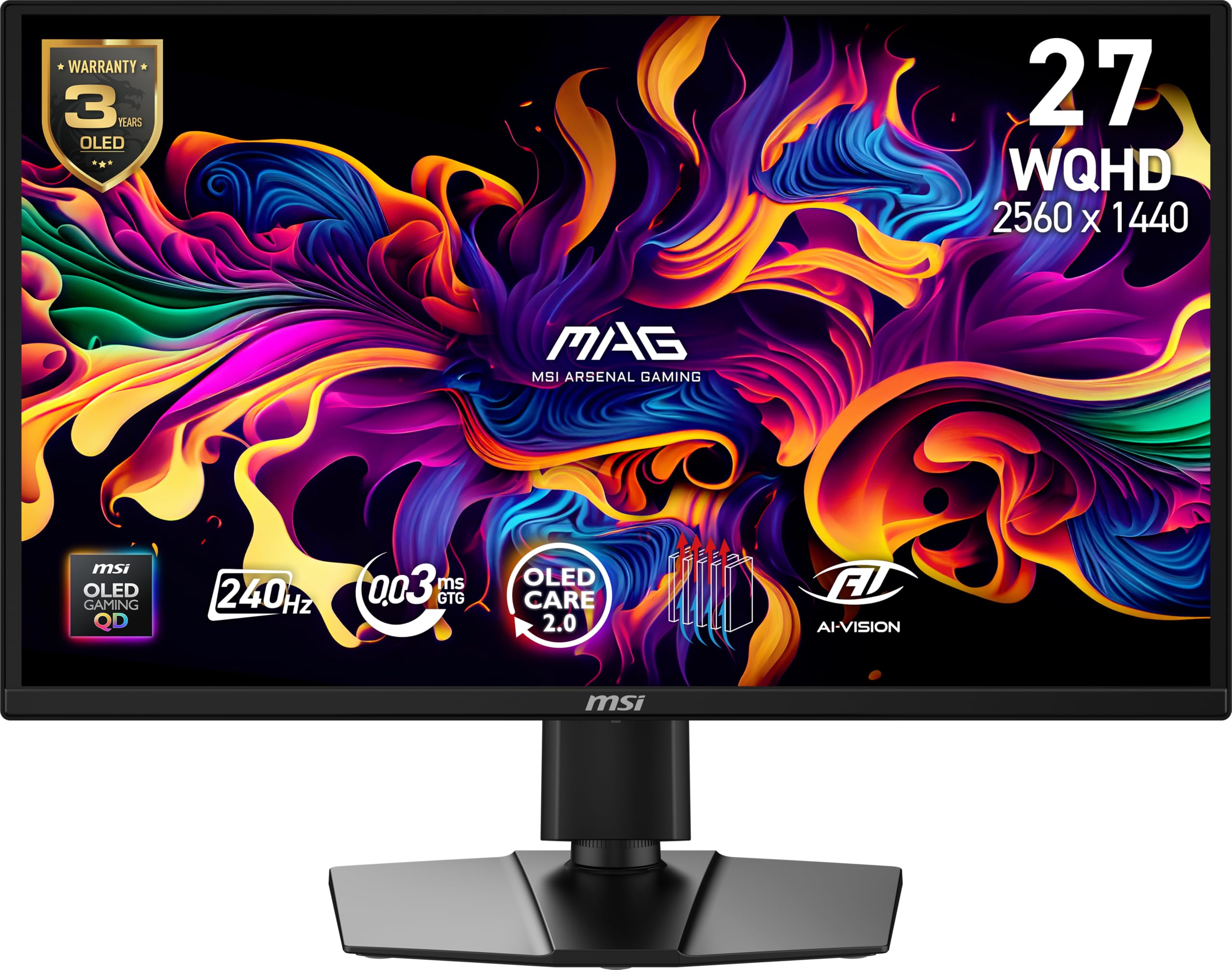
The QD-OLED entry point that punches above its price tag with glossy clarity.
This MSI MAG 272QP is the most affordable QD-OLED in the lineup, using a 27-inch WQHD (2560 x 1440) Quantum Dot OLED panel with a 240Hz refresh rate and 0.03ms response time. The glossy panel is the same type found in more expensive QD-OLEDs, meaning you get the rich color volume and deep blacks that define the technology without the matte coating that can mute highlights. Owners say it is the “Best QD-OLED monitor: perfect brightness, contrast, blacks, vivid HDR,” and the “quality far exceeds the price.”
It covers 99% of the DCI-P3 color space and has a native 1.5 million-to-one contrast ratio. MSI includes OLED Care 2.0, which runs automatically to prevent burn-in with pixel shift and panel refresh routines. The connectivity is solid — you get DisplayPort 1.4a, HDMI 2.1, and a USB-C port, all supporting up to WQHD at 240Hz. The graphene heatsink is fanless, keeping the monitor silent and cool during long sessions. Some shoppers say isolated defects like dead pixels or wake-from-sleep delays, which can happen with any OLED panel, but the overall sentiment is very positive at 4.4 stars across 115 ratings.
The main difference between this and the LG 27GX700A-B is the panel chemistry: the MSI uses QD-OLED with a glossy finish, while the LG uses WOLED with a semi-glossy matte coating. The LG has a higher refresh rate (280Hz vs 240Hz) and wider color gamut (99.5% vs 98% DCI-P3), but the MSI’s glossy QD-OLED delivers more vibrant highlights in a dark room.
What Shines
- The glossy QD-OLED panel provides vibrant HDR and deep blacks on par with much pricier monitors.
- 240Hz and 0.03ms response time eliminate motion blur for smooth gaming.
- OLED Care 2.0 and a graphene heatsink protect against burn-in with no fan noise.
- Full connectivity with HDMI 2.1, DP 1.4a, and USB-C for PC and console setups.
The Caveats
- Limited to 98% DCI-P3 — slightly less color space coverage than the LG’s 99.5%.
- Occasional QC issues reported, like dead pixels or sleep/wake instability.
- Brightness in SDR is modest; pair it with a dimmer room for best results.
Best for: buyers who want the lowest-cost QD-OLED entry point with genuine glossy panel quality and a 240Hz speed that handles competitive gaming beautifully.
skip it if: you need the absolute widest color gamut or the highest refresh rate — the LG 27GX700A-B beats it on both specs.
8. Samsung 27” Odyssey OLED G6 (G60SD) QD-OLED Gaming Monitor 360Hz

Samsung’s 360Hz QD-OLED with a dynamic cooling system that fights burn-in better than most.
The Samsung Odyssey OLED G6 (G60SD) delivers a 27-inch QD-OLED panel with a 360Hz refresh rate and a 0.03ms response time. Its standout feature is the Dynamic Cooling System — a pulsating heat pipe that diffuses heat 5x better than the graphite sheets used in older designs. This directly addresses the main cause of OLED burn-in — heat buildup — and gives the G6 a durability edge over rivals without active thermal management. The panel also has an anti-glare coating that Samsung calls Glare Free, which significantly cuts reflections without making the image look hazy.
Owners rate it at 4.3 stars across 382 ratings, with many noting the “incredible colors” and the “360Hz speed” as standouts. The monitor includes Samsung’s OLED Safeguard+ software, which uses algorithms to detect logos and taskbars and automatically dim them to prevent burn-in. The build quality is sleek — just 3.9mm at its thinnest point — and the stand is fully adjustable. Some owners point out a limitation: the monitor uses HDMI 2.0 and DisplayPort 1.4, requiring Display Stream Compression (DSC) to hit 360Hz, which can cause a brief black screen when alt-tabbing out of a game.
If you game in a bright room, the Samsung’s anti-glare coating and thermal management make it a stronger choice than the glossy QD-OLEDs from MSI or ASUS. If you alt-tab frequently, the DSC black screen might be a minor annoyance to factor in.
Why it stands out: The active heat pipe cooling and anti-glare screen make this the most practical 360Hz QD-OLED for non-dark rooms.
The quirk: HDMI 2.0 means you need DSC for 360Hz, which introduces a 1-2 second black screen when switching windows.
9. GIGABYTE MO27U2 27″ QD-OLED Gaming Monitor – UHD 3840×2160 240Hz
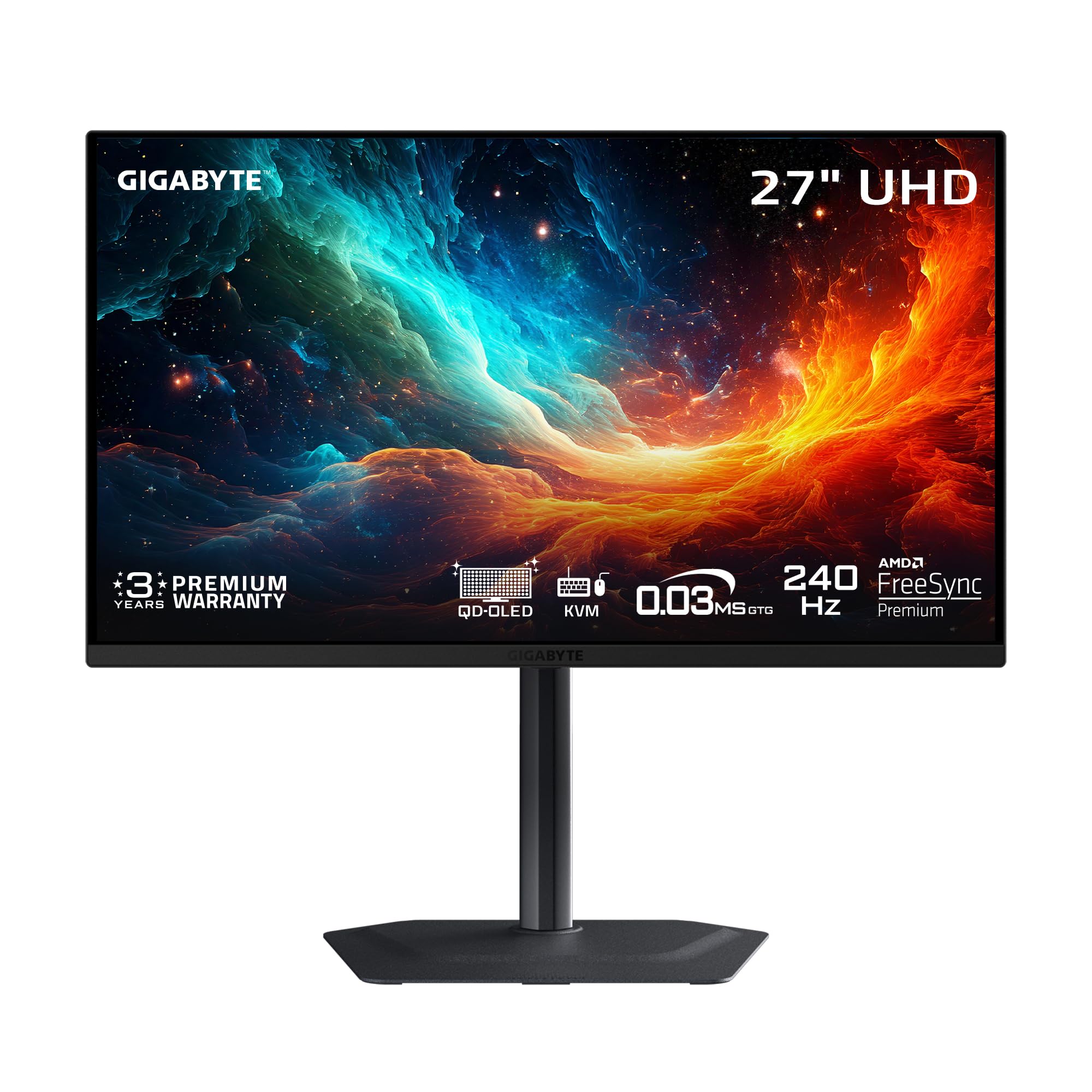
The 4K QD-OLED that packs a next-gen 5-layer tandem panel into a compact 27-inch frame.
The GIGABYTE MO27U2 is a 27-inch 4K UHD (3840 x 2160) QD-OLED gaming monitor with a 240Hz refresh rate and 0.03ms response time. It uses a next-generation 5-layer tandem OLED structure that delivers higher brightness and longer lifespan than earlier OLED generations — the panel density hits 166 PPI, making text and fine details exceptionally sharp. Owners describe the picture as “unbeatable” and a “massive visual upgrade,” with picture quality that creates a “looking through a window” effect.
GIGABYTE’s OLED Care uses an AI-based algorithm running in the background to minimize burn-in risk with minimal intrusion. The graphene thermal film and fanless four-sided ventilation design keep the monitor cool without any noise. It has a 99% DCI-P3 color gamut and a 1.5 million-to-one contrast ratio, which delivers the deep blacks and vivid highlights you expect from a premium QD-OLED. The lack of DisplayPort 2.1 is the only connectivity note — it uses HDMI 2.1 and DP 1.4, but for 4K at 240Hz, that is entirely sufficient with DSC.
With only 18 ratings so far, the sample size is small, but the early 4.8-star average is encouraging. This is a niche pick for those who want 4K resolution at 27 inches (a very sharp combination) without stepping up to a larger, more expensive 32-inch panel.
For whom: enthusiasts who want 4K sharpness in a compact 27-inch size — the 166 PPI pixel density makes text and game details look incredibly crisp.
The small caution: The rating sample is still small (18 reviews), so owner consensus at scale is not yet established.
10. Acer Predator X32 31.5″ UHD 4K Quantum Dot OLED Curved Gaming Monitor 240Hz

The 31.5-inch curved 4K QD-OLED that wraps your peripheral vision for total immersion.
The Acer Predator X32 is a 31.5-inch UHD (3840 x 2160) Quantum Dot OLED monitor with a 1700R curvature and a 240Hz refresh rate. The curve is the defining feature here: it wraps the 4K image around your field of view, creating a sense of depth that a flat panel cannot match. This is especially effective in racing games, flight sims, and open-world RPGs where peripheral awareness adds to the experience. The 0.03ms response time ensures no motion blur, despite the large screen size.
It covers 99% of the DCI-P3 color gamut (the wide color space used in movies) and is VESA DisplayHDR True Black 400 certified (a standard for deep blacks and bright highlights). Owners note that the “true blacks make it look absolutely unreal” and that the “clarity and brightness are phenomenal.” The stand is fully adjustable with tilt, swivel, and height options, making it easier to find a comfortable position given the 31.5-inch size. The built-in speakers are present but described as weak — you will want external speakers or a headset for a quality audio experience. The only recurring owner complaint is an on-screen prompt that appears every couple of hours, reminding you to run a pixel refresh cycle.
At 4.3 stars from 30 ratings, it is a niche pick for those who specifically want a curved 4K OLED at a high refresh rate. The price sits at the higher end of this guide, but the curved format offers a genuine cinematic alternative to the flat panels that dominate the market.
Best for: rich single-player gaming and media consumption — the 1700R curve (a gentle bend that wraps around your field of view) combined with 4K QD-OLED is a spectacle for story-driven titles.
The caveat: The periodic pixel refresh prompt can be annoying if you are in the middle of a session, and the built-in speakers are not worth using.
Understanding the Specs
Panel Technology: WOLED vs. QD-OLED
WOLED (white OLED) uses a white subpixel with color filters to create the image. It excels at delivering pure black and handles bright room lighting better without color shifts. QD-OLED adds a quantum-dot layer for wider color volume and often higher peak HDR brightness, making it the choice for dark-room HDR enthusiasts. The difference is most visible in HDR content — QD-OLED can show more saturated reds and greens, while WOLED maintains black purity in any lighting condition.
Refresh Rate and Response Time
Refresh rate, measured in hertz (Hz), tells you how many times per second the screen refreshes with a new image. 240Hz updates 240 times per second, which feels extremely smooth. 360Hz pushes that further, making motion in fast-paced games look almost liquid. Response time (measured in milliseconds) is how quickly a pixel changes color — OLEDs manage 0.03ms GtG, which is effectively instant and completely eliminates motion blur and ghosting for a clear picture in fast motion.
VESA DisplayHDR True Black
This certification specifically covers OLED and other emissive display technologies. It ensures the monitor can achieve a specific minimum brightness (400, 500, or 600 nits) at a 10% window while maintaining true black levels with zero bloom. A True Black 400 rating means the black level is 0.0005 nits or lower while hitting at least 400 nits brightness. This standard directly quantifies the HDR performance that makes OLED special.
Burn-in Prevention and Warranty
Burn-in (permanent image retention) happens when static elements like taskbars or HUDs (heads-up displays in games) are displayed for thousands of hours. Modern OLED monitors fight this with pixel refresh cycles, logo detection (dimming static areas), screen savers, and orbiters (shifting the image slightly). A warranty that explicitly covers burn-in for 2-3 years is a strong protection. Without it, burn-in is generally not covered under standard warranties. Brands like ASUS, MSI, Alienware, and LG are competitive on this front. This is the single best investment for long-term confidence with an OLED monitor.
FAQ
Is 240Hz enough or do I need 360Hz for a budget OLED monitor?
Will a budget OLED monitor work well with my PlayStation 5 or Xbox Series X?
Should I get a matte or glossy OLED monitor?
How do I prevent burn-in on a budget OLED monitor?
Is a 4K budget OLED monitor worth it over 1440p?
What is the difference between WOLED and QD-OLED in plain terms?
Will a budget OLED monitor suffer from text fringing for productivity work?
Which budget OLED monitor has the best warranty coverage?
Can I use a budget OLED monitor for photo or video editing?
What cables come with these budget OLED monitors?
Final Thoughts: The Verdict
For most buyers, the clear winner among the budget oled monitor options is the LG 27GX700A-B because it delivers a 280Hz refresh rate, 99.5% DCI-P3 color gamut, VESA DisplayHDR True Black 500 certification, and a highly adjustable stand — all at a price that undercuts competitors while out-specing many of them. If you want the absolute best glossy WOLED clarity and a 3-year burn-in warranty, grab the ASUS ROG Strix XG27AQDMG. And for competitive gamers who need 360Hz speed, the Alienware AW2725DF or the ASUS ROG Strix XG27ACDNG are the ones to reach for.
How We Picked
We do not accept paid placement. Every pick is matched to a real buyer and a real use-case; we do not hands-on test units.
Sources & Methodology
Specifications: manufacturer listings and product documentation. Review insights: verified customer reviews, as of July 2026. Pricing: not shown on this page (it changes often); check the current price via the retailer link.
As an Amazon Associate, FitlyFast earns from qualifying purchases. This does not affect which products we feature.