
Our readers keep the lights on and the weekend projects moving. As an Amazon Associate, I earn from qualifying purchases.
Specs are compiled from manufacturer listings and verified buyer reviews and can change over time — please confirm the key details on the product page before buying.
When you are shopping for budget RAM, the real puzzle is getting more speed or capacity without watching your build budget go up in smoke. The catch is that even a cheap stick needs to be stable—the lowest-priced module that crashes your system is no bargain at all. The picks here cut through the spec-spreadsheet noise to memory sticks that actually deliver on their promise without costing a fortune.
I’m Rikta—the writer behind FitlyFast. This guide is built on the manufacturers’ published specifications and patterns in verified customer reviews, so you get each pick’s real strengths and trade-offs instead of marketing spin.
We focused on DDR4 kits between 16GB and 32GB, at speeds from 2400MHz up to 3600MHz, to find the best value sticks you can buy today. Here is your shortlist of the best budget ram worth your money.
Our Picks at a Glance


How To Choose The Best Budget RAM
Memory is one of the simplest parts of a PC to upgrade, but grab the wrong type or speed and you leave performance sitting on the table. Here is what really matters when you are shopping on a tighter budget.
Form Factor First (DIMM vs SO-DIMM)
This is the rule you cannot break: desktop motherboards use DIMM (dual in-line memory module) sticks with 288 pins, while laptops use SO-DIMM (small outline dual in-line memory module) sticks with 260 pins. They are physically different sizes and cannot swap. Check your machine’s manual before you click “buy.”
Speed vs Latency — The Real Trade-Off
A higher MHz number moves data faster, but a lower CL (CAS Latency, or Column Address Strobe Latency) number means the stick responds quicker once you ask for data. Budget kits tend to balance this with CL22 at 3200MHz—fine for most builds. If you see a kit with CL16 at the same speed, that is genuinely snappier, but it usually costs a little more.
Kit vs Single Stick
A 2-module kit (like 2x8GB) can run in “dual-channel mode”—both sticks work at the same time to double the data pipe to your CPU. A single 16GB stick costs less, but you lose that dual-channel boost, which hits performance in games and multitasking. For a new build, always prefer the 2-stick kit.
Quick Comparison
| Model | Best For | Speed | CAS Latency | Form Factor | Amazon |
|---|---|---|---|---|---|
| Timetec 16GB DDR4 2400MHz★ Best Overall | Desktop Upgrade | 2400 MHz | CL17 | DIMM (288-pin) | Amazon |
| Silicon Power 16GB 3200MHz Kit (2x8GB)Also Great | Budget Performance | 3200 MHz | CL22 | DIMM (288-pin) | Amazon |
| G.SKILL Ripjaws V 16GB Kit (2x8GB) 3200MHzTop Performer | Gaming Desktop Build | 3200 MHz | CL16 | DIMM (288-pin) | Amazon |
| A-Tech 16GB DDR4 2400MHz SODIMM | Laptop Upgrade | 2400 MHz | CL17 | SO-DIMM (260-pin) | Amazon |
| A-Tech DDR4 16GB 2666MHz SODIMM | Mid-Speed Laptop Build | 2666 MHz | CL19 | SO-DIMM (260-pin) | Amazon |
| TEAMGROUP Elite 16GB Kit (2x8GB) 3200MHz | Reliable Desktop Kit | 3200 MHz | CL22 | DIMM (288-pin) | Amazon |
| TEAMGROUP T-Force Vulcan Z 16GB Kit (2x8GB) 3200MHz | Reliable AMD/Intel Build | 3200 MHz | CL16 | DIMM (288-pin) | Amazon |
| G.SKILL Trident Z RGB 16GB Kit (2x8GB) 3600MHz | High-Performance RGB Build | 3600 MHz | CL18 | DIMM (288-pin) | Amazon |
| CORSAIR Vengeance LPX 16GB Kit (2x8GB) 3200MHz | Compact & Cool Gaming Build | 3200 MHz | CL16 | DIMM (288-pin) | Amazon |
In‑Depth Reviews
1. Timetec 16GB DDR4 2400MHz (PC4-2400T) UDIMM
The perfect fix for an older desktop that needs a single-stick capacity boost.
This Timetec module is a single 16GB stick at 2400MHz with CL17 timings. For an older PC that only has two RAM slots and is maxing out, dropping this in is a no-brainer upgrade. Buyers report that it “worked beautifully” when one of their motherboard slots died—they replaced two 8GB sticks with this single 16GB module and the “BIOS recognized it, Win10 Pro recognized it” with “zero problems since.” Performance is the most-praised aspect, followed by memory quality. It is also noted for running video editing apps smoothly.
The major limitation is the speed: it runs at 2400MHz, while the faster kits run at 3200MHz. That matters for gaming and creative work but is perfectly fine for office tasks, web browsing, and general multimedia. Also, it is a single stick, so you miss out on dual-channel performance. If your motherboard is limited to 2400MHz anyway, this is a smart, affordable upgrade.
Reach for this if: You need a quick, cheap capacity boost in an older desktop that only supports up to 2400MHz DDR4.
pass on it if: You want the fastest possible performance for gaming or are building a new system from scratch.
2. Silicon Power DDR4 16GB Kit (2x8GB) 3200MHz
the balance between price and speed for most desktop builders.
This two-stick 16GB kit runs at 3200MHz, which makes your system feel noticeably quicker without costing what a premium set does. The CL22 timing (CAS Latency of 22 clock cycles) is the standard for budget DDR4—it is not the absolute fastest, but it runs right from the start without needing to mess with BIOS settings. Buyers report it “works out-of-box without XMP” and “matches Gskill speed” for a fraction of the price. That means you get dual-channel performance (both sticks working together to double the data pipe to your CPU) at 1.2V, so it runs cool and efficient. With over 700 ratings, functionality is the most-praised aspect, and value for money comes second.
The trade-off is that this kit does not have fancy metal heatsinks, so overclocking headroom is minimal. If you want to push your memory to the limit, look higher—but if your goal is straight-up faster performance for everyday use and gaming, this is the one.
Why it wins
- 3200MHz speed for a budget-friendly price
- Dual-channel 16GB kit (2x8GB) ready to go without tweaking
- Low 1.2V voltage for less power draw
Know before you buy
- CL22 latency is not the fastest; CL16 kits are snappier
- No heatsinks or fancy extras for overclocking
Grab this if: You want the best blend of speed and low cost for a new or upgraded desktop, no BIOS fussing required.
Look elsewhere if: You are overclocking your RAM to the max or need RGB lighting.
3. G.SKILL Ripjaws V Series 16GB Kit (2x8GB) 3200MHz CL16
The enthusiast’s choice for tight timings without paying premium prices.
Where the Silicon Power kit runs at CL22, this G.SKILL set runs at CL16—a noticeably faster response time that matters in games, photo editing, and any task that pounds the memory. This 16GB kit (2x8GB) is rated for 3200MT/s (megatransfers per second) at just 1.35V, and it includes an Intel XMP (Extreme Memory Profile) so you can enable full speed in the BIOS with a single toggle. Owners mention it works “from the start” and that enabling XMP “get[s] full speeds” easily. Reliability is the most-praised aspect with well over 200 mentions, followed by memory quality—a rare double-check that this is a safe, fast choice.
The catch is that you do have to enable XMP in the BIOS to get that CL16 at 3200MHz—at default JEDEC (Joint Electron Device Engineering Council) settings it will boot slower. That is standard for any performance memory, but it is worth knowing if you are a beginner. With nearly 6,000 ratings, this is the most-trusted budget-performance pick on the list.
The performance edge: At CL16 vs CL22 on the Silicon Power kit, this stick shaves multiple clock cycles off every memory request—you will feel it in loading times and smoothness.
Pick this for: Gaming or creative work where every millisecond counts, and you are comfortable flipping on XMP.
Think twice if: You want truly plug-and-play with zero BIOS interaction—that is better left to the standard CL22 kits.
4. CORSAIR Vengeance LPX 16GB Kit (2x8GB) 3200MHz CL16

The low-profile king that fits small cases and big coolers alike.
At just 34mm tall, this Vengeance LPX kit slides under even the bulkiest air CPU coolers—a real pain point for builders who find tall RAM blocks the first fan. It runs at 3200MHz with CL16-20-20-38 timings at 1.35V, and the solid aluminum heat spreader keeps things cool under load. Buyers consistently mention that enabling XMP gets them the full 3200MHz speed for a snappy, stable gaming experience, with compatibility and stability each earning significant praise. The 34mm height means zero clearance issues with large air coolers—a quiet but major win for compact or mini-ITX builds.
The slight downside is that like any performance stick, you need to enable XMP in the BIOS to hit the advertised 3200MHz—from the start it runs at a slower JEDEC default. The reward is a kit with hand-sorted chips that has generous overclocking headroom. With nearly 6,000 ratings, this is the most popular high-quality option on the list.
Low-profile advantage: The 34mm height means zero clearance issues with large air coolers—a quiet but major win for compact or mini-ITX builds.
Ideal for: Small-form-factor PCs where every millimeter counts, and for gamers who want a reliable, cool-running kit with proven stability.
Not if: You prefer a single stick to save money—this kit’s magic is the dual-channel performance.
5. G.SKILL Trident Z RGB 16GB Kit (2x8GB) 3600MHz CL18
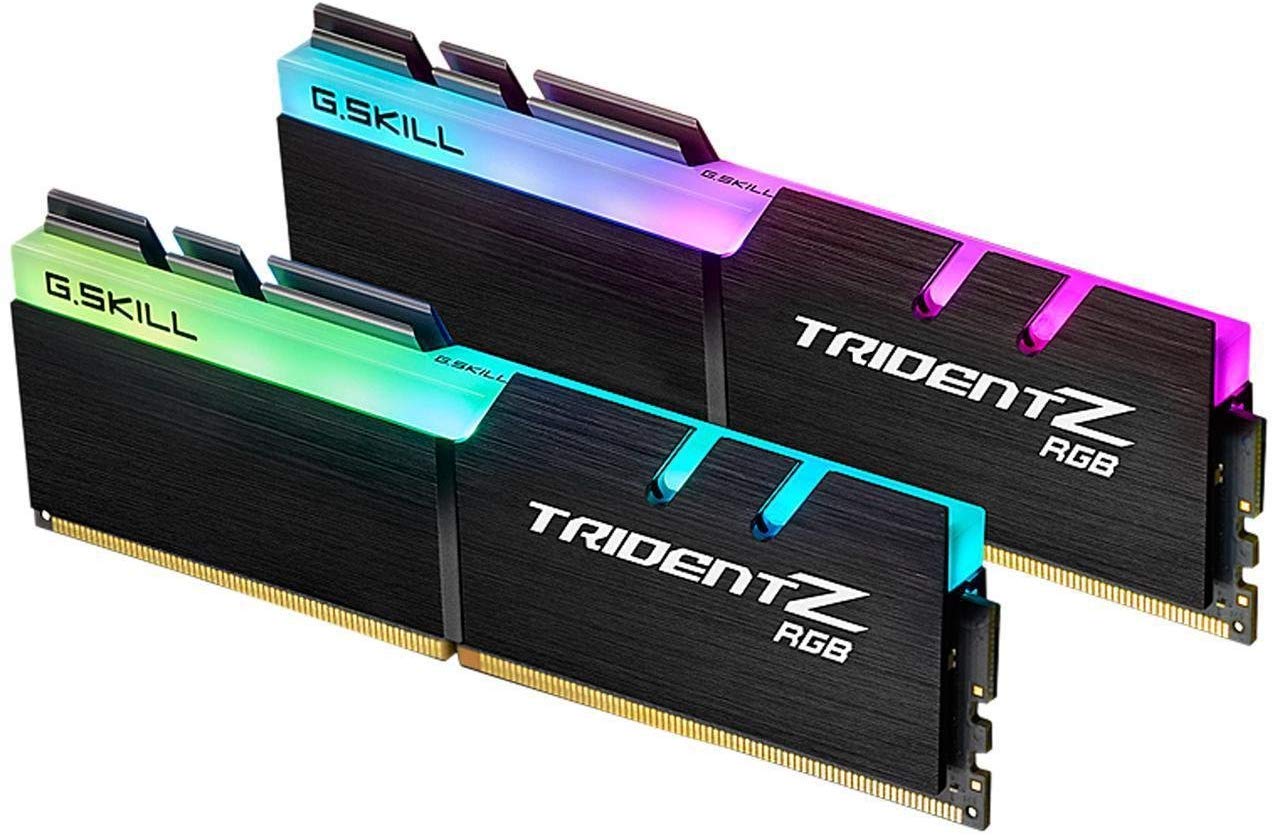
The fastest speed on this list with a dazzling light show to match.
This is the only kit here that breaks the 3200MHz barrier—it is rated for 3600MT/s at CL18-22-22-42 and 1.35V. For a Ryzen build, that 3600MHz balance is a particular performance sweetener because the CPU’s internal fabric (Infinity Fabric) locks to the memory speed. The RGB (Red-Green-Blue) lighting on the Trident Z modules is fully customizable, and customers note the RAM is “still working 2 years later” and that enabling DOCP (Direct Overclock Profile, the AMD version of XMP) was a breeze. Reliability is the top praise, with over 200 positive mentions, and memory quality is a close second.
The honest limit is that some reviewers point out needing to tweak settings to hold 3600MHz stable—a few systems only reach 3200MHz. That is normal for high-speed memory, but it means the Silicon Power or Teamgroup kits are more simple to use. For the price, this is a premium option that earns its spot for enthusiasts.
Best for Ryzen: The 3600MHz speed syncs perfectly with AMD’s Infinity Fabric for a performance bump that slower kits cannot match.
Choose this for: A high-end build with a Ryzen CPU and a side window to show off those RGB lights.
skip it if: You want a simple drop-in upgrade without touching BIOS settings—the CL22 kits are more forgiving.
6. TEAMGROUP T-Force Vulcan Z 16GB Kit (2x8GB) 3200MHz CL16

The reliable workhorse that gets out of your way and just works.
With CL16 timings at 3200MHz and a rated speed of PC4-25600, this kit delivers the same snappy performance as the G.SKILL and Corsair options but often at a slightly lower price point. The aluminum heat spreaders do a solid job keeping temperatures in check, and the low-profile gray design is no-fuss—no RGB lighting to manage. Buyers highlight that it “just works” and that adding a second kit to an existing pair matched perfectly, running at advertised speeds. Installation is praised for the satisfying click as each module locks into place. With over 6,000 ratings, this is among the most popular and best-reviewed kits overall.
The main concession is the plain aesthetic—no flashy lights, just a simple gray heat spreader. The build quality and speed are top-notch for the price. This is the pick for anyone who wants CL16 without paying the RGB tax.
Why it’s a staple: The CL16 speed and thermal adhesive that bonds the heat spreaders make it a safe, cool-running choice for any modern desktop.
Great for: Gamers and builders who want reliable CL16 performance without the premium RGB tax.
Not for: Anyone who wants their RAM to be a visual centerpiece—these are subtle.
7. TEAMGROUP Elite DDR4 16GB Kit (2x8GB) 3200MHz CL22

The tightest budget kit that still hits the 3200MHz mark.
If you want dual-channel 3200MHz at the lowest possible cost, this Teamgroup Elite kit is the ticket. It is a 16GB kit (2x8GB) with CL22-22-22-52 timings at 1.2V, which is the standard JEDEC spec for 3200MHz DDR4. That means it hits your rated speed automatically without needing to enable XMP—a real advantage for beginners or anyone using a motherboard with limited BIOS options. Shoppers say it runs “butter smooth at 3200MHz” and that doubling memory made their machine “smooth out and purr like a kitten.” Performance and value for money are the top aspects.
The trade-off is that CL22 is not as fast as CL16, so if you are gaming competitively or rendering video, you might feel the difference. For everyday use, office work, and even most gaming, this is a bargain that gets the job done. The Elite line is all about no-frills reliability, and with a lifetime warranty, it is a safe bet.
No BIOS needed: Because the 3200MHz at CL22 is JEDEC standard, this RAM runs at full speed from the moment you boot—no XMP required.
Best for: Entry-level builds, office PCs, or anyone who wants 16GB of 3200MHz RAM with zero setup hassle.
Avoid if: You are building a high-FPS gaming rig where every single clock cycle of latency matters.
8. A-Tech 16GB DDR4 2400 MHz SODIMM
A simple, budget-friendly boost for an older laptop that is feeling sluggish.
This A-Tech module is among the most straightforward laptop memory upgrades you can do. It is a single 16GB DDR4 SO-DIMM (small outline dual in-line memory module) stick with 260 pins, running at 2400MHz with CL17 latency. Owners mention it made their laptop “sooo much faster” and that installation was as easy as watching a quick YouTube video—the computer “detected size change” and configured itself automatically. Reliability and speed are the top praised aspects, and with 465 ratings it has a solid track record.
A few buyers mention that compatibility can be tricky—it works great in many laptops but is not universal, so check your model. At 2400MHz, it is not the fastest available, but for a laptop from a few years ago that originally came with 8GB, this is an enormous performance upgrade. Just remember: this is a SO-DIMM for laptops, not a desktop DIMM.
Ideal for: Reviving an older laptop that supports DDR4 up to 2400MHz—this will make it snappy again.
Check first: Verify your laptop’s maximum supported RAM capacity and that it uses SO-DIMM memory, not desktop DIMM.
9. A-Tech DDR4 RAM 16GB 2666MHz SODIMM
A step up in speed for newer laptops that support 2666MHz.
If your laptop supports the faster 2666MHz standard, this A-Tech SO-DIMM stick delivers a noticeable bump over the 2400MHz options. It is a single 16GB module with CL19 timings, operating at the JEDEC standard 1.2V. Customers note it made their old Dell “run like its new” and call it a “wonderful cost effective upgrade” that is “very simple, quick, and easy.” Performance and memory quality are the two most-praised aspects, with value for money a strong third.
A small number of buyers had compatibility issues with certain laptops (like the Asus GX502G) where the system failed to boot. That is rare but worth noting—double-check your model’s memory specs. This is a low-power, single-stick upgrade that is a perfect fit for a laptop or mini PC needing a capacity boost without the complexity of a dual-channel kit.
Best for: Laptop, All-in-One, or Mini PC owners who know their system supports 2666MHz DDR4 and need 16GB of dependable memory.
One caveat: A few laptops are picky—verify your system’s memory form factor and maximum capacity before buying.
Understanding the Specs
MHz — The Speed Limit
Think of MHz as the data-lane speed. A 3200MHz stick runs at 3200MHz, while a 2400MHz stick runs at 2400MHz, so games load faster and multitasking feels smoother with the higher speed. For basic browsing and office work, the difference is much less noticeable.
CAS Latency — The Reaction Time
CL (CAS Latency, or Column Address Strobe Latency) is the number of clock cycles it takes for the RAM to respond to a request. A lower number is faster—CL16 versus CL22 means the stick gets to work on your data sooner. It is measured in nanoseconds, not MHz, so a 3200MHz CL22 kit and a 2400MHz CL17 kit can actually perform very similarly depending on the task.
DIMM vs SO-DIMM — The Physical Fit
DIMM (dual in-line memory module) with 288 pins is the long stick that goes into a desktop motherboard. SO-DIMM (small outline dual in-line memory module) with 260 pins is the shorter stick used in laptops, mini PCs, and some all-in-ones. They are not electrically different, but they physically cannot fit in the wrong slot.
XMP — The Speed open up
XMP (Extreme Memory Profile) is a setting in your BIOS that tells the RAM to run at its advertised speed. Without enabling XMP, many 3200MHz and 3600MHz kits will default to a slower 2133MHz or 2400MHz JEDEC speed. It takes just a few clicks once you are in the BIOS setup screen.
FAQ
Will 3200MHz RAM work on a motherboard that only supports up to 2400MHz?
Can I mix different brands or speeds of RAM in the same computer?
What does CL16 vs CL22 mean for real-world gaming?
How much RAM do I actually need for gaming in 2025?
Is a single 16GB stick better than two 8GB sticks?
How do I check what type of RAM my laptop uses?
Does budget RAM come with a warranty?
What is the difference between ECC and Non-ECC memory?
Will upgrading my laptop’s RAM void the warranty?
Final Thoughts: The Verdict
For most people, the winner of the budget ram search is the Silicon Power 16GB 3200MHz Kit because it delivers fast dual-channel performance at a price that makes higher latency kits seem overpriced. If you want the absolute best response time for gaming on a budget, grab the G.SKILL Ripjaws V CL16. And for anyone building a compact, quiet system that fits under a large cooler, the CORSAIR Vengeance LPX is the one to reach for.
How We Picked
We do not accept paid placement. Every pick is matched to a real buyer and a real use-case; we do not hands-on test units.
Sources & Methodology
Specifications: manufacturer listings and product documentation. Review insights: verified customer reviews, as of July 2026. Pricing: not shown on this page (it changes often); check the current price via the retailer link.
As an Amazon Associate, FitlyFast earns from qualifying purchases. This does not affect which products we feature.