
Our readers keep the lights on and the weekend projects moving. As an Amazon Associate, I earn from qualifying purchases.
Specs are compiled from manufacturer listings and verified buyer reviews and can change over time — please confirm the key details on the product page before buying.
You want your PC to glow with stunning RGB lighting, but you also need it to stay cool and quiet—without spending a lot. The problem is that many cheap fans are noisy, push barely any air, or have dim, flickering LEDs. This guide picks the ones that actually balance bright lighting, solid cooling, and a quiet hum.
I’m Rikta — the writer behind FitlyFast. This guide compares published specs and patterns from verified customer reviews, so you get each pick’s real strengths and trade-offs instead of marketing spin.
The focus here is on packs that deliver genuine value. You do not have to sacrifice performance to light up your case with the best budget rgb fans that actually cool well and stay quiet under load.
Our Picks at a Glance

How To Choose The Best Budget RGB Fans
Picking the right budget-friendly illuminated fan pack means balancing airflow, noise, and lighting quality while keeping the cost down. Here are the key specs to look for.
Static Pressure vs. Airflow (CFM)
Airflow, measured in Cubic Feet per Minute (CFM), tells you how much air the fan moves in an open space. That spec is most relevant when the fan is used as a case intake or exhaust with unrestricted mesh. Static pressure, measured in mmH2O (millimeters of water), measures the fan’s ability to push air through obstacles like a dense radiator fin stack or a fine dust filter. For most all-in-one liquid cooler radiators, a higher static pressure rating is what keeps your CPU cool—raw CFM matters less when the path is blocked. A budget fan that lists both numbers gives you the full picture.
PWM and RPM Range
PWM (Pulse Width Modulation) is a 4-pin connection that lets your motherboard or a fan controller automatically adjust the fan speed based on temperature. A wide RPM range—say from 700 RPM up to 3000 RPM—gives you the flexibility to run silent at idle (low RPM) and blast full speed when the CPU is under heavy load. Fans with a narrower range or only a 3-pin connector lack that fine control and may run at a fixed, louder speed all the time.
Bearing Type and Noise
The bearing inside the fan hub determines how long it lasts and how much noise it makes. Fluid Dynamic Bearings (FDB) are the quietest and most durable option at this price tier—they use a thin layer of oil to reduce friction and wear, which keeps the fan running smoothly for years without developing a rattle. Noise is measured in decibels (dBA); at idle, anything under 25 dBA is essentially silent, while under 30 dBA it is still quiet enough for most environments.
ARGB Lighting and Control
ARGB (Addressable RGB) lets you control each LED individually, producing smooth color transitions and chasing effects instead of a single static color. These fans use a 3-pin 5V ARGB header that syncs with your motherboard’s lighting software (like ASUS Aura Sync, MSI Mystic Light, or Gigabyte RGB Fusion). Some packs include a separate controller box if your motherboard lacks an ARGB header, which is a big plus for older builds.
Quick Comparison
| Model | Best For | Max RPM | Airflow (CFM) | Noise (dBA) | Amazon |
|---|---|---|---|---|---|
| ARCTIC P12 Pro A-RGB★ Best Overall | High static pressure on radiators | 3000 RPM | 77 | — | Amazon |
| ID-COOLING XF-12025-ARGB-TRIOSilent Runner | Silent ultra-budget builds | 1500 RPM | 62 | 26.4 | Amazon |
| Thermalright TL-M12Q X3 | Daisy-chain simplicity with strong airflow | 2000 RPM | 68.9 | 28.2 | Amazon |
| Thermalright TL-M12Q-S X3 | Illuminated blades and infinity mirror look | 2000 RPM | 68.9 | 28.2 | Amazon |
| Corsair RS120-R ARGB | Reverse-blade intake with visible RGB | 2100 RPM | 65.8 | 34.6 | Amazon |
| AsiaHorse COSMIQ | Music-sync RGB with included controller | 2000 RPM | 68.5 | 29 | Amazon |
| ASUS Prime MR120 ARGB | Near-silent operation and thick-frame cooling | 1600 RPM | — | 21 | Amazon |
In‑Depth Reviews
1. ARCTIC P12 Pro A-RGB – 3 Pack
This fan spins all the way to 3000 RPM and pushes through dense radiator fins without struggling.
If you are cooling a dense radiator or a case with very fine mesh panels, you need static pressure (the ability to push air through resistance)—and the ARCTIC P12 Pro delivers 77 CFM (Cubic Feet per Minute) of airflow with a high static pressure of around 7 mmH2O (millimeters of water) that punches through obstructions where other budget fans stall. Buyers report that the high static pressure is excellent for dense radiators in a small ITX (a compact motherboard standard) case—it moves astonishing amounts of air even when the path is blocked.
The 4-pin PWM (Pulse Width Modulation) control lets you dial the speed from 600 RPM all the way to 3000 RPM, and below 5% PWM the fan stops completely for a true zero-RPM silent mode. That is a full 50% more top-end speed than the Thermalright TL-M12Q X3 (2000 RPM), giving you an emergency gear when CPU temperatures spike. The fluid dynamic bearing keeps the noise low at idle, though owners find the sound “noticeable” past 70% speed—but that is the sound of serious airflow, not a rattle. The larger hub and outer ring design hides the individual LEDs for a smooth, diffused glow, and it integrates with any standard ARGB control software without needing a proprietary app.
What wins people over
- Extreme 3000 RPM delivers class-leading headroom for heavy loads
- True zero-RPM mode below 5% PWM for dead-silent idle
- High static pressure confirmed by owners for dense rads
- Works with open-source FanControl and SignalRGB—no proprietary lock-in
The trade-off
- Audible at high speeds from 70% onward (expected for this airflow)
- Short cables may need extension cables for routing
Reach for these if: you are mounting on a radiator and need the high static pressure and raw speed to keep a hot CPU cool under load.
Look elsewhere if: you prioritize absolute silence at all speeds—the top-end noise at 3000 RPM is a fact, not a flaw.
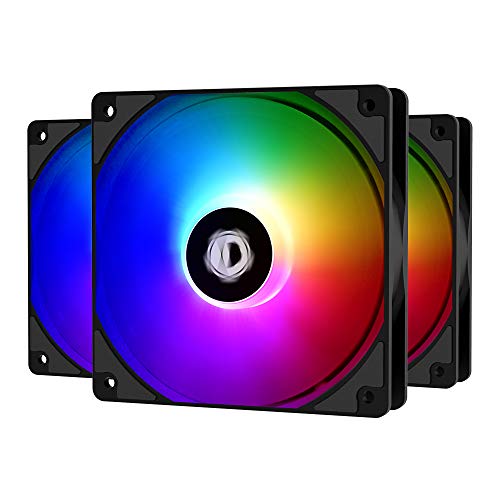
2. ID-COOLING XF-12025-ARGB-TRIO 3 Pack
At just 26.4 dBA (decibels), these are noticeably quieter than the Thermalright TL-M12Q X3 (28.2 dBA)—perfect if you need near-silence.
These fans run at a modest 1500 RPM maximum, making them the go-to choice for anyone who wants their PC nearly silent during everyday use. The “vibrant ARGB, 1500 RPM, quiet fluid dynamic bearings, easy install with rubber pads” is what buyers consistently report, and the noise level is the most-discussed positive aspect—over 40 owners call it out specifically.
The airflow of 62 CFM is lower than the ARCTIC P12 Pro’s 77 CFM (a 24% gap), so these are best suited for unrestricted case intake or exhaust rather than thick radiators. The 3-pin ARGB (Addressable RGB) connector syncs with your motherboard’s 5V header for smooth color transitions, and the fan blades have a built-in light diffuser that spreads the glow evenly. One thing to be aware of: the ARGB plugs are a little chunky and may not fit tightly on all hubs, and a very small number of units have shown bearing noise after extended use. For the price, the bright RGB, quiet operation, and solid build quality make this a fantastic starter pack.
Sound-first design: If a silent office PC or a media-center build is your goal, the ID-COOLING XF-12025-TRIO lets you light up the case without hearing the fans. The trade-off is the lower CFM—do not bank on these for a high-performance radiator.
Who it fits: budget-conscious builders who want bright RGB and near-silent operation in a standard case with open mesh.
The one caution: the chunky ARGB connector can be tight on some hubs, and a tiny fraction of units develop bearing noise—inspect yours early.
3. Thermalright TL-M12Q X3 3-Pack

Daisy-chain wiring (connecting fans in a series) makes cable management a breeze while pushing 68.9 CFM of strong airflow.
The “strong airflow up to 2000 RPM, quiet, PWM control, dual-sided infinity mirror ARGB, solid build with fluid dynamic bearings, easy daisy-chain install” is the exact chorus owners sing about the Thermalright TL-M12Q X3. At 68.9 CFM, it moves significantly more air than the ID-COOLING XF-12025-TRIO (62 CFM) and does it at 2000 RPM—a 33% higher top speed than that quieter fan. The dual-sided infinity mirror effect creates a deep, layered look in glass-panel cases that standard edge-lit fans cannot match.
the strength here is the daisy-chain wiring. Instead of running individual PWM and ARGB cables for each fan, you click them together in a chain and connect one set to the motherboard. That makes cable management much cleaner, especially in builds with three front intake fans. The caveat, and owners are upfront about it, is that daisy-chaining forces all three fans in the chain to run at the same speed and RGB pattern—you cannot individually control fan #3 separately from fan #1 without a separate hub. Still, the value-for-money is the top-rated aspect (49 mentions), making this a standout in the mid-range tier.
The strengths
- Strong 68.9 CFM at a reasonable 28.2 dBA
- Infinity mirror ARGB looks premium from every angle
- Daisy-chain keeps cables tidy and build time short
- Fluid dynamic bearings for long-term reliability
The limitation
- No individual fan control—the whole chain is one zone
- Needs an extra dongle if you want a 2+1 split setup
Perfect for: a clean, symmetrical build where you want all intake or all exhaust fans matched, with minimal visible wiring.
Think twice if: you need independent fan curves or RGB effects for separate zones in one case.
4. Thermalright TL-M12Q-S X3 3-Pack
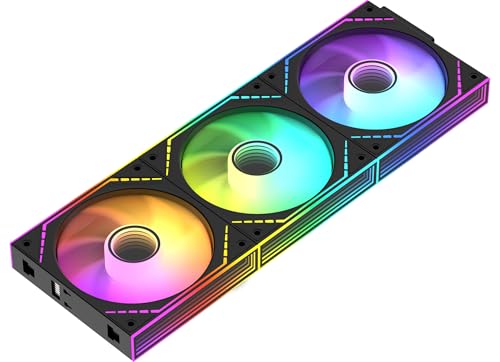
The same 68.9 CFM airflow as the TL-M12Q X3, but with illuminated fan blades for a fuller, more rich glow.
Think of the TL-M12Q-S X3 as the visual upgrade to the standard TL-M12Q X3. It shares the same core specs—68.9 CFM airflow at 2000 RPM, 2.21mmH2O static pressure, and a 28.2 dBA noise floor—but adds ARGB lighting directly on the fan blades themselves. The dual-sided infinity mirror ring on the frame plus the center-lit blades means the entire fan face glows, not just the outer ring. Owners call them “quiet and effective at lowering temperatures by almost 10°C” in their cases.
The daisy-chain connections work the same way, keeping wire clutter low. The installation process is straightforward, though the daisy-chain design does require all connected fans to share one orientation—they all have to face the same direction. The 4-pin PWM control lets your motherboard handle the speed curve smoothly. At this price point, the build quality (the #1 positive mention) and the near-silent operation at lower speeds make this a strong candidate for a budget-midrange build where appearance matters as much as cooling.
Visual edge: If you want your fans to be the centerpiece of a glass-side-panel build, the TL-M12Q-S X3 delivers the deepest look with its blade lighting. The trade-off is that you cannot mix orientations in one daisy-chain—plan your intake and exhaust layout before installing.
Best suited for: anyone who wants a bright, rich RGB look and does not need separate fan speeds for each position.
One downside to know: cable management gets mixed feedback from owners—the included adapters cover groups of fans, not individual ones.
5. Corsair RS120-R ARGB 3-Pack
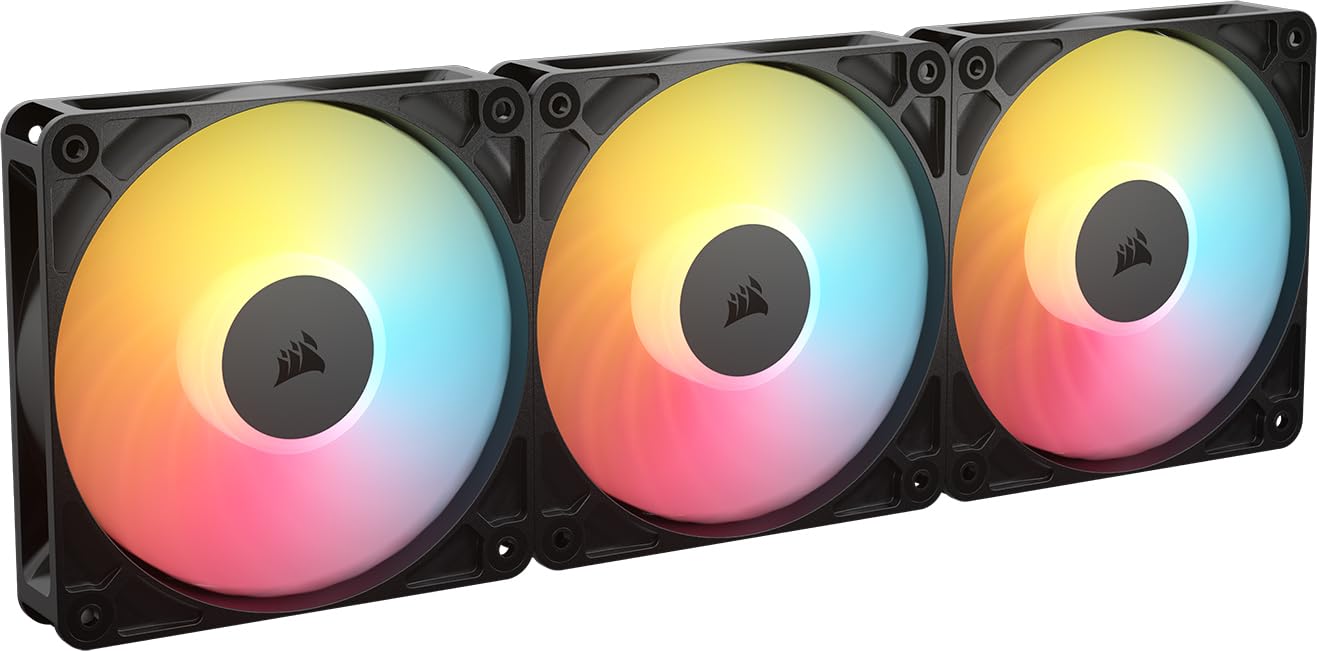
A reverse-blade design (spins backward to intake air) that shows off full RGB from inside the case—no ugly hub facing inward.
Standard intake fans hide their RGB lighting because the un-lit back of the hub faces into the case. The Corsair RS120-R ARGB solves that with a reverse rotor design: the fan spins backward to pull air in while keeping the fully lit side visible through your glass panel. The eight ARGB (Addressable RGB) LEDs per fan produce brilliant, customizable lighting controlled through your motherboard’s ARGB header. Owners confirm it works “like standard fans” and “without sacrificing performance,” delivering 65.82 CFM at 2100 RPM.
The static pressure of 2.81 mmH2O makes these effective on radiators and restrictive panels, while the magnetic dome bearing keeps operation smooth. At 34.6 dBA, these are the loudest fans on this list at full tilt, so they are best used with a gentle fan curve that keeps RPMs low for most tasks. Noise level receives mixed feedback—some find them very quiet at lower speeds, while others note the higher maximum noise. The build quality gets top marks, and owners call them “amazing quality” and “worth the money,” particularly for builds where intake position lighting is non-negotiable.
What stands out
- Reverse rotor shows full RGB on intake positions
- 2.81 mmH2O static pressure works well on radiators
- Eight LEDs per fan for smooth, bright color gradients
- Magnetic dome bearing reduces wear over time
What to consider
- 34.6 dBA at full speed is the loudest here—use a quiet fan curve
- Premium tier means a higher price per pack
Go for this if: you have a glass-front case and you want intake fans to glow as brightly as your exhaust fans.
skip it if: you run fans at full speed all the time—the noise at 2100 RPM will be noticeable.
6. AsiaHorse COSMIQ 120mm RGB 3-Pack

A built-in sound sensor makes the RGB pulse with your music—no extra software needed.
Built-in sound pickup modules are rare at this price, but the AsiaHorse COSMIQ includes one that lets the fan lighting pulse and change with game sounds, music, or any ambient noise—with eight different rhythm modes to choose from. Beyond the a neat extra, these are solid performers: 68.5 CFM airflow at 2000 RPM with 2.05mmH2O static pressure and a controlled noise level of 29 dBA. That puts them right alongside the Thermalright TL-M12Q X3 in raw cooling ability.
The daisy-chain connection design reduces cable clutter, and the included dedicated controller means you do not need an ARGB header on your motherboard to control the lights. Owners switched from more expensive Corsair iCUE fans and report that the AsiaHorse fans “look more up to date and fit the aesthetic of my case” while running cooler and quieter than their old fans. The FDB (Fluid Dynamic Bearing) keeps the noise down, and the infinity mirror design on the hub creates a layered look. The only real catch is that if you have a pre-built case with separate front fan mounts, the daisy-chain setup might not reach every position without extra cables.
The extra dimension: For builders who want lighting effects that react to audio without installing extra software or a separate mic module, the COSMIQ brings that from the start. It is a strong value pick that matches the cooling of pricier options.
Reach for this if: you want built-in music sync and a controller included, and you do not mind relying on daisy-chain groups rather than individual fan control.
Consider a different pick if: your case has widely separated fan mounts where a single daisy-chain cannot physically reach every location without extra extensions.
7. ASUS Prime MR120 ARGB Black Triple Pack
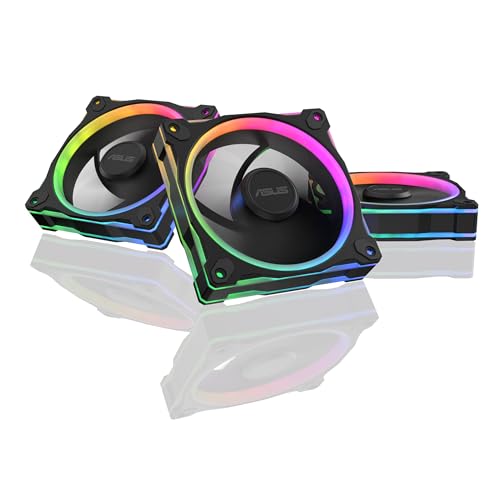
At just 21 dBA, these are the quietest fans in this guide—even the ID-COOLING at 26.4 dBA is louder.
The ASUS Prime MR120 achieves that low noise partly with a 28mm extra-thick frame (most fans are 25mm), which adds more blade surface area and allows the fan to move meaningful air at a lower, quieter RPM. The 1600 RPM maximum speed is the lowest of any pick here, but the thick frame compensates to deliver solid cooling for a typical mid-range build.
The 20 ARGB (Addressable RGB) LEDs arranged in a circular pattern create a smooth, vivid glow with dual-sided frame lighting—meaning the light spills out from both the front and the back of the fan frame, not just one side. That is a nice detail for cases with vertical GPU mounts or open test benches. The included silicone mounting corners help dampen vibration further. Owners confirm they are “very silent and look great in my build” and note the “great RGB” and excellent cooling. The downside, and it is a significant one for some: these fans are not daisy-chainable, so you will need a separate ARGB hub to manage the three individual cables, which adds to cable clutter.
Why it wins for silence
- 21 dBA is the quietest rating on this list
- 28mm thick frame moves more air per RPM than standard fans
- 20 ARGB LEDs with dual-sided lighting for a smooth look
- ASUS Aura Sync integration for easy motherboard control
The drawback
- No daisy-chain—individual cables mean more wire management effort
- Low 1600 RPM top speed limits high-load radiator performance
Ideal for: a silent-focused build where decibel levels matter more than raw top-end airflow, especially with an ASUS motherboard for smooth Aura Sync.
Not for: anyone who wants a clean daisy-chain setup—plan on a fan hub if you choose these.
Understanding the Specs
Static Pressure (mmH2O)
This measures how well a fan pushes air through resistance—like a dense radiator, a mesh dust filter, or a tight front panel. A value of 2.0 mmH2O (millimeters of water) or higher is good for most air coolers and radiators. The ARCTIC P12 Pro, for example, hits around 7 mmH2O, making it a beast for radiator use, while standard case fans often hover around 1.5 to 2.5 mmH2O.
CFM and Noise Balance
CFM (Cubic Feet per Minute) tells you the raw volume of air moved. Higher CFM is better for cooling, but it usually comes with more noise. A good budget fan balances the two—for example, the Thermalright TL-M12Q X3 moves 68.9 CFM at 28.2 dBA, which is audible but not intrusive. A fan at 34.6 dBA like the Corsair RS120-R will be clearly noticeable at full speed.
PWM (Pulse Width Modulation)
A 4-pin PWM header lets your motherboard control the fan speed dynamically based on temperature. This is essential for keeping the system quiet at idle—the fan can drop to 600 RPM or lower—and ramping up only when needed. Fans without PWM (3-pin) run at a fixed voltage-controlled speed, which is less flexible.
Fluid Dynamic Bearing (FDB)
FDB (Fluid Dynamic Bearing) uses a thin oil film to separate the rotating shaft from the bearing housing. This reduces friction, wear, and noise. It is the preferred bearing type for quiet, long-lasting operation—most of the fans in this guide use FDB or a similar hydrodynamic bearing, which is why they can last for years without developing a grinding sound.
FAQ
Will these fans work with my motherboard’s RGB software?
How many fans can I daisy-chain together safely?
What is the difference between standard and reverse-blade fans?
Will a 2000 RPM fan be too loud for a bedroom PC?
Can I use budget RGB fans on a liquid cooler radiator?
What does a “fluid dynamic bearing” actually do for me?
Is a 3-pin PWM fan worse than a 4-pin PWM fan?
Do I need a separate controller for ARGB fans?
How long do budget ARGB fans typically last?
Final Thoughts: The Verdict
Across the board, the budget rgb fans winner is the ARCTIC P12 Pro A-RGB because it delivers the highest static pressure and widest RPM range at a price that undercuts almost every competitor—perfect for anyone mounting fans on a radiator or wanting serious headroom. If you want the quietest possible build with a thick frame that still moves decent air, grab the ASUS Prime MR120 ARGB. And for the cleanest cable management with strong mid-range airflow, the Thermalright TL-M12Q X3 is the one to reach for.
How We Picked
We do not accept paid placement. Every pick is matched to a real buyer and a real use-case; we do not hands-on test units.
Sources & Methodology
Specifications: manufacturer listings and product documentation. Review insights: verified customer reviews, as of July 2026. Pricing: not shown on this page (it changes often); check the current price via the retailer link.
As an Amazon Associate, FitlyFast earns from qualifying purchases. This does not affect which products we feature.