
Our readers keep the lights on and the weekend projects moving. As an Amazon Associate, I earn from qualifying purchases.
Specs are compiled from manufacturer listings and verified buyer reviews and can change over time — please confirm the key details on the product page before buying.
You need a soldering iron that stays hot when you touch a joint and doesn’t cost more than your whole project. A cheap iron that cools off or takes forever to heat up makes every job a fight. Here are the budget irons that deliver fast heat-up, stable tips, and enough accessories to actually finish the work.
I’m Rikta — the founder and writer behind FitlyFast. This guide is built by comparing the manufacturers’ published specifications and the patterns across verified customer reviews, so you get each pick’s real strengths and trade-offs instead of marketing spin.
Whether you are fixing a guitar amp, building a circuit board, or diving into stained glass, this lineup of budget soldering iron options will help you pick the right tool without wasting a cent.
Our Picks at a Glance

How To Choose The Best Budget Soldering Iron
The three specs that separate a usable tool from a frustrating one are wattage, tip stability, and heat-up time. Here are the three specs that separate a usable tool from a frustrating one.
Wattage And Heat-Up Time
Higher wattage (80W or more) means the iron recovers heat quickly after you touch a joint, which is vital for larger connections or thick wires. A 60W iron works fine for small circuit boards but can struggle on ground planes or heavier gauge wire. Look for a ceramic heating element (a type of heating core that warms up faster and lasts longer than older nichrome wire types).
Temperature Control And Accuracy
Fixed-temperature irons are cheap but unpredictable. A station with adjustable temperature (ideally with a digital display) lets you dial in exactly the heat your solder needs, usually between 350°F and 750°F depending on the joint. Some budget stations now include PID controllers (Proportional-Integral-Derivative, a smart circuit that keeps the tip within a few degrees of your setting) — a huge help for consistent results.
Kit Completeness
A budget iron’s true cost often lies in the accessories you must buy separately. A kit with multiple tips, a desoldering pump, solder, flux, tweezers, and a stand saves you money and a second trip. Check that the tips are a common size (like 900M series) so replacements are easy to find later.
Quick Comparison
| Model | Best For | Wattage | Temp Range | Heating Element | Amazon |
|---|---|---|---|---|---|
| Beizkna 80W 18-in-1★ Best Overall | Best Overall / All-purpose | 80W | 356–968°F | Ceramic | Amazon |
| YIHUA 947-VBeginner’s Choice | Beginner / LED visibility | 60W | — | Ceramic | Amazon |
| Crtsweker 100W StationStation Value | Station precision / Auto-sleep | 100W | 356–896°F | Ceramic | Amazon |
| WEP 926LED V3 | Compact desk / PID control | 130W MAX | 392–896°F | Ceramic | Amazon |
| Weller WLIRK6012A | Brand trust / LED ring light | 60W | — | Ceramic | Amazon |
| Weller WLIRPK8012A | Big wires / Power grip | 80W | — | Ceramic | Amazon |
| YIHUA 928D-III | Portability / Digital precision | 110W | 194–896°F | Ceramic | Amazon |
| Preciva 926 III | Feature-packed station / Ham radio | 130W MAX | 194–896°F | Ceramic | Amazon |
In‑Depth Reviews
1. Beizkna 80W 18-in-1 Soldering Iron Kit
An 80W ceramic-core iron that goes from cold to ready in about the time it takes to find your first joint.
This Beizkna kit hits the balance for anyone who wants to start soldering without second-guessing their tool. The 80W ceramic heating element pushes the tip to working temperature in roughly 10 seconds — a genuine time-saver when you are hopping between joints on a circuit board. The digital display lets you dial in anything from 356°F to 968°F with a claimed accuracy of ±5°C (about ±9°F), and the simple +/- buttons make switching between Celsius and Fahrenheit painless.
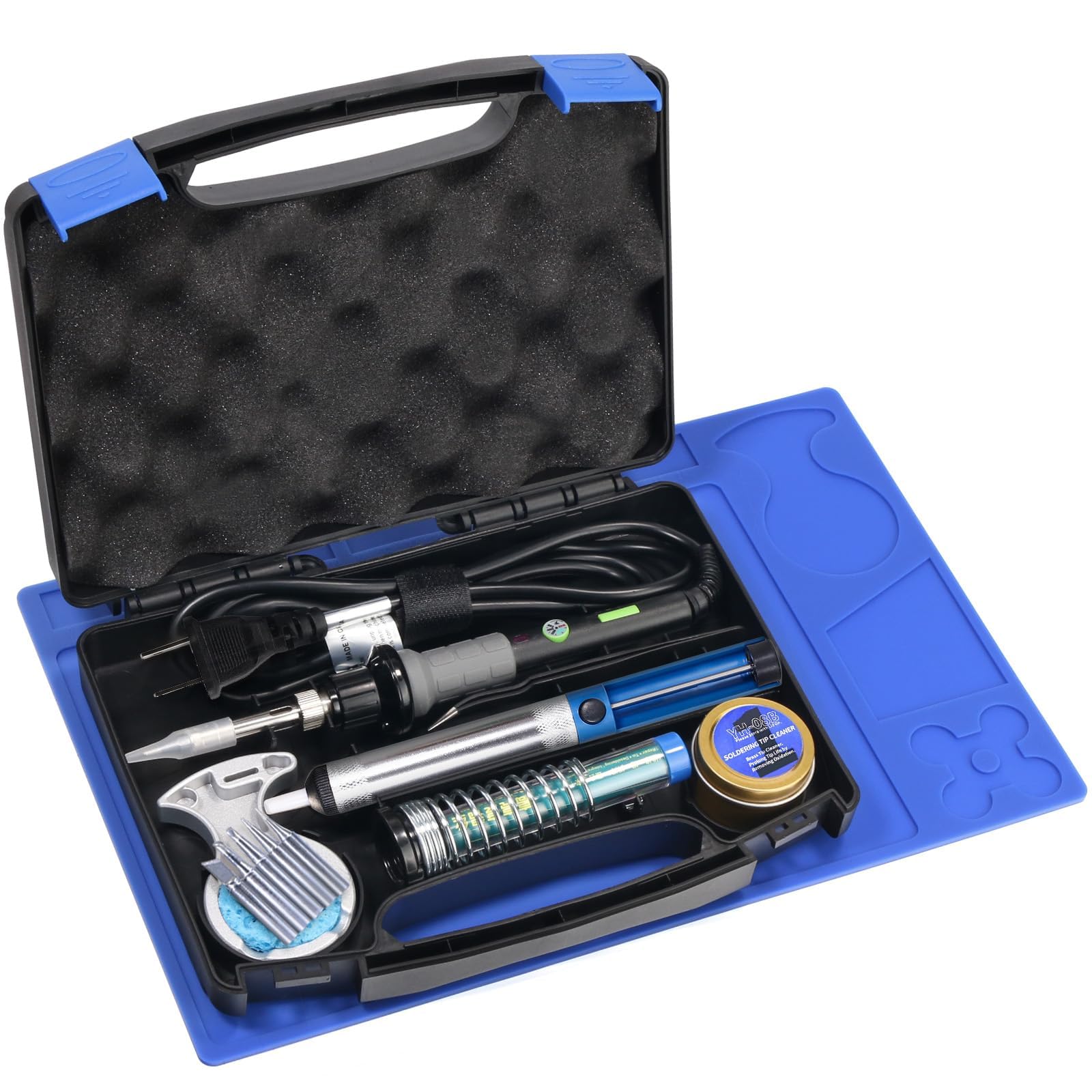
What wins people over is the completeness: five 900M-series tips, a full 50g spool of 0.8mm solder wire, flux paste, a desoldering pump, tweezers, solder wick, heat shrink tubing, a wire stripper, and a sturdy PU case to keep it all organized. The four ventilation holes in the handle and the insulated silicone grip keep the heat at the tip, not in your hand. It is not built for production-line abuse, but for electronics repair, hobby projects, and jewelry soldering, it is remarkably capable. A few owners note the included stand feels a bit light, but the consensus is unanimous: “arrived well packaged works very well for a small soldering iron heats up quick.”
Kit That Delivers
- 80W with ceramic core hits 520°C in ~10 seconds
- 18-piece kit includes everything from solder to a PU case
- Temperature range from 356°F to 968°F with ±5°C accuracy
- Five interchangeable 900M tips cover fine to medium work
One Real Trade-off
- Stand feels a bit flimsy for the price; best to handle the base with care
- Not intended for heavy-duty or professional production use
Who it fits: Hobbyists, electronics repairers, and first-time solderers who want a turnkey kit that actually works.
Who should look further: Anyone who needs a heavy-duty station for all-day, industrial soldering tasks.
2. YIHUA 947-V Soldering Iron Kit
A complete 15-piece kit built around three LED lights that help you see tiny joints without a separate lamp.
The YIHUA 947-V puts a 60W ceramic iron in a portable plastic case with a clever inner layout that keeps every accessory locked in its own slot. The standout feature here is the three LED lights around the tip — they cast 360-degree illumination right where you are working, so you are not fighting shadows on a crowded PCB (printed circuit board). The iron itself uses an exclusive temperature control system that owners confirm heats up fast: “heats up super quick and works like a charm,” as one buyer put it. The kit includes five extra tips, a roll of solder, a desoldering pump, a cleaning sponge and brass wool, tweezers, and even a silicone pad for a portable workspace.
Quality and reliability are the most-mentioned praise points, with 32 and 17 counts respectively, and the value proposition is strong for beginners. The catch is heat control — it is marked in Fahrenheit only, which can be confusing if you work in Celsius, and a few users found the tip heats more at the sides than the very end, requiring careful positioning. The iron itself feels a little lightweight in the hand, but the performance punches above its feel. This kit lets you start soldering immediately without a separate station.
Best for first-timers: The LED ring and organized case make this an ideal starter kit, but the single-unit iron means less precise temperature management than a station like the Crtsweker.
Reach for this if: You want a grab-and-go kit with great visibility and don’t mind working in Fahrenheit.
Look elsewhere if: You need digital temperature readout or plan to work in Celsius primarily.
3. Crtsweker 100W Digital Soldering Station
A 100W station with auto-sleep and two helping hands that costs less than some standalone irons.
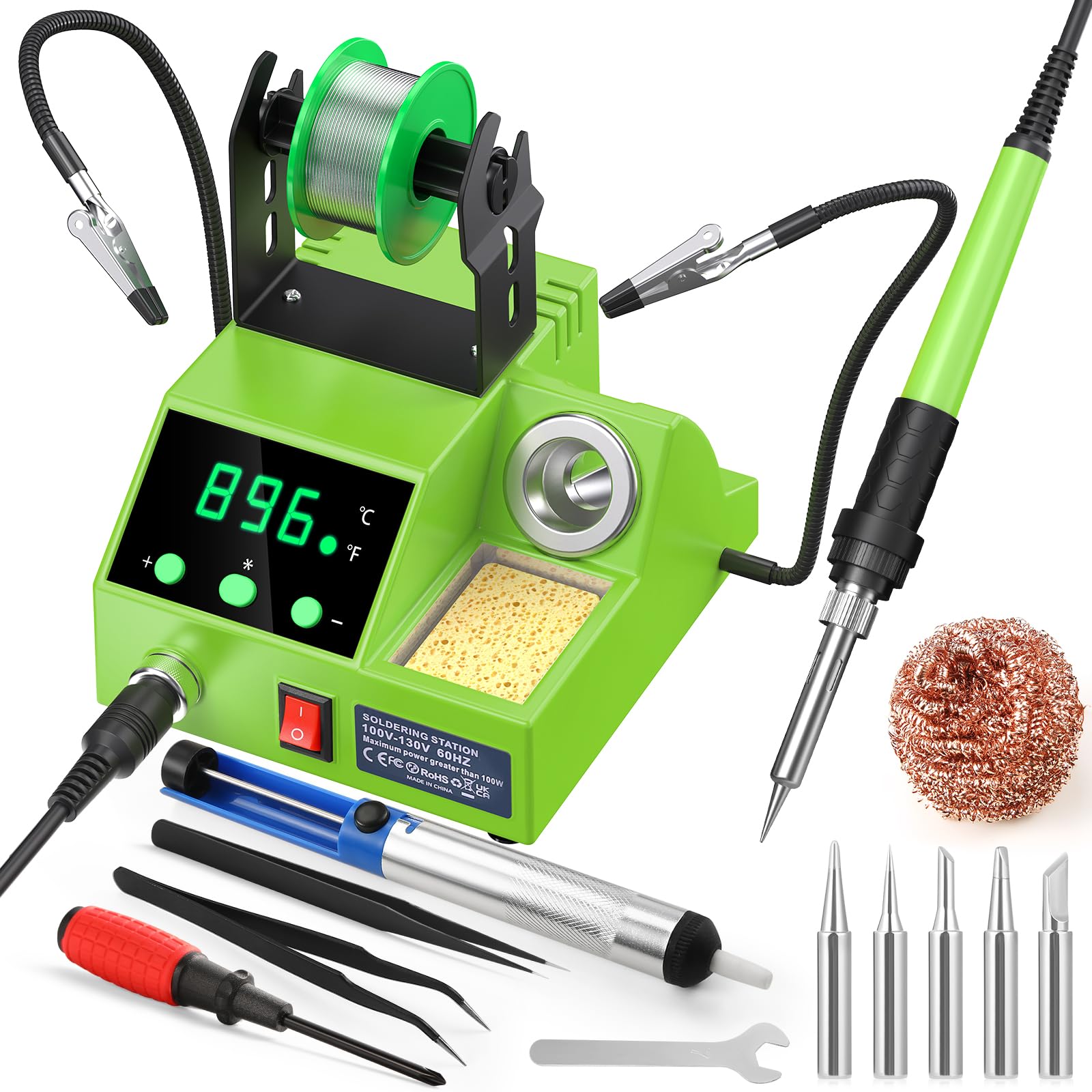
This Crtsweker station delivers 100 watts of adjustable heat from 180°C to 480°C (356°F to 896°F), with a clear LED display that toggles between Celsius and Fahrenheit. The auto-sleep feature is a real safety upgrade: you can set a timer between 0 and 600 seconds, and the station drops to a low idle temperature when inactive, protecting the tip and reducing fire risk. An on/off switch on the station itself gives you one more layer of control.
Functionality and quality lead the praise here, with 91 and 84 counts respectively — owners clearly value how well this station works for the price. The kit includes a pair of helping hands (adjustable alligator clips on arms) with a sturdy base, a solder wire dispenser, a cleaning sponge and brass tip cleaner, five tips, elbow tweezers, a desoldering pump, and a mini screwdriver. The ergonomic silicone handle keeps long sessions comfortable, and the four ventilation holes in the steel pipe help the iron cool quickly between tasks. The helping hands are sturdy for holding wires but a few owners note they can struggle with heavier PCBs. Inclusion of a calibration function is a nice touch for accuracy-minded users.
The real story: This station provides 100W versus a 60W iron, with a maximum temperature of 480°C, giving you headroom for larger joints.
Best for: Beginners and hobbyists who want station-grade stability, auto-sleep safety, and helping hands without spending station money.
Plan for: The included solder is basic — pick up quality 60/40 or 63/37 solder for cleaner joints.
4. WEP 926LED V3 Soldering Station

A space-saving station that integrates the iron holder directly onto the body — no extra clutter on your desk.
The WEP 926LED V3 is built for tight workspaces. The soldering iron holder is molded right into the station’s chassis, saving bench real estate without sacrificing safety. Under the hood, a PID microcontroller (Proportional-Integral-Derivative, a smart temperature controller) handles temperature compensation rapidly, keeping the tip steady at your chosen setting. You adjust from 392°F to 896°F via a simple control knob, and the real-time LED readout shows you exactly where you are. An auto-sleep function kicks in after 10 minutes of inactivity to extend tip and element life.
Functionality, quality, and heating speed are the most praised aspects, with counts of 76, 71, and 69 respectively, making this among the most consistently appreciated stations in its tier. The kit includes five tips, solder wire, a tip cleaner (sponge and brass wool), tweezers, a desoldering pump, and a solder wire dispenser. The included solder is decent quality, and the tips arrive pre-tinned. A few owners note the stability of the iron holder could be better, and the cord is not heat-resistant, so routing it carefully matters. The 1-year USA technical support is a solid bonus for confidence.
Smart Design
- Integrated holder saves desk space and reduces clutter
- PID control maintains steady tip temperature
- 130W max power handles larger joints with good recovery
- Auto-sleep after 10 minutes of idle time
Minor Notes
- Holder stability has room for improvement during aggressive use
- Included solder is basic — consider upgrading for best results
Who this fits: Hobbyists with limited bench space who want PID-controlled temperature stability without a large footprint.
Think twice if: You need a heavy-duty holder or plan to use non-standard tip shapes frequently.
5. Weller 60W LED Halo Ring Iron (WLIRK6012A)

A Weller-branded iron with a 360-degree LED halo and a 7-year warranty — rare reassurance at this price.
The Weller name carries weight in soldering, and the WLIRK6012A backs it up with a ceramic heating element, a 360-degree LED halo ring that casts bright light around the tip, and a comfortable molded pencil grip. The iron comes with three tips — conical (0.8mm), chisel (6.4mm), and screwdriver (2.4mm) — plus a soldering aid, a basic stand, and a roll of lead-free rosin solder. Owners say it gets hot quickly and cools fast too, which is a safety plus. The thin, flexible cord is UL listed, and the 7-year warranty is nearly unheard of in this price bracket.
Quality and value are the positive themes, but a few buyers report the LED lights are not necessary in a well-lit room, and occasional durability issues with the heating element have surfaced within the first year. The integrated safety rest is a nice touch but feels basic. This is a dependable iron for someone who values brand support and warranty over the sheer accessory count of a kit.
The honest take: Weller’s 7-year warranty is the real differentiator here — you pay for confidence and a solid 60W ceramic iron, not for a drawer full of extras.
Choose this if: You want a brand-backed iron with a long warranty and don’t need a station’s temperature readout.
Consider the alternative: If you prefer a station-based system with digital control, the Crtsweker offers more features and wattage at a similar price.
6. Weller 80W Power Grip Iron (WLIRPK8012A)

An 80W iron with a thicker power grip built for laying down a continuous line of solder on big joints.
The Weller WLIRPK8012A is designed for sustained heavy work — think soldering copper pipes, stained glass seams, or thick 12–10 AWG wire (American Wire Gauge, the standard for wire thickness). The ergonomic power grip gives you a secure, fatigue-resistant hold, and the ceramic element delivers full heat saturation fast. The kit includes a chisel tip (10mm), a screwdriver tip (10mm), an iron stand, a solder aid, and lead-free rosin solder. Owners mention it solves underpowered iron issues for coax cable and 14 AWG wire, and it is hot enough to solder directly to a guitar amp chassis, which acts as a massive heat sink.
The most-discussed topic here is heating speed, which is mixed — some praise it for getting hot fast, while others note the included tips are large and awkward for small projects. The tip tends to oxidize quickly, so frequent wiping and tinning is part of the routine. This iron also lacks an on/off switch and a high-quality stand, which feels like a miss at this price. But for raw heat output on big jobs, it is effective.
Who this suits: Stained glass artists, auto electrical repairers, and anyone who needs to dump heat into large metal workpieces without the iron cooling off mid-joint.
Reach for it if: You need a hot iron for heavy-duty connections and don’t mind swapping tips for fine work.
Look elsewhere if: Your projects are mostly small circuit boards — the 10mm tips are oversized for that scale.
7. YIHUA 928D-III 110W Soldering Iron

A lightweight (0.43 lb) 110W digital iron that packs station-grade temperature precision into a portable pencil form.
The YIHUA 928D-III is a high-power portable iron with a full digital display, temperature correction, and a flexible range from 194°F to 896°F. It weighs only 197g (0.43 lbs), making it genuinely easy to maneuver for fine electronics work while still delivering 110W for heavy-duty tasks. The X-4 holder has a wider, more stable base than standard stands to prevent tipping, and the built-in ON/OFF switch adds safety when you are plugged in. It comes with two silver SGS-certified lead-free tips — a knife type and an all-round type — plus a brass wool cleaner and cleaning sponge.
Owners praise the digital temperature control and the versatile tip set, which works well for everything from foiled stained glass to circuit boards. Value for money is mentioned positively overall, but there is a recurring pattern: some units have shown durability issues after moderate use, struggling to reach sufficient heat for lead-free solder. The advice from experienced users is to avoid running the iron at maximum temperature for extended periods (over 15 minutes) to prevent the tip from fusing to the heating element. For the price, it is a capable tool if treated with care.
The honest trade-off: This iron delivers impressive power and precision in a portable package, but longevity is a known question mark — handle it gently and keep temperatures moderate during idle periods.
Best for: Users who want digital temperature control in a lightweight, portable iron for mixed electronics and stained glass work.
Plan for: Extra care with tip maintenance and avoiding prolonged max heat to extend the element’s life.
8. Preciva 926 III 130W Digital Soldering Station

A full-featured station with PID temperature control, two helping hands, and selectable auto-sleep timers at a budget entry point.
The Preciva 926 III is a compact station that packs PID technology (a smart controller that claims to keep the tip within ±2°C of the set temperature), selectable standby timers (0, 5, 10, or 30 minutes), and an intuitive control knob with a bright digital display. The all-in-one design integrates the iron holder, spool rack, and cleaning pad to save bench space. The kit includes two helping hands, five tips, 30g of solder wire, and 1.5m of solder wick — a genuinely complete package for someone starting out.
Quality is mentioned positively, with owners noting it checks all the boxes for applications from ham radio to general electronics. The value proposition is solid on paper, but some customers note the temperature gauge can be inaccurate — struggling to melt solder below 600°F despite the setting — and the included cable is stiff, which can pull the station around on a cluttered desk. The smart pickup here is the feature set for the price: PID control, auto-sleep, and helping hands are rare at this tier.
The bottom line: You get station features (PID, auto-sleep, dual helping hands) for iron money, but quality control on the temperature sensor is a known variable — test it with a thermometer when it arrives.
Who this fits: Hobbyists and ham radio enthusiasts who want station-grade features without the station-grade price tag.
Watch for: Temperature accuracy may vary between units; verify calibration on arrival for the best experience.
Understanding the Specs
Wattage And Heat Recovery
Wattage determines how fast the iron heats up and how well it recovers when you touch a joint — a high-wattage iron (80W or more) stays hot even on large ground planes or thick wires. Lower-wattage irons (60W) work fine for small through-hole components but can struggle on bigger connections. Look for a station with a real LED readout so you know exactly where the temperature sits.
Tip Compatibility And Size
Most budget irons use the 900M series tip, which is widely available and inexpensive to replace. Your tip shape matters: a chisel tip transfers heat better than a conical one for larger joints, while a fine conical tip gives you precision for tight spaces. Pre-tinned tips (coated with solder at the factory) make your first joint much easier.
Auto-Sleep And Safety
An auto-sleep function drops the iron to a low idle temperature after a set time of inactivity. This extends tip life, reduces oxidation, and cuts fire risk. Some stations let you adjust the idle timer (5, 10, or 30 minutes). An integrated on/off switch on the station itself is a good safety feature that lets you kill power without unplugging.
Kit Completeness
A complete kit should include at least three different tip shapes (chisel, conical, screwdriver), a stand, a cleaning sponge or brass wool, solder wire, and a desoldering pump. Helping hands (alligator clips on adjustable arms) and a solder wire dispenser are bonuses that save you from buying them separately. The quality of the included solder varies — many budget kits include basic lead-free wire that can be harder to work with than a standard 60/40 or 63/37 alloy.
FAQ
Can a 60W soldering iron handle heavy-duty jobs?
What is the difference between a ceramic and a copper heating element?
Do I really need an auto-sleep feature?
How do I know which tip size to use?
Is a soldering station better than a standalone iron?
Will these irons work for stained glass projects?
How do I clean and maintain my soldering iron tip?
What solder should I use with these budget irons?
Can I use these irons with 220V mains power?
How long should a budget soldering iron tip last?
Final Thoughts: The Verdict
For most buyers, the budget soldering iron winner is the Beizkna 80W 18-in-1 because it combines fast heat-up, digital temperature control, and a full accessory kit in a price range that leaves room for solder and flux. If you want a station with auto-sleep and helping hands, grab the Crtsweker 100W Station. And for stained glass or heavy wire work, the Weller 80W WLIR8012A is the one to reach for.
How We Picked
We do not accept paid placement. Every pick is matched to a real buyer and a real use-case; we do not hands-on test units.
Sources & Methodology
Specifications: manufacturer listings and product documentation. Review insights: verified customer reviews, as of July 2026. Pricing: not shown on this page (it changes often); check the current price via the retailer link.
As an Amazon Associate, FitlyFast earns from qualifying purchases. This does not affect which products we feature.