
Our readers keep the lights on and the weekend projects moving. As an Amazon Associate, I earn from qualifying purchases.
Specs are compiled from manufacturer listings and verified buyer reviews and can change over time — please confirm the key details on the product page before buying.
Soldering tiny circuit boards means trusting your eyes on joints smaller than a grain of rice — and a cheap magnifying lamp only gets you so far. A budget soldering microscope puts a live, zoomed view of your work on a screen so you can actually see cold joints, bridges, and lifted pads before they cause a headache. This guide walks you through six value-priced digital microscopes built for PCB work, coin checking, and fine electronics repair.
I’m Rikta — the founder and writer behind FitlyFast. This guide is built by comparing the manufacturers’ published specifications and the patterns across verified customer reviews, so you get each pick’s real strengths and trade-offs instead of marketing spin.
You’ll see exactly which features matter for soldering, from magnification range to lighting, so you can find a dependable budget soldering microscope that suits your workbench and your eyes.
Our Picks at a Glance

How to Choose the Best Budget Soldering Microscope
Choosing a microscope for soldering is about matching the tool to the size of your work and the space on your bench. You don’t need lab-grade optics for most electronics repair — you need a clear, steady view with room to move your iron and hands.
Screen Size and Resolution
A bigger screen means less eye strain during long sessions, but it usually costs more. Look for at least 1080P resolution so solder joints appear sharp rather than soft. Some models offer 4K imaging, but for most hobby soldering, a crisp 1080P display is plenty detailed.
Magnification and Working Distance
Higher magnification numbers sound impressive, but too much zoom means you’re working too close to the board to fit your iron underneath. What you actually want is enough magnification for the joint details plus enough clearance — often called working distance — to solder comfortably without bumping the lens.
Quick Comparison
| Model | Best For | Magnification | Screen Size | Power Source | Amazon |
|---|---|---|---|---|---|
| Aikokkl 5″ LCD★ Best Overall | Portable soldering checks | 1000X | 5″ IPS | Battery / USB-C | Amazon |
| Leipan 7″ LCDBest Value | Clear 1080P viewing | 1200X | 7″ rotatable | Battery | Amazon |
| TOMLOV DM9 7″ | All-around hobby work | 1200X | 7″ rotatable | Battery | Amazon |
| JL210 10.1″ | Full silver dollar view | 260X | 10.1″ IPS | Plug-in | Amazon |
| LINKMICRO LM210 | Large work area | 260X | 10.1″ IPS | Plug-in | Amazon |
| Elikliv EDM9 Max | Highest detail imaging | 1500X | 10.1″ 20MP UHD | Battery / plug-in | Amazon |
In-Depth Reviews
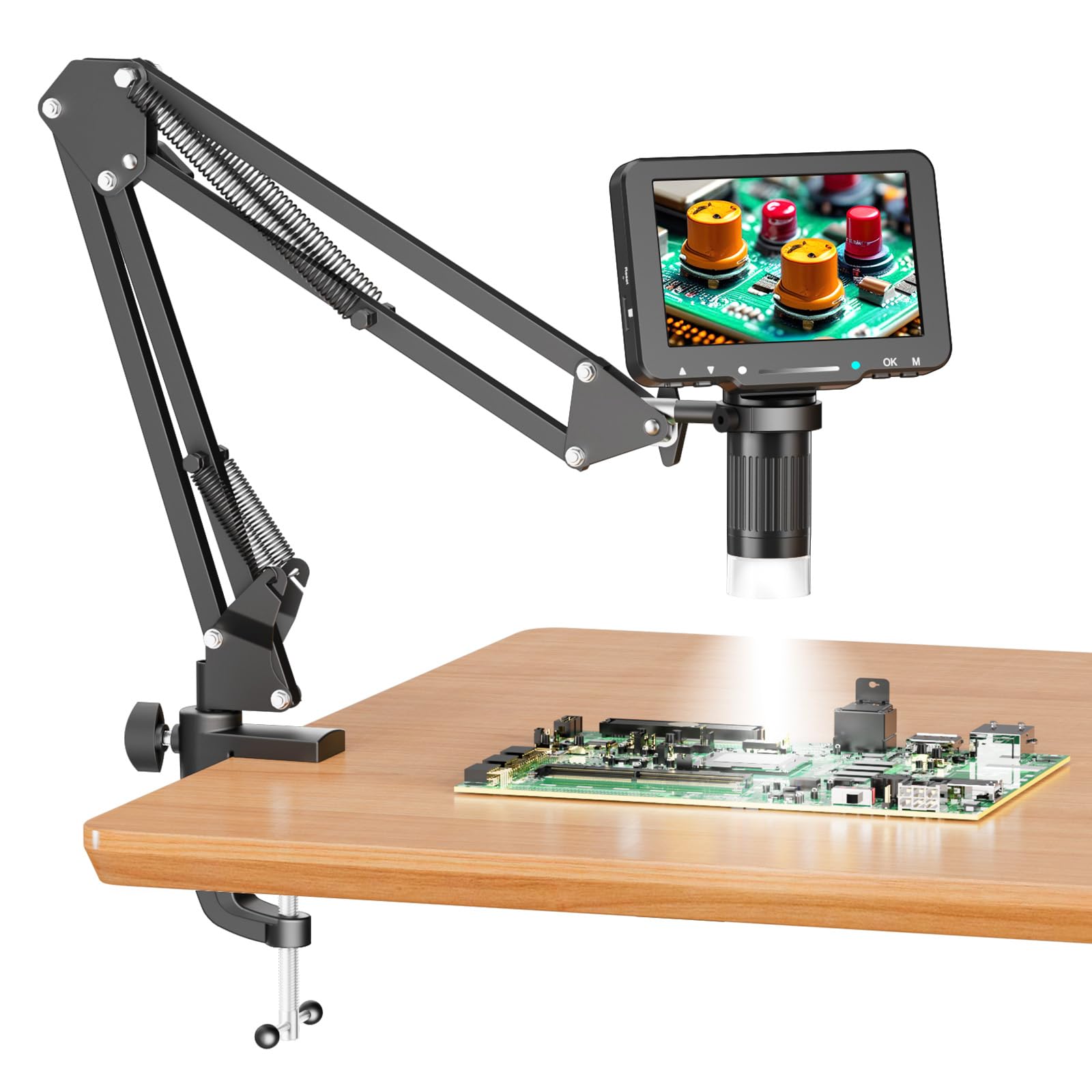
1. Aikokkl 5″ LCD Digital Soldering Microscope
The portable 5-inch that frees both hands for the iron.
This pick stands out for its built-in battery and flexible gooseneck arm, letting you work anywhere on the bench without hunting for a wall outlet. The 5-inch IPS screen sits close to your work, so your eyes and neck stay relaxed during long repair sessions. It magnifies up to 1000X digitally, which gives you a close enough look at tiny solder joints and pads for confident inspection.
At 1.2 pounds with a metal enclosure, it feels solid without anchoring you to one spot. Buyers report it makes soldering easier and that the image quality looks “good and clear.” The main trade-off is the battery — owners openly say it “doesn’t last too long,” so keep the USB-C cable nearby for the charging port that matches almost everything else you own. The arm itself is also stiff to adjust, which some users find fiddly when repositioning mid-task.
Unlike the larger 7-inch models below, this one trades screen size for portability and simplicity. It requires a Micro SD card (up to 32GB, not included) to save photos or 1080P repair videos, so budget for that extra. Getting the focus right takes a little practice: you move the flexible arm to change the lens-to-object distance, then rotate the focus wheel until the image sharpens.
What earns its keep
- Battery-powered portability for on-the-go repairs
- USB-C charging matches modern cables
- Connects to PC as a camera without extra software
- Compact metal body at 1.2 pounds
What to work around
- Battery life is short by owner accounts
- Arm adjustment is stiff
- Micro SD card required and not included
The right fit: hobbyists and technicians who want a simple, mobile scope for quick joint checks without a computer setup.
A fair caution: if you routinely do multi-hour board work away from power, the short battery could interrupt your flow.
2. Leipan 7″ LCD Digital Microscope 1200X
A 7-inch rotatable screen that saves your neck during long board work.
This Leipan model pairs a 7-inch 1080P screen with a 12MP camera, delivering images noticeably bigger and sharper than older 4.3-inch 720P scopes. That larger display is the whole point here: it lets you inspect solder joints without hunching over, and the screen rotates 90 degrees so you can find a comfortable viewing angle. The continuous 10X to 1200X zoom range covers fine SMD work, though it is worth remembering this is not a professional lab biological microscope.
Buyers consistently praise the image quality and value, and owners use it for basic soldering of small components as well as coin checking. The wired remote is a thoughtful touch — pressing the host button can introduce shake, while the remote keeps the camera steady for clear 12MP photos and 1080P video. The aluminum alloy holder and base add stability for circuit board work, and the whole setup runs on a rechargeable battery.
Set against the Aikokkl above, the Leipan gives you a 7-inch screen versus the Aikokkl’s 5-inch screen and a 1200X top magnification versus 1000X. The honest catch is the auxiliary side lights: occasional units arrive with lights that never worked, and focus can drift at times, though it is easy to bring back. Everything you need to observe is here, and it works with or without a computer for saving photos.
Where it shines
- 7-inch rotatable 1080P screen reduces strain
- Wired remote cuts camera shake
- Aluminum alloy holder and base for stability
- Works standalone or connected to a PC
Watch outs
- Auxiliary lights can arrive non-functional
- Focus occasionally drifts
Reach for this: solderers who prioritize a bright, large screen and want the flexibility of a remote for shake-free captures.
Consider skipping: if you specifically need dependable auxiliary lighting from the start, its reliability is hit-or-miss.
3. TOMLOV DM9 7″ Digital Microscope
The crowd favorite that makes micro soldering feel almost easy.
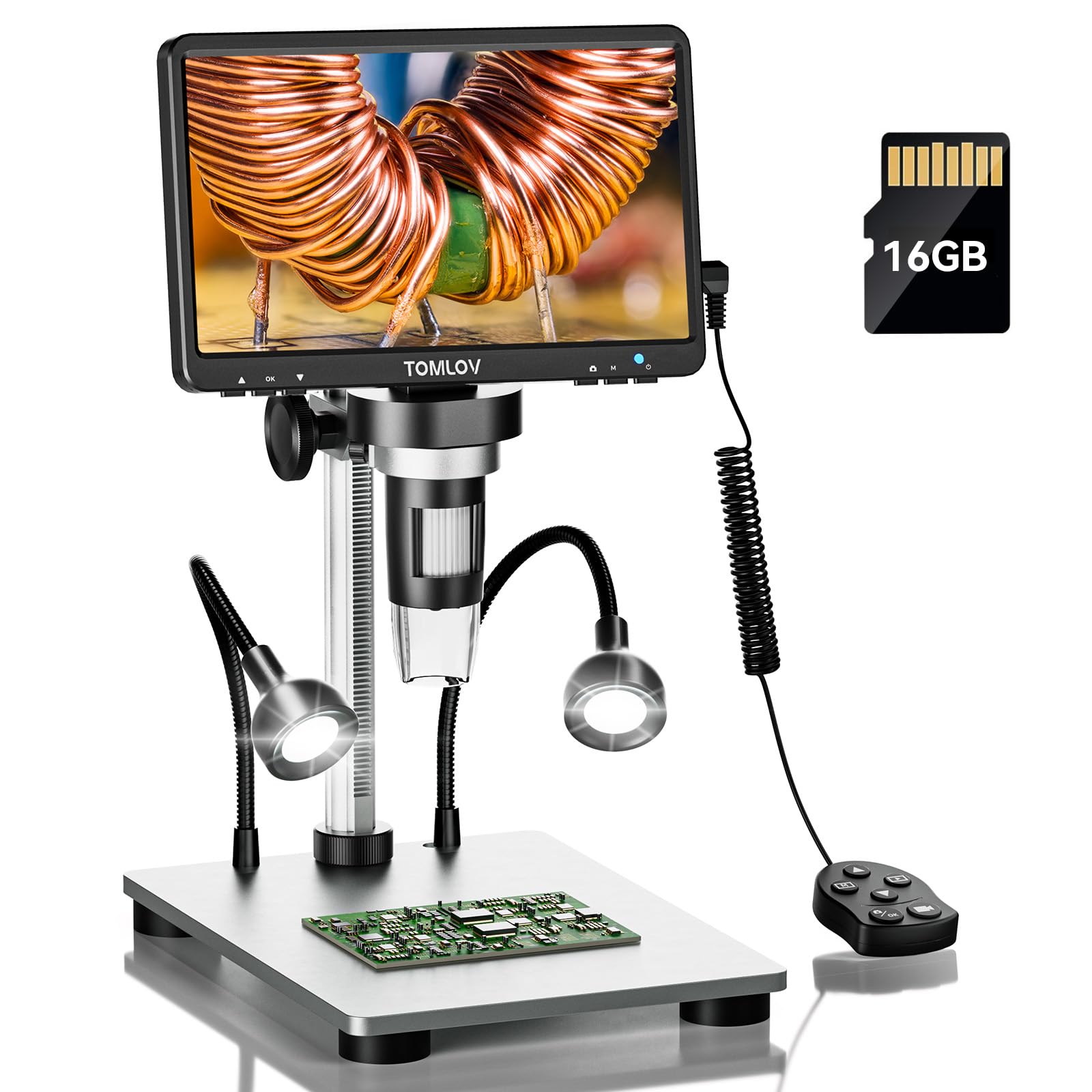
With thousands of owners behind it, the TOMLOV DM9 is the most proven pick on this list, and the reason is simple: it gets the fundamentals right. The 7-inch rotatable 1080P screen and 12MP ultra-precise focusing camera deliver the sharp, high-resolution views soldering demands, while the 5X to 1200X range covers everything from wide board overviews to tight pin inspection. A 16GB Micro SD card comes pre-installed, so you can start saving photos and videos the moment it arrives.
The solid aluminum alloy frame — base, stand, and holder — is built for the kind of long-term durability a regular workbench tool needs. Owners use it for everything from micro soldering and PCB repair to grading sports cards and inspecting jewelry work, and the consensus is that it is excellent value for the price. Eight LED fill lights plus two gooseneck lights keep the field well-lit, which matters when you are chasing reflections off fresh solder.
A few hobby users note the height adjustment runs a bit short for photographing a full coin in one frame, sometimes needing a DIY lift. The magnification calibration is also informal — the scope does not tell you exactly what zoom you are at. For soldering specifically, the clear screen and adjustable stand win people over, and the PC view on a larger monitor works without any extra software downloads.
The standout strengths
- Pre-installed 16GB SD card for instant saving
- Aluminum alloy construction throughout
- 1080P rotatable screen with 12MP camera
- PC connection with no software needed
Honest limitations
- Stand height may be too short for full coin views
- Zoom level is not calibrated on display
Best suited to: anyone who wants a reliable, well-reviewed all-rounder for soldering and hobby inspection with zero setup friction.
Think twice if: you are a coin collector needing a guaranteed single-frame full-dollar view — that is not its strong suit.
4. JOYALENS JL210 10.1″ Digital Microscope

A 10.1-inch screen with the tallest stand on this list for roomy soldering.
The JL210 leaps to a 10.1-inch IPS display, giving you a big, vivid view that makes long electronics repair far more comfortable. Its defining feature is the 12.6-inch all-metal stand with up to 10.2 inches of working distance — that is the clearance between the lens and your work, which means plenty of room to maneuver an iron and hands around a circuit board. The large 7.1″ × 7.9″ base adds stability so the scope does not wobble mid-solder.
Owners say it is ideal for soldering game consoles and electric board work, with good clarity and the ability to see very close detail, and several note it is good value for the money. The package is generous: a wireless remote, 32GB memory card with card reader, 5 prepared slides, a bottom stage light, and cleaning cloth all arrive in the box. Eight built-in LEDs, two gooseneck spotlights, and the bottom light can all be brightness-adjusted to cut shadows on boards and coins.
The trade-off compared to the Aikokkl and TOMLOV is magnification — this tops out at 260X, which is plenty for inspecting solder joints but far below the 1000X-plus digital zoom of smaller scopes. This scope also runs on plug-in power rather than a battery, so it stays on the bench. A couple of owners note the lights auto-on every time, and the fixed mount can make it hard to view very large boards in one pass.
Why it wins
- 10.2 inches of working distance for tool clearance
- 10.1-inch IPS screen with wide viewing angles
- Remote control eliminates vibration for captures
- Full kit: slides, card, reader, and remote included
Trade-offs to know
- 260X top magnification is modest
- Lights turn on automatically with no easy off
- Plug-in only, so it stays tethered to the bench
Grab this for: console repair and PCB work where you need generous space under the lens and a large, clear screen.
Skip it for: anyone chasing extreme close-up magnification — the 260X ceiling is the trade-off for that big workspace.
5. LINKMICRO LM210 10.1″ Digital Microscope

Precision fine-focus gears for steady zoom on delicate solder work.
The LINKMICRO LM210 is the sibling to the JL210 with one meaningful upgrade: precision fine-adjustment gears on its 12.6-inch all-metal stand. That refined focus control makes a real difference when you are zeroing in on a single solder joint or a hairline crack, because you can dial in sharpness without jarring the whole assembly. The 10.1-inch rotatable IPS screen keeps your posture healthy across long motherboard or watch repairs.
Buyers find the magnification and functionality excellent with crisp views and good resolution, and it is a favorite among coin collectors for its ability to focus on coin anomalies. The remote control lets you capture 12MP images and 1080P video hands-free, which cuts down the camera shake that blurs fine details. An upgraded slide holder with built-in bottom illumination, 5 prepared slides, tweezers, and a collection box round out the kit.
One honest gap versus the Leipan or TOMLOV: the LM210 has no PC output, so you cannot pipe the view to a larger monitor for demos or group work. A few owners also notice the picture-mode field of view does not match the screen, and there is no zoom available in photo mode — you have to switch to video. The 260X max magnification is again more than adequate for joint inspection but well under the digital zoom of the smaller scopes above.
Its best traits
- Fine-focus gears for precise adjustments
- 10.1-inch rotatable IPS screen reduces fatigue
- Remote control for shake-free photos and video
- Complete kit with slides, tweezers, and card
Where it falls short
- No PC or TV output for larger displays
- Photo mode lacks zoom and has field-of-view quirks
Choose this one if: you want the smoothness of geared focus plus a large screen for marathon repair sessions.
Pass if: you plan to present your work on a big monitor — this one stays screen-only.
6. Elikliv EDM9 Max Digital Microscope
The highest-resolution scope here, with TV output for showing your work.
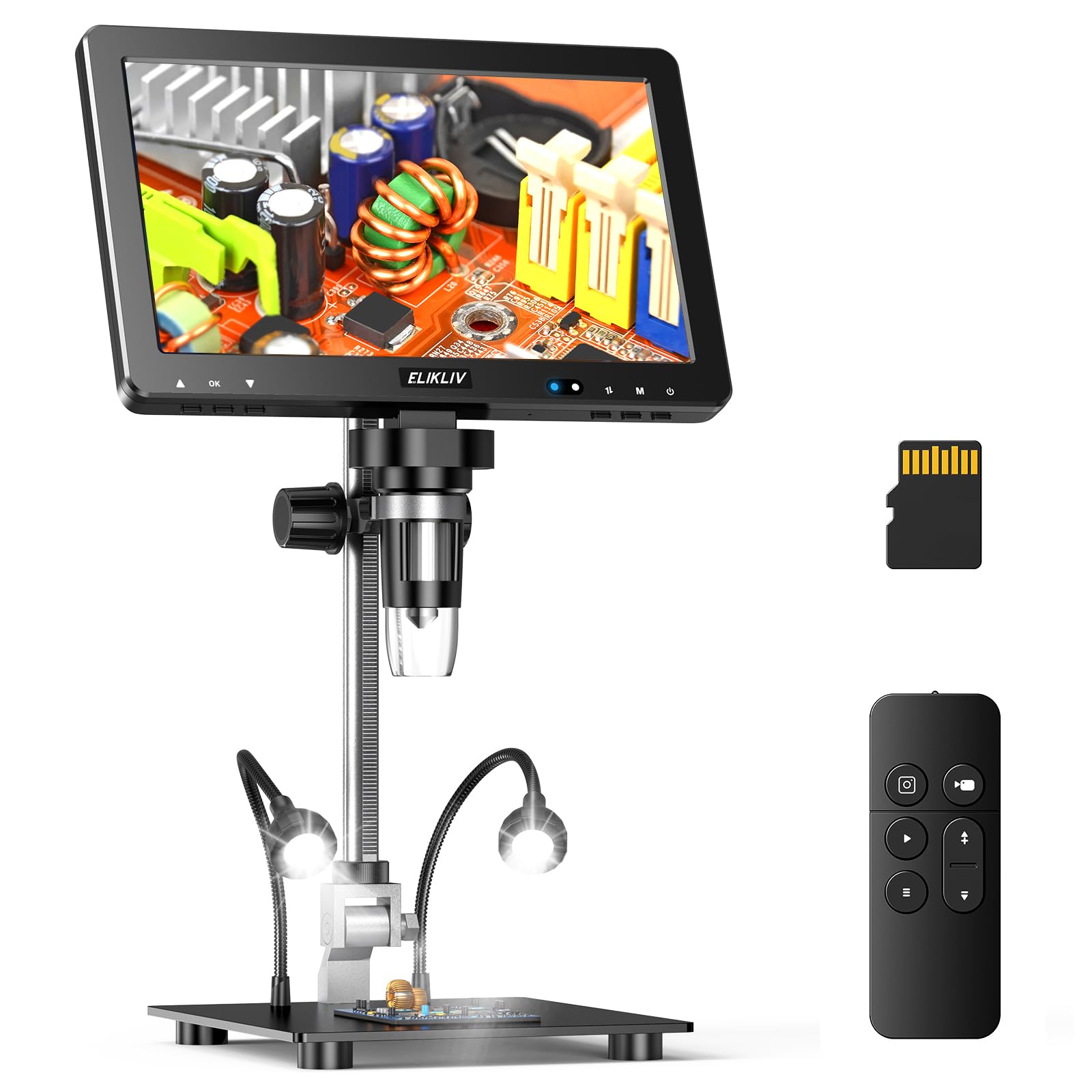
The EDM9 Max pushes the category ceiling with a 20MP UHD sensor and 5X to 1500X magnification — the sharpest, highest-zoom setup in this lineup. That extra resolving power shows up when you inspect fine solder points, connector pins, and chips, where even small defects become obvious. The 10.1-inch HD IPS screen displays all that detail comfortably, and the 12.6-inch adjustable bracket with a large base keeps everything stable.
What sets this model apart is its output flexibility: a TV cable is included, so you can connect to a television, monitor, or projector for coin comparison, repair demonstrations, or classroom viewing. The remote capture function lets you zoom, photograph, and record without touching the screen, which dramatically reduces shake and focus shift. Owners describe the clarity as incredible, easily seeing all coin details, and the setup is simple enough for beginners upgrading from a handheld loupe.
Battery life is genuinely split — some users get around 3 hours, others find it short, though it is rechargeable and can be wired into the bench permanently like one owner did. The base can also use a small bushing fix for smoother positioning. Against the TOMLOV DM9, this one leads on raw imaging detail (20MP versus 12MP) and adds TV output, but it costs noticeably more, so it is the pick when maximum clarity is the priority.
Why it’s the top tier
- 20MP UHD sensor for exceptional clarity
- 1500X maximum magnification
- TV cable included for large-display viewing
- Remote control minimizes shake
The catches
- Battery life gets mixed feedback, around 3 hours
- Stand base may need a small bushing fix
Splurge on this for: serious inspectors who want maximum detail, TV sharing, and a big screen in one tool.
Save your money if: your soldering rarely needs more than 1080P clarity — the cheaper scopes handle that fine.
Understanding the Specs
Magnification Versus Working Distance
Magnification tells you how zoomed in the image appears, but it is not the whole story for soldering. What often matters more is working distance — the gap between the lens and your circuit board. If that gap is small, you cannot fit the soldering iron underneath comfortably, no matter how powerful the zoom. Look for a balance: enough magnification to see a joint clearly, plus enough working distance to actually solder it.
Screen Type and Resolution
The screen is how you experience everything, so its size and sharpness shape your comfort. An IPS panel gives wide viewing angles and consistent color, which helps when you tilt your head during work. Resolution matters too: a 1080P display keeps solder joints crisp, while 720P screens can look soft at high zoom. Bigger screens like 10.1 inches reduce eye strain but add cost and bench footprint.
Lighting Flexibility
Fresh solder is shiny, and reflected light can wash out the very detail you need to see. Most scopes use a ring of built-in LEDs for general illumination, but flexible gooseneck side lights are what really help you kill shadows and glare on awkward angles. A bottom stage light adds another option for viewing slides or translucent objects, though it is less critical for ordinary PCB work.
Power Source and Portability
Battery-powered scopes free you from the wall outlet and let you move around the bench or take the scope to a job. Plug-in models keep a constant, bright light and never die mid-project, but they stay anchored where the outlet is. If you mostly work at a single bench, a plug-in may serve you perfectly; if you move between projects, a battery model is more flexible.
FAQ
What magnification do I actually need for soldering?
Will a 5-inch screen be enough for circuit board work?
Can I use these microscopes without connecting to a computer?
Why should I buy a separate soldering microscope instead of using my phone camera?
Do I need a memory card for photos and videos?
What is the difference between optical and digital magnification?
How does screen size affect eye strain during soldering?
Is battery power or plug-in power better for a bench microscope?
Final Thoughts: The Verdict
For the majority of shoppers, the budget soldering microscope winner is the Aikokkl 5-inch LCD because it pairs true portability with a USB-C charging port and sufficient magnification for everyday joint inspection. If you want a bigger, sharper screen plus extras like a wired remote, grab the Leipan 7-inch for its rotatable 1080P display. And for the most premium imaging with TV output and 20MP clarity, the Elikliv EDM9 Max is the one to reach for. The pick that feels most proven and dependable across thousands of owners remains the TOMLOV DM9, which bundles a pre-installed 16GB card and solid aluminum construction into a complete, no-fuss kit.
How We Picked
We do not accept paid placement. Every pick is matched to a real buyer and a real use-case; we do not hands-on test units.
Sources & Methodology
Specifications: manufacturer listings and product documentation. Review insights: verified customer reviews, as of August 2026. Pricing: not shown on this page (it changes often); check the current price via the retailer link.
As an Amazon Associate, FitlyFast earns from qualifying purchases. This does not affect which products we feature.