
Our readers keep the lights on and the weekend projects moving. As an Amazon Associate, I earn from qualifying purchases.
Specs are compiled from manufacturer listings and verified buyer reviews and can change over time — please confirm the key details on the product page before buying.
If the last TV you bought was a clunky box with a confusing remote and tinny sound, the reality of shopping today can feel overwhelming. You want a sharp picture, sure, but the real deal-breakers for older adults are different: you need a remote you can actually read, voice commands that work the first time, and sound that treats dialogue like the star of the show. This guide cuts through the clutter to find models that deliver exactly that without draining your wallet.
I’m Rikta — the founder and writer behind FitlyFast. This guide is built by comparing the manufacturers’ published specifications and the patterns across verified customer reviews, so you get each pick’s real strengths and trade-offs instead of marketing spin.
Whether you are helping a parent or finding your own perfect screen, these eight picks focus on what truly matters for comfortable viewing, including the budget tvs for older adults that make every day easier.
Our Picks at a Glance


How To Choose The Best Budget TV For An Older Adult
For this audience, the best TV isn’t the one with the most ports or the highest number of nits. It is the one you never have to fight with. Here are the three areas that make or break the experience.
Interface and Remote Simplicity
This is the biggest hidden cost of a bad TV for older adults: frustration every time you try to watch something. Look for a platform with a clean home screen (Roku’s interface is famous for this) and a remote with distinct, logically placed buttons. Voice control, via a built-in assistant like Alexa or Roku Voice, is a huge win — you simply say the name of the show and it finds it. The Amazon Ember goes further by letting you speak to the TV even when it’s off.
Sound Quality Focused on Dialogue
Tinny, muffled TV speakers are the number one complaint in this age group. Some brands, like the Roku Select Series, explicitly design their speakers for clearer speech and louder overall volume. You can also look for technologies like Dolby Audio or DTS Virtual:X, which try to create a fuller sound without extra boxes. A 32-inch screen is often enough for a bedroom, but a 55-inch set with good audio is a treat for the living room.
Screen Size and Ease of Setup
Bigger is not always better if the TV is too heavy to wall-mount or looks overwhelming in a small room. The 32-inch Roku and the Samsung 43-inch are great for smaller spaces. The reviews consistently praise models that get you from box to watching in under ten minutes. Features like “Instantly On” on the Amazon Ember, which wakes the display when you walk in, remove that “which button?” anxiety entirely.
Quick Comparison
| Model | Best For | Resolution | Screen Size | Voice Assistant | Amazon |
|---|---|---|---|---|---|
| Roku 32″ Select Series★ Best Overall | Pure Simplicity | 1080p Full HD | 32 inches | Roku Voice, Siri, Alexa | Amazon |
| INSIGNIA 43″ F50 SeriesSmart Value | Big Picture Value | 4K UHD (2160p) | 43 inches | Alexa | Amazon |
| TOSHIBA 50″ C350 SeriesAll-Rounder | Balanced Performer | 4K UHD | 50 inches | Alexa | Amazon |
| Samsung 43″ U8000H | Smart Hub & Free Content | 4K UHD | 43 inches | Alexa Built-in | Amazon |
| Roku 55″ Plus Series | Premium Picture, Simple OS | 4K QLED Mini-LED | 55 inches | Roku Voice | Amazon |
| Hisense 55″ E6 Cinema Series | Home Cinema Thrills | 4K UHD Hi-QLED | 55 inches | Alexa | Amazon |
| Amazon Ember 50″ QLED | Hands-Free Alexa Integration | 4K UHD QLED | 50 inches | Alexa+ (Hands-free) | Amazon |
| TCL 55″ QM6K Series | Smooth Motion (Sports) | 4K Mini-LED QLED | 55 inches | Google Assistant / Alexa | Amazon |
In‑Depth Reviews
1. Roku 32″ Select Series
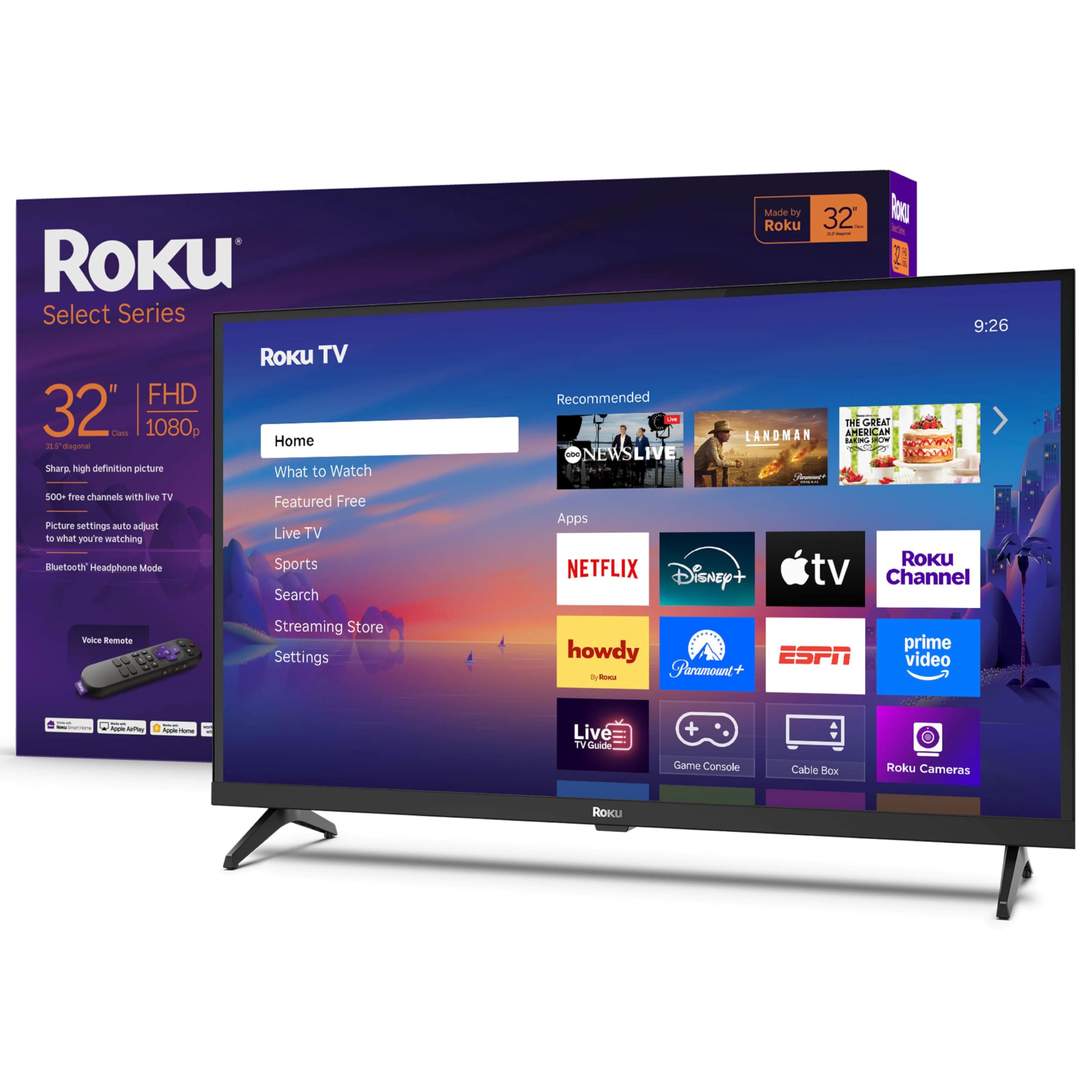
The Roku 32″ Select Series offers a simple remote and clear interface for stress-free viewing.
This is the kit that solves the biggest problem in this buying guide: a remote that makes sense and a home screen that doesn’t hide your apps. The 32-inch flat screen delivers a bright 1080p Full HD picture, which is perfect for a bedroom, kitchen, or den. What wins people over is how simple it is — one review put it plainly: “I’ve had this for a few weeks now and have to say this Roku has far exceeded my expectations.” The setup takes about five minutes, and the Roku app connects nearly instantly.
It has a trick other budget sets miss: Bluetooth Headphone Mode. You can listen through your own wireless headphones without disturbing anyone else, which the button-oriented remote makes trivially easy. The speakers are also a standout — they are designed for clear speech and louder output, so you catch every line of dialogue without constantly grabbing the volume rocker. Its 32-inch size, at 32 inches versus the TOSHIBA’s 50 inches, is smaller, but that makes it a far better fit for a dresser or a smaller shelf.
With over half a thousand ratings backing it and picture quality the most-praised feature by a wide margin, this Roku is the definition of “just works.” It is lightweight and the wide, stable legs mean no wobble on a tabletop. If you are looking for a TV that asks nothing from you except to sit back and watch, this is it.
The Crowd Pleaser
- Clutter-free Roku interface with large, simple app icons
- Bright 1080p display that looks crisp up close
- Voice remote works with Roku Voice, Siri, or Alexa
- Bluetooth Headphone Mode for private listening
The Trade-Off
- 32-inch size feels small for a large living room
- 1080p resolution lacks the pixel density of 4K
Best for daily ease: Anyone who values a straightforward remote and a TV that gets out of the way so you can enjoy the show.
Consider the size first: If you plan to sit more than eight feet from the screen, the 32-inch display may feel small — the 55-inch Roku Plus Series further down this list is a better fit for larger rooms.
2. INSIGNIA 43″ Class F50 Series
The INSIGNIA 43″ F50 Series delivers a 4K upgrade at a budget-friendly price.
If you are moving from an older, smaller TV, this 43-inch 4K UHD set from INSIGNIA is the logical step up in resolution without the premium cost. The picture is crisp — owners say it is “sharp, bright, colorful” — and the HDR10 support ensures colors have more depth than a standard 1080p set. The Amazon Fire TV platform gives you Alexa built right into the voice remote, so asking for the evening news or a specific movie is a simple request.
A clever feature here is the DTS Virtual:X sound processing. Instead of just pumping volume from tiny speakers, it creates a three-dimensional sound field, which helps dialogue feel like it is coming from the center of the room rather than the tiny speakers at the bottom of the frame. Buyers who made a few sound adjustments reported an “excellent picture and sound after tweaks,” which is a big win for a set at this price. The 43-inch size feels substantial in a living room without dominating it.
There is one mixed area: the sound quality is fine, but heavy listeners with big living rooms might eventually want a soundbar. Also, a small number of reviews reported quirks with the remote setup, though for the vast majority it was plug-and-play. It is the clear value king for someone who wants 4K and a bigger screen than the top pick, without stepping up to the premium tier.
Measurement to keep in mind: This 43-inch set, at 43 inches versus the 32-inch Roku, provides a larger screen, and the annual energy consumption sits at 165 kilowatt-hours. A smart choice for those who want a big, sharp picture for a modest investment.
Go for the size gain: This is the best entry-level 4K TV for someone moving up from a smaller 720p or 1080p set — the picture leap is immediate and obvious.
Skip if you need a tiny fit: At 43 inches, it needs a medium-to-large table or wall space. The 32-inch Roku is a better match for tight corners or bedroom dressers.
3. TOSHIBA 50″ Class C350 Series
The TOSHIBA 50″ C350 Series combines Dolby Atmos sound with sharp 4K picture quality.
At 50 inches, this TOSHIBA is a significant step up from the 32-inch Roku — a 56% larger screen, to be exact — making it a real living room centerpiece. The headline feature is the REGZA Engine ZR, which intelligently upscales standard content to near-4K. When you are watching a classic film or an older cable broadcast, it intelligently fills in the missing pixels so the image looks cleaner than the source. The buyer consensus is that the picture quality is excellent and versatile — bright enough for daytime viewing and rich enough for movie nights.
The sound is where this model steals the show. It combines Dolby Vision HDR imaging with Dolby Atmos sound, meaning the audio feels like it is coming from all around you, not just the front of the screen. This is a real boon for older adults who struggle with dialogue clarity on flat-screen TVs. The built-in Fire TV platform also means you have Alexa on hand to change inputs or find a specific show using just your voice.
One aspect to note is that the remote can feel a tad slow, with some owners noting it needs a quicker response time. Also, the “Sports Mode” is a nice extra, setting the picture to reduce motion blur during fast games. For those who want a mid-sized screen with genuinely impressive sound, this TOSHIBA is a very balanced pick.
What Stood Out
- Dolby Atmos sound creates a room-filling audio experience
- AI 4K Upscaler improves the look of standard cable TV
- 50-inch screen is a great living room size without being too heavy
A Slow Touch
- The remote’s response can feel a little laggy compared to the Roku
- Average reliability mixed feedback — some screens had issues
Ideal for the cinephile: This is the TV to buy if hearing every whisper and explosion matters as much as seeing it.
Think twice about: If you prefer a snappier, more immediate button press, the Roku’s interface is faster. This is a slow-motion luxury, not a speedster.
4. Samsung 43″ Crystal UHD U8000H Series

The Samsung 43″ U8000H includes over 2,700 free channels via Samsung TV Plus.
Samsung’s 2026 model, the U8000H, has a secret weapon for frugal viewers: Samsung TV Plus. This gives you access to over 2,700 free streaming options, including 750+ channels you can watch without any subscription. For someone who just wants to turn on the TV and watch news, old movies, or reality shows without signing up for another streaming service, this is a huge practical advantage. The 43-inch display uses a Crystal Processor 4K to enhance colors and sharpen details.
The Motion Xcelerator tech helps with sports and action sequences, creating clear visuals up to 4K at a 60Hz refresh rate. The picture and sound quality get good praise, with one happy owner noting it “exceeded all my expectations.” However, the minimalist remote has drawn some criticism for being too small and unclear, which is a genuine consideration for older hands. It uses Bluetooth 5.3 for a stable connection to accessories like soundbars.
One reviewer pointed out that the setup is straightforward, but it is a bit heavy on the initial account creating. Once past that, it is a solid, lightweight performer that is very easy to wall-mount. It is a great choice if you want to cut the cord completely and rely on free, ad-supported TV.
The real catch: The tiny, minimalist remote may be hard to read. A large-button universal remote or using the app on a phone is a practical workaround for better control.
Best for cord-cutters: The 2,700+ free channels are the real draw here. If you hate monthly bills, this Samsung pays for itself.
Reconsider if you need a large remote: The standard remote is small. Plan on buying a third-party large-button remote, which adds a small extra cost.
5. Roku 55″ Plus Series

The Roku 55″ Plus Series upgrades to Mini-LED QLED picture quality while keeping the easy Roku interface.
This is the TV for the viewer who loves the top pick’s ease of use but wants a significantly bigger, better-looking screen. It uses Mini-LED backlighting and a QLED screen to produce deep blacks and vivid, lifelike colors. Owners who compare it to the standard Select Series note the difference is “night and day” — the detail in 4K content is “terrific,” and the built-in subwoofer gives the sound a surprising amount of punch for a flat-panel TV. The 55-inch size is perfect for a living room where you sit seven to ten feet from the screen.
Because it runs on the Roku OS, you get the same clean, simple home screen as the 32-inch version. That consistency is key for a household with multiple TVs — the navigation muscle memory works the same on every screen. The voice remote is enhanced, so asking for a show is fast. One buyer called it a “fantastic TV” and recommended paying the premium over the Select Series for the significant picture and build quality boost.
The only minor hiccup reported involves a USB port that keeps bias lights on for about ten minutes after the TV shuts off, which is a niche issue for most viewers. Otherwise, the combination of top-tier picture, sound, and the best interface in the business makes this a fantastic upgrade for the living room.
The Upgrade Advantages
- Mini-LED + QLED screen for superior contrast and color
- Dolby Vision provides stunning HDR highlights
- Sound has more depth than most built-in TV speakers
- Roku OS remains the industry standard for simplicity
Small Quirk
- USB power stays on for about 10 minutes after the TV is off, which can annoy some bias light users
Reach for this if: You want a cinematic home theater experience without learning a new remote or complicated menu system.
Consider the budget pick if: This is double the price of the 32-inch Roku. Stick with the smaller model if picture quality isn’t your priority.
6. Hisense 55″ E6 Cinema Series

The Hisense 55″ E6 Cinema Series delivers vibrant Hi-QLED colors for an rich viewing experience.
Hisense is known for packing premium features into a more accessible price, and the E6 Cinema Series is a perfect example. The “Hi-QLED Color” is the star of the show, making shades like the green of a forest or the red of a sunset pop with intensity. It supports every major HDR format, including Dolby Vision, HDR10+, and HDR10, which means you never have to guess if you are getting the best possible picture from your source. The Dolby Atmos sound integration completes the cinema feel.
A smart touch is the AI Light Sensor. This automatically adjusts the screen brightness based on the light in the room — very handy for a viewing room that gets bright afternoon sun. The Fire TV platform with Alexa is built in, so you can use voice commands to launch apps or check the weather. It also has a Filmmaker Mode, which shuts off motion smoothing for a more authentic picture, ideal for watching classic films exactly as they were shot.
The reliability feedback is mixed, with a few owners reporting random shutdowns, though the vast majority find the TV works flawlessly for daily viewing. The Motion Rate 120 helps keep sports and action sequences blur-free. If you care deeply about color accuracy and a premium visual experience without a premium price, this is a strong contender.
A note on setup: The built-in Fire TV gives you a smooth transition from a previous Fire Stick. The 30-60 second cold boot is typical for the platform.
Choose this for color lovers: If you enjoy nature documentaries, colorful animations, or sports through vivid broadcast feeds, this screen treats every shade with stunning clarity.
Be aware of the risk: While many units are flawless, Hisense has a slightly wider variance in reliability reports than the Roku or Samsung brands.
7. Amazon Ember 50″ QLED Series

A TV that listens even when you haven’t touched the remote.
The Amazon Ember is the newest addition to the Fire TV family, and it is designed for the smart home generation. The biggest news is the “No remote needed” capability — you can ask Alexa to play shows, set timers, or control smart lights without even holding the remote, even when the screen is off. The Omnisense technology wakes the display the moment you walk into the room, showing artwork or your home screen without you having to press a button. This is a huge help if you have mobility issues or just want the TV to be more reactive.
Picture quality is solid for a QLED, with Dolby Vision and HDR10+ Adaptive making sure it looks good in any light. The quad-core processor makes the interface feel snappy, and the new Fire TV experience (the 2026 release) has a cleaner layout so you find your shows fast. It also has Wi-Fi 6 for better connectivity if your router is nearby. One owner called it a “massive TV” with good integration, especially for controlling the lights in the room.
The main frustration for some has been reliability after a few months of use. Some owners reported streaming services glitching, though this seems tied to internet stability. Also, because it is so new, the number of long-term reviews is smaller than the INSIGNIA or TOSHIBA. It also has the highest price point here, so this is an investment in convenience over pure value.
The Future Features
- Hands-free Alexa works without the remote — just talk to the TV
- Omnisense wakes the screen when you walk in the room
- Four HDMI inputs for all your gadgets
- Wi-Fi 6 for fast streaming
The Practical Catch
- Some early reviews mention streaming app glitches after a few months
- Premium price compared to similar-sized competitors
Best for tech lovers: If you already use Alexa lights, plugs, or thermostats, this TV becomes the smooth hub of your smart home.
Skip if you don’t use smart home: Paying a premium for voice control you won’t use is wasted. Pick the TOSHIBA or INSIGNIA instead.
8. TCL 55″ QM6K Series

The sports fan’s secret weapon — blurs begone at 144 frames per second.
If you or your loved one watches a lot of live sports, this TCL QM6K is a. It has a native 144Hz refresh rate (Motion Rate 480), which means fast-moving action — a baseball pitch, a soccer pass, a hockey goal — stays crisp and clear without ugly motion blur. The QD-Mini LED technology combines the tiny light zones of Mini-LED with the rich color of Quantum Dots, producing over a billion colors. The “Halo Control System” ensures you don’t get distracting halos around bright objects on a dark background.
The sound is handled by Onkyo Audio, a respected brand in home theater, which gives the built-in speakers more authority than most TV audio systems. The remote has an illuminated backlight that lights up when you pick it up — a thoughtful touch for evening viewing that solves the “which button is which” problem instantly. Buyers consistently praise the picture quality and the amazing clarity for the price, with one calling it an “excellent TV with beautiful colors.”
This is the most expensive pick in the guide, but it matches the performance of much more expensive TVs. The Google TV interface is slick, but it is a different menu system than the Roku or Fire TV, so there is a small learning curve. It is the best choice for someone who prizes smooth, high-detail visuals above all else.
Port reality check: It has two HDMI 2.1 ports that can handle the full 144Hz signal, so a modern streaming box or console will work perfectly.
Pick this for the motion: If your TV is mostly for watching live sports or fast-action movies, the 144Hz refresh rate is a genuine advantage no other budget TV here matches.
Consider a different platform: The Google TV interface is powerful but busier than the Roku. If simplicity is your top priority, stick with the Roku 55″ Plus Series at the top of this list.
Understanding the Specs
Resolution: 1080p vs 4K
Resolution tells you how many tiny dots (pixels) make up the picture. A 1080p Full HD screen has about two million pixels — plenty sharp for a 32-inch set where you sit close. A 4K UHD screen has over eight million pixels, which matters when the screen is 50 inches or larger. If you mostly watch cable TV and old movies, 1080p is fine. If you stream Netflix in 4K or want the sharpest picture possible, go with a 4K set.
Refresh Rate: 60Hz vs 144Hz
Measured in Hertz (Hz), refresh rate is how many times per second the TV updates the image. A standard 60Hz TV refreshes 60 times a second, which is fine for news, dramas, and most streaming. A high 144Hz rate (like on the TCL QM6K) refreshes more than twice as fast. This eliminates motion blur during fast sports, making a baseball pitch or a car race look clear instead of smeary.
Smart Platform: Roku vs Fire TV vs Google TV
This is the operating system of the TV — the menu you scroll through. Roku is the gold standard for simplicity, with a clean grid of apps and a very easy remote. Fire TV (Amazon) focuses heavily on Alexa voice control and integrates Prime Video deeply. Google TV is more modern and customizable but has a slightly busier interface. For an older adult, Roku is often the safest bet.
HDR: Dolby Vision and HDR10+
HDR stands for High Dynamic Range. It is a technology that makes the bright parts of a picture brighter and the dark parts darker, creating more depth. Dolby Vision and HDR10+ are the two main formats. If a TV supports both, it will automatically pick the best picture settings for whatever movie or show you are watching. Look for both if you plan to watch a lot of streaming movies.
FAQ
What size TV is best for an older adult in a small room?
Is a 4K TV worth it for watching standard cable TV?
Which TV has the best built-in speakers for clear dialogue?
Can I use voice control on these budget TVs?
Which TV is the easiest to set up for someone who is not tech-savvy?
What is Bluetooth Headphone Mode and why is it useful?
How long do these budget TVs typically last?
Can I wall-mount these TVs?
Which is better for an older adult, Roku or Fire TV?
What if the remote has tiny buttons I cannot read?
Final Thoughts: The Verdict
For most people, the winner for budget tvs for older adults is the Roku 32″ Select Series because it delivers a strong balance of a dead-simple remote, clear dialogue-focused sound, and a bright 1080p screen at a very accessible price. If you want a bigger living room screen with a picture upgrade, grab the Roku 55″ Plus Series for its superb QLED image combined with the same easy interface. And for the sports fan in the family who cannot stand motion blur, the TCL 55″ QM6K Series is the one to reach for, with its blazing-fast 144Hz refresh rate.
How We Picked
We do not accept paid placement. Every pick is matched to a real buyer and a real use-case; we do not hands-on test units.
Sources & Methodology
Specifications: manufacturer listings and product documentation. Review insights: verified customer reviews, as of July 2026. Pricing: not shown on this page (it changes often); check the current price via the retailer link.
As an Amazon Associate, FitlyFast earns from qualifying purchases. This does not affect which products we feature.