
Our readers keep the lights on and the weekend projects moving. As an Amazon Associate, I earn from qualifying purchases.
Specs are compiled from manufacturer listings and verified buyer reviews and can change over time — please confirm the key details on the product page before buying.
Finding a budget video card that can handle modern games without breaking your bank or sounding like a jet engine is the real challenge. The budget GPU market is a minefield of confusing model numbers, fake specs, and cards that just can’t keep up. This guide cuts through the noise to find the few cards that actually deliver solid 1080p performance for a fair price, without the usual compromises that make other budget picks feel like a bad deal.
I’m Rikta — the founder and writer behind FitlyFast. This guide is built by comparing the manufacturers’ published specifications and the patterns across verified customer reviews, so you get each pick’s real strengths and trade-offs instead of marketing spin.
Every card here was chosen for its ability to play modern games smoothly at 1080p, with a focus on raw performance per dollar. Whether you are assembling your first PC or giving an old desktop a second life, this is your honest look at the best budget video card options available right now.
Our Picks at a Glance


How To Choose The Best Budget Video Card
Choosing a budget video card is less about finding the cheapest option and more about avoiding the traps. A low price is meaningless if the card can’t play the games you want, or if it arrives in a damaged box. Focus on these three things.
VRAM Size — The 8GB Rule of Thumb
VRAM (video memory, the card’s dedicated workspace for textures and scene data) is the single most important spec for longevity. For 1080p gaming in 2024 and beyond, 6GB is the bare minimum, but 8GB is the balance. Many newer games demand more than 6GB at medium-to-high settings, so a card with 8GB will stay relevant longer. A card with only 4GB will struggle on modern titles.
Power Connectors and PSU Requirements
This is where many budget builds fail. Every dedicated card needs a specific power connector from your PSU (Power Supply Unit). Most cards in this range use a single 8-pin connector, but some of the more powerful ones need two. Before you buy, check your power supply to see if it has the right cables. Reviewers often mention installation problems because of this simple oversight.
Cooling and Physical Size
A card’s cooling system (how it moves heat away from the GPU chip) directly affects how loud and how hot it gets. Dual-fan designs with a “0dB” or “intelligent fan stop” feature let the fans turn off completely during light work, making the PC silent. Also measure the space inside your case. Some cards, like the “low profile” models, are built specifically for compact desktop computers where a full-size card won’t fit.
Quick Comparison
| Model | Best For | VRAM | GPU Clock Speed | Max Resolution | Amazon |
|---|---|---|---|---|---|
| AISURIX RX 5500 XT★ Best Overall | Entry-Level Budget | 8 GB | 1750 MHz | 3840 x 2160 | Amazon |
| ASRock Arc B570Also Great | 1440p Gaming | 10 GB | 2600 MHz | 7680 x 4320 | Amazon |
| XFX RX 7600Top Performer | 1080p High Refreshrate | 8 GB | 2655 MHz | 7680 x 4320 | Amazon |
| GIGABYTE RTX 5060 | DLSS 4 Performance | 8 GB | — | 7680 x 4320 | Amazon |
| ASUS RTX 5060 | SFF Builds | 8 GB | 2565 MHz | 7680 x 4320 | Amazon |
| ASRock Arc A580 | Raw 1080p Power | 8 GB | 2000 MHz | 7680 x 4320 | Amazon |
| ZER-LON GTX 1660 Super | Starter PCs | 6 GB | 1530 MHz | 7680×4320 | Amazon |
| MSI RTX 3050 LP | Small Form Factor PCs | 6 GB | 1492 MHz | 3840 x 2160 | Amazon |
In‑Depth Reviews
1. AISURIX RX 5500 XT 8gb GDDR6 Graphics Card
The true entry-level card that packs 8GB but asks you to check the box condition.
The AISURIX RX 5500 XT is the most affordable card in this list, and it makes some real sacrifices to get to that price. The GPU clock is 1750 MHz, which is lower than the 2000 MHz Arc A580 and the 2600 MHz Arc B570. The card has 8GB of GDDR6 memory — the same capacity as the much more expensive cards.
The customer reviews tell the real story. Owners mention the card works well for budget gaming, with one satisfied user calling it “great for budget PC builds” and noting it runs BeamNG.Drive near 60fps on Ultra settings. However, another buyer reported the “card arrived bent in damaged box; needed manual bending and force to install.” That same buyer found only 1 of the 3 DisplayPorts worked. This is the risk you accept at the bottom of the price ladder: the specs are reasonable, but the quality control and packaging can be inconsistent. It also has a maximum resolution limit of 3840 x 2160, while the ASRock cards support 7680 x 4320.
For the bare-bones budget builder who needs 8GB of VRAM for the lowest possible entry cost, this card works. It is a gamble on packaging quality, but if you get a good unit, it delivers solid 1080p performance for a very low price, making it the true budget champion in terms of cost-to-VRAM ratio.
What you get
- 8GB GDDR6 VRAM at the lowest price point
- Low power draw at 130W maximum
- Intelligent fan stops for quiet office use
- Works solidly for 1080p gaming when functional
Risks
- Mixed quality control — some cards arrive damaged
- Only 3840 x 2160 max resolution
- PCI-Express 3.0 interface limits performance on new boards
The last-resort budget pick: This card is for the shopper who absolutely must have 8GB of VRAM for the absolute lowest price and is willing to accept a risk on packaging and port functionality.
Better to skip if: You can stretch your budget by even a small amount — the ASRock A580 or ZER-LON 1660 Super offer far better reliability and performance.
2. ASRock Intel Arc B570 Challenger 10GB OC GDDR6 Graphics Card
The budget card that feels premium and delivers true 1440p performance.
The ASRock Arc B570 is the one that makes you question why you would spend more. It skips the budget-card compromises with a 10GB GDDR6 frame buffer (that is the video memory), which gives it a clear edge over the 8GB cards below it. This extra VRAM means you can run texture packs and higher resolutions without stuttering. The GPU clock speed of 2600 MHz is aggressive, and buyers report it handles 1440p gaming beautifully, hitting 75-100 fps in titles like Cyberpunk and Apex Legends when paired with XeSS 2 upscaling technology.
It also packs modern hardware features that cheaper cards skip. You get three DisplayPort 2.1 outputs (the latest video connection standard for high refresh rate monitors) and an HDMI 2.1a port. The dual-fan 0dB cooling system stops the fans completely when the card is cool, making your PC silent during web browsing. With 10GB of VRAM, it beats the RTX 4060 and RTX 5060 cards on memory capacity by a solid 2GB margin.
One reviewer noted the RGB lighting on the card cannot be customized through software, which is a minor quibble for an otherwise excellent package. But the build quality is high, with a metal backplate that prevents the card from sagging in your case.
What stands out
- 10GB VRAM beats every other card in this budget roundup
- 2600 MHz GPU clock from the start
- 0dB fan stop for silent operation at idle
- Modern DisplayPort 2.1 and HDMI 2.1a ports
What to watch for
- RGB color is not adjustable via software
- Requires Resizable BAR support for full performance
The buy-it pick: This is the best choice if you want 1440p capability and more VRAM than any competitor. It future-proofs your build better than any other card on this list.
The honest limit: It needs a modern motherboard with Resizable BAR enabled to open up its full potential, which is not a problem for new builds but could be for very old systems.
3. XFX Speedster SWFT210 Radeon RX 7600 Graphics Card
The reliable workhorse that churns out high frame rates without fuss.
The XFX RX 7600 is the card you buy when you just want to play games without tinkering. It runs on the AMD RDNA 3 architecture and offers a boost clock of up to 2655 MHz, which translates to smooth, fast 1080p gameplay. Owners mention it handles most games at over 100 fps with FSR (FidelityFX Super Resolution, AMD’s upscaling technology) enabled. The 8GB GDDR6 memory is the balance for 1080p, matching the ASRock Arc A580 and the RTX 5060 cards in capacity.
The dual-fan XFX SWFT cooling solution keeps temperatures in check. One buyer on Fedora Linux noted the card idles at a cool 40°C and consumes only 1 watt at idle, making it incredibly efficient for a desktop that stays on all day. The card is also compact and quiet. Some users did mention initial crashing at high temperatures (in the 80s Celsius), which was resolved after improving case airflow and updating drivers — a reminder that a good card needs a well-ventilated case.
At 2655 MHz boost clock, it is faster on paper than the ASRock Arc A580’s 2000 MHz clock, giving it an edge in raw frame rate in older games. But unlike the B570, the 7600 has only 8GB of VRAM, so it will fill up faster in texture-heavy modern titles. The switch from an Nvidia card was also reported to be easy on Linux, with all three display outputs working right away.
Why it works
- High boost clock of 2655 MHz for fast frame rates
- Efficient and quiet operation, especially at idle
- Works well with Linux from the start
- 8GB GDDR6 is the standard for 1080p
Heads up
- Initial driver updates and airflow management are critical for stability
- 8GB VRAM is a limit for future-proofing vs the 10GB B570
Best for plug-and-play: This is the card for the gamer who wants high frame rates at 1080p and prefers a trouble-free AMD experience.
Best to skip if: You want the extra VRAM headroom for future titles or 1440p gaming — the B570 is the better choice there.
4. GIGABYTE GeForce RTX 5060 Gaming OC 8G
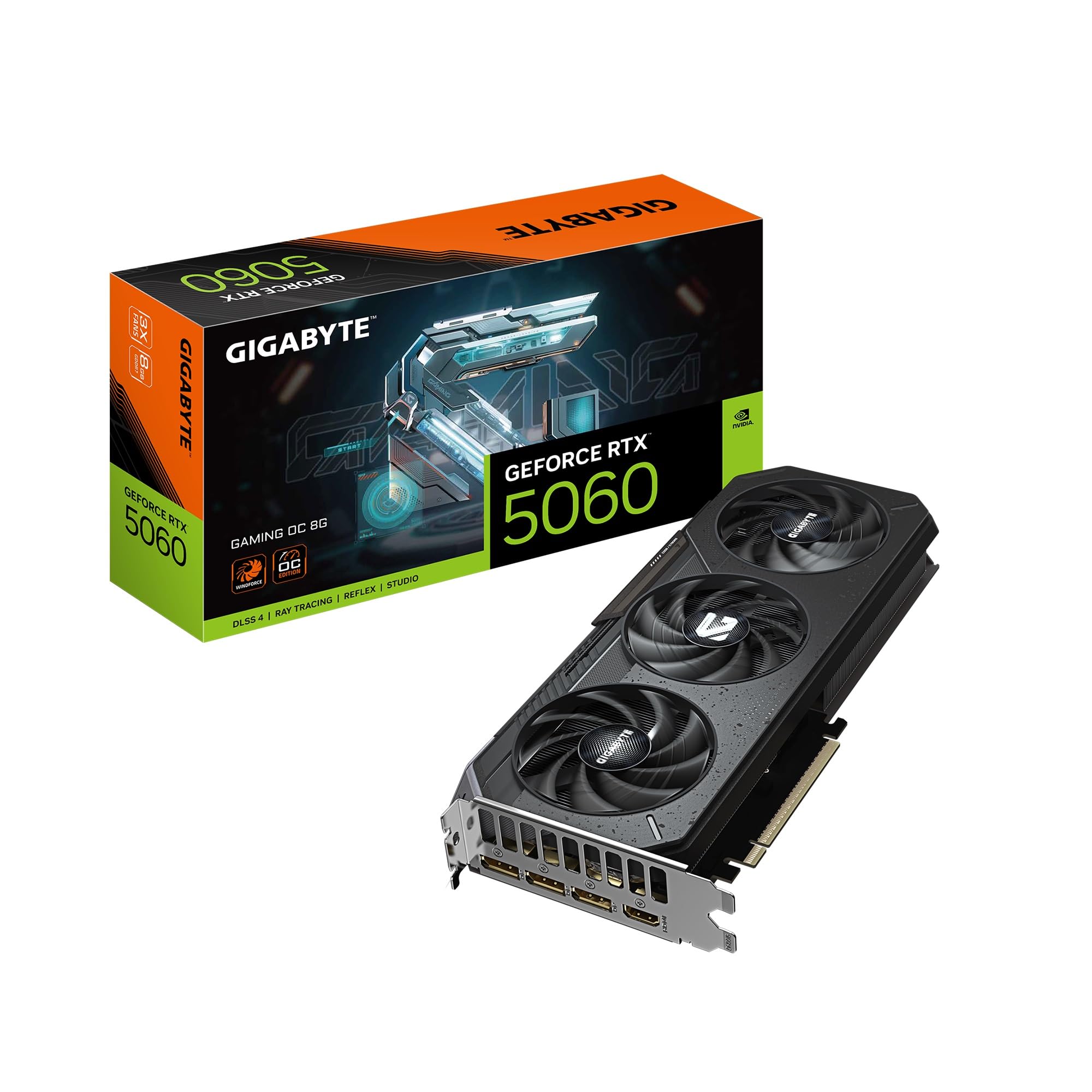
The newest architecture with DLSS 4 magic for sharper 1080p gaming.
The GIGABYTE RTX 5060 brings Nvidia’s newest Blackwell architecture to the budget segment. Its headline feature is DLSS 4 (Deep Learning Super Sampling, Nvidia’s AI-powered upscaling) which uses machine learning to render games at a lower resolution and then smartly upscale them, giving you higher frame rates with very little loss in visual quality. Customers note it is 30% faster than an RTX 2070 and handles 1080p with authority, making it a massive upgrade for anyone on a five-year-old card.
This card uses the brand new GDDR7 video memory standard (the latest generation of GDDR memory, offering faster speeds than GDDR6) on a 128-bit memory interface. While it has 8GB of VRAM — the same as several cards here — the faster GDDR7 helps it keep up. It also supports PCIe 5.0, the latest motherboard connection standard, which future-proofs it for builds that use a faster CPU. The triple-fan WINDFORCE cooling system is both effective and quiet, as buyers have noted.
Compared to the ASRock B570, the RTX 5060 has less VRAM (8GB vs 10GB) but offers superior upscaling technology with DLSS 4. For gaming with ray tracing enabled, Nvidia cards generally hold an edge. One reviewer cautioned this is not the best card for streamers or video editors due to the 8GB VRAM limit, but for pure 1080p gaming, it is a top performer.
Best features
- Newest Blackwell architecture with DLSS 4
- Fastest GDDR7 memory in this budget roundup
- PCIe 5.0 for future motherboard compatibility
- Effective triple-fan cooling that runs quiet
Considerations
- 8GB VRAM is less than the B570’s 10GB
- PCIe 5.0 provides no benefit on PCIe 4.0 motherboards
The feature winner: This is the card to get if you want the newest tech (GDDR7 memory, DLSS 4 upscaling) and prioritize high-quality 1080p gaming with ray tracing.
The trade-off: If you care more about raw VRAM capacity for high-resolution texture packs, the B570 with 10GB is a smarter pick.
5. ASUS Dual NVIDIA GeForce RTX 5060 8GB GDDR7 OC Edition

A compact powerhouse for small builds that outperforms pricier rivals.
The ASUS Dual RTX 5060 is a slightly different take on the new 5060 chip, designed to fit into smaller cases (it is a “SFF-Ready Enthusiast GeForce Card”, meaning it’s built for Small Form Factor PCs). It runs at a boost clock of up to 2565 MHz and comes with the same DLSS 4 technology found in the GIGABYTE card. Unlike the three-fan GIGABYTE, this ASUS model uses a two-fan Axial-tech design, making it shorter at 9 inches long compared to the GIGABYTE’s 11.06 inches.
Performance from the GDDR7 memory and the Blackwell architecture is strong. Reviewers point out it delivers raster performance (raw processing power without upscaling) comparable to an RTX 2080 Ti or RTX 3070, which is impressive for a card in this price bracket. One buyer on a Linux system praised its compatibility with an 8-year-old computer. The “0dB Technology” means the fans stop completely when the GPU is cool, making it silent for office work.
A key difference from the GIGABYTE model is the AI performance rating of 623 AI TOPS, which is a measure of how fast the card can process AI workloads. For gamers, this translates directly to better DLSS 4 performance. It uses a 150W TDP (Thermal Design Power, the amount of heat the cooler needs to dissipate), which is very efficient and does not require a massive power supply. Like its GIGABYTE sibling, it has 8GB of VRAM, making it less future-proof for VRAM-heavy tasks than the 10GB ASRock B570.
Why it fits
- SFF-ready design fits in compact cases easily
- 623 AI TOPS for top-tier DLSS 4 performance
- Runs cool and efficient at 150W TDP
- Fans stop completely at idle for silence
Where it cuts corners
- 8GB VRAM is a bottleneck for some modern titles
- Requires a PCIe 5.0 motherboard for peak bandwidth
The compact crusher: If you are building a small form factor PC and want the latest Blackwell architecture with DLSS 4, this ASUS card fits perfectly where the bigger cards cannot go.
The one catch: For a standard mid-tower case, the larger GIGABYTE 5060 often offers better cooling for the same price.
6. ASRock Intel Arc A580 Challenger 8GB OC Graphics Card

The raw performer that lays down 2000 MHz and 8GB for the price of a dinner out.
The ASRock Arc A580 is a ground-pounder for 1080p gaming. Its GPU clock speed of 2000 MHz and 8GB GDDR6 memory on a 256-bit interface (the width of the data path to memory, wider means faster transfers) make it a strong contender against cards that cost more. It supports a resolution up to 7680 x 4320, whereas the AISURIX card is limited to 3840 x 2160. Buyers are stunned by the performance, reporting 170+ fps in War Thunder at max settings, 80+ fps in Warzone at medium, and 240+ fps in Rainbow Six.
This card requires a bit more power than the simpler cards. It needs two 8-pin PCIe power connectors and a recommended 650W PSU, whereas the MSI RTX 3050 LP needs no additional power at all. The dual-fan 0dB Silent Cooling stops the fans completely when temperatures are low, so your PC is silent while you browse. The stylish metal backplate adds rigidity and class to the look. One buyer flagged a random black screen and audio loss issue, which they suspected was a driver problem, so keeping drivers updated is critical here.
The A580 has 8GB of VRAM, the ZER-LON GTX 1660 Super has 6GB; the A580 also has a GPU clock of 2000 MHz vs the 1660 Super’s 1530 MHz. That translates directly to higher frame rates in games that can use the extra memory. For the buyer who targets maximum 1080p frame rates, this card is a monster for the money.
Strengths
- 2000 MHz factory overclock for high frame rates
- 8GB GDDR6 on a 256-bit bus for fast memory access
- 0dB silent cooling stops fan noise at idle
- Supports up to 7680 x 4320 resolution
Weak points
- Requires two 8-pin connectors and a 650W PSU
- Some users report driver-related black screen issues
The frame-rate king: This is the best choice for the gamer who wants the highest possible 1080p frame rates for the lowest possible price and does not mind a slightly higher power draw.
Skip this if: Your PC has a low-wattage power supply or limited space for two power cables.
7. ZER-LON GeForce GTX 1660 Super 6GB Graphics Cards

An older warrior that still throws solid punches in entry-level gaming.
The ZER-LON GTX 1660 Super is a card built on Nvidia’s older 12 nm process (a measure of the manufacturing technology, smaller is more efficient) and uses 6GB of GDDR6 memory on a 192-bit bus. While it lacks modern features like ray tracing cores or DLSS, it has a proven track record for 1080p gaming. Shoppers say it delivers high frame rates at 1080p, with one reviewer successfully using it to enable 4 HD Homerun tuners alongside dual video sources on their desktop.
The biggest practical difference between this and newer cards is the 6GB VRAM limit. Compared to the 8GB on the ASRock A580, the 1660 Super has 2GB less, which means some newer games will force you to lower texture quality to avoid stuttering.
It supports up to 8K display output (7680×4320), matching the resolution of the top-tier cards in this list. Its base clock of 1530 MHz is much lower than the 2000 MHz of the Arc A580, but older games are less sensitive to raw clock speed. The card requires an 8-pin power connector. The ZER-LON brand does not include any accessories like driver discs or adapters, as buyers have noted, so be prepared to download drivers from Nvidia’s website.
Pros
- Proven, reliable performance for 1080p gaming
- 192-bit memory bus offers good bandwidth for its era
- Quiet fans with zero-load stop feature
- Supports 8K display output
Cons
- 6GB VRAM is low for newer games
- No ray tracing or DLSS support
- No accessories included in the box
The budget starter: This card is a good pick for building a cheap first gaming PC for a kid or for older games that do not need a lot of memory.
Look elsewhere if: You plan to play the latest AAA titles at high settings — the 6GB VRAM will max out quickly.
8. msi Gaming RTX 3050 LP 6G OC Graphics Card

The tiny card that brings ray tracing and DLSS to your small office PC.
The MSI RTX 3050 LP is a unique beast. It is a low-profile card (a smaller bracket and PCB that fits in slim desktop computers like the Dell Optiplex or HP EliteDesk) that does not need any extra power cables. It draws all its power from the PCI-Express x16 slot itself, making it a perfect drop-in upgrade for pre-built office PCs. This makes it fundamentally different from every other card here, all of which require an 8-pin power connector from the PSU.
Performance is solid for entry-level 1080p, with a boost clock of 1492 MHz and 6GB of GDDR6 memory on a 96-bit bus (a narrow bus, which limits memory bandwidth). It supports Nvidia’s DLSS (Deep Learning Super Sampling), which is a significant advantage over the ZER-LON 1660 Super. Buyers report great results in small form factor builds, with one reviewer getting it running in a Dell Inspiron 3471 SFF without any modifications. It even supports ray tracing at a basic level, though you will need to lower settings to keep playable frame rates.
The catch is the narrow 96-bit memory bus, which is the smallest in this roundup. This means that even though the card has 6GB of GDDR6, it cannot access it as quickly as a card with a 128-bit or 192-bit bus. This limits performance in games that need to move a lot of data quickly. But if you need a card that physically fits in a small case and does not require a PSU upgrade, this is the only real option.
Why it works
- Low-profile design fits in slim desktop cases
- No extra power cables needed — works on slot power alone
- Supports DLSS and ray tracing for better visuals
- Fans stop completely at idle for silent operation
Where it struggles
- 96-bit memory bus is narrow, limiting bandwidth
- Only 6GB VRAM, which is tight for 1080p
- Performance is firmly entry-level
The fit-first pick: This card is for anyone upgrading a slim desktop (Dell, HP, Lenovo SFF) who needs a drop-in upgrade with zero hassle.
skip it if: You have a standard mid-tower case — the ASRock A580 or XFX RX 7600 will offer much better performance for the money.
Understanding the Specs
VRAM (Video Memory)
Think of VRAM as the card’s desk space. When you play a game, the textures, textures, and models are loaded onto this desk. A bigger desk (more VRAM) means you can keep more high-resolution items ready to go without having to swap them out to the slower system memory. For 1080p gaming, 8GB is the current balance. Cards with 6GB, like the ZER-LON 1660 Super and MSI RTX 3050 LP, will run into limits in newer, more demanding games. The ASRock B570’s 10GB is an advantage that will keep the card relevant for years.
GPU Clock Speed (MHz)
The GPU clock speed, measured in MHz (megahertz), is how fast the card’s processing cores run. A higher number usually means more calculations per second, which translates to more frames per second in games. But it is only part of the puzzle — a card’s architecture and the number of cores matter too. For budget cards, a clock speed of 1500-2000 MHz is typical for older designs, while newer chips like the ASRock B570 hit 2600 MHz. The 2000 MHz of the ASRock A580 gives it a clear lead over the 1530 MHz of the ZER-LON 1660 Super.
FAQ
Will a budget video card work in my old office computer?
How much VRAM is enough for 1080p gaming?
Do I need a special power supply for a budget graphics card?
What is DLSS and why does it matter for a budget card?
Is the Intel Arc A580 good for the price?
Can a budget video card handle 1440p gaming?
What does “0dB Silent Cooling” mean?
Is the ZER-LON GTX 1660 Super still worth buying in 2025?
Should I be worried about the card’s memory bus width?
What brand of budget video card should I choose, ZER-LON or AISURIX?
Final Thoughts: The Verdict
Across the board, the budget video card winner is the ASRock Intel Arc B570 because it offers the best mix of modern features (10GB VRAM, high clock speed, 0dB cooling) and performance at a price that beats the competition. If you want the highest raw 1080p frame rates for the lowest price and have a suitable power supply, grab the ASRock Intel Arc A580. And for upgrading a tiny office PC where space and power are limited, the standout is the msi Gaming RTX 3050 LP.
How We Picked
We do not accept paid placement. Every pick is matched to a real buyer and a real use-case; we do not hands-on test units.
Sources & Methodology
Specifications: manufacturer listings and product documentation. Review insights: verified customer reviews, as of July 2026. Pricing: not shown on this page (it changes often); check the current price via the retailer link.
As an Amazon Associate, FitlyFast earns from qualifying purchases. This does not affect which products we feature.