
Our readers keep the lights on and the weekend projects moving. As an Amazon Associate, I earn from qualifying purchases.
Specs are compiled from manufacturer listings and verified buyer reviews and can change over time — please confirm the key details on the product page before buying.
Finding a Budget Wireless Keyboard that doesn’t feel like a flimsy toy used to mean endless scrolling and crossed fingers. The good news: the budget tier has grown up, and you no longer have to trade a full-size layout, quiet keys, or a reliable connection just to stay under a sensible spend. The real question is which one matches how you actually work — and where the hidden trade-offs sit.
I’m Rikta — the founder and writer behind FitlyFast. This guide is built by comparing the manufacturers’ published specifications and the patterns across verified customer reviews, so you get each pick’s real strengths and trade-offs instead of marketing spin.
Seven full-size wireless keyboards stand out for quiet typing, solid 2.4GHz connections, and honest value — here is the breakdown of the best budget wireless keyboard options for your desk.
Our Picks at a Glance


How To Choose The Best Budget Wireless Keyboard
Every keyboard on this list shares the same basic promise: a full-size layout, a wireless connection, and a price that won’t sting. The differences come down to a few key choices that change how the keyboard feels on your desk and in your daily routine.
Connection type: the 2.4GHz receiver advantage
Most budget wireless keyboards use a small USB dongle — a 2.4GHz receiver — that you plug into your computer. This is the most reliable option at this price level because it connects instantly (no pairing menus) and avoids the lag that can creep into Bluetooth connections. The trade-off: the receiver occupies a USB port, and if you lose it, the keyboard is useless until you find it. Check where the receiver stores — many models tuck it into the battery compartment so it doesn’t vanish.
Battery life: battery-powered vs rechargeable
You will see two approaches here. Some keyboards run on AA or AAA batteries and advertise extreme endurance — 12 months, 36 months, even 365 days — which means you might change batteries once a year or less. Others pack a built-in rechargeable battery that you charge with a USB cable every few months. Both work; the right choice depends on whether you prefer keeping spare AA batteries around or plugging in a cable occasionally. The rechargeable route typically means a slimmer, lighter keyboard.
Layout and comfort features that actually matter
Full-size means you get a numeric keypad on the right — a must if you do data entry or accounting. Beyond that, look for tilt legs that raise the back of the keyboard so your wrists stay level, and a palm rest if you type for long stretches. Multimedia hotkeys (play/pause, volume, email) sound like a small bonus but become genuinely handy once you use them daily. And if you share an office or type at night, a quiet membrane key design makes a real difference to everyone around you.
Quick Comparison
| Model | Best For | Connection | Battery Life | Keys | Amazon |
|---|---|---|---|---|---|
| QUASIO Silent Combo★ Best Overall | Quiet shared offices | 2.4GHz USB | Up to 365 days | Full-size + 12 hotkeys | Amazon |
| EDJO ComboTop Performer | Programmers & multitaskers | 2.4GHz USB | Auto-sleep power saving | Full-size + 12 hotkeys | Amazon |
| ONIKUMA Tri-Mode | Gamers on a budget | Bluetooth 5.0 + 2.4GHz + USB-C | 2000mAh rechargeable | 94-key compact PBT | Amazon |
| Logitech K345 | Comfort-first typists | 2.4GHz USB | Up to 3 years | 102 keys + palm rest | Amazon |
| Logitech MK270 | Reliable everyday combo | 2.4GHz USB | 36-month keyboard / 12-month mouse | Full-size + 8 hotkeys | Amazon |
| UBOTIE Typewriter | Style-conscious desks | 2.4GHz USB | Auto-sleep power saving | Full-size round keys | Amazon |
| Arteck Slim | Travel & minimal setups | 2.4GHz USB | 6-month rechargeable | 113 keys + numpad | Amazon |
In-Depth Reviews
1. QUASIO Full-Size Silent Keyboard & Mouse Combo
The quietest full-size combo that still feels like a step up, not a compromise.
This is the pick that wins you over before you even finish typing a sentence. The soft membrane keys are nearly silent, and the mouse uses silent micro-motion clicks — so in a shared office or a late-night session, the loudest thing on your desk is your breathing. The quality shines through in the details: a hand-friendly contoured mouse with 1600 DPI tracking, and a full-size keyboard with a numeric keypad and 12 multimedia shortcut keys for play/pause, volume, and email.
The battery story here is the headline number — up to 365 days for both keyboard and mouse on a single AAA and AA battery respectively. After 10 minutes of inactivity, both devices slip into sleep mode to stretch that further. The combo shares one nano USB receiver, stored neatly in the mouse’s battery compartment, and it’s plug-and-play with Windows 11, 10, 8, 7, Mac OS, Chrome OS, and Linux. The adjustable height tilt legs help keep your wrists comfortable during long typing sessions.
Buyers report the setup is instant and the connection is lag-free, with one noting it “works with multiple devices without issues.” What wins people over is the overall quality — the most-praised aspect across the review pages. The honest caveat: a few owners mention the key feel as mixed, and one noted the color wasn’t quite what they expected (“Maybe my fault,” they added). At this price, you’re getting a genuinely premium-feeling upgrade that’s easy to live with.
What wins people over
- Nearly silent keys and mouse clicks — the most-praised quality by far
- Up to 365 days of battery life on one AAA and one AA battery
- Sleep mode kicks in after 10 minutes of inactivity to save power
Worth knowing
- Key feel gets mixed feedback — functional but not tactile
- Color can look different in person than on screen
- Shared receiver means you can’t use keyboard and mouse far apart
Your best bet if: you want a quiet, reliable, full-size combo that handles work and school without fuss — and you’d rather not think about batteries for a year.
Think twice if: you need a tactile, clicky typing feel; the soft membrane here is calm, not crisp.
2. EDJO Computer Wireless Keyboard & Mouse Combo
A workhorse combo with a foldable stand that serious typists keep coming back to.
If you spend your day bouncing between code, email, and spreadsheets, this combo earns its keep through small-but-crucial details. The foldable stand on the keyboard tilts it to a comfortable angle, and anti-slip pads keep it planted while you type. The mouse is ambidextrous with a symmetrical shape, using optical tracking that glides across most surfaces. Programmers in particular will appreciate the dedicated F12 key — no Fn combos needed for console access.
You get a rock-solid connection that owners mention “connects without difficulty and has no delay.” The 2.4GHz (a standard wireless signal) reaches 33ft (10m), and both devices share one USB receiver tucked inside the mouse’s battery compartment. Power saving is split smartly: the keyboard sleeps after 6 minutes of inactivity, while the mouse dozes off after just 25 seconds. The keyboard takes one AA battery, and the mouse takes two AAA batteries (not included).
Twelve multimedia hotkeys put music, mail, and your computer one tap away, with number lock, caps lock, and power indicators in the upper-right corner. Customers note it’s “very easy to set up” and feels “nice to the touch” — one sums up: “They are a great value for the cost.” The honest trade-off: a few owners flagged occasional key jams during light gaming, and some noted missing USB components on arrival. This is firmly a work-and-school keyboard — keep gaming to a dedicated board.
Built for work: the foldable stand, anti-slip pads, and dedicated F12 key make it a favorite among programmers and office multitaskers.
Keep it for typing: a couple of buyers saw keys jam after ~2 weeks of gaming — this is an office board, not a gaming rig.
3. ONIKUMA GAMING Tri-Mode Wireless Keyboard
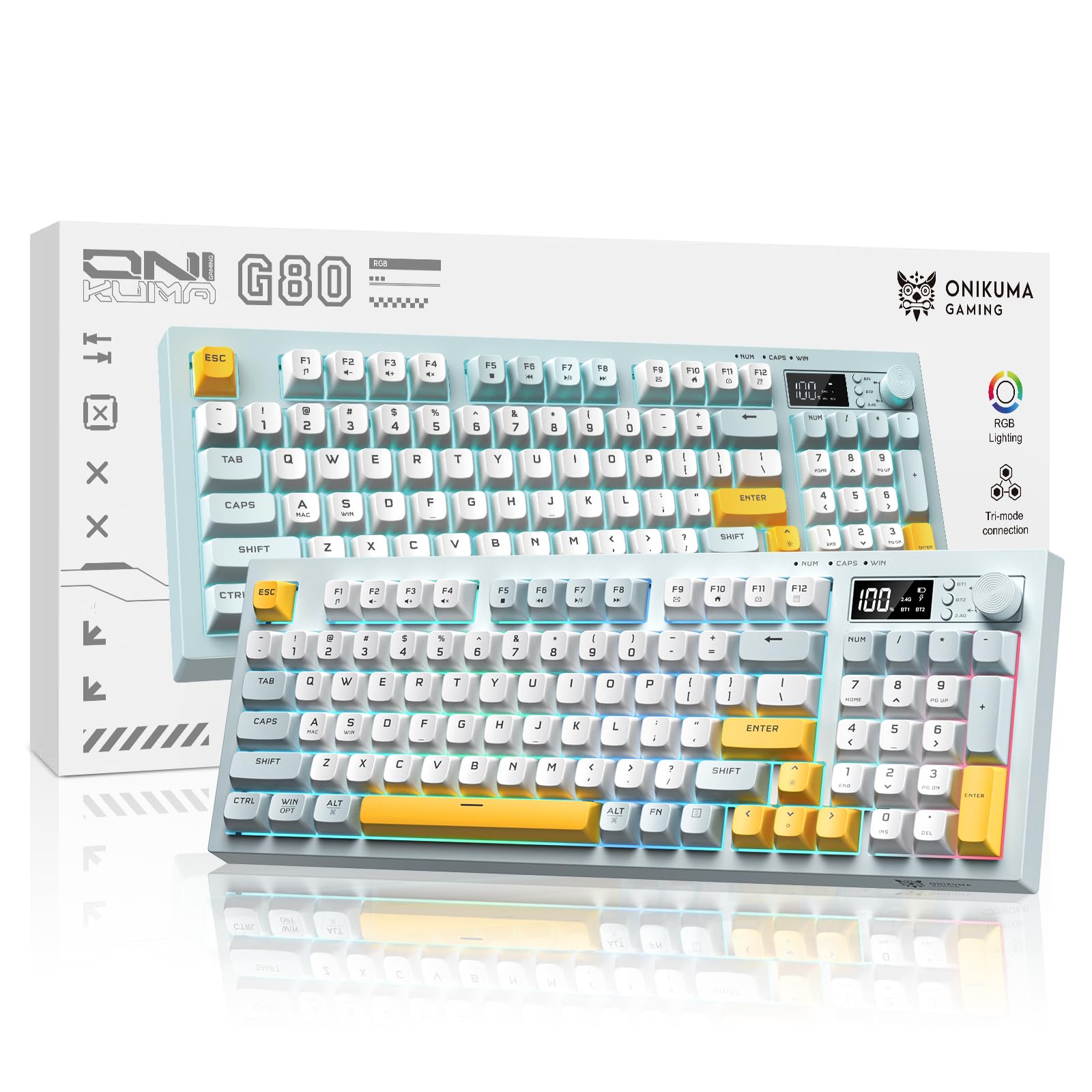
RGB glory, a display screen, and a volume knob — all squeezed into the budget zone.
This is the keyboard that makes you double-check the price tag. It packs three connection modes — Bluetooth 5.0, 2.4GHz wireless, and wired USB-C — so you can hop between a PC, laptop, and phone without re-pairing. It even connects to two Bluetooth devices simultaneously, which buyers rave about. The 94-key compact layout keeps the essentials (including a numeric section) while freeing up serious desktop space.
The party piece is the built-in display screen that shows battery level, connection mode, and lighting status at a glance — no guessing, no digging through settings. A multifunction knob controls volume, RGB brightness, and lighting effects with a simple twist, which is faster than hunting for hotkeys mid-game. The PBT keycaps feel smooth and durable; buyers describe the typing as “buttery smooth” and “silent,” with the spacebar being the loudest key — still quiet.
Battery life is a genuine standout: a 2000mAh rechargeable cell lasted buyers “months” of on-and-off use between charges. The build is “sturdy but heavy” — which some appreciate as durability. The honest compromises: the backlight doesn’t illuminate the key legends in the dark, and there’s no dedicated Delete key (you must press NUM to close the number section). One gamer flagged that the Alt key acts as a Windows key, which complicates certain game controls. If you want budget RGB without the usual flimsiness, this is it.
Why it stands out
- Tri-mode: Bluetooth 5.0, 2.4GHz, and wired USB-C
- Display screen shows battery and connection status clearly
- 2000mAh battery lasts months between charges
Before you buy
- No dedicated Delete key — requires the NUM key to close the number section
- Backlight doesn’t light up the key legends in the dark
- Heavier than most budget boards at 2 pounds
Grab it if: you want RGB, a volume knob, and multi-device switching without leaving the budget tier.
Not for: gamers who rely on remappable Alt keys or a dedicated Delete key for shortcuts.
4. Logitech K345 Full Size Wireless Keyboard

Logitech’s dependable full-size comfort, with a palm rest that earns its place on your desk.
When cheaper brands fail you with malfunctioning keys, Logitech is the name buyers fall back on — and the K345 is the comfort-focused answer. It’s a full-size 102-key keyboard with a built-in palm rest, which makes long typing sessions noticeably easier on your wrists. The soft-touch keys feel good under your fingers, with a satisfying “click” that owners love — though it’s not silent, so it’s better suited to a home office than a hushed library.
You can set it up and forget it — battery life runs up to 3 years on the included batteries. The spill-resistant design adds everyday confidence, and the easy-access media keys for mute, volume, and play sit right where you’d want them. The 2.4GHz connection reaches up to 10 meters (33 feet) away, and it’s compatible with Windows 10 and up. At 1.3 pounds, it’s solid without being heavy.
Reviewers point out the typing feel as “very good” and the value as “great for the price,” with one long-time Logitech fan noting it’s been their only keyboard brand for 20+ years after a cheaper rival failed. The honest trade-offs: it’s not compatible with Logitech’s Unifying Receiver, so it needs a dedicated USB port, and the hollow plastic sound won’t please everyone. An occasional unit develops key-response issues after a few months, though most owners are clearly satisfied — the brand’s reliability reputation is the main reason they stay.
Comfort first: the palm rest and soft-touch keys make this the easy-pick for all-day typists who want a familiar, comfortable layout.
Know the limits: no Unifying Receiver support and a hollow plastic sound — it’s basic, but it’s built to last.
5. Logitech MK270 Full Size Keyboard & Mouse Combo
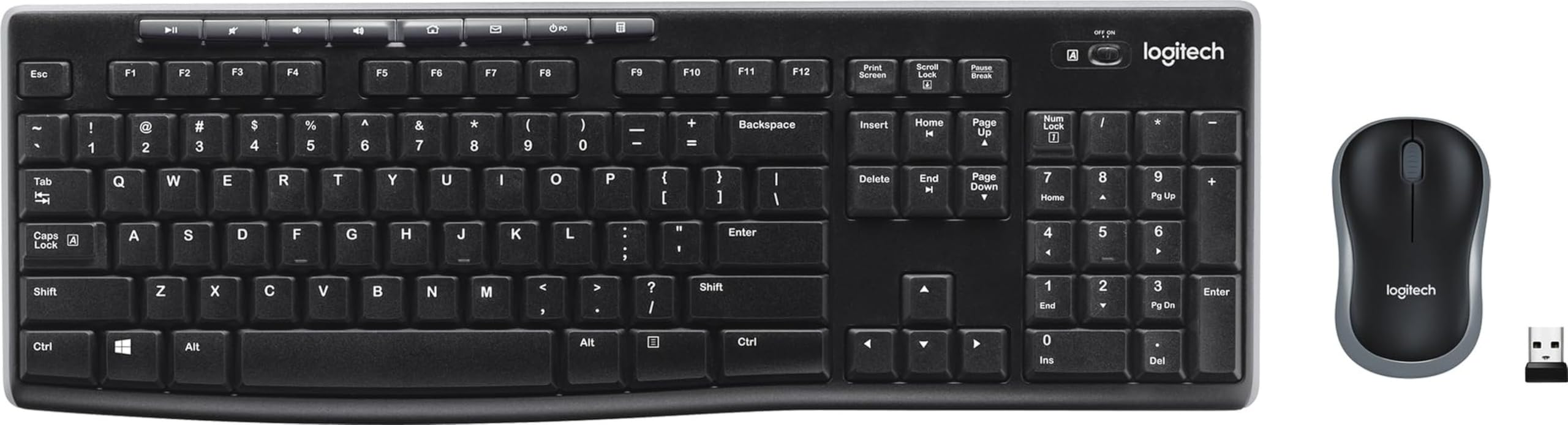
The most-loved budget combo on the market — and a staggering 110,000+ owners back it up.
This is the keyboard-and-mouse combo that practically defines the budget category, and the reason is simple: it just works. The USB receiver provides a reliable wireless connection up to 33ft, so you can forget about drop-outs and delays — plug it in, and it’s ready. The low-profile, quiet keys and standard layout with full-size F-keys, number pad, and arrow keys make it a no-learning-curve upgrade over any laptop keyboard.
The battery story is the defining spec: a 36-month keyboard life and 12-month mouse life, with on/off switches on both devices so you can stretch that even further. The spill-resistant design and durable keys with adjustable tilt legs handle daily abuse. Eight multimedia hotkeys give you instant access to the Internet, email, play/pause, and volume. The compact mouse is ambidextrous and smooth on most surfaces, and Logitech even certifies the plastic — 49% post-consumer recycled in the mouse and 54% in the keyboard.
Across thousands of reviews, buyers agree it’s “easy to set up and use” with “good value for money.” The most-praised aspect is functionality, and buyers love that it “matches my headset” and works “from the start.” The honest caveats: durability gets negative feedback from a chunk of owners, with some reporting the devices stopped working after a few months, and the mouse feels “cheaply made” and “small” to some (even those without big hands). This is the safe, proven choice for everyday reliability — just don’t expect the mouse to feel premium.
Why it’s the crowd favorite
- 36-month keyboard battery life with on/off switches
- Reliable 33ft 2.4GHz connection — plug and play
- Spill-resistant design with durable keys and tilt legs
The honest trade-offs
- A notable share of shoppers say failure after a few months
- Mouse feels small and cheaply made to many
- Keys don’t light up in the dark
Reach for this if: you want the safest, most-proven budget combo that requires zero setup and works from the start.
Consider elsewhere if: you need a premium-feeling mouse or plan to game — the MK270’s mouse is basic, and durability is a mixed bag.
6. UBOTIE Retro Typewriter Colorful Keyboard & Mouse

The desk accessory that turns typing into a statement — vibrant, round, and unmistakably yours.
Let’s be honest: this keyboard is a purchase made with your eyes first. The multicolor design with a mirror-finish panel that reflects each key subtly is a genuine conversation starter, and the “2026 color coating” resists fading even with daily use. The retro typewriter-inspired round keys deliver a smooth, clicking typing experience that feels nostalgic without being clunky. Buyers constantly report receiving compliments — it’s the keyboard that makes coworkers look twice.
Functionally, it’s a solid plug-and-play performer. The shared USB nano receiver (stored near the mouse’s battery compartment) keeps your workspace tidy, and both devices use automatic sleep mode to conserve battery — with one owner reporting the same batteries lasted a full year. The keyboard is compatible with Windows 7/8/10/11 and macOS, though some shortcut keys may not work perfectly on updated macOS systems. An included brush makes cleaning the round keys easy.
Unsurprisingly, appearance is the #1 most-praised aspect — and the different colored key caps plus smooth typing experience earn consistent raves. Battery life is a pleasant surprise, with active users getting 11 months from a single set. The honest catch: durability and functionality both get mixed-to-negative feedback, with the most common issue being a keyboard that “stops working altogether” for some owners, and occasional non-functional mice. One long-time owner called it “the best keyboard I have ever owned” while noting they had to replace the mouse. This is a style-first purchase that works beautifully — treat it as a joy-inducing desk upgrade, not a rugged workhorse.
What makes it special
- Gorgeous multicolor design with a fade-resistant coating
- Round typewriter keys with a satisfying clicking feel
- Surprisingly long battery life — up to 11 months for some owners
Keep in mind
- Some units have a keyboard that stops working entirely
- Mouse shape isn’t loved by everyone
- Shortcut keys may not work fully on updated macOS
Buy it for the look: if your desk is an extension of your personality and you want typing to feel fun, this delivers joy no other keyboard here can match.
Think twice if: you need bulletproof daily reliability — a small share of owners hit dead keyboards or mice.
7. Arteck Stainless Steel Ultra Slim Wireless Keyboard

A stainless-steel featherweight that charges fast and types like a dream — at 14.9oz.
This is the slimmest, lightest full-size keyboard on the list, and it proves that budget doesn’t mean bulky. The stainless steel material gives a heavy-duty feel at just 14.9oz, with low-profile keys that offer quiet, comfortable typing. It’s compact enough to slip into a bag — 16.9 x 4.9 x 0.6 inches — yet keeps every key you need: full-size keys, arrow keys, a number pad, and shortcuts. Buyers describe the typing as “velvety smooth” and “totally quiet.”
Instead of swapping batteries, you plug in a USB-C cable to charge a built-in rechargeable lithium battery that lasts 6 months per charge (based on 2 hours of non-stop use per day). Buyers report charging it just 4-5 times a year, and one noted the battery “charged to full in twenty minutes.” The setup is genuinely instant — insert the nano USB receiver and type. It works with Windows 10/8/7, laptops, desktops, PCs, and even Smart TVs.
Buyers consistently praise the “sleek design” and “good battery life that charges quickly,” with one calling it “quality of an keyboard” at a fraction of the price. The build quality and quick charge are the standout features. The honest trade-offs: it’s not spill-resistant, the charging port uses micro-USB instead of the modern USB-C, and one owner reported the battery died without a low-battery warning after heavy use. The keys can pop off but reassemble easily. If you want a slim, portable, rechargeable board — this is the one.
Made for mobility: the 14.9oz stainless-steel build and 6-month rechargeable battery make it ideal for desks that change, or bags that travel.
One caveat: micro-USB charging and no spill-resistance mean you’ll want to keep drinks away from this one.
Understanding the Specs
2.4GHz wireless range
This is the standard radio connection used by budget keyboards. The “33ft / 10m” spec tells you how far the keyboard can be from the receiver — but note that walls and desks cut that distance dramatically. What actually matters is that a 2.4GHz connection is instant (no pairing) and generally lag-free for typing. Bluetooth, by contrast, requires a pairing step and can occasionally stutter under heavy interference.
Battery life: days vs months
Battery claims vary wildly here — “365 days,” “36 months,” “6 months per charge.” The key distinction: battery-powered keyboards (using AA/AAA cells) advertise extreme endurance because a single alkaline cell holds a lot of energy. Rechargeable keyboards with built-in lithium batteries (like 2000mAh) offer months of use but require periodic charging. Auto-sleep modes — which kick in after minutes of inactivity — are the real hero, stretching both types of power further.
FAQ
Will a budget wireless keyboard work with my Mac or Chromebook?
What’s the difference between a 2.4GHz receiver and Bluetooth?
How long will the batteries actually last?
Is a membrane keyboard or a mechanical keyboard better for typing?
What does “full-size” actually include?
Will the USB receiver fit in my keyboard’s storage slot?
Are budget wireless keyboards good for gaming?
What’s the difference between a keyboard-only and a keyboard-plus-mouse combo?
Final Thoughts: The Verdict
For most buyers, the best budget wireless keyboard overall is the QUASIO Silent Combo — it delivers near-silent typing, a 365-day battery, and a premium feel at a price that’s tough to top. If you want the proven reliability of a household name backed by a massive fanbase, the Logitech MK270 is the safe bet. And for RGB, a volume knob, and multi-device switching, the ONIKUMA Tri-Mode is the budget gamer’s dream.
How We Picked
We do not accept paid placement. Every pick is matched to a real buyer and a real use-case; we do not hands-on test units.
Sources & Methodology
Specifications: manufacturer listings and product documentation. Review insights: verified customer reviews, as of August 2026. Pricing: not shown on this page (it changes often); check the current price via the retailer link.
As an Amazon Associate, FitlyFast earns from qualifying purchases. This does not affect which products we feature.