
Our readers keep the lights on and the weekend projects moving. As an Amazon Associate, I earn from qualifying purchases.
Specs are compiled from manufacturer listings and verified buyer reviews and can change over time — please confirm the key details on the product page before buying.
You want a robot kit that feels like a real engineering project, not a snap-together toy for a 10-year-old. The good news is that this category splits cleanly into two very different worlds: mechanical marvels you build with gears and wooden cogs, and programmable platforms where you wire, code, and debug your way to something that thinks. Picking the wrong one means either a static display piece when you wanted to code, or a frustrating wiring marathon when you just wanted to watch gears turn.
I’m Rikta — the founder and writer behind FitlyFast. This guide is built by comparing the manufacturers’ published specifications and the patterns across verified customer reviews, so you get each pick’s real strengths and trade-offs instead of marketing spin.
The honest truth before you buy: the best build your own robot kit for adults is the one that matches how you want to spend your weekend, and this guide breaks down all nine very differently.
Our Picks at a Glance

How To Choose The Best Build Your Own Robot Kit For Adults
Before you pick a kit, decide what “build” means to you. Some kits are pure mechanical assembly — you fit laser-cut wood or aluminum brackets together and a spring or motor brings it to life. Others are electronics projects where the real work is wiring sensors and writing code. Both are rewarding for adults, but they scratch completely different itches.
Mechanical vs. Programmable
Mechanical kits like the UGEARS Hexapod focus on precision assembly and moving parts. You learn how gears, springs, and linkages translate motion. Programmable kits like the OSOYOO car or the robot dogs require a separate computer brain (often a Raspberry Pi) and some coding comfort, because the payoff is in what you make the robot do.
The Hidden Cost Trap
Many kits advertise a low price but don’t include the essential brain. The FREENOVE and SunFounder dog kits, for example, explicitly require a Raspberry Pi, batteries, and a memory card that you must buy separately. Factor that into your total budget before you commit.
Physical Size and Display Value
Consider what happens after the build. The iATOM Johnny 5 stands 18.5 inches tall and makes a statement on a shelf, while the UGEARS hexapod is a desktop curiosity. If the finished robot will sit on your desk, think about the footprint and whether it needs to keep working as a display piece.
Quick Comparison
| Model | Best For | Build Type | Control Method | Power Source | Amazon |
|---|---|---|---|---|---|
| UGEARS Hexapod★ Best Overall | Pure mechanical assembly | 388-piece wood | Spring motor | Wind-up | Amazon |
| OSOYOO Robot CarBest Value | Arduino coding beginners | Acrylic chassis | WiFi / Bluetooth | Battery box | Amazon |
| iATOM Johnny 5Best Display | Movie fans & display | 1176-piece brick | Remote / App | Rechargeable | Amazon |
| UNCLE BRICK Sphere | Sci-fi display builds | Plastic bricks | Remote control | — | Amazon |
| FREENOVE Robot Dog | Raspberry Pi tinkering | Laser-cut + servos | App / WiFi | 2x 18650 | Amazon |
| LewanSoul Robotic Arm | Metal arm mechanics | Metal bracket | PC / App / Handle | USB | Amazon |
| SunFounder PiDog | AI & LLM experiments | Aluminum + 12 servos | App / Python | Battery (not incl.) | Amazon |
| Hiwonder xArm1S | Precision arm control | Aluminum alloy | PC / PS2 / App | USB | Amazon |
| Makeblock mBot Ultimate | 10-in-1 versatility | Aluminum alloy | App / Arduino / Pi | 6x AA | Amazon |
In‑Depth Reviews
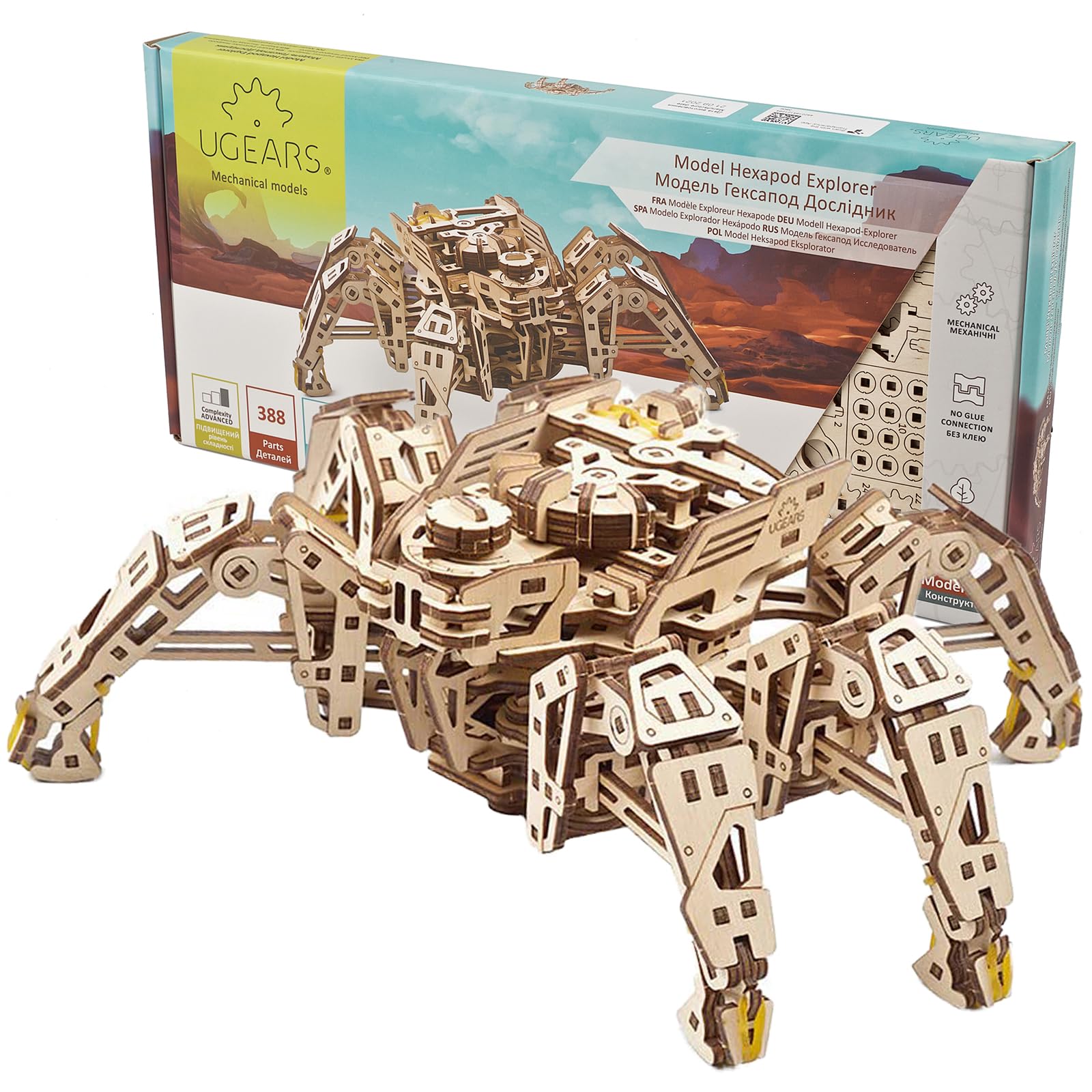
1. UGEARS Hexapod Explorer
Our pick — over 4★ from 650+ verified ratings; the strongest balance of quality and price.
The wind-up wooden crawler that walks like a real beetle and needs zero batteries.
Watching this 388-piece hexapod skitter across a desk on six articulated legs is genuinely mesmerizing — the spring motor drives it up to 3 meters, and it can step over 1-2cm obstacles like an actual insect. The speed dial on its head lets you shift from a slow creep to a fast skitter mid-run, which is the kind of tactile feedback no screen-based kit can match. Built from laser-cut 3mm plywood, the parts lock together without a drop of glue.
Be honest about the difficulty: the manual is visual-only and the subtle diagram differences trip people up. Builders who succeed swear by generous waxing on every moving surface and sanding with far finer grit than the supplied 220-grit paper — over-sanding ruins tolerances and one leg failed on a rushed builder. The critical moment is page 13, step #19, where indicator marks must align exactly or the walk fails.
The thing everyone raves about is the pure fun of the build and the satisfaction of the first successful walk. The recurring gripe is the rubber bands that drive the switches and arms — they dry out over time and are difficult to replace on a finished model. This is unapologetically an advanced build, not a beginner’s kit, and the 8-hour claim is optimistic for most people.
What wins people over
- Walking action on 6 legs with realistic beetle-like leg flailing when lifted
- Glue-free snap assembly with tight-fitting parts
- Variable speed control dial for different operating modes
The honest trade-offs
- Visual-only manual with subtle diagram differences
- Supplied wax insufficient; needs finer sandpaper (400/1000 grit)
- Rubber bands for switches dry out and are hard to replace
Your best match: Mechanical enthusiasts who love precise, glue-free assembly and want a wind-up trophy that actually moves.
Look elsewhere if: You’d rather code than sand and wax — this kit is about craftsmanship, not programming.
2. OSOYOO Robot Car Starter Kit
The coding gateway that bundles everything you need to build, wire, and program your first car.
At roughly 10 x 7 x 5 inches, this acrylic-chassis car is a genuine introduction to electronics, not a toy. The kit is fully compatible with the R3 board and includes an ultrasonic sensor, 5 line tracking modules, a servo motor, and a WiFi shield — enough hardware to build line-following, obstacle-avoiding, and gravity-sensing projects. The App control via Android and iOS adds smooth-driving and battle-bot modes if you buy a second kit.
The education-first design is its biggest strength. You learn circuits, sensors, and actuators hands-on, with sample project code and step-by-step instructions. But the physical tutorial CD is a real weakness — finding a CD player in 2025 is its own project, and the online videos can be hard to follow for exact wire placement.
Support is where this kit shines: buyers report that “they provided great customer service and resolved issues” when technical problems came up. The components themselves get consistent praise for quality. The 13-and-older crowd picks it up fast, and it scales from complete beginner to professional depending on how deep you go with the Arduino IDE.
Coding-first verdict: The best entry point into Arduino for anyone who wants to learn programming and electronics together.
The friction point: The CD-based tutorial feels dated — expect to rely on online videos and support instead.
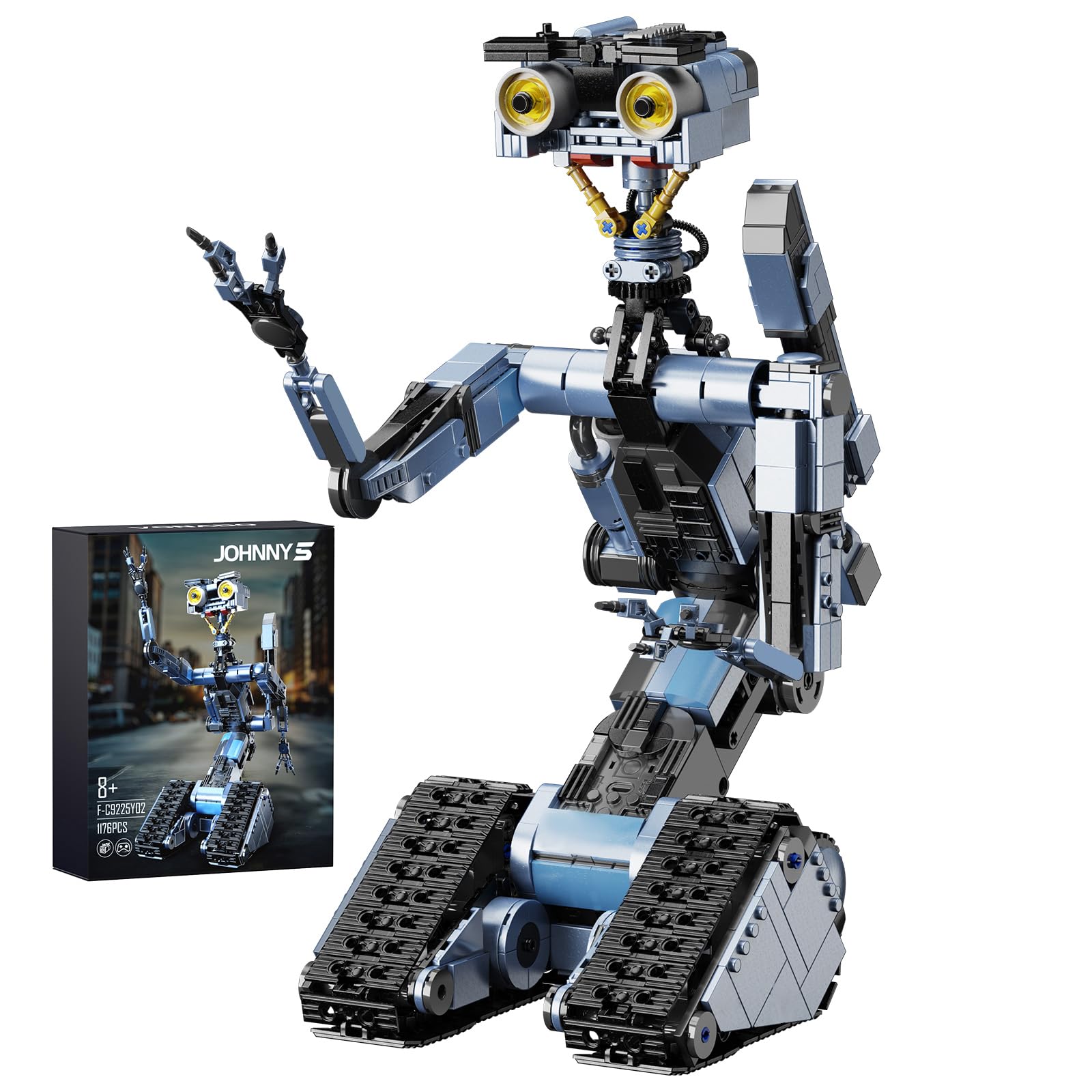
3. iATOM Johnny 5 Robot Building Set
The 18.5-inch movie legend that rolls, turns its head 360 degrees, and stops traffic on a shelf.
At 1176 pieces, this is the biggest build on the list — more than triple the part count of the UGEARS hexapod’s 388 pieces. Standing 18.5 inches tall, the finished Johnny 5 is a genuine centerpiece with movable arm joints, expressive eyebrows, and classic electric drive tracks. The remote control or phone app drives it forward, backward, and in circles while the head rotates a full 360 degrees.
The rechargeable battery runs about 40 minutes per charge and comes with a charging cable — no hunting for AAs for the robot itself (the remote takes 2 AAs, not included). What wins people over is the quality and the fun factor, with the striking movie-accurate appearance a close second in owner feedback.
The honest trade-offs are predictable for a brick set at this scale: the grey pieces can be tricky to tell apart during assembly, the instructions get confusing in spots, and a few owners hit missing pieces. The drive is on the slow side with no suspension, so it’s best treated as a posable display model with remote-control party tricks rather than a rugged rover.
Where it impresses
- 40-minute runtime from the built-in rechargeable battery
- Fully compatible with major brick brands for future expansion
- Strong movie-accurate appearance that owners love
Where it taxes you
- Confusing instructions in parts and tricky grey piece distinctions
- Slow drive with no suspension or obstacle capability
- Some owners mention missing pieces on arrival
Reach for this if: You’re a Short Circuit fan who wants a striking, posable display robot with working motion.
Think twice if: You need rugged off-road performance — this is a display piece first, a driver second.
4. UNCLE BRICK Sci-Fi Rolling Sphere Robot
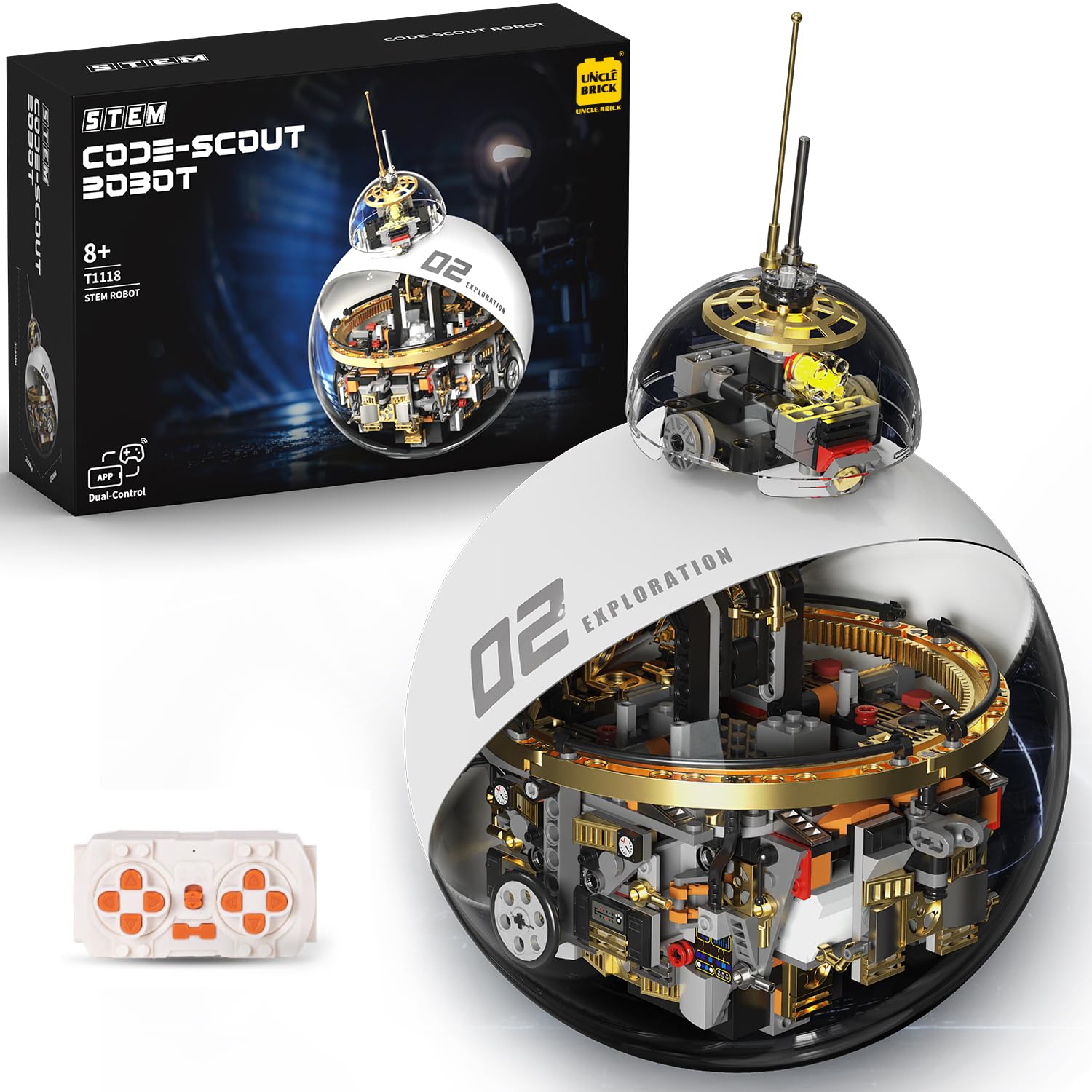
A spherical sci-fi build with a visible mechanical core that doubles as a desk sculpture.
You get a rolling sphere with a visible mechanical core and layered structure that looks pulled from a classic sci-fi film, so it stands out on your shelf instead of blending in. At roughly 7.87 x 7.87 x 12.13 inches, it fits neatly on a shelf yet still draws attention with its detail. The remote control functions are programmable, meaning you can set your own commands rather than just watching it sit still like a static display kit.
Owner experience splits on the movement. Some find the rolling smooth and the whole build a satisfying project with all pieces accounted for. Others describe clunky movement, weak control response, and decorative trim pieces that need glue or fall off — one found two pieces needed removal for lower clearance. The part count feels inflated to some relative to the structural quality.
Go in with clear expectations: this is a sci-fi display piece with programmable party tricks, not a precision engineering platform. The many small pieces make it a lengthy build best suited to someone patient, and the spherical structure is the conversation starter.
Display-first verdict: A futuristic sphere with programmable functions for sci-fi collectors who value looks.
The caveat: Movement is acceptable rather than smooth — treat it as a posable collectible with bonus motion.
5. FREENOVE Robot Dog Kit for Raspberry Pi

A quadruped with a camera and ultrasonic eyes that you teach to walk, balance, and track balls.
Weighing just 2.1 pounds, this dog packs 13 servos — three per leg plus one for the rotatable head — along with a Pi Camera and ultrasonic distance sensor. It walks, self-balances, recognizes faces, and traces balls, all controllable from the Freenove App on Android, iPhone, or a computer running Windows, macOS, or Raspberry Pi OS. The complete Python code and a step-by-step guide come via download.
Here’s the catch: the Raspberry Pi and battery are NOT included. You’ll need a Pi 5, 4B, or 3B+, a memory card, an HDMI adapter, and special 18650 batteries before this walks. The zero models work too but need extra parts. Owners consistently praise the quality, the extra spare parts, and the outstanding 122-page PDF manual, but warn it fails on pile carpet — smooth concrete or plywood is where it performs.
Runtime is short at around 3 minutes per charge, and the flimsy servos with nylon gears need gentle handling to avoid stripping. This is a learning device first and a pet second: expect debugging, calibration tweaks, and the occasional software crash that a reboot fixes. The support team gets strong marks for responsiveness.
The depth you get
- 13 servos plus Pi Camera and ultrasonic sensor for rich behaviors
- Outstanding 122-page PDF manual with complete Python code
- Extra acrylic pieces and spare screws included
The prep required
- Raspberry Pi, memory card, and 18650 batteries all sold separately
- Fails on pile carpet — needs smooth surfaces
- Short runtime around 3 minutes; servos need gentle handling
Your best match: Tinkerers with a Raspberry Pi already on hand who want deep Python robotics learning.
Reconsider if: You want a plug-and-play pet — this one demands setup, calibration, and patience.
6. LewanSoul Robotic Arm Kit 6DOF

An anodized aluminum arm with industrial bearings that lifts about a pound and learns new tricks.
At 4.2 pounds with a metal bracket construction and an industrial-grade bearing turntable, this arm feels like real equipment rather than a toy. The base uses high-torque servos for stability, and the end features 3 anti-blocking servos with gear clutches that protect them from stalling — a meaningful longevity win. It’s a six-degree-of-freedom arm, meaning six independent joints for complex positioning.
Control is flexible: PC software, a phone app, a mouse, and a wireless handle all work. The gripper comes pre-assembled, and 3D assembly videos make the build far clearer than printed instructions alone. Owners call the machining and anodizing excellent, with smooth powerful servos and simple PWM programming for beginners.
The assembly road has a few bumps: mixed tiny screws, one misaligned hole, and a wrist servo that needed extra nuts and longer screws for clearance. One reviewer noted the gripper falling off due to a stripped plastic servo shaft, fixed with a longer screw. The software works but is picky — enthusiasts advise patience with the setup.
Mechanical-first verdict: A high-quality metal arm for learning robotics structures and programming basics.
Be ready for: Minor hardware quirks during assembly that require extra screws and careful wiring.
7. SunFounder PiDog AI Robot Dog
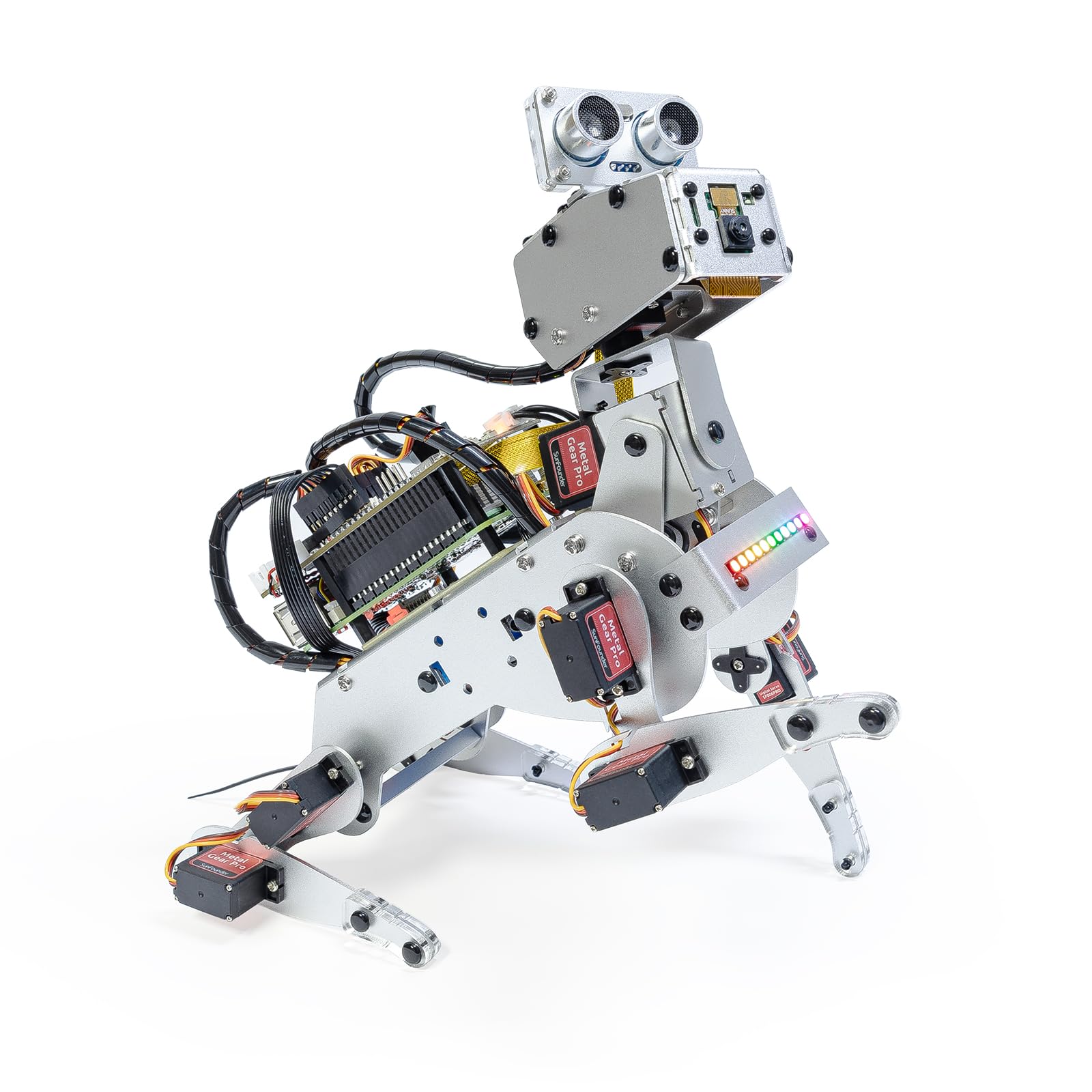
The quadruped that talks to ChatGPT, sees with a camera, and wags its tail on command.
This is the most ambitious kit on the list. PiDog runs on a Raspberry Pi (5, 4B, 3B+, or Zero 2W — not included) and pairs with OpenClaw and multi-LLMs like ChatGPT and Gemini to hold conversations, recognize math problems, and interpret hand gestures. Its 12 servos enable 32 dog-like actions — walking, sitting, shaking its head, wagging its tail — and the sensor suite adds ultrasonic ranging, touch, gyroscope, camera, microphone, and speaker for genuinely interactive behavior.
The documentation is a standout: owners call the instructions excellent with clear labeling and an active forum community. The aluminum alloy structure feels sturdy, and the support team ships replacement parts when things break. It’s a strong platform for learning robotics basics through Python, with the autoboot option making everyday use easier.
This is explicitly NOT beginner-friendly. Assembly runs around 70 steps requiring patience and dexterity, and owners with programming experience found it far smoother than true novices. One noted the Raspberry Pi 4 is the safer choice — the Pi 5 can burn out servos. Voice recognition is finicky, and missing parts occasionally need a support request, though the response is quick.
What makes it special
- 12 servos with 32 dog-like actions including tail wagging
- OpenClaw plus ChatGPT/Gemini/Grok for smart conversations
- Rich sensor suite: ultrasonic, touch, gyroscope, camera, mic
The learning curve
- Challenging ~70-step assembly needing patience and dexterity
- Requires a Raspberry Pi and battery purchased separately
- Best with a Pi 4 — the Pi 5 can burn out servos
Your best match: Engineers and hobbyists already comfortable with Python who want an AI companion to experiment with.
Not for you if: You’re a complete beginner — start with a simpler platform and build up to this.
8. Hiwonder xArm1S Robotic Arm

A full-metal desktop arm with position feedback servos that grab objects up to 500g.
Where the LewanSoul arm uses standard servos, the xArm1S steps up to 6 high-precision intelligent serial bus servos that report their position, voltage, and temperature back to you. That feedback means precise, drift-free closed-loop control — owners measure the positioning accuracy at 0.24-degree increments, which translates to about 0.058 inches of variance at full extension. The aluminum alloy bracket and industrial-grade bearings keep it stable while it grasps objects weighing up to 500g.
Control options are generous: PC, phone app, mouse, and a wireless PS2-style controller. Action editing works across PC, app, and offline manual modes, making it easy to record and replay custom sequences. The Arduino integration is possible but requires reaching out to support for the correct library — it’s not plug-and-play from the start.
Assembly runs about 4 hours, with owners recommending you sort screws first and wire servos during the build. The documentation is the weak link: printed instructions are sparse, servo identification is unclear, and the gripper holes can be misaligned. One buyer argues it’s effectively a 5-axis arm plus a gripper rather than a true 6-axis design. The software requires a modern computer — an M1 Mac or newer.
Precision-first verdict: The right arm for repeatable, accurate movement thanks to feedback-equipped servos.
The friction: Plan for a 4-hour build, sparse printed instructions, and some support-driven setup for Arduino.
9. Makeblock mBot Ultimate 10-in-1

One industrial-aluminum kit that rebuilds into ten different robots, from a robotic arm to a tank.
The value proposition here is sheer variety: at 8 pounds of anodized aluminum alloy parts, this kit rebuilds into 10 distinct models including a functional robotic arm and a remote-controlled tank. The MegaPi control board drives multiple motors and servos in sync, reads sensors for obstacle-avoiding vehicles, and connects to a Raspberry Pi for machine vision projects. You get drag-and-drop coding in mBlock to start, then graduate to Arduino IDE and Python.
Owners consistently call the build quality exceptional — “high quality from components to instructions” sums up the consensus — and the precision threaded grooves make assembly compatible with industry-standard parts. One father spent 4 hours building the robotic arm tank with his son, calling it a fantastic experience. Everything arrives present and accounted for, with parts packaged carefully.
The gripes are real but manageable: the battery compartment fits poorly with no cover, so batteries pop out and the upside-down placement makes it worse. Physical instructions only cover 3 of the 10 designs, with the rest online — frustrating if you’re offline. It needs 6 AA batteries, not included. The price is significant, but owners echo the same refrain: you get what you pay for.
The flexibility
- 10-in-1 models in one kit with industrial aluminum alloy parts
- Scales from drag-and-drop blocks to Arduino IDE and Python
- MegaPi board drives multiple motors and servos in sync
The annoyances
- Battery compartment fits poorly with no cover — batteries pop out
- Physical instructions cover only 3 of 10 designs; the rest are online
- Requires 6 AA batteries not included in the box
Choose this for: A long-term investment that grows with skill level and rebuilds into ten different projects.
Weigh the cost: The premium price makes sense only if you’ll actually build multiple models over time.
Understanding the Specs
Degrees of Freedom (DOF)
This is the count of independently moving joints on a robotic arm. A 6DOF arm has six joints that each move on their own, which is what lets it reach around obstacles and position a gripper in almost any orientation. More DOF means more complex, lifelike movement — and a longer learning curve to control it well.
Servo Feedback
A standard servo just moves to a position; a feedback servo tells you where it actually is. Serial bus servos report position, voltage, and temperature back to the controller, which enables precise, repeatable movements that don’t drift over time. This matters most for robotic arms where accuracy is the whole point.
FAQ
Do these robot kits include the Raspberry Pi or Arduino board?
Which kit is best for a complete beginner with no coding experience?
How long does assembly actually take?
Can these kits be programmed with Python?
What batteries do these robots need?
Are these kits suitable for teenagers or strictly adults?
What is the difference between a mechanical kit and a programmable kit?
How much space do the finished robots take up?
Final Thoughts: The Verdict
If you want one dependable pick, the build your own robot kit for adults winner is the UGEARS Hexapod because it delivers the purest mechanical satisfaction — glue-free, battery-free, and genuinely mesmerizing to watch walk. If you want to learn real coding and electronics, grab the OSOYOO Robot Car for the best value entry point. And for the ultimate variety, the Makeblock mBot Ultimate rebuilds into ten different robots as your skills grow.
How We Picked
We do not accept paid placement. Every pick is matched to a real buyer and a real use-case; we do not hands-on test units.
Sources & Methodology
Specifications: manufacturer listings and product documentation. Review insights: verified customer reviews, as of August 2026. Pricing: not shown on this page (it changes often); check the current price via the retailer link.
As an Amazon Associate, FitlyFast earns from qualifying purchases. This does not affect which products we feature.