
Our readers keep the lights on and the weekend projects moving. As an Amazon Associate, I earn from qualifying purchases.
Specs are compiled from manufacturer listings and verified buyer reviews and can change over time — please confirm the key details on the product page before buying.
Walking into business-grade 3D printing means one thing above all else: you cannot afford a machine that treats filament like it is free. Every purge tower, every failed first layer, every single-color print that needs hours of post-processing erodes your margin. A real business printer has to deliver dimensional accuracy on the first try, handle engineering-grade materials without warping, and keep running shift after shift. That is what this guide cuts through — the marketing talk about speed and resolution to find the machines that actually earn their keep on a production floor or a design studio bench.
I’m Rikta — the founder and writer behind FitlyFast. This guide is built by comparing the manufacturers’ published specifications and the patterns across verified customer reviews, so you get each pick’s real strengths and trade-offs instead of marketing spin.
if you need multi-color output for client prototypes or a heated chamber for industrial-grade nylon, these picks represent the best available options in the business 3d printer category for 2025 — sorted by reliability, material versatility, and real-world throughput.
Quick Picks
- Snapmaker U1 — Best Overall
- QIDI Max4 Combo — Champion of Engineering Materials
- ELEGOO Saturn 4 Ultra 16K — High-Value Resin Entry
- Creality K2 Combo (A) — Multi-Color on a Budget
- Official Creality K2 Combo — Multi-Color with Heat
- Anycubic Photon P1 — Dual-Material Resin
- Creality Ender 5 Max — Large-Volume Print Farm
- Original Prusa MK4S — Workhorse for Makers
- Original Prusa CORE One — Enclosed Production Grade
- Snapmaker Artisan — 3-in-1 Workshop
How to Choose the Best Business 3D Printer
The cheapest machine on paper is often the most expensive when you count failed prints, wasted material, and lost labor hours. Key spec decisions will determine whether a printer becomes a profit center or a maintenance headache.
Build Volume vs. Throughput
A massive build plate sounds impressive, but it means nothing if the printer takes three days to fill it. Larger machines also require bigger heated beds and chambers, which draw more power and take longer to reach temperature. For small-batch production, a smaller, faster machine running multiple shifts often beats a giant unit running one long job.
Multi-Color System Design
There are two main approaches: a single nozzle that purges and reloads filament (high waste, lower hardware cost) or multiple independent toolheads (near-zero waste, higher upfront cost). For a business, the waste matters — if you produce hundreds of parts with a 15% purge tower, you are throwing away a significant portion of your filament budget. The toolhead-swap approach eliminates that entirely.
Heated Chamber Capability
If you plan to print anything beyond PLA, a heated chamber is non-negotiable. Engineering materials like ABS, polycarbonate, and carbon-fiber nylon warp and delaminate without a stable ambient temperature of 55–65 °C. An active chamber with a closed-loop thermostat is far superior to a passive enclosure that just holds heat from the bed.
Quick Comparison
| Model | Best For | Build Volume | Max Speed | Weight | Amazon |
|---|---|---|---|---|---|
| Snapmaker U1 | Zero-waste multi-color | 270×270×270mm | 500 mm/s | 59 lbs | Amazon |
| QIDI Max4 Combo | Industrial engineering filaments | 390×390×340mm | 800 mm/s | 120 lbs | Amazon |
| Creality K2 Combo (A) | Budget multi-color prints | 260×260×260mm | 600 mm/s | 65.9 lbs | Amazon |
| Official Creality K2 Combo | Multi-color with 300°C nozzle | 260×260×260mm | 600 mm/s | 39.7 lbs | Amazon |
| Anycubic Photon P1 | Dual-material resin parts | 8.78×4.96×9.05in | — | 39 lbs | Amazon |
| Creality Ender 5 Max | Print farm expansion | 400×400×400mm | 700 mm/s | 68.9 lbs | Amazon |
| Snapmaker Artisan | 3-in-1 workshop versatility | 400×400×400mm | — | 75.8 lbs | Amazon |
| Prusa MK4S | Reliable day-to-day prototyping | 9.84×8.3×8.6in | — | 15.4 lbs | Amazon |
| Prusa CORE One | Enclosed high-quality production | 250×220×270mm | — | 56.8 lbs | Amazon |
| ELEGOO Saturn 4 Ultra | Ultra-high-res resin parts | 8.33×4.66×8.66in | 150 mm/h | 35.5 lbs | Amazon |
In‑Depth Reviews
1. Snapmaker U1

The only multi-color system that does not burn money on purge towers.
Every other multi-color printer wastes filament in a purge cycle to swap colors. The Snapmaker U1 skips that entirely with its SnapSwap system — four independent toolheads that swap in five seconds. The manufacturer validated the locking mechanism through over 1,000,000 swaps with zero failures. You keep filaments preloaded and preheated, so the only waste is a small prime tower after calibration.
This is a CoreXY machine (a motion system that moves the print head on a gantry for speed and stability) hitting 500 mm/s across a 270×270×270mm build volume. Reviewers report zero waste on multi-color prints: one reviewer noted a model that took 32 hours on the U1 versus 58 hours on a competitor with a single-nozzle purge system, saving 350g of filament. The included Snapmaker Orca slicer has a built-in model library to get you started fast, and the 3.5-inch touchscreen handles job management directly.
At 59 pounds, it is not the lightest, but the carbon-fiber X-axis rails keep prints accurate at speed. You are limited to four colors at a time unless you swap spools, and the mobile app is weaker than Prusa’s ecosystem, per one reviewer. But if your business does multi-color work, you recover the higher upfront cost in saved filament alone.
Why it earns the top spot
- Near-zero filament waste on color changes — cuts costs immediately
- Four independent toolheads swap in 5 seconds with a validated 1,000,000-cycle lock
- 500 mm/s CoreXY speed with carbon-fiber X-axis rails for accuracy
- Includes 2 kg of PLA (four spools) and a built-in model library
The real-world limits
- Limited to four colors at a time without manual spool swaps
- Mobile app is less refined than Prusa’s ecosystem, per reviewers
- No heated chamber for engineering materials like ABS or nylon
The profitable pick: If your business prints anything in multiple colors or materials, this machine pays for itself by eliminating purge waste — no other system under does that.
skip it if: you need a heated chamber for carbon-fiber nylon or ABS-CF, or if your work is almost entirely single-color functional parts where any multi-color system is overkill.
2. QIDI Max4 Combo

If you need to print carbon-fiber nylon at scale, this is the one.
The QIDI Max4 Combo delivers a massive 390×390×340mm build volume plus a 65°C active heated chamber. That combination lets you print industrial-grade materials like ABS-CF, polycarbonate, and PPS-CF without warping. The closed-loop motors on the X/Y axes push speeds up to 800 mm/s with 30,000 mm/s² acceleration, and the 2mm lead screw on Z keeps vertical layers precise.
One reviewer who runs PPA-CF and ABS-CF for aerial drone applications says the print quality is outstanding and that the machine handles engineering filaments “like butter.” The 40 mm³/s high-flow hotend with a hardened steel nozzle chews through abrasive composites. You can add the QIDI BOX for up to 16 colors, but note the Polar Cooler is sold separately — the Max4 series does not include it. At 120 pounds, this is a serious piece of hardware; buyers report assembly is essentially plug-and-play with on-screen prompts.
Pre-print start time is long because the massive chamber needs to stabilize, and the initial firmware update process caused Wi-Fi connection issues for one buyer, resolved through support. The price is steep, but lower than what industrial-grade alternatives from Stratasys or Markforged cost for similar material capability.
Built for heavy lifting
- 65°C active heated chamber for ABS, PC, PPS-CF and other engineering materials
- 390×390×340mm build volume fits large parts without splitting
- Closed-loop motors on X/Y for 800 mm/s speed with accuracy
- Open-source slicer compatibility (QidiStudio, but also others)
Pains at this level
- 120 pounds — you need a dedicated floor space and help to move it
- Polar Cooler is not included; must buy separately
- Wi-Fi and firmware issues reported during initial setup
Reach for this if: you print engineering-grade composites daily and need a chamber that keeps them stable — this machine does what printers twice its price claim to do.
Look elsewhere if: your work is mostly PLA and PETG, or you cannot handle a 120-pound machine in your workspace.
3. ELEGOO Saturn 4 Ultra 16K

16K resolution that makes every layer feel like a finished product.
For parts that demand fine detail — jewelry molds, dental models, miniatures — resin printing still beats FDM on surface finish. The ELEGOO Saturn 4 Ultra pushes that with a 10-inch 16K mono LCD (monochrome LCD, which cures resin faster than color screens and lasts longer) for smooth surfaces and lifelike textures. The smart tank heating system keeps the resin at a consistent 30 °C, improving fluidity and reducing defects like bubbles and layer separation.
Owners mention it is “fast out-of-box printing with included resin” and one reviewer who had used older Anycubic and Mars printers says the Saturn 4U delivers better print quality with no leveling alignment needed. The tilt-release technology (the vat tilts to peel the model instead of the build plate lifting) hits speeds up to 150 mm/h. At 35.5 pounds and measuring 24 x 17 x 15 inches, it is compact for its build volume of 8.33 × 4.66 × 8.66 inches. An AI camera with built-in light supports real-time monitoring and time-lapse capture, though the manufacturer notes that AI detection results may vary depending on environment and resin type.
Resin requires a wash and cure station, and the resin itself costs more per part than filament. Reviewers also note that resin can pool on the build plate after printing, though one user designed a simple drip bracket printed in 1 hour 10 minutes to solve that.
Where it shines
- 16K resolution captures fine detail — individual hairs and fabric texture visible on first prints
- Smart tank heating at 30°C reduces print failures versus unheated resin
- Tilt-release technology at 150 mm/h speeds up peeling
- Auto-leveling works perfectly from the start; no manual bed leveling
The resin reality
- Requires separate wash and cure station — additional cost and workspace
- Resin is more expensive per part than FDM filament
- Resin tends to pool on the build plate; a drip bracket solves it
Best for detail work: If your business needs ultra-high-resolution parts — dental, jewelry, miniatures — this is the most accessible 16K resin printer that actually prints well from the start.
Not for you if: you need larger parts or want to avoid the cleanup and cost of resin post-processing.
4. Creality K2 Combo (A)

16 colors for the price of a single-color machine — if you accept the quirks.
The Creality K2 Combo (A) brings multi-color printing to a budget-friendly price point. It ships with one CFS (Creality Filament System) unit for up to four colors, and you can chain four CFS units together for a total of 16 colors. The build volume is 260×260×260mm — enough for most user scenarios, per the manufacturer. Speed hits 600 mm/s using step-servo motors (motors that combine the precision of a stepper with the smoothness of a servo) in the extruder and on the X/Y axis.
Customers note good packaging and easy assembly. One reviewer says print quality is great and that the CFS auto-feeds and dries filament. Another who upgraded from an Ender 3 calls it an “amazing upgrade” — fast, quiet, with excellent adhesion. The 95% pre-assembly means you are printing within an hour of unboxing, and the smart auto-leveling only probes the area your model will occupy, speeding up calibration significantly.
The pain points: reviewers point out the CFS requires full-size 1kg reels, so smaller 250g spools need an adapter. One buyer experienced CFS slot #2 errors, extruder clogs, and violent shaking. The AI camera (spaghetti detection) missed at least one error for another user. At 65.9 pounds, the K2 (A) is heavier than the ELEGOO Saturn 4 Ultra at 35.5 pounds, so plan for a sturdy table. Also notable: the K2 (A) variant at is a different listing from the official Creality K2 Combo at — the (A) version appears to be a third-party-sold variant, so check seller reputation.
Why consider it
- Up to 16 colors with multiple CFS units — cheap entry to multi-color
- 600 mm/s speed with step-servo motors for smooth motion
- Near-fully assembled; setup under one hour per buyers
- Quiet printing with step-servo and balanced fans
Be aware of
- CFS slot errors and extruder clogs reported by some users
- AI camera does not catch every failure — do not rely on it
- Heavy at 65.9 pounds; needs a solid work surface
- Third-party listing variant — verify seller
Good entry point: If you want multi-color for a fraction of the premium machines but are willing to tinker, the K2 Combo (A) delivers impressive speed and color capability for the price.
Avoid if: you need a set-and-forget production machine — the reliability reports are mixed, and a failed print in a batch of 50 costs more than the savings on the printer.
5. Official Creality K2 Combo

Same multi-color engine, now with a 300°C hotend for abrasive filaments.
The Official Creality K2 Combo is the manufacturer-direct version of the K2, and it comes with a key upgrade: a hardened steel nozzle capable of 300°C and an 80W heater pushing a 40 mm³/s flow rate for ABS at 280°C. That means you can run carbon-fiber and other abrasive composites without destroying the nozzle in a week. The build volume matches the (A) variant at 260×260×260mm (10.24×10.24×10.24 inches), and the CoreXY-inspired motion system hits 600 mm/s with 20,000 mm/s² acceleration.
The super-sturdy matrix frame uses die-cast aerospace aluminum alloy parts. One reviewer calls the test print gcode “huge” — it took 11.5 hours and used over half a spool of filament, so budget time for first calibration. Another buyer says print quality is phenomenal and that the CFS auto-feeds and dries filament, but notes the AI camera missed one error. At 39.7 pounds, this variant is significantly lighter than the (A) version at 65.9 pounds — the product dimensions are also different (17.24 x 18.58 x 16.7 inches vs 16.93 x 16.54 x 21.06 inches), so double-check which version fits your space.
One reviewer experienced a warped bed after initial use (replaced quickly by support) and recommends a glass bed for smoother bottoms. The manual is outdated for bed attachment, and two side bolts arrived misaligned. Firmware settings may default to 230V, requiring adjustment to 115V for North American users.
What it does better
- 300°C hardened steel nozzle handles carbon-fiber and other abrasive materials
- 80W heater with 40 mm³/s flow rate for high-temperature materials
- Aerospace aluminum alloy frame is rigid for print quality
- Lighter than the (A) variant at 39.7 pounds
Known issues
- Bed warping reported; glass bed recommended as fix
- Test print takes 11.5 hours and uses over half a spool
- Manual is outdated; firmware voltage may need adjustment
Best for abrasive composites on a budget: If you need multi-color plus the ability to print carbon-fiber or other abrasive filaments without a separate expensive industrial printer, this is the cheapest entry point.
pass on it if: reliability is your top priority — the support is responsive per reviews, but the initial failure rate is higher than established brands like Prusa or QIDI.
6. Anycubic Photon P1
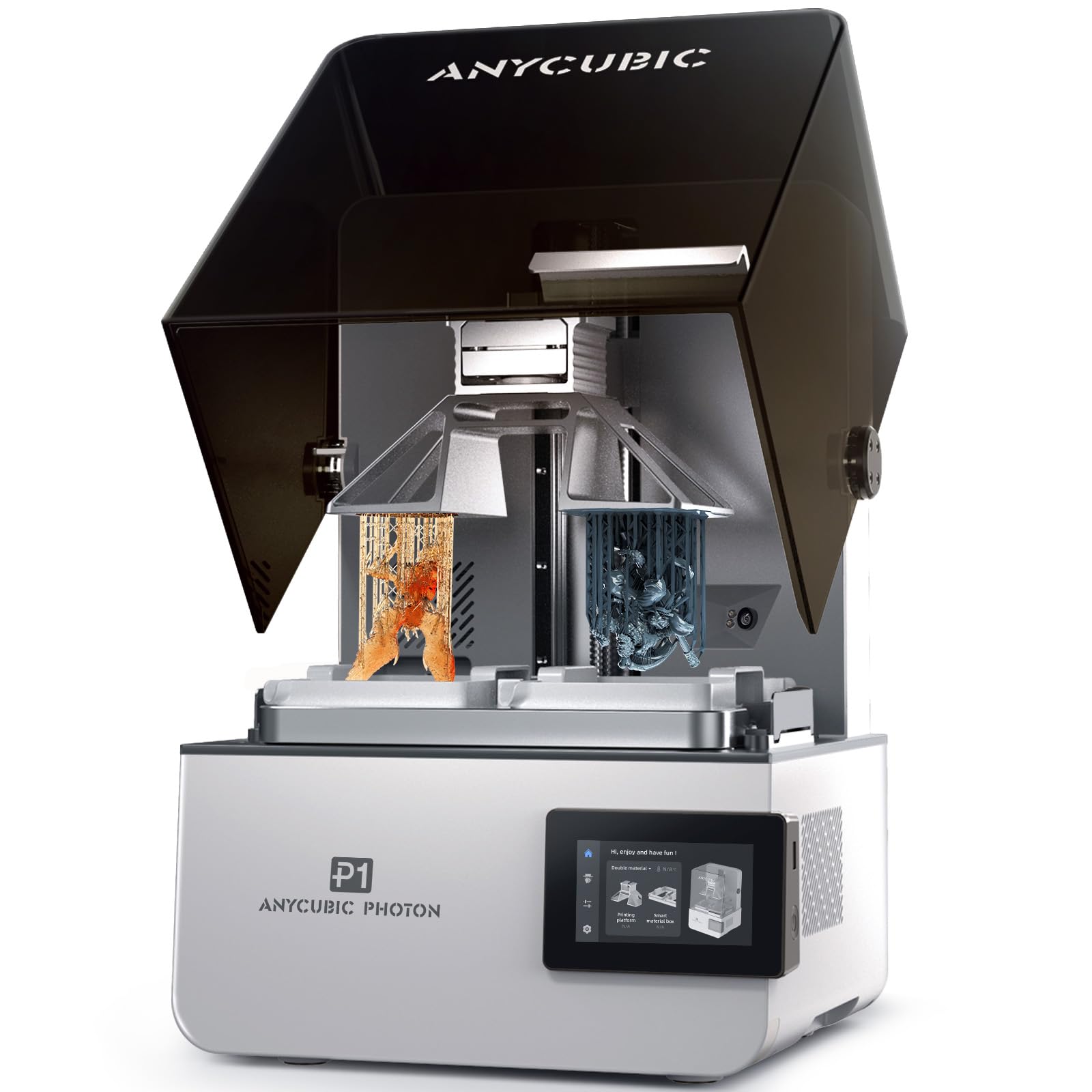
Resin printing gets dual-material capability — and an industrial-grade ball screw.
The Anycubic Photon P1 is a resin printer that steps up from hobbyist machines with dual-color and dual-material printing, meaning you can print two different resins (different colors or different materials) in a single job. The build volume is 8.78 x 4.96 x 9.05 inches. The industrial ball screw and precision guide rails minimize vibration for smooth lifts and consistent details. Wave Release Technology reduces the release force by 60% during lifting for easier model detachment and lower failure rates.
One buyer in a dental lab reports excellent results for dental models. Another reviewer who has owned several resin printers calls it their favorite, noting the larger build size and consistent print quality across multiple prints. The AI-powered inspection system checks build plate installation, bottom layer separation, resin level, and residue detection. The printer handles ultra-high-viscosity resins up to 8,000 cps (centipoise, a unit of viscosity) for professional applications, and comes with pre-configured settings for Anycubic resins.
The slicer software occasionally crashes with complex models per one reviewer. At 39 pounds, it is comparable in weight to other resin printers, and at 28 x 14 x 13 inches, it requires a decent footprint. The dual-material capability is still limited compared to FDM multi-color systems — you are swapping between two resin vats, not 16 colors. Resin maintenance and cleanup remain a factor.
Where it stands out
- Dual-material/dual-color printing for creative designs and functional parts
- Industrial ball screw Z-axis and dual linear rails eliminate wobble
- Handles ultra-high-viscosity resins up to 8,000 cps
- AI monitoring checks build plate, resin level, and detects residue
Resin printing realities
- Slicer software can crash with complex models
- Limited to two materials — not a full multi-color system
- Requires wash and cure station for post-processing
Ideal for professionals: If your business needs precise dual-material resin parts — dental, engineering prototypes, or dual-color models — the Photon P1 bridges the gap between hobbyist and industrial.
Not for everyone: If you do not need the dual-material feature, cheaper single-resin printers will do the same job for less.
7. Creality Ender 5 Max

A 400mm cube that you can control dozens of over WLAN.
The Creality Ender 5 Max is built for scale: a 400×400×400mm build volume lets you print large parts in one go, and the CoreXY system with high-torque motors pushes speeds up to 700 mm/s. The 1000W rapid-heating bed reaches working temperature in minutes, supporting PLA, PETG, ABS, ASA, PA, and more. But the real business feature is WLAN multi-printer control — you can manage a group of Ender 5 Max printers from one interface, seeing tri-color status indicators from across the room.
The all-metal die-cast aluminum frame minimizes vibration for tall or heavy models, and the X-axis linear rail adds accuracy across wide prints. The 64-point auto-leveling system with automatic Z-offset ensures first-layer adhesion without manual adjustment. The direct-drive dual-gear extruder uses hardened gears for long-term stability in continuous production scenarios.
The reliability reports are sharply divided. One buyer who runs a small business says “I absolutely love this printer, it is everything I could have ever dreamed of.” Another reports the first unit broke after 8 hours into its very first print, and the replacement broke 6 hours into its third print — calling it “garbage product that breaks during normal use.” A separate buyer says bed adhesion is worse than nonstick cookware and that the machine shakes so badly the extruder casing broke. At 68.9 pounds, this is a heavy machine, and the enclosed frame is actually too short — one buyer mentioned a 6-inch riser to prevent the top panel from scuffing parts.
What it promises
- Massive 400mm cube build volume fits large parts without splitting
- WLAN multi-printer control for managing print farms from one interface
- 1000W rapid-heating bed for quick startup
- 64-point auto leveling with automatic Z-offset
What buyers actually found
- Multiple reports of complete failure within first 8 hours of printing
- Bed adhesion issues worse than nonstick cookware per some users
- Enclosure is too short; requires a riser for normal operation
- AI monitoring is unreliable; spare parts hard to find
A gamble for print farms: If you have the budget to buy multiple units and can handle the failure rate, the WLAN control and large volume are compelling for scaling production — but only if you accept the risk.
Steer clear if: reliability is non-negotiable for your business. The failure reports from verified buyers make this a high-risk pick for production environments.
8. Original Prusa MK4S

The lightest printer here, but the heaviest on reliability.
The Prusa MK4S is not the biggest, fastest, or most feature-packed printer on this list. But it is the one that runs. At 15.4 pounds, it is dwarfed by the QIDI Max4 Combo at 120 pounds, but that weight difference tells you everything about their design philosophies — the MK4S is a desk-friendly machine for day-in, day-out prototyping. The print size is 9.84 x 8.3 x 8.6 inches, and Input Shaping (motion compensation that reduces ringing at higher speeds) keeps print quality clean even when you push it.
Buyers who have been printing for years say the MK4S is the “3D printing workhorse.” One user calls it “simply the best open design 3D printer available,” noting that different brands of PETG and PLA print well even with generic profiles. The open-source design means long-term firmware updates and hardware upgrade paths — Prusa is known for supporting machines for years after purchase. It comes with a 1 kg spool of Prusament PLA Galaxy Black and lifetime technical assistance. Part cooling is described as “fantastic while still very silent,” and the printer is “surprisingly quiet even for a live room.”
The kit version saves money but one reviewer found the assembly challenging: belt tensioning and awkward reaching around the printer made them wonder if the saving was worth the frustration. The MK4S lacks a heated chamber — it is an open-frame design — so it is not suitable for ABS or other high-temperature materials without an aftermarket enclosure. And compared to the newer CORE One, the MK4S is a bed-slinger design (the bed moves on the Y-axis), which is inherently less stable at high speeds than CoreXY designs.
Why it endures
- Extremely reliable — prints well with generic profiles for multiple filament brands
- Open-source ecosystem with long-term firmware updates and upgrades
- Incredibly quiet; suited for an office or live-room environment
- Lifetime technical assistance included with purchase
What it compromises
- No heated chamber — not suitable for ABS or nylon without an enclosure
- Smaller build volume than most competitors at 9.84 x 8.3 x 8.6 inches
- Kit assembly is challenging per buyers; consider fully assembled
Best for consistent prototyping: If your business needs a dependable FDM printer that works every day with minimal tinkering, the MK4S is the safest bet in this price range.
Not the right fit if: you need large parts, multi-color, or a heated chamber for engineering materials — this is a single-color, open-frame machine designed for reliability, not features.
9. Original Prusa CORE One

Prusa’s answer to the enclosed CoreXY machine — with a 55°C active chamber.
The Prusa CORE One is the company’s move from the open-frame bed-slinger (the MK4S) to an enclosed CoreXY design, featuring a 55°C active temperature control chamber. The print size is 250×220×270mm (9.8 x 8.6 x 10.6 inches). The all-steel exoskeleton frame gives it the rigidity needed for consistent high-speed printing without vibration artifacts. It supports PLA and PETG with the door closed, plus more demanding materials like ASA, PC, or Nylon.
Buyers who built the kit say it is a satisfying 25-hour build and that speed and quality are a dramatic improvement over Flash Forge and Creality machines. One reviewer calls it a “solid, dependable workhorse” that works from the start with great filament compatibility. The open-source philosophy continues here — no cloud lock-in, full local and online use, and a right-to-repair approach that matters if you plan to keep this printer running for years.
The harshest review calls it “previous gen tech at next gen price,” arguing it is a generation behind Bambu Lab at three times the price. Specific criticisms: no filter for ABS fumes, a janky multi-material unit (MMU3), firmware homing issues, and a cheap acrylic lid with plastic rivets. The Prusa CORE One is also currently a single-color machine — the multi-color add-on is delayed to early next year, per one buyer. At assembled, it sits at the premium end of this list.
What Prusa does right
- 55°C active heated chamber enables reliable ASA, PC, and Nylon printing
- All-steel exoskeleton frame is rigid for consistent print quality
- Open-source, no cloud lock-in — full local control and right to repair
- Lifetime technical assistance and 24-hour customer service
- Multi-color add-on (MMU3) is delayed and expensive at ~ extra
- No built-in filter for ABS fumes — needs separate ventilation
- Firmware homing issues and belt tensioning require a guitar tuner tool
- High price for hardware that some consider a generation behind competitors
For Prusa loyalists: If you value open-source, long-term support, and a heated chamber in a proven ecosystem, the CORE One is a safe bet — it will be supported for years.
Hard to recommend to new buyers: At this price point, competitors offer more features (larger build volume, multi-color, faster speeds) for less money. Buy the CORE One for the ecosystem and support, not for the specs on paper.
10. Snapmaker Artisan

One frame, three functions: a 3D printer, laser engraver, and CNC mill in one.
The Snapmaker Artisan is not just a 3D printer — it is a modular system that also does laser engraving and CNC carving through quick-swap toolheads. The 3D printing module uses dual extrusion (7:5:1 planetary gears plus dual extrusion gears) for multi-material prints. The build volume is a generous 400×400×400mm, and the all-metal frame with CNC-ground steel guide rails at micron-level precision gives you rigidity for all three functions. The 7-inch touchscreen offers live status viewing, nozzle temperature settings, and G-code previews.
The modular design lets you swap between 3D printing, a 40W laser module, and a 200W CNC module in under five minutes, per one reviewer. The Artisan supports over 600 materials across its three functions — from PLA and ABS to wood and acrylic for laser, to tough materials for CNC with the 4mm bits. One buyer who rated the 3D printing 7.5/10 called the laser performance 10/10, noting outstanding results. The software, Snapmaker Luban, covers all three functions in one interface.
One reviewer says the printer failed to print properly after four months — the right extruder strings and blobs, the print head hits the bed, and auto/manual calibration only worsens the issues. Software crashes with blank or Chinese error messages. Assembly took about four hours with no proper instructions, only a quick start guide. At 75.8 pounds and measuring 24.41 x 22.83 x 24.96 inches, it needs a dedicated space — plus the enclosure has no physical lock, which some users consider a security concern. The 3D printer module is decent, but the machine’s strength is its versatility across all three functions.
Versatility open up
- Three functions (3DP, laser, CNC) in one machine with quick-swap modules
- 400mm cube build volume for large 3D prints
- All-metal frame with CNC-ground steel guide rails for precision
- Supports 600+ materials across all three functions
The compromises
- Reports of print head hitting the bed and calibration failures after months
- No assembly instructions — only a quick start guide
- Software crashes with blank or Chinese error messages per one buyer
- Heavy (75.8 lbs) and large footprint; requires 4×5 ft workspace
Best for makerspace versatility: If you need a 3D printer, laser engraver, and CNC mill in one footprint and are willing to trade some reliability for modularity, the Artisan is a unique option.
Not for production reliability: For a business environment where uptime matters, the failure rate reported on the 3D printing side makes this a risky choice — buy it for laser/CNC work with occasional 3D printing, not the other way around.
Understanding the Specs
Heated Chamber Temperature
An enclosed printer helps hold heat, but a heated chamber actively maintains a specific temperature (typically 55–65°C). This is critical for engineering materials like ABS, polycarbonate, and nylon, which shrink and warp if the ambient air is cooler than the printed part. An active chamber with a thermostat is far more reliable than a passive enclosure for consistent results.
Multi-Color System Type
There are two main approaches. Single-nozzle systems use one extruder that loads, unloads, and purges filament for each color change — creating significant waste from purge towers. Multi-toolhead systems (like the Snapmaker U1) keep each filament preloaded in its own nozzle and swap toolheads in seconds, eliminating purge waste entirely. Choose based on your color-change frequency and material-waste tolerance.
FAQ
What size business 3D printer do I need for production?
<
Can a business 3D printer print ABS and carbon-fiber nylon?
How much filament waste does multi-color printing create?
Is resin or FDM better for business prototypes?
What does 16K resolution mean on a resin printer?
How much space does a business 3D printer need?
Which business 3D printer is the most reliable?
Can I run a print farm with these printers?
Do I need a separate wash and cure station for resin printers?
What is the difference between the two Creality K2 Combo listings?
Final Thoughts: The Verdict
For most businesses, the best business 3d printer overall is the Snapmaker U1 because it eliminates the single biggest hidden cost in multi-color printing: filament waste. The four-toolhead design saves material on every color change and prints at 500 mm/s with excellent build quality. If you need to run engineering-grade composites with a heated chamber, the QIDI Max4 Combo handles carbon-fiber nylon and ABS-CF at a fraction of industrial printer prices. And for a reliable single-color workhorse that will run day after day with minimal drama, the Prusa MK4S is the safest choice if you do not need a heated chamber or multi-color.
How We Picked
We do not accept paid placement. Every pick is matched to a real buyer and a real use-case; we do not hands-on test units.
Sources & Methodology
Specifications: manufacturer listings and product documentation. Review insights: verified customer reviews, as of July 2026. Pricing: not shown on this page (it changes often); check the current price via the retailer link.
As an Amazon Associate, FitlyFast earns from qualifying purchases. This does not affect which products we feature.