
Our readers keep the lights on and the weekend projects moving. As an Amazon Associate, I earn from qualifying purchases.
Specs are compiled from manufacturer listings and verified buyer reviews and can change over time — please confirm the key details on the product page before buying.
Walking into your shop or warehouse and not knowing if a real threat happened overnight — that uneasy feeling is exactly what a business alarm system is supposed to eliminate. But between jumbled specs, confusing AI detection claims, and the question of if you need a wired or wireless setup, picking the right security system for your commercial space can feel like a full-time job.
I’m Rikta — the founder and writer behind FitlyFast. This guide is built by comparing the manufacturers’ published specifications and the patterns across verified customer reviews, so you get each pick’s real strengths and trade-offs instead of marketing spin.
Whether you run a retail store, a warehouse, or a professional office, the right business alarm systems deliver clear evidence when things go wrong, alert the right people instantly, and keep operating without expensive monthly fees draining your bottom line.
Our Picks at a Glance


How To Choose The Best Business Alarm Systems
A security system for your business needs to be tougher, more reliable, and more scalable than a home setup. You are not just protecting a living room — you are covering a store floor, a stockroom, or maybe an entire warehouse. Here are the three things that separate a good commercial system from a frustrating one.
Wired PoE vs. Wireless — Which Fits Your Building?
Power over Ethernet (PoE) systems send both power and video data through a single network cable. That means no chasing dead batteries and no Wi-Fi interference. For a business with drop ceilings or concrete walls, a wired PoE system is the gold standard. Wireless systems offer faster installation in open layouts, but they rely on strong signal strength and a constant battery replacement schedule — something a busy manager does not want to track. If your building has Ethernet cabling or you are okay running it through the ceiling, go wired.
Resolution and Frame Rate — Spot the Detail That Matters
A 4K (8MP) camera captures roughly four times the detail of a standard 1080p camera. That difference can mean reading a license plate or identifying a face in the parking lot instead of seeing a blur. Frame rate (fps) determines how smooth the video looks — 30 fps gives you near-real-time movement, while 15 to 20 fps can look choppy, especially when someone walks past quickly. For a business, 4K at 20-30 fps is the balance.
Storage, Alerts, and AI — Cutting the Noise
Your hard drive (measured in terabytes) determines how many days of footage you keep. A 2TB drive on a 4-camera 4K system might store around 10 days of continuous recording, while a 4TB drive on an 8-camera system gives you roughly the same window with more cameras. AI detection — smart software that distinguishes humans, vehicles, and animals — dramatically cuts false alerts. Without it, every swaying tree branch or passing car pings your phone. With it, you only get a notification when a person or a vehicle actually enters your defined area.
Quick Comparison
| Model | Best For | Resolution | Storage | Channels | Amazon |
|---|---|---|---|---|---|
| Ring Alarm 8-Piece Kit★ Best Overall | Small offices & shops, easy DIY | N/A (alarm system) | N/A (cloud/app) | 8-piece, expandable | Amazon |
| SimpliSafe 8-Piece SystemTop Performer | Contract-free DIY protection | N/A (alarm system) | N/A (cloud/app) | 8-piece, expandable | Amazon |
| eufy 5-Piece Alarm KitSmart Pick | No-fee protection, small sites | N/A (alarm system) | N/A (no fees) | 5-piece, expandable | Amazon |
| ADT Blu Starter Kit | Renters & leased spaces | N/A (alarm system) | N/A (cloud/app) | Hub + 4 sensors, expandable | Amazon |
| Qolsys IQ Panel 4 | Smart alarm & home automation hub | 8MP (built-in camera) | Local (internal) | N/A (panel only) | Amazon |
| Honeywell Vista 20P Kit (3 sensors) | Traditional wired intrusion alarm | N/A (alarm panel) | N/A | 8 zones | Amazon |
| Honeywell Vista 20P Intrusion Kit | DIY wired security starter | N/A (alarm panel) | N/A | 8 zones | Amazon |
| Honeywell Vista 20P + 10 Sensors Kit | Complete wireless/hybrid alarm | N/A (alarm panel) | N/A | 8 zones (wireless expansion) | Amazon |
| Fortstrong Panic Exit Alarm Bar | Emergency exit door alarms | N/A (alarm only) | N/A (9V battery) | Single door | Amazon |
In‑Depth Reviews
1. Ring Alarm 8-Piece Kit (2nd Gen)
Our pick — 4.7★ from 18,000+ verified ratings; the strongest balance of easy setup, expandability and price.
A true wireless intrusion alarm a business owner can install in an afternoon, then arm and monitor from a phone.
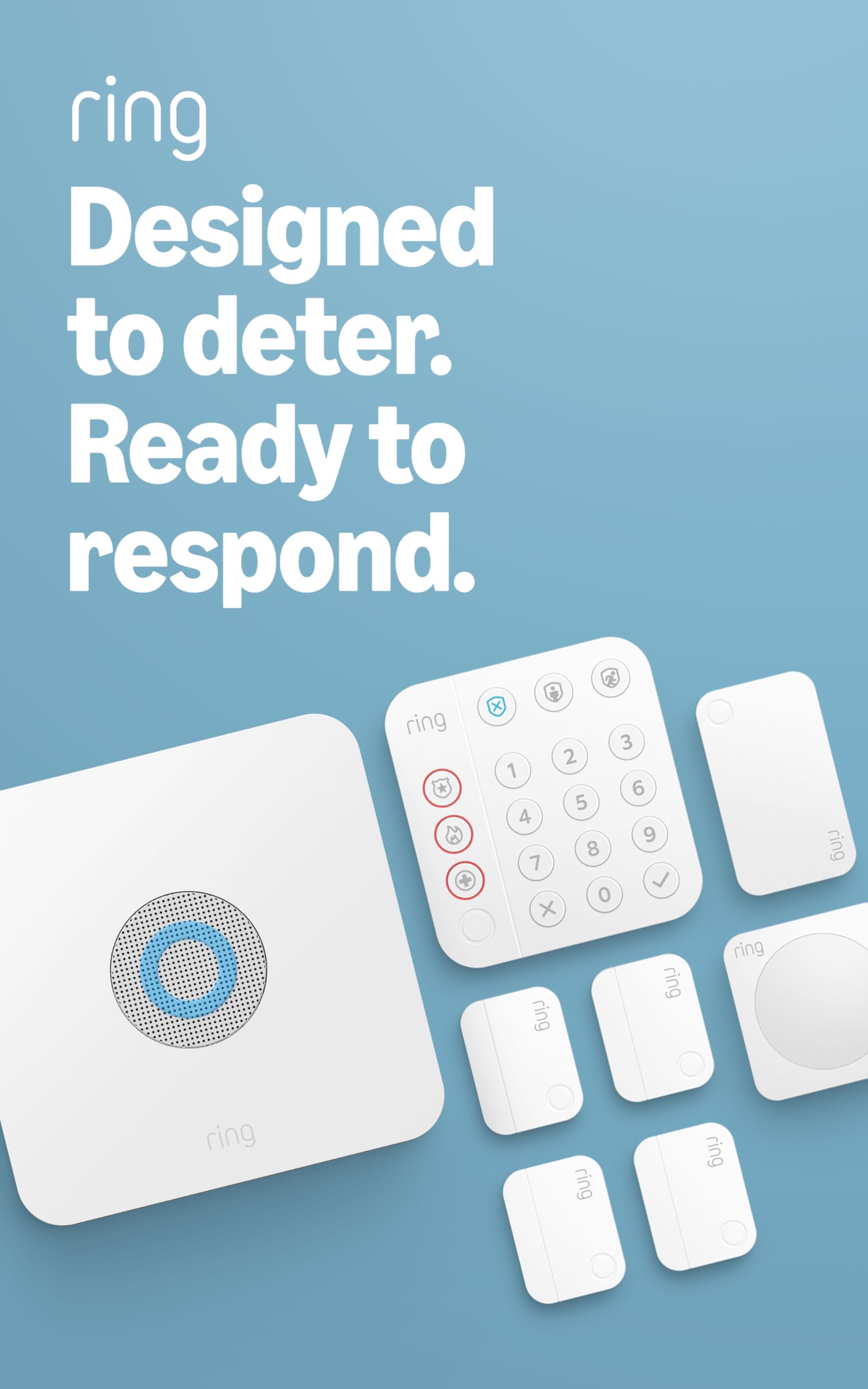
Ring Alarm’s 8-piece kit is a genuine intrusion alarm system — not a camera rig — built around a Base Station with a built-in siren, a Keypad, four Contact Sensors, a Motion Detector and a Range Extender. That covers the doors, windows and open floor of a 1–2 bedroom office or small storefront right out of the box, and you can add more contact, motion or glass-break sensors at any time. Everything is wireless and mounts with adhesive or screws, so there is no wiring and no electrician.
Day to day the Keypad arms and disarms the system, the Contact Sensors trip when a door or window opens, and the Motion Detector watches the interior. Any trigger sounds the siren and pushes an instant alert to the Ring app, where you can also arm or disarm from anywhere. Add a Ring Protect Pro plan and you unlock 24/7 professional monitoring, cellular backup that keeps the system online if the internet drops, and Alexa voice control — the features a business actually needs for after-hours coverage.
The honest trade-offs: the most valuable features — professional monitoring and cellular backup — require a paid Ring Protect subscription, and the system is happiest when you stay within Ring’s own sensors and accessories. For a small business that wants dead-simple setup, phone control and the option of monitored response, though, it is the most complete package at this price. It carries a 4.7-star average across more than 18,000 ratings.
Complete & Expandable
- Real intrusion kit — base siren, keypad, 4 contact sensors, motion detector and range extender.
- Fully wireless DIY install with adhesive or screws, no electrician needed.
- Arm, disarm and get instant breach alerts from the Ring app anywhere.
- Optional 24/7 professional monitoring with cellular backup and Alexa control.
Subscription Extras
- Professional monitoring and cellular backup need a paid Ring Protect plan.
- Works best when you stick to Ring’s own sensors and accessories.
- Sized for a 1–2 bedroom footprint — larger sites need extra sensors.
Best Overall Choice: you want a proven, easy-to-install alarm for a small office or shop, with the option to add monitored, cellular-backed response.
Look Elsewhere If: you refuse any subscription and want fully local, self-monitored hardware with no cloud at all.
2. SimpliSafe 8-Piece Wireless Home & Business Security System
A no-contract wireless alarm that protects right out of the box and only charges for monitoring if and when you want it.
SimpliSafe’s 8-piece system is a plug-and-play intrusion alarm built around a Base Station with a siren, a wireless Keypad, a set of Entry Sensors and a Motion Sensor. You place the sensors on doors, windows and cabinets, plug in the Base Station, and the space is protected in minutes — no tools and no wiring. Entry Sensors alert you the moment a protected door or window opens, and the Motion Sensor blankets a room with a 35-foot, 90-degree field of view that ignores pets under 60 pounds.
What makes it a strong business fit is the flexibility of monitoring. You can self-monitor for free through the SimpliSafe app, or add optional 24/7 professional monitoring with no long-term contract for fast police dispatch — including a silent panic option that signals for help discreetly. The Base Station carries a 24-hour backup battery plus cellular backup with monitoring, so a cut phone line or power outage does not leave you exposed, and the Keypad is smash-safe.
The trade-offs are modest. Cellular backup and professional response are tied to a paid plan, and this older-generation hardware is not as sleek as newer smart-home kits. But for a shop or office that wants dependable, contract-free protection with a real panic button, it delivers. It holds a 4.5-star average across more than 2,600 ratings.
Contract-Free Protection
- Base station with siren, keypad, entry sensors and a motion sensor.
- Sets up in minutes with no tools, wiring or electrician.
- Free self-monitoring or optional 24/7 professional monitoring, no contract.
- 24-hour backup battery, cellular backup and a silent panic button.
Paid Add-Ons
- Professional monitoring and cellular backup require a paid plan.
- Older-generation design lacks some newer smart-home polish.
- Motion sensor tolerates pets only under 60 pounds.
Great DIY Pick: you want contract-free protection you can install yourself and monitor for free, with pro response available on demand.
Reconsider If: you need one app that also runs a large camera network straight out of the box.
3. eufy Security 5-Piece Home Alarm Kit
A budget hub-and-sensor alarm with no mandatory fees — the whole system is a one-time purchase.
The eufy 5-piece Home Alarm kit is the value pick for a very small office, kiosk or back room. In the box you get the HomeBase hub, a Keypad, a Motion Sensor and two Entry Sensors — enough to cover a main door, a second entry and an open room. The entry sensors stick to doors and windows while the keypad and motion sensor mount to a wall, and the whole thing installs in minutes with no tools.
Its headline advantage is cost: eufy Security devices are one-time purchases with no monthly fees, so once you buy the kit there is nothing more to pay. You arm and disarm from the keypad or the eufy Security app and get an instant push alert the moment a door opens or motion is detected. A newer optional 24/7 professional monitoring service is available if you later want emergency police, fire and medical dispatch, but it is entirely optional rather than required.
The honest limits: with two entry sensors and one motion sensor, the starter kit suits a compact footprint — a larger site needs add-on sensors, and eufy’s alarm accessory range is narrower than Ring’s or SimpliSafe’s. Its professional monitoring is also newer and less established than the big brands. For no-fee, self-monitored protection of a small space, though, the value is hard to beat. It holds a 4.3-star average across roughly 1,200 ratings.
Where it shines: No subscription, ever — a one-time purchase that self-monitors through the app with instant breach alerts.
One trade-off: The five-piece starter covers only a small area, so expect to add sensors for anything larger than a room or two.
Best on a Budget: a very small business that wants genuine alarm protection with zero recurring fees and simple app self-monitoring.
Skip If: you need professional monitoring from an established provider or a wide catalog of add-on sensors.
4. ADT Blu Security Starter Kit (DIY)
A name-brand starter alarm that mounts with tape, needs no wiring, and adds cameras later — ideal for a leased storefront.
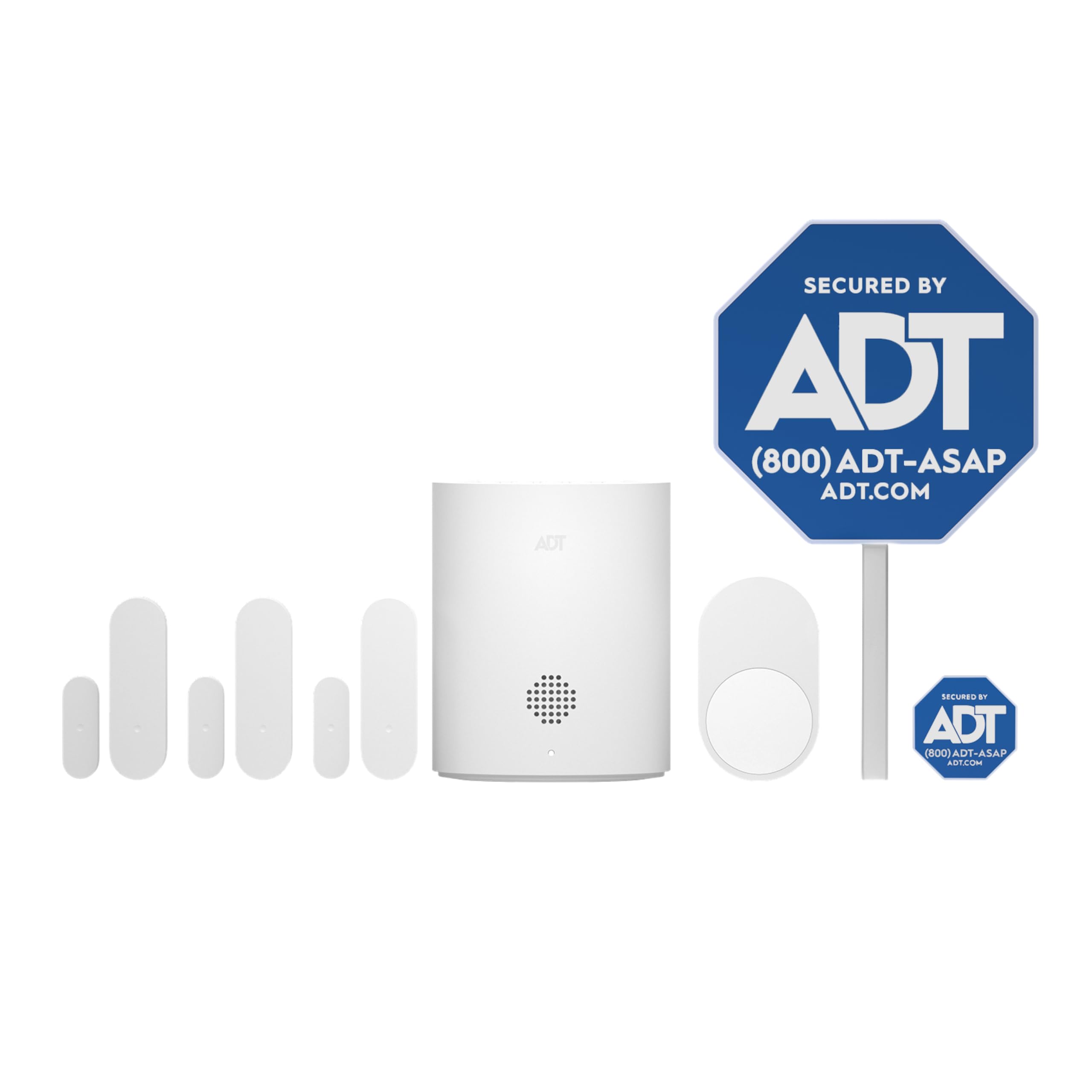
The ADT Blu Security Starter Kit brings the ADT name to a fully DIY, self-installed alarm. The kit includes a base hub, three door/window sensors and a pet-friendly motion sensor, plus a yard sign and window stickers that act as a visible deterrent. Everything mounts with screws or adhesive tape and needs no heavy tools or wiring, so it goes up in minutes and comes down clean — a genuine plus for a renter or a leased retail space.
You control the whole system from the ADT+ app, arming and disarming remotely and getting real-time phone alerts the instant a door opens or the motion sensor trips. Monitoring is month-to-month with no long-term contract — self-monitor or add a paid plan (the kit includes 30 days of professional monitoring with a paid subscription), and cancel anytime. The system also grows with your business: add indoor cameras, outdoor cameras, a video doorbell or glass-break sensors as you expand.
The caveats: this is a newer product with a shorter track record than the established alarm brands, and its most useful monitoring and camera features layer on paid subscriptions and extra hardware. But for an apartment-sized office or a first alarm from a recognizable security name, it is a low-commitment, expandable starting point. It holds a 4.0-star average across a still-small pool of ratings.
Deterrent Included
- Base hub, three door/window sensors and a pet-friendly motion sensor.
- Mounts with tape or screws — renter-friendly, no wiring or tools.
- Control and get real-time alerts from the ADT+ app; cancel monitoring anytime.
- Yard sign and window stickers add a visible deterrent; expandable with cameras.
Newer Brand
- Fewer ratings and a shorter track record than established alarm brands.
- Best features rely on paid monitoring and add-on hardware.
- Starter kit covers a small footprint; larger sites need more sensors.
Best for Renters: an apartment-sized office or leased shop that wants a recognizable, no-wiring alarm it can take along when the lease ends.
Look Further If: you want a long, proven review history or a large multi-sensor system out of the box.
5. Qolsys IQ Panel 4: Wireless Smart Home Security System Alarm Panel

The touchscreen brain that turns your phone into a full security command center.
The Qolsys IQ Panel 4 is fundamentally different from the camera-heavy kits above — it is a central alarm and automation panel designed for small commercial spaces that want a clean, wireless security foundation. The 7-inch touchscreen panel itself contains an 8MP front camera with a 120-degree wide-angle lens and FlexTilt capability that captures photos and video clips (up to 4 minutes) when the alarm is triggered. It supports over 100 wireless sensors — door contacts, motion detectors, glass break detectors, smoke alarms, flood sensors, and more — all managed from the panel or the Alarm.com mobile app.
What makes this a serious business tool is the Z-Wave integration. You can pair it with smart locks, thermostats, and lights, then create automation rules like “open up the door when I disarm the system” or “turn on the lights when the driveway sensor trips.” The built-in LTE cellular connection means the panel stays online even if your internet goes down. The 85-decibel onboard siren is loud enough to be heard through a typical office or small retail space.
The catch: this is a panel and hub only — it does not include sensors, cameras, or door contacts beyond what is in the box. You will need to buy those separately (door/window sensors, motion detectors, cameras), which adds to the total cost. A few buyers received defective units that would not power on at all, so inspect it immediately upon arrival.
Wireless Smart: the smooth integration with Alarm.com’s app and Z-Wave automation rules — you can lock the door, check the thermostat, and view the built-in 8MP camera feed all from one screen.
Hub Dependent: the base kit is just the panel and transformer. To secure a real business space, budget for a full set of door contacts, motion sensors, and possibly additional cameras — the cost adds up fast.
Reach for Ease: you want a wireless, smartphone-controlled alarm system with automation features (lights, locks, thermostats) for a small office or boutique retail space.
Not Wired Fan: you need comprehensive video surveillance from the start — this is a hub that requires separate sensor purchases to function as a full security system.
6. Honeywell Vista 20P Hardwired Security System Kit with 6160 Keypad, IS335 Motion Sensor, 3 Contacts, Wave2 Siren

The industry-standard wired alarm panel that professional installers trust.
The Honeywell Vista 20P is the backbone of countless commercial security installations across the country. This kit gives you the Vista 20P control panel (Version 10.23, the newest), a 6160 alphanumeric keypad, one IS335 PIR motion sensor, three 7939WG hardwired door/window contacts, and a Wave2 two-tone siren. The panel supports 8 hardwired zones and can be expanded with up to 48 wireless zones using an RF receiver — making it flexible enough for a warehouse, office, or retail space.
What keeps this system relevant is the reliability of wired connections. There is no Wi-Fi dropout, no battery to charge in the sensors, and the alphanumeric keypad shows you exactly which zone triggered the alarm (e.g., “Back Door” instead of just a beep). The Wave2 siren is loud enough to alert everyone inside a typical small to mid-size business. The system can be monitored by most third-party alarm companies.
The programming is the barrier. Multiple owners — including an electrical engineer — found the default instructions difficult to follow. You will need to watch YouTube walkthroughs or call for support. The kit also lacks an entry-delay sensor from the start; the motion sensor triggers instantly, which means you cannot walk past it to disarm without setting off the alarm. Adding a wireless door contact for entry delay is recommended.
Best for Stability: a business owner who wants a rock-solid wired foundation and either has previous Honeywell programming experience or is willing to invest a few hours in setup videos.
Skip if Mobile: you want a plug-and-play system — this is a project kit that rewards patience and technical comfort.
7. Honeywell Ademco V20P60PK Vista-20P Intrusion Kit
The alarm that screams at 106 decibels — your intruder will hear it before they get in.
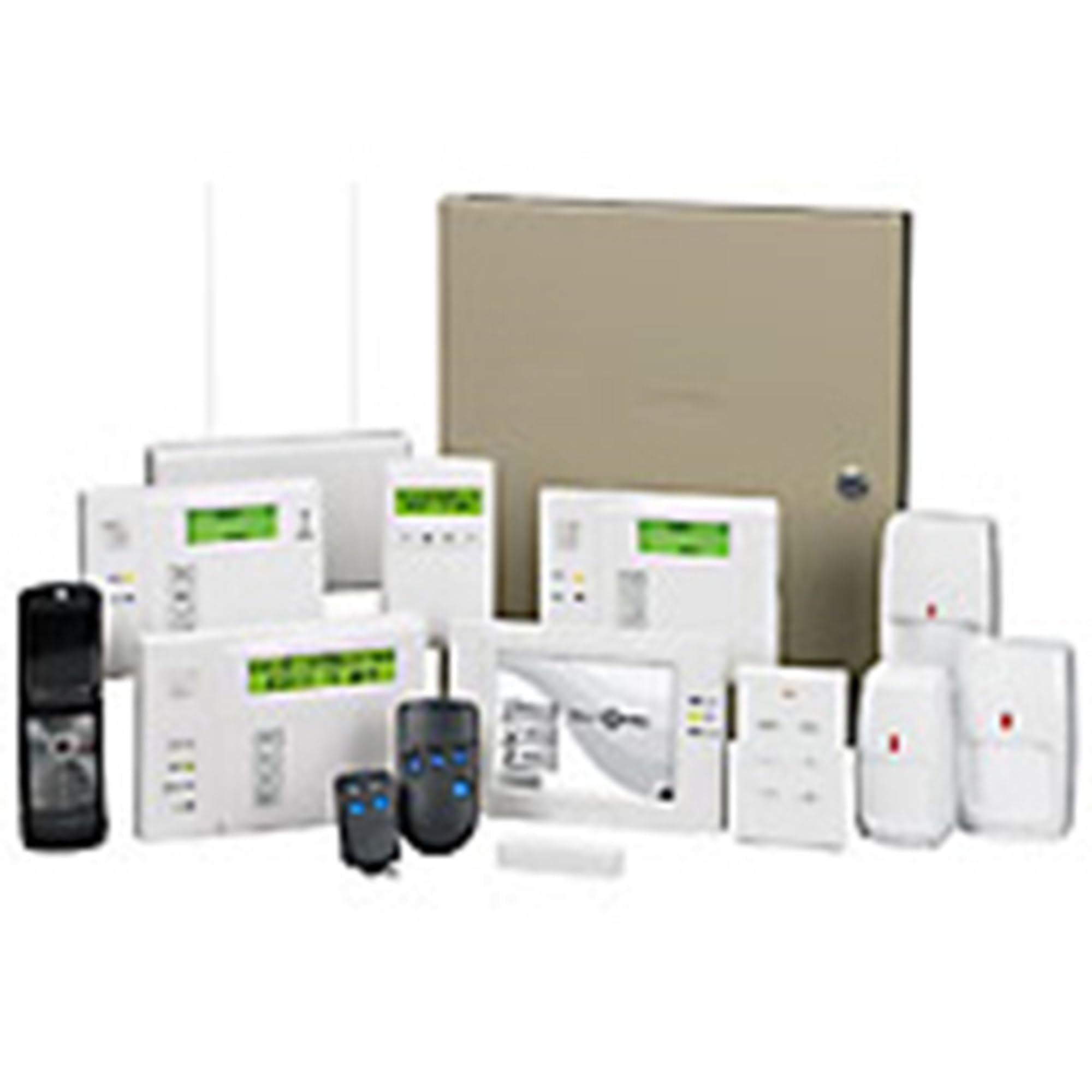
This is a leaner version of the Honeywell Vista 20P kit, stripping out the extra door contacts and focusing on the core alarm essentials. You get the Vista 20P control panel, a 6160 alpha keypad, an IS2535PIR motion detector, a Wave2 siren, battery, cord, and jack. The key spec that gets attention is the siren: rated at 106 decibels (dB). For context, that is as loud as a chainsaw or a live rock concert — enough to make an intruder think twice and alert anyone within earshot. Several owners have added a second, even louder external siren (127dB) for extra deterrence.
The panel supports 8 hardwired zones, expandable via wireless modules. The 6160 alphanumeric keypad shows text-based zone labels, so you can name each sensor (“Stockroom Window” instead of Zone 4). The system is fully compatible with traditional monitoring services. One owner described this as a “top-tier product” and a clear upgrade over consumer-grade all-in-one units.
The common complaint: the kit is incomplete for a full installation. It lacks door/window contacts and sensors needed for entry delay — the motion sensor triggers instantly, so there is no grace period to disarm. The programming process is notoriously unintuitive (using key combinations like pressing 1 and 3 simultaneously to change keypad modes). This is definitely a system for someone who enjoys tinkering or hires a professional.
Ideal for Traditional: a hands-on owner who wants an expandable, professional-grade alarm panel with a ridiculously loud siren and is comfortable with a learning curve.
Not for Modern: you expect a complete “from the start” solution — you will need to buy door contacts and invest time in programming.
8. Honeywell Vista 20P, 6160RF, (10) 5816WMWH Wireless Sensors, Battery, Siren, Jack & Cord Kit

Ten wireless door sensors paired with the legendary Vista 20P panel — the best of both worlds.
This kit solves the biggest pain point of the standard Vista 20P — the lack of included sensors. Here, you get ten wireless door/window sensors (5816WMWH models) right in the box, plus the 6160RF keypad (which includes a built-in RF receiver for wireless sensors), the Vista 20P panel, a Yuasa 12V 4Ah battery, a Wave2 siren, and the RJ31X jack and cord. It is the most complete “from the start” Honeywell commercial alarm kit on this list.
The wireless sensors mean you can install door and window contacts without running wires through walls — ideal for a retail space with glass doors or an office with existing finishes. The 6160RF keypad shows text labels for each zone, making it easy to identify exactly which door or window triggered the alarm. The included Yuasa battery provides backup power so the system stays armed during a blackout.
The catch: this is still a professional-grade system, not a consumer plug-and-play device. Honeywell itself will not provide phone support to non-professionals — you will need to rely on the seller or DIY YouTube videos for programming. One owner noted that the system needs 18-gauge 5-wire thermostat cable for proper installation, which is not included. A defective panel arriving is a risk, so test everything before permanent mounting.
Choose Expandability: you want the reliability of the Honeywell Vista 20P platform but need the convenience of wireless sensors (10 included) for a space where running wires is impractical.
Think Twice DIY: you want a simple setup with manufacturer tech support — this kit rewards DIY research and patience.
9. Commercial Door Bar Panic Exit Device with Alarm – FS-1550A UL Listed Push Bar
The UL-listed push bar that screams when someone opens your emergency exit.
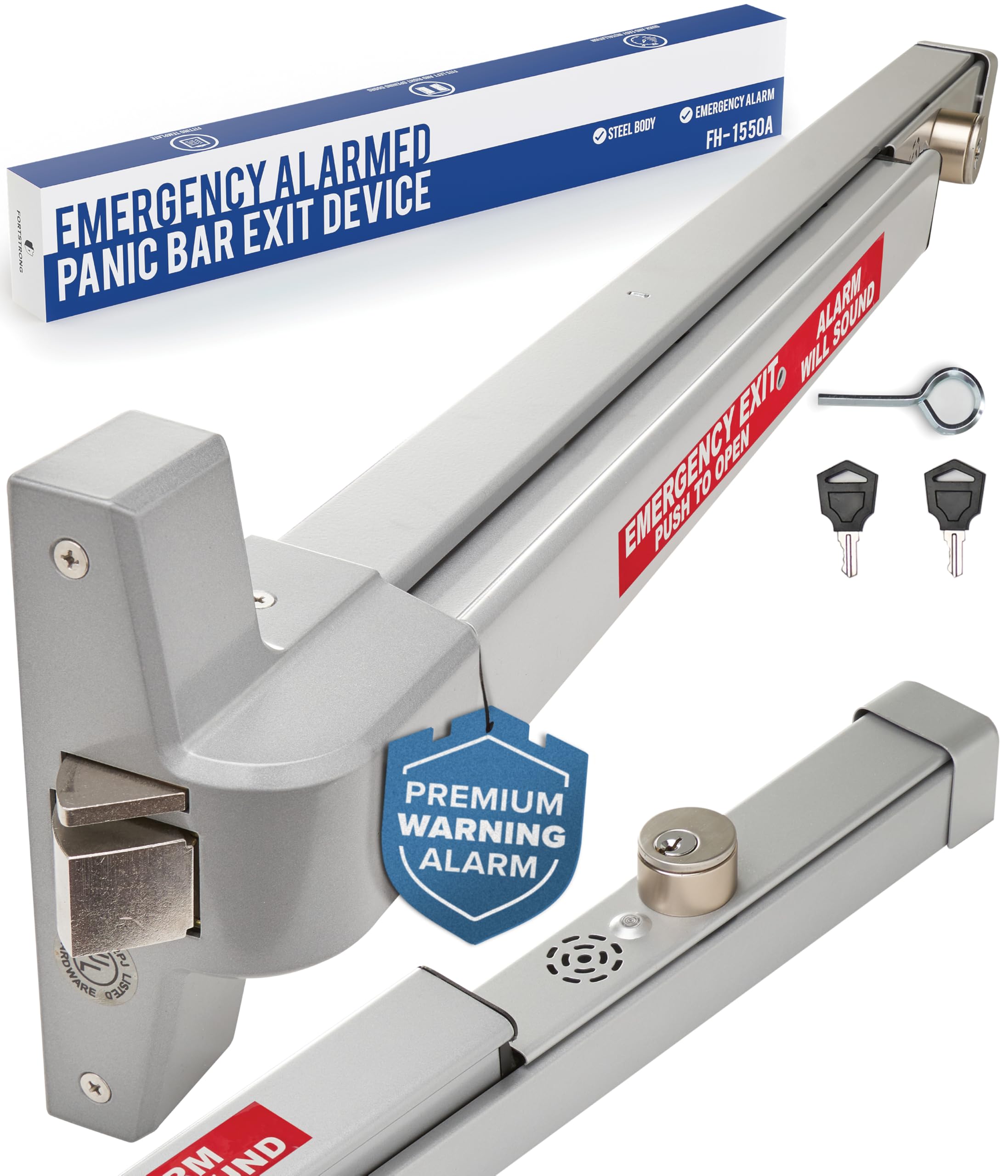
This is a specialized piece of hardware — a Grade 1 certified panic exit device with a built-in alarm, designed for commercial exit doors in hotels, offices, warehouses, and government buildings. When someone pushes the bar to exit, the unit sounds a 95-decibel alarm. The UL listing and ADA approval mean it meets commercial building code requirements for emergency egress in high-traffic spaces. It fits wood, metal, and composite doors with the included reversible roller striker and shim.
Installation is genuinely quick. The data shows one owner completed it in about 20 minutes using the included template and hardware. The push bar action is described as smoother than the older unit it replaced. The alarm runs on a single 9V battery and includes a removable shut-off key, so authorized personnel can silence it without tools.
The split opinion: some buyers call the alarm sound more of a “buzzer” than a true alarm, saying it is faint and “can’t be heard anywhere except at the door.” For a noisy warehouse floor or a busy restaurant kitchen, the 95dB may not be enough to alert distant staff. Also, the two keys provided may not be keyed alike, meaning you have to carry two different keys for multiple bars.
Ideal for Emergency: a small retail store or office that needs a code-compliant emergency exit alarm on a single door — installs in minutes and meets UL requirements.
Not Enough Features: you need a piercing alarm that cuts through a loud environment — the 95dB buzzer may not be heard far from the door in a noisy warehouse or kitchen.
Understanding the Specs
NVR (Network Video Recorder) vs. DVR
An NVR works with IP cameras (cameras that connect to your network via Ethernet cables). Each camera has its own processor that encodes the video, so the recorder just stores the footage. A DVR works with analog cameras, where the recorder does all the processing. For modern business installations, NVR systems with PoE cameras are the standard because they deliver higher resolution (4K and above) and simpler single-cable setup.
PoE (Power over Ethernet)
PoE sends both electrical power and video data through a single Ethernet cable — up to 330 feet for the standards used in these kits. That removes the need for a separate power outlet near each camera and keeps the video signal digital all the way, avoiding the signal degradation that can happen with analog cabling. If your building already has Cat5e or Cat6 cabling, PoE systems are dramatically easier to install.
AI Detection (Person / Vehicle / Animal)
Standard motion detection triggers on any pixel change — a leaf blowing across the parking lot sets it off. AI detection uses machine learning to recognize the shape of a human or vehicle. It ignores animals, shadows, and weather effects. The best pet-immune motion sensors achieve a similar reduction in false alerts, so your phone only buzzes when a real person actually enters your defined zone.
Frame Rate (fps) and Its Real Impact
Frame rate measures how many individual still images the camera captures every second. 30 fps produces smooth, fluid video — a person walking looks natural. 15 to 20 fps can appear slightly choppy, with noticeable stuttering on fast movement. For a checkout counter or a door entry, 30 fps is ideal. For a wide-area parking lot where movement is slower, 20 fps is often acceptable and uses less storage space.
FAQ
Will a PoE security camera system work with my existing Ethernet cables?
What happens to a business alarm system during a power or internet outage?
Can I use these business alarm systems without a monthly monitoring subscription?
Is 4K resolution really necessary for a business security camera?
How do wired PoE cameras compare to wireless (Wi-Fi) security cameras for a business?
What does UL Listed mean for a panic exit alarm bar?
Can I add more sensors to these alarm systems later?
How difficult is it to program a Honeywell Vista 20P alarm panel?
What does “8-zone” mean on a security alarm control panel?
Final Thoughts: The Verdict
For most businesses, the business alarm systems winner is the Ring Alarm 8-Piece Kit because it delivers the best balance of easy DIY setup, expandable sensors, and phone control, with optional 24/7 professional monitoring and cellular backup. If you want contract-free protection you can self-monitor for free, grab the SimpliSafe 8-Piece System. And for a very small store or office that wants genuine alarm protection with no monthly fees, the eufy Security 5-Piece Alarm Kit is the one to reach for.
How We Picked
We do not accept paid placement. Every pick is matched to a real buyer and a real use-case; we do not hands-on test units.
Sources & Methodology
Specifications: manufacturer listings and product documentation. Review insights: verified customer reviews, as of July 2026. Pricing: not shown on this page (it changes often); check the current price via the retailer link.
As an Amazon Associate, FitlyFast earns from qualifying purchases. This does not affect which products we feature.