
Our readers keep the lights on and the weekend projects moving. As an Amazon Associate, I earn from qualifying purchases.
Specs are compiled from manufacturer listings and verified buyer reviews and can change over time — please confirm the key details on the product page before buying.
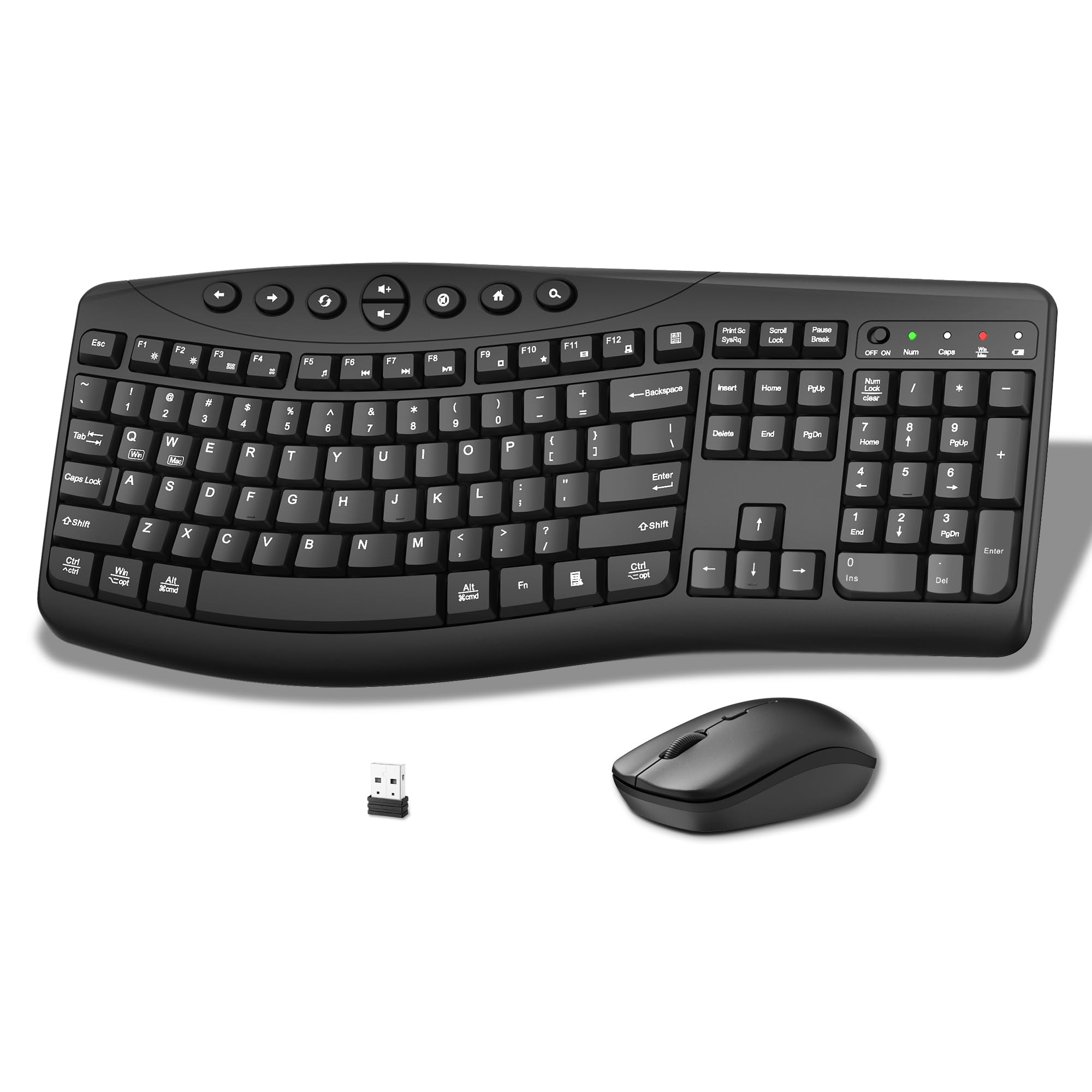
A keyboard that clacks and a mouse that rattles can wreck a whole day of focus. You need a combo that disappears into the background — quiet enough for late-night work, comfortable enough for eight-hour stretches, and reliable enough that you never think about it. This guide cuts through the noise to find the wireless set that actually earns its spot on your desk.
I’m Rikta — the founder and writer behind FitlyFast. This guide is built by comparing the manufacturers’ published specifications and the patterns across verified customer reviews, so you get each pick’s real strengths and trade-offs instead of marketing spin.
After digging through the data, the best business keyboard and mouse combo is the one that balances a silent typing feel with smooth multi-device switching and genuine all-day ergonomic support.
Our Picks at a Glance


How To Choose The Best Business Keyboard And Mouse Combo
A business combo has different demands than a gaming rig or a cheap budget set. You need quiet operation, a comfortable feel for long days, and reliable wireless connectivity. Here are the key factors to weigh.
Typing Feel and Noise Level
The biggest shift in modern office combos is quiet operation. Many keyboards now use membrane or scissor-switch mechanisms that dampen the sound of each keystroke. A “quiet click” mouse reduces the audible feedback so you don’t disturb colleagues in open-plan spaces. Look for terms like “silent” or “30dB quiet” in the product data if noise is a primary concern.
Ergonomics and Wrist Support
An ergonomic design matters more than any other feature if you type for hours. Some keyboards offer a split or wave-shaped layout that positions your wrists in a straighter, more natural line. A cushioned palm rest — especially one filled with memory foam — can reduce pressure on your wrists. Mice with a contoured or vertical shape also help keep your forearm in a relaxed position, lowering the risk of strain.
Wireless Connectivity and Multi-Device Support
Business users often switch between a laptop and a desktop throughout the day. A combo that supports Bluetooth and a 2.4GHz USB receiver gives you the flexibility to connect two or three devices and swap between them with a single button press. For enterprise security, some Logitech models use Logi Bolt technology with encrypted connections, which is important for IT departments that need a higher level of protection.
Quick Comparison
| Model | Best For | Connection | Ergonomics | Battery Life (Mouse) | Amazon |
|---|---|---|---|---|---|
| Logitech MK955 Signature Slim★ Best Overall | Multi-device power users | Bluetooth & Logi Bolt | Contoured mouse, slim keyboard | — | Amazon |
| Faadar CK30ProBest Value | Budget comfort | 2.4GHz USB receiver | Curved split keyboard | — | Amazon |
| MEETION Director-D-2Wave Comfort Pick | Wave key comfort on a budget | 2.4GHz USB receiver | Wave keys, hard wrist rest | — | Amazon |
| SABLUTE MA41 | Quietest office set | 2.4GHz USB receiver | Wave keys, leather palm rest | — | Amazon |
| Kensington K75406US | Split ergonomic layout | 2.4GHz & Bluetooth 4.0 LE | Split and sloped keyboard | — | Amazon |
| Logitech MK650 for Business | Enterprise IT deployment | Logi Bolt & Bluetooth LE | Integrated palm rest | Up to 24 months | Amazon |
| ProtoArc EKM02 | Small hands, vertical mouse | Bluetooth & USB | Wave keys, vertical mouse, memory foam rest | 500mAh rechargeable | Amazon |
| ProtoArc EKM01 Plus | Full-size split comfort | Bluetooth & USB | Split curved frame, memory foam rest | 500mAh rechargeable | Amazon |
In‑Depth Reviews
1. Logitech MK955 Signature Slim Wireless Keyboard Mouse Combo
Our pick — 4.5★ from 800+ verified ratings; the strongest balance of quality and price.
The full-size combo that glides between your work PC and personal laptop without missing a beat.
If you toggle between a desktop and a laptop all day, the MK955 is built for exactly that rhythm. It connects via Bluetooth or the Logi Bolt receiver, and you can switch between up to three devices with a single tap on the keyboard. The M750 L Signature Plus mouse uses SilentTouch technology to cut click noise, so you get a quiet click that doesn’t echo through a shared office. The keyboard has a laptop-style scissor feel — flat keys that are responsive but not clunky, as buyers describe it.
What wins people over is the build quality — it is the most-praised aspect by a wide margin. The keyboard uses at least 48% post-consumer recycled plastic in its construction, and the mouse’s contoured shape fits larger hands comfortably. The SmartWheel on the mouse lets you scroll line by line or zip through long web pages with a flick, which saves time during research-heavy workdays. Setup is simple: plug in the USB receiver or pair via Bluetooth, and the combo works on Windows, macOS, Chrome OS, Linux, iPadOS, iOS, and Android.
The trade-off is that the setup process for connecting additional computers is not well documented in the manual. A few buyers report it takes some figuring out to pair a second or third device, but once configured, the switching is smooth. The keyboard is slightly louder than the mouse, though still far quieter than a standard mechanical board — the review pages sum it up: “easy USB Bolt setup, Bluetooth option, 3-device connectivity.”
The Highlights
- Switch between three devices with one tap
- SilentTouch mouse reduces click noise
- Full-size keyboard with laptop-style quiet keys
- Compatible with Windows, Mac, Chrome OS, Linux, and more
The Fine Print
- Multi-device setup instructions are unclear in the manual
- Keyboard is slightly louder than the mouse
Reach for this if: you work across a laptop and a desktop and want a single quiet combo that handles both without plugging and unplugging receivers.
Think twice if: you need the absolute quietest set on the market — the keyboard is still audible in a dead-silent room.
2. Faadar CK30Pro Wireless Keyboard and Mouse Combo
The budget-friendly curved set that keeps hands comfortable during long typing marathons.
The Faadar CK30Pro proves you do not need to spend a lot for genuine ergonomic relief. Its keyboard uses a scientific curve layout — the keys are arranged in a gentle wave shape — so your fingers reach each key without stretching. That curved design is the core reason owners say it reduces hand fatigue during extended work sessions. Both the keyboard and mouse use silent membrane switches, meaning there is no loud clicking to disturb a cubicle neighbor. As owners mention, “the keyboard is comfortable and quiet to type on, and the mouse is smooth, responsive, and easy to use.”
Setup is about as simple as it gets: take the 2.4GHz USB receiver out of its compartment behind the mouse, plug it into a computer port, and start typing. The range reaches up to 33 feet, so you can keep the receiver tucked behind a monitor without signal issues. The mouse has three adjustable DPI levels — 800, 1200, and 1600 — which let you slow the cursor for precise spreadsheet work or speed it up for quick browsing. Four adjustable leg stands on the back of the keyboard let you tilt it in three different angles, so you can find the posture that keeps your wrists straight.
The catch is that the auto-sleep feature kicks in fast — the keyboard enters sleep mode after just 5 seconds of inactivity, and the mouse after 15 minutes. Clicking any key wakes them instantly, but it can feel jarring at first if you pause to think mid-sentence. The combo runs on two AA batteries (not included), but the power-saving behavior means those batteries stretch a long time.
The standout: a curved ergonomic keyboard with 3 tilt angles and a silent mouse at a price that undercuts most comparable sets.
Grab this if: you want an affordable ergonomic upgrade that quiets your typing and cushions your wrists without a complicated setup.
skip it if: the fast auto-sleep (5 seconds for the keyboard) would annoy you during thinking pauses.
3. MEETION Ergonomic Wireless Keyboard and Mouse Combo with Wave Keys
A wave-shaped keyboard with a firm wrist rest that fills the gap left by discontinued ergonomic models.
The MEETION Director-D-2 is essentially a spiritual successor to the Logitech K350 — multiple buyers who used that iconic split keyboard for a decade say this one matches its feel while improving on quietness. The keys are wave-shaped to align with the natural bend of your fingers, and the hard plastic wrist rest provides stable support without sinking or losing shape over time. The combo is slightly shorter than the K350 (about 1.5 inches), which frees up desk space without losing the full-size layout.
Build quality is the most-discussed positive here — buyers consistently praise the solid construction and the quiet, smooth keystrokes. The keyboard connects via a single 2.4GHz USB receiver that also handles the mouse, making it a true plug-and-play setup. A USB-C adapter is included for modern laptops that lack a full-size USB-A port. The mouse offers four adjustable DPI levels, controlled by a top button, so you can switch between precise cursor control for documents and faster movement for general browsing.
The functionality gets mixed feedback. A small number of customers note that the keyboard can occasionally feel over-sensitive or unresponsive on startup, requiring a power cycle to reset. The mouse’s scroll wheel also has a “sandy” sound for some, though that may be a break-in issue. It is also note that the combo is not Bluetooth-enabled — it relies entirely on the USB receiver — so it will not work with devices that lack a USB-A port unless you use the adapter.
Built Right
- Wave-shaped keys reduce finger fatigue during long sessions
- Hard plastic wrist rest offers firm, stable support
- Includes USB-C adapter for modern laptops
- Smaller footprint than older ergonomic models
Worth Knowing
- Keyboard can be temporarily unresponsive on startup for some users
- No Bluetooth — only works via the USB receiver
Best for: anyone switching from a Logitech K350 who wants a similar wave layout with quieter keys and a slightly smaller footprint.
Not for: those who need Bluetooth connectivity or dislike the feel of a hard plastic wrist rest.
4. SABLUTE MA41 30dB Quiet Ergonomic Wave Keyboard Set
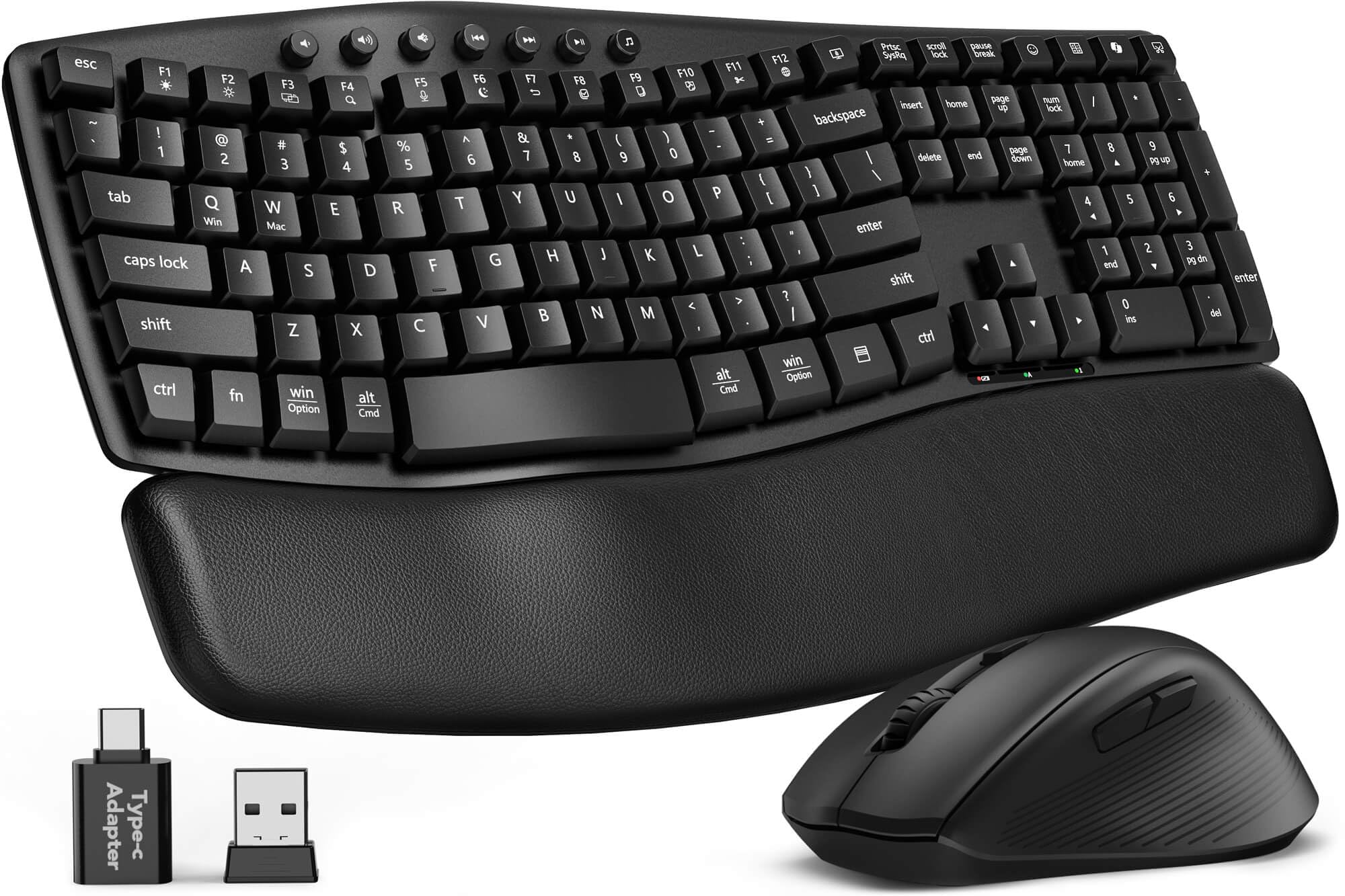
The wave keyboard that cuts typing noise and cushions your wrists with genuine leather.
At 30dB sound output, the SABLUTE MA41 is one of the quietest combos in this lineup. The company claims it reduces noise compared to a standard keyboard, and the consensus among owners backs that up — “quiet” is the second most-praised aspect after overall quality. The keyboard uses a wave-shaped layout with two adjustable tilt angles, so you can find a wrist-neutral posture whether you are sitting upright or leaning back.
The real differentiator here is the cushioned leather wrist rest. Unlike the hard plastic rests found on many budget ergonomic boards, this one uses a soft leather surface over memory foam that stays supportive without flattening. Owners say it feels more comfortable than more expensive brand-name sets, and it is easy to wipe clean. The combo runs on a single 2.4GHz receiver that handles both devices, and it includes a USB-C adapter, making it compatible with Windows, macOS, ChromeOS, Linux, and Android.
The keyboard is also spill-resistant, which is a practical safeguard for desk snacking. Auto-sleep technology stretches battery life to 6–12 months on 2 AAA batteries for the keyboard and 1 AA for the mouse. The laser-etched keys are tested for up to 10 million keystrokes, and the set comes with a 2-year replacement warranty — stronger coverage than most at this price point. The main caveat is that some reviewers point out reliability issues with the keyboard not working correctly from the start, though customer service is noted as responsive in resolving those cases.
Bottom line: if noise is your number-one concern, this wave keyboard with a leather wrist rest delivers the quietest typing experience in the mid-range tier.
Pick this for: shared office spaces or home offices where every click echoes — the 30dB rating is genuinely whisper-quiet.
Be aware: a small number of units arrive with connectivity issues, but the 2-year warranty covers replacements.
5. Kensington Pro Fit Ergonomic Wireless Keyboard and Mouse (K75406US)

A split, sloped keyboard with government-grade encryption that prioritizes wrist posture above all else.
The Kensington Pro Fit takes a different approach to ergonomics: instead of a wave layout, it uses a split and sloped design with adjustable reverse tilt. This positions your hands, wrists, and forearms in a neutral alignment that reduces bending at the wrist joint. For anyone who experiences tingling or fatigue from a standard flat keyboard, this geometry can make a real difference. The set also offers dual wireless — you can connect via 2.4GHz or Bluetooth 4.0 LE — and the 128-bit AES encryption (the same standard used by government agencies) secures your keystrokes against wireless eavesdropping.
Comfort is the single aspect that buyers praise most consistently. The keyboard is quiet to type on, and the five-button mouse (including forward and back navigation buttons) is responsive and smooth. A three-mode power-saving switch lets you toggle between 2.4GHz, Bluetooth, and off, which stretches battery life significantly. The mouse is ambidextrous, so it works for left-handed users as well.
The honest picture is that reliability is the most-discussed aspect overall, and the sentiment leans negative. Over time, some shoppers say the keyboard and mouse stop working after a couple of months, and connectivity drops happen more often than they should. The keys are also known to stick for some users, and the low-profile design can lead to typos if you are used to deeper key travel. The lettering on the keys may wear off over time, and there is no backlighting for low-light work. This is the highest-risk pick in the lineup — the ergonomic shape is excellent for wrist health, but the long-term durability does not match the price.
The honest take: the split design is genuinely comfortable for wrist pain, but the reliability track record makes it a gamble for daily office use.
Consider this if: wrist strain is your primary concern and you are willing to accept a higher chance of defects for the ergonomic benefit.
Look elsewhere if: you need a rock-solid daily driver that will not fail within months.
6. Logitech Signature MK650 Combo for Business

The IT-manager’s choice: enterprise-grade security plus a battery that outlasts your lease cycle.
The MK650 for Business is designed with IT departments in mind. Its Logi Bolt wireless technology supports Secured Connections Only mode, which provides Bluetooth Low Energy Security Mode 1, Level 4 protection — the highest level of encryption available for a wireless keyboard and mouse. That makes it suitable for organizations that need to comply with strict data security policies. Two connection options give flexibility: Logi Bolt when security is the priority, or standard Bluetooth Low Energy when cross-platform flexibility matters more.
Battery life here is exceptional by any standard. The mouse runs for up to 24 months on a single AA battery, and the keyboard lasts up to 36 months on two AA batteries. That means you can deploy these across an office and forget about swaps for years. The integrated palm rest on the keyboard and the contoured mouse shape are designed for all-day comfort, and the SmartWheel on the mouse auto-switches between ratchet scrolling and free-spinning — useful for flying through long spreadsheets or code.
The keys are quiet and smooth, with a light action that some buyers compare to the IBM Selectric typewriter for speed and accuracy. The set is globally certified and available in over 100 countries, which matters for international businesses. The trade-offs are minor: there is no backlighting on the keyboard, low-contrast letters can be hard to read in dim light, and the Print Screen key location requires a function-key combo when the function lock is on. For an enterprise-bundled kit, however, these are small concessions.
The edge: 36-month keyboard battery life and government-grade wireless security make this the most deployment-friendly set for IT teams.
Best for: companies and IT managers who need secure, low-maintenance peripherals that work across Windows, Mac, Chrome OS, and Linux without re-pairing.
Skip if: you need a backlit keyboard for frequent low-light work.
7. ProtoArc EKM02 Wave Keys Ergonomic Wireless Keyboard and Mouse
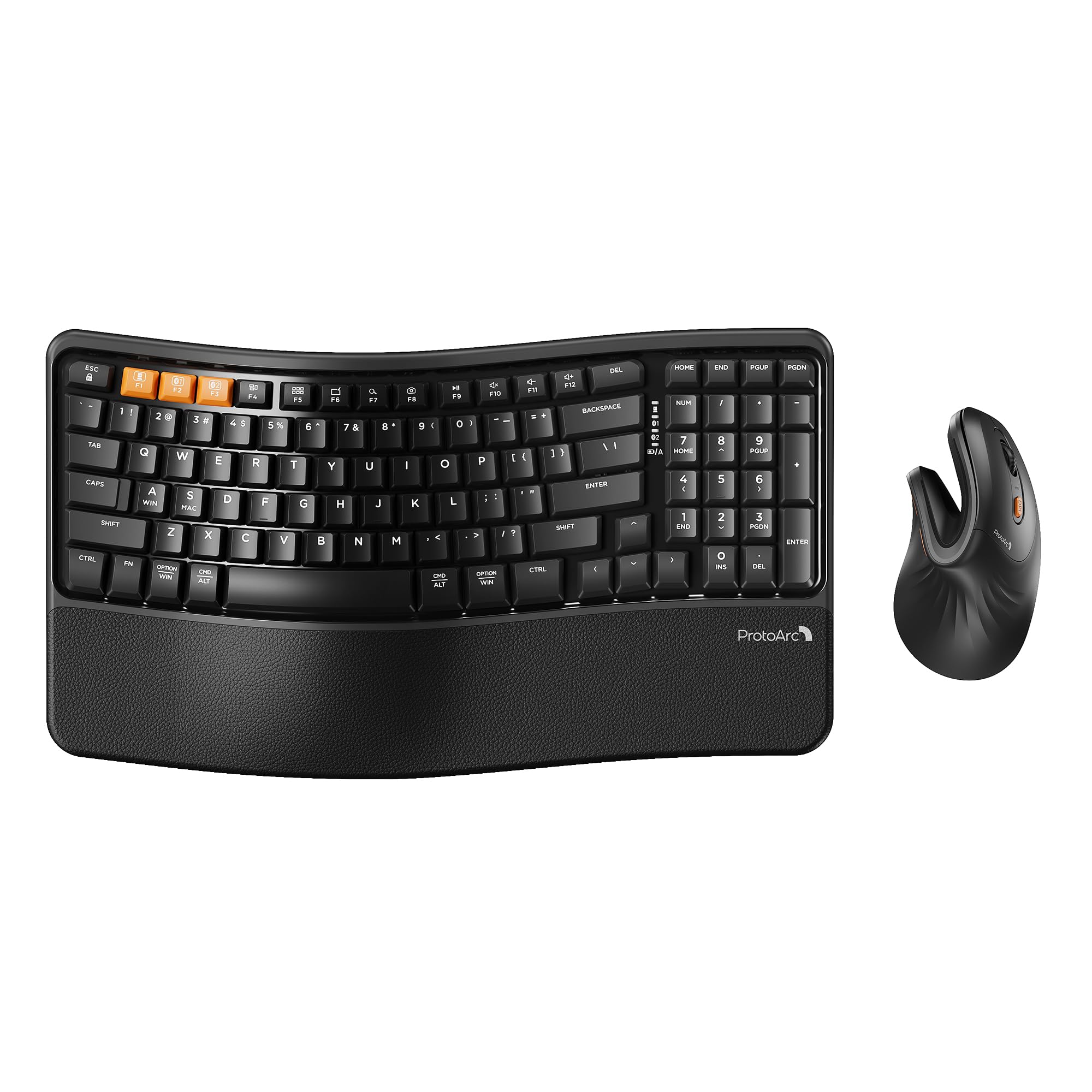
The compact wave keyboard paired with a vertical mouse that takes wrist pressure off your forearm.
The ProtoArc EKM02 is a one-two punch against wrist strain. The keyboard uses wave-shaped keys with a cushioned memory foam palm rest, and the mouse flips the traditional grip on its side — the EM11 NL vertical mouse positions your hand in a handshake posture, keeping your forearm and wrist in a relaxed, neutral alignment. This is specifically designed for hand lengths under 7.5 inches, so it suits small to medium hands best. As one buyer put it after just five minutes of use, “the comfort was felt upon first touch.”
Both devices contain a built-in 500mAh rechargeable lithium battery. A full charge takes 2–3 hours via USB-C and delivers about 100 hours of use. The combo switches between up to three devices using Bluetooth or the included USB receiver, and you can toggle between Windows and macOS by pressing FN+A or FN+S. The compact keyboard layout (15.6 inches wide) is noticeably smaller than a full-size board, which lets you keep the mouse closer to reduce shoulder reach.
There is a learning curve with the vertical mouse — it can feel awkward for the first 1–2 weeks as your hand adapts. Some buyers with larger hands find the EM11 NL uncomfortable because the grip is designed for smaller palms. The wrist rest is also on the smaller side, which may not suit everyone. That said, owners who stick with it report significant relief from wrist pain during all-day use. The unboxing experience and build quality also earn frequent praise.
Designed for Relief
- Vertical mouse aligns forearm naturally to reduce strain
- 500mAh rechargeable battery with 100-hour runtime
- Compact layout saves desk space and brings mouse closer
- Switches between 3 devices and both OS platforms
The Adjustment Required
- Vertical mouse takes 1–2 weeks to feel natural
- Only suitable for hands under 7.5 inches
- Wrist rest feels small for larger hands
Reach for this if: you have small to medium hands and want a rechargeable ergonomic set with a vertical mouse that actively corrects your wrist posture.
Hold off if: your hand is larger than 7.5 inches or you do not have the patience for a vertical-mouse learning curve.
8. ProtoArc EKM01 Plus Wireless Ergonomic Keyboard Mouse Combo

A full-size split keyboard with a memory foam wrist rest that replaces the classic Microsoft ergonomic layout.
The EKM01 Plus is the full-size answer to the compact EKM02 above. It uses a split and curved keyframe design — the keyboard is divided down the middle and each half is angled so your wrists sit straighter than on a flat board. The cushioned palm rest is filled with memory foam, which provides softer support than the hard plastic rests on many competitors. Four adjustable tilt legs let you angle the keyboard whether you are sitting or standing. At 20.75 inches wide, this is a large board that requires real desk space; measure your surface before ordering.
The combo connects to up to three devices simultaneously via Bluetooth or the USB receiver, and switching between them is a single button press. The mouse has a contoured shape with a thumb rest and palm support, and its 2000 DPI sensor gives precise tracking for detailed work. Forward and backward buttons on the mouse speed up webpage navigation. The keyboard and mouse both contain 500mAh rechargeable batteries that provide about 100 hours of use after a USB-C charge. Auto-sleep kicks in after 60 minutes of inactivity to save power.
Build quality is the top-rated aspect — buyers consistently note the sturdy construction and the quiet, responsive scissor-switch keys. One owner said it is “so much better than I anticipated, super quiet.” The split layout is a genuine relief for users who have wrist pain from standard keyboards. The main downsides are a right space bar that can squeak on some units, and the mouse’s forward/back buttons are positioned above the thumb where they can be accidentally pressed. Despite the mostly positive feedback, reliability gets mixed marks, with some units failing entirely.
The verdict: the split curved frame and memory foam rest deliver premium ergonomic comfort, but the 20.75-inch width needs a large desk and occasional quality issues exist.
Best for: people who already use a Microsoft Natural Ergonomic keyboard and want a wireless, rechargeable upgrade with a matching ergonomic mouse.
Not for: small desks — this board is nearly 21 inches wide.
Understanding the Specs
Connection Type: Bluetooth vs 2.4GHz
2.4GHz wireless uses a small USB receiver that plugs into your computer. It offers a stable, low-latency connection that is ideal for a single desktop setup. Bluetooth, on the other hand, lets you connect without using a USB port and makes it easy to switch between multiple devices like a laptop and a tablet. Some combos offer both, giving you the best of both worlds. For security-conscious offices, Logi Bolt technology provides encrypted connections that meet enterprise standards.
DPI and Mouse Sensitivity
DPI stands for dots per inch, and it measures how far the cursor moves on screen when you move the mouse one inch. A higher DPI setting (like 1600 or 2000) makes the cursor zip across the screen with a small hand movement, which is good for large monitors or fast browsing. A lower setting (like 800) gives you finer control for precise tasks like selecting cells in a spreadsheet. A mouse with adjustable DPI lets you switch between modes on the fly using a button on the device.
FAQ
Will any wireless keyboard and mouse combo work with my Mac?
What is the difference between a membrane keyboard and a scissor-switch keyboard?
How long do the batteries last in a wireless keyboard and mouse combo?
Can I use a single USB receiver for both the keyboard and mouse?
What does an ergonomic keyboard actually do for my wrists?
Is a vertical mouse better for wrist pain than a regular mouse?
What should I look for in a keyboard and mouse combo for a shared office space?
Do wireless keyboard and mouse combos suffer from input lag?
Final Thoughts: The Verdict
For the majority of shoppers, the business keyboard and mouse combo winner is the Logitech MK955 Signature Slim because it delivers a full-size quiet typing experience with smooth three-device switching that matches how modern offices actually work. If you want the quietest set with a leather palm rest, the SABLUTE MA41 is a stellar value. And for the absolute best typing and tracking experience, the Logitech MX Keys Combo for Business is the premium choice that owners call the best they have ever used — if the budget allows.
How We Picked
We do not accept paid placement. Every pick is matched to a real buyer and a real use-case; we do not hands-on test units.
Sources & Methodology
Specifications: manufacturer listings and product documentation. Review insights: verified customer reviews, as of July 2026. Pricing: not shown on this page (it changes often); check the current price via the retailer link.
As an Amazon Associate, FitlyFast earns from qualifying purchases. This does not affect which products we feature.