
Our readers keep the lights on and the weekend projects moving. As an Amazon Associate, I earn from qualifying purchases.
Specs are compiled from manufacturer listings and verified buyer reviews and can change over time — please confirm the key details on the product page before buying.
A crimp is either perfect or it is a future headache — a loose connection that flickers, shorts, or just fails when you need it most. The right crimping tool turns that gamble into a sure thing, and this guide walks you through the ones that actually deliver a gas-tight, pull-proof bond every single time, without needing a second pair of hands or a prayer.
I’m Rikta — the founder and writer behind FitlyFast. This guide is built by comparing the manufacturers’ published specifications and the patterns across verified customer reviews, so you get each pick’s real strengths and trade-offs instead of marketing spin.
Whether you are wiring a home network, a car audio system, or a solar array, the right cable crimping tool is the difference between a connection that lasts and one that lets you down.
Our Picks at a Glance


How To Choose The Best Cable Crimping Tool
Every crimping tool does the same basic job — squeeze a connector onto a wire — but the tool you choose depends entirely on the connector type and wire thickness you are working with. Here are the three specs that separate a tool that frustrates you from one that becomes a go-to.
Connector Type and Die Compatibility
The first question is what connector you are crimping. F-connectors for coax cable need a compression tool with a fixed or adjustable anvil. RJ45 Ethernet plugs need a pass-through or standard punch-down die. Battery lugs and ring terminals need a hex die set that wraps around the connector. Buy a tool whose included dies match your connector type — or one that takes interchangeable dies — or you will be fighting the tool from the first squeeze.
Ratcheting vs. Non-Ratcheting Mechanism
A ratcheting mechanism locks the handles and prevents them from opening until the crimp reaches full depth. This ensures every crimp is as tight as the last, which is critical for low-resistance, weatherproof connections. Non-ratcheting tools are lighter and cheaper, but you have to guess the exact pressure — and one weak squeeze can mean a loose terminal that later pulls out.
Wire Gauge Range (AWG)
Every crimper has a specific wire-gauge range (e.g., AWG 10-1/0). If you work with thin signal wires (22 AWG) one day and thick battery cables (2 AWG) the next, you need a tool that covers both ends of that range — either with multiple die cavities in the head or with a set of interchangeable dies. Pushing a tool beyond its gauge range damages both the tool and the connector.
Quick Comparison
| Model | Best For | Connector Type | Wire Gauge Range | Mechanism | Amazon |
|---|---|---|---|---|---|
| Klein Tools VDV212-008-SEN★ Best Overall | Coax F-connectors | F-type compression | RG-6 | Spring-loaded, fixed plunger | Amazon |
| HIIJA RG6 Compression Tool KitBest Value Kit | All-in-one coax kit | F-type compression | RG-6, RG-11, RG-59 | Adjustable compression | Amazon |
| PETECHTOOL RJ45 CrimperTop Performer | Ethernet cables | RJ45, RJ12 | Cat5, Cat6 | Ratcheting, pass-through | Amazon |
| CHZHLM RJ45 Crimp Tool Kit | Compact Ethernet kit | RJ45, RJ11/12 | Cat5, Cat6, Cat7 | Ratcheting, pass-through | Amazon |
| ZOERAX Ethernet Crimping Tool Kit | Complete networking kit | RJ45, RJ11/12 | Cat5, Cat6 | Ratcheting, pass-through | Amazon |
| Solsop Battery Cable Crimper | Battery & solar lugs | Ring terminals | AWG 10 to 1/0 | Rotating hex dies | Amazon |
| Tivorex Battery Cable Crimper | Heavy-duty lug crimping | Ring terminals | AWG 10 to 1/0 | Ratchet, rotating hex dies | Amazon |
| haisstronica 6-Piece Crimping Set | Versatile terminal work | Insulated & non-insulated | Various (6 dies) | Ratchet, interchangeable dies | Amazon |
| YUZES 10-Ton Hydraulic Crimper | High-force lug crimping | Ring terminals | 12 AWG to 2/0 AWG | Hydraulic, 10-ton | Amazon |
In‑Depth Reviews
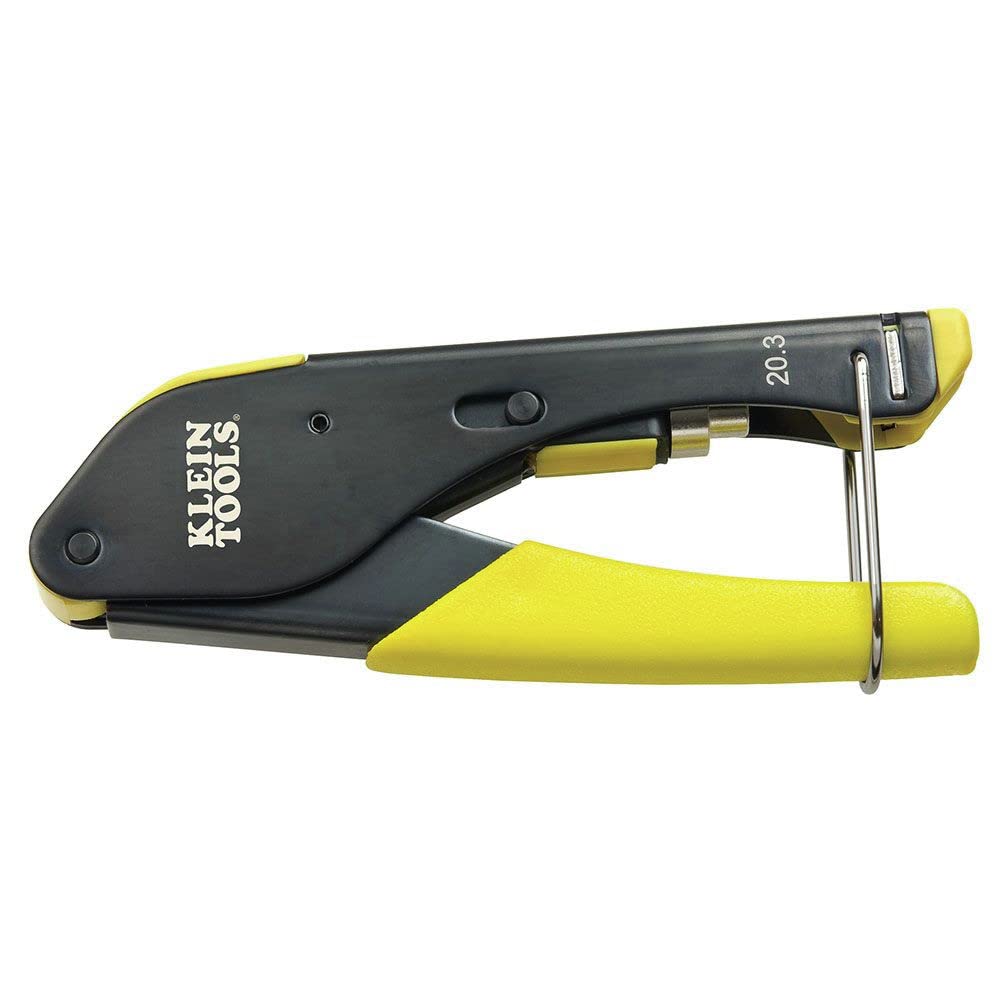
1. Klein Tools VDV212-008-SEN Compact Compression Crimper
Our pick — over 4.5★ from 750+ verified ratings; the strongest balance of quality and price.
The crowd favorite that turns coax crimping into a one-motion habit.
If you install F-connectors for cable TV, satellite, or CCTV, this is the tool the pro crowd leans on. Its fixed plunger design (a non-adjustable rod that pushes the connector sleeve) means you just push the cable in, squeeze the steel body, and you get a consistent compression every time — no fiddling with adjustments. The spring-loaded return eases hand fatigue when you have a long run of connectors to do, and the integrated handle lock makes it compact enough to toss in a tool bag without snagging.
The build quality is what wins people over — 64 owners single out the solid feel and corrosion-resistant black-oxide finish. What the tool earns quiet respect for is compatibility: it works with Snap-N-Seal and Gilbert connectors, which covers the vast majority of F-type fittings on the market. The crowd favorite — 4.7 stars across nearly 800 owners — and the one trade-off that comes up is the lack of adjustability; you get a fixed anvil (the part that stops the plunger), so it is built for one specific connector depth, not a universal fit. That design choice is exactly why it is so consistent for its primary job.
Buyers report that the key is matching your cable shield type (single to quad) to the connector — do that, and you get perfect connections that feel “like using a fork.” The steel body and simple internals mean it lasts, though a few note that the non-adjustable anvil means it is a dedicated tool rather than a catch-all.
Why it clicks
- Fixed anvil delivers identical crimp depth every squeeze
- Spring-loaded return reduces hand strain on long jobs
- Compact with handle lock for easy storage
The honest limit
- Not adjustable — only for one depth of F-connector
- Cable shield type must match connector for best results
Reach for it if: you crimp F-connectors regularly and want a no-guess, repeatable tool that fits in a pouch.
skip it if: you need a multi-purpose crimper that handles coax, Ethernet, and ring terminals in one tool.
2. HIIJA RG6 Compression Tool Kit
An all-in-one coax kit that brings a rotating head and a stack of connectors to the party.
This kit includes a compression tool that handles RG-6, RG-11, and RG-59 connectors (three common coax cable thicknesses) in one body, thanks to an advanced rotating head that alternates between sizes without needing a separate die (the insert that shapes the connector). The adjustable compression feature lets you dial in the fit for different connector brands, which is a step up from the fixed-plunger Klein — if you work with mixed connector types, this flexibility matters.
Functionality is the most-discussed aspect here, with 86 owners praising how the tool works for shortening cables and making professional-grade ends. Owners mention that the compression tool itself works very well, though the included cutting tool can damage RG6 braid — a cardboard spacer fixes that issue. The kit also comes with 20 F compression connectors, a stripper, a cutter, and a carrying case, so you have everything to start crimping immediately.
The instruction manual gets mixed marks — clear once you figure it out, but not the most intuitive. The connectors themselves receive mixed feedback, with some owners finding them functional and others swapping them for higher-quality brands. At its price point, the tool body alone is the real value; the accessories are the bonus.
Smart buy for: someone setting up a home theater or satellite system who wants one kit that covers multiple coax sizes and comes with enough connectors to finish the job.
3. PETECHTOOL RJ45 Crimping Tool
The Ethernet crimper that survives thousands of terminations without flinching.
If you make custom patch cables for Cat5, Cat6, or RJ12 phone lines, this pass-through crimper (a crimper that lets wires stick out the front of the plug for easy checking) gets the job done with a ratcheting mechanism that locks onto the connector until the pins are fully seated. The pass-through design is a standout for beginners: the wires slide through the connector, letting you verify the color order before the built-in blade simultaneously trims the excess and crimps the plug — no short-pin anxiety.
Quality is what 77 owners praise most, and the thickened cold-rolled steel body gives the tool a solid, stable feel that produces flush, clean trims every time. The kit includes 20 RJ45 Cat6 connectors and a set of replacement blades, so you are covered when the cutter eventually dulls after hundreds of cycles. The thing everyone raves about is the ergonomic handle — comfortable enough for terminating dozens of cables in one sitting, and the grip does not slip.
The recurring note is that the wire cutter blade can struggle to fully cut through the pass-through wires, especially with certain connector brands. A quick workaround is to rock the tool slightly during the cut. For a home network build or a small office install, this kit is tough to top for the price.
What it nails
- Pass-through design lets you verify wire order before final cut
- Replacement blades extend tool life significantly
- Comfortable ergonomic grip for high-volume work
The trade-off
- Cutter blade may not fully sever wires with all connector brands
- Die and cutter can wear after thousands of crimps
Your pick if: you are tired of mis-crimps and want a tool that lets you double-check your wire layout before committing.
Think twice if: you only crimp one cable a year — the pass-through connectors this tool is designed for are slightly more expensive than standard ones.
4. CHZHLM RJ45 Crimp Tool Kit

A tiny two-thirds-size crimper that stows anywhere and still delivers full-power crimps.
This kit is built around a mini crimper that is about two-thirds the size of traditional tools — an obvious advantage if you work in tight server racks or crowded network panels. Despite its smaller footprint, the high-carbon steel blades handle Cat5, Cat6, and even Cat7 pass-through and non-pass-through connectors, plus RJ11 and RJ12 phone plugs. The pass-through design works the same as larger tools: wires feed through the connector and the built-in blade makes the final cut during the crimp.
Reliability is the most-praised aspect, with 44 owners noting that their first crimp was perfect. The kit comes with 50 Cat5e connectors, 50 strain-relief boots, a mini stripper, a set of spare blades, and a 6P/8P cable tester (9V battery not included) — enough material to wire a whole home network. Customers note that the tool achieves 1GB speeds on CAT 6 upgrades when the lower 8P screw is adjusted for CAT 6 or below.
The sheath cutter (the part that strips the outer jacket) can nick thin cables if you are not careful, and the included pass-through connectors require slightly more force than higher-quality brands. The cable tester is fine for basic continuity checks but the battery compartment is tight. For the size and included parts, it is a strong value for a hobbyist or a second tool in a field kit.
Best for: the network installer or IT pro who needs a backup tool that fits in a laptop bag and still crimps Cat7.
5. ZOERAX Ethernet Crimping Tool Kit

An 8-in-1 networking kit that leaves nothing out except a 9V battery.
This kit covers the entire Ethernet cable process: a pass-through RJ45 crimper, a wire cutter pliers, a network cable stripper with adjustable blade depth, a mini stripper, a multi-function cable tester, 50 Cat6 pass-through connectors, and 50 strain-relief boots. The pass-through design on the crimper simplifies the process — you run the wires through the plug, verify the order, and the built-in blade cuts the excess as you crimp, so there is no guesswork on wire length.
Buyers consistently highlight the value: the kit includes replaceable blades for the crimper, so the tool lasts longer than disposable alternatives. The multi-function cable tester supports PoE (Power over Ethernet) testing up to 60V with anti-burning protection, meaning you can test live PoE lines without damaging the tester. The one thing everyone agrees on is that the included connectors are pass-through but not the highest quality — several owners recommend buying better connectors for critical runs.
The cable stripper uses a nut-adjustable blade depth, which lets you strip round and flat cables without nicking the inner wires. For a comprehensive home network build or a small office project, this kit saves a second Amazon order for connectors and boots.
What makes it complete
- Includes crimper, stripper, cutter, tester, connectors, and boots
- Replaceable blades extend the tool’s useful life
- PoE-safe tester prevents burnout on live lines
The honest note
- Included pass-through connectors are functional but not top-tier
- Tester requires a 9V battery not included
Grab this if: you are wiring a house or office and want a single purchase that covers every step including testing.
Pick something else if: you only need a simple crimper for a single cable repair — this kit is overkill for one-time use.
6. Solsop Battery Cable Crimper Tool
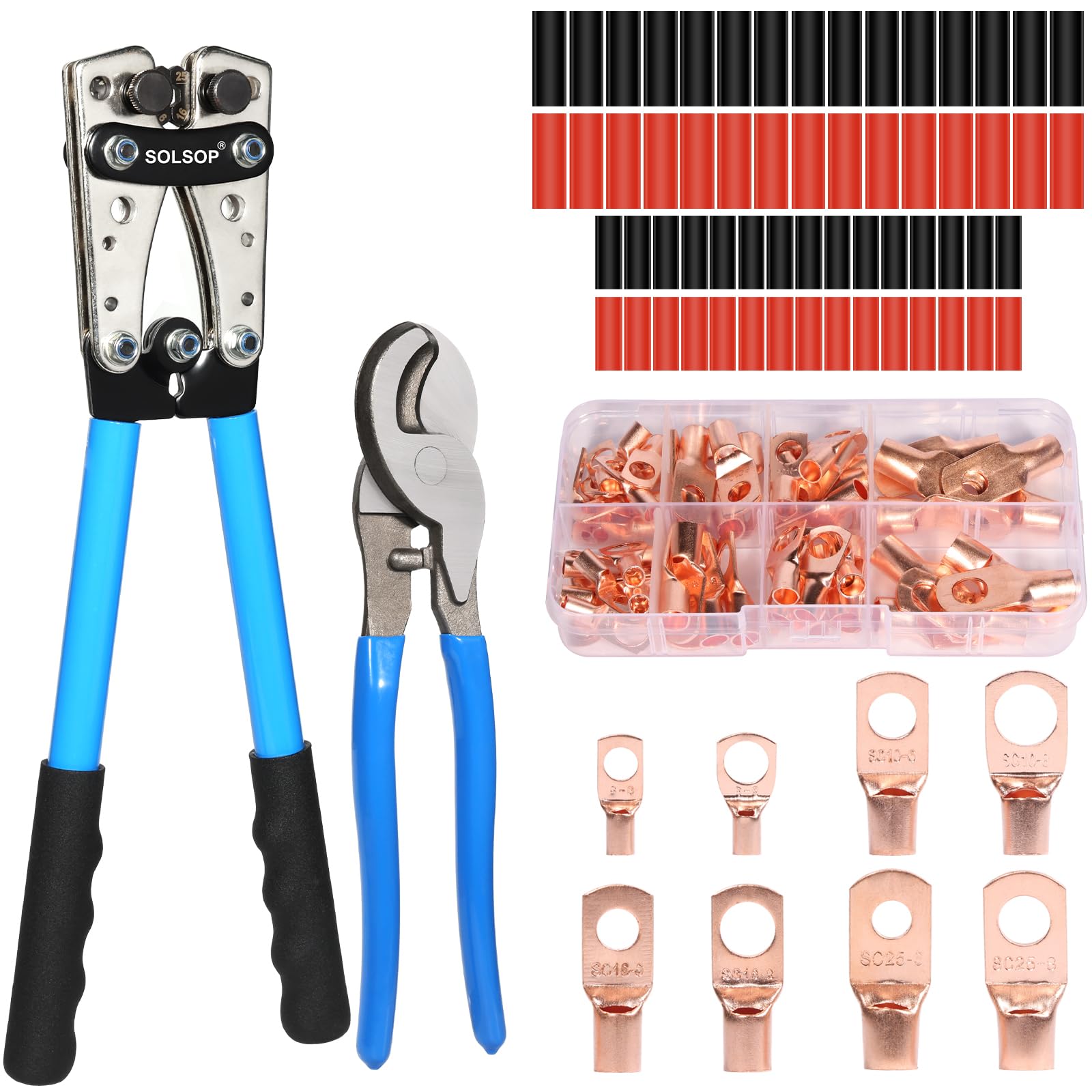
The affordable battery-lug crimper that brings a full set of dies and a cable cutter to the table.
For automotive, marine, or solar wiring where you are crimping ring terminals onto AWG 10 to 1/0 cable (about 6mm to 8mm thick), this tool uses a rotating-head design that lets you switch between six die sizes (6mm² through 50mm², matching AWG 10, 8, 6, 4, 2, and 1/0) by twisting the built-in dial. No loose dies to lose — each size is locked into the head. The hexagonal crimp shape (six flat sides) creates maximum contact area, which translates to low electrical resistance and a pull-proof hold.
The kit goes beyond a bare tool: you also get 60 copper wire lugs, 60 pieces of heat shrink tubing, a 10-inch cable cutter that buyers describe as “sharp and amazing,” and a user manual. Functionality is the most-praised aspect, with 42 owners reporting it works great for cable railing work, golf cart wiring, and heavy-duty solar connections. The ergonomic rubber-coated handles reduce fatigue when you are working through a stack of terminals.
The included lugs receive mixed feedback — some owners wish they were thicker and longer, though they hold fine under normal use. A few buyers noted that the crimp on 6 AWG wire at first pulled out, but using a different brand of 6 AWG solved it, suggesting the dies match standard wire diameters closely. For the price, the combination of a rotating-die crimper, cutter, and a generous supply of lugs is hard to match.
Who it fits: the DIY mechanic or solar hobbyist who needs one tool that crimps everything from battery terminals to solar lugs without hunting for individual dies.
7. Tivorex Battery Cable Crimping Tool

Longer handles give you serious leverage for clean, one-squeeze crimps on thick cable.
This tool is built for heavy lifting — crimping AWG 10 all the way up to 1/0 cable with a precision-engineered jaw that uses a rotary die set. The dies are marked with clearly visible scales, so you twist to your gauge, pull the ratcheting handle, and the hex mechanism creates an even, 360-degree compression around the lug. The long handle design uses a lever construction that multiplies your hand force, making a 1/0 cable crimp feel more like squeezing a 10 AWG terminal.
Crimping performance is what 84 owners praise most, noting that the cutters slice through thick battery cable as cleanly as a dedicated cable shear. The kit includes a cable cutter, 64 copper ring terminals (8, 6, 4, and 2 AWG sizes), and 70 heat-shrink tubes — 134 accessories total. The thing buyers come back to is the precision: the rotary mold rotates 360-degrees smoothly, and one-touch adjustment means you do not swap any parts.
The included lugs draw sharp criticism: several owners describe them as very poor quality with thin walls that can slip off or fail to crimp properly. The consensus is that the crimper and cutter are five-star tools but the terminals should be replaced with quality ones for safety-critical jobs. The TPE-wrapped handles stay comfortable and non-slip through long sessions, and the ratchet ensures every crimp reaches full depth before releasing.
Where it shines
- Long lever handles provide excellent mechanical advantage on big cables
- Rotary hex dies deliver consistent 360° compression
- Lever-ratchet mechanism locks until full crimp depth
Know going in
- Supplied ring terminals are thin and low quality — budget for replacements
- Die sizes may run slightly off; trying one size smaller often works better
Best for: pro installers and serious DIYers who want a powerful, comfortable crimper for big battery cables and are prepared to buy quality terminals separately.
Not ideal if: you want a single kit with premium lugs included — plan on an extra purchase for the terminals.
8. haisstronica 6-Piece Crimping Tool Set
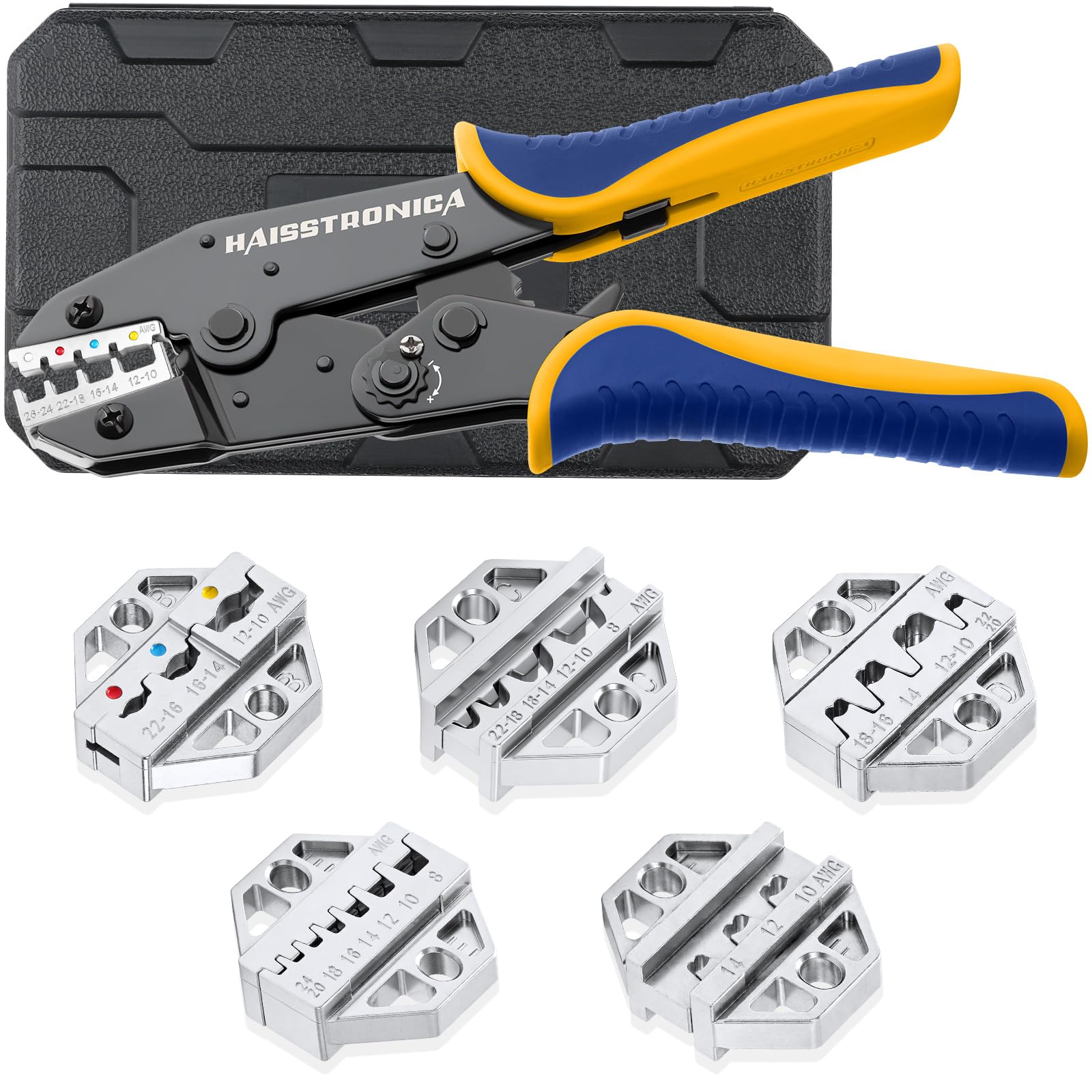
A six-die system that adapts to heat-shrink, insulated, non-insulated, open-barrel, and solar terminals.
This set is the Swiss Army knife of terminal crimping. The main tool is a ratcheting crimper with adjustable pressure, and it comes with six chrome-plated dies that cover heat-shrink connectors, insulated and nylon terminals, non-insulated terminals, insulated cable-end sleeves, open-barrel terminals, and solar connectors. Swapping dies is fast — a built-in screw mechanism and the included extra screws mean you are not hunting for lost parts.
Quality is the standout here, with 112 owners praising the build: the jaws are forged from 40CR precision-formed steel, which produces a single-crimp result that looks “like a solder” connection. The ratchet action is smooth and firm, releasing only when the crimp reaches full depth. Reviewers point out that the adjustable tension lets you dial in the squeeze for different connector types, and the die cavities are AWG-marked (labeled with the wire gauge) to eliminate confusion. The ergonomic nylon handles and comfortable rubber grips make extended use less tiring.
The blow-molded storage case is decent but the lid snaps are weak — several owners mention wishing for stronger latches. Alignment between die halves can occasionally be off by a hair, requiring a slight adjustment. For the range of connector types this single tool handles, it is a favorite among electricians and solar installers who need to switch between terminal styles without carrying three different crimpers.
Your move if: you work with multiple terminal types — insulated, non-insulated, open-barrel, solar — and want one tool with dies that swap in seconds.
9. YUZES 10-Ton Hydraulic Crimping Tool
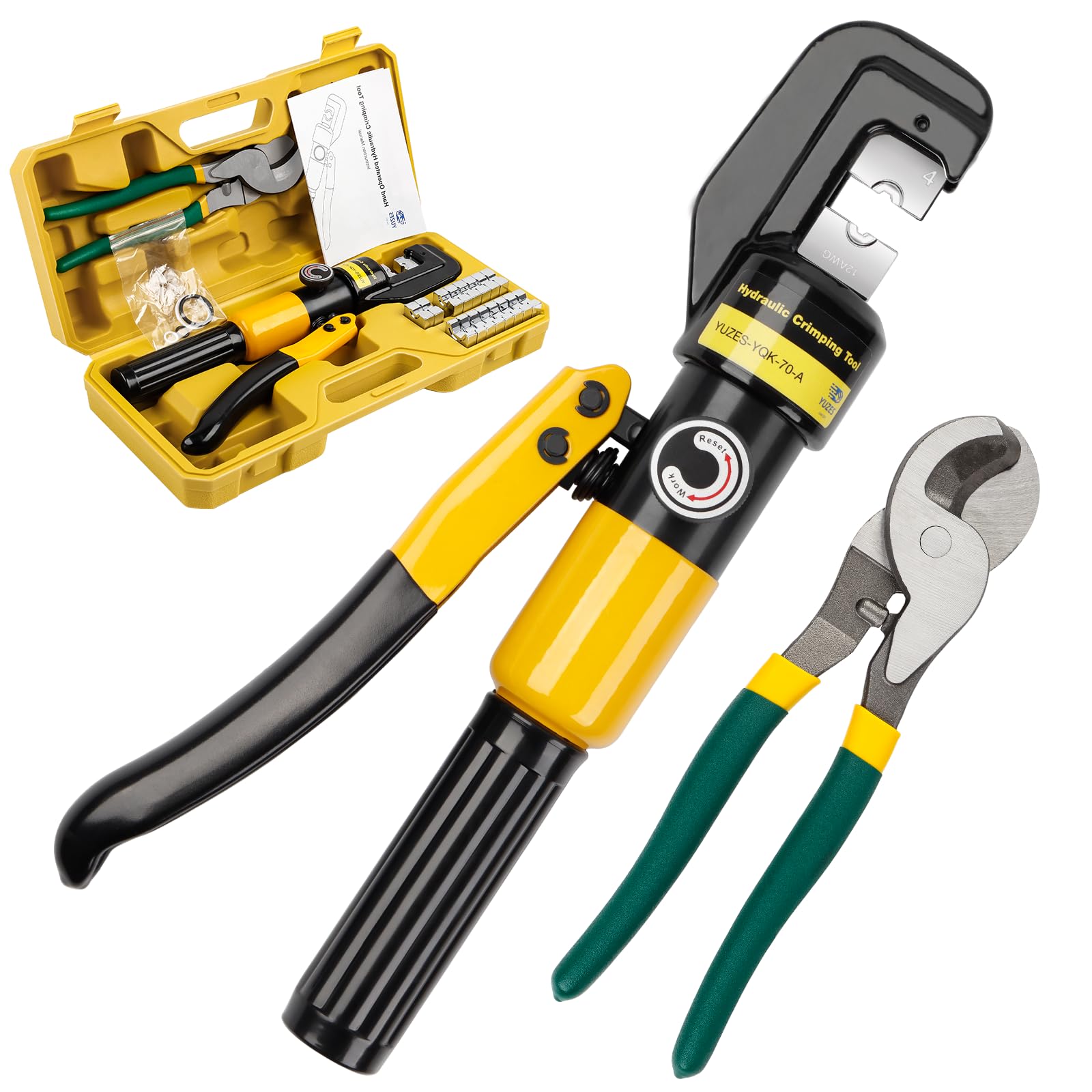
Hydraulic force turns the hardest 2/0 cable crimp into a one-hand operation.
For the biggest jobs — marine battery banks, solar arrays, welding cables, or deck railing — this hydraulic tool brings 10 tons of crimping force through a hand-pumped mechanism (a piston that you pump with the handle). You slip the die over the terminal, pump the handle, and the hydraulic piston drives the die closed evenly on all sides. The result is a clean, hexagonal crimp that a pull test will not budge. The head rotates 180 degrees, letting you position the tool in tight engine compartments or panel corners without fighting the tool body.
Functionality is what 101 owners praise most, especially for winch wiring and heavy cable. The set includes 9 pairs of hexagon dies covering 12 AWG up to 2/0 AWG (4mm² to 70mm²), a cable cutter, seal rubber rings, and a portable storage box. The magnetic rails inside the die holder snap the dies firmly in place, eliminating wobble. After crimping, you turn the pressure on-off knob and the handle return spring resets the tool automatically.
The recurring theme is that the American-size die markings can be slightly off — several owners found that an 8 AWG lug needed the next die size down for a tight crimp. The physical heft (3.49 kg or about 7.7 lbs) means it is not a tool you carry casually, but when you need it, the hydraulic advantage makes crimps that manual tools struggle to match.
What 10 tons gets you
- Hydraulic power requires minimal hand effort for big cables
- 180° rotating head fits into tight spaces
- Magnetic rails keep dies secure and wobble-free
The honest catch
- Die sizes may not match US AWG perfectly; plan on trial fitting
- Heavy at 3.49 kg — a workshop tool, not a pocket carry
Get this when: you need to crimp 2/0 cable for a solar or marine system and want a tool that does the work for you.
Stick with a manual if: your largest cable is 6 AWG or smaller — the hydraulic power is overkill for light-duty work.
Understanding the Specs
Ratcheting Mechanism
A ratcheting mechanism inside the handles clicks forward as you squeeze, locking the tool at each step so it cannot open until the crimp is fully compressed. This is critical because it forces you to apply 100% of the required pressure before the tool releases — no guessing, no partial crimps that later fail. Non-ratcheting tools rely on your feel, which varies between squeezes, especially when your hands get tired.
Rotating vs. Interchangeable Dies
Some crimpers, like the Solsop and Tivorex, use a rotating head with multiple die cavities built into the jaw — you twist to the gauge you need. Others, like the haisstronica set, use removable dies that you swap by hand. Rotating heads are faster because there are no loose parts to track. Interchangeable dies can cover more connector styles (insulated, non-insulated, open-barrel, solar) in one tool body. Neither is better — the right choice depends on whether you value speed or versatility.