
Our readers keep the lights on and the weekend projects moving. As an Amazon Associate, I earn from qualifying purchases.
Specs are compiled from manufacturer listings and verified buyer reviews and can change over time — please confirm the key details on the product page before buying.
You rotate a 3D model and the screen freezes. Your workflow grinds to a halt. The right cad computer handles complex assemblies, multi-viewport rendering, and constant file saves without a stutter. This guide compares published specs and customer reviews to find the desktop that keeps up with your design software.
I’m Rikta — the founder and writer behind FitlyFast. This guide is built by comparing the manufacturers’ published specifications and the patterns across verified customer reviews, so you get each pick’s real strengths and trade-offs instead of marketing spin.
Getting the right cad computer means balancing processor power, memory (RAM), and upgrade potential against what you want to spend. This article breaks down the four best options for 2025.
Our Picks at a Glance

How To Choose The Best CAD Computer
Picking a CAD desktop is different from picking a general-use PC. Your daily work involves multi-threaded rendering (the processor working on several calculations at once), handling large file sizes, and running multiple design applications at once. Getting the wrong balance of components means dealing with slowdowns or crashes during critical tasks.
Processor – The Engine for Complex Models
For CAD software like SolidWorks, AutoCAD, or Fusion 360, the processor is the most important component. You want a high core count (at least 8 to 20 cores — these are individual processing units on the chip) so the system can handle complex geometry calculations and multi-tasking without slowing down. Cache memory (measured in MB — a small, ultra-fast data storage area on the processor) also matters. A larger cache (24 MB or more) helps the CPU quickly access frequently used data, speeding up operations like rotating a large 3D assembly in real-time.
Memory (RAM) – Keeping Your Models Alive
CAD files get large fast. You need at least 16 GB of DDR5 RAM (Double Data Rate 5 — the current fastest standard of system memory) for moderate assemblies. 32 GB is the balance for most professionals working with detailed 3D models or multiple design sheets. DDR5 is faster than older DDR4, which means smoother operation when loading large files or running simulations.
Storage – Loading and Saving Without Delay
An SSD (Solid State Drive — a storage drive with no moving parts) is non-negotiable. Look for a PCIe NVMe SSD (Peripheral Component Interconnect Express Non-Volatile Memory Express — a very fast connection standard for storage drives). It is far faster than a SATA SSD (an older, slower connection standard), so your project files open in seconds and saves happen instantly. A 512 GB drive is a starting point, but 1 TB (terabyte — 1,000 GB) gives you breathing room for software installs and project archives.
Quick Comparison
| Model | Best For | Processor | RAM | Storage | Amazon |
|---|---|---|---|---|---|
| Dell Tower Desktop ECT1250★ Best Overall | Best Overall CAD Workhorse | Intel Core Ultra 7-265 (20 Cores, 5.3 GHz) | 32 GB DDR5 | 1 TB M.2 SSD | Amazon |
| Dell Pro Tower Plus (Ultra 7) | Business-Grade Reliability | Intel Core Ultra 7 265 (20 Cores, 5.3 GHz) | 16 GB DDR5 | 512 GB PCIe SSD | Amazon |
| Dell Pro Tower (i7-14700) | Premium Performance & Expandability | Intel Core i7-14700 (20 Cores, 5.4 GHz) | 32 GB DDR5 | 1 TB PCIe SSD | Amazon |
| WIWB Gaming PC (i9-14900HX) | Rendering & Gaming Hybrid | Intel Core i9-14900HX (up to 5.4 GHz) | 16 GB DDR5 | 1 TB NVMe SSD | Amazon |
In‑Depth Reviews
1. Dell Tower Desktop ECT1250 (Intel Core Ultra 7)
Our pick — over 4★ from 350+ verified ratings; the strongest balance of quality and price.
The 20-core tower that keeps your multi-viewport 3D models fluid instead of frozen.
This Dell Tower runs an Intel Core Ultra 7-265 processor with a 30 MB cache (the processor’s fast-access memory). The ECT1250 has a 30 MB cache, compared to the 24 MB cache in the Dell Pro Tower’s i7-14700. The larger cache means your complex assemblies and render previews feel more responsive because the CPU spends less time fetching data from the main RAM. The 32 GB of DDR5 RAM and 1 TB M.2 SSD (a small, fast SSD that plugs directly into the motherboard) let you load large project files in seconds and keep multiple design applications running without a stutter.
Buyers praise its reliability above all else. They report the Dell Tower Desktop ECT1250 boots in under 30 seconds and handles trading software alongside three monitors with ease. Its quiet operation makes it a good fit for a shared office. A few owners note the USB port selection is lean for legacy devices, so you may want a hub if you have many peripherals.
For CAD work, the 20-core CPU handles multi-threaded rendering and simulation tasks well. The integrated UHD graphics (a basic graphics chip built into the processor) are fine for 2D drafting and light 3D. That means you can work on mechanical part drawings or simple models. But if you do heavy rendering or real-time visualisation, you will likely want to add a dedicated GPU (stand-alone graphics card) later — the tool-less chassis makes that upgrade straightforward.
What Owners Rave About
- Blazing fast boot and snappy multitasking
- Quiet enough for a shared workspace
- Easy to upgrade components with tool-less access
The Trade-Offs
- USB port count is limited — plan for a hub
- Integrated graphics means you will likely add a GPU later
- McAfee trial bloatware requires a clean uninstall
Grab it for: A reliable, quiet daily driver that handles heavy multitasking and leaves room to grow.
Think twice if: You need a fully-fledged workstation with a dedicated GPU from the start for real-time 3D rendering.
2. Dell Pro Tower Plus Business Desktop PC (Ultra 7)
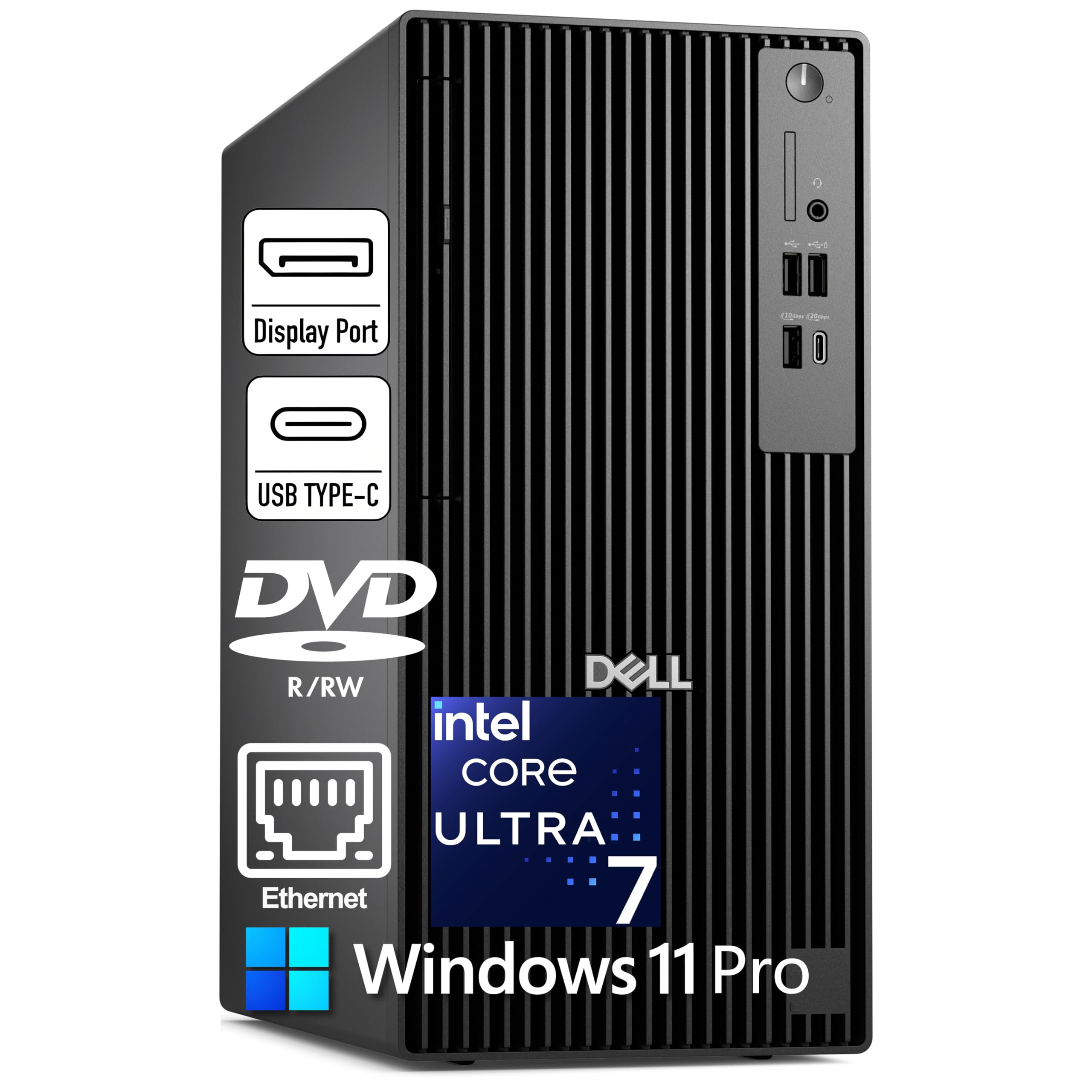
A secure business tower with an AI chip built in for accelerating specific design tasks.
This Dell Pro Tower Plus runs the Intel Core Ultra 7 265, which includes a 13 TOPS NPU (a Neural Processing Unit that handles 13 trillion operations per second for AI tasks). The NPU can speed up generative design features in some CAD tools. It drives three 4K monitors through dedicated DisplayPort 1.4a outputs (a video connection standard that supports high resolutions and refresh rates), so you can keep your schematic on one screen, the 3D view on another, and your email on the third without any adapters. The 30 MB cache matches the ECT1250’s processor, but this model ships with 16 GB DDR5 RAM and a 512 GB PCIe SSD — which stores fewer files and runs out of headroom sooner for heavy multi-tasking than the ECT1250’s 32 GB and 1 TB.
Buyers call it blazingly fast and report it handles heavy multitasking — running Plex, Chrome, Steam, and game development tools simultaneously without hitting limits. One owner says after 6 years it is still fast. This is the launchpad for a long-term workstation. The catch is that this unit comes without built-in WiFi — it relies on wired Ethernet only. If your desk is not near a router port, factor in a USB WiFi adapter or powerline kit. The 16 GB RAM is a solid baseline, but CAD users with large assemblies will want to upgrade to 32 GB eventually. The DVD-RW drive is a rarity that some may find useful for legacy data archives.
The Highlights
- Runs heavy multitasking without hitting RAM/CPU limits
- Drives three 4K displays for complex multi-screen workflows
- Expandable chassis with upgradeable CPU/GPU/RAM
Keep in Mind
- No built-in WiFi — Ethernet only from the start
- 16 GB RAM is workable but 32 GB is better for big assemblies
- McAfee bloatware can bog the system until removed
Reach for this if: You need a rock-solid, secure business PC with AI-ready hardware and the ability to run three 4K monitors.
Look elsewhere if: You must have built-in WiFi or require a dedicated GPU straight from the start.
3. Dell Pro Tower PC Desktop (i7-14700, 32GB)

The 20-core i7 with 32 GB RAM built for data-intensive rendering sessions.
This Dell Pro Tower runs the Intel Core i7-14700, a 20-core processor that boosts up to 5.4 GHz (gigahertz — billions of cycles per second, a measure of speed for simple tasks), making it ideal for 4K video editing, 3D rendering, and CAD workflows. The 32 GB of DDR5 RAM lets you keep multiple design files, simulation software, and communication apps open without slowdown. Speed is the thing everyone raves about — buyers report it boots quickly and feels fast from the moment you start using it. The compact tower design is noticeably smaller than older Dell towers, saving desk space, but the power button has drawn a few critical comments for feeling flimsy.
Unlike the ECT1250, this model uses the Intel UHD Graphics 770 integrated GPU, which is a step up in graphics performance for light 3D work, but still not a replacement for a dedicated CAD card. The system does not include built-in WiFi, so you are limited to wired Ethernet unless you add an adapter. A few owners also noted that the unit can be registered in a different region, making US-based support a bit harder to reach — something to confirm before purchase if business-grade support is critical.
The build quality scores high marks across the board. One owner described it as solid. For CAD users, the 32 GB RAM and 1 TB SSD mean you can load large assemblies and save iterations fast. The lack of WiFi and the need to budget for a dedicated GPU if you do real-time rendering are the honest trade-offs.
Best upgrade path: You get 32 GB DDR5 and a 1 TB SSD from the start, so you can skip the RAM upgrade and put that budget toward a dedicated GPU when rendering needs grow.
The honest hitch: No built-in WiFi and a power button that feels less premium than the rest of the machine.
Ideal for: Creative professionals who want plenty of RAM and fast storage ready to go for 4K video editing and CAD.
Not your match if: You need built-in wireless connectivity or a dedicated GPU for heavy rendering without adding components.
4. WIWB Gaming PC (Core i9-14900HX, RTX 5060 Ti)

The only pick here with a dedicated GPU — ready for real-time rendering and gaming from the start.
This WIWB desktop stands apart because it ships with a dedicated GeForce RTX 5060 Ti 8GB GDDR7 graphics card (a stand-alone, high-performance GPU with 8 GB of the latest video memory). That means it handles real-time ray tracing (a technique for realistic lighting and reflections), AI-powered DLSS 4.0 (Deep Learning Super Sampling — NVIDIA’s AI upscaling for smoother visuals), and GPU-accelerated rendering tasks that the integrated-GPU models above cannot touch. The Intel Core i9-14900HX processor boosts up to 5.4 GHz, so it delivers the multi-threaded power CAD users need for complex assemblies and simulations. The 16 GB of DDR5 RAM and 1 TB NVMe SSD provide fast boot times and quick file access.
Owners mention the system handles high-level rendering, live streaming, and gaming without lag or frame drops. For a CAD user, the RTX 5060 Ti means you can run real-time visualisations in software like Twinmotion or Enscape and even train AI models locally. The lack of a USB-C port is a minor inconvenience for modern peripherals. The 16 GB RAM is fine for moderate CAD work, but if your projects involve very large assemblies (hundreds of parts), you will likely want to upgrade to 32 GB.
The advanced air cooling keeps performance steady during extended sessions. WiFi 6 (the latest wireless networking standard) is built in, so you do not need to worry about Ethernet cables — a clear advantage over the previous Dells. This is a hybrid machine: it serves as a gaming PC and a capable workstation from the start, but its entry-level GPU means it is better for moderate rendering loads rather than heavy, studio-grade visualisations.
What Stands Out
- Dedicated RTX 5060 Ti GPU for real-time rendering and AI tasks
- Built-in WiFi 6 for wireless connectivity
- Handles gaming, streaming, and rendering without lag
The Limitations
- 16 GB RAM is a starting point — plan to upgrade for heavy projects
- No USB-C port for modern peripherals
- Entry-level GPU is good for moderate, not studio-heavy, rendering
Choose this if: You want one machine that does gaming, real-time rendering, and AI work without needing to add a graphics card.
skip it if: Your CAD work involves massive assemblies that demand 32 GB or more RAM from the start.
Understanding the Specs
Processor Cores & Cache
The number of cores (like 20 in these Intel processors) determines how many calculations your computer can do at the same time — essential for CAD software that splits rendering or simulation work across all available cores. Cache memory (24 MB, 30 MB) is a small pool of ultra-fast memory right on the CPU that stores frequently used data, so your processor spends less time waiting for instructions from the main RAM. A larger cache means snappier responses during complex operations like rotating a detailed 3D model.
RAM (DDR5) & Storage (PCIe SSD)
DDR5 is the current generation of system memory. It is faster and more efficient than DDR4, which matters when you are loading large CAD files or running multiple design apps side-by-side. 16 GB is a minimum for moderate 3D work, while 32 GB is the safe spot for serious multi-tasking. A PCIe NVMe SSD (like the 1 TB drives here) is much faster than older SATA SSDs — it makes booting, saving, and loading project files feel nearly instant.
FAQ
Do I need a dedicated graphics card for CAD or will integrated graphics work?
Is 16 GB of RAM enough for AutoCAD and SolidWorks?
Can I upgrade the RAM and storage in these Dell towers later?
What does the cache size (24 MB vs 30 MB) mean for CAD performance?
Does every CAD desktop work with multiple monitors?
Is a gaming GPU like the RTX 5060 Ti good for professional CAD software?
What is the difference between DDR5 and DDR4 RAM for a CAD computer?
Do these computers come with operating system installed?
Can I use a CAD computer for other tasks like video editing or daily office work?
Which Dell model is best for running 3D rendering software like Blender or Keyshot?
Final Thoughts: The Verdict
For most people, the cad computer winner is the Dell Tower Desktop ECT1250 because its 20-core processor, 30 MB cache, and 32 GB DDR5 RAM give you the smoothest experience for complex design work right from the start. If you want built-in WiFi and a dedicated GPU for real-time rendering, grab the WIWB Gaming PC. And for a secure business machine with AI-ready hardware and triple-4K support, the Dell Pro Tower Plus is the one to reach for.
How We Picked
We do not accept paid placement. Every pick is matched to a real buyer and a real use-case; we do not hands-on test units.
Sources & Methodology
Specifications: manufacturer listings and product documentation. Review insights: verified customer reviews, as of July 2026. Pricing: not shown on this page (it changes often); check the current price via the retailer link.
As an Amazon Associate, FitlyFast earns from qualifying purchases. This does not affect which products we feature.