
Our readers keep the lights on and the weekend projects moving. As an Amazon Associate, I earn from qualifying purchases.
Specs are compiled from manufacturer listings and verified buyer reviews and can change over time — please confirm the key details on the product page before buying.
When your calculator lags on derivatives, integrals, and graphing, calculus becomes a battle. You need a machine that keeps up, but first decide: do you need a CAS engine (a system that solves symbolic math like factoring or solving equations exactly) or just a high-end graphing unit? Your exam rules often settle that question for you.
I’m Rikta — the founder and writer behind FitlyFast. This guide is built by comparing the manufacturers’ published specifications and the patterns across verified customer reviews, so you get each pick’s real strengths and trade-offs instead of marketing spin.
Choosing the right calculator for calculus means weighing exam approval, CAS power, and battery life against your actual course load.
Our Picks at a Glance

How To Choose The Best Calculator For Calculus
Before you spend money, lock down your exam rules. The most powerful calculator is useless if it gets confiscated at the door. The ACT, SAT, and AP exams have strict lists of what counts as an approved graphing calculator, and CAS (Computer Algebra System) models often get excluded from the most restrictive tests.
Match the engine to your course level
A plain graphing calculator like the TI-84 Plus CE handles derivatives numerically and shows you the curve. A CAS model like the HP Prime or Casio fx-CG500 solves algebra symbolically—meaning you can type in an integral and get the antiderivative expression as the answer, not just a decimal. If you are in Calc I and II, a strong graphing unit is enough. If you are in engineering or upper-level math, the symbolic power of CAS saves hours.
Battery and charging matter more than you think
A calculator that dies mid-exam is a disaster. Models like the NumWorks and TI-84 Evo charge over USB-C, which is the same cable your phone uses. Others, like the Casio fx-CG100, use four AAA batteries, which means you will buy spares but never worry about a worn-out internal cell. The TI-Nspire CX’s rechargeable battery lasts up to two weeks per charge, a serious advantage for long study sessions.
Quick Comparison
| Model | Best For | CAS Engine | Screen | Charging | Amazon |
|---|---|---|---|---|---|
| NumWorks Graphing Calculator★ Best Overall | Intuitive student use | No | 320×240 color | USB-C | Amazon |
| TI-84 EvoTop Performer | Modernized TI classic | No | LCD color | USB-C | Amazon |
| Casio fx-CG1003D Graph Pick | 3D graphing and Python | No | 65,000+ color LCD | 4x AAA | Amazon |
| TI-84 Plus CE (Coral) | Exam-approved reliability | No | 140 DPI, 16-bit color | Rechargeable | Amazon |
| TI-84 Plus CE (Golden Ratio) | Color graph clarity | No | High-res backlit LCD | Rechargeable | Amazon |
| HP Prime G2 (WYNGS case) | CAS power plus protection | Yes | Multi-touch color | Rechargeable Li-ion | Amazon |
| HP Prime (standard) | Blazing-fast CAS | Yes | 3.5″ multi-touch color | CR2032 battery | Amazon |
| Casio fx-CG500 | Stylus CAS workflows | Yes | 4.8″ touchscreen | 4x AAA | Amazon |
| TI-Nspire CX | Long battery STEM work | No | 3.5″ color backlit | Rechargeable | Amazon |
In‑Depth Reviews
1. NumWorks Graphing Calculator
Our pick — over 4.5★ from 8,500+ verified ratings; the strongest balance of quality and price.
The light, intuitive pick that math teachers and students both rave about for daily calculus use.
Your calculus workflow starts with the interface, and the NumWorks nails it. It weighs just 220 grams (about 7.8 ounces) and measures 6.3″L x 3.2″W, so it slides into a backpack pocket next to a textbook without doubling the bulk. The high-resolution color screen runs 320×240 pixels, enough to render curves and inequalities crisply, and the whole experience feels like a modern smartphone—not a 1990s keypad.
What wins people over is the usability. Dozens of owners highlight how intuitive it is, with a math teacher calling it the best available and noting that students pick it up with minimal instruction. The battery life earns consistent praise, and the USB-C cable means you top it up with the same charger that powers your phone. The open-source operating system gets frequent updates, which keeps the feature set growing with you from middle school through college.
The trade-off is the plastic build and the lack of a CAS engine—it won’t spit out symbolic antiderivatives for you. The buttons get described as mushy, and the casing scratches if you toss it loose in a bag. But for AP and SAT approved graphing, instant graph rendering, and an excellent equation solver, the review pages sum it up: “the best calculator I’ve ever owned.”
What owners love
- Highly intuitive interface—the top praise among owners by far
- Bright, adjustable high-res screen that is easy to read
- Long battery life with a handy charging indicator LED
- Open-source software means free, frequent feature updates
The honest downsides
- Mushy, slightly sticky buttons that take getting used to
- Scratchable plastic shell—needs a case
- Only 4KB Python memory, and scripts clear if the battery dies
- No CAS engine for symbolic algebra
Reach for this if: you want the easiest, most student-friendly graphing calculator that grows from middle school math into college calculus without a steep learning curve.
Think twice if: you need symbolic CAS answers (like exact antiderivatives) or you want a rugged, metal-bodied unit.
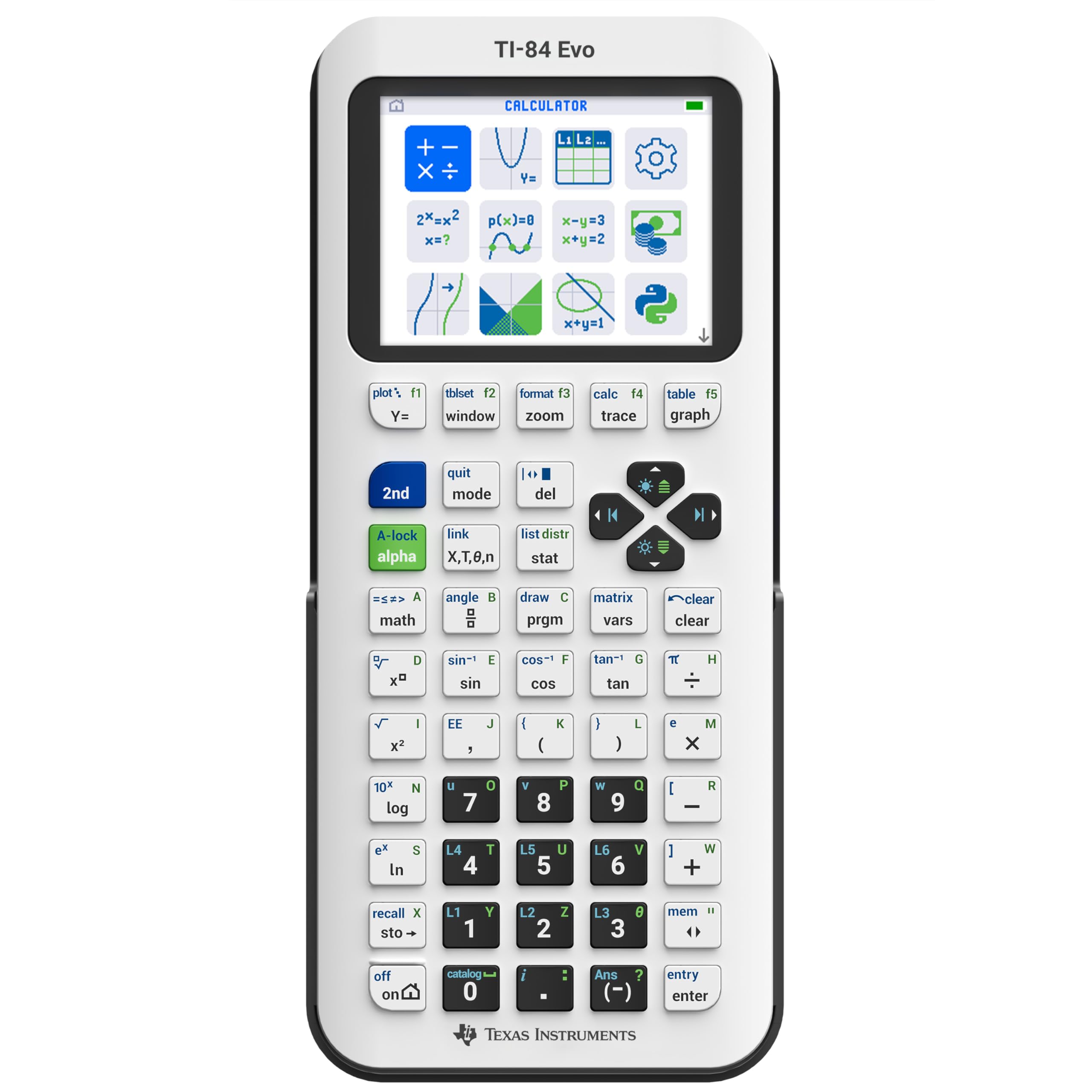
2. TI-84 Evo Graphing Calculator
The newest TI-84 with a faster brain and graphs that give you half again as much screen real estate.
Texas Instruments rebuilt its classroom staple for the modern era. The TI-84 Evo runs 3x faster than earlier models, and the graphing window is 50% bigger, so you see the full shape of a derivative curve before it scrolls off-screen. An icon-based home screen puts the math tools you use most front and center, cutting out the menu hunting that slows you down mid-exam.
The hardware updates are exactly what a calculus student wants. It weighs 7.2 ounces—lighter than the Casio fx-CG100 at 8 ounces—and charges over USB-C, matching the cable you already carry. Owners specifically call out the dedicated fraction button and the way graphing inequalities shows the symbols directly, both of which make textbook problems translate to the screen faster. One buyer sums up the real-world result: “Powerful, helped earn an A.”
The honest catch is the value equation. Some owners say it feels overpriced for what is essentially a polished refresh, and the speed claims draw mixed feedback—a few find it faster, others note it is not a massive leap over the previous TI-84 Plus CE. The APPS key got removed in favor of a function button, which long-time TI users will need to relearn.
Editors’ take: The most future-proof non-CAS TI on this list, with USB-C, a larger graph window, and a free 4-year online subscription that includes tutorials and a web emulator.
Who it beats: The older TI-84 Plus CE on screen size, charging convenience, and processor speed—though you will pay a small premium for the upgrade.
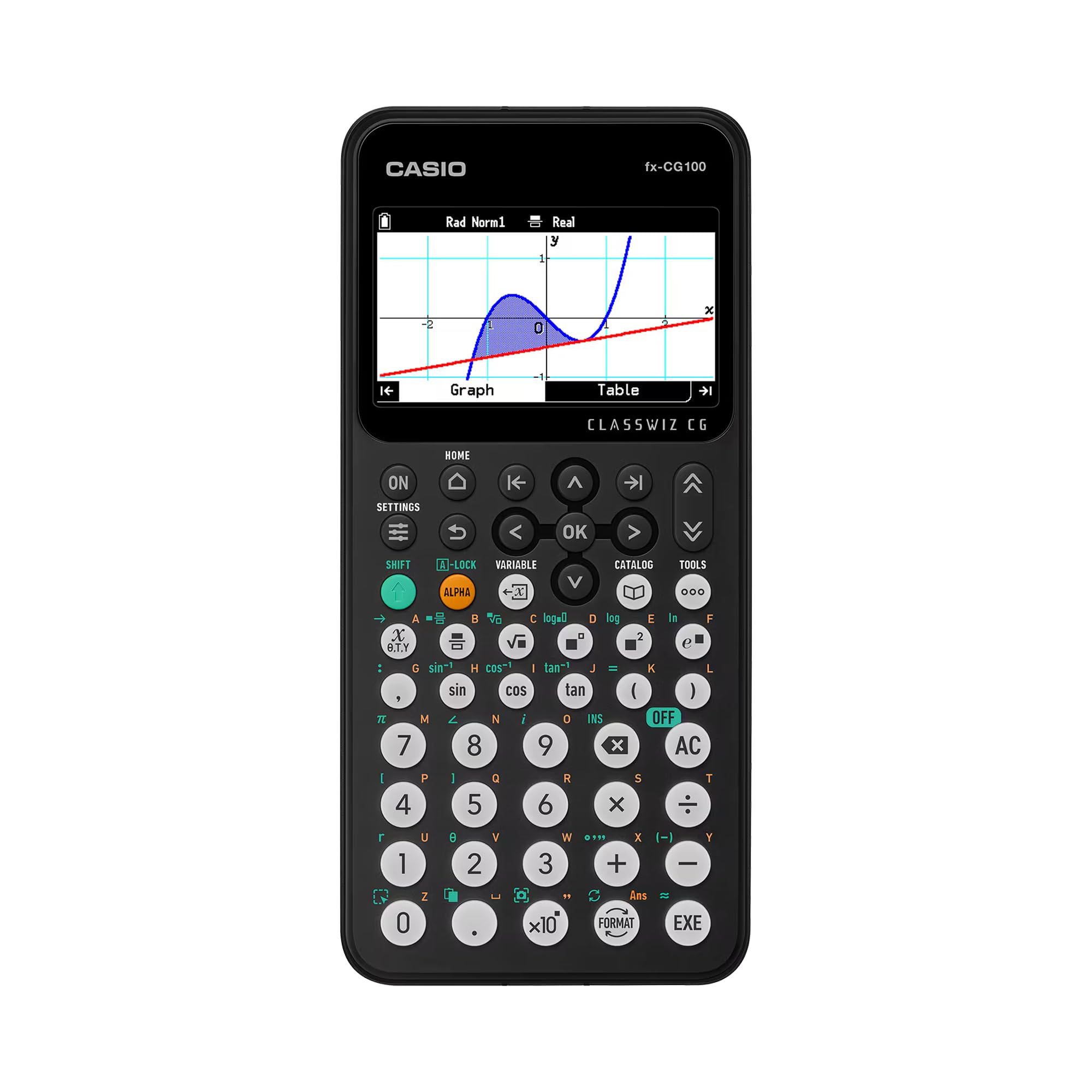
3. Casio fx-CG100 ClassWiz
The only pick here that draws 3D spheres and planes, with Python built right into the keypad.
For a multivariable calculus class, 3D graphing is not a gimmick—it is how you actually see a plane versus a sphere. The Casio fx-CG100 renders over 65,000 colors on a large, backlit LCD and graphs up to three functions in three dimensions, including spheres, cylinders, and planes. That visual grasp of surfaces gives you an edge that a 2D-only unit simply cannot offer.
The ClassWiz design language carries over, so if you learned on a Casio scientific calculator, the transition feels natural. It runs the full suite of advanced math—complex numbers, simultaneous equations, matrix and vector operations, geometry, and statistics—plus MicroPython integration for learning to code directly on the device. At 8.86″L x 3.62″W and 8 ounces, it is the largest and heaviest of the mainstream graphing picks, an honest trade-off for the bigger display. Buyers report it is exam-approved for AP, SAT, PSAT, and ACT, with a built-in Exam Mode to keep test security easy.
The battery runs on four included AAA cells, so you will never be locked to a wall charger—though that means keeping spares around. The reviews skew overwhelmingly positive, with owners praising the build quality and one noting it arrived at his door in Peru within four days. The main drawback is the 8-ounce weight, which makes it slightly less backpack-friendly than the NumWorks.
Standout strengths
- 3D graphing of up to three functions—unique on this list
- MicroPython for learning programming alongside calculus
- AAA batteries, so no internal cell that wears out
- Familiar ClassWiz key layout for easy upgrades
Keep in mind
- Heaviest mainstream graphing pick at 8 ounces
- No CAS engine for symbolic math
- AAA batteries require spares, unlike USB-C rivals
Best for: STEM students who need 3D visualizations and want to dip into Python coding, all in an exam-approved package.
Look elsewhere if: you want the lightest possible carry or need CAS symbolic solving.
4. TI-84 Plus CE (Coral Metallic)

A reliable classroom workhorse wrapped in a coral shell that stands out in a sea of black and white.
The TI-84 Plus CE is the graphing calculator that thousands of students default to, and the coral metallic color gives it personality without sacrificing function. The display runs at 140 DPI with 16-bit color, which translates to sharp, readable graphs and a full-color periodic table that chemistry majors specifically adore. It is the approved standard for most high school and college courses, so you will rarely hit a compatibility wall.
Owners praise its functionality first, and tutoring professionals say they rely on it for everything they teach. Battery life gets mixed reviews: many report it stays charged for a long time, but a few find it stops holding a charge after extended use—so plan on possibly replacing the cell later. Durability gets a real-world nod: one owner dropped it twice without a scratch.
The design measures 8″L x 4.4″W, making it a touch wider than the sleeker NumWorks, but that standard layout means every TI tutorial and teacher instruction applies directly. The biggest complaint in the reviews is the price point—it is not the cheapest way into a graphing calculator, but the ecosystem and exam approval carry real weight.
Verdict: Buy it if you want the safest, most widely supported choice for a course that explicitly requires a TI-84, and you like a little color while you integrate.
The catch: Battery longevity is the recurring gripe—some units hold charge for years, others degrade faster, so keep the charger handy.
5. TI-84 Plus CE (Golden Ratio)

The gold-toned TI-84 that turns color-coded graphs into a true advantage when you track multiple functions.
When you graph a derivative and its original function at the same time, color is not cosmetic—it is clarity. The Golden Ratio edition of the TI-84 Plus CE draws each function in a distinct color, so you instantly see which curve is which without squinting at dashes. Owners consistently highlight this, with one noting the graphs are drawn faster and easier to read thanks to all the colors, and another calling it the calculator of the year.
This unit weighs just 7.04 ounces and measures 6″L x 4″W, making it one of the lighter TI-84 variants. It ships with preloaded apps and images, and the MathPrint feature shows expressions the way they appear in your textbook—stacked fractions and proper integral symbols. The rechargeable battery means no AAA hunting, and it still works reliably after many years, per long-term owners.
The recurring feedback centers on value, with some finding it pricey even while admitting the function set is flawless. The shell is plastic, so it is not built for heavy drops, and the battery life draws mixed notes the way most rechargeable units do. The gold finish is polarizing—if you want to blend in during an exam, this is not the unit for that.
The breakdown: Functionality is the clear headline—89 owners single it out as the main reason to buy. It handles college-level math and advanced Algebra with ease, and the color screen makes multi-graph analysis genuinely easier.
Who should skip: Bargain hunters who do not need the metallic finish—the plain TI-84 Plus CE does the same math for less.
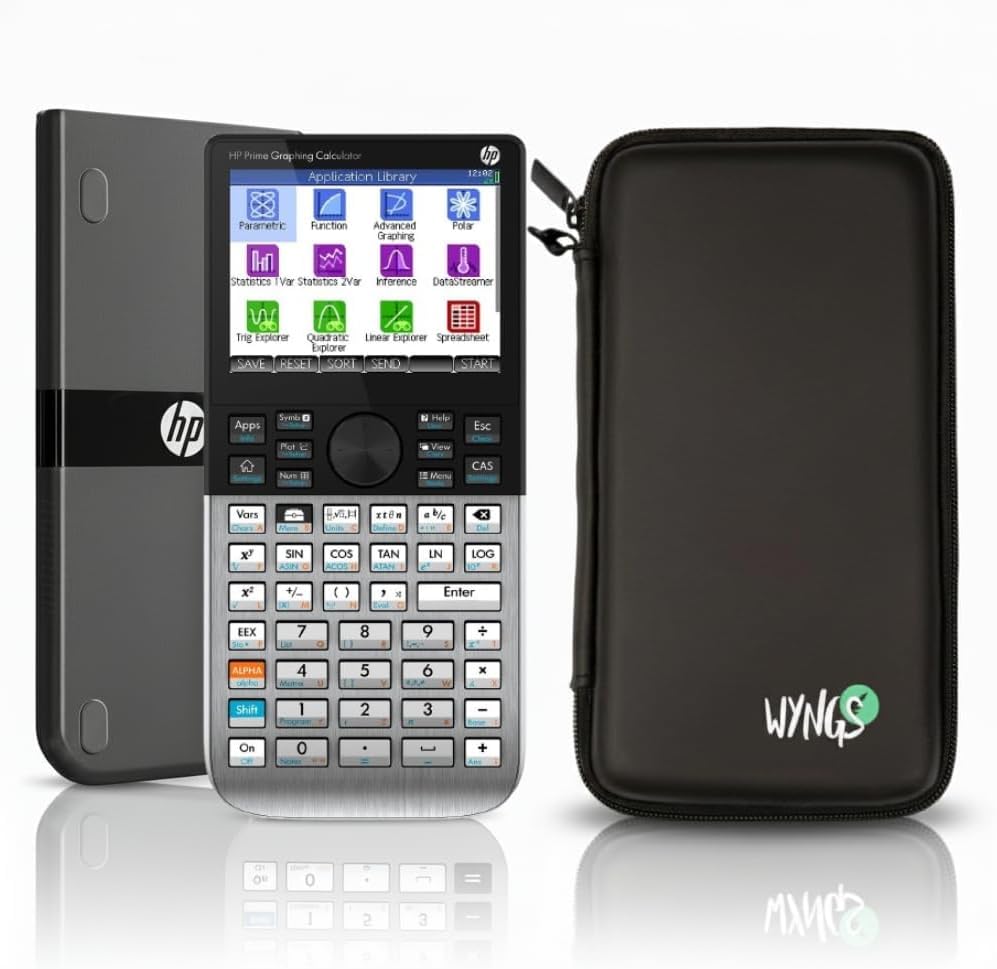
6. HP Prime G2 with WYNGS Case
A phone-like touchscreen with symbolic CAS power that handles integration and differentiation in pure math form.
This is the calculator that stops being a tool and starts feeling like a mini computer. The HP Prime G2 pairs a fast processor with a high-resolution multi-touch display, so you swipe and tap through problems the way you would on a smartphone. The Computer Algebra System (CAS) is the headline feature—it performs symbolic differentiation, integration, and solves linear systems, giving you exact expressions instead of decimal approximations.
The bundle includes the WYNGS Custom-fit Protective Case, which owners say fits snugly, adds grip, and keeps the metal-bodied unit safe from bumps and drops. The metal enclosure is a genuine step up from the plastic shells on most rivals, and the rechargeable lithium-ion battery covers long study sessions. Engineering students specifically praise the key layout and matrix options, with one calling it a powerful companion for scientific calculations.
The honest trade-off is the learning curve. The touchscreen is fantastic once you master it, but the manual runs about 1,200 pages across two PDFs, and you will likely lean on online tutorials to get fluent. The brand on the listing is WYNGS rather than HP, which confuses some buyers, though the unit itself is the confirmed G2 model—owners verify the marking on the back.
Why it stands out
- Full CAS engine for symbolic calculus—exact answers, not decimals
- Multi-touch color display that feels like a modern device
- Metal enclosure plus included protective case
- Fast processor with immediate graphical rendering
Before you buy
- Steep learning curve; plan to study the manuals or videos
- CAS models are banned on the most restrictive exams
- Listed under WYNGS brand, which confuses some shoppers
Ideal for: engineering and upper-level math students who need symbolic CAS power daily and want a protected, premium build.
Reconsider if: you are taking the ACT or a similarly strict exam where CAS gets disqualified.
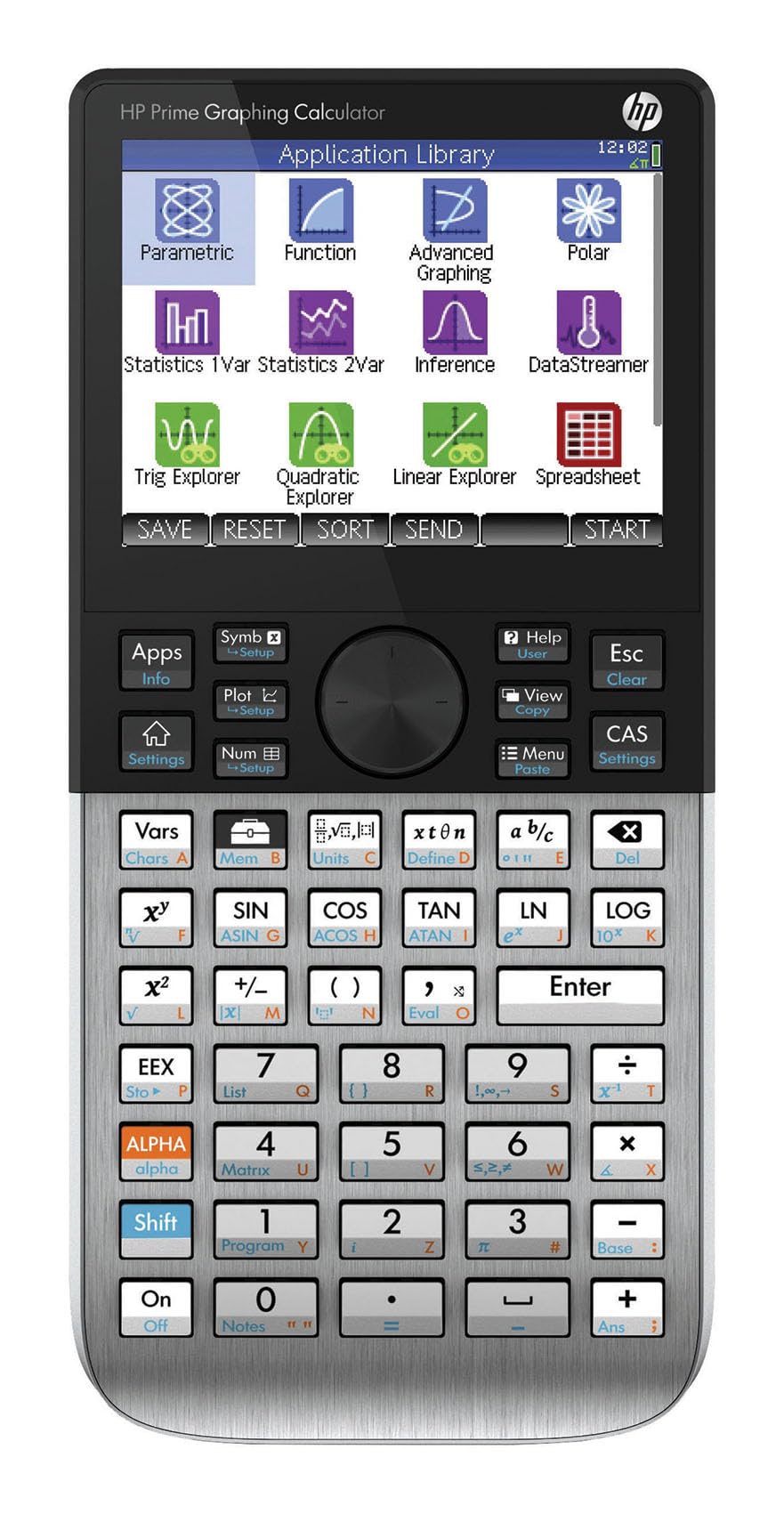
7. HP Prime Graphing Calculator
The gold standard of scientific calculators, with instant 3D graphs and a CAS that engineering students swear by.
Speed is the story here. The HP Prime is widely regarded as the fastest calculator in its class, drawing instant 3D graphs and crunching Laplace transforms and complex matrix operations without the lag you feel on older TI units. Engineering students call it better than the TI-Nspire, and it is the unit professors tend to praise for serious coursework. The 3.5″ multi-touch color display makes graph manipulation feel direct and responsive.
The CAS engine is the core value—it switches between symbolic, graphical, and numerical views with dedicated keys, and owners describe it as two calculators in one (the HOME environment and the CAS environment). It uses a CR2032 battery, which is a real quirk: this is a coin-cell powered device, not a USB-C rechargeable, so battery life lands in the average range and you will swap the cell periodically. The build is sturdy plastic at 8 ounces, with dimensions of 7.25″L x 3.66″W.
The recurring gripe is the micro-B USB port, which feels dated when everything else has moved to USB-C, and some owners mention finicky responsiveness from certain buttons. Quality is the top praise among a large owner base, so these are edge cases rather than the norm. Just know that the CAS also makes it ineligible for College Board exams—one owner notes it was technically un-allowed despite proctors rarely checking.
Standout spec: Instant 3D graph rendering and a CAS that handles Laplace transforms—power you will not outgrow through graduate-level engineering.
The fine print: Coin-cell battery and micro-B charging feel dated, and CAS means it is not allowed on the most restrictive standardized tests.
8. Casio fx-CG500

A huge 4.8-inch touchscreen with a stylus that makes CAS math feel like writing on paper.
Some calculators ask you to adapt to them; the fx-CG500 adapts to you. The 4.8-inch color touchscreen is the largest on this list, and the included stylus lets you tap, drag, and drop data between graphs, tables, and equations directly. That drag-and-drop workflow is a genuine productivity boost—owners describe great copy-paste and a split-screen view that keeps your problem and your graph visible at once.
The built-in CAS solves algebraic expressions symbolically, making it ideal for advanced math, calculus, and engineering coursework. Battery life is a standout, with one owner reporting it outlasts the TI-84 twice over, and the four AAA batteries mean replacement is cheap and instant. The Natural Textbook Display shows expressions just as they appear in print, which removes the translation layer between your homework and your screen.
The usability gets mixed reviews—while many find the interface easy to learn, some note it is not intuitive and the cursor button can feel sluggish. The stylus is precise but easy to lose, so keep it tethered.
What stands out
- Largest screen on the list at 4.8 inches, with stylus input
- Excellent battery—outlasts the TI-84 by about 2x per owners
- Drag-and-drop CAS workflow for fast problem solving
- Natural textbook display for easy reading
The honest limits
- Not the most intuitive interface—plan a learning curve
- Bulky 11.14″L x 7.21″W footprint, not pocket-friendly
- Stylus can be lost easily if not secured
- Cursor button feels sluggish to some owners
Choose this for: a CAS-focused engineering or calculus course where the huge touchscreen and drag-and-drop speed outweigh the bulk.
Pass if: you need something pocket-sized or you prefer physical keys over stylus input for everything.
9. TI-Nspire CX

A two-week battery life that turns “charge me” anxiety into a non-issue for intensive STEM study.
Nothing kills a study session faster than a dying calculator, and the TI-Nspire CX sidesteps that entirely. Owners confirm the rechargeable battery lasts up to two weeks per charge, with one noting it goes many days before needing a top-up. That longevity makes it the unit you grab for a week of classes without ever packing a charger, a genuine advantage over the daily-charge crowd.
The 3.5-inch color backlit display is clear and sharp, and the slim design keeps the 12.8-ounce weight manageable. It earns strong praise for functionality—the top aspect by a wide margin—with versatile use across upper-level math classes and college entrance exams. IB students specifically call it perfect for their program, citing the built-in manual and computer-like keyboard as standout features.
The trade-off is the learning curve. Usability draws mixed reviews: some find it easy to pick up, while others struggle with the touch-sensitive nav pad. It is not the CAS model (the CX II CAS is a separate, pricier unit), so it stays exam-eligible but lacks symbolic algebra. If you want a durable, battery-first graphing calculator for AP and SAT work, this one beats the others on stamina alone.
The core appeal: Up to two weeks of battery per charge and a functionality set that owners praise in overwhelming numbers—77 call it out as the main reason to buy.
Know this: The touchpad takes practice, and this standard model skips the CAS engine to stay exam-approved.
Understanding the Specs
CAS vs. Non-CAS Graphing
A CAS (Computer Algebra System) calculator solves math symbolically—type in an integral and it returns the exact antiderivative expression. A standard graphing calculator like the TI-84 Plus CE solves numerically, giving you decimal values and plotted curves. For Calc I and II, a strong graphing unit is enough. For engineering or higher math, CAS (found in the HP Prime and Casio fx-CG500 here) saves hours of manual work—but it gets banned on the most restrictive standardized exams.
Exam Approval (AP, SAT, PSAT, ACT)
Before you buy, check your specific test’s calculator policy. The ACT, SAT, and AP exams publish approved-model lists, and CAS models are typically excluded. The Casio fx-CG100 and NumWorks are explicitly exam-approved for AP, SAT, PSAT, and ACT. If you are taking multiple test types, a non-CAS graphing unit like the TI-84 series is the safest all-around choice, while a CAS model like the HP Prime is best for coursework where you control the environment.
FAQ
What is the difference between a CAS and a non-CAS calculator for calculus?
Will a TI-84 Plus CE handle calculus problems?
Are CAS calculators allowed on the SAT or ACT?
Which calculator is best for engineering students?
How long does a calculus calculator battery last?
What is the difference between the TI-84 Evo and the TI-84 Plus CE?
Can I use a Python-capable calculator for calculus?
Is a graphing calculator required for calculus?
What does MathPrint or Natural Textbook Display mean?
Final Thoughts: The Verdict
For the majority of shoppers, the calculator for calculus winner is the NumWorks Graphing Calculator because it pairs an intuitive, student-friendly interface with bright high-resolution color and long battery life at a price that undercuts the name-brand alternatives. If you want the raw symbolic power of a CAS engine with a touchscreen, grab the HP Prime G2. And for an exam-safe workhorse with a battery that lasts up to two weeks, the TI-Nspire CX is the one to reach for.
How We Picked
We do not accept paid placement. Every pick is matched to a real buyer and a real use-case; we do not hands-on test units.
Sources & Methodology
Specifications: manufacturer listings and product documentation. Review insights: verified customer reviews, as of August 2026. Pricing: not shown on this page (it changes often); check the current price via the retailer link.
As an Amazon Associate, FitlyFast earns from qualifying purchases. This does not affect which products we feature.