
Our readers keep the lights on and the weekend projects moving. As an Amazon Associate, I earn from qualifying purchases.
Specs are compiled from manufacturer listings and verified buyer reviews and can change over time — please confirm the key details on the product page before buying.
When you’re picking a 120mm fan, the one spec that matters most is often hidden in the fine print: CFM, or cubic feet per minute — the actual volume of air a fan moves. A fan spinning at 2500 RPM can still push less air than a slower one with better blade design, so you should shop by airflow, not just speed. Here are nine top contenders, ranked by the specs that really predict cooling performance, so you can match the right fan to your case, radiator, or heatsink without paying extra for marketing hype.
I’m Rikta — the founder and writer behind FitlyFast. This guide is built by comparing the manufacturers’ published specifications and the patterns across verified customer reviews, so you get each pick’s real strengths and trade-offs instead of marketing spin.
From silent office builds to high-CFM industrial rigs, here are the best CFM 120mm fan options ranked by real airflow data and buyer consensus.
Our Picks at a Glance


How To Choose The Best CFM 120mm Fan
Before you pick a fan, know what job it has to do. A case exhaust fan and a radiator fan face very different demands, and the spec that matters flips depending on the mounting spot. Match the fan’s strengths to your build’s needs, not just the highest number on the box.
Airflow vs. Static Pressure: Which One Do You Need?
Airflow (CFM) measures how much air a fan moves in free space — perfect for case intake and exhaust. Static pressure (measured in mmH₂O) measures how well a fan pushes air through resistance, like a dense radiator or a mesh front panel. A fan with high CFM but low static pressure will struggle on a thick radiator, while a high-pressure fan in an open case might move less total air than you expect.
Noise: The Spec Nobody Wants to Compromise
Every fan has a maximum noise rating in decibels (dB), and it climbs fast as speed increases. A fan rated at 25.6 dB at 1550 RPM will be far more pleasant in a bedroom PC than a 60 dB industrial unit at 5300 RPM — even if the louder one moves triple the air. Look for PWM (pulse-width modulation) control, which lets your motherboard adjust speed based on temperature, so you get quiet at idle and power under load.
Bearing Types and Lifespan
The bearing is the heart of a fan’s longevity. Fluid dynamic bearings (FDB) offer long life and quiet operation, often rated for hundreds of thousands of hours. Dual-ball bearings last long too and can be mounted at any angle, but they tend to be noisier. Cheaper sleeve bearings are fine for budget builds but wear out faster, so check the rated hours if you plan to run the fan 24/7.
Quick Comparison
| Model | Best For | Airflow (CFM) | Max Speed (RPM) | Noise (dB) | Amazon |
|---|---|---|---|---|---|
| be quiet! Silent Wings 4★ Best Overall | High-performance radiators | 76.7 | 2500 | 31.2 | Amazon |
| Thermalright TL-C12C-S X3Best Value | Budget triple-fan setups | 66.17 | 1550 | 25.6 | Amazon |
| ARCTIC P12 PWM PST A-RGBStatic Pressure Pick | Quiet static pressure | 48.8 | 2000 | 0.29 sones | Amazon |
| ARCTIC P12 Pro A-RGB 3-Pack | Dense radiators | 77 | 3000 | — | Amazon |
| Wathai 12038 | Miners & extreme airflow | 530 | 5300 | 58 | Amazon |
| Thermalright TL-M12Q X3 | RGB-focused builds | 68.9 | 2000 | 28.2 | Amazon |
| Noctua NF-F12 iPPC-2000 | Industrial & waterproof | 182.5 m³/h | 2000 | 31.5 | Amazon |
| Noctua NF-A12x25 G2 | Premium quiet builds | 107.3 m³/h | 1800 | 22.5 | Amazon |
| AsiaHorse COSMIQ | RGB + music sync | 68.5 | 2000 | 29.2 | Amazon |
In‑Depth Reviews
1. be quiet! Silent Wings 4 120mm PWM High Speed
Our pick — over 4.5★ from 950+ verified ratings; the strongest balance of quality and price.
The 760-gram heavyweight that pushes 76.7 CFM while staying whisper-quiet at typical speeds
If you want the best all-rounder for demanding setups, this is it. The Silent Wings 4 delivers 76.7 CFM of airflow at a 2500 RPM maximum speed — That’s 57% more air than the ARCTIC P12’s 48.8 CFM., making it a clear step up for radiators and heatsinks. The 6-pole motor with 3 phases keeps vibration low and power consumption efficient, while the fluid-dynamic bearing (FDB) carries a rated lifespan of up to 300,000 hours, so this fan should outlast your entire build.
Owners consistently rave about the silence — one noted it’s barely audible at 2000 RPM, and another praised the “premium unboxing experience” where all you hear is air moving, not motor whine. The build quality gets frequent praise too, with the 310g weight feeling substantial compared to cheaper plastic fans. It’s also noticeably heavier than the Thermalright TL-C12C-S’s 100g, and It spins 61% faster than that fan’s 1550 RPM ceiling., which tells you where the extra cost goes.
The catch is the price — some buyers feel it’s steep for a single fan, and the noise rating of 31.2 dB is higher than some quieter rivals. Buyers also warn about the sharp blade edges — one owner literally cut their fingers installing it, so handle with care. The pre-installed anti-vibration mounts plus the included plastic mounting for radiators give you two solid installation options right in the box.
What wins people over
- Exceptional 76.7 CFM airflow at high static pressure
- 300,000-hour bearing life for long-term reliability
- Two mounting options: anti-vibration or plastic for radiators
What to weigh before buying
- Higher price tag that some owners question
- Sharp blade edges that require careful handling during install
- No RGB lighting for those wanting visual flair
Reach for this if: you’re cooling a radiator or high-end CPU and want premium airflow with genuinely quiet operation.
Look elsewhere if: you’re on a strict budget and don’t need the extra CFM headroom for overclocking or dense radiators.
2. Thermalright TL-C12C-S X3 CPU Fan 120mm (3-Pack)
Three solid fans that move 66.17 CFM each for less than what rivals charge for one
For a full-case cooling solution on a budget, this 3-pack is the smartest buy in the lineup. Each fan pushes 66.17 CFM at a modest 1550 RPM with a noise rating of just 25.6 dB — quiet enough for most users and That’s roughly 22% quieter than the be quiet! Silent Wings 4’s 31.2 dB ceiling.. The S-FDB bearing (a fluid dynamic design) keeps blade shake to a minimum and extends fan life while maintaining low noise during operation.
The daisy-chainable cables — up to 55cm — let you connect all three fans to a single header, simplifying wiring in cases and CPU coolers. They also feature 17 ARGB light modes, with the atomized blade design giving softer, more diffused lighting that syncs with your motherboard. Buyers call them “stellar for the price” and note that airflow and loudness are comparable to the ARCTIC P series, though the plastic feels thinner, so long-term durability against the ARCTIC’s 6-year reliability reputation remains unproven.
There’s a minor caveat: some units may have a slight bearing rasp that owners fixed with a bit of grease, and they’re not perfectly silent at full speed. But for a 3-pack that costs about what you’d pay for a single premium fan, the value proposition is hard to argue with. The 55cm cable length also gives plenty of routing flexibility in larger cases.
Why it’s the budget king
- Three fans for the price of one premium unit
- Quiet 25.6 dB operation with solid 66.17 CFM airflow
- 17 ARGB modes with easy motherboard sync
Where it cuts corners
- Thinner plastic that concerns some owners about longevity
- An occasional unit arrives with bearing noise
Grab this if: you’re outfitting an entire case and want capable, ARGB-lit fans without draining your budget.
skip it if: you demand premium build materials or need the extra static pressure of higher-RPM fans for dense radiators.
3. ARCTIC P12 PWM PST A-RGB
The quiet static-pressure specialist that shines on radiators while staying affordable
This ARCTIC P12 is tune for static pressure — the measure of how well a fan pushes air through resistance. With 1.85 mmH₂O of static pressure and a wide 200-2000 RPM speed range, it’s built for heatsinks and radiators where airflow alone isn’t enough to overcome dense fins. The 4-pin PWM connector lets your motherboard regulate speed across that broad spectrum, keeping noise minimal at idle while delivering full cooling when your system heats up.
This fan’s 48.8 CFM rating is lower than some rivals, but its real job is pushing air through tight spaces like radiators and heatsinks. The 12 A-RGB LEDs (addressable RGB, meaning each light can be controlled individually) and transparent rotor design deliver even, rich illumination. Owners appreciate the built-in Y-splitter on both the fan and A-RGB cables, which makes daisy-chaining multiple fans simple, and the rubber mounts on the screw holes help cut vibration transfer to your case.
Noise is rated at just 0.29 sones — a unit that measures perceived loudness — and buyers consistently describe these fans as inaudible at under 60% speed. One owner called them “GORGEOUS” and noted airflow and sound near Noctua level for a fraction of the cost. The main downside is cable management: each fan needs both a power and RGB cable, and with nine fans that means 18 cords to wrangle. ARCTIC backs these with a long warranty, which adds confidence on value.
The strengths
- 1.85 mmH₂O static pressure for radiators and heatsinks
- Y-splitter on fan and RGB cables for easy daisy-chaining
- Extremely quiet operation at typical speeds
The trade-offs
- Dual cables per fan create wiring clutter
- Lower 48.8 CFM than high-airflow rivals
Choose this for: radiator or heatsink duty where static pressure matters more than raw airflow.
Think twice if: you need maximum case airflow volume and don’t want to manage two cables per fan.
4. ARCTIC P12 Pro A-RGB 3-Pack

A 3000 RPM monster that blasts 77 CFM with the precision to chew through dense radiators
This pro-grade ARCTIC P12 takes everything great about the standard P12 and cranks it up. The speed range extends all the way to 3000 RPM — with the fan stopping completely below 5% PWM for a semi-passive mode — and the redesigned rotor blades push 77 CFM of airflow. That high static pressure is designed to easily penetrate dense radiators, narrow perforated panels, and mesh structures, making it a strong choice for high-performance water-cooling loops.
The fluid dynamic bearing (FDB, a bearing that uses a thin film of oil to reduce friction) is self-lubricating, which keeps noise low and extends the fan’s life. Buyers report a 7°C drop in idle CPU temperatures., and the ARGB lighting is vibrant with solid build quality. One buyer called it “the best bang for the buck” and noted that daisy-chaining both ARGB and power headers means you don’t need a separate hub.
The honest trade-off is noise — at 100% speed, these fans are loud enough that one owner compared them to “an rc drone fly my pc to the moon and back.” But owners consistently say they’re quiet under 60-70% speed while still moving plenty of air. The wide PWM range (pulse-width modulation, which lets your motherboard control fan speed precisely) means you can set a custom fan curve to keep things calm during everyday use. This fan rewards buyers who are willing to tweak their settings.
Why it performs
- 3000 RPM max speed with 77 CFM airflow
- Stops completely below 5% PWM for silent idle
- Daisy-chainable ARGB and power cables eliminate hubs
The honest catches
- Genuinely loud if you run it at 100% speed
- Needs a custom fan curve to stay quiet
Pick this up if: you run a dense radiator or overclocked system that needs serious static pressure when demanded.
Leave it if: you want set-and-forget silence and won’t configure a fan curve.
5. Wathai 12038 120mm x 38mm PWM Fan
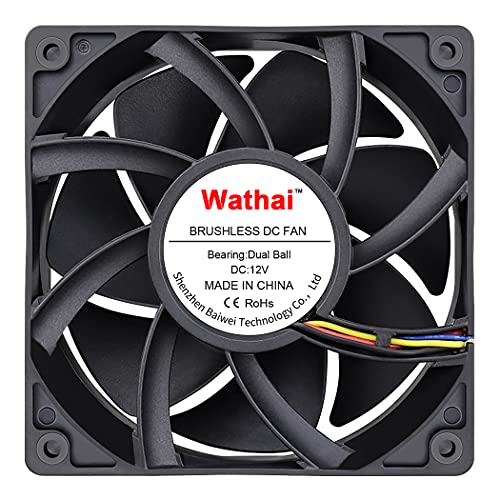
The 5300 RPM, 230 CFM brute that cools miners but sounds like a small jet taking off
This is not a fan for a quiet office PC — it’s a serious tool for serious cooling. With a 5300 RPM max speed and 230 CFM airflow, the Wathai 12038 is designed for projects that demand maximum ventilation: think mining rigs, server chassis, and industrial enclosures. The dual-ball bearings have a lifespan of 67,000 hours and allow the fan to be laid flat or stand upright, offering flexibility in tight installations.
Owners mention spectacular results — One owner measured CPU temps dropping from 71°C to 42°C in 20 seconds., and another said the fan pushed itself across a desk during testing. It runs the full speed range from 1000 to 5000 RPM flawlessly, and the 4-pin PWM connector supports intelligent speed regulation where your BIOS can trigger higher speeds at set temperatures. The included fan grill and mounting screws save you an extra purchase, and at 120x120x38mm it’s thicker than standard 25mm fans, so verify your case has the clearance.
The enormous catch is noise: at 58 dB max it’s louder than every other fan in this list by a wide margin — customers note it’s audible from 30+ feet away at half speed. The key is speed control; several owners run it at 35-45% speed where it’s more tolerable while still moving far more air than a standard fan.
What it delivers
- Massive 530 CFM airflow at extreme speeds
- 67,000-hour dual-ball bearing lifespan
- Works in any orientation — flat or upright
What you must accept
- 58 dB noise that demands a controller or low-speed setting
- Needs a sturdy PSU connection for the 22.8W draw
Perfect for: mining rigs, server rooms, or any project where raw airflow beats comfort.
Not for: desk-side PCs or anyone who values quiet operation — this fan will dominate a room.
6. Thermalright TL-M12Q X3 120mm ARGB (3-Pack)

A 2000 RPM, 68.9 CFM triple-pack with dual-sided infinity mirror lighting that turns heads
If your build lives behind glass, the TL-M12Q makes a visual statement while doing serious cooling work. Each fan runs up to 2000 RPM with 68.9 CFM airflow and 2.21 mmH₂O static pressure — that’s more pressure than some costlier fans, making it genuinely capable on radiators and heatsinks, not just a pretty face. The dual-side infinity mirror ARGB lighting creates a fuller, deeper look that owners say is striking in glass-panel cases and visible side or bottom fan positions.
This 3-pack comes with daisy-chain connections for cleaner wiring, and the 4-pin PWM speed control (pulse-width modulation, letting your motherboard adjust fan speed) plus 3-pin 5V ARGB works with standard motherboard headers and lighting software. Owners praise the build quality, citing premium materials, sturdy locking, and low noise. The fluid dynamic bearings keep things quiet at normal speeds. One buyer called it “a gem” and praised the smooth cable management, while another noted that the daisy-chain requires a row of three fans connected together — they’re not individually controllable.
For the price of a single premium fan, you get three capable, good-looking units. The main consideration is the chain setup: understand that your three fans will run as one group before you buy. If you want independent control of each fan’s RGB and speed, this design limits that flexibility. But for straightforward case cooling with visual flair, it’s tough to beat.
Standout strengths
- 68.9 CFM with excellent 2.21 mmH₂O static pressure
- Dual-side infinity mirror RGB looks premium
- Daisy-chain wiring keeps the case tidy
Before you commit
- Fans in the daisy chain aren’t individually controllable
- Beginners may find the cable setup instructions unclear
Reach for these if: you want strong airflow and dramatic RGB lighting without paying per-fan premium prices.
Pass if: you need individual per-fan control or prefer a minimalist no-light aesthetic.
7. Noctua NF-F12 iPPC-2000 IP67 PWM
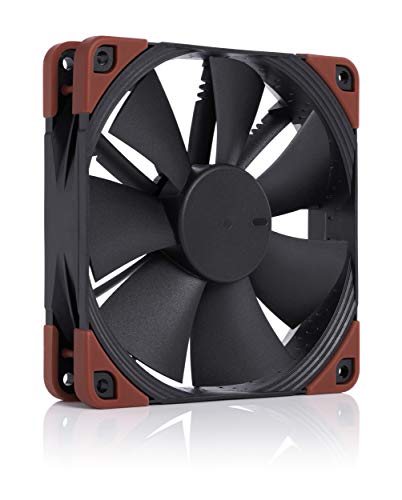
A rugged, fully waterproof 2000 RPM fan that shrugs off dust and liquids in harsh environments
This is the fan you choose when your build faces conditions that would kill a standard case fan. The NF-F12 iPPC-2000 boasts an IP67 certification — meaning full protection against dust ingress and immersion in water up to 1 meter — and is built from fibre-glass reinforced polyamide, a rugged construction rated for industrial heavy-duty applications. The Focused Flow frame design delivers high static pressure for superior cooling efficiency on radiators and other resistance-heavy mounts.
The 2000 RPM maximum speed operates across a broad 450-2000 RPM range via 4-pin PWM, giving your motherboard fine control from near-silent idle to full power. The rated lifespan exceeds 150,000 hours MTTF (mean time to failure), and the thick rubber grommets reduce vibration transfer to the case frame. Reviewers point out case temperatures dropping by 8–10°C., and the fan performs exactly as advertised even in demanding roles — one buyer runs several on a server setup with impressive results.
Expect a premium price and an industrial character. Some buyers find it surprisingly quiet at lower speeds, while others note it’s louder than expected at maximum RPM — the truth is it’s louder than consumer-grade Noctua fans, but quieter than most industrial units at the same airflow. The fiberglass construction and IP67 rating (meaning it’s fully dust-tight and protected against temporary immersion in water) make it significantly heavier than a plastic fan, and the aesthetic is utilitarian black without RGB flair. This one’s a tool, not a showpiece.
Built for the long haul
- IP67 waterproof and dustproof certification
- 150,000+ hour rated lifespan for 24/7 operation
- 450-2000 RPM PWM range for fine thermal control
What it costs you
- Premium price for industrial-grade construction
- Audible at higher RPM ranges — not a silent consumer fan
Buy it for: servers, workshop PCs, or any environment with dust, humidity, or demanding conditions.
Choose something else if: you want the quietest possible home PC and don’t need IP67-rated resilience.
8. Noctua NF-A12x25 G2 PWM chromax.Black
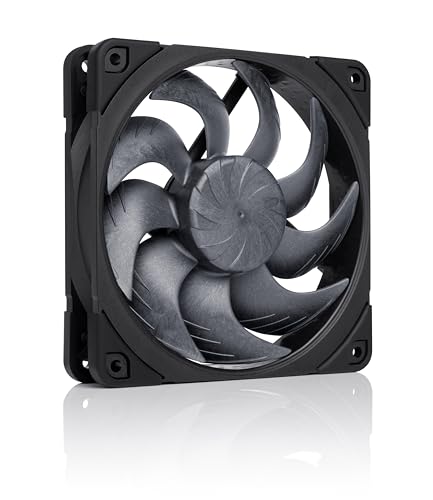
The next-gen quiet king whose 22.5 dB operation is practically inaudible next to rivals
If silence is your priority and budget is secondary, the NF-A12x25 G2 is the definitive choice. This is Noctua’s latest evolution in 120mm cooling, and the specs tell the story: a 22.5 dB noise rating (decibels, a measure of sound pressure) — the lowest in this entire list — with a 360-1800 RPM speed range that’s nearly silent at idle and powerful under load. The fan even stops completely at 0% PWM, enabling a semi-passive mode for completely silent systems at rest.
The engineering is state-of-the-art: a Progressive Bend impeller with winglets and a Centrifugal Turbulator (both blade features that improve airflow), Flow Acceleration Channels, and a Sterrox LCP frame material (a liquid-crystal polymer that allows ultra-tight tip clearance). Translation: it moves air with remarkable efficiency (107.3 m³/h, or cubic meters per hour), so it doesn’t need to spin fast to deliver. The SSO2 bearing (a self-stabilising oil-pressure bearing) carries a rated lifespan exceeding 150,000 hours, and certifications from UL and TÜV plus protection against reverse polarity and overvoltage add genuine confidence.
Owners are effusive — “the best 120mm fan on the market” is a recurring sentiment, and one reviewer noted it “kills” the older NF-F12 in every way, performing better while quieter and lower in pitch. The all-black chromax version fits stealth builds perfectly, and the bundle includes anti-vibration mounts, a gasket for radiators, a Low-Noise Adaptor, extension cable, and splitter cable. The only real downside is the price — it’s the most expensive single fan here — and at 1800 RPM max, it doesn’t hit the extreme speeds of the ARCTIC P12 Pro if you need that headroom.
Why it’s the quiet pick
- Exceptionally quiet 22.5 dB at maximum speed
- Stops at 0% PWM for truly silent idle builds
- Premium construction with UL and TÜV safety certifications
Consider this first
- Highest single-fan price in the lineup
- 1800 RPM ceiling lower than high-speed rivals
Select this if: you’re building a silent-focused PC and want the top-tier quiet cooling that money can buy.
Opt elsewhere if: you need extreme airflow for dense water-cooling radiators and don’t want to pay the premium for near-silent operation.
9. AsiaHorse COSMIQ 120mm PC Case Fan (3-Pack, White)

A white, infinity-mirror 3-pack that runs at 2000 RPM and even syncs lighting to your music
This set of three fan options stands out for its unique a neat extra: a built-in sound pickup module that syncs the lighting to music, with 8 different rhythm light modes. Whether you’re gaming or just playing tunes, the white, infinity-mirror design reacts to ambient sound for a layered visual effect that owners say looks fantastic in glass cases. The 2000 RPM max speed pushes 68.5 CFM per fan with 2.05 mmH₂O static pressure, so it’s not just lighting — it can actually move air effectively across a case.
The daisy-chain design reduces cable clutter dramatically — clips connect the fans together with one cable per set, Cutting redundant wiring by about two-thirds., and a small controller is included for independent lighting control at no extra cost. The FDB bearings keep operation quiet, with noise held to 29.2 dB even at maximum speed. Owners say these run near-silent at low RPM and still deliver impressive cooling — A couple of owners ran them in mATX cases with temps staying in the 50–60°C range..
There are a couple of trade-offs. The fans connect via a 5V 3-pin ARGB connector plus PWM for speed, and while they work with SignalRGB and Aura Sync, they lack the fine-grained per-fan control of pricier options like Lian Li. Cable management gets mixed reviews — the interlocking clips require firm force to connect. But with three fans and a controller in the box, this is a strong value proposition for anyone wanting a white, RGB-heavy build with solid airflow.
What impresses
- Music-sync RGB with 8 rhythm light modes
- Daisy-chain clips cut cable clutter dramatically
- 68.5 CFM with quiet FDB bearings at 29.2 dB max
Know before you buy
- No per-fan individual control — runs as a group
- Interlocking clips need firm force to connect
Best for: casual gamers and RGB enthusiasts who want eye-catching, synced lighting without paying for top-tier branding.
Not ideal if: you need precise per-fan speed or lighting control for a heavily customized setup.
Understanding the Specs
CFM (Cubic Feet per Minute)
This is the headline number for comparing fans — it measures how much air a fan moves in a minute of operation. Higher CFM generally means better cooling, but only if the air can flow freely. That’s why case fans with high CFM are ideal for intake and exhaust positions, where there’s little resistance to airflow.
Static Pressure (mmH₂O)
Static pressure measures how much air a fan can push against resistance — think the tight fins of a radiator or the mesh of a dust-filtered intake panel. Measured in millimeters of water column (mmH₂O), higher numbers mean the fan can better force air through obstacles. High static pressure fans are essential for AIO coolers and dense radiators.
PWM (Pulse-Width Modulation)
A 4-pin PWM connector lets your motherboard continuously adjust the fan speed based on temperature readings. This means the fan runs quietly at low load and ramps up only when your components get hot. Older 3-pin fans generally run at a fixed speed or use voltage control, which is less precise and often noisier at idle.
dB (Decibels) and Sones
Decibels measure the sound pressure level, and for fans, lower is better. A 20-25 dB fan is generally quiet enough for a bedroom, while 30+ dB can start to be noticeable. Some manufacturers list noise in sones, which measure perceived loudness rather than raw pressure — it reflects how loud a sound seems to the human ear.
FAQ
What CFM do I need for a typical PC case?
Is higher CFM always better?
What’s the difference between CFM and static pressure?
Will a 120mm fan fit in any case?
How long should a PC fan last?
What does IP67 mean on a fan?
Why is my PWM fan not ramping up with temperature?
Can I use a high-CFM fan like the Wathai on a regular PC?
Do ARGB fans work with any motherboard?
Is a 3-pack of budget fans better than one premium fan?
Final Thoughts: The Verdict
For most buyers, the cfm 120mm fan winner is the be quiet! Silent Wings 4 because it nails the balance of high airflow (76.7 CFM) and quiet operation with a massive 300,000-hour lifespan. If you want to outfit a whole case on a budget, grab the Thermalright TL-C12C-S 3-pack for capable cooling at a fraction of the per-fan cost. And for absolute silence in a premium build, the Noctua NF-A12x25 G2 with its market-leading 22.5 dB noise is the one to reach for.
How We Picked
We do not accept paid placement. Every pick is matched to a real buyer and a real use-case; we do not hands-on test units.
Sources & Methodology
Specifications: manufacturer listings and product documentation. Review insights: verified customer reviews, as of August 2026. Pricing: not shown on this page (it changes often); check the current price via the retailer link.
As an Amazon Associate, FitlyFast earns from qualifying purchases. This does not affect which products we feature.