
Our readers keep the lights on and the weekend projects moving. As an Amazon Associate, I earn from qualifying purchases.
Specs are compiled from manufacturer listings and verified buyer reviews and can change over time — please confirm the key details on the product page before buying.
Getting your guitar, voice, or podcast into a computer without that cheap, tinny sound used to cost real money.
I’m Rikta — the founder and writer behind FitlyFast. This guide is built by comparing the manufacturers’ published specifications and the patterns across verified customer reviews, so you get each pick’s real strengths and trade-offs instead of marketing spin.
The key is to find one that gives you clean preamps, reliable drivers, and the right inputs for your gear—all without blowing your budget on features you won’t use. Here is our roundup of the best cheap audio interface options for recording, streaming, or just getting started.
Quick Picks
- Focusrite Scarlett Solo 3rd Gen — Best Overall
- Focusrite Scarlett Solo 4th Gen — Latest Gen
- Universal Audio Volt 1 — Vintage Sound
- PreSonus AudioBox 96 25th Anniversary — Best Value
- M-AUDIO M-Track Duo — Budget Dual-Channel
- IK Multimedia iRig USB Guitar Audio Interface — Ultra-Portable
- Wrugste Solo USB Audio Interface — Entry Level
How To Choose The Best Cheap Audio Interface
An audio interface does one main job: convert the analog signal from your microphone or instrument into digital data your computer can record, and then send audio back out to your headphones or monitors. For a cheap audio interface you want a box that does this job cleanly, with low noise and reliable drivers, rather than loading up on features you will not use.
Inputs That Match Your Gear
The first decision is how many channels you need. A solo interface with a single XLR mic input plus a single instrument jack is enough for a vocalist or a guitarist recording one track at a time. If you plan to record a vocal and a guitar simultaneously, or host a two-person podcast, look for two combo inputs (one XLR and ¼-inch jack in each). Combo jacks accept both XLR plugs for microphones and ¼-inch plugs (TS or TRS) for instruments or line-level signals.
Sample Rate and Bit Depth
These two numbers describe how accurately your interface converts sound into data. A higher sample rate (measured in kHz, e.g. 48kHz vs 192kHz) captures more snapshots of sound per second—giving you higher-frequency detail. Higher bit depth (e.g. 16-bit vs 24-bit) gives you more headroom for loud peaks without distortion. 24-bit/48kHz is the standard for CD-quality podcasts and streaming music. 24-bit/96kHz or 192kHz offers extra clarity for professional studio mics.
Phantom Power for Condenser Mics
Condenser microphones, which are common in home studios for vocals and acoustic instruments, require +48V phantom power to operate. Several of the interfaces here include a +48V phantom power switch, while some instrument-focused models do not. Dynamic mics (like the Shure SM57 or SM58) do not need phantom power and are safe to plug in even when the switch is on, but it is always best to engage it only when a condenser mic is connected.
Low Latency and Direct Monitoring
Latency is the delay between you singing or playing a note and hearing it in your headphones. In a cheap interface, ASIO drivers (a type of audio driver that reduces delay) are important to keep latency low enough for real-time monitoring without an audible echo. Many interfaces include a direct monitoring knob that blends the incoming signal directly to the headphone out, bypassing the computer’s processing entirely—this gives you instant, zero-latency sound.
Software Bundle and Driver Support
A good interface often includes a software bundle with DAWs (Digital Audio Workstations like Ableton Live Lite or Studio One Artist), effects, amp simulators, and mastering tools. This can save you the cost of buying extra software. However, the most important factor is driver support: ensure the interface works with your computer’s operating system (Mac, Windows, or Linux) without constant glitches. Many interfaces are class-compliant, meaning no extra driver is needed on Macs, but Windows often benefits from dedicated ASIO drivers.
Quick Comparison
| Model | Best For | Max Sample Rate | Channels / Inputs | Weight | Amazon |
|---|---|---|---|---|---|
| Focusrite Scarlett Solo 3rd Gen | Premium all-in-one (studio quality) | 192 kHz | 1 mic pre / 1 instrument | 12.32 ounces | Amazon |
| Focusrite Scarlett Solo 4th Gen | Latest-gen premium clarity | 192 kHz | 1 mic pre / 1 instrument | — | Amazon |
| Universal Audio Volt 1 | Vintage tube emulation | 192 kHz | 1 mic / 1 instrument / MIDI | 544 grams | Amazon |
| PreSonus AudioBox 96 25th Anniversary | Dual-channels + MIDI I/O | 96 kHz | 2 mic pres / 2 instrument / MIDI I/O | 2.01 Pounds | Amazon |
| M-AUDIO M-Track Duo | Budget-friendly dual-channel | 48 kHz | 2 combo inputs | 0.3 Kilograms | Amazon |
| IK Multimedia iRig USB | Ultra-portable guitar / bass | 48 kHz | 1 instrument jack | 1.9 Ounces | Amazon |
| Wrugste Solo USB Audio Interface | Entry-level plug-and-play | 96 kHz | 1 combo input | — | Amazon |
In‑Depth Reviews
1. Focusrite Scarlett Solo 3rd Gen

The classic starter interface that sounds better than its price tag suggests.
If you want a recording that sounds like you are in a real studio, the Scarlett Solo 3rd Gen delivers. Its mic preamp is noticeably clean—buyers report a brighter, more detailed recording compared to cheaper interfaces—and the switchable Air mode adds clarity to acoustic instruments and vocals. You can record and mix at up to 24-bit/192kHz, so those high-frequency details, like finger noise on a guitar string, come through clearly.
The difference between the 3rd Gen and many budget rivals is immediate: it includes a software bundle with Pro Tools Intro+, Ableton Live Lite, Cubase LE, and the Hitmaker Expansion suite, so you can start recording right away. Compared to the PreSonus AudioBox 96 below, the Scarlett edges ahead with its higher sample rate and the Air mode—the PreSonus tops out at 96kHz. On the downside, there is no MIDI input, so if you plan to connect a keyboard or synth later, look at the Universal Audio Volt 1 instead. Even after three years, owners mention the metal body feels heavy duty and the unit is still going strong, which is a strong sign of durability in this price bracket.
Studio-Ready Performance
- Switchable Air mode for added high-end clarity on acoustic instruments
- High-performance converters up to 24-bit/192kHz for detailed recordings
- Three-year warranty and proven long-term durability; customers note it lasts years
One Limitation
- No MIDI input, so connecting a keyboard requires an extra adapter or a different interface
The confident pick: If you want the most proven, clean-sounding starter interface with excellent software support and a three-year warranty, this is the one.
The trade-off: If you need MIDI I/O or dual inputs for a two-mic podcast, look at the PreSonus AudioBox 96 or Universal Audio Volt 1 below.
2. Focusrite Scarlett Solo 4th Gen
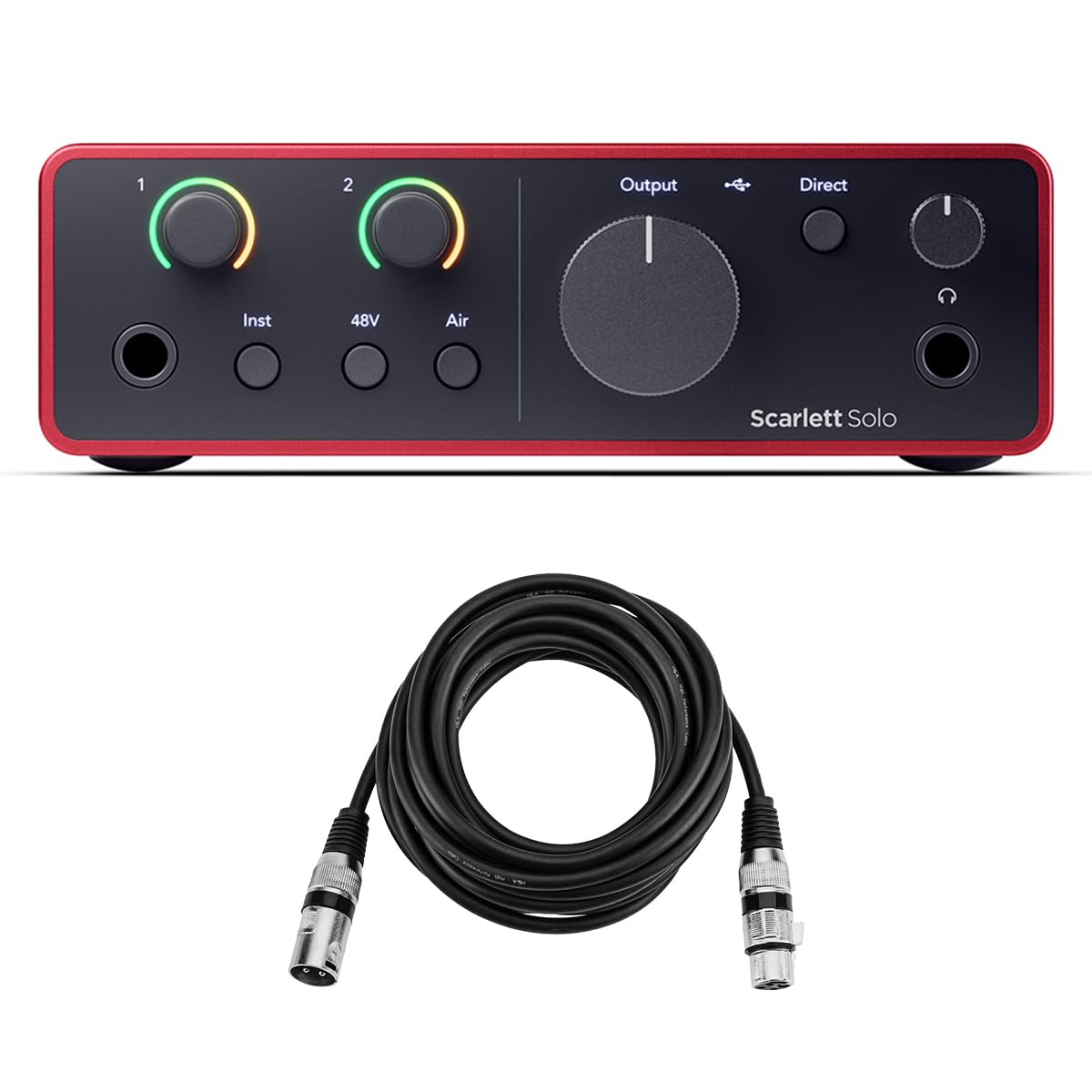
The same trusted Scarlett formula, updated with USB-C and a premium bundle.
The 4th Gen keeps the same 24-bit/192kHz A/D resolution as its predecessor, meaning your recordings stay crisp and professional. The big upgrade here is USB Type-C connectivity, which simplifies plugging into modern laptops and iPads without needing an adapter. It is class-compliant, so it works with any modern Mac, Windows PC, or USB-C iPad without extra driver hassle.
This bundle also includes a HA 10-foot XLR microphone cable, saving you a small additional purchase. Software-wise, you get Pro Tools Artist, Ableton Live Lite, and the Hitmaker Expansion suite—everything you need to start recording vocals, guitar, or podcast audio. The difference in value versus the M-AUDIO M-Track Duo is clear: the Scarlett 4th Gen runs at a much higher sample rate (192kHz vs 48kHz) and includes a premium software bundle, while the M-Track Duo offers two combo inputs at a lower entry price but tops out at 48kHz. If you are serious about learning production and want a future-proof entry point, this is the more logical starting line.
Modern Connectivity
- Ultra-low latency via USB 2.0 protocol and USB Type-C for real-time recording without delays
- Includes a 10-foot XLR microphone cable, so you do not need to buy one separately
- Class-compliant design for easy plug-and-play with Mac, PC, and USB-C iPads
What You Give Up
- Only one mic preamp and one instrument input, so simultaneous two-mic recording is not possible
Reach for this if: You want the latest-gen Scarlett performance with USB-C convenience and a free XLR cable—ideal for solo vocalists or guitarists building a modern home studio.
Look elsewhere if: You need two mic inputs for a podcast or duo recording; the PreSonus AudioBox 96 gives you two mic pres at a lower price.
3. Universal Audio Volt 1

The interface that gives your recordings a touch of classic console warmth.
The Universal Audio Volt 1 is unique in this price range because it includes a Vintage mode that emulates the sound of UA’s classic 610 preamps—the same preamps used on countless hit records. When engaged, it adds a subtle tube-like saturation that makes vocals and acoustic guitar sound full and rounded. Reviewers point out the preamp is extremely quiet, which means you do not get a background hiss even when you crank the gain. The converters go up to 24-bit/192kHz, matching the Scarlett generation for detail.
Unlike the Focusrite Scarlett Solo 3rd Gen, which lacks MIDI inputs, the Volt 1 includes full MIDI I/O—so you can connect a keyboard controller or synth without an extra adapter. It also comes with the LUNA Digital Audio Workstation (which mimics a real analog studio workflow) plus Ableton Live Lite, Melodyne, and amp simulators. The catch is that it requires an external power supply for full functionality—so it is less convenient for mobile recording than the USB-bus-powered PreSonus AudioBox 96. At 544 grams (about 1.2 pounds), it is also noticeably heavier than the 1.9-ounce IK Multimedia iRig USB.
Studio Character
- Vintage mode gives you the rich, tube-like warmth of UA’s classic 610 preamps
- Includes MIDI I/O for connecting keyboards and synthesizers
- Comes with LUNA, Melodyne, and Ableton Live Lite—a strong software bundle
The Trade-Off
- Requires an external Volt power supply, not fully bus-powered via USB for mobile use
Ideal for: The singer-songwriter who wants that vintage preamp character and MIDI connectivity in a compact desktop unit.
Not ideal if: You plan to record purely on battery power or need a featherweight device; the PreSonus AudioBox 96 is lighter and fully bus-powered.
4. PreSonus AudioBox 96 25th Anniversary
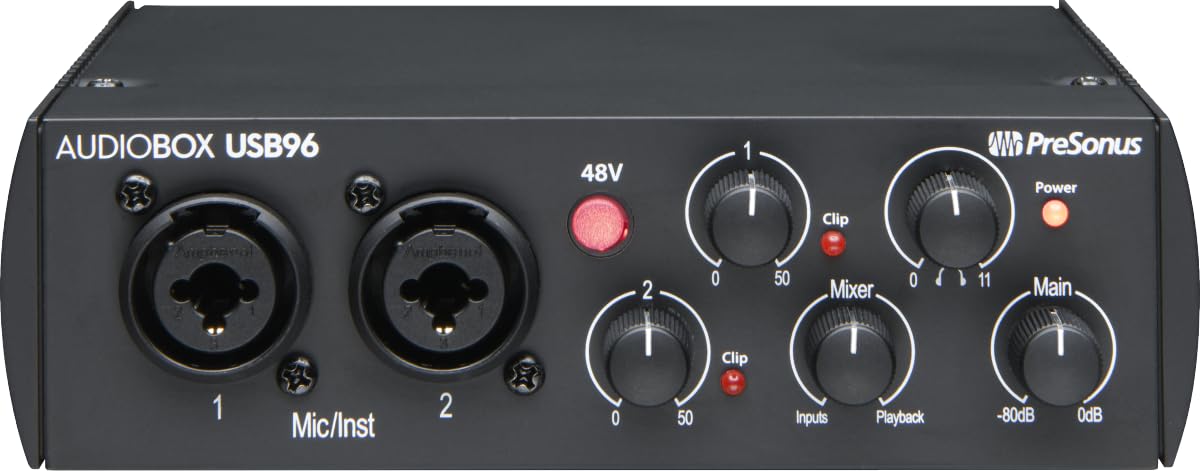
The dual-channel workhorse that packs two mic pres and MIDI connectivity.
If you need to record two microphones at once—say, yourself and a guest on a podcast—the PreSonus AudioBox 96 gives you two high-quality Class-A mic preamps and two high-headroom instrument inputs, plus MIDI I/O for synths or drum machines. It records and plays back at up to 24-bit/96kHz, which is enough for professional vocal and instrumental tracks. Shoppers say that the sturdy metal chassis feels like a tank and the unit is completely bus-powered over USB 2.0, so you can take it anywhere without a wall wart.
Compared to the Premium picks, the AudioBox 96 only goes up to 96kHz sample rate—the Scarlett 3rd Gen and Volt 1 both reach 192kHz—but the PreSonus gives you two mic pres at a lower price. It also comes with Studio One Artist, Ableton Live Lite, and the Studio Magic Plug-In suite, which buyers report is worth a lot of value for beginners. The downside, as reviewers mention, is that the gain knobs have a narrow balance—background noise can appear suddenly if you overshoot the setting. It is not as forgiving as the Scarlett’s smoother taper, but for the price it is tough to top.
Two-Channel Power
- Two Class-A mic preamps enable simultaneous two-microphone recording for podcasts or duets
- Includes MIDI I/O for connecting external instruments like keyboards and drum machines
- USB bus-powered so no extra power supply needed for mobile recording
What Holds It Back
- Max sample rate is 96kHz, half that of the Scarlett 3rd Gen (192kHz)
- Gain knobs have a narrow balance; background noise can creep in if not adjusted carefully
Who it beats: If you need two mic inputs and MIDI I/O without paying for a Scarlett 4th Gen, this is the most affordable way to get both.
Who it does not suit: If you plan to record at higher sample rates for maximum detail (192kHz), choose the Scarlett 3rd Gen or Universal Audio Volt 1 instead.
5. M-AUDIO M-Track Duo

The two-input interface that punches above its weight for songwriting and tracking.
The M-AUDIO M-Track Duo gives you two combo XLR/line/instrument inputs with phantom power—so you can record a vocal and a guitar simultaneously, or two singers for a duet. It operates at 48kHz resolution, which is standard for podcasting and music demo recording. One buyer who used it to record 20 songs for copyright noted it delivered “very good clarity and response,” which is impressive at this price.
It includes the MPC Beats software from Akai Professional, so you can start making beats and recording vocals right away. The trade-off is the gain taper: owners mention the volume gets extremely sensitive past the 90% mark, meaning 95% to 100% is a huge jump in loudness that makes it tricky to dial in the perfect level. And unlike the PreSonus AudioBox 96, which offers MIDI I/O, the M-Track Duo has no MIDI connectivity—so for synth players, the PreSonus is the better pick. Still, for pure recording of vocals and guitar, this is a fine starting block.
Twin Inputs, Low Cost
- Two combo XLR/line/instrument inputs with phantom power for flexible miking
- Includes MPC Beats production software for beat-making and recording
- USB/Direct switch for zero-latency monitoring during recording
Real-World Catch
- Gain knobs are very sensitive past 90%, making clipping hard to avoid without frequent tweaks
- No MIDI I/O; if you need MIDI connections, the PreSonus AudioBox 96 covers that
Perfect for: A guitarist or vocalist who needs two inputs now and wants the simplest possible way to record demos and streaming audio.
skip it if: You need a smoother gain taper or MIDI connectivity; the PreSonus AudioBox 96 handles both for a modest increase in price.
6. IK Multimedia iRig USB Guitar Audio Interface

The featherlight interface designed for guitarists who want to plug in and play.
At just 1.9 ounces and smaller than a smartphone, the IK Multimedia iRig USB is purpose-built for guitarists and bassists who need to record or practice with amp sims on a laptop, iPad, or iPhone. It offers studio-grade 24-bit/48kHz resolution, plus a headphone output with direct monitoring for silent practice. It works with a USB-C cable (included) and is compatible with Mac, PC, iPad, and iPhone 15. Customers note it is a breeze to set up—one reviewer noted it “works great very easy.”
Unlike the M-AUDIO M-Track Duo, which gives you two combo inputs and phantom power for condenser mics, the iRig has a single 1/4-inch instrument jack and no XLR input—so you cannot plug a standard microphone into it. That makes it a specialist tool for electric guitar and bass rather than a general-purpose recorder. One buyer mentioned that the included SE versions of Tone X and Amplitube are limited, and open up all sounds. If you do not care about the software and just want a simple adapter to get your guitar into your computer, this is a tiny, quiet, and reliable option. It is the most portable option here by far.
Road-Ready Design
- Weighs only 1.9 ounces—pocket-sized and easy to take anywhere
- Includes USB-C cable and works with iPad, iPhone 15, Mac, and PC
- Direct monitoring for silent practice with headphones
What You Lose
- No XLR mic input, so standard microphones need an adapter or a different interface
- SE software is limited; open up the full suite costs extra
Best for: The traveling guitarist or bassist who wants the lightest possible way to plug into a computer and use amp modeling apps.
Not for: Any vocalist or podcaster who needs an XLR mic input; get the M-AUDIO M-Track Duo or PreSonus AudioBox 96 instead.
7. Wrugste Solo USB Audio Interface

The no-frills starter that gets a mic and guitar into your computer for next to nothing.
The Wrugste Solo is the entry-level champion for anyone who just wants a single XLR or 1/4-inch input without any extra complexity. It has a combo input socket that accepts both XLR and ¼-inch jacks, plus +48V phantom power for condenser microphones. It records at up to 24-bit/96kHz—a higher sample rate than the M-AUDIO M-Track Duo (48kHz) for the same rough price bracket—though the Wrugste only has one combo input versus the M-Track’s two. That 96kHz max sample rate means it can capture more high-frequency detail than many budget interfaces ever attempt. The package includes a USB A to C cable and a USB C adapter.
One major catch: the Wrugste does not include any recording software, so you need to supply your own DAW (like Audacity, which is free, or Cubase). It also requires you to download an ASIO driver (ASIO4ALL) on Windows—reviewers point out it works well for beginners, but one reviewer found the unit failed after eight months, only working for 30 minutes before stopping the second input. If longevity is your priority, the Presonus AudioBox 96 or Scarlett 3rd Gen both have much better reliability track records. That said, for a very low investment to try out recording, this gets you started with surprisingly clean sound.
Budget-Friendly Specs
- Records at 24-bit/96kHz, which is higher than many interfaces at this price
- Combo input accepts both XLR and ¼-inch connections for mics or instruments
- Includes a USB A to C cable and USB C adapter for modern laptops
Honest Drawbacks
- No recording software included—you must supply your own DAW
- Shoppers say some units failing after 8 months; reliability is inconsistent
Fine for: A complete beginner who wants the absolute cheapest way to plug a mic or guitar into a computer and experiment with recording.
Spend a little more if: You want a more reliable interface with included software and a longer track record—the PreSonus AudioBox 96 or M-AUDIO M-Track Duo are better investments.
Understanding the Specs
Sample Rate and Bit Depth
These two numbers define how much audio information your interface captures each second (sample rate, in kHz) and how many volume levels it can measure between silence and full volume (bit depth, in bits). A common standard for podcasts and streaming music is 24-bit/48kHz. If you record at 24-bit/96kHz or 24-bit/192kHz, you get even more detail—handy for capturing the sparkle of a high-end condenser mic or the harmonics of an acoustic guitar. Many interfaces here offer 96kHz or 192kHz, while the M-AUDIO M-Track Duo and IK Multimedia iRig stop at 48kHz.
Phantom Power (+48V)
Phantom power sends 48 volts of direct current through an XLR cable to power studio condenser microphones, which have internal electronics that need external energy. Almost every interface in this guide includes a +48V phantom power switch. Dynamic microphones (like the Shure SM57) do not need phantom power and will work fine with the switch off. Always toggle phantom power on only after a condenser mic is connected, and off before you unplug it, to avoid a loud pop.
Latency and Direct Monitoring
Latency is the tiny delay between you singing or playing a note and hearing it in your headphones. If the delay is more than 10-15 milliseconds, it becomes distracting. Most cheap audio interfaces now include a direct monitoring feature: a knob or switch that sends the input signal directly to your headphone output, completely bypassing your computer. This gives you zero-latency sound so you can perform naturally. The Scarlett Solo 3rd Gen and PreSonus AudioBox 96 both offer this, making them comfortable for real-time tracking.
Driver Support: ASIO vs. Core Audio
Drivers are small software programs that let your computer talk to the audio interface. On macOS, most interfaces are class-compliant—no driver needed, just plug and play. On Windows, you often need ASIO drivers (Audio Stream Input/Output) to get low latency and stable performance. Some interfaces, like the PreSonus AudioBox 96, ship with excellent custom ASIO drivers. Others, like the Wrugste Solo, require downloading ASIO4ALL separately. If you are on Windows, check that the interface you choose has good ASIO support to avoid crackles and dropouts.
FAQ
Can I use a cheap audio interface with my iPad or iPhone?
What is the difference between a solo interface and a two-channel interface?
Does a higher sample rate always sound better?
Do I need phantom power for my microphone?
What is direct monitoring and do I need it?
Does a cheap audio interface work with OBS for streaming?
Which interface is best for recording electric guitar?
Can I use a cheap audio interface for two-person podcasting?
Does the interface come with recording software?
How long does a cheap audio interface typically last?
Final Thoughts: The Verdict
For the majority of shoppers, the cheap audio interface winner is the Focusrite Scarlett Solo 3rd Gen because it delivers exceptionally clean mic preamps, a switchable Air mode for clarity, high 192kHz sample rate, and a three-year warranty—all at a price that still qualifies as budget-friendly. If you want the latest USB-C connectivity and an even stronger software bundle, grab the Focusrite Scarlett Solo 4th Gen. And for two-mic podcasting or recording with MIDI gear while staying affordable, the standout is the PreSonus AudioBox 96 25th Anniversary.
How We Picked
We do not accept paid placement. Every pick is matched to a real buyer and a real use-case; we do not hands-on test units.
Sources & Methodology
Specifications: manufacturer listings and product documentation. Review insights: verified customer reviews, as of July 2026. Pricing: not shown on this page (it changes often); check the current price via the retailer link.
As an Amazon Associate, FitlyFast earns from qualifying purchases. This does not affect which products we feature.