
Our readers keep the lights on and the weekend projects moving. As an Amazon Associate, I earn from qualifying purchases.
The moment you start shuffling files between computers, clearing space for a new game, or backing up years of photos, the need for a reliable, portable hard drive becomes urgent. The challenge is finding a drive that offers enough capacity and decent transfer speeds without draining your wallet — a balance that often feels impossible.
I’m Rikta — the co-founder and writer behind FitlyFast. I spent countless hours analyzing the technical specifications, user feedback, and real-world performance data of dozens of budget-friendly external hard drives to bring you this guide.
Whether you need extra space for a game library, a backup solution for a laptop, or a portable drive for work files, this guide to finding the best cheap external hard drive will help you make a confident choice.
How To Choose The Best Cheap External Hard Drive
When shopping for a budget-friendly external hard drive, the temptation is to simply buy the one with the highest capacity at the lowest price. However, a few key specifications have a massive impact on how useful that drive will be over the long term. Prioritizing the right ones will save you from frustration down the line.
Storage Capacity vs. Physical Size
Most portable drives in this category come in 1TB or 2TB capacities, which is a sweet spot for the price. A 1TB drive holds roughly 200,000 photos or 500 hours of HD video. While 2TB offers more headroom, the physical size of the drive is also a factor. 2.5-inch drives are designed for portability and are bus-powered (no external power brick), whereas any desktop-grade 3.5-inch drive requires a power outlet and is much heavier. For most users on a budget, a 2.5-inch portable drive is the right choice.
Transfer Speed: USB 3.0 vs. USB 3.2 Gen 1
Don’t let the different names confuse you. USB 3.0, USB 3.1 Gen 1, and USB 3.2 Gen 1 all operate at the same theoretical maximum speed of 5 Gbps. This is more than enough for a mechanical hard drive, which is typically bottlenecked by its own internal read/write speed. A cheap hard drive is often a 5,400 RPM model, which delivers real-world sequential transfer speeds around 100-130 MB/s. This is fine for file storage and backups, but if you edit video directly from the drive, you may want to look for drive models that can sustain that peak speed over long transfers.
Durability and Build Quality
At this price point, you shouldn’t expect military-grade shockproofing, but the drive’s enclosure matters. Some budget drives use a thin plastic shell that offers minimal drop protection. Others feature an aluminum body that helps dissipate heat and adds rigidity, or a rubberized coating that provides grip and dampens vibration. If you plan to carry the drive in a backpack or bag, look for one with a slightly thicker, more robust housing. Also, consider the cable connection — a detachable cable is easier to replace if it breaks, while an integrated one is one less thing to lose.
Quick Comparison
On smaller screens, swipe sideways to see the full table.
| Model | Category | Best For | Key Spec | Amazon |
|---|---|---|---|---|
| ADATA HD710 Pro 1TB | Rugged | Outdoor & travel backup | IP68 Waterproof / MIL-STD-810G | Amazon |
| Seagate Portable 1TB | Standard | Everyday PC & console backup | 1-Year Rescue Service | Amazon |
| WD Elements 2TB | Capacity | Large file archives | 6TB max capacity option | Amazon |
| Toshiba Canvio Basics 1TB | Slim | Ultra-portable PC storage | Matte smudge-resistant finish | Amazon |
| Maxone 1TB | Metal | Durable daily carry | Aluminum anti-scratch casing | Amazon |
| GAZELLE 1TB | Dual Interface | USB-C & USB-A devices | Type-C adapter included | Amazon |
| Toshiba Canvio Basics 2TB | 2TB Value | High-capacity budget backup | 2TB in a compact body | Amazon |
In‑Depth Reviews
1. ADATA HD710 Pro 1TB
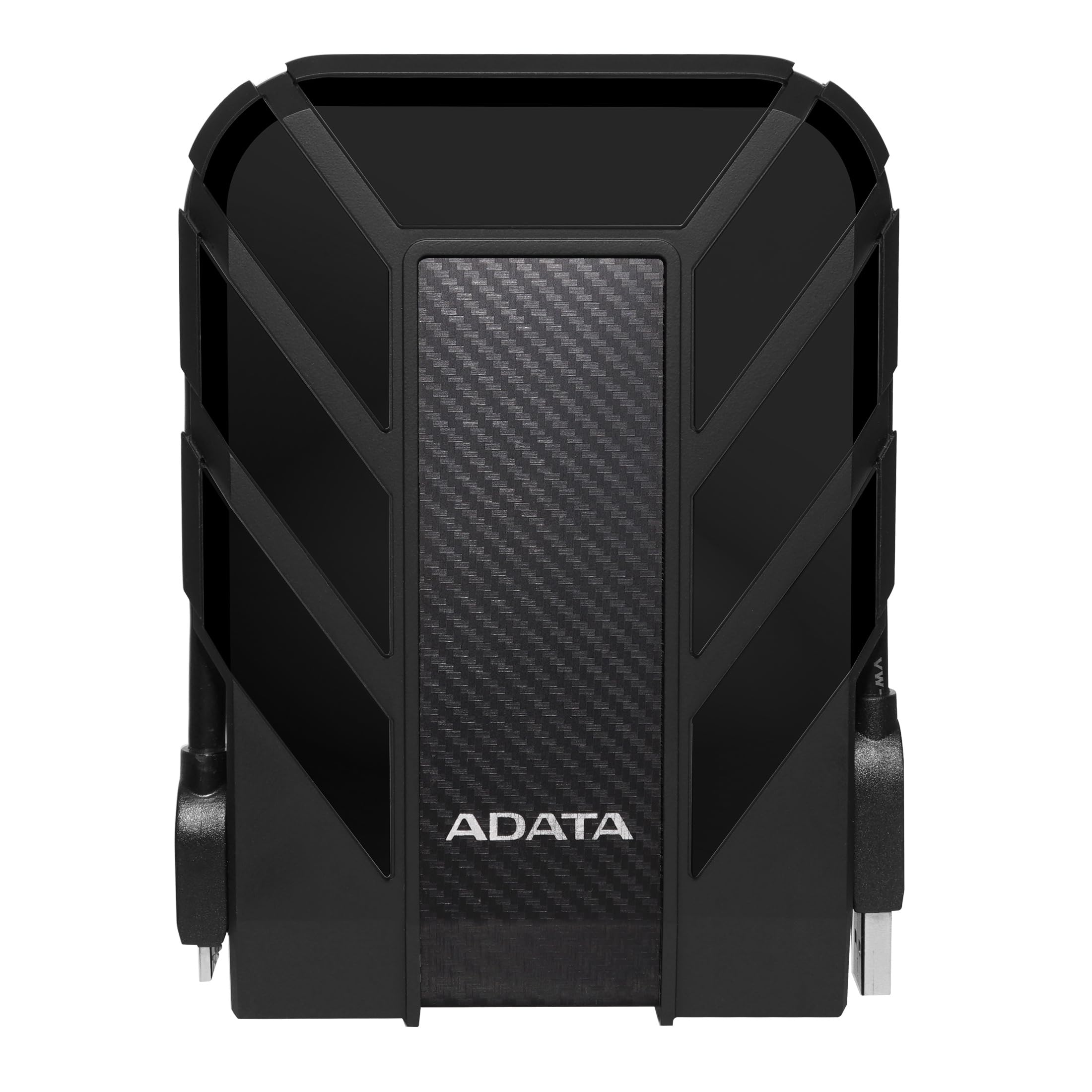
This is not just another plastic box. The ADATA HD710 Pro is a ruggedized drive built to survive the elements, boasting an IP68 waterproof and dustproof rating combined with MIL-STD-810G 516.6 shock resistance. The triple-layered construction and a thick rubber bumper mean you can drop this off a table without losing precious data, making it a top choice for photographers, field workers, or anyone with a clumsy streak. It uses a USB 3.1 interface (backward compatible with USB 3.0) and offers cable management built into the body.
User feedback highlights its speed for large, contiguous file transfers, noting it handles several hundred gigabytes in minutes. The rugged design holds up exceptionally well over years of use, with the rubber casing resisting dirt and the USB cover keeping the port clean. Some users with larger hands found the recessed connector tricky to plug in, but the peace of mind from the water and dust protection is a clear trade-off. The drive arrives clean with no bloatware.
The primary compromise here is portability in the traditional sense; the rubber armor adds noticeable bulk compared to a slim aluminum drive. It’s still travel-friendly, but it’s chunkier. Internally, it is still a mechanical hard drive, so it is not truly shock-proof against a major fall. It is best suited for static off-site backup or as a rough-and-tumble travel companion rather than a daily commute drive where you want extreme slimness.
Why it’s great
- IP68 waterproof and dustproof rating
- Passed military-grade shock tests
- Cable management keeps cord tidy
Good to know
- Bulky design compared to slim drives
- Recessed connector can be hard to grip
2. Seagate Portable 1TB

The Seagate Portable 1TB is the quintessential entry-level external hard drive that does exactly what it promises without fuss. Its single standout feature is the included 1-Year Rescue Service, which offers professional data recovery services in case of drive failure — a rare safety net at this price tier. The drive is a simple, no-frills black rectangle that works with Windows and Mac (reformatting required for Mac), and it offers drag-and-drop simplicity. It connects via USB 3.0 and is also compatible with PlayStation and Xbox consoles.
Real-world reports confirm it is very quiet in operation and lightweight enough to slip into a laptop bag pocket. Users focusing on photography, music production, or college coursework found its speed adequate for transferring large project files. It is a common choice for offloading phone backups, with transfers of 30-45 minutes for a full dump of photos and videos. Some users in creative fields noted that for direct workflow from the drive, a faster SSD is preferable, but for storage and backup, this is a solid performer.
The key trade-off is that it lacks any physical durability features. The casing is standard plastic, so you must handle it carefully. Several reviews mentioned that the drive needs sufficient power from the USB port; some older PCs struggled to supply it, leading to connection issues. However, for a straightforward, reliable backup solution backed by a reputable data recovery promise, this is a wise choice for students and home users.
Why it’s great
- Includes a 1-year data recovery service
- Compact and whisper-quiet operation
- Compatible with PC, Mac, and consoles
Good to know
- Plastic casing is not shock-resistant
- Some systems may have power issues
3. WD 2TB Elements

The WD Elements is a titan in the budget storage market, and the 2TB version offers a fantastic cost per gigabyte. While boasting a standard plastic enclosure, the internal drive is a WD product, a brand with a long track record for reliability. It uses USB 3.2 Gen 1 (5Gbps) and is plug-and-play on Windows, offering a hassle-free setup. For macOS users, reformatting is required, but the drive works flawlessly with Time Machine once set up. The design is a simple, matte black wedge that is easy to grip.
User feedback over the long term is very positive, with many reporting years of trouble-free operation. It is described as whisper-quiet and generates only a mild amount of heat. The drive holds up well for archival storage and as a buffer for cloud backups. Some users who installed large game libraries found it completely adequate for loading times on a PC. However, the supplied USB cable has been noted as a weak point by several reviewers, who found it failing after months of use and recommend replacing it with a higher-quality one.
The most common criticism is that it lacks a hardware encryption feature and its plastic shell is not designed for adventure. It is a gentle carry-it-from-desk-to-desk drive. A few users experienced a “click of death” error, often traced back to a faulty cable or insufficient power from a front-panel USB port. Despite this, the overwhelming consensus is that for a high-capacity, reliable drive at a low price, the WD Elements is an industry benchmark.
Why it’s great
- Excellent price-per-gigabyte value
- Consistent, reliable performance
- Compact and quiet design
Good to know
- Plastic body feels basic
- Included cable can be prone to failure
4. Toshiba Canvio Basics 1TB

The Toshiba Canvio Basics is a masterclass in minimalist design for a budget portable drive. Its slim profile and matte, smudge-resistant finish make it one of the more attractive options in the entry-level space. It is a true plug-and-play drive, pre-formatted NTFS for Windows, requiring no software installation. The USB 3.0 interface provides fast read/write speeds that are more than adequate for daily file management, photo storage, and system backups. It is bus-powered, drawing all power from the USB port.
Customer reviews frequently praise its form factor, calling it “small, great for travel” and “easy to use.” Users have found it to be a “power horse” for its size, with fast read/write times and no overheating during extended use. Many use it to replace older, failing drives, noting that full backups now take under an hour. The LED indicator light is a simple, non-intrusive way to see drive activity. It works with USB 2.0 ports, though transfer speeds will be slower.
The main caveats are its basic construction and lack of cross-platform readiness. The enclosure is polycarbonate, which is not particularly impact-resistant. It is pre-formatted for Windows, so Mac users must reformat the drive, which is an extra step. Some users also noted that the drive’s connector is not integrated into the cable, so you can lose the cable. For a purely Windows-focused user who wants a sleek, lightweight drive for the desk drawer or laptop bag, this is a top contender.
Why it’s great
- Sleek, slim, smudge-resistant finish
- True plug-and-play for Windows
- Fast and cool operation
Good to know
- Polycarbonate shell is not very durable
- Requires reformatting for macOS
5. Maxone 1TB Ultra Slim

For those seeking a more premium feel without a premium price, the Maxone 1TB Ultra Slim delivers with its all-aluminum anti-scratch casing. This enclosure provides better heat dissipation and a sturdier feel than standard plastic shells. It is remarkably thin at just 0.4 inches, making it one of the most portable options on this list. It promises USB 3.0 transfer speeds up to 5 Gbit/s and includes a 3-year manufacturer warranty, which is generous for the price point.
Users confirm its plug-and-play simplicity, and many are satisfied with its performance as extra storage for a Steam library or for backing up design files. The slim, lightweight nature is frequently praised for being perfect for on-the-go use. However, several buy-it-for-life reviews have noted that it is a fragile product. Specifically, the internal connector can detach from the drive if it is jostled or dropped while connected, and one user reported the port broke after two weeks in a bag.
The drive also has a low power drain, which is good for older laptops. The main issue is the physical fragility of the connection point. While the aluminum shell looks and feels good, it does not protect the internal connection from stress. This drive is best for someone who will place it on a desk and leave it, or who carries it very carefully in a padded case. The 3-year warranty is a plus, but the design flaws make it unsuitable for rough handling.
Why it’s great
- Strong aluminum body resists scratches
- Ultra-slim and lightweight
- 3-year warranty included
Good to know
- Internal connector is fragile
- Occasional random noise reported
6. GAZELLE 1TB Ultra Slim

The GAZELLE 1TB Ultra Slim is a value-focused drive that solves one of the biggest modern compatibility headaches: it includes both a standard USB 3.0 cable and a Type-C adapter. This makes it instantly compatible with older laptops and the newest MacBooks, tablets, and phones without needing an extra dongle. It runs on a 2.5-inch mechanical hard disk and offers a data transfer rate of 120 MB/s. The ultra-slim design (12 x 7.7 x 1.3 cm) weighs only about 150 grams.
Customer feedback is largely positive, with many praising the “great value for the money” and ease of use. It is recognized as plug-and-play on macOS without drivers, which is a plus for Mac users. The LED indicator light is a simple but appreciated feature for knowing when the drive is active. It works well as a backup drive for a Mac or to add storage to a TV. One user reported an initial unit was defective, but the replacement worked perfectly.
The trade-offs for this low price are in the build materials and warranty length. The enclosure is plastic and does not feel as durable as a metal or rubberized drive. It also only comes with a 1-year warranty. While the included Type-C adapter is a big plus, the cable itself is short. This is a good fit for a user with a modern laptop who needs a cheap, light, and simple backup solution that works across their devices without hassle.
Why it’s great
- Works with USB-C and USB-A out of the box
- Plug-and-play on Mac without drivers
- Extremely lightweight and portable
Good to know
- Plastic casing feels inexpensive
- 1-year warranty is shorter than most
7. Toshiba Canvio Basics 2TB

This is the higher-capacity sibling of the Toshiba Canvio Basics 1TB, offering double the storage in the same compact 2.5-inch form factor. It is one of the best ways to get a significant amount of storage without stepping up to a desktop drive. It mirrors the 1TB version’s design with a sleek, matte, smudge-resistant finish and is just as portable. It uses USB 3.0 and is plug-and-play on Windows PCs, offering a hassle-free way to double your laptop’s storage or create a massive backup archive.
Long-term user reviews are glowing, with some owners reporting it working “like new” after four years of use. It is described as “silent, lightweight, durable” and “the size of a pack of playing cards.” Users appreciate the peace of mind of keeping important data separate from the main system drive. For a backup drive that sits on a desk or in a bag, it provides a fantastic capacity-to-portability ratio. Several users noted it was a “steal deal” at its price point.
The primary technical consideration is that several users have identified this drive as using Shingled Magnetic Recording (SMR) technology. SMR drives are great for sequential writes (archiving files) but can become painfully slow for random writes or tasks like running Time Machine or a database. They are not ideal for heavy, ongoing read-write usage. The plastic casing also feels basic. This is a perfect drive for cold storage and static backups, but not for active software installations or professional video editing.
Why it’s great
- High capacity in a compact body
- Proven long-term reliability
- Excellent value for 2TB storage
Good to know
- Uses slower SMR recording technology
- Plastic case feels less premium
FAQ
Do I need to reformat a new external hard drive for Mac?
Is a cheap external hard drive suitable for gaming?
How do I safely eject my portable hard drive?
Final Thoughts: The Verdict
For most users, the cheap external hard drive winner is the Seagate Portable 1TB because it combines a trusted brand, a one-year data recovery service, and a simple, reliable design at an accessible price. If you want rugged durability for travel and outdoor use, grab the ADATA HD710 Pro. And for massive storage capacity on a budget, nothing beats the WD 2TB Elements for the best cost-per-gigabyte value.