
Our readers keep the lights on and the weekend projects moving. As an Amazon Associate, I earn from qualifying purchases.
Specs are compiled from manufacturer listings and verified buyer reviews and can change over time — please confirm the key details on the product page before buying.
The right coding robot for your child isn’t the most expensive one — it’s the one that matches their age, patience, and whether they’d rather build a tank or program a cat. The picks below split cleanly into two camps: screen-free “press the arrow buttons” robots for ages 3–7, and build-it-yourself brick kits with app coding for ages 6–14. Whichever camp fits, you want a robot that survives carpet, has clear instructions, and grows with your child instead of gathering dust after one weekend.
I’m Rikta — the founder and writer behind FitlyFast. This guide is built by comparing the manufacturers’ published specifications and the patterns across verified customer reviews, so you get each pick’s real strengths and trade-offs instead of marketing spin.
Here are the best coding robot for kids options that balance real STEM learning with genuine play value, so your child stays engaged long after the unboxing.
Our Picks at a Glance

How To Choose The Best Coding Robot For Kids
Before you click “buy,” match the robot to your child’s age and attention span. A 9-year-old who loves LEGO will devour a 596-piece build kit, while a 4-year-old needs something that works from the start with simple arrow buttons.
Screen-Free vs. App-Based Coding
Screen-free robots (like the Coding Critters or Botley) use physical buttons and cards to teach sequencing — perfect for ages 3-7 and for parents who want zero tablet time. App-based robots (like the Makeblock mBot or Apitor) introduce drag-and-drop block coding and even text-based languages like JavaScript, which suits older kids ages 8-14 who can handle a phone or tablet as part of the toy.
Build Complexity: How Many Pieces is Too Many?
Pay close attention to piece counts. A 596-piece or 727-piece kit is a weekend project that requires patience (and possibly parent help). A 45-piece set like Botley is ready to play immediately. Buyers consistently report that assembly difficulty is the #1 reason a robot gets abandoned — match the piece count to how much building your child actually enjoys, not how impressed you are by the box.
Quick Comparison
| Model | Best For | Piece Count | Coding Style | Power | Amazon |
|---|---|---|---|---|---|
| Sillbird STEM Robot Kit★ Best Overall | Hands-on builders 8-14 | 596 blocks | Bluetooth App + Remote | Rechargeable (40 min) | Amazon |
| Learning Resources Coding CrittersCutest Pick | Preschoolers & early learners | 22-piece playset | Screen-free buttons | Batteries (not specified) | Amazon |
| PIVONAX STEM Robotics KitBest Value | Young builders 6+ | 560+ blocks | 2.4GHz Remote + App | 1 Nonstandard Battery (incl.) | Amazon |
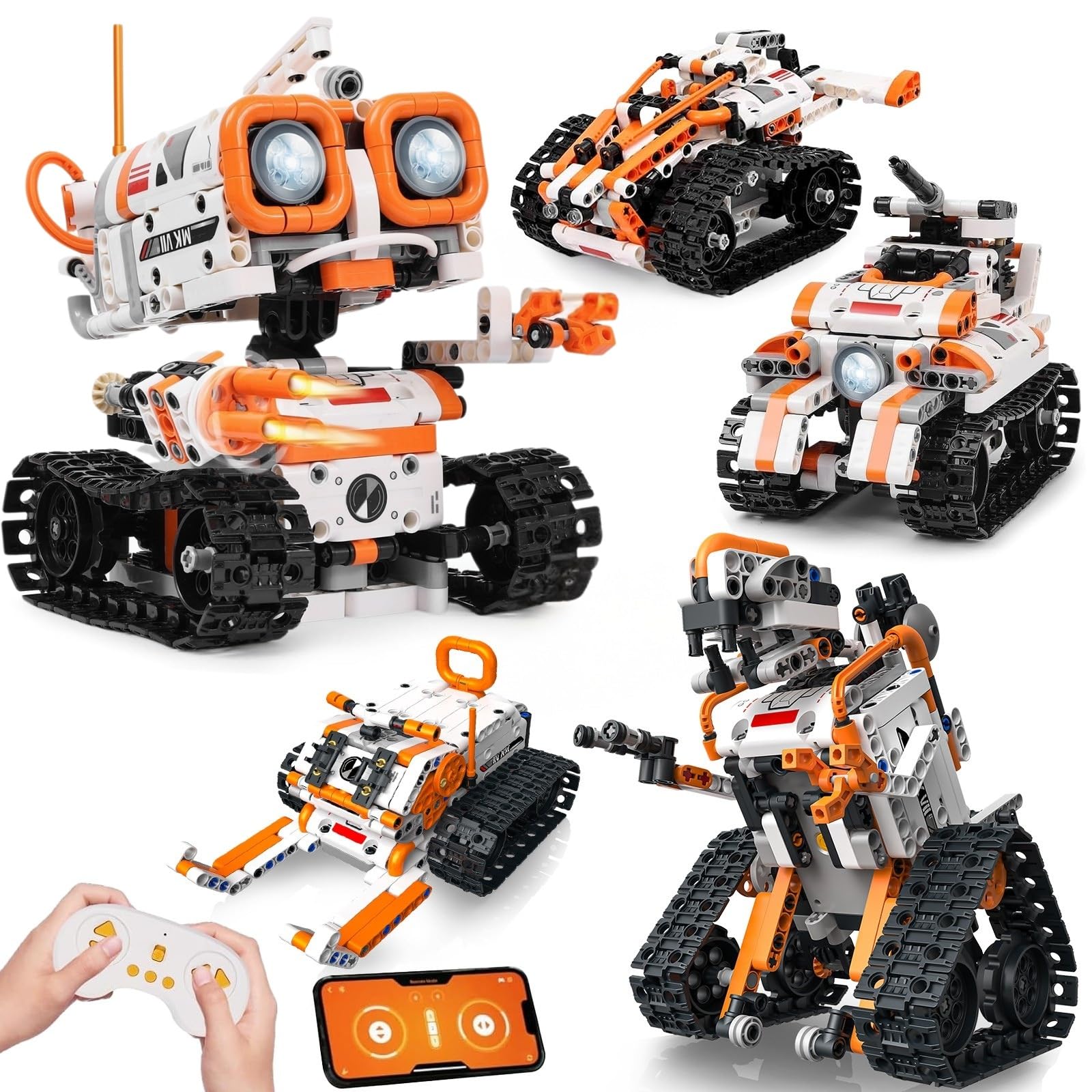
| Opmind 5-in-1 STEM RC Kit | Creative kids 6-12 | 478 pieces | App + Remote | 1 Lithium Ion (incl.) | Amazon |
| Apitor STEM Robot 6-in-1 | Icon-based coders 7-12 | 480 blocks | Scratch App (Bluetooth) | 3 AA (not included) | Amazon |
| Sillbird Robot Car Kit | Advanced builders 8-14 | 727 pieces | Bluetooth App + Remote | Rechargeable (40 min) | Amazon |
| Learning Resources Botley | Screen-free coders 5+ | 45-piece set | Screen-free remote | 5 AAA (not included) | Amazon |
| Makeblock mBot Arduino Kit | Future programmers 8-12 | Chassis + electronics | Scratch + Arduino | Lithium-Ion / AA holder | Amazon |
| Sphero Mini Activity Kit | Fast-paced gamers 5+ | 28-piece construction | Blocks + JavaScript/Swift | Rechargeable (USB) | Amazon |
In‑Depth Reviews
1. Sillbird STEM Robot Building Kit
Our pick — over 4.5★ from 900+ verified ratings; the strongest balance of quality and price.
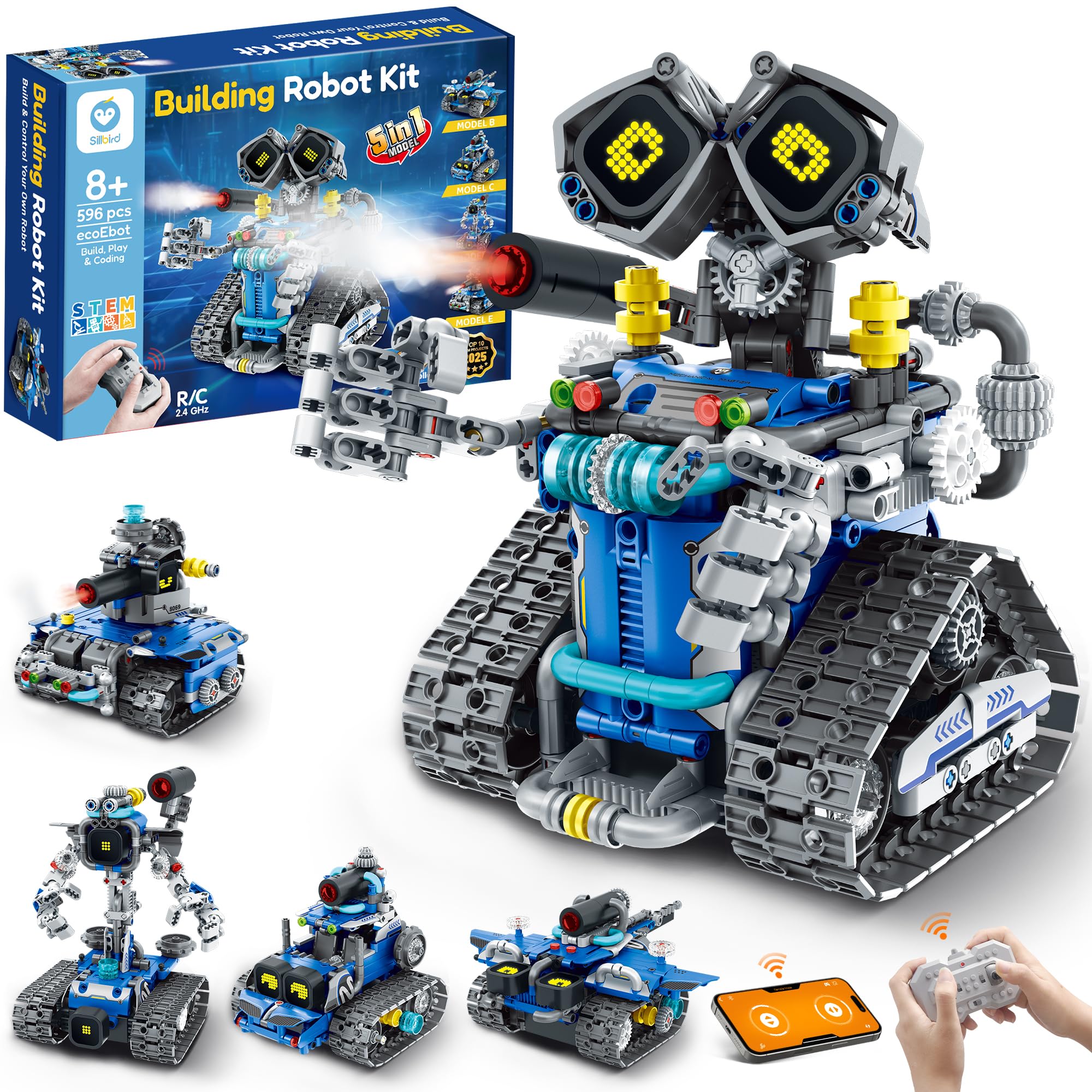
The 596-block 5-in-1 build that has 8-to-14-year-olds tuning out the TV for hours.
This kit earns the top spot because it nails the balance between challenge and payoff. With 596 blocks, kids can build a Robot, Tank, Car, and more — each model has a different difficulty level, so a child can start with the simplest build and gradually take on harder ones. Once built, the robot comes alive with digital LED eyes that change expressions, playful sound effects, and a mist-spray feature you activate by adding a little water.
Control comes via the remote or the Bluetooth app, which opens the door to creative coding fun without needing a screen attached to the toy itself. The rechargeable battery delivers up to 40 minutes of continuous play on a single charge — no hunting for AA batteries every afternoon. The instruction manual is colorful and step-by-step, and buyers report that kids often build it independently, though younger builders may need help pushing tube connectors into place.
You get a compact gift that won’t overwhelm a shelf, with box dimensions of 7 x 8 x 6 inches. Parents report the build is “a bit difficult but appropriate for the age group,” and that “the final robot was worth the hardwork.” Expect to help with tricky steps — plan for quality time together, not handing it over and walking away.
What Wins Parents Over
- 5 models from one 596-block set — huge replay value
- Rechargeable 40-minute battery kills the battery-buying loop
- LED expressions and mist-spray add wow factor beyond coding
Where It Demands Patience
- Assembly is genuinely challenging — younger kids need adult help
- Best for 8+; a 6-year-old will likely get frustrated
Reach for this if: you have a builder aged 8-14 who loves LEGO-style projects and wants a robot that does something cool at the end.
Look elsewhere if: you need a toy that works from the start — this is a project, not an instant-play robot.
2. Learning Resources Coding Critters Scamper & Sneaker
A screen-free cat-and-kitten duo that makes “coding” feel like playtime for ages 3-7.
This is the gentlest introduction to coding you can buy. The set includes Scamper the coding robot cat, Sneaker the kitten, a 22-piece playset with accessories, and a coding storybook — so kids literally follow a story to guide the cats through obstacle courses and snack time. There are no screens and no remote; the controls sit right on the device, which saves batteries and keeps little hands focused on the toy itself.
Your preschooler can carry it easily at 0.64 kg, and the box (9 x 10 x 5 inches) is bigger than photos suggest — buyers are often surprised by how much comes in the set. The magnetic pieces are fun even before you switch the cats on, a nice bonus for the youngest kids. Designed for toddlers and early elementary children, it fits well in a classroom, homeschool room, or playroom.
The trade-off: the small wheels can struggle on thick carpet, and some owners mention the distance and turn alignment can be frustrating when following exact coding paths. Most kids don’t mind — they gravitate toward play mode or “silly coding” instead of precise sequences. The enjoyment factor is what owners praise most, with one noting the 5-year-old in their life “plays ~30 min” at a stretch, while a preschooler’s parents reported the gift was a hit.
The honest take: this is a screen-free, story-driven coding intro that prioritizes fun over exactness. The cardboard tree in the set is the one fragile piece — treat it gently.
3. PIVONAX STEM Robotics Kit
Five builds, a 2.4GHz remote, and numbered bags that keep assembly sanity intact.
PIVONAX takes the “5-in-1” idea and makes it genuinely beginner-friendly. The kit packs 560+ color-coded building blocks in numbered bags — a small touch that saves parents from the dreaded “sort 500 pieces by color” Friday night. Kids aged 6+ can assemble five designs: Machine Gun Robot, Armored Vehicle, Cannon Tank, Snowmobile, and Mechanical Dinosaur. The included brick separator makes disassembly and rebuilds genuinely easy.
Control is via a 2.4GHz remote or the app-based coding interface, and the ABS material is built to survive active play. At 1.8 pounds it’s a substantial-feeling kit, and the included battery means it works right from the start. The manufacturer backs it with a 1-year warranty against defects, which is reassuring for a toy that will be thrown around.
Buyers consistently call it fun to build and “well worth the price,” with some noting it suits technically-minded kids. The company suggests children aged 6+ may need partial interaction and assistance from parents depending on their familiarity with building blocks — so plan to join in for the first build. It’s a step up from basic LEGO sets but more forgiving than the hardest kits here.
Why It Earns Its Keep
- Numbered bags make the 560+ piece build manageable
- Included battery and 1-year warranty remove friction
- Five models from one set — snowmobile to dinosaur
Consider This
- Younger 6-year-olds will likely need parent help
- Plastic build — not as premium-feeling as metal kits
Choose this for: a first big build kit where you want fewer assembly headaches thanks to the numbered bags.
Pass on it if: your child wants a metal, Arduino-level robot — this is a brick toy, not an electronics project.
4. Opmind 5-in-1 STEM RC Robot Building Kit

A 478-piece set where the snail actually has moods — and a mute button for parents.
Opmind stands out with its “Interactive Expressions” feature: the cute snail shows emotions like curiosity, excitement, and calmness through its eyes. If you’re tired of beeping toys, there’s a single-click mute that turns off the sound while keeping the charm. The 478-piece set builds five models — animal snails, AI robots, and engineering vehicles — with instructions buyers find easy to follow.
The app control is where this kit flexes. Beyond basic remote control, the app offers 360° rotation and all-direction movement, plus educational features like driving simulation, a gravity gyroscope, navigation paths, pet traction, and AI programming. It’s a rich feature set for the price, and the included Lithium Ion battery means it’s ready to go immediately. The box is a large 9.4 x 2.7 x 12.9 inches — a proper presence under the Christmas tree.
Assembly feedback is genuinely mixed: some customers note it’s easy, others find it challenging and note the instructions are “fairly basic,” with some steps needing “a bit of tweaking rather than following the instructions exactly.” This is a toy for a patient 8+ builder, not a quick afternoon project. Some parents note it’s a great fit for kids 5-7 who enjoy constructive play with help.
Best used as: a screen-break activity that develops logical thinking and planning. The app’s AI programming features give it more depth than most kits in this range.
5. Apitor STEM Coding Robot Toy

Icon-based coding with real loops and variables, wrapped in a 480-block robot that does 360-degree stunts.
Apitor is the pick for kids who are ready to move past arrow-button coding into actual programming logic. The intuitive, icon-based app lets kids explore loops, variables, and problem-solving through activities designed for each of the 6 builds. The set comes with 480 colorful blocks, a control module with 2 high-speed motors, 2 multicolor LED lights, and a sorting tray — no screws or tools needed, so kids can snap blocks together freely.
The robot moves in all directions and performs 360-degree stunts, with lively eyes and flexible hand joints. The free Apitor Kit app offers 4 control modes: dual-motor, single-motor, gyro, and path mode. One reviewer noted the 10-year-old grandson built 2 projects solo and used the tablet app as a remote while learning programming — a strong sign the quality “rivals/beats name-brand blocks.”
The honest caveat: this needs 3 AA batteries (not included), and the manufacturer’s own description targets ages 7-12. One owner wryly noted it’s “not for teenagers but adults with engineering experience” — which is really a compliment about challenge level, but signals this isn’t a toy a young child can master alone. The paper booklet covers one build; the app handles the rest, so tablet access is required for full value.
The Programming Edge
- Real Scratch-style coding with loops and variables
- 4 app modes (dual-motor, gyro, path, single)
- Tool-free snap assembly speeds up builds
Before You Buy
- AA batteries not included — you’ll need 3
- App required for most builds, so a tablet is necessary
Pick this for: a 7-12 year old who has done basic building kits and is curious about how code actually drives movement.
skip it if: you want a completely screen-free option — the app is central to the experience here.
6. Sillbird Robot Car Building Kit
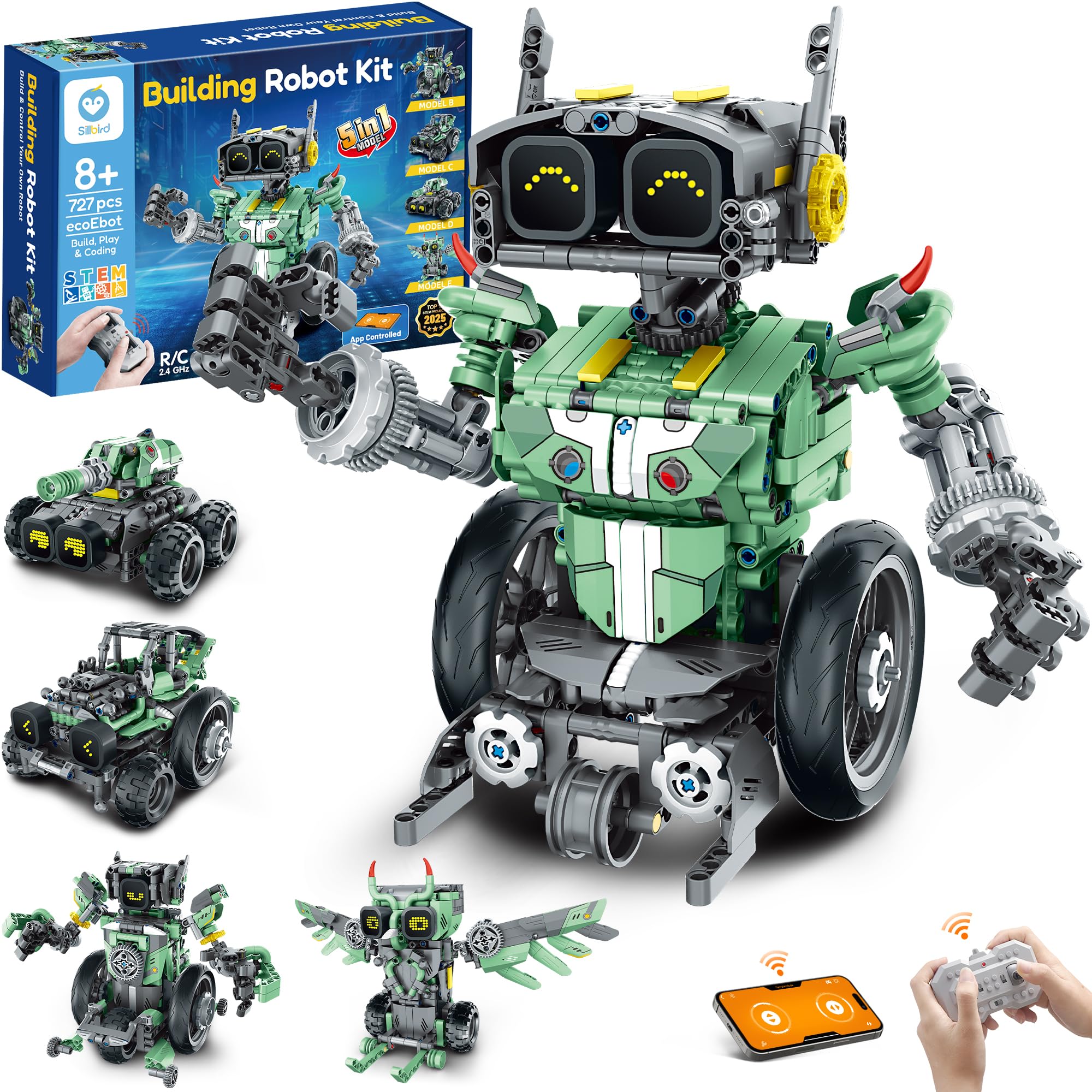
The 727-piece flagship build that gives experienced 8-14 builders a real weekend project.
This is the bigger sibling to our Best Overall pick, and it’s for families who want maximum build time. With 727 pieces, kids can rebuild into five designs — Robot, Car, Tank, and Owl — with beginners starting simple and experienced builders taking on complex challenges. Like its sibling, it features LED eyes that change expressions, sound effects, and control via Bluetooth app or remote for forward, backward, and free rotation.
The rechargeable battery provides up to 40 minutes of continuous play per charge, matching the top pick’s runtime. The box is compact at 6 x 5 x 8 inches — smaller than you’d expect for 727 pieces, which is actually a plus for storage. Reviewers point out it appeals strongly to brainy kids, with one grandparent noting it “appealed to my 9 and 11 year old grandsons.”
There are two honest notes. First, a rare buyer mentioned a missing piece — worth checking the box contents early in case you need a replacement. Second, one owner who struggled with the app had success by selecting the “3.0 series” in the app settings, so if you hit app issues, try that fix. The full-color instruction book is clear, and with this many pieces, plan for several focused sessions.
The premium argument: more pieces, more models, and the same proven rechargeable battery system. You’re paying for depth of build, not flashy extras.
7. Learning Resources Botley the Coding Robot

The screen-free classic that teaches 80-step programming with a chunky remote and zero tablet.
Botley is the benchmark for screen-free coding, and it’s been a classroom staple for years. The 45-piece set includes a remote programmer, detachable robot arms, and 42 coding cards. With 80-step programming capabilities, loops, and advanced obstacle detection, it grows with your child from simple arrow sequences to complex loops. It’s ready to use from the start (you’ll need 5 AAA batteries, not included) — no building, no app, no setup.
What buyers love is the immediate engagement: a 5-year-old can master the remote quickly, and the hidden sequences that trigger funny phrases keep older kids (6-8) entertained for hours. The 6 double-sided tiles and accessories let kids create endless obstacle courses — knocking down walls and making Botley say “hi” with secret codes. At 0.57 kg, it’s sturdy enough to survive drops.
The recurring advice from owners is to buy the full accessory pack rather than the basic set for maximum longevity. Object detection takes some learning, and the functionality receives mixed reviews — some units don’t work as advertised, so buy from a seller with easy returns. It’s best for ages 5+ and fits perfectly in classrooms, where it’s described as a “fantastic resource.”
The Screen-Free Magic
- 80-step programming with loops and obstacle detection
- Ready to play immediately — no build required
- Classroom-tested and loved by ages 5-8
Worth Knowing
- Requires 5 AAA batteries (not included)
- Mix of quality — occasional units have functionality issues
Ideal for: screen-free homes and classrooms where you want zero tablet time and instant play for ages 5+.
Not the pick if: your child loves building — Botley is ready-made, not a construction project.
8. Makeblock mBot Arduino Robot Kit

The aluminum-frame starter bot that graduates kids from block code to real Arduino programming.
The mBot is the serious programmer’s entry point — the kit that bridges toy coding and real engineering. Built around the mCore mainboard and an aluminum chassis, kids assemble it in about 15 minutes following the comprehensive manual. It includes four projects: line-following, obstacle avoidance, remote control, and more, each with clear explanations and 8 step-by-step online courses.
what separates it is the progression path. Kids start with block-based Scratch coding on the mBlock platform, then transition to Arduino text coding as their skills grow. The included electronics are substantial: mCore mainboard, 2 motors, a line-follower sensor, infrared remote controller, and USB cable. It’s a genuine learning tool, not just a toy — one parent noted their 9-year-old “built it in a day” and is “enamored” with the programming projects.
The honest trade-offs are real. Assembly is challenging for an 8-year-old alone — effectively an adult with some technical comfort is needed, and one buyer estimated 30-45 minutes of build time with an electrical engineering background. The instructions reference an older 9V battery setup, but the kit ships with a 4 AA battery holder, which can confuse. This is also the priciest brick-style kit here, and its value depends entirely on whether your child is genuinely interested in programming.
The Learning Ladder
- Scratch block coding that advances to Arduino text code
- Durable anodized aluminum frame
- 4 projects: line-follow, obstacle-avoid, remote control
The Reality Check
- Needs adult help to assemble — not solo for most 8-year-olds
- Instructions lag the newer 4-AA battery pack
Buy this for: a tech-curious kid (and a willing parent) ready for real electronics, not just block snapping.
Avoid if: you want open-and-play — the mBot demands assembly and learning investment upfront.
9. Sphero Mini Activity Kit

A ping-pong-ball robot that rolls, glows any color, and doubles as a game controller.
The Sphero Mini is a completely different take on coding robots — there’s nothing to build. This ping-pong ball-sized robot packs a gyroscope and accelerometer, plus a customizable LED light that glows any color you choose. The Activity Kit adds a 28-piece construction set, 15 STEM-inspired activity cards, 6 bowling pins, and 3 cones for building mazes, obstacle courses, and towers. It’s the most “toy-like” option here, and that’s its superpower.
Drive mode alone is wildly fun: Joystick mode, Slingshot mode (pull back and release), or Tilt mode (tip your phone to steer). The robot doubles as a game controller for arcade-style games in the Sphero Play app. For learning, Blocks drive mode offers drag-and-drop coding, and the Sphero Edu app open up JavaScript and Swift programming for ambitious kids.
The what’s-in-the-box list is generous: clear Sphero Mini, bumper cover, 6 pins, 3 cones, 15 activity cards, 28-piece construction set, and a Micro USB cable. It weighs just 15.5 ounces — easily portable for school or travel. Owners praise the playability most by far, calling it “durable” and “user-friendly.” But honesty requires the caveat that some kids lose interest quickly — as one parent put it, it’s “best left for a school environment” if your child prefers deep, focused building over fast-paced play.
The Fun Factor
- Works instantly — zero assembly, zero setup
- 3 drive modes + game-controller mode
- Grows from block code to JavaScript/Swift
The Attention Risk
- Novelty can fade fast for kids who prefer building
- Small ball is easy to lose under furniture
Suit the gamer: this is for a kid who loves instant action, apps, and fast-moving play rather than slow assembly.
For builders instead: a brick kit will hold their attention far longer than a rolling ball.
Understanding the Specs
Piece Count & Build Complexity
A 22-piece set is instant play; a 596-piece kit is a weekend project. The more pieces, the more replay value and the more parent help required. Match this to your child’s proven patience with LEGO — not their enthusiasm at the store.
Screen-Free vs. App Coding
Screen-free robots use buttons and cards to teach sequencing, ideal for ages 3-7. App-based robots add drag-and-drop block coding (and sometimes JavaScript) but require a tablet or phone — decide whether screen time is a reward or a concern for your family.
FAQ
What age should a child start with a coding robot?
Are screen-free coding robots as educational as app-based ones?
How long does it take to build a 596-piece robot kit?
Will a coding robot work on carpet?
What batteries do these robots need?
Is a 5-in-1 robot kit a real feature or a gimmick?
Can a coding robot be used without a smartphone or tablet?
What is the difference between a coding robot and a remote-control toy?
Final Thoughts: The Verdict
For most families, the best coding robot for kids is the Sillbird STEM Robot Kit because it combines a substantial 596-block build with a rechargeable battery and real app-based coding — the complete package for ages 8-14. If you want screen-free simplicity for a younger child, grab the Learning Resources Coding Critters. And for a budding programmer ready for real electronics, the Makeblock mBot is the one to reach for.
How We Picked
We do not accept paid placement. Every pick is matched to a real buyer and a real use-case; we do not hands-on test units.
Sources & Methodology
Specifications: manufacturer listings and product documentation. Review insights: verified customer reviews, as of August 2026. Pricing: not shown on this page (it changes often); check the current price via the retailer link.
As an Amazon Associate, FitlyFast earns from qualifying purchases. This does not affect which products we feature.