
Our readers keep the lights on and the weekend projects moving. As an Amazon Associate, I earn from qualifying purchases.
Specs are compiled from manufacturer listings and verified buyer reviews and can change over time — please confirm the key details on the product page before buying.
Building or upgrading a PC means facing one loud decision: which fans actually move hot air out of your case without drowning out your game audio. This guide compares published specs and verified reviews to match each fan to its ideal airflow, pressure, and noise profile.
I’m Rikta — the founder and writer behind FitlyFast. This guide is built by comparing the manufacturers’ published specifications and the patterns across verified customer reviews, so you get each pick’s real strengths and trade-offs instead of marketing spin.
Whether you are chasing silence, maximum cooling, or flashy RGB, this breakdown of the best computer fans matches each pick to the job it actually does best.
Our Picks at a Glance


How To Choose The Best Computer Fans
Your first decision is what the fan will push air through. A fan mounted on a radiator or behind a solid front panel needs high static pressure (measured in mmH2O) to force air through the dense fins. A fan simply exhausting hot air from an open mesh grill cares more about raw airflow, measured in cubic feet per minute (CFM).
Match the Fan Size to the Mounting Spot
Check your case specs for where 120mm or 140mm fans fit. A 140mm fan typically moves more air at a lower speed and lower noise than a 120mm fan doing the same job, which is why larger builds often favor them for front intakes. Measure your available clearance before ordering.
Understand Noise and Speed Ratings
Decibel (dB) ratings tell you how loud a fan gets at maximum speed, but real-world noise depends on how you control it. A fan with PWM (pulse-width modulation) lets your motherboard ramp speed up and down based on temperature, letting you run a high-RPM fan quietly at idle and spin it up only when needed.
Quick Comparison
| Model | Best For | Max Speed | Airflow | Noise Level | Amazon |
|---|---|---|---|---|---|
| be quiet! Silent Wings 4★ Best Overall | Ultra-quiet high performance | 2500 rpm | 76.7 cfm | 31.2 db | Amazon |
| Thermalright TL-C12C-S X3Budget Champion | Budget 3-pack value | 1550 rpm | 66.17 cfm | 25.6 db | Amazon |
| be quiet! Pure Wings 3Quiet 140mm | Quiet 140mm airflow | 1800 rpm | 72.2 cfm | 30.5 db | Amazon |
| DARKROCK F120 3in1 | Infinity mirror aesthetics | 1600 rpm | 46.7 cfm | 27.7 db | Amazon |
| ARCTIC P12 Pro A-RGB | High static pressure radiators | 3000 rpm | 77 cfm | — | Amazon |
| ELUTENG Dual AC USB | External device cooling | 1500 rpm | 52.7 cfm | 25 db | Amazon |
| AsiaHorse AMICI-5GT | RGB-heavy gaming builds | 1800 rpm | 61.5 cfm | 30 db | Amazon |
| CORSAIR iCUE Link LX120 | Streamlined premium RGB | 2400 rpm | 69.9 cfm | 36 db | Amazon |
In-Depth Reviews
1. be quiet! Silent Wings 4 120mm PWM High Speed
Our pick — over 4.5★ from 950+ verified ratings; the strongest balance of quality and price.
A 2500 rpm fan that delivers 76.7 cfm at just 31.2 db for silent high-performance cooling.
This is the fan for builders who refuse to compromise between silence and performance. Its 6-pole motor and fluid-dynamic bearing (a bearing type that uses oil to reduce friction) let it hit a top speed of 2500 rpm while producing just 31.2 db of noise. The funnel-shaped frame tightens the gap between blades and housing, which boosts air pressure so it can push 76.7 cfm through dense radiator fins.
Buyers report it runs “silent at idle (30%),” with no throttling even when cooling a hot i9-13900K at 90% load around 1700 rpm. The build quality gets constant praise — at 310 g, this fan feels dense and premium in hand, and the included anti-vibration mount cuts down rattling noise against your case. It is noticeably heavier than the Thermalright pick below, which tips the scales at just 100 g, and that heft translates to a more solid, less buzzy feel.
The trade-off is the price tag, which some buyers feel is steep for a single fan. You are paying for the long lifespan — the fluid-dynamic bearing is rated for up to 300,000 hours — and the dual mounting options that let you switch between vibration-dampening for case use and plastic mounts for radiators.
What Wins People Over
- Exceptional quiet operation at mid-range speeds
- High 76.7 cfm airflow for demanding builds
- Superb build quality and premium heft
Consider This
- Premium price for a single fan
- No built-in RGB lighting
Reach for this if: you want the best blend of quiet operation and high performance for a radiator or case.
Look elsewhere if: you need multiple fans on a tight budget — this one costs like a flagship.
2. Thermalright TL-C12C-S X3 120mm ARGB
Three solid ARGB fans for the price of one premium unit — the value king.
If you are outfitting a whole case without emptying your wallet, this 3-pack is the smart play. Each fan spins up to 1550 rpm and pushes 66.17 cfm at a quiet 25.6 db, which is plenty for a standard mesh-front gaming case. The S-FDB bearing (a fluid-dynamic bearing variant) keeps the blades from shaking at low speeds, extending the fan’s life while minimizing noise.
The daisy-chain connections are a favorite with buyers, letting you link two or three fans into a single 4-pin header on your motherboard. As owners put it: “the daisy chain connections helped connect two together, to one 4 pin connector.” At 100 g per fan, they are featherlight compared to the 310 g be quiet! Silent Wings 4, making them easy to mount. Up to 17 ARGB lighting modes sync through your motherboard’s addressable RGB header.
The honesty here is that these are budget fans, not silent premium ones. Some owners mention a slight audible drone at medium speeds, and the plastic corners feel fragile — one buyer broke a corner during installation. For the price, though, the cooling performance and ease of setup are hard to argue with.
Why It’s a Steal
- Three fans with great value per unit
- Daisy-chainable for clean cable management
- Quiet 25.6 db operation at low speeds
Keep in Mind
- Audible drone at medium RPM
- Fragile plastic corners during install
Grab it for: a budget build or case full of fans where price per fan matters most.
skip it if: you demand near-silent operation at all speeds — step up to a premium fan.
3. be quiet! Pure Wings 3 140mm PWM
A 140mm fan that moves 72.2 cfm at 30.5 db with a long-life rifle bearing for quiet operation.
Bigger fans spin slower to move the same air, which is why this 140mm unit stays composed. With a top speed of 1800 rpm, it delivers 72.2 cfm of airflow at 30.5 db — a strong showing for a fan that prioritizes smooth operation. The seven airflow-tune blades are shaped to cut noise in demanding setups, and the rifle bearing (a bearing type known for longevity) is rated for 80,000 hours of operation.
Owners describe it simply: “It’s a fan. It works. It is quiet-ish for a 140mm fan.” That sums up the appeal — it is dependable, unflashy cooling. Since there are no LEDs, installation is straightforward plug-and-play, and the low minimum RPM lets you run it nearly silent when your system is idle. Some even repurpose it to cool car audio amplifiers, which speaks to its versatility.
The main friction point is installation: while most buyers find it simple, a few hit a snag with screws that would not thread into the fan frame. It is also less flashy than RGB options, so if you want lighting effects, this is not the pick.
Reliable and calm: strong airflow with lower noise than a 120mm fan spinning faster, backed by a long-life bearing that suits it for continuous operation.
The catch: occasionally finicky screws and zero RGB make it a practical, no-frills choice for builders who value function over flash.
Choose it for: a quiet 140mm front intake or exhaust where size fits your case.
Think twice if: you want addressable lighting to match a themed build.
4. DARKROCK Black F120 3in1 120mm

A 3-pack with layered ARGB infinity mirror lighting that delivers 46.7 cfm at 27.7 db.
This 3-in-1 pack is for builders who want the wow factor of layered RGB lighting while staying affordable. Each 120mm fan uses a hydraulic bearing (a bearing that uses fluid to reduce friction) and spins between 800 and 1600 rpm, pushing 46.7 cfm at a quiet 27.7 db. Eight rubber pads on each corner absorb vibration, keeping operation stable and durable.
The defining feature is the infinite mirror design — the center and sides of the fan reflect the ARGB lighting into a multi-layered effect that owners say looks premium rather than tacky. The fans are daisy-chainable, meaning you can connect them in series, and some buyers found they needed no hub at all if their motherboard had the right headers. One owner noted that for a clean look, a single separable cable would beat the two-wire design.
While airflow is lower than the high-performance picks at 46.7 cfm, it is plenty for typical gaming cases. The main durability quibble: a sticker tab on the fans can break if you peel it carelessly, so take your time during setup.
What Stands Out
- Premium-looking infinite mirror RGB effect
- Daisy-chainable without needing a hub
- Excellent value for a 3-pack
Minor Hiccups
- Lower airflow than performance-focused fans
- Sticker tab can break during install
Best suited to: showpiece builds where aesthetics are a priority alongside decent cooling.
Not ideal for: radiator duty where high static pressure is required.
5. ARCTIC P12 Pro A-RGB 3-Pack

A 3000 rpm fan with 7mmH2O static pressure that pushes 77 cfm through dense radiator fins.
This is the fan you want when your cooling loop has serious resistance. The P12 Pro generates exceptional static pressure — confirmed by owners at around 7mm H2O — which lets it penetrate dense radiator fins and mesh panels that would choke lesser fans. The redesigned rotor blades balance performance and noise, and the fluid-dynamic bearing (FDB) keeps things smooth and self-lubricating over a long lifespan.
The headline spec is the wide speed range: it can ramp from just 600 rpm up to a blistering 3000 rpm via the 4-pin PWM header, and it stops completely below 5% PWM for total silence at idle. At 77 cfm, it pushes more air than many larger fans, and customers note dramatic temperature drops — including a 7-degree drop in idle processor temperature. The included Y-cable splitter lets you connect multiple fans to one header.
The price for all that power is noise. At 70-100% speed, these fans are genuinely loud — one owner compared the full-speed sound to a drone. They are quiet under 60-70% speed, so the secret is configuring a proper fan curve. If you leave them at max, you will hear them.
The Power Perks
- High static pressure for radiator and mesh setups
- Wide 600-3000 rpm speed range
- Stops completely below 5% PWM for silence
The Noise Trade-off
- Loud at high speeds, needs a fan curve
- Not a quiet pick from the start
Reach for it when: you have a radiator or restricted airflow path that demands high static pressure.
Pass on it if: you want set-and-forget silence and dislike tuning fan curves.
6. ELUTENG Dual AC USB Fan

A USB-powered dual-fan cooler that moves 52.7 cfm at 25 db for external electronics.
This one is different — it is not a case fan at all, but a versatile external cooler. Powered by a 12v adapter, it is designed to sit next to or on top of electronics like a router, modem, PS4, or Xbox and blow heat away. Each of the dual fans spins at 1500 rpm and moves about 52.7 cfm, with a noise rating of 25 dBA. The 3-speed control lets you dial in the balance between cooling and quiet.
Buyers love the flexibility: one owner cooled their gaming laptop from a toasty 91°C down to a comfortable 68-87°C range at load, while another used it to keep a network router cool. The hydraulic bearings (a fluid-based bearing) are rated for about 50,000 hours of theoretical life, and the fan can run continuously for 24 hours. The 4 foot pads let it sit flat or upright safely.
The noise feedback is genuinely split — some call it near-silent, while others compare the low setting to a fridge compressor. It is also small, roughly half the size of a deck of cards, which is efficient but not a visual centerpiece. If you need a quick, effective way to cool external devices, this is a solid tool.
Handy and effective: USB-powered flexibility with a 3-speed slider makes it a great utility fan for consoles, docks, and routers.
The honest caveat: noise perception varies widely by user and setting, so if you are noise-sensitive, expect to run it on low.
Use it for: spot-cooling electronics outside your PC case where a standard fan cannot reach.
Not for: replacing case fans inside your desktop tower.
7. AsiaHorse AMICI-5GT RGB Fans
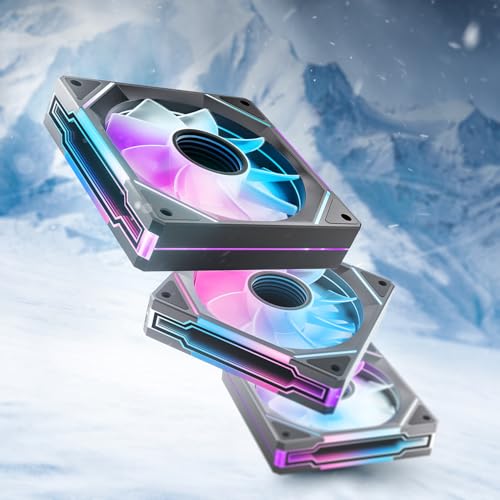
A 3-pack with 24 LEDs per fan that syncs with Aura Sync, RGB Fusion, and Mystic Light.
This set is built for gamers who want their rig to light up the room. Each 120mm fan carries 24 LED beads for 16.8 million colors, all arranged around an infinity mirror design that creates layered, dimensional lighting. The fans are compatible with Asus Aura Sync, Gigabyte RGB Fusion, and MSI Mystic Light Sync, so you can match them to your whole system. The high-performance HDB bearing (a hydraulic bearing that maintains an oil film) helps keep operation smooth and extends the rated lifespan to 50,000 hours.
Cooling is more than adequate for gaming: at 1800 rpm, each fan pushes 61.5 cfm with 2.0mmH2O of static pressure, and the noise stays capped at a reasonable 30 db. Reviewers point out excellent temperatures during intense sessions — one even cooled a Ryzen 9 990X down to 29°C. The rubber pads and noise-reduction cushions keep vibration in check during install.
Two things to know before buying. First, the cable management gets mixed reviews — the fans link together with cables, and the recommended chain length is no more than three. Second, the forward and reverse blade versions are not clearly labeled on the box, which confused some installers. Check blade direction before mounting.
The Glow-Up
- 24 LED beads per fan for vivid, syncable RGB
- Good 61.5 cfm airflow for gaming loads
- Long 50,000-hour bearing lifespan
Watch Out For
- Unclear labeling on forward vs reverse blades
- Cable chain limited to 3 fans
Pick this for: a colorful gaming build where RGB sync with your motherboard matters.
Be careful if: you plan to chain more than three fans together — keep the chain short.
8. CORSAIR iCUE Link LX120 RGB 3-Pack

A 3-pack with bridge connectors that cuts cable count from 26 to 2-4 while delivering 69.9 cfm.
If the mess of fan cables drives you crazy, this is the solution. The iCUE Link system uses bridge connectors to join fans directly to each other, then feeds the whole chain into the included System Hub with just a single cable. Shoppers say slashing their cable count from 26 wires down to 2-4, which transforms the inside of a case from spaghetti to showroom. The hub can even run up to 12 fans per port.
Each fan packs 18 LEDs spread across dual light loops — an inner and outer ring — for brilliant, customizable lighting synchronized with all your iCUE devices. Cooling performance is top-tier: fans spin up to 2400 rpm, pushing 69.9 cfm with an impressive 5.22mmH2O of static pressure, making them excellent for radiators. Corsair’s AirGuide technology (anti-vortex vanes) focuses the airflow on your hottest components.
Buyers report temperature drops into the 50-60°C range during gaming and appreciate the quiet operation at load. The Magnetic Dome bearing keeps things smooth and low-friction. However, this is a premium-priced investment, and while most find it worth it, some find the sticker placement ugly and a few report minor blade wobble. The initial iCUE software setup takes patience.
The Upgrade Perks
- Dramatic cable reduction via single-cable link system
- High static pressure for radiator mounting
- Dual light loop RGB with deep iCUE integration
The Premium Costs
- High price point for a 3-pack
- Software setup takes time to configure
Invest in this if: you want the cleanest possible build with top-tier RGB and radiator performance.
Look past it if: you are on a budget or prefer simple, standard fan wiring.
Understanding the Specs
Airflow vs Static Pressure
Airflow, measured in cubic feet per minute (CFM), tells you how much air a fan moves in open space. Static pressure, measured in mmH2O, tells you how forcefully it pushes air through obstacles like radiator fins or mesh filters. For most case intake and exhaust spots, high CFM matters most. For radiators, high static pressure is the spec to chase.
PWM and Fan Speed
PWM (pulse-width modulation) is a 4-pin connection that lets your motherboard automatically adjust fan speed based on temperature. This lets a high-RPM fan run quietly when your PC is cool and spin up only under load. Fixed-speed fans are simpler but cannot adapt. A fan with a very low minimum RPM can run nearly silent at idle.
FAQ
Will 140mm fans fit in my case?
What is the difference between airflow and static pressure?
Is a 3-pin fan the same as a 4-pin PWM fan?
How long do PC case fans typically last?
Can I connect multiple fans to one motherboard header?
Are RGB fans worth the extra cost?
What does a high noise level in decibels mean for a fan?
Is a 3-pack of budget fans better than one premium fan?
How do I know which way a fan blows air?
Do I need a fan hub for RGB fans?
Final Thoughts: The Verdict
For the majority of shoppers, the computer fans winner is the be quiet! Silent Wings 4 because it delivers exceptional quiet performance with premium build quality, making it a favorite across nearly a thousand owners. If you want the best value for a full case, grab the Thermalright TL-C12C-S 3-pack for solid airflow at a budget price. And for high-pressure radiator duty with stunning RGB, the ARCTIC P12 Pro A-RGB is the one to reach for.
How We Picked
We do not accept paid placement. Every pick is matched to a real buyer and a real use-case; we do not hands-on test units.
Sources & Methodology
Specifications: manufacturer listings and product documentation. Review insights: verified customer reviews, as of August 2026. Pricing: not shown on this page (it changes often); check the current price via the retailer link.
As an Amazon Associate, FitlyFast earns from qualifying purchases. This does not affect which products we feature.