
Our readers keep the lights on and the weekend projects moving. As an Amazon Associate, I earn from qualifying purchases.
Specs are compiled from manufacturer listings and verified buyer reviews and can change over time — please confirm the key details on the product page before buying.
Virtual reality is the most demanding thing you can ask a desktop to do. A VR headset doesn’t just display a game — it renders two full images side by side, every single frame, and any drop below the refresh rate turns into visible, motion-sickness-inducing stutter. That’s why the graphics card matters more than anything else here, and why the machines below are built around serious NVIDIA GeForce RTX GPUs rather than entry-level chips.
I’m Rikta — the founder and writer behind FitlyFast. This guide is built by comparing the manufacturers’ published specifications and the patterns across verified customer reviews, so you get each pick’s real strengths and trade-offs instead of marketing spin.
To help you find the right rig for your next headset, here is the honest breakdown of the best computer for virtual reality on the market, ranked by real-world performance and owner satisfaction.
Our Picks at a Glance


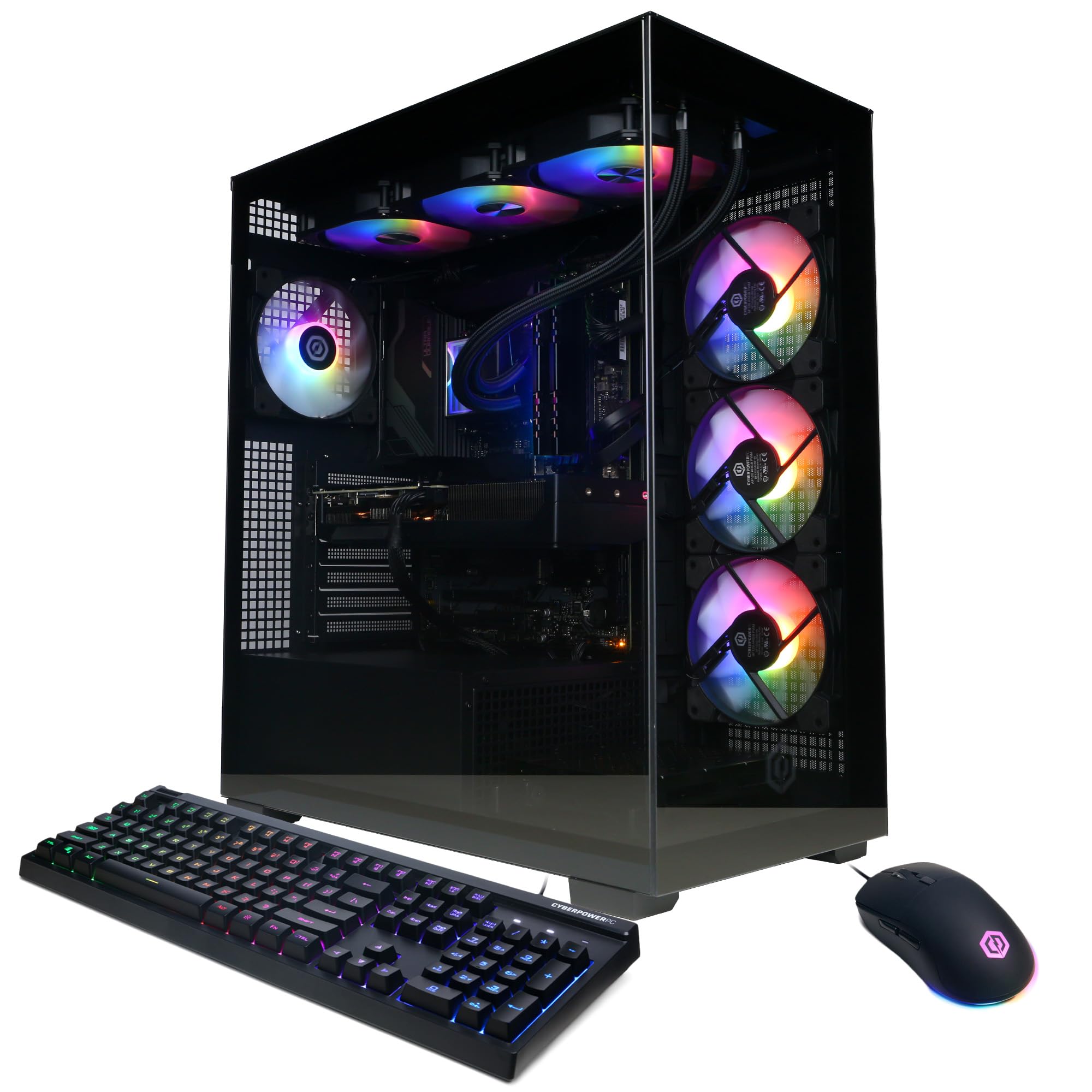
How To Choose The Best Computer For Virtual Reality
Your headset is only half the equation. The desktop feeds it every frame, and if the desktop can’t keep up, the headset has nothing to show you but a stuttering mess. Focus on GPU, VRAM, CPU, RAM, and storage—these five specs determine VR performance.
Graphics Card and VRAM: The Real Engine
For VR, the GPU is everything. Look for an NVIDIA GeForce RTX card with at least 8GB of dedicated graphics memory (VRAM). More VRAM, like 12GB or 16GB, lets you push higher resolution settings and keeps textures from blurring as you move your head quickly. The RTX 5070 Ti with 16GB is a balance that appears on several picks here.
CPU and Memory: The Support Crew
A modern processor with 8 or more cores handles the simulation logic while the GPU draws the scene. Pair that with 16GB of RAM as a starting point, but 32GB gives you comfortable headroom for streaming or multitasking alongside your VR games. Most premium VR desktops ship with 32GB of DDR5 RAM, giving you headroom for streaming and multitasking.
Storage and Connectivity: The Speed of Daily Life
An NVMe SSD is non-negotiable for VR. It loads entire virtual environments in seconds instead of minutes, and it is the difference between a smooth session and staring at a loading screen. Also check that the desktop has the right ports for your headset — most need a DisplayPort or HDMI connection from the graphics card, not the motherboard.
Quick Comparison
| Model | Best For | GPU / VRAM | Processor | Memory / Storage | Amazon |
|---|---|---|---|---|---|
| Skytech O11 Vision★ Best Overall | High-end 1440p VR | RTX 5070 Ti 16GB | Ryzen 7 9850X3D 4.7GHz | 32GB / 2TB | Amazon |
| CyberPowerPC Gamer XtremeBest Value | Budget 1080p VR entry | RTX 4060 8GB | Intel Core i5-13400F 2.5GHz | 16GB / 1TB | Amazon |
| CyberPowerPC Gamer Xtreme VRTop Performer | Powerful 1440p VR | RTX 5070 12GB | Intel Core i9-14900KF 3.2GHz | 32GB / 2TB | Amazon |
| Alienware Aurora | Quiet, premium gaming | RTX 5070 | Intel Core Ultra 7 265F | — / — | Amazon |
| Thermaltake View i570 | Ultra-high refresh gaming | RTX 5070 12GB | Intel Core i9-14900KF | 32GB / 1TB | Amazon |
| MSI Aegis R2 | AI-ready 4K and VR | RTX 5070 Ti | Intel Core Ultra 9 285 | 32GB / 2TB | Amazon |
| Lenovo Legion Tower 5i | Streaming and VR | RTX 5070 Ti 16GB | Intel Core Ultra 7 265F | 32GB / 1TB | Amazon |
| MSI Aegis ZS2 | Multi-core creation and VR | RTX 5070 | AMD Ryzen 9 7900X | 32GB / 2TB | Amazon |
| iBUYPOWER Y40 PRO | High-FPS 1440p | RTX 5070 Ti 16GB | AMD Ryzen 9 7900X | 32GB / 2TB | Amazon |
| Horizon Autherium Dragon | Max multitasking and storage | RTX 5070 OC 12GB | Intel Core i9 open up | 64GB / 5TB | Amazon |
| STORMCRAFT Phantom | High-end 4K and VR | RTX 5080 16GB | Ryzen 7 9800X3D | 32GB / 2TB | Amazon |
| Skytech Azure 3 | 4K Ultra and VR | RTX 5080 16GB | Ryzen 7 9800X3D 4.7GHz | 32GB / 2TB | Amazon |
| Panorama RTX 5080 | Content creation and VR | RTX 5080 16GB | Intel Core i9-14900KF | 32GB / 2TB | Amazon |
In‑Depth Reviews
1. Skytech Gaming O11 Vision Gaming PC
Our pick — 4.5★ from 750+ verified ratings; the strongest balance of quality and price.
The luxury VR powerhouse that pairs a 16GB RTX 5070 Ti with liquid cooling for stutter-free headsets.
The RTX 5070 Ti’s 16GB of GDDR7 memory handles VR’s double-rendering load, keeping textures sharp during fast head movement. The NVIDIA GeForce RTX 5070 Ti with 16GB of GDDR7 memory handles the double-rendering workload that VR demands, so textures stay sharp even when you whip your head around. It runs on an AMD Ryzen 7 9850X3D at 4.7GHz, and the 360mm AIO liquid cooler keeps that processor from thermal throttling during marathon sessions.
What wins people over is the sheer performance — it is the most-praised aspect by a wide margin. Buyers report it streams games at 1080p60 @4000 bitrate with zero lag while running a browser, Spotify, and Discord all at once. The 2TB Gen4 NVMe SSD loads games fast, and 32GB of DDR5 RAM at 5600MT/s gives you plenty of headroom for VR plus background apps.
It delivers a clean Windows 11 experience with no bloatware, and a 1-year parts and labor warranty backs the build. The white Lian Li PC-O11 Vision case shows off the RGB setup beautifully. The main trade-off is that Wi-Fi 5 is an older standard, so if you want cutting-edge wireless speed, you will want an ethernet cable for heavy downloads.
What wins owners over
- Performance is the standout — by a huge margin it is the most-mentioned positive
- 16GB GDDR7 VRAM handles high-detail VR without blurring
- 360mm AIO liquid cooling stops thermal throttle during long sessions
- 2TB Gen4 NVMe SSD means near-instant game loads
The honest trade-offs
- Wi-Fi 5 is dated; use ethernet for the fastest transfers
- Reliability draws the most critical feedback, so check the warranty terms
- Some noise was noted, though cooling performance offsets it
Ideal first choice: Buyers who want a top-tier VR experience today with enough GPU headroom for several years of advances.
Think twice if: You are on a strict budget — this is the premium tier, and the mid-range options below still run VR capably.
2. CyberPowerPC Gamer Xtreme VR Gaming PC
The entry-level gateway to VR that still packs a genuine RTX 4060 and runs cool and quiet.
This is the budget pick that proves you don’t need a flagship card to step into VR. The NVIDIA GeForce RTX 4060 with 8GB of graphics memory meets the baseline for modern headsets, and the 16GB of DDR5 RAM keeps things smooth. Owners mention 100+ FPS in COD and Fortnite, and around 60 FPS in modded GTA V and Cyberpunk at 1080p — solid proof this machine handles real gaming loads.
The standout here is value for money, which owners praise right behind raw performance. At 4.5 stars from a large pool of buyers, the consensus is that this prebuilt exceeds expectations for its tier. It runs quietly thanks to four fans, and the tempered glass side panel shows off the custom RGB lighting.
Setup is genuinely plug-and-play with no bloatware slowing things down. The honest caveat is that 16GB of RAM is fine for VR now but you will likely want an upgrade for heavy multitasking. Wi-Fi 5 and Bluetooth 4.2 are also showing their age, so plan to use a wired connection for the best VR streaming experience.
Why it leads on value: Owners get a true gaming GPU and a fast 1TB PCIe Gen4 SSD at the budget tier, with setup praised nearly as much as the performance itself.
Who it suits: First-time VR buyers who want a capable machine without paying premium prices.
3. CyberPowerPC Gamer Xtreme VR Gaming PC (i9)
A 24-core i9 and RTX 5070 combination that runs modern games at Ultra with ease.
When you want the muscle of a top-tier processor with a strong GPU, this is the match. The Intel Core i9-14900KF runs at 3.2GHz across 24 cores, and it is paired with the NVIDIA GeForce RTX 5070 carrying 12GB of GDDR7 memory. Customers note running modern games at Ultra settings with the GPU cooler sitting at 0% fan speed — meaning the card isn’t even breaking a sweat.
Performance is the clear headline here, and it is the most-discussed aspect by far. The 32GB of DDR5 RAM and 2TB PCIe 4.0 NVMe SSD give you the storage and memory headroom for large VR titles. One owner uses it for Iracing with a Quest 3 VR headset and confirms it does everything they want, only lacking if you insist on maxing every single setting.
The build uses quality components with magnetic dust filters and a liquid-cooled CPU. Setup is easy, with customers appreciating that the side panel pulls down without screws. A 1-year parts and labor warranty with free lifetime tech support backs the purchase. The recurring complaint is Bluetooth reliability — it can disconnect unless the device is very close to the case.
Built for smooth VR: The i9’s 24 cores handle simulation logic while the 12GB RTX 5070 draws detailed scenes, a combo that keeps frame times consistent.
Keep in mind: Bluetooth range is limited, so pair your headset dongle or controllers close to the tower.
4. Alienware Aurora Gaming Desktop

Alienware’s polished tower that pairs the RTX 5070 with genuinely quiet cooling.
Alienware brings its signature design and a focus on quiet operation to the VR-ready desktop. The NVIDIA GeForce RTX 5070 is powered by the Blackwell architecture, and the Intel Core Ultra 7 265F processor boosts up to 5.3GHz. Owners consistently praise how silent this machine runs even during heavy gaming, which is a real bonus when you’re immersed in VR without headphones.
Cooling gets strong positive feedback, keeping temperatures in check under load with a reported 44-52°C in-game. The Alienware Command Center software lets you control the AlienFX lighting zones and create custom gaming profiles for your whole library. Performance is the top positive aspect, and buyers confirm max settings are no problem on AAA titles.
Dell backs this with 1 Year Onsite Service, meaning support comes to you if a hardware issue can’t be resolved remotely. A 16:10 aspect ratio display support and the sleek matte basalt black finish round out the premium feel. The main gripes are the port selection — some reviewers point out limited HDMI options — and occasional startup quirks that need a full discharge to resolve.
Why it stands out: The quiet operation and effective cooling make long VR sessions comfortable, while 4K display resolution support keeps future headsets in play.
Watch for: Check the port layout against your headset’s connection before buying, as availability on this chassis is the most-discussed negative.
5. Thermaltake LCGS View i570-170

A liquid-cooled i9 machine with an RTX 5070 that owners call a beast for the price.
Thermaltake’s View i570 is built for players who want high refresh rates and smooth VR without compromise. The Intel Core i9-14900KF pairs with the NVIDIA GeForce RTX 5070’s 12GB of memory, and the closed-loop liquid cooling with a 240mm radiator keeps temperatures manageable during long sessions. Owners describe it as running quiet and very fast with zero problems.
The 32GB of DDR5 6000MT/s RGB memory is fast, and the 1TB NVMe M.2 SSD keeps boot times and game loads snappy. A buyer calls the RTX 5070 “a monster” with crisp graphics, praising how smoothly Battle Royale titles run. The motherboard, an Asrock B760M-C with the LGA1700 socket, supports up to 4 DDR5 DIMMs for a maximum of 192GB of RAM if you ever want to expand.
The all-black case features a PSU power cover with a filtered ventilated side mount radiator. A minor caveat is that the RGB RAM lighting can be tricky to configure, and the fans are only very slightly noisy according to owners. For a machine that handles VR and high-refresh gaming, this is a strong mid-to-premium value.
Loved by owners
- Liquid cooling keeps heavy games stable and quiet
- Fast 6000MT/s DDR5 memory for smooth multitasking
- Clean, upgradeable motherboard design
Minor quirks
- RGB RAM lighting can be difficult to customize
- Fans are slightly audible at high load
Reach for this if: You want i9-level processing with liquid cooling and a 12GB RTX 5070 in a build that stays quiet.
Look elsewhere if: You need more than 1TB of storage included from the start.
6. MSI Aegis R2 AI Gaming Desktop

MSI’s VR-ready tower with an AI-focused Core Ultra 9 and strong cooling airflow.
This desktop is ready for the next era of gaming, with the Intel Core Ultra 9 285 processor boosting up to 5.7GHz. The NVIDIA GeForce RTX 5070 Ti pairs with that CPU for serious VR headroom, and buyers confirm flawless 4K gaming performance. The case features four system cooling fans — three in the front and one in the rear — to actively pull cool air in and push heat out.
Performance is the most-praised aspect, and owners note the machine runs quieter than their previous PCs thanks to the RGB CPU air cooler. The MSI Center software gives you fine control over fan curves and lighting. With 32GB of DDR5 RAM and a 2TB M.2 NVMe SSD, this is a future-proofed build with zero issues reported over 5-6 months of use.
Owners specifically highlight the “VR-Ready” certification, making it a safe pick for headset owners. The main caveat is that some shoppers say connectivity issues detecting monitors on the first boot — usually resolved with a driver update or cable reseat. The Aegis R2 looks great with its built-in RGB lighting, and it includes a keyboard and mouse in the box.
Why it’s a solid investment: Four case fans and an air cooler keep this quiet during long sessions, and the 4K resolution support means it won’t hold back future headsets.
Set expectations: Setup may require a small amount of troubleshooting if your monitor doesn’t immediately detect the GPU output.
7. Lenovo Legion Tower 5i

Lenovo’s expandable tower that stays whisper-quiet even during marathon VR sessions.
This is the machine for streamers who want VR gaming and live broadcasting from one rig. The NVIDIA GeForce RTX 5070 Ti with 16GB of graphics memory sits at the top of its class, and the Intel Core Ultra 7 265F processor keeps up. Buyers report it doesn’t break a sweat during 17-18 hour gaming sessions, maintaining cool temperatures with the tune air-cooling solution rated up to 180W.
What stands out is the combination of speed and quiet. One owner achieves 130-140 FPS on demanding titles, and another notes the cooling system maintains room temperature rather than blowing hot air. The tool-less transparent side panel makes upgrading easy, and the RAM can expand all the way to 128GB of 5600MHz DDR5 from the included 32GB.
Connectivity is a major plus with 2.5G Ethernet and WiFi 6E, giving you fast networking for VR streaming or online play. The machine includes 3 months of Xbox Game Pass with EA Play for instant access to new titles. This is one of the highest-rated picks in this list, with owners calling it totally reliable across years of use.
Why it shines
- Exceptional cooling keeps long VR sessions comfortable
- Tool-less design makes upgrades simple
- WiFi 6E and 2.5G Ethernet for fast, stable connections
Consider this
- Comes with 1TB storage — heavy VR libraries may need a second drive
- RAM expansion requires buying additional modules
Built for: Streamers and VR players who value quiet operation, cool temperatures, and easy upgrades.
Budget note: This sits at a premium price point, so it’s for buyers who prioritize reliability over cost.
8. MSI Aegis ZS2 Gaming Desktop

MSI’s water-cooled workhorse with a 12-core Ryzen 9 for VR plus heavy creation.
If your VR needs share a desk with video editing or 3D work, the Aegis ZS2 covers both. The AMD Ryzen 9 7900X brings 12 cores and 24 processing threads, making it a multitasking monster, while the NVIDIA GeForce RTX 5070 handles the graphics. MSI’s exclusive 360mm CPU liquid cooler provides maximum heat dissipation for hardware-intensive games.
The build quality earns the most praise, with owners noting how easy it is to access different parts of the case — a genuine advantage over some competitors. One owner who has been building gaming machines for 25 years purchased two of these to replace self-built rigs after a house fire, calling it an act of humility and a great buy. The machine includes 32GB of DDR5 RAM and a 2TB M.2 NVMe SSD with WiFi 7 connectivity.
Performance is smooth and the RGB lighting is customizable through MSI Center. The honest caveat is that value for money gets mixed feedback — some buyers feel the asking price is steep for the components. This is not a beginner-friendly machine if something goes wrong, as one owner needed BIOS updates and SSD troubleshooting on arrival.
Why it’s the creator pick: The 12-core Ryzen 9 and 24 threads make it ideal for streaming, rendering, and VR all at once, with WiFi 7 as a bonus.
Who it’s not for: First-time PC owners who want a completely hands-off experience — be ready for some basic troubleshooting.
9. iBUYPOWER Y40 PRO

iBUYPOWER’s RGB statement piece that pairs a 16GB RTX 5070 Ti with a 12-core Ryzen 9.
This rig pairs a 16GB RTX 5070 Ti with a Ryzen 9 7900X at a price below the luxury tier. — the RTX 5070 Ti with 16GB of memory and the Ryzen 9 7900X at 5.6GHz boost — for a price that undercuts the luxury tier. The 32GB of DDR5 RGB RAM runs at 5200MHz, and the 2TB NVMe SSD gives you ample room for a large VR library. Setup time is about 15 minutes, according to owners, and it arrives ready to play.
The tempered glass case with 16-color RGB lighting is a genuine showpiece, and the free iBuyPower gaming keyboard and mouse add value. Owners coming from an RTX 2080 Super report 100+ FPS on very high settings in their main games. For creators, the NVIDIA Studio drivers accelerate Blender and Unreal Engine 5 workloads without issues.
The honest warning is durability. The most-discussed negative is that some units experience component failure after around six months, particularly the power supply, and the 1-year warranty has limited weekend support. Performance itself gets mixed reviews — some owners say it runs everything perfectly while others had a different experience. This is a case where you should weigh the strong specs against the reliability reports.
Strong points
- 16GB RTX 5070 Ti is a huge step up for VR detail
- Fast setup with no bloatware
- Water cooling for the CPU keeps thermals in check
What to watch
- Reported power supply failures around the six-month mark
- Performance feedback is genuinely mixed, not universally positive
Reach for this if: You want flagship-level specs at a slightly lower cost and are comfortable managing the warranty process.
Look elsewhere if: You need maximum confidence — other picks in this list have more consistent long-term reliability reports.
10. The Horizon Autherium Dragon RGB

The over-the-top rig with 64GB RAM and 5TB storage for VR plus serious multitasking.
With 64GB of RAM and 5TB of storage, this desktop handles VR, streaming, and content creation simultaneously. The open up Intel Core i9 runs up to 5.4GHz, and the NVIDIA GeForce RTX 5070 OC 12GB comes factory overclocked for consistent frame rates. The standout spec is the 64GB of RAM — twice the 32GB found in most high-end systems — which makes heavy multitasking easy.
Storage is staggering with 5TB total: a fast 1TB M.2 NVMe SSD for your OS and active games, plus a 4TB 7200RPM HDD for your library archive. This is the only pick here with that level of included capacity. The cooling setup is equally extreme — a 360mm liquid cooler plus 11 total fans keep things whisper-quiet, and owners confirm they can’t hear it running at all.
Performance is the most-praised aspect, with one owner noting it renders a 3-minute video in about 35 seconds. Customer support is also highly rated, with a direct line and a handwritten note included. The 3-year parts warranty and 5-year labor warranty are the best in this list. The catch is that no power cable is included, so you’ll need to provide one, and this is firmly in the luxury price tier.
Why it’s the max-storage king: 5TB of combined storage and 64GB of RAM mean you will never uninstall a VR title again, supported by the longest warranty here.
Best for: Power users who run VR, streaming, and heavy production workloads simultaneously without compromise.
11. STORMCRAFT Phantom RTX 5080
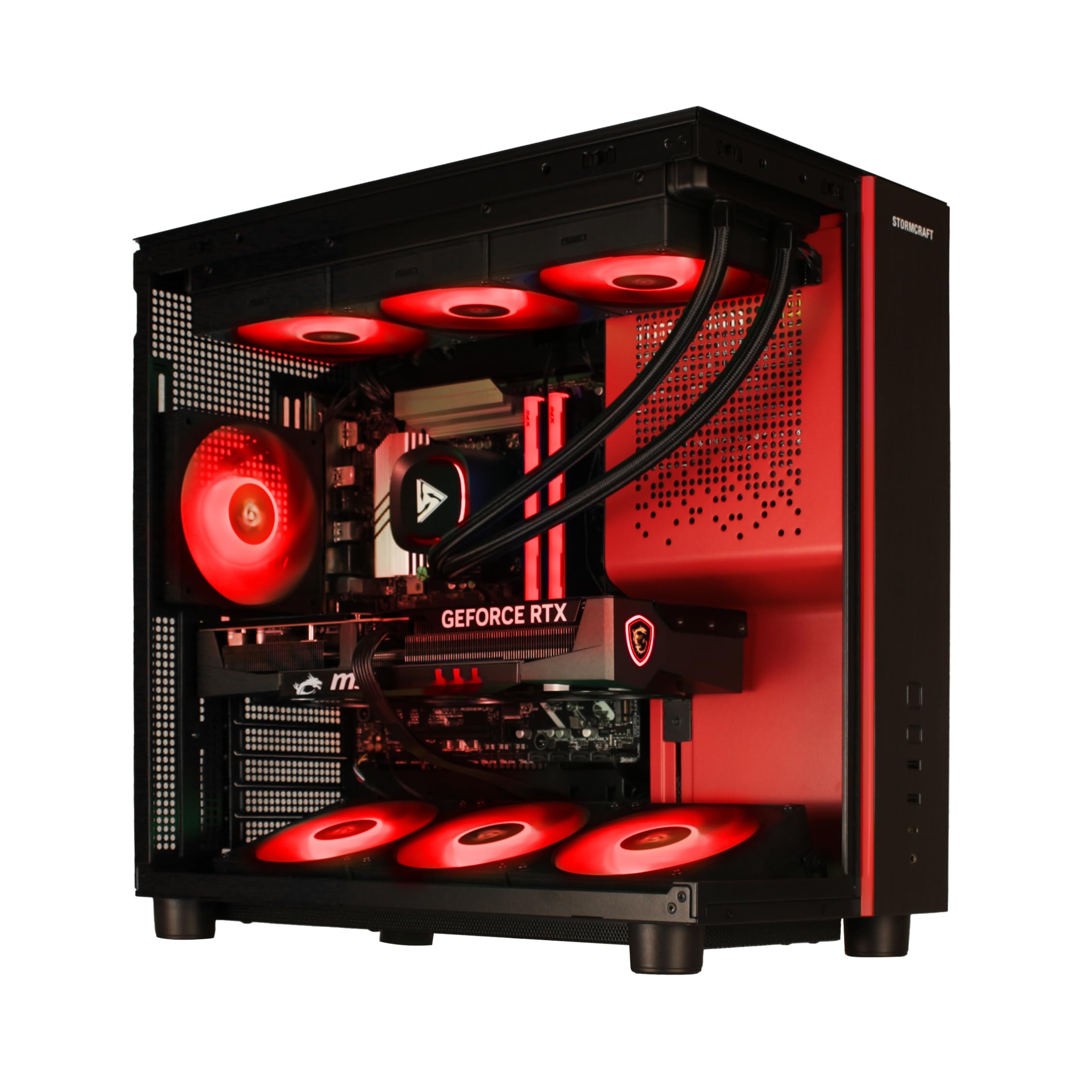
STORMCRAFT’s 4K-ready beast pairs the RTX 5080 with the legendary 9800X3D gaming CPU.
The Ryzen 7 9800X3D’s 3D V-Cache delivers top-tier gaming frame rates, paired here with an RTX 5080. The AMD Ryzen 7 9800X3D with its 3D V-Cache is widely considered the top choice for gaming, and here it’s paired with the NVIDIA GeForce RTX 5080 carrying 16GB of GDDR7 memory on a 256-bit bus. Owners call it a beast at 1440p 240Hz and report it handles 4K at around 180Hz.
Performance exceeds all expectations, with one owner playing Gears 5 on a 4K monitor at ultra settings with 100 FPS or higher. The 32GB of DDR5 6000MHz RGB memory is fast, and the 2TB NVMe Gen4 SSD provides generous storage. The 850W Gold Certified Power Supply is a quality component that won’t need an upgrade.
Assembled in California with a 2-year parts and 3-year labor warranty, plus free lifetime technical support, this is a confident buy. The 360mm AIO liquid cooler and 7 ARGB fans keep things running quiet, and the RGB mechanical keyboard and mouse are appreciated bonuses. Only minor notes: the case is substantial at 17 inches tall, so measure your desk space.
What makes it special
- The 9800X3D is the best gaming CPU available for frame consistency
- RTX 5080 crushes 4K and high-refresh VR
- Strong 2-year parts warranty with lifetime support
Before you buy
- Large case footprint needs desk space
- Premium price positions it near the top of this list
Ideal for: Enthusiasts who want the best possible VR frame times and plan to keep the system for years.
Not for: Budget-conscious buyers — this is unapologetically a high-end investment.
12. Skytech Gaming Azure 3

Skytech’s white 4K showpiece with the RTX 5080 and a 360mm AIO cooler.
The Azure 3 is Skytech’s premium answer to 4K Ultra gaming and high-end VR. It combines the AMD Ryzen 7 9800X3D at 4.7GHz with the NVIDIA GeForce RTX 5080’s 16GB of GDDR7 memory, a pairing designed for maximum frame rates. The 32GB of DDR5 RAM runs at 6000MT/s with RGB lighting, and the 2TB NVMe SSD handles your entire library.
Owners are uniformly enthusiastic, with one calling it a “beast of a machine” that nothing slows down. The 360mm AIO liquid cooler prevents thermal throttling, and the white Azure case with tempered glass is a head-turner. It runs most games at 4K Ultra with smooth 60+ FPS, which is exactly the headroom demanding VR titles need.
The build includes free gaming keyboard and mouse, plus the same no-bloatware Windows 11 Home experience as the O11 Vision. Wi-Fi 5 is the included wireless standard, so again, ethernet is recommended for large downloads. This is a strong alternative to the STORMCRAFT Phantom if you prefer the Skytech brand and the white aesthetic.
Why it’s a confident pick: The 9800X3D and RTX 5080 combo is proven to deliver top-tier performance, and owners mention no issues with noise or heat.
Choose this if: You want the premium performance and like the clean white tower look; otherwise the similar STORMCRAFT is equally strong.
13. Panorama RTX 5080 Gaming Desktop

A 24-core powerhouse with panoramic glass that runs VR and heavy creation flawlessly.
The Panorama is for creators who need a machine that never says no. The Intel Core i9-14900KF offers 24 cores and 32 threads with a massive 6.0GHz max boost clock, making it a rendering monster. The NVIDIA GeForce RTX 5080 with 16GB of GDDR7 memory handles the graphics, and Windows 11 Pro comes preinstalled for advanced security and device control.
Customers note it runs games smoothly for a full year of non-stop use, with one handling DCS A-10C flawlessly. The 2TB PCIe Gen4 NVMe SSD offers boot and transfer speeds up to 30x faster than a traditional hard drive. Visuals are the headline here — the Panorama name comes from the front and side full-panel tempered glass that shows off the 9 ARGB PWM fans.
Empowered PC assembles these in the USA with rigorous stress testing before shipping. The 3-year limited hardware warranty plus lifetime technical support is excellent backing. A caveat from owners: the ad claims 10 RGB fans but the unit ships with 9, and one owner found a GPU power cable touching a lower fan — easily fixed but worth checking on arrival.
Why it’s the creator pro pick: The 6.0GHz boost clock and 24 cores deliver serious rendering power, and the panoramic glass case is a visual centerpiece.
Best suited for: Streamers, editors, and VR users who want Windows 11 Pro with a three-year warranty and a showpiece tower.
Understanding the Specs
GPU and VRAM
The graphics card is the single most important part of a VR computer. Your headset is basically a monitor strapped to your face, and it needs the GPU to render two images at once. VRAM (video RAM) is the card’s short-term memory for textures — more of it means higher detail without stuttering. Look for RTX 5070-classcards with at least 12GB to 16GB of VRAM for comfortable headroom in the most demanding VR titles.
CPU and Cooling
The processor simulates the game world while the GPU draws it. A modern 8-core or higher CPU (like the Ryzen 7 9800X3D or Core i9) prevents bottlenecking. Cooling matters because VR sessions are intense — a 360mm AIO liquid cooler keeps things stable, while air-cooled builds with multiple fans are quieter but can run warmer under sustained loads.
Memory and Storage
RAM handles everything happening at once — your VR game, background apps, and streaming software. 32GB of DDR5 is the balance for serious VR users. Storage speed determines load times. An NVMe SSD with Gen4 speeds loads entire VR environments in seconds, while a traditional hard drive is significantly slower.
Connectivity
Most VR headsets connect via DisplayPort or HDMI directly to your graphics card. High-end headsets like the Valve Index need a DisplayPort connection, while the Meta Quest headsets primarily use USB. Check that your chosen desktop has the right ports on the GPU, and consider if you want WiFi 6E or 2.5G Ethernet for online VR or streaming.
FAQ
What is the minimum spec for a VR-ready computer?
How much VRAM do I really need for VR?
Does my VR headset plug directly into the graphics card?
Is 16GB of RAM enough for virtual reality?
Why does refresh rate matter for my VR computer?
Can a budget gaming desktop really handle VR?
Should I buy a desktop or a laptop for VR?
Is liquid cooling necessary for a VR gaming PC?
Final Thoughts: The Verdict
For the majority of shoppers, the computer for virtual reality winner is the Skytech Gaming O11 Vision because it balances a 16GB RTX 5070 Ti with liquid cooling and a roomy 2TB SSD, at a crowd-pleasing value backed by thousands of satisfied owners. If you want a more budget-friendly entry point, grab the CyberPowerPC Gamer Xtreme and still get a real VR-capable GPU at the lowest cost. And for the absolute best frame times and 4K headroom, the STORMCRAFT Phantom with its RTX 5080 and top-tier gaming CPU is the one to reach for.
How We Picked
We do not accept paid placement. Every pick is matched to a real buyer and a real use-case; we do not hands-on test units.
Sources & Methodology
Specifications: manufacturer listings and product documentation. Review insights: verified customer reviews, as of August 2026. Pricing: not shown on this page (it changes often); check the current price via the retailer link.
As an Amazon Associate, FitlyFast earns from qualifying purchases. This does not affect which products we feature.