
Our readers keep the lights on and the weekend projects moving. As an Amazon Associate, I earn from qualifying purchases.
Specs are compiled from manufacturer listings and verified buyer reviews and can change over time — please confirm the key details on the product page before buying.
If you type all day, the difference between a good and a bad keyboard is the difference between finishing work pain-free and finishing with aching wrists. The best office keyboards balance quiet keys, solid comfort, and reliable connections — and this guide breaks down nine of the most popular options so you can pick the one that fits your desk and your hands.
I’m Rikta — the founder and writer behind FitlyFast. This guide is built by comparing the manufacturers’ published specifications and the patterns across verified customer reviews, so you get each pick’s real strengths and trade-offs instead of marketing spin.
You spend hours typing every day, so the right computer keyboard for office work can save your wrists and boost your speed. This guide covers budget combos, premium mechanical boards, and ergonomic split designs, so you can match a keyboard to your typing style and budget.
Our Picks at a Glance


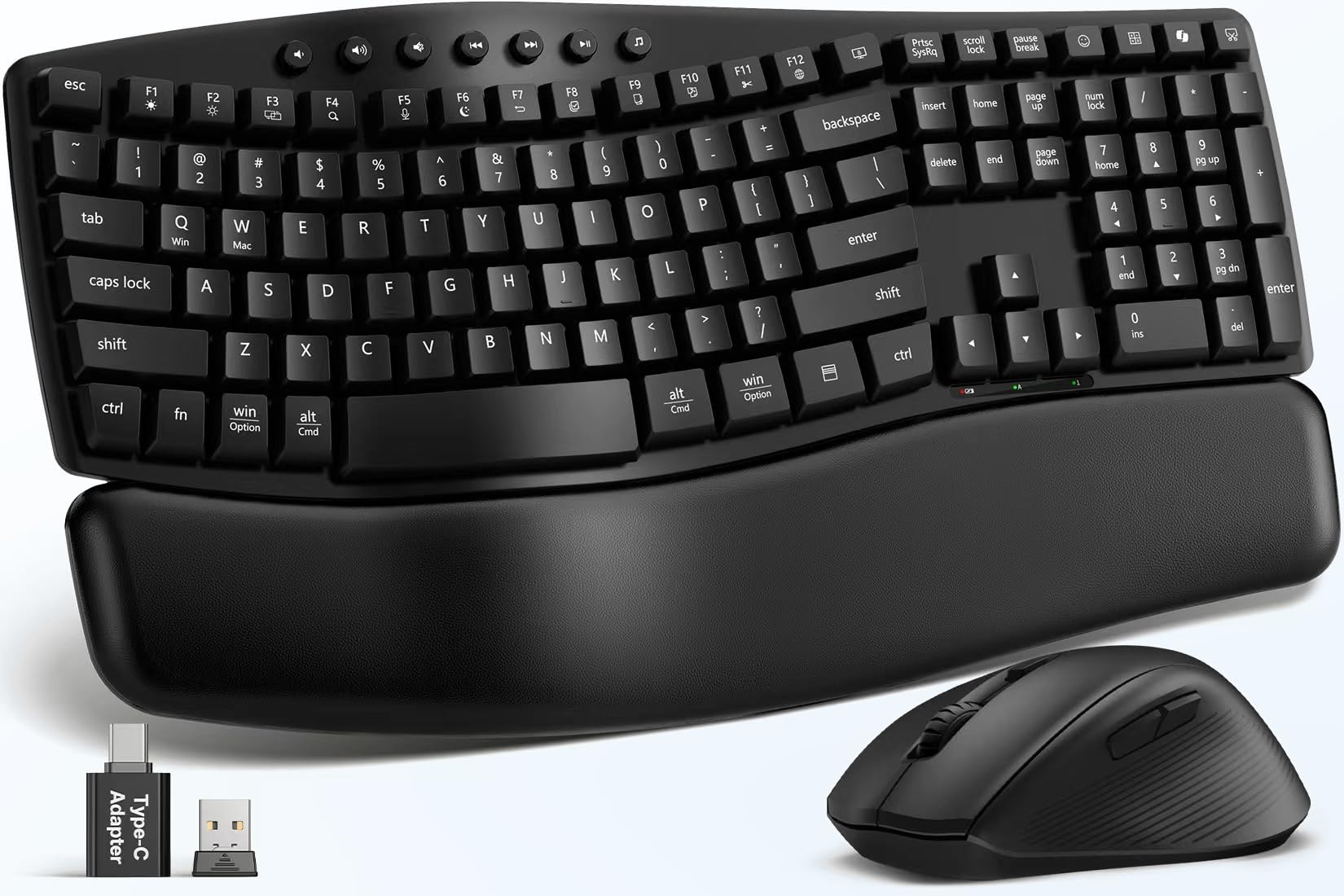
How To Choose The Best Computer Keyboard For Office Work
Office keyboards are not all the same. Match the switch type, ergonomic features, and connectivity to your typing habits and workspace. Here are the key factors to consider before you buy.
Switch Type and Key Feel
The “switch” is the mechanism under each key that registers your press. Mechanical switches (like Cherry MX) give a crisp, tactile feel that many typists love, but they can be loud. Membrane keyboards (like most standard office boards) are quieter and cheaper, but often feel softer and less precise. If you type in a shared office, a quiet mechanical or a good membrane is the safer pick.
Ergonomics: Wrist Rests and Tilt
Long typing sessions can strain your wrists. A cushioned wrist rest supports your palms, while adjustable tilt legs let you find a comfortable angle. Split or wave-shaped keyboards encourage a more natural hand position, which can reduce fatigue over an 8-hour day.
Connectivity: Wired, 2.4GHz, or Bluetooth
Wired keyboards (USB-A) are plug-and-play with zero latency, but cables clutter your desk. Wireless 2.4GHz keyboards use a tiny USB receiver for a stable connection. Bluetooth connects to multiple devices like laptops and tablets but can occasionally drop. Consider how many devices you switch between and whether you mind changing batteries.
Quick Comparison
| Model | Best For | Key Type | Connectivity | Wrist Rest | Amazon |
|---|---|---|---|---|---|
| SABLUTE CK23 Plus★ Best Overall | Style & Value Combo | Membrane (Round) | 2.4GHz Wireless | Magnetic Soft-Touch | Amazon |
| RECCAZR ErgonomicBudget Ergonomic | Budget Ergonomic | Membrane | Wired USB-A | Built-in | Amazon |
| SABLUTE MA41Quiet Combo | Quiet Wireless Combo | Membrane (Wave) | 2.4GHz Wireless | Soft Leather | Amazon |
| Nulea Split | Split Design & Rechargeable | Membrane | Bluetooth & 2.4G | Cushioned Leatherette | Amazon |
| SABLUTE MA31 Pro | Backlit & Rechargeable | Membrane (Wave) | 2.4GHz Wireless | Faux Lambskin | Amazon |
| Cherry KC 200 MX | Quiet Mechanical Feel | Mechanical (MX2A Silent) | Wired USB-A | No | Amazon |
| Logitech MK850 | Multi-Device Switching | Membrane | Bluetooth & USB | Cushioned Palm Rest | Amazon |
| Incase Sculpt | Classic Microsoft Ergo | Scissor | Wireless (Receiver) | Cushioned Palm Rest | Amazon |
| Logitech MX Keys S | Premium Typing & Backlit | Scissor (Low-Profile) | Bluetooth & Logi Bolt | No | Amazon |
In‑Depth Reviews
1. SABLUTE CK23 Plus Wireless Combo
Our pick — over 4.5★ from 150+ verified ratings; the strongest balance of quality and price.
A full-size wireless combo that brings style and comfort to your desk while staying affordable.
The SABLUTE CK23 Plus is the crowd favorite for a reason. Weighing just 2.2 pounds, this set pairs a retro typewriter-style keyboard with a mouse that features three DPI settings (800/1200/1600) for smooth cursor control. The full-size layout includes 104 keys, including a number pad, so your workflow stays uninterrupted.
Its detachable magnetic wrist rest and plug-and-play 2.4GHz connectivity win users over. The detachable magnetic wrist rest snaps on and off in seconds, stays aligned, and has a wipeable soft-touch surface. You get stable 2.4GHz wireless connectivity with a single USB receiver — no drivers needed, just plug in and type. Both devices auto-sleep after 5 minutes of inactivity to save battery.
As owners put it, this set is “cute and functional,” with satisfying yet quiet typing and a reliable connection. The recurring gripe is the occasional defective unit on arrival — one reviewer noted a dead keyboard and broken wrist rest, though the replacement worked great. At this price, it’s a fantastic value for a full combo that looks great on any desk.
What You Get
- Detachable magnetic wrist rest with soft padding
- Two-stage adjustable tilt legs for a natural angle
- Mouse with 3 DPI levels and side buttons
- Auto-sleep mode to extend battery life
Keep In Mind
- No backlighting for dark rooms
- Runs on 2 AAA + 1 AA batteries (not included)
Best for: Anyone who wants a complete, stylish, budget-friendly wireless set that’s comfortable for all-day typing.
Think twice if: You need backlit keys or a mechanical switch feel — this is a membrane keyboard.
2. RECCAZR Ergonomic Wired Keyboard
A wired, wave-shaped keyboard that gives you ergonomic comfort without the wireless hassle.
The RECCAZR Ergonomic Keyboard is for the person who just wants to plug in and type. It’s a 104-key full-size membrane board with a built-in wrist rest and a stepped keycap design that makes every key easy to reach. “It’s def better than the flat keyboards,” one buyer notes, praising the non-slip, contoured surface.
Its spill-resistant design features bottom drain holes. If you tip over a coffee, just disconnect it and wait for the water to dry — it’s built to shrug off minor accidents. The wired USB-A connection means zero latency, no battery changes, and no interference. You get quiet, cushioned keystrokes that feel responsive under your fingertips.
The sensitive keys may cause typos for light typists. Some owners find that lightly brushing a key activates it, and the lightweight build needs a skid-proof mat underneath to stay put. For the price it’s okay, as the reviews put it. If you’re a heavy-handed typist who hates missed keystrokes, this could be the perfect reliable daily driver.
Comfort focus: The built-in wrist rest and wave-style keys reduce strain, with buyers reporting their hands and wrists don’t cramp during long sessions.
Value read: A no-frills, dependable wired board that skips wireless features but nails the essentials at a budget price.
Reach for this if: You want a cheap, reliable, ergonomic keyboard that never needs charging.
Look elsewhere if: You’re a light typist — the sensitive keys can cause typos.
3. SABLUTE MA41 Wireless Combo
An ultra-quiet wave keyboard that keeps your shared office peaceful and your wrists happy.
The SABLUTE MA41 is designed for quiet. With 30dB quiet typing and mouse clicks, it claims to reduce noise by up to 90%, creating a calmer workspace for meetings and late-night work. The soft leather memory foam palm rest reduces wrist pressure, unlike traditional hard plastic rests.
Laser-etched keys resist fading for long-term durability. Laser-etched keys resist fading, and every key is tested for up to 10 million keystrokes. You also get 12 productivity shortcuts for screenshots, media controls, calculator, and screen lock — though on macOS, the Music App, Calculator, and AI Assistant shortcuts are unavailable. The single 2.4GHz receiver connects both devices and includes a USB-C adapter.
What owners rave about is the quality and the quiet. One buyer calls it a rare find, praising the soft leather palm rest that reduces wrist strain and the easy plug-and-play setup. The mixed feedback centers on battery life — some report great performance, while others note it’s rechargeable. With auto-sleep and 6-12 months of battery life, it’s a strong mid-range choice.
Quiet & Comfortable
- 30dB quiet typing for shared spaces
- Soft leather memory foam wrist rest
- 12 productivity shortcut keys
- Spill-resistant with auto-sleep
Consider This
- Battery life gets mixed reviews
- Some Mac shortcuts don’t work
Best suited for: Office workers who need a whisper-quiet setup and want all-day wrist comfort.
The catch: Battery expectations vary, so keep spare AAs on hand.
4. Nulea Ergonomic Split Keyboard
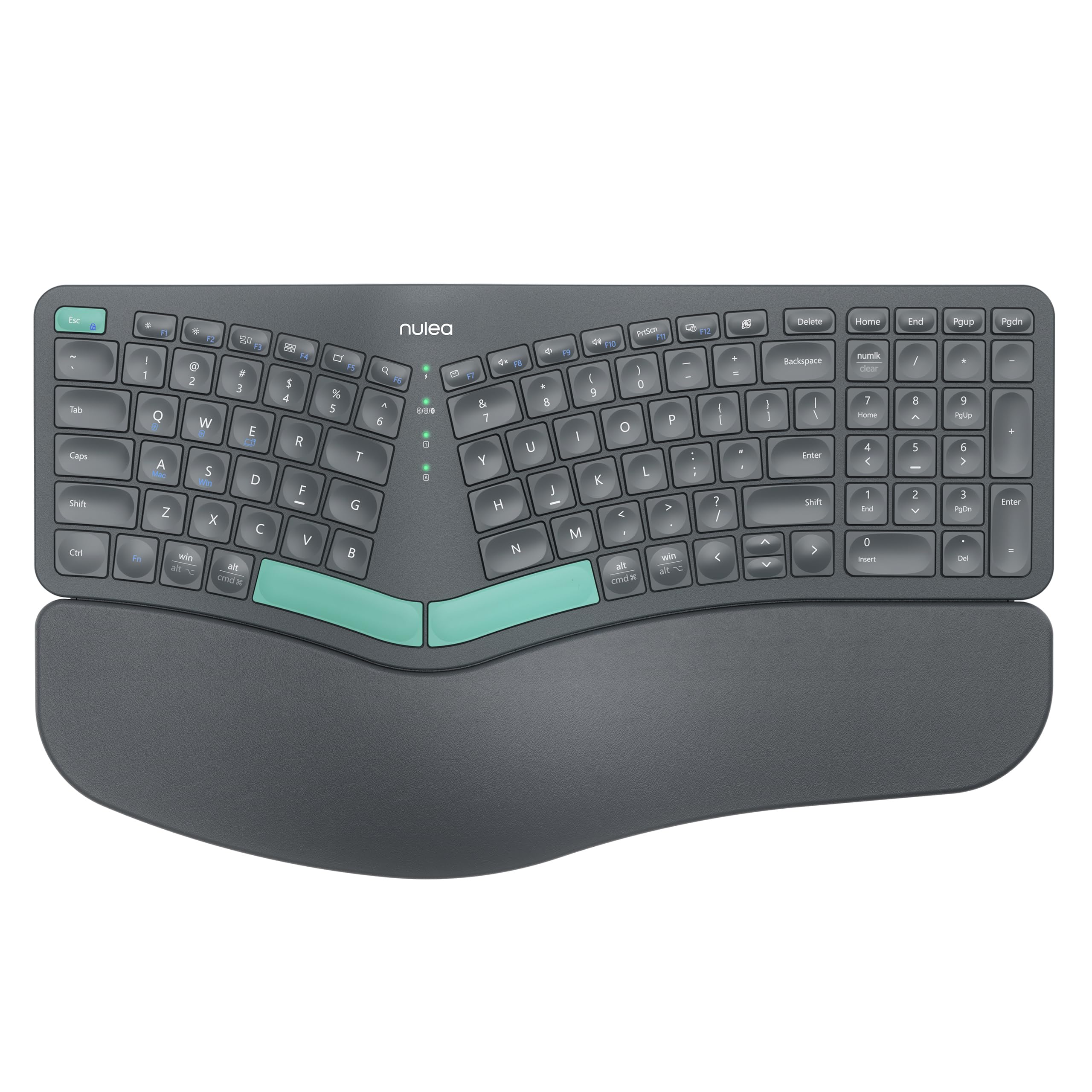
A split-design wireless keyboard that adapts to your hands’ natural alignment for serious comfort.
The Nulea split keyboard takes ergonomics seriously with a distinctive split design that adapts to the natural alignment of your hands. “I had my doubts about the design since it’s the first one like this I’ve tried, but getting used to it was super fast (2 to 3 days),” one owner shares. The padded wrist rest is crafted with a soft, skin-friendly leatherette.
It’s dual-mode, with both Bluetooth and 2.4G wireless so you can switch between devices. No more hunting for batteries — it’s rechargeable with an impressive 206-hour battery life, keeping you productive without interruption. The adjustable support tilts offer three different angles to suit your personal preference.
The key feel is “very pleasant,” and one buyer reports it boosted their words per minute. The trade-off is minor: one owner notes the numlock LED light doesn’t work. But functionally, everyone agrees it’s a good purchase. If you type for hours and want a more natural hand position, this is a compelling pick.
Comfort-first: The split keyset and oversized leatherette wrist rest help reduce strain and keep your wrists in a neutral position.
Feature set: Bluetooth + 2.4G dual-mode with 206-hour rechargeable battery is rare at this price.
Ideal for: People with hand or wrist pain who want a rechargeable, split-style keyboard they can use wirelessly.
Note: Some users may see non-functional indicator LEDs — a minor cosmetic issue.
5. SABLUTE MA31 Pro Combo

A backlit, rechargeable combo with a silky palm rest that works for weeks on a single charge.
The SABLUTE MA31 Pro is for the person who works late. It features a 4000mAh battery — double the capacity of standard backlit keyboards — with intelligent auto-sleep so it lasts weeks between charges. The silky-smooth faux lambskin palm rest is durable, sweat-proof, and easy to maintain.
The backlighting is a highlight. You can choose soft tones (blue, cyan, white) for calm productivity or bold colors (red, green, purple, yellow) to match your mood. Wave keys deliver smoother, more comfortable typing, and adjustable front/back stands support healthy wrist posture. The RGB mouse has a 700mAh battery, 6 buttons, and 3 DPI levels (800/1200/1600).
Owners love the lighting and the quality — one buyer calls it the best keyboard and mouse they’ve ever used, praising the ergonomic shape and the unique dual feet that tilt the keyboard down for wrist comfort. The one mixed note is ergonomics, with a few finding the left palm rest too small and the mouse a bit slippery. For late-night workers, the backlit keys are a standout.
Standout Features
- 4000mAh battery lasts weeks per charge
- 7 backlight colors for any mood
- Faux lambskin palm rest, sweat-proof
- 9 shortcut keys for productivity
Watch Out For
- Left palm rest may feel small to some
- Mouse contour could be more sculpted
Pick this if: You type in the dark or want a premium-feeling, rechargeable wireless combo with no battery anxiety.
skip it if: You need a perfectly contoured mouse — a few owners find it slippery.
6. Cherry KC 200 MX Mechanical

A wired mechanical board with silent switches that delivers the classic clicky feel without the office noise.
The Cherry KC 200 MX is for typists who refuse to give up mechanical feel. It’s equipped with CHERRY MX2A SILENT RED switches — smooth, linear, with no click — rated for more than 50 million actuations per key. The anodized aluminum surface gives it a solid, heavy build that stays put on your desk.
It’s packed with practical office features: white status LEDs in the CAPS LOCK, SCROLL LOCK, and NUM LOCK keys, plus 4 additional keys for quick access to the calculator app and volume control. Full N-key rollover means all keys are read simultaneously, and anti-ghosting prevents incorrect entries — useful if you type fast or game on the side.
Owners describe it as “deathly quiet” and “butter-smooth,” with one noting it’s quiet enough for a cubicle. It lacks backlighting and is wired-only. Also, the function key spacing and calculator placement take some adjustment. If you want mechanical precision without waking your coworkers, this is the one.
Why It Wins
- Silent red switches, perfect for shared offices
- 50 million actuations per key durability
- Dedicated calculator and volume keys
- Solid aluminum plate, non-slip feet
The Trade-Off
- No backlighting for dark environments
- Wired only — no wireless option
Best for: Mechanical keyboard fans who demand quiet, precise switches and a build that lasts.
Not for: Anyone who needs backlighting or hates cables.
7. Logitech MK850 Combo

A multi-device combo that lets you switch between three screens with the press of a button.
The Logitech MK850 is built for the multi-tasker. Both the keyboard and mouse are fully multi-device and multi-OS friendly. You can start typing on your computer, then switch to your tablet, phone, or a second computer. Pair your mouse with up to 3 screens and toggle between them instantly.
The full-size, oversized wave-shaped keyboard features a cushioned palm rest and carefully-crafted keys for quiet, comfortable typing. The contoured right-handed mouse has a hyper-fast scroll wheel and 8 customizable buttons so you can fly through documents and web pages. Logitech DuoLink software links the mouse and keyboard together for custom functionality.
Buyers report excellent multi-device switching with a simple button hold, and one notes the AA battery lasts around 2 years at 100% with daily heavy use. “The way the keys click and clack is very nice,” one buyer says. The mixed feedback centers on Bluetooth quality — a few report lag and disconnects. If you work across multiple machines, this combo earns its keep.
Productivity booster: You can switch between 3 devices without re-pairing, so you move from your desktop to your laptop in one keystroke. The hyper-fast scroll wheel lets you fly through long documents without endless scrolling.
Heads up: Bluetooth can be finicky for a small number of users — the USB receiver is the more stable route.
Choose this if: You juggle a desktop, laptop, and tablet and hate re-pairing devices.
Consider otherwise: If you only use one computer, a simpler setup saves money.
8. Incase Sculpt Ergonomic Keyboard

The beloved Microsoft Sculpt design is back, with a split keyset and cushioned palm rest for all-day relief.
The Incase Sculpt is a faithful recreation of the discontinued Microsoft Sculpt, and fans are thrilled. “A classic is back,” one owner writes, praising the soft but satisfying scissor keystroke that’s quiet and comfortable. It features a domed keyboard with a split keyset design that positions your wrists and forearms in a natural, relaxed position.
It’s fully customizable. A removable elevator and reverse tilt let you adjust wrist comfort and maintain a straight, neutral wrist position. It includes a Windows button for one-touch start menu access, a back button for faster navigation, and a screen snipping key for quick copy, paste, and share functions. The separate number pad is included.
Security matters too — it offers Advanced Encryption Standard (AES) 128-bit encryption for secure data entry. Owners mention 3-day adaptation with no wrist pain afterward, and 2 AAA batteries lasting around 1 year. Some users report two-finger typos and mixed functionality reviews. It’s a proven ergonomic fix for wrist pain.
Comfort Wins
- Split keyset with domed design for natural posture
- Removable elevator and reverse tilt
- Separate number pad included
- AES 128-bit encryption for security
Know This
- ‘Mixed’ feedback on overall functionality
- 2 AAA batteries needed (not included)
Reach for this if: You loved the original Microsoft Sculpt and want the same ergonomic relief with modern availability.
Be aware: Some users find certain functions finicky; expect a short adaptation period.
9. Logitech MX Keys S

A premium low-profile keyboard with smart backlighting that adapts to your environment.
The Logitech MX Keys S is the gold standard for premium office typing. It has a laptop-like profile with spherically-dished keys shaped for your fingertips, delivering a fast, fluid, precise, and quieter typing experience. “I’ve used it for 18 months of daily use and it’s earned a permanent spot on my desk,” one owner says.
The smart backlighting is the standout feature. Keys light up as your hands approach and automatically adapt to the environment. You get more lighting customizations through the Logi Options+ app. It’s USB-C rechargeable, staying powered for up to 10 days on a full charge (or up to 5 months with backlighting off).
You can pair it with up to 3 devices on Windows, macOS, or Linux using Bluetooth Low Energy (a low-power wireless standard) or the included Logi Bolt USB receiver (a small plug-in dongle). Customers note the keys are quiet and tactile, with good travel (the distance a key moves when pressed), and switching between devices takes one button press. The trade-off is the price, and some users note wireless connections may occasionally drop. If you want a premium feel and don’t mind paying for it, this keyboard delivers.
Premium Perks
- Spherically-dished, low-profile keys
- Smart backlighting adapts to environment
- 10-day battery, USB-C rechargeable
- Pairs 3 devices via Bluetooth or Logi Bolt
Before You Buy
- Premium price tag
- Connectivity occasionally drops for some
- No wrist rest included
Best for: Professionals who want the best typing experience and don’t mind paying for it.
Skip if: You’re on a strict budget or prefer a wrist rest built into the keyboard.
Understanding the Specs
Switch Types
The switch is the mechanism under each key. Mechanical switches (like Cherry MX) use a spring and metal contact for a crisp, precise feel — great for fast typists, but often louder. Membrane keyboards use a rubber dome for a quieter, softer press. Scissor switches (common in laptops) sit between the two, offering short travel and a stable, quiet feel.
Connectivity Options
Wired keyboards connect via USB-A and offer zero latency with no batteries to change. Wireless 2.4GHz uses a tiny USB receiver for a stable connection. Bluetooth connects to multiple devices (laptops, tablets, phones) without a receiver. Some premium boards offer both Bluetooth and a 2.4GHz receiver for maximum flexibility.
FAQ
Is a mechanical keyboard better for office work?
What is the difference between Bluetooth and 2.4GHz wireless?
Will a wireless keyboard work with my Mac and Windows PC?
How long do wireless keyboard batteries last?
What does an ergonomic keyboard actually do?
What does N-key rollover and anti-ghosting mean?
Is it worth getting a keyboard and mouse combo?
What is a keycap and why does it matter?
Why do some keyboards have a wrist rest and others don’t?
Are backlit keyboards worth it?
Final Thoughts: The Verdict
For most people, the winner for the computer keyboard for office work is the SABLUTE CK23 Plus because it gives you a full wireless combo with a comfortable magnetic wrist rest at a value price. If you type across multiple devices and want smooth switching, grab the Logitech MK850 — it earns its keep when you juggle a desktop and a laptop. And for premium backlighting and the best typing feel, the Logitech MX Keys S is the one to reach for, with its smart keys that light up as your hands approach.
How We Picked
We do not accept paid placement. Every pick is matched to a real buyer and a real use-case; we do not hands-on test units.
Sources & Methodology
Specifications: manufacturer listings and product documentation. Review insights: verified customer reviews, as of August 2026. Pricing: not shown on this page (it changes often); check the current price via the retailer link.
As an Amazon Associate, FitlyFast earns from qualifying purchases. This does not affect which products we feature.