
Our readers keep the lights on and the weekend projects moving. As an Amazon Associate, I earn from qualifying purchases.
Specs are compiled from manufacturer listings and verified buyer reviews and can change over time — please confirm the key details on the product page before buying.
If you spend your workday hunched over a laptop or staring down at a screen that sits too low, a monitor stand is the quickest fix for a sore neck you can make without changing your chair or your desk. The right one lifts your display to eye level, frees desk space for your keyboard, and hides cables, drives, and pens.. This guide compares nine stands that handle from a single lightweight laptop to a heavy dual-monitor setup, so you can match build, height, and storage to your needs.
I’m Rikta — the founder and writer behind FitlyFast. This guide is built by comparing the manufacturers’ published specifications and the patterns across verified customer reviews, so you get each pick’s real strengths and trade-offs instead of marketing spin.
We break down the strongest computer monitor stand choices for every desk size, budget, and workload to help you buy the right one.
Our Picks at a Glance


How To Choose The Best Computer Monitor Stand
Start with your screen’s weight and desk depth, then decide how much organization you need. A stand is simple, but the wrong size can mean a wobbly monitor or a keyboard that won’t slide underneath.
Check the weight limit first
Your monitor’s weight determines which stands are safe. Basic models hold 20 pounds, while heavier-duty steel or wood options can carry 100 pounds or more, which matters if you run two large screens or a heavy all-in-one PC with a printer on top.
Measure your desk, then your keyboard
A stand’s height raises your screen, but the space beneath it is where your keyboard and mouse need to live. Measure the depth of your desk and the height of your keyboard, and compare that to the stand’s dimensions to make sure everything fits comfortably.
Decide how much storage you really need
Stands range from a bare platform to models with drawers, sliding trays, and power ports. If your desk is cluttered with pens and drives, pay for storage; if you just want your screen higher, a simple riser is all you need.
Quick Comparison
| Model | Best For | Height | Weight Limit | Material | Amazon |
|---|---|---|---|---|---|
| Simple Trending 2-Tier★ Best Overall | Dual-monitor setups | 7 inches | 100 lbs | Metal | Amazon |
| ELIVED 2-Pack with DrawersBest Value | Adjustable height | 4.0–5.6 in | 44 lbs | Metal | Amazon |
| valen Riser with DrawersCompact Pick | Compact tool-free setup | 4.7 inches | 20 lbs | Wood | Amazon |
| YAOHUOO Dual Monitor | Budget dual-monitor | 4.9 inches | 100 lbs | Wood | Amazon |
| Uncaged WorkEZ | Adjustable height range | 2–18 inches | 13 lbs | Aluminum | Amazon |
| ROCDEER Bamboo Riser | Eco-friendly style | 4.4 inches | 100 lbs | Bamboo | Amazon |
| Fenge Two-Tier Oak | Large dual-monitor with drawers | 5.5 inches | 99 lbs | Wood | Amazon |
| Fenge Corner Module | Custom corner layouts | 5.3 inches | 132 lbs | Wood | Amazon |
| Vaydeer All-in-One | Power + charging built-in | 5.5 inches | 110 lbs | Metal | Amazon |
In-Depth Reviews
1. Simple Trending 2-Tier Dual Monitor Stand with Mouse Pad
Our pick — over 4.5★ from 850+ verified ratings; the strongest balance of quality and price.
A towering 7-inch lift that clears your desk and holds a full dual-screen setup with room underneath for your keyboard.
This is the pick for people with two monitors and a keyboard that keeps getting in the way. The 7-inch rise puts displays right at eye level, and the 30.5″W x 10″D bottom tier gives a full-size gaming keyboard, an Xbox console, or a printer a proper home. The metal frame with steel support legs is rated to hold up to 100 lbs, so a pair of 24-inch screens or a heavy printer won’t make it flex.
The design goes further than most rivals at this level. The mesh platform pulls heat away from your gear so it stays cool during long sessions, and the included 32″x10″ mouse pad glides smoothly across the whole width. At 3.16 kg it isn’t the lightest stand around, and its 7-inch height towers over the valen riser’s 4.7 inches, so it’s the better match for taller users or deeper desks. Buyers report it “holds two 24″ monitors; room for keyboard below,” which is exactly the setup most office workers run.
The recurring note across reviews is that the middle shelf can bend slightly under a heavy load, since the anti-bend bar only runs across the top. It’s a cosmetic issue rather than a structural failure, but if you’re planning to rest a single 43-inch ultrawide on it, you may want to add your own center support. Assembly takes most people about 10-20 minutes with the included Allen wrench, and the quality-per-dollar balance is why it’s the default recommendation.
What Owners Love
- Raises screens to a proper 7-inch eye level to ease neck strain
- Steel legs carry up to 100 lbs across two monitors
- Mesh middle shelf keeps electronics cool during use
- Generous 32-inch mouse pad included for smooth gliding
The Trade-Off
- Middle shelf can sag slightly without a center support bar
- Assembly takes roughly 20 minutes, not five
Pick this for: dual-monitor workers who want a tall, sturdy lift with real storage beneath.
Think twice if: you run a single massive ultrawide and want zero flex on the middle shelf.
2. ELIVED 2 Pack Monitor Stand Riser with Metal Drawer
Two adjustable-height stands that let you tune your eye level and stash the laptop out of the way.
The headline here is the 3-height adjustment: press the button on each leg and lift the platform to 4.0, 4.8, or 5.6 inches to find the spot that kills that nagging neck ache. Each stand is rated for 44 pounds, and across a pair that’s plenty for two separate workout stations or a monitor-plus-laptop combo. Owners mention “the adjustable legs make it great to tuck my laptop out of the way,” which is the whole point of a riser.
Assembly is genuinely tool-free — you screw the four legs in by hand and slide in the mesh drawer, done. The top plate and drawer are both mesh steel, so your computer stays cooler than it would on a solid shelf. The drawer is the main draw for desk tidiness, holding pens, drives, and paperwork, though a few owners find the drawers too shallow for large items.
Compared to the valen riser at 20 pounds, the ELIVED’s 44-pound limit is more than double, so it’s the safer bet for a heavier all-in-one desktop. The platform measures 14.57″x9.25″, which suits most standard monitors, and the anti-slip rubber pads protect both your gear and your desk surface. For the price of getting two stands that adjust independently, this is the smartest value in the list.
Reach for this if: you want two stands with real height adjustability and built-in drawers.
Look elsewhere if: you need one very wide platform for two side-by-side monitors.
3. valen Monitor Stand Riser with 3 Organizer Drawers
A shallow 7.5-inch-deep riser that fits tight desks and clips together in minutes without a single screw.
Space is the story here. At 19.5″L x 7.5″W x 4.7″H, this is 4.3 times shallower than the Simple Trending’s 32-inch width, which makes it the right call for a narrow desk or a shared workspace. The engineered-wood body resists warping and moisture, and the rounded corners keep it safe around hands and elbows.
What buyers love most is the three drawers, which turn a simple riser into a mini desk organizer for pens, drives, and small office supplies. Underneath, a full-size keyboard with a numeric keypad slides in “with room to spare,” so you get back usable desk space. Build it like a puzzle — no screws, no tools, under 10 minutes — although a few owners note the pieces need a bit of force and the edges aren’t perfectly smooth.
The honest limits: the height is fixed at 4.7 inches, so there’s no adjusting your eye level, and the drawers are too shallow for tall items like scissors. The 20-pound rating is also the lightest in this lineup, so keep it to a single monitor or a laptop rather than heavy dual screens. It feels a little lighter in hand than the MDF implies, but for a budget-friendly, ultra-compact organizer it does the job well.
Best for: tight desks where a shallow footprint and tidy drawers matter more than height adjustability.
4. YAOHUOO Dual Monitor Stand with LED Light and 2 Drawers

A wide white-and-pink desktop organizer that carries 100 pounds and lights up your workspace.
This one is built for style as much as function. The 36.2″W x 8.7″D tabletop fits two monitors, a laptop, and even a printer, while the particle-board frame is rated to hold a substantial 100 pounds. It comes in a clean white and pink finish that stands out from the sea of black metal risers, with a smooth surface that wipes clean in one pass.
Owners rave about the two large drawers with dividers, which keep pens, notepads, and calculators in order, and the slot on the middle shelf holds a phone or tablet upright. The real differentiator is the built-in LED light that adds a soft glow to your setup, even if some wish they could change its color. Assembly runs about 10 minutes with all tools included, and the 2-in-1 screwdriver covers both flathead and Phillips bits.
The catch is the 4.9-inch height, which is a touch lower than some tall users want, and the fact that this model is a single level — the keyboard lives beneath but there’s no lower shelf for extra gear. If you want drawers, a light, and serious weight capacity without paying premium prices, this is the balance point.
Who it’s for: buyers who want a pretty, well-organized desk with lighting built in — at a mid-range cost.
5. Uncaged Ergonomics WorkEZ Adjustable Monitor Stand

A foldable aluminum stand that rises from 2 inches to 18 inches and swivels a full circle.
If you’ve ever wished you could stand up and keep working, this is the answer. The legs open across a 16-inch range, so you can raise the panel from 2 inches up to a full 18 inches — tall enough to use your monitor at standing height on an ordinary desk. The swivel panel turns a complete circle and locks every 15 degrees, perfect for showing your screen to a colleague beside you.
Portability is the second act. At 3.1 lb it folds flat and lifts with one hand, so it slides into a bag or moves between desks with zero installation. The 16″x11″ aluminum top panel supports a full-size screen without flex, and owners find the height range (commonly used at 6″-10″) ideal for two monitors when paired. The biggest praise is how easy it is to change height and how sturdy it feels for a portable unit.
The trade-off is a 13-pound limit, which is the lowest here, and some customers note the legs feel wobbly at maximum height or that leveling one side tips the other. This isn’t a stand for heavy ultrawide monitors — it’s for a standard single display or a lighter laptop, where the adjustability range beats everything else on this list.
Standout Strengths
- 2-to-18-inch height range covers sitting and standing desks
- Panel swivels a full circle with 15-degree lock stops
- Folds flat at 3.1 lb for easy transport
The Reason to Hesitate
- 13-pound limit rules out heavy dual-monitor setups
- Leveling takes patience — adjusting one side tips the other
Choose this when: you alternate between sitting and standing or need a portable stand for multiple desks.
skip it if: your monitor is heavy or you never change your screen height.
6. ROCDEER Bamboo Monitor Stand Riser with Drawer
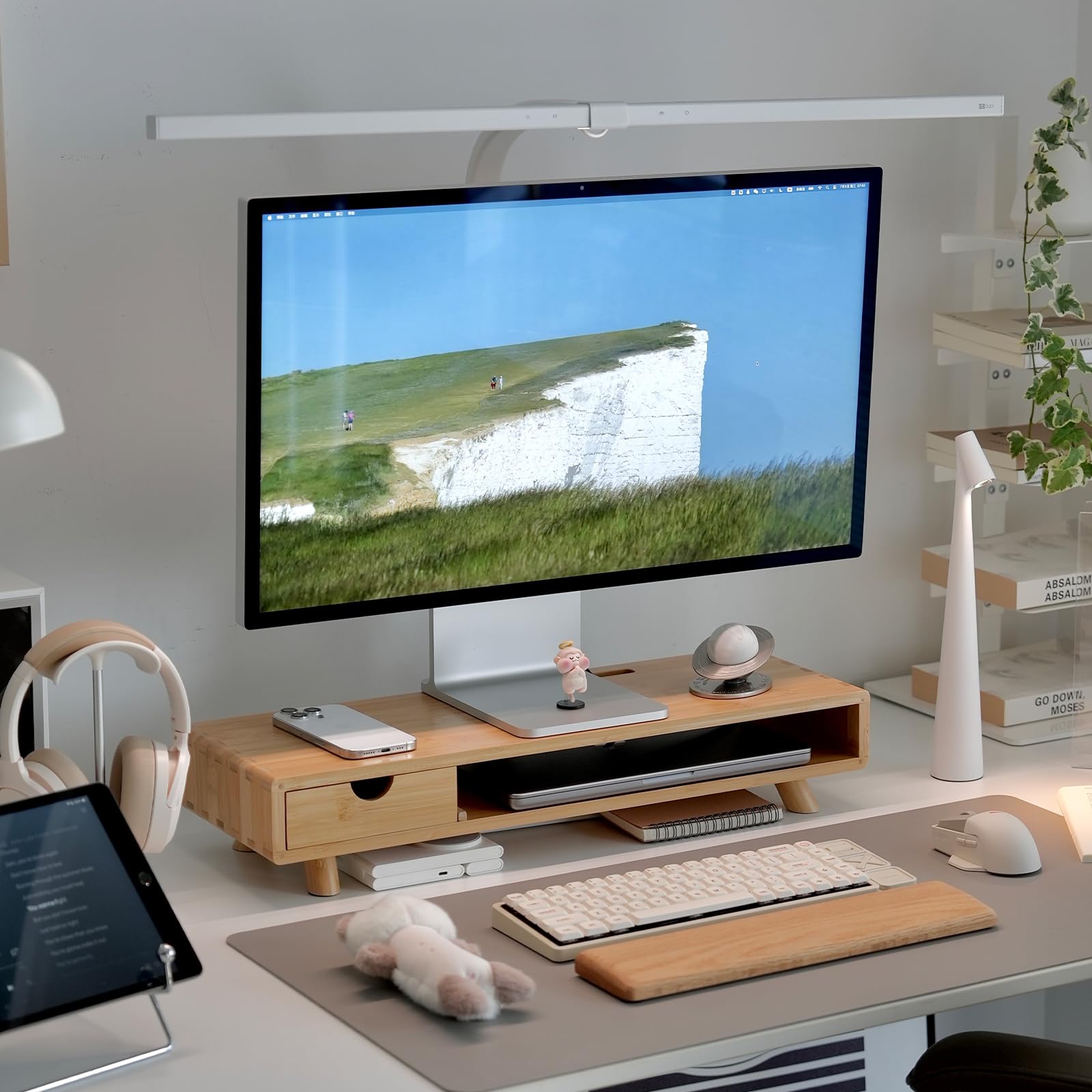
A warm FSC-certified bamboo stand that holds 100 pounds and brings a natural finish to any desk.
This is the stand you buy when you want your desk to look as good as it works. Every component is made from FSC-certified wood, finished with a water-based varnish that keeps it odorless and safe. The natural bamboo aesthetic reads as warm and modern, and the solid construction with mortise-and-tenon joinery gives it a premium feel that metal stands can’t match.
It supports up to 100 pounds and fits most 24-32 inch monitors, curved displays, and laptops, so it’s genuinely heavy-duty despite the delicate look. The lower tier and drawer organize tablets, books, and desktop gadgets, while the semi-enclosed shelf swallows a laptop up to 16 inches or A4 files. Behind it, a T-shaped slot routes cables cleanly, and the 4.4-inch height can drop even lower if you remove the legs.
Owners consistently call out the quality and the clean natural wood finish, with some noting the drawer fits scissors snugly and the whole unit levels perfectly. The minor caveats are that the wood is smooth enough for items to slide back, and an occasional unit shows a slightly rusty leg attachment hidden after install. At this price you’re paying for material and craftsmanship, and it shows.
The verdict: the best-looking stand here, with 100-pound strength and enough organization for a tidy, warm desk.
7. Fenge Monitor Stand with Frosted Storage Drawer, Oak
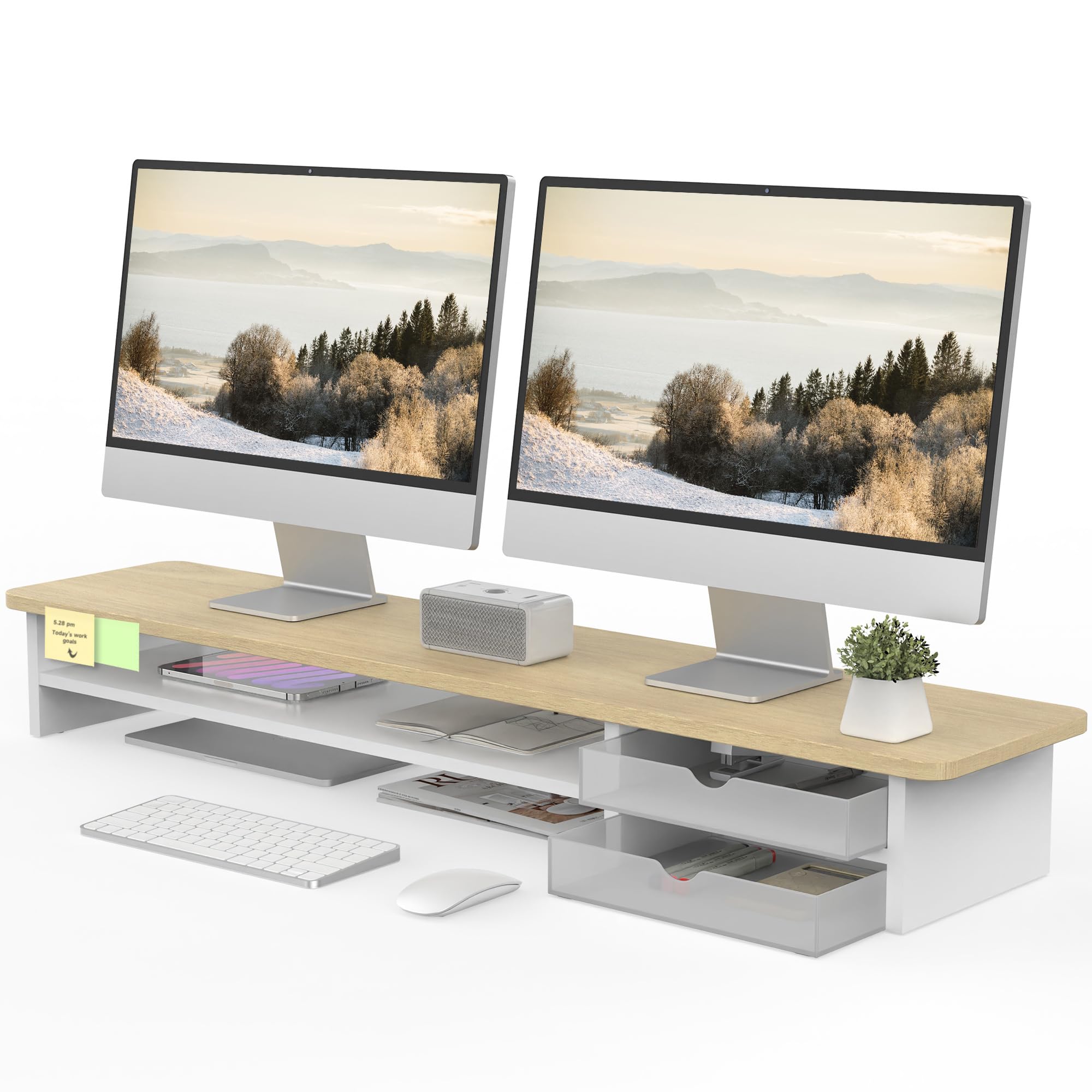
A wide 42.5-inch oak desk organizer with frosted drawers built for two monitors and a sound bar.
This is for people whose desk is also a landing zone for everything. The 42.5″L x 9.3″W x 5.5″H surface is big enough to support two monitors comfortably, and the panel thickness of 15mm (0.59 inches) helps it hold up to 99 pounds. The 2-tier design adds a second shelf for a laptop or speaker, and two frosted acrylic drawers keep pens and drives out of sight.
Buyers mention it fits both a 32-inch Dell and a 27-inch MSI side by side, and that it stays put without sliding around on the desk. The drawers can be swapped left and right, the surface resists scratches and fingerprints, and rounded corners won’t bump your wrists. Assembly is roughly 5-8 minutes with the included manual and tools, and the oak finish with FSC-certified wood adds a touch of warmth.
The honest caveat is depth: at 42.5 inches wide, this stand takes significant desk real estate, so measure before you buy. Some owners also note the white veneer can scratch and the small shelves won’t fit notebooks or keyboards. It’s priced at the upper end, but for a wide dual-monitor setup with storage, this is a solid buy.
Go with this if: you run two large monitors and want drawers plus a second shelf for daily gear.
Pass if: your desk is shallow — this needs room to breathe.
8. Fenge Dual Monitor Stand, Corner Desk Shelf with Drawer & Slide-Out Tray
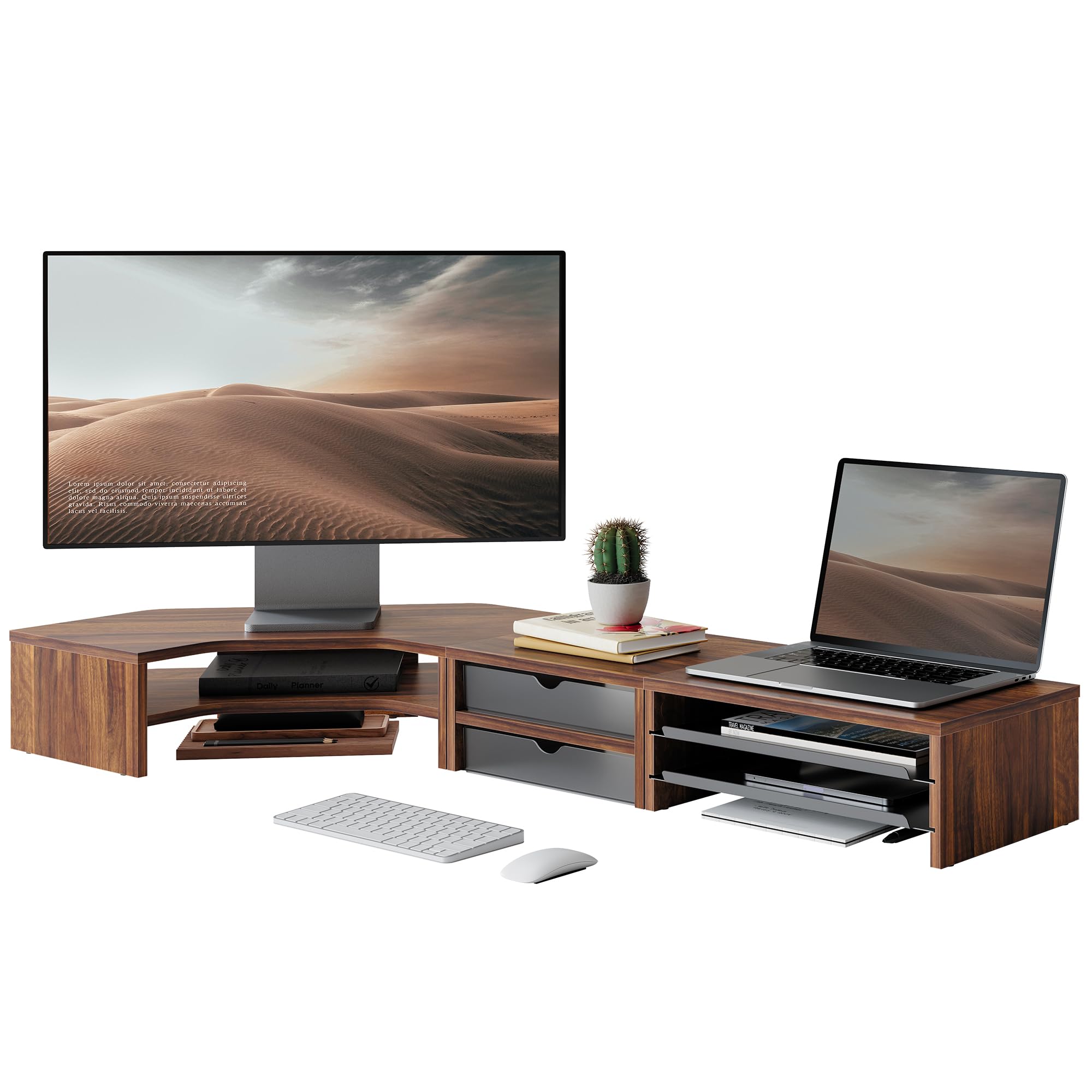
A modular corner system that builds six different ways and carries the heaviest load here at 132 pounds.
This is the most flexible stand in the roundup, and it’s built for corner desks. The 3-unit modular system assembles into a monitor riser, a desk shelf, or a corner organizer — six layouts total — so you can shape it to your room rather than the other way around. The 43.8-inch wide surface fits two 27-inch screens side by side, and elevating them 5.3 inches aligns your line of sight with the display center.
It’s also the strongest pick here, holding up to 132 pounds (60kg) without a shake, even with dual monitors, a printer, and speakers on top. The configuration includes 2 drawers, 2 slide-out trays, and compartments for files and hard drives, all finished with a metal drawer stopper so nothing falls out the back. Assembly runs about 15 minutes with pre-drilled holes and included tools.
Owners love the flexibility and the heavy load capacity, with reviews noting it’s “solid and sturdy” for a MacBook plus an additional monitor. The caveats are that the pieces feel a little light in hand for the price, and the silicone feet can come off if you slide the modules around — pick them up instead. For a corner desk that needs serious storage and customizable layouts, this is the one.
Why it wins: no other stand here matches its 132-pound capacity or its six-way modular flexibility for corner spaces.
9. Vaydeer All-in-One Dual Monitor Stand with 8 USB Ports and Wireless Charging
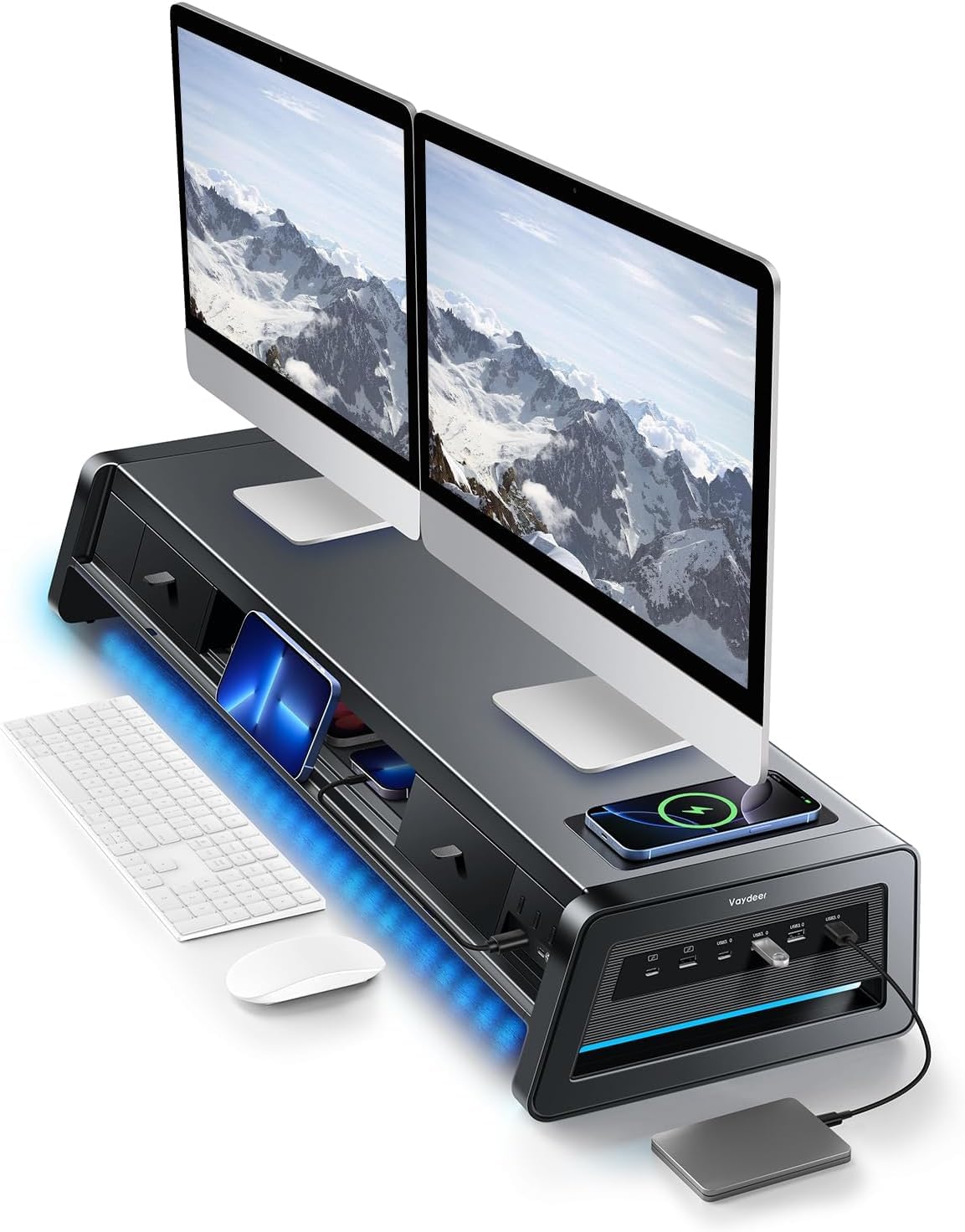
A 13-in-1 metal dock that charges your phone wirelessly, powers 8 USB devices, and lights your desk.
This is the all-in-one command center for a fully wired workspace. The 13-in-1 design packs a dual-monitor riser, a 15W wireless charging pad, 8 USB ports (4 for fast charging, 4 for data transfer), an LED light strip, and storage drawers into one durable metal frame. It supports up to 50kg (about 110 lbs), so two 24-inch monitors sit rock-solid with zero sag.
The USB hub is the standout feature: owners say it recognizes devices instantly, transfers fast, and keeps the ports smartly placed along the side. Wireless charging handles phones and even AirPods, and the built-in soft LED light gently illuminates your workspace to cut eye strain. The two pull-out drawers and dual-tier storage keep drives, pens, and notebooks within reach, and the cable management at the back hides the mess.
At 5.84 kg this is the heaviest stand here, and it’s priced like the premium tech hub it is. A few owners note the lighting options are limited to preset colors rather than fluid RGB, and one found the depth closer to 10 inches than 11. But if you want a single unit that raises your monitors, charges your phone, powers your gadgets, and tucks everything away, nothing else in this list comes close.
Buy this for: a fully connected desk — dual monitors, wireless charging, USB hub, and lights in one metal unit.
pass on it if: you just need a simple riser and don’t want to pay for power features.
Understanding the Specs
Load Capacity
This is the maximum weight the stand can safely hold, listed in pounds. Check your monitor’s weight on its spec sheet and add a few pounds for a printer or speaker on top. A 20-pound stand works for a single laptop or light monitor, while 100-pound models handle dual screens and heavy all-in-one PCs.
Height and Adjustability
Eye level means the top of your screen sits at or just below your natural gaze when sitting tall. Fixed stands offer one height (typically 4.5-7 inches), while adjustable models let you press a button and change the lift. If you alternate between sitting and standing, choose a stand with a wide height range.
Materials
Steel and aluminum carry the most weight and feel the most industrial, while engineered wood is lighter, warmer-looking, and usually cheaper. Bamboo offers the best of both — natural beauty with real strength. Each material affects both the look on your desk and how much weight it can hold.
Storage and Extras
Drawers, shelves, and cable holes turn a simple riser into a desk organizer. Decide what needs a home: a keyboard that slides underneath, a drawer for pens and drives, or USB and charging ports for your devices. More features cost more, so match storage to your actual clutter.
FAQ
How do I know what height my monitor stand should be?
Will a monitor stand hold my heavy ultrawide monitor?
What is the difference between metal and wood monitor stands?
Can I fit my keyboard under the stand?
How long does it take to assemble a monitor stand?
Will a monitor stand fit on my small desk?
Can I use a monitor stand for my laptop instead?
Do monitor stands help with neck and back pain?
Is it worth paying more for a stand with drawers and USB ports?
Will a monitor stand damage my desk surface?
Final Thoughts: The Verdict
For the majority of shoppers, the computer monitor stand winner is the Simple Trending 2-Tier because its 7-inch height, 100-pound capacity, and included mouse pad cover every office need at a fair price. If you want adjustable eye-level height, grab the ELIVED 2-Pack with its three leg positions and built-in drawers. And for the buyer building a fully connected setup, the Vaydeer All-in-One is the one to reach for — it charges your phone, powers eight USB devices, and lights your desk in a single metal frame.
How We Picked
We do not accept paid placement. Every pick is matched to a real buyer and a real use-case; we do not hands-on test units.
Sources & Methodology
Specifications: manufacturer listings and product documentation. Review insights: verified customer reviews, as of August 2026. Pricing: not shown on this page (it changes often); check the current price via the retailer link.
As an Amazon Associate, FitlyFast earns from qualifying purchases. This does not affect which products we feature.