
Our readers keep the lights on and the weekend projects moving. As an Amazon Associate, I earn from qualifying purchases.
That single USB-C port on your laptop is the only gateway to your monitor, external drive, and power — and the wrong adapter turns that gateway into a bottleneck. Flickering displays, throttled charge speeds, and dropped connections are not design flaws; they are the predictable result of choosing a hub that cuts corners on the USB-C DisplayPort Alt Mode and Power Delivery specs that your hardware actually requires.
I’m Rikta — the co-founder and writer behind FitlyFast. I’ve spent hundreds of hours analyzing the silicon controllers, aluminum enclosures, and PD negotiation chips inside dozens of multi-port adapters, mapping real-world throughput against the data sheets most buyers never see.
This guide breaks down the concrete resolution limits, transfer rates, and charging wattages that separate a seamless workstation from a desk full of cables that barely work. Whether you need a compact travel dongle or a full docking station, you will leave with a clear decision on the best usb-c adapter for your specific laptop and monitor setup.
How To Choose The Best USB-C Adapter
A USB-C adapter that matches your laptop’s video-out capabilities and your monitor’s native resolution transforms a single cable into a full desktop. The decision narrows to three concrete factors: video resolution support, Power Delivery wattage, and data transfer speed.
Video Output Resolution & Refresh Rate
A hub’s HDMI port lists a maximum resolution and refresh rate — for example, 4K@60Hz versus 4K@30Hz. The 60Hz variant delivers noticeably smoother cursor movement and video playback, especially on large monitors. If your laptop supports DisplayPort Alt Mode, the adapter can push that signal to an external display. Confirm your laptop’s USB-C port is labeled with a DisplayPort or monitor icon, or check the manufacturer spec sheet. Without Alt Mode, the HDMI port on the hub will not function.
Dual-monitor setups add another wrinkle: many hubs on macOS mirror both external displays rather than extending the desktop. Windows laptops typically handle true extended dual monitors with separate resolutions. If you need two independent screens on a Mac, look for a hub that explicitly supports macOS extended mode or consider a Thunderbolt dock.
Power Delivery Passthrough Wattage
A hub rated for 100W input typically reserves 5W to 15W for internal chip operation, delivering 85W to 95W to your laptop. That 85W to 95W range is sufficient for most thin-and-light notebooks during moderate use, but a workstation running 3D rendering or compiling code may drain its battery even while connected. Match the hub’s output to your laptop’s charger wattage — a MacBook Pro 16-inch that ships with a 140W charger will not sustain full performance on an 85W PD output. The PD chip inside the hub must also negotiate correctly with your laptop’s charging controller; mismatched negotiation can cause slow charging or intermittent power cycling.
Data Transfer Speed Port Selection
A USB-A 3.0 port rated at 5Gbps transfers a 1GB file in roughly two seconds, while a 10Gbps USB 3.1 Gen 2 port cuts that to one second. For photographers, video editors, or anyone moving large project files, the difference is tangible. USB 2.0 ports (480Mbps) are best left for low-bandwidth peripherals like wireless mouse receivers. The total shared bandwidth of the hub — not just individual port limits — matters when transferring data on multiple ports simultaneously. High-quality hubs with a dedicated controller maintain throughput across all active ports; budget hubs may bottleneck when every port is in use.
Quick Comparison
On smaller screens, swipe sideways to see the full table.
| Model | Category | Best For | Key Spec | Amazon |
|---|---|---|---|---|
| Apple USB-C Digital AV Multiport Adapter | Premium | Mac & iPad mirroring | HDMI, USB-A, USB-C PD | Amazon |
| Anker 7-in-1 USB-C Hub | Premium | Dual monitor setup | 10Gbps data transfer | Amazon |
| VVB 14-in-1 USB-C Docking Station | High-End | Full desktop dock | Dual HDMI + DP + Ethernet | Amazon |
| Hiearcool 7-in-1 USB-C Hub | Mid-Range | MacBook travel hub | 4K@30Hz + SD/TF slot | Amazon |
| Acer 5-in-1 USB-C Hub | Mid-Range | 4K@60Hz single monitor | 4K@60Hz HDMI output | Amazon |
| UGREEN 5-in-1 USB-C Hub | Mid-Range | Budget multiport dongle | 4K@30Hz, 100W PD | Amazon |
| TZBAY 5-Port USB-C Charger Block | Budget | Multi-device charging | 60W total / 20W per USB-C | Amazon |
In‑Depth Reviews
1. Apple USB-C Digital AV Multiport Adapter

The Apple USB-C Digital AV Multiport Adapter is the reference standard for connectivity reliability on macOS and iPadOS. Its three ports — HDMI, USB-A, and USB-C pass-through charging — deliver consistent performance without the driver conflicts or video glitches that sometimes plague third-party dongles. The USB-C port supports Power Delivery at the full wattage your MacBook or iPad Pro can negotiate, so you can charge while mirroring a 4K display without power drops.
Video output is limited to a single external monitor, and the HDMI port supports up to 4K at 30Hz — adequate for presentations and media playback but not ideal for high-refresh-rate productivity. The USB-A port runs at standard 5Gbps speeds, sufficient for flash drives and backup drives. Build quality is unmistakably Apple: the white plastic shell and captive cable feel dense and durable, and the adapter runs cool even during extended use.
The premium price reflects guaranteed compatibility across Apple’s ecosystem — including older macOS versions and iPadOS — that cheaper hubs sometimes break with system updates. If you own a single MacBook or iPad and only need to connect an HDMI display, a wired keyboard, and power through one compact adapter, this is the most dependable solution. The trade-off is the lack of SD card slots, Ethernet, or additional USB ports that multi-port docks offer.
Why it’s great
- Flawless macOS/iPadOS compatibility with zero driver setup
- Compact, lightweight, and runs cool during extended use
- Reliable USB-C PD passthrough for full laptop charging
Good to know
- Limited to 4K@30Hz — not suitable for high-refresh monitors
- Only three ports: no SD, Ethernet, or extra USB-A
- Premium cost compared to feature-rich third-party hubs
2. Anker 7-in-1 USB-C Hub
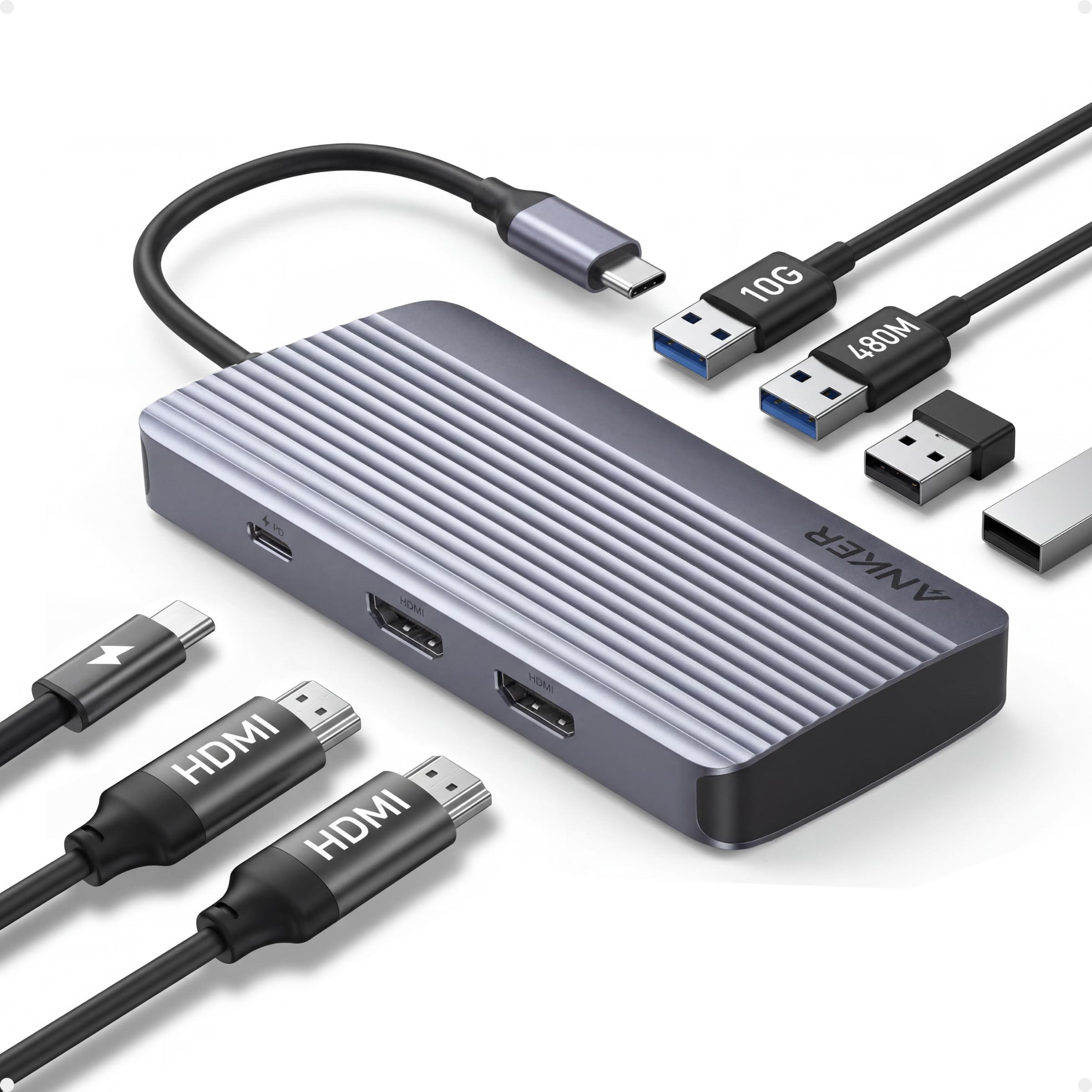
The Anker 7-in-1 USB-C Hub is engineered for the laptop user who needs two external monitors without investing in a full docking station. Its dual HDMI ports output 1080p at 60Hz on each display, enabling a true extended desktop experience on Windows laptops. The 10Gbps USB-C and USB-A data ports are meaningfully faster than the 5Gbps standard — transferring a 5GB video project takes roughly half the time.
Power Delivery is rated at 100W input with 85W output, which adequately charges most thin-and-light laptops during dual-monitor use. The aluminum shell dissipates heat effectively; users report the hub stays warm rather than hot even after hours of simultaneous video output, file transfers, and passthrough charging. Compatibility covers USB-C, USB4, and Thunderbolt 3/4 ports, and it works with Windows 10/11 and macOS (though macOS mirrors both external displays rather than extending them).
The limiting factor is the 1080p ceiling on both HDMI ports — this hub will not drive a 4K or 1440p monitor at its native resolution. If your monitors are 1080p and you prioritize smooth 60Hz output over 4K sharpness, this hub delivers a clean, stable dual-monitor workflow. For users with higher-resolution displays, the VVB 14-in-1 Dock below is a better choice.
Why it’s great
- True dual 1080p@60Hz extended desktop on Windows
- 10Gbps data port reduces large file transfer times
- Solid build with effective aluminum heat management
Good to know
- HDMI ports limited to 1080p — no 4K or 1440p support
- macOS mirrors both external displays instead of extending
- 85W PD output may not sustain high-power workstation laptops
3. VVB 14-in-1 USB-C Docking Station

The VVB 14-in-1 USB-C Docking Station is the most complete single-cable solution in this lineup, offering dual HDMI ports, a DisplayPort, Gigabit Ethernet, five USB data ports, SD/TF card readers, and a 3.5mm audio jack. The HDMI 1 and DisplayPort each support 4K at 60Hz, while the second HDMI caps at 4K@30Hz. When running dual monitors on Windows, you get 4K@30Hz and 1080p@60Hz simultaneously — a flexible arrangement for a mixed-resolution desk.
Data transfer comes from two USB 3.1 ports at 10Gbps and two USB 2.0 ports for peripherals. The SD and microSD card readers are convenient for photographers transferring files directly from camera media. The 100W PD input delivers 87W output, and the Ethernet port provides stable 1Gbps wired networking — a real advantage in offices with weak Wi-Fi or for large file downloads. The aluminum enclosure keeps temperatures under control during heavy use.
Compatibility is broad for Windows, ChromeOS, and some macOS laptops, though MacBooks mirror external displays rather than extending them. The USB-C cable is short at roughly eight inches, which means the dock sits close to your laptop. A few users report HDMI ports failing within the first month, which makes checking the return policy important. For the price, however, this dock delivers more ports per dollar than any other option here.
Why it’s great
- 14 ports including dual 4K video, Ethernet, SD, and audio
- 10Gbps USB 3.1 ports for fast external drive transfers
- Gigabit Ethernet provides stable wired network connection
Good to know
- Short USB-C cable forces dock close to the laptop
- Some units have reported HDMI failure within weeks
- macOS only mirrors external displays, not extends them
4. Hiearcool 7-in-1 USB-C Hub for MacBook

The Hiearcool 7-in-1 USB-C Hub has been a consistent choice among MacBook users who need a reliable, compact hub that covers the basics without breaking the bank. Its port selection includes 4K HDMI at 30Hz, a 100W PD passthrough, two USB 3.0 ports at 5Gbps, and a combined SD/TF card reader. The SD slot is a meaningful addition for photographers and content creators who offload files from camera cards regularly.
The aluminum body matches the space-gray finish of modern MacBooks and serves as a heat sink — the hub stays cool even during extended use with multiple peripherals. User reports consistently note plug-and-play reliability across MacBook Air, MacBook Pro, HP laptops, and even iPad Pro units with USB-C. The 4K@30Hz output is adequate for presentations, design reviews, and media consumption, though not ideal for high-refresh-rate productivity workflows.
The two USB-A ports run at 5Gbps, which is fast enough for external SSDs and flash drives. The PD passthrough supports up to 100W input, so your MacBook charges at its normal speed while the hub is active. The form factor is exceptionally thin at 0.34 inches, sliding easily into a laptop sleeve pocket. If your priority is a dependable, travel-friendly hub with SD card support and you can work comfortably at 30Hz, this is a strong mid-range pick.
Why it’s great
- SD and microSD card slots built in for camera workflows
- Ultra-slim aluminum design that matches MacBook aesthetic
- Consistent plug-and-play reliability across multiple laptop brands
Good to know
- HDMI capped at 4K@30Hz — not for high-refresh monitors
- USB-A ports limited to 5Gbps; no 10Gbps option
- No Ethernet port for wired networking
5. Acer 5-in-1 USB-C Hub
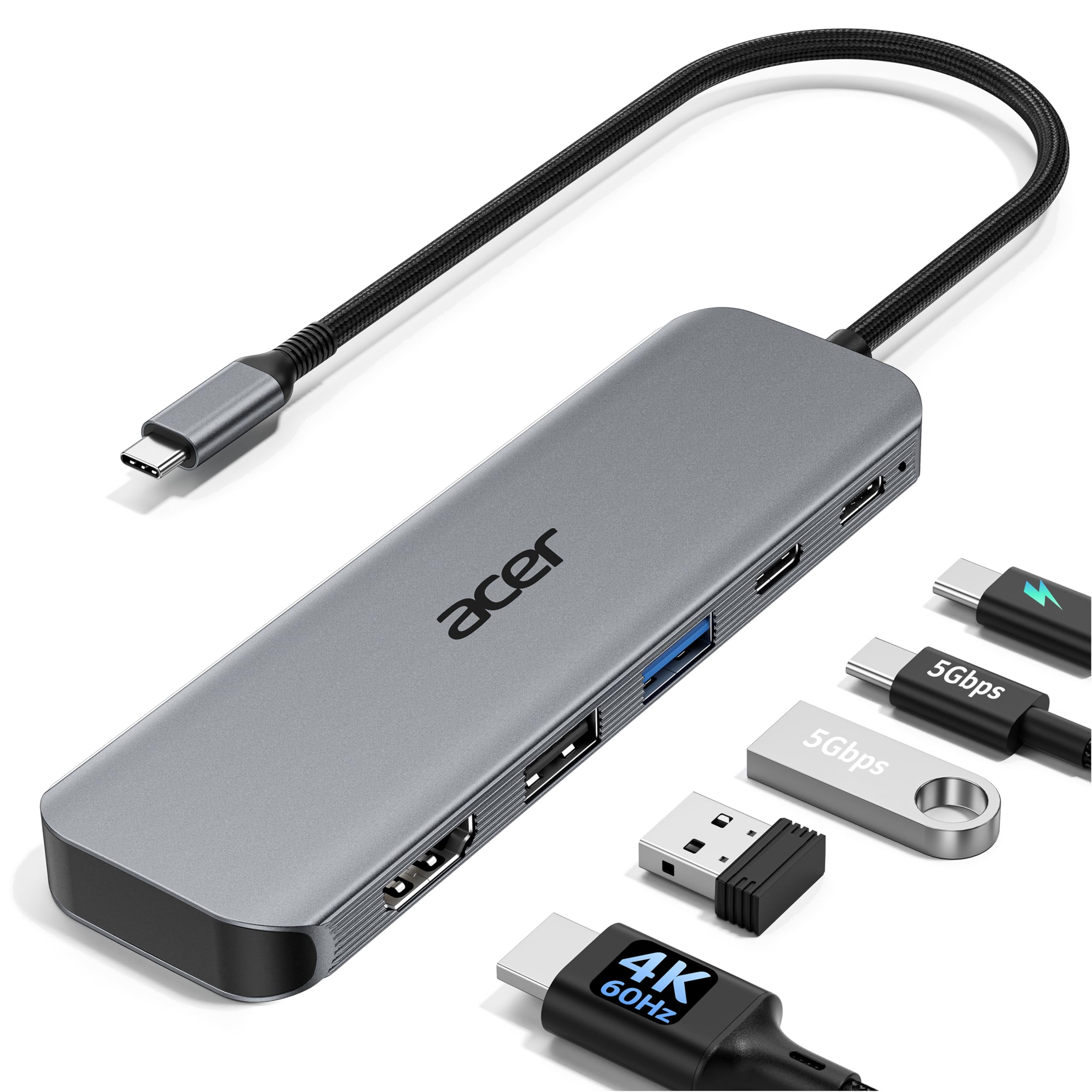
The Acer 5-in-1 USB-C Hub delivers the single feature that most budget hubs skip: genuine 4K output at 60Hz. The HDMI port supports 4K@60Hz, offering double the frame smoothness of the typical 30Hz hub — a tangible difference for video editors, spreadsheet users, and anyone who notices cursor stutter on a large monitor. The PD port accepts 100W input and delivers 90W to your laptop, which is enough headroom for most ultrabooks during intensive tasks.
Data connectivity includes a USB-C 3.0 port at 5Gbps and a USB-A 3.0 port at the same speed, plus a USB 2.0 port for lag-free mouse and keyboard connections. The aluminum shell is slim and lightweight, fitting easily into a bag pocket. Users report that the hub works immediately on Windows and macOS without driver installation, and the compact footprint does not block adjacent ports on laptops with tightly spaced USB-C connectors.
The limitation is the port count — five ports is minimal for anyone who needs Ethernet, SD card reading, or more than two USB-A devices simultaneously. The USB-C PD port is power-input only, so you cannot connect a data device through that port. For users whose only needs are a single 4K@60Hz monitor, a laptop power cable, and a couple of USB peripherals, this hub offers the best 60Hz value in the list.
Why it’s great
- Genuine 4K@60Hz output for smooth monitor performance
- 90W PD output provides solid charging headroom
- Ultra-compact aluminum body that travels easily
Good to know
- Only five ports — no SD, Ethernet, or extra USB
- USB-C PD port is power input only, not for data
- 4K@60Hz requires a laptop with DisplayPort Alt Mode
6. UGREEN 5-in-1 USB-C Hub

The UGREEN 5-in-1 USB-C Hub is the entry-level multiport adapter that gets the fundamentals right without unnecessary extras. Its port layout — 4K HDMI at 30Hz, a 100W PD passthrough, one USB 3.0 port at 5Gbps, and two USB 2.0 ports — covers the core needs of connecting a monitor, charging the laptop, and plugging in a keyboard, mouse, and flash drive. The USB 3.0 port is fast enough for external SSDs, while the USB 2.0 ports handle low-bandwidth peripherals without latency.
The aluminum enclosure feels denser than its price suggests, and the 91-gram weight makes it virtually unnoticeable in a bag. Users report that the 4K@30Hz output is consistent with no flicker or handshake issues, and the PD passthrough works reliably across MacBook, Dell XPS, and Lenovo ThinkPad models. Plug-and-play compatibility extends to Windows, macOS, Linux, and even Android phones that support DisplayPort Alt Mode — a useful feature for data recovery from broken phone screens.
The trade-offs are the 4K@30Hz cap — noticeable if you are accustomed to 60Hz — and the lack of a USB-C data port. The USB-C port on this hub is reserved for power input only, so you cannot connect a USB-C flash drive or monitor through it. For users on a strict budget who need a reliable daily driver for office work and presentations, this hub delivers proven performance at an aggressive price point.
Why it’s great
- Proven reliability across Windows, macOS, Linux, and Android
- Aluminum build at a price that undercuts most competitors
- 100W PD passthrough works consistently for laptop charging
Good to know
- HDMI capped at 4K@30Hz — 60Hz not supported
- USB-C port is power-only; no data passthrough
- USB 2.0 ports are slow for large file transfers
7. TZBAY 5-Port USB-C Charger Block
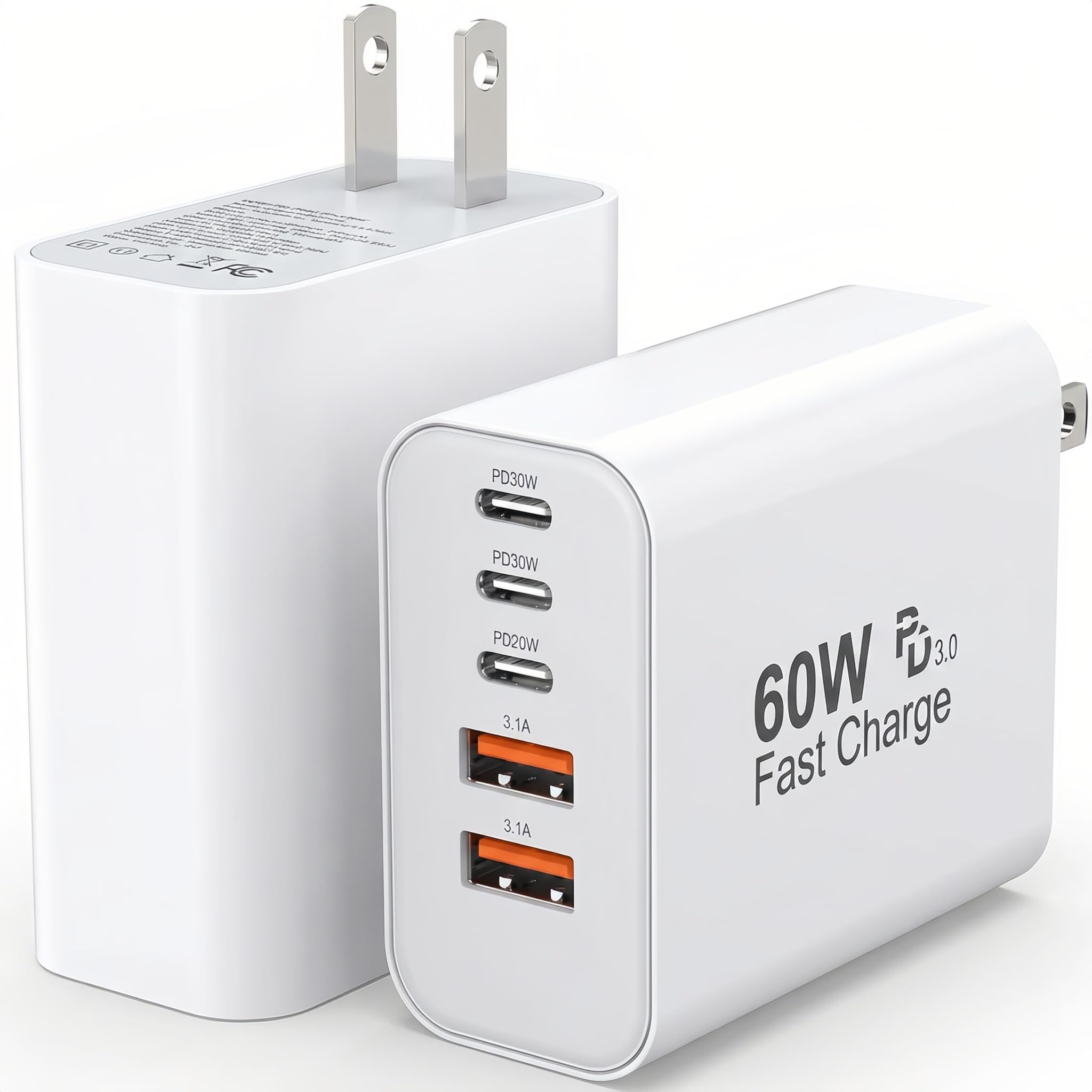
The TZBAY 5-Port USB-C Charger Block is a different category of adapter — a wall charger rather than a data hub — but it earns a place here because many users searching for a USB-C adapter also need a multi-port charging brick. This unit packs three USB-C ports and two USB-A ports into a single block, with total output rated at 60W. The USB-C ports deliver up to 20W each, enough to fast-charge an iPhone from zero to 50% in roughly 30 minutes or to power an iPad Air at full speed.
The two USB-A ports output 5V at 3A, which is standard for older devices and accessories. The charger uses PD 3.0 and Qualcomm Quick Charge protocols, so it negotiates the correct voltage with modern phones, tablets, and smartwatches. The exterior is built from fireproof ABS and PC plastic, and the charger automatically stops current flow when devices reach full charge. The package includes two identical 60W blocks, which is practical for keeping one at home and one in a travel bag.
This is not a data adapter — it will not connect a monitor or transfer files. The 60W total is shared across all ports, so plugging in five devices simultaneously drops individual charging speeds. The physical size is larger than a typical single-port charger. For users who need a reliable, compact multi-device charging station for their phones, tablets, and earbuds, this two-pack offers solid value.
Why it’s great
- Two 60W blocks included for home-and-travel setup
- Three USB-C PD ports fast-charge iPhones and Samsung devices
- Fireproof housing with overcharge protection for device safety
Good to know
- No data or video passthrough — charging only
- 60W total is shared; speeds drop with all ports in use
- Bulky for a travel charger; larger than single-port bricks
FAQ
Can a USB-C hub support 4K at 60Hz on a MacBook?
Does a USB-C adapter drain my laptop battery faster?
Why does my dual-monitor hub only mirror on macOS?
Can I use a USB-C hub with my iPad Pro or iPhone?
Final Thoughts: The Verdict
For most users, the best usb-c adapter winner is the Apple USB-C Digital AV Multiport Adapter because it guarantees glitch-free HDMI output, reliable USB-A connectivity, and full-speed passthrough charging for anyone in the Apple ecosystem who needs a simple, well-built dongle. If you want dual-monitor support on Windows, grab the Anker 7-in-1 USB-C Hub. And for a full 14-port docking station with Ethernet, SD card slots, and dual 4K video output, nothing beats the VVB 14-in-1 USB-C Docking Station.