
Our readers keep the lights on and the weekend projects moving. As an Amazon Associate, I earn from qualifying purchases.
Whether you’re drafting emails, taking lecture notes, or writing a blog post on the couch, a dedicated keyboard transforms your slate into a true productivity machine. The problem is that the accessory market is flooded with janky, poorly connected, or flimsy options that make matters worse.
I’m Rikta — the co-founder and writer behind FitlyFast. I’ve spent years sorting through tablet accessories, analyzing Bluetooth chipsets, battery capacities, key travel distances, and fold mechanisms to separate the daily drivers from the drawer-fillers.
The goal is simple: find you a reliable, responsive android tablet keyboard that actually improves your typing speed without introducing lag, fragile build, or a frustrating setup process.
How To Choose The Best Android Tablet Keyboard
Picking the right keyboard for your Android tablet comes down to matching your mobility needs with the physical connection type. Not every high-end Bluetooth board pairs well with every Android skin, and not every universal case locks your tablet securely enough for lap use.
Form Factor: Case vs. Standalone
A keyboard case integrates the keys into a protective folio, turning your tablet into a mini-laptop. This is ideal if you move around frequently and want one piece of hardware. A standalone keyboard (or a foldable unit) is better if you already have a preferred case and just want a typing companion for a desk or coffee table. The trade-off is protection versus flexibility — cases shield the screen, but separates often have more durable key mechanisms.
Key Feel and Travel
You want scissor-switch keys for a crisp, responsive press with about 1.3mm to 1.5mm of travel. Membrane-style keys feel mushy and lead to typos during longer sessions. If you write a lot, test the key travel number — anything under 1.0mm will feel like tapping the screen again.
Multi-Device Switching
For anyone juggling a phone and a tablet, a keyboard with a dedicated dial or key combo to swap between 2 or 3 Bluetooth channels saves constant re-pairing. Avoid keyboards that require you to re-pair from scratch each time, as many budget boards do.
Quick Comparison
On smaller screens, swipe sideways to see the full table.
| Model | Category | Best For | Key Spec | Amazon |
|---|---|---|---|---|
| Logitech K480 | Standalone | Multi-device desk use | Easy-switch dial, 3 devices | Amazon |
| Lenovo Multi-Device | Standalone | Ultra-portable office | 60-hour battery, 180g | Amazon |
| Satechi Slim EX3 | Standalone | Full-size with numpad | 108 keys, 4-in-1 connection | Amazon |
| Dexnor Keyboard Case | Case | Samsung Galaxy S9/S10 FE | Backlit, touchpad, 650mAh | Amazon |
| Samsung FE Book Cover | Case | Official Galaxy S9 FE fit | AI key, wireless sharing | Amazon |
| TECKNET Foldable | Standalone | Travel with number pad | Foldable, 99-key layout | Amazon |
| MoKo Universal Case | Case | Universal budget fit | 9-11″ tablet compatibility | Amazon |
In‑Depth Reviews
1. Logitech K480

The Logitech K480 is a desk anchor that earns its spot through sheer versatility. Its standout feature is the physical Easy-Switch dial on the top-left corner — you rotate between three paired devices (tablet, phone, laptop) without touching a single menu. The built-in cradle holds most tablets up to 10 inches wide and props them at a readable angle while you type. Scissor-switch keys deliver a crisp, responsive feel that matches what you’d get from a full-size desktop board, and the familiar layout includes dedicated shortcut keys for Windows, macOS, and Chrome OS.
Build quality is solid — the chassis uses a mix of metal and thick plastic that feels substantial on a desk. The spill-resistant design is a practical safety net for coffee-drinkers, and the battery life is exceptional: two AAA batteries last up to 24 months, meaning you’ll likely forget it even needs power. The keycaps are also slightly concave, which helps finger placement during touch-typing sessions.
On the downside, this is not a portable keyboard. It is bulky (11.8 inches wide, nearly an inch thick), and it requires AA batteries rather than USB-C recharging. The cradle also does not fit a tablet that is already in a thick case. If you need a keyboard to stay at your desk and swap between an Android tablet and a work laptop all day, it is hard to beat this Logitech for the price.
Why it’s great
- Easy-Switch dial is instant and intuitive
- Spill-resistant for desk safety
- 24-month battery on AAAs
- Familiar full-size layout with shortcut keys
Good to know
- Not portable for travel
- No USB-C rechargeable battery
- Cradle won’t hold cased tablets
- Keys are slightly noisier than membrane boards
2. Satechi Slim EX3
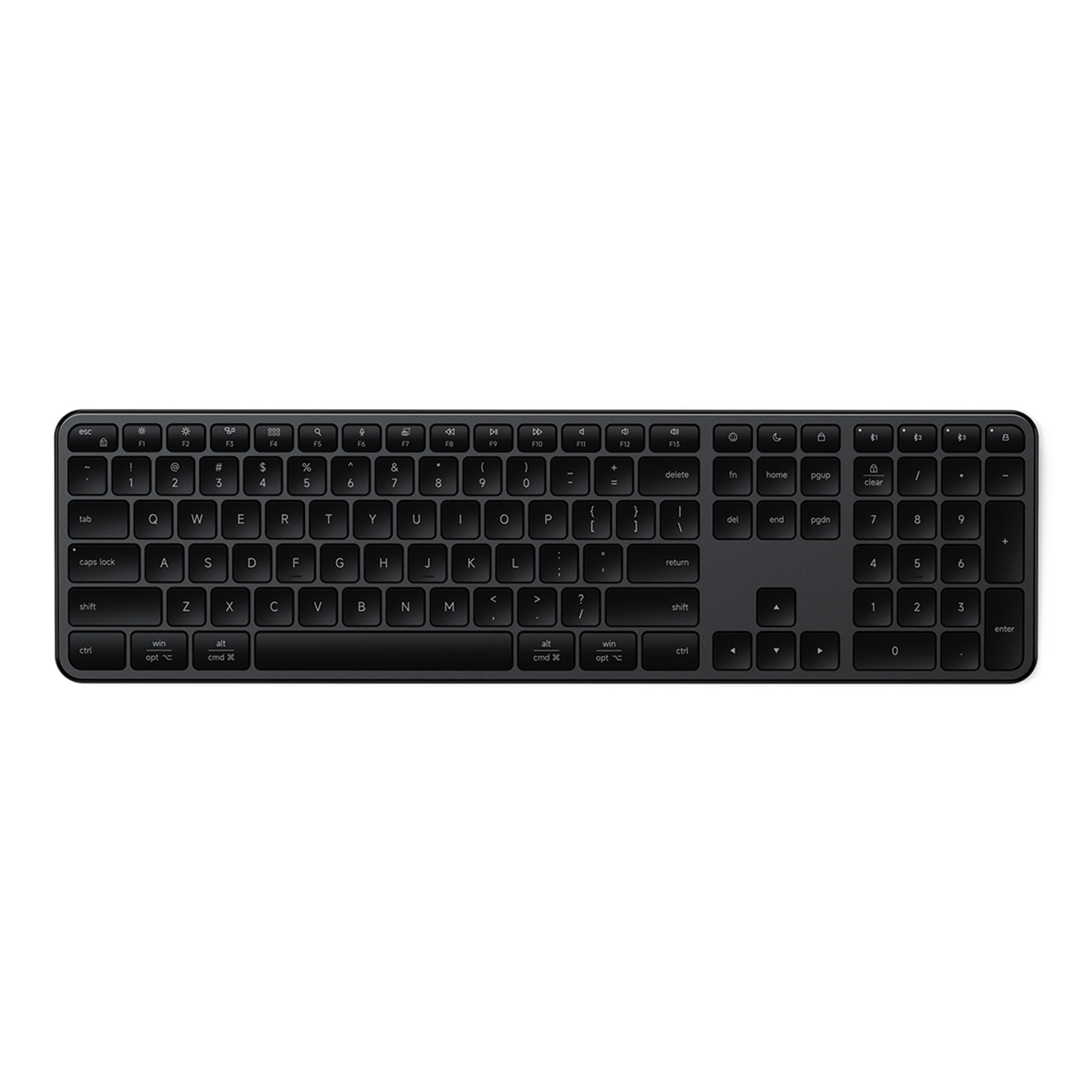
The Satechi Slim EX3 is a full-size keyboard that brings a dedicated numeric keypad to your Android tablet setup without sacrificing connectivity. It supports three Bluetooth 5.3 channels plus a 2.4GHz dongle, giving you four devices it can jump between instantly. The physical OS toggle on the side remaps shortcut keys for macOS or Windows, and the keyboard works seamlessly with Android, so modifier keys like Alt and Ctrl behave as expected in Google Docs or third-party text editors.
The key feel is smooth and quiet, using low-profile scissor switches that require moderate actuation force. The 450mAh rechargeable battery lasts up to five weeks per charge, and Satechi prioritized battery life by omitting backlit keys — a smart trade-off for anyone who types in well-lit rooms and does not need glow. The chassis uses galvanized steel in the backplate for rigidity, though the top shell is plastic, which keeps weight manageable at 552 grams.
Build quality has been a point of contention: some recent units feel less premium than earlier Satechi models, with a plastic finish that does not match the price bracket. The device switching is fast when moving between a Mac and iPad but occasionally requires multiple button presses when pairing with a Windows or Android device. If you want a full-size layout with a number pad and the convenience of both Bluetooth and 2.4GHz, this is a strong contender, but check the latest build reports.
Why it’s great
- Numpad for heavy data entry
- Four-device connectivity (BT + 2.4GHz)
- USB-C rechargeable, weeks of battery
- Physical OS toggle for shortcuts
Good to know
- No backlit keys
- Recent build quality concerns on plastic shell
- Android/Windows switching can be inconsistent
- Premium price point
3. Lenovo Multi-Device Keyboard

The Lenovo Multi-Device Keyboard hits a sweet spot for professionals who need something ultra-slim but still capable of all-day typing. At just 0.22 inches thick and 180 grams, it is one of the thinnest standalone keyboards you can pair with an Android tablet, fitting easily inside a messenger bag alongside a tablet. Despite the slim profile, it uses scissor-switch keys with 1.3mm of travel — enough to avoid the flat, dead feeling of a membrane board.
Battery life is rated at 60 hours of continuous use on a single USB-C charge, and the keyboard connects to up to three devices via Bluetooth with a dedicated function-key toggle. The 75-key layout includes 12 customizable shortcut keys, though the lack of a dedicated number pad means you need to rely on the top row for numeric input. The enclosure is plastic, but the overall build feels rigid enough for daily commutes.
One of its best features is the built-in riser that tilts the keyboard to a comfortable typing angle — a detail many slim keyboards omit. The key caps are slightly narrow for users with larger hands, and some users report that the System Lock key cannot be remapped. For anyone who wants a carry-everywhere keyboard that pairs quickly with a Samsung Galaxy Tab or Pixel Tablet without adding bulk, this Lenovo is a smart mid-range choice.
Why it’s great
- Ultra-thin and light (180g)
- Built-in tilt riser
- 60-hour rechargeable battery
- 3-device Bluetooth switching
Good to know
- No numpad
- Slightly narrow key spacing
- No dedicated media play/pause key
- Plastic chassis is basic
4. Dexnor Keyboard Case (Samsung Galaxy S9/S10 FE)

The Dexnor Keyboard Case delivers a laptop-like experience for Samsung Galaxy Tab S9, S9 FE, and S10 FE users by combining a protective folio with a floating cantilever stand, a multi-touch trackpad, and a backlit keyboard — all in one package. The aluminum alloy hinge uses embedded magnets to hold your tablet at a single fixed angle, similar to Apple’s Magic Keyboard, and the connection is rock-solid for lap or desk use. The 64-key layout is compact but includes Android-specific shortcut keys and an auto wake/sleep function triggered by the case lid.
The trackpad supports multi-finger gestures (two-finger scroll, three-finger app switch), giving you mouse-like precision for document editing without reaching for the screen. The keyboard is backlit with seven solid colors and three brightness levels, which is rare at this price tier. The 650mAh battery provides up to 200 hours of working time and 1200 hours of standby, recharging via USB-C in about 3.5 hours. Two S Pen holders (one magnetic in the keyboard, one cut-out slot on the back cover) keep the stylus secure.
Some users report that the keyboard section can lift slightly due to the combined weight of the tablet, making one side of the typing area feel uneven. The edges of the tablet are held only by magnets, leaving the corners somewhat exposed in a drop scenario. A few reviewers also wish the backlight stayed on longer without manual reactivation. For Galaxy Tab owners who want a premium all-in-one case with a trackpad at a mid-range price, this is the strongest option.
Why it’s great
- Built-in precision touchpad
- Backlit with adjustable brightness
- 200-hour battery life
- Dual S Pen storage
Good to know
- Keyboard can lift with heavy tablet weight
- Corner edges exposed, mag-only hold
- Backlight timeout is short
- Only fits specific Samsung Galaxy models
5. Samsung FE Book Cover Keyboard Slim

The Samsung FE Book Cover Keyboard Slim is the official first-party keyboard cover for the Galaxy Tab S9 FE, S9, and S10 FE. It uses a magnetic snap-on attachment with a sleek, slim folio design that adds minimal bulk while protecting the rear and screen. The keyboard features a dedicated AI key that launches Bixby or Gemini instantly, and when combined with Samsung DeX mode, the entire interface transforms into a desktop-like workspace with resizable windows and a taskbar.
Wireless Keyboard Sharing is a unique feature: you can pair this keyboard cover with other compatible Galaxy devices (like a Galaxy phone or another tablet) and type or navigate on them without re-pairing. The key travel is shallow but precise, feeling closer to a modern ultrabook than a traditional mechanical board. The trackpad is not included — this is a keyboard-only cover, so navigation relies on the touchscreen or DeX’s cursor mode.
Fit and finish are excellent, as expected from Samsung’s own accessory division. The polycarbonate and TPU materials snap into place with zero wobble, and the back flap houses an S Pen holder. The main drawbacks are the price — significantly higher than third-party alternatives — and the fact that the keyboard cover is somewhat heavy for such a slim tablet. It also locks into a single viewing angle, which may not suit everyone’s preference. For pure brand integration and DeX optimization, this is the smoothest experience available.
Why it’s great
- Perfect fit for Galaxy Tab S9/S10 FE
- Dedicated AI key for Bixby/Gemini
- Wireless Keyboard Sharing with Galaxy phones
- Seamless DeX mode integration
Good to know
- No trackpad included
- Single fixed viewing angle
- Adds noticeable weight
- Premium price vs. third-party alternatives
6. TECKNET Wireless Foldable Bluetooth Keyboard
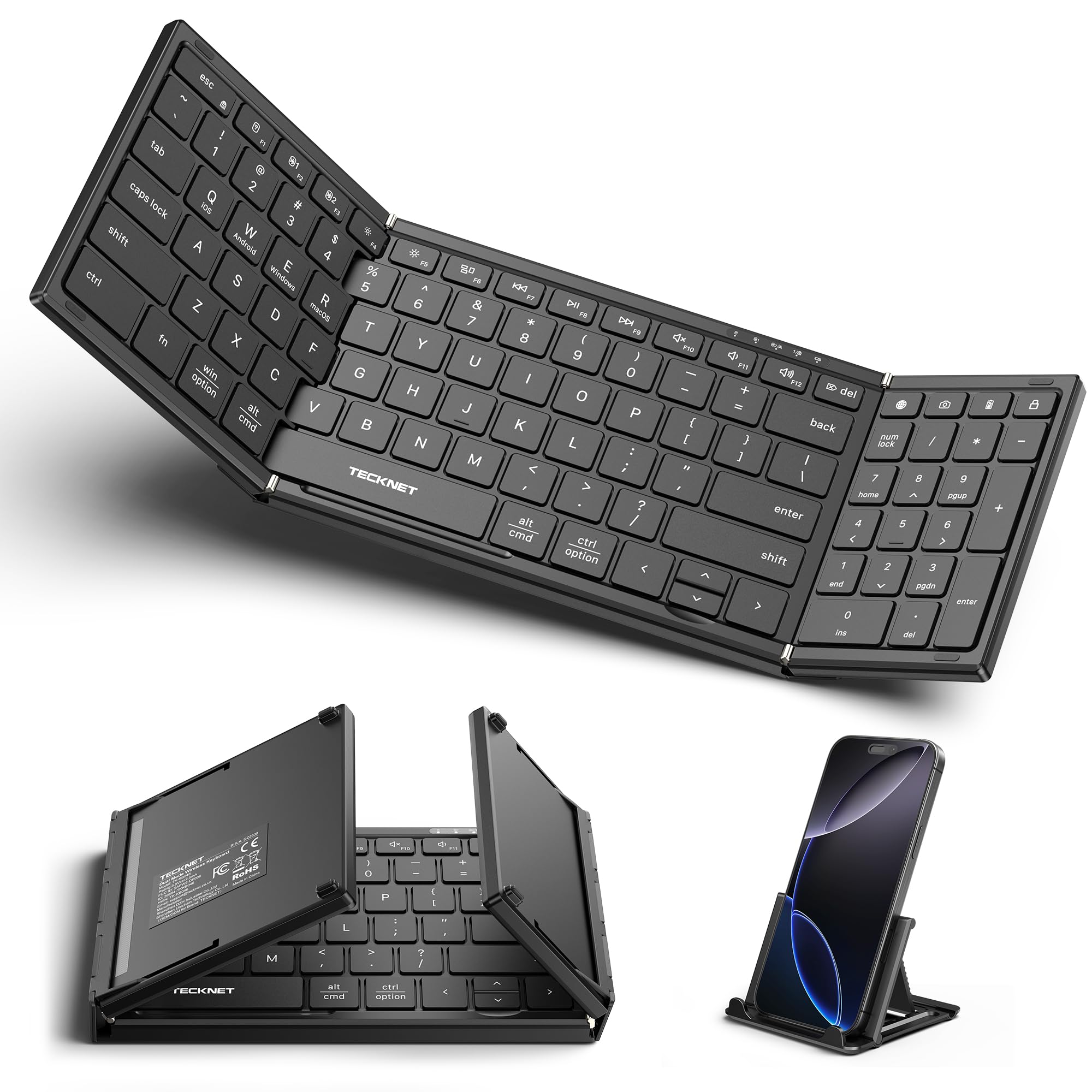
The TECKNET Foldable Keyboard solves the portability riddle by folding down to 7.26 x 4.52 x 0.9 inches — small enough for a coat pocket or the front pouch of a tablet sleeve. When unfolded, it reveals a full 99-key layout with a dedicated number pad, which is rare for a travel keyboard. The aluminum alloy hinge is rated for over 100,000 folds, and it connects via dual Bluetooth 6.0 chips and a 2.4GHz USB receiver, handling up to three devices simultaneously.
Typing feel is better than expected for a foldable: the scissor-switch keys are ultra-quiet (claimed 90% noise reduction) and require a satisfying amount of actuation force. The keyboard includes an auto-sleep function that extends standby to 275 days, and it recharges via USB-C. The included device stand cradles your tablet or phone at a comfortable viewing angle, though it works best with smaller tablets and phones — an iPad Pro in a case may not fit securely in the stand groove.
The flat design has no tilt feet, so the keyboard sits completely level on the table. Some users find this uncomfortable for extended typing sessions, as there is no ergonomic incline. The tri-fold mechanism creates three separate key planes that take a short adjustment period. The arrow keys, particularly up and down, are smaller than standard. For travelers who need a full number pad in a coat-pocketable package, this is a capable mid-range choice.
Why it’s great
- Folds to pocket size with number pad
- Triple device connection (BT + 2.4GHz)
- Ultra-quiet scissor switches
- 275-day standby battery
Good to know
- No tilt feet for ergonomic angle
- Stand doesn’t fit large cased tablets
- Small up/down arrow keys
- Flat key planes need adjustment period
7. MoKo Universal Tablet Case with QWERTY Keyboard
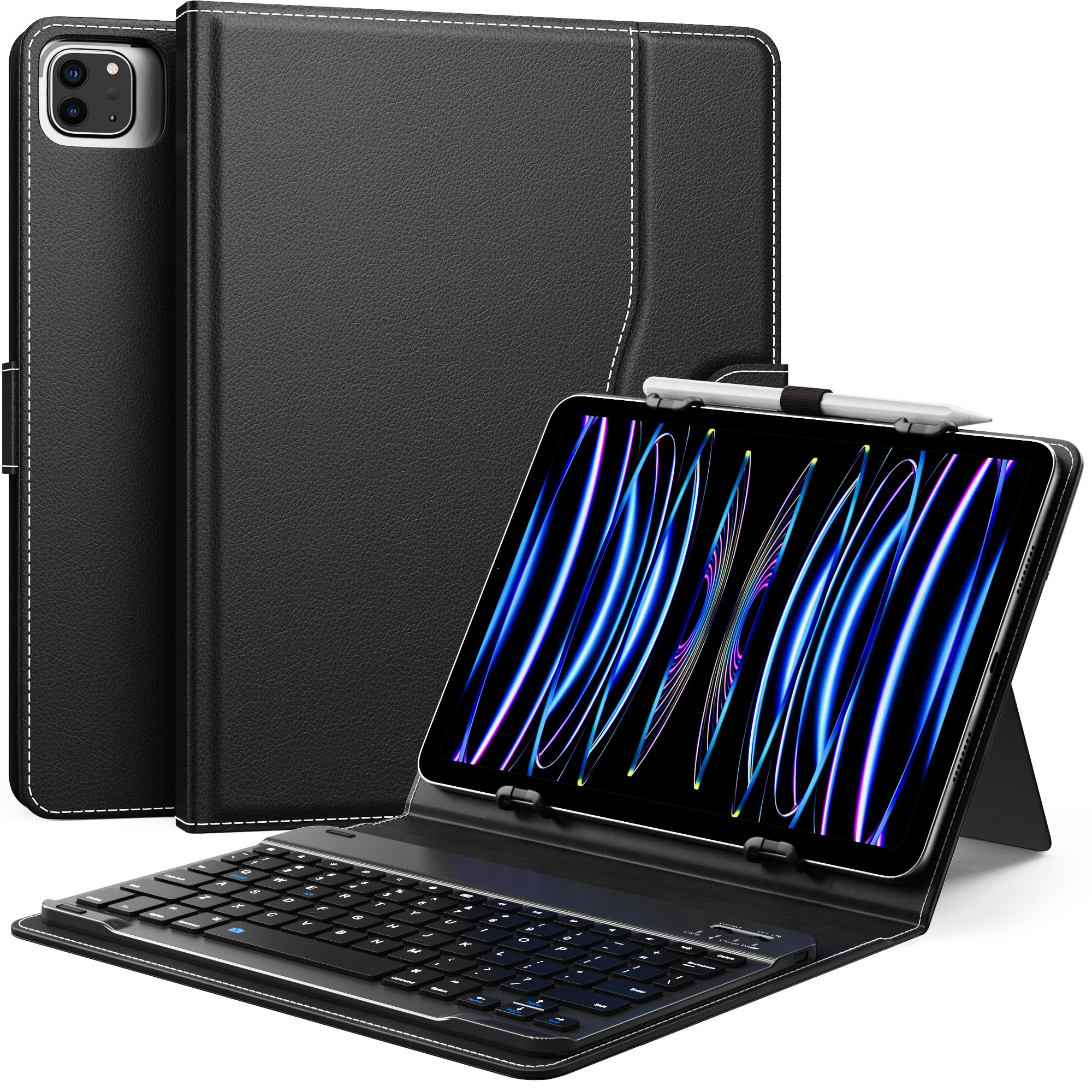
The MoKo Universal Case is a budget-friendly catch-all that fits most tablets between 9 and 11 inches, as long as your device falls within the 160-180mm width and 230-260mm length range. It includes a removable Bluetooth keyboard, a built-in kickstand, a side pocket for cables, and a pen loop for a stylus. The PU leather cover with microfiber lining provides decent drop protection for daily commutes or cafe work sessions, and the elastic corner holders keep the tablet secure without blocking side buttons.
The keyboard connects via Bluetooth and pairs instantly with Android tablets. The 78-key layout is compact but functional, with a magnetic attachment that keeps the keyboard docked to the cover when not in use. The kickstand offers a stable laptop-like viewing angle, though some users report it feels a bit flimsy and can tip if bumped. The camera opening is positioned for rear-facing lenses, but the cutout placement is optimized for iPads rather than Android tablets, so your camera may be partially blocked depending on your specific model.
There is no auto wake/sleep function — you have to manually power the keyboard on and off — and the tablets are held by elastic straps rather than a rigid frame, which means they can shift slightly during vigorous typing. For the price, this is a solid starter kit for anyone who wants a keyboard case but is not ready to commit to a model-specific accessory. The value is hard to beat, but the trade-offs in camera cutout alignment, kickstand stability, and lack of auto sleep are real.
Why it’s great
- Works with a wide range of 9-11″ tablets
- Includes pen loop and side pocket
- Removable Bluetooth keyboard
- Great value for a case + keyboard combo
Good to know
- No auto wake/sleep
- Kickstand can be unstable
- Camera cutout optimized for iPad, not Android
- Elastic straps allow some tablet shifting
FAQ
Will any Bluetooth keyboard work with my Android tablet?
Do I need a keyboard with a trackpad for Android?
How do I enable on-screen keyboard when using a physical Android tablet keyboard?
Final Thoughts: The Verdict
For most users, the android tablet keyboard winner is the Logitech K480 because its Easy-Switch dial and solid scissor-switch keys make it the most versatile desk companion for multi-device workflows. If you want a portable standalone that fits in a bag without a second thought, grab the Lenovo Multi-Device Keyboard. And for Samsung Galaxy Tab owners who want a premium case with a trackpad and backlit keys, nothing beats the Dexnor Keyboard Case.