
Our readers keep the lights on and the weekend projects moving. As an Amazon Associate, I earn from qualifying purchases.
Finding a desktop that balances a clean, single-cable setup with enough muscle for daily tasks without draining your wallet is a genuine challenge. Many budget-friendly all-in-ones cut corners on processor performance or memory, leaving you frustrated with sluggish boot times and laggy multitasking. This guide cuts through the noise to find the units that deliver real, usable performance for home, office, and student work.
I’m Rikta — the co-founder and writer behind FitlyFast. I’ve spent hundreds of hours analyzing hardware specifications, comparing processor benchmarks, memory configurations, and display quality across dozens of models to pinpoint the machines that offer the best value in this space. This guide reflects that deep research.
After a thorough analysis of over a dozen models, I’ve identified the top contenders that offer the best balance of performance, storage, and display quality. Read on to find the perfect budget all in one computer that fits your needs without compromise.
How To Choose The Best Budget All In One Computer
Choosing a budget-friendly all-in-one means carefully balancing the processor, memory, storage, and display to match your specific workload. A low price tag can be tempting, but understanding which specs matter most for your daily tasks will help you avoid a machine that feels slow within the first year.
Processor Performance
The processor is the heart of your all-in-one. For basic web browsing, email, and document editing, a modern Intel N100 or entry-level Celeron will suffice. However, if you plan on running multiple applications simultaneously, using video conferencing, or doing light creative work, you’ll want a Core i5, Core i7, or an AMD Ryzen 5 or 7. These chips offer more cores and threads for better multitasking.
Memory and Storage
8GB of RAM is the absolute minimum for a workable Windows experience today. For a noticeably smoother experience when juggling multiple browser tabs and office apps, 16GB is the sweet spot. For storage, a Solid State Drive (SSD) is non-negotiable. A 256GB SSD is a good starting point, but 512GB provides much more breathing room for documents, photos, and applications. Avoid any unit that still relies on a traditional hard drive (HDD), as it will be drastically slower.
Display Quality
Most budget all-in-ones come with a 21.5-inch or 23.8-inch Full HD (1920×1080) display. An IPS panel is preferred for its better viewing angles and color accuracy compared to a TN panel. An anti-glare coating is also a major plus for reducing eye strain in brightly lit rooms. A touch screen can be a nice convenience, but it often comes at a premium that you can spend on better internal components.
Quick Comparison
On smaller screens, swipe sideways to see the full table.
| Model | Category | Best For | Key Spec | Amazon |
|---|---|---|---|---|
| HP 24‑cr0032 | Mid-Range | Home Office Power | AMD Ryzen 7 7730U | Amazon |
| Acer Aspire C24 | Mid-Range | Multimedia & Value | 120Hz IPS Display | Amazon |
| Dell EC24250 | Mid-Range | Reliable Workhorse | Intel Core 3 100U | Amazon |
| Lenovo V100 | Mid-Range | Everyday Computing | 512GB PCIe SSD | Amazon |
| SAINTDISE 23.8″ | Mid-Range | Touchscreen Ease | Multi-Touch Display | Amazon |
| Lenovo IdeaCentre 24″ | Mid-Range | Sleek Design & Webcam | 5MP AI Webcam | Amazon |
| Apple iMac M4 | Premium | Creative & Ecosystem | Apple M4 Chip | Amazon |
| Lenovo IdeaCentre 27″ | Premium | High Performance | 32GB DDR5 RAM | Amazon |
| ASUS V470 | Premium | Large Touch Display | 27″ Touch Screen | Amazon |
| HP 22″ N100 | Budget | Essential Tasks | DDR5 RAM | Amazon |
| Lenovo 24″ N100 | Budget | Large Entry-level Screen | 16GB RAM | Amazon |
In‑Depth Reviews
1. HP 24-inch All-in-One Desktop PC, 24-cr0032

The HP 24-cr0032 strikes an excellent balance between cost and capability, powered by a robust AMD Ryzen 7 7730U processor. This chip provides eight cores and sixteen threads, delivering the kind of multitasking headroom usually found in more expensive machines. It handles multiple browser tabs, office applications, and even light photo editing without noticeable slowdown, making it a true workhorse for the home office.
The 23.8-inch Full HD display features an ultra-slim, three-sided micro-edge design that looks modern and maximizes screen real estate. Its 89% screen-to-body ratio makes the unit feel more premium than its price suggests. The included tiltable pop-up privacy camera is a smart addition for video conferencing, and the dual array microphones with advanced noise reduction ensure you come through clearly on calls.
With 16GB of RAM and a 512GB solid-state drive, this HP has the memory and storage configuration that most users will find ideal for years of reliable service. While the stand is not height-adjustable, the overall build quality and the powerful processor make this the most well-rounded all-in-one for users who need genuine performance without stepping into the highest price tiers.
Why it’s great
- Powerful AMD Ryzen 7 processor for smooth multitasking.
- Excellent 16GB RAM and 512GB SSD configuration.
- Pop-up privacy camera and noise-reducing mics for clear calls.
Good to know
- The stand is not height-adjustable.
- Some users may want more USB ports.
2. Acer Aspire C24 AIO Desktop (C24-2G-UR15)

The Acer Aspire C24 stands out in the mid-range for its 23.8-inch Full HD IPS display that refreshes at 120Hz. This higher refresh rate translates to notably smoother cursor movement, scrolling, and general on-screen motion, a benefit rarely seen at this price. The narrow bezels and 90.71% screen-to-body ratio create an immersive look that rivals more expensive monitors.
Under the hood, the AMD Ryzen 5 7430U hexa-core processor is a capable performer for office work, streaming, and productivity suites. Paired with 16GB of DDR4 RAM and a 512GB PCIe NVMe SSD, this Acer is well-equipped to handle a busy workload. The inclusion of AMD Radeon Graphics also gives it a slight edge for casual gaming compared to many competitors with Intel UHD.
Connectivity is a strong point with Wi-Fi 6E for the latest wireless standards, and front I/O ports make plugging in peripherals a breeze. Some users have reported the fan can be audible under load, though adjusting power settings often mitigates this. For users who value a fluid visual experience and strong all-around specs, the Aspire C24 is a compelling choice.
Why it’s great
- 120Hz IPS display for exceptionally smooth visuals.
- Fast AMD Ryzen 5 processor and 16GB of RAM.
- Wi-Fi 6E for fast wireless connectivity.
Good to know
- Fan can be audible under heavy load.
- Rear ports can be a bit cramped to access.
3. Dell 24 All-in-One Desktop (EC24250)

The Dell EC24250 offers a polished, premium-looking white chassis that hides a very capable machine. It is powered by the Intel Core 3 100U processor, a chip that provides a solid performance uplift over the entry-level N100 for everyday tasks, booting Windows 11 and launching applications with noticeable speed. The 23.8-inch FHD IPS display with Dell ComfortView Plus reduces harmful blue light without washing out colors, making it excellent for long work sessions.
One of the most appreciated features is the 5MP+IR webcam with HDR, which provides a much sharper and more balanced video feed than the standard 720p or 1080p cameras found on most competitors. The inclusion of Dolby Atmos-tuned dual speakers also makes a significant difference for media consumption and video calls, delivering clearer and more immersive audio than the thin sound typical of this category.
With 8GB of DDR5 RAM and a 512GB SSD, the core specs are solid, though the 8GB may feel limiting for users who keep dozens of browser tabs open. Dell sweetens the deal with 1 Year Onsite Service and a 6-month Dell Migrate tool, adding peace of mind. This is a fantastic choice for users who prioritize a better camera, superior audio, and a clean, modern aesthetic.
Why it’s great
- Excellent 5MP+IR webcam with HDR for video calls.
- Superior Dolby Atmos audio quality.
- 1 Year Onsite Service for peace of mind.
Good to know
- 8GB of RAM may be limiting for heavy multitaskers.
- Processor is not as powerful as Ryzen 7 options.
4. Lenovo V100 23.8″ FHD All-in-One

The Lenovo V100 is a no-nonsense machine that focuses on delivering the storage and display quality that matter most for daily use. Its key selling point is the 512GB PCIe SSD paired with 8GB of RAM, offering fast boot times and plenty of space for files. The 23.8-inch Full HD IPS anti-glare display with 99% sRGB coverage is a standout, providing vibrant and accurate colors for photo viewing and media.
Powered by the Intel N100 processor, this Lenovo is best suited for web browsing, email, office applications, and video streaming. It won’t handle heavy video editing or professional creative work, but for its target audience of students and home office users, the performance is more than adequate. The inclusion of Intel Wi-Fi 6 and Bluetooth 5.2 ensures modern, reliable connectivity.
The Eclipse Black finish and slim design look clean on any desk. While some users have noted the lack of a mouse in the box and a basic webcam, the overall package offers a great value proposition. For those who prioritize a large, high-quality screen and ample storage over raw processing power, the Lenovo V100 is a smart, budget-conscious pick.
Why it’s great
- Large 512GB PCIe SSD for fast storage.
- Excellent 23.8″ IPS anti-glare display with wide color gamut.
- Modern Wi-Fi 6 and Bluetooth 5.2 connectivity.
Good to know
- The Intel N100 processor is entry-level.
- Some units may be missing the mouse.
5. SAINTDISE 23.8″ All-in-One PC
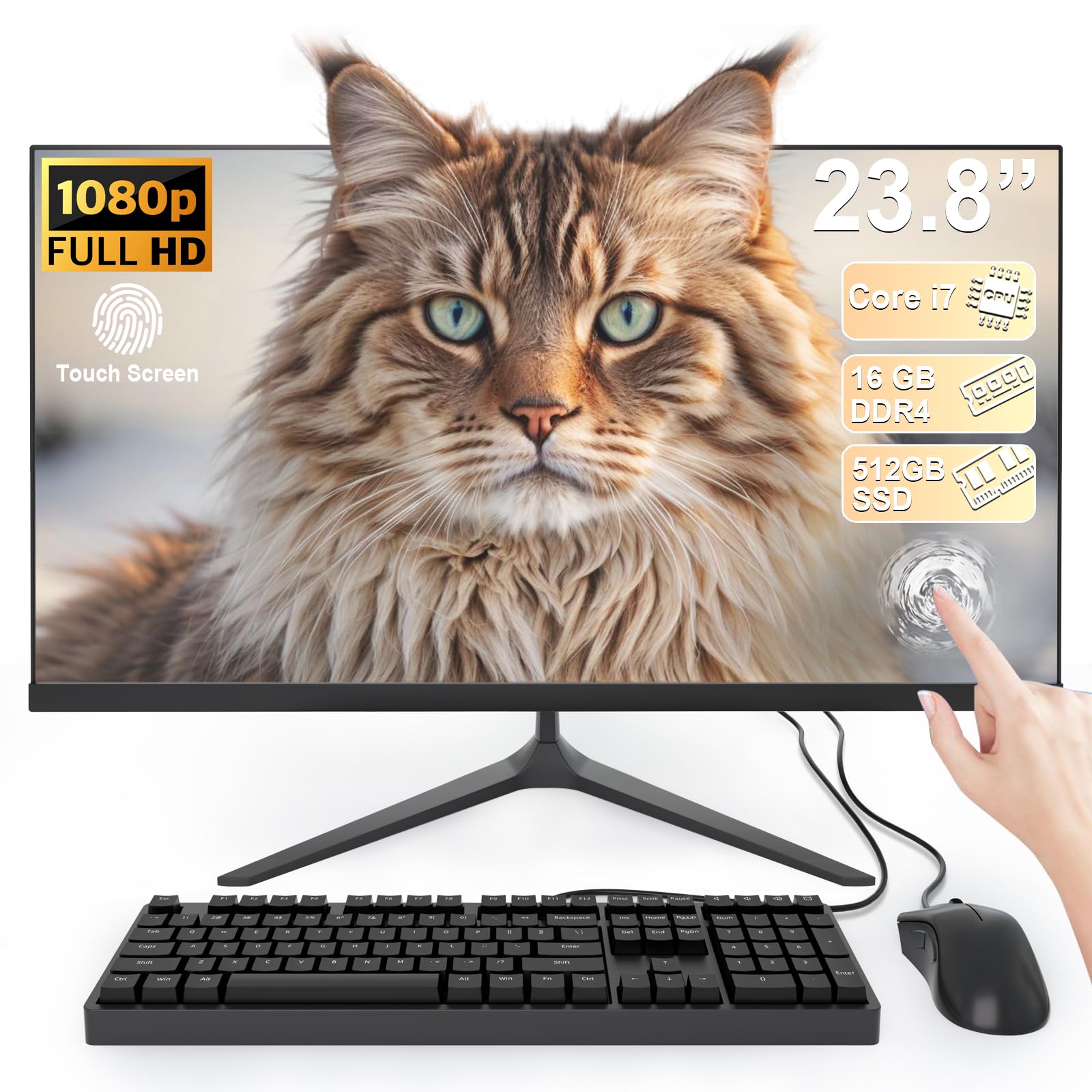
The SAINTDISE model is a distinctive option that packs a 23.8-inch Full HD multi-touch display into a very competitive price point. The responsive touch interface makes navigation feel intuitive, allowing you to swipe, pinch, and tap directly on the screen, which is particularly handy for browsing, creative apps, or simply interacting with Windows 11 in a more tactile way.
It is powered by a Core i7 processor, though it is from an older generation, paired with a substantial 16GB of RAM and a 512GB SSD. This combination provides enough memory and storage for smooth daily operation and running multiple applications. The processor can handle turbo frequencies up to 3.0GHz, which is sufficient for office tasks, streaming, and light productivity work.
The unit comes with a wired keyboard and mouse, a helpful inclusion that gets you up and running immediately. The port selection is generous, including four USB 3.0 ports. While the older-generation Core i7 won’t match the performance of newer chips, the inclusion of a touch screen at this price level makes the SAINTDISE a unique and appealing choice for users who value that interactive experience.
Why it’s great
- Responsive multi-touch display for intuitive interaction.
- Ample 16GB RAM and 512GB SSD for multitasking.
- Generous port selection with multiple USB 3.0 ports.
Good to know
- The Core i7 processor is an older generation.
- Touch screen may not be essential for all users.
6. Lenovo IdeaCentre 24″ All-in-One
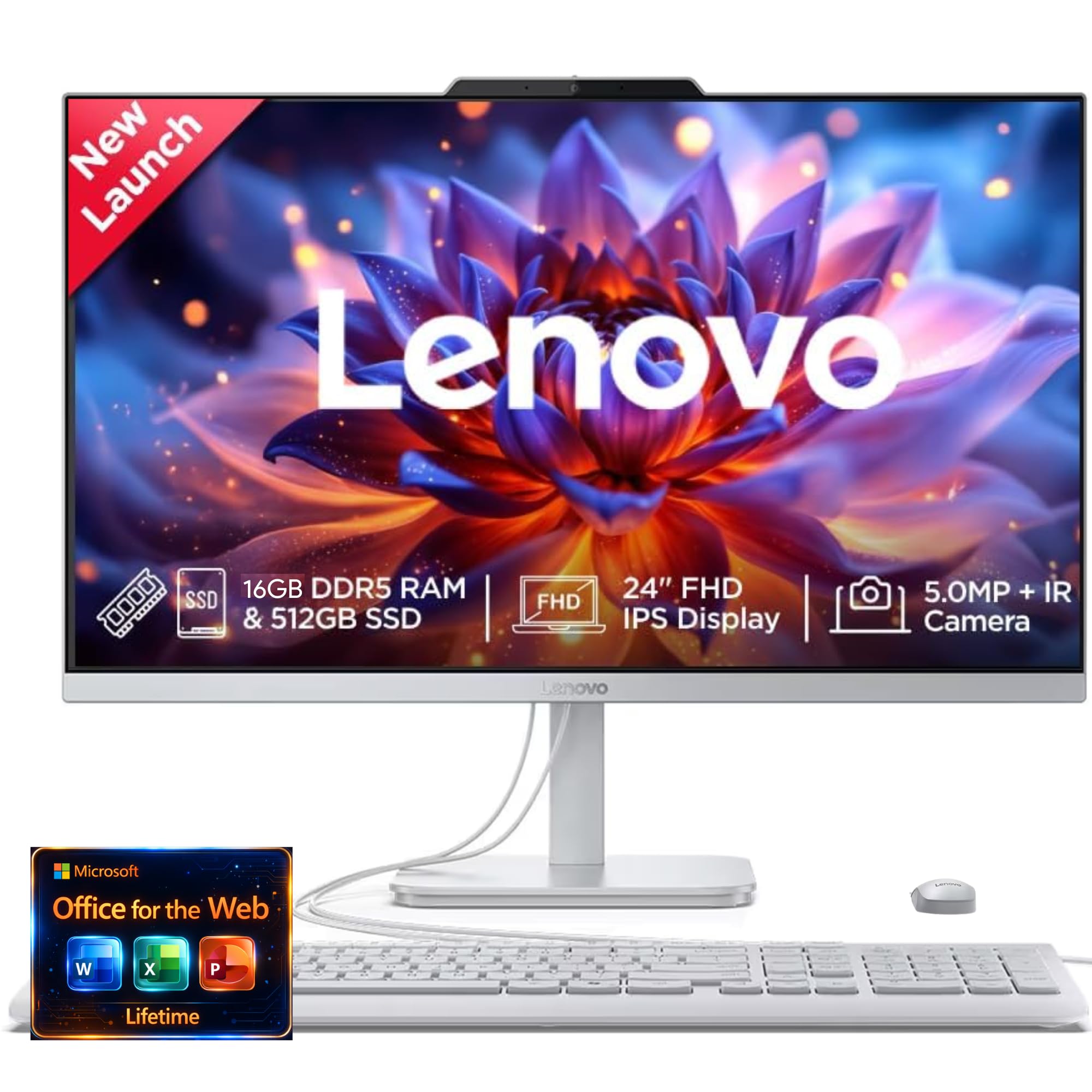
The Lenovo IdeaCentre 24 focuses on the user experience beyond raw specs, featuring a high-quality 5MP AI webcam with an IR sensor and a privacy electronic shutter. This camera, combined with Lenovo’s Smart Meeting software and AI-based noise cancellation, delivers a significantly better video conferencing experience, automatically framing you and reducing background noise for clear communication.
Audio is also a strong point, with Harman audio-enhanced speakers that provide fuller, richer sound than the tinny speakers found on most all-in-ones. The 23.8-inch FHD IPS display offers vivid colors and good viewing angles, and low blue light technology helps reduce eye strain during extended use. The design is sleek, with a black and silver finish that fits well in a modern home or office.
Under the hood, it is powered by the Intel N100 processor with 16GB of RAM. This is adequate for everyday tasks, but the processor limits its capability for more demanding workloads. For users who spend a lot of time on video calls and want a polished media experience, the IdeaCentre 24 is a standout choice that prioritizes the audio-visual aspects without a premium price tag.
Why it’s great
- Excellent 5MP AI webcam for superior video calls.
- Rich Harman audio-enhanced speaker system.
- Sleek design with a privacy e-shutter for the webcam.
Good to know
- Intel N100 processor is entry-level.
- Some users may prefer a larger storage capacity.
7. Apple 2024 iMac with M4 Chip

The Apple iMac with the M4 chip is a premium entry into the all-in-one space, offering a level of performance and integration that is unmatched in its ecosystem. The M4 chip is incredibly fast and efficient, making everything from launching apps to editing 4K video feel instantaneous. The 24-inch 4.5K Retina display is simply stunning, with exceptional brightness, color accuracy, and sharpness that makes text look like print.
Its all-in-one design is remarkably thin and comes in seven vibrant colors, making it a statement piece for any desk. The 12MP Center Stage camera ensures you stay perfectly framed during video calls, and the six-speaker system with Spatial Audio provides immersive, room-filling sound. For users deeply embedded in the Apple ecosystem, features like iPhone Mirroring and seamless Handoff make the iMac a central hub for productivity.
With 16GB of unified memory and a 256GB SSD, the base model is fast but offers limited storage. The primary barrier is the higher entry price, which places it above the scope of a strict budget buy. However, for those who can stretch their budget, the iMac M4 delivers a premium experience in performance, display quality, and design that is genuinely in a class of its own.
Why it’s great
- Blazing-fast Apple M4 chip performance.
- Stunning 4.5K Retina display with incredible detail.
- Seamless integration within the Apple ecosystem.
Good to know
- Base model has a relatively small 256GB SSD.
- Premium price point well above typical budget machines.
8. Lenovo IdeaCentre 27″ All-in-One (i7-13620H)

The Lenovo IdeaCentre 27 is a performance powerhouse designed for demanding users who need serious multitasking capability. It is equipped with a 10-core Intel Core i7-13620H processor that can boost up to 4.9GHz, making it perfectly suited for content creation, data analysis, video editing, and running multiple professional applications concurrently without breaking a sweat.
The 32GB of DDR5-5200 RAM is a massive amount of memory that will handle even the most intensive multitasking sessions with ease, and the 1TB PCIe 4.0 NVMe SSD provides lightning-fast load times and ample storage for large projects. The 27-inch Full HD IPS display with 99% sRGB coverage and an anti-glare coating offers a large, vibrant workspace that is easy on the eyes during long workdays.
While the display is large and bright, it is still 1080p, not 1440p or 4K, which is a minor compromise at this price. However, the inclusion of Windows 11 Pro, a 5MP webcam, and HARMAN speakers makes it a complete package for professional use. This machine is for users who need genuine desktop-level power and memory capacity in a clean, all-in-one form factor, and who value performance above all else.
Why it’s great
- Powerful 10-core Intel Core i7-13620H processor.
- Massive 32GB DDR5 RAM and 1TB SSD storage.
- Large 27-inch display with wide color gamut.
Good to know
- The 27-inch display is still 1080p resolution.
- Premium price reflects the high-end internal specs.
9. ASUS V470 All-in-One (V470VA-MS504T)

The ASUS V470 commands attention with its large 27-inch Full HD anti-glare touchscreen display. This generous screen size is ideal for users who need more real estate for productivity, creative work, or simply enjoying media, and the touch capability adds an extra layer of intuitive control. The anti-glare coating helps reduce reflections, keeping the screen comfortable to use in various lighting conditions.
Under the hood, it is powered by an Intel Core i5-13420H processor, a capable 8-core chip that offers a strong balance of performance and efficiency for demanding workloads. The 16GB of DDR5 RAM and a spacious 1TB PCIe SSD provide a snappy and responsive experience, with plenty of room for large file archives, applications, and games. This configuration is ideal for users who want a lot of storage without needing external drives.
The inclusion of a 1080p Full HD camera with an array microphone and Dolby Atmos speakers makes it a solid choice for communication and entertainment. Some users note that ASUS includes some bloatware, and the stand is not height-adjustable. For those seeking a large, touch-enabled screen with a fast processor and abundant storage, the ASUS V470 is a premium, fully-featured package.
Why it’s great
- Large 27-inch anti-glare touchscreen display.
- Spacious 1TB PCIe SSD storage.
- Powerful Intel Core i5-13420H processor.
Good to know
- Some built-in software (bloatware) may need removal.
- The stand is not height-adjustable.
10. HP 22″ FHD All-in-One (N100)

The HP 22″ All-in-One is a classic entry-level machine that focuses on simplicity and essential performance at a very accessible price. It is powered by the latest 13th Gen Intel N100 processor, which is efficient and adequate for core tasks like web browsing, email, and document editing. The pre-installed Windows 11 Pro is a significant bonus, offering enhanced security features often found on business-class machines.
The 21.5-inch Full HD display is a decent size for a small desk or kitchen counter, and the anti-glare coating helps with comfortable viewing. The inclusion of 8GB of DDR5 RAM is a modern touch, ensuring the system feels responsive for basic usage, though it may feel limiting with heavy multitasking. The 128GB SSD provides fast boot times but is quite limited in storage space for applications and media.
Connectivity is solid for its class, featuring a USB Type-C port, HDMI-out, and built-in Wi-Fi 6 and Bluetooth 5.3. The built-in HD webcam with a privacy shutter is a welcome addition for secure video calls. This HP is an ideal choice for a senior user, a child for schoolwork, or as a secondary household computer where the primary need is reliable, no-frills operation without a big investment.
Why it’s great
- Great entry-level price for essential tasks.
- Includes Windows 11 Pro for enhanced security.
- Modern connectivity with USB-C and Wi-Fi 6.
Good to know
- Small 128GB SSD storage is very limited.
- 8GB RAM and N100 processor are for basic use only.
11. Lenovo 24″ FHD All-in-One (N100, 16GB)

This Lenovo 24-inch model is an interesting entry-level option as it offers a larger 23.8-inch Full HD IPS display than many similarly-priced competitors, while also packing a solid 16GB of DDR4 RAM. The generous amount of memory is this machine’s standout feature, allowing for much smoother multitasking between browser tabs, office applications, and streaming than the standard 8GB found in its price bracket.
Powered by the Intel N100 processor, raw processing power is still its primary limitation, making it unsuitable for video editing or heavy creative software. However, for the vast majority of home and student users whose work involves web apps and Microsoft Office, the large screen and abundant RAM will provide a more pleasant and responsive experience than a faster processor with less memory.
The inclusion of a wireless keyboard and mouse is convenient, and connectivity options like HDMI-out and Bluetooth 5.2 are modern enough for most needs. It is worth noting that some user reviews report issues with the included keyboard’s key mapping and a lack of external speakers in the box. For budget-conscious buyers who prioritize screen size and multitasking headroom over pure CPU speed, this Lenovo is a solid, value-driven choice.
Why it’s great
- Large 23.8-inch FHD IPS display for the price.
- 16GB RAM for smooth multitasking.
- Wireless keyboard and mouse included.
Good to know
- Intel N100 processor is entry-level.
- Some reports of keyboard quality issues.
FAQ
Can a budget all-in-one computer handle multiple monitors?
Is 8GB of RAM enough for a Windows 11 all-in-one?
What is the difference between an Intel N100 and a Core i5 processor?
Do budget all-in-one computers come with a keyboard and mouse?
Final Thoughts: The Verdict
For most users, the budget all in one computer winner is the HP 24-cr0032 because its AMD Ryzen 7 processor offers the best balance of power and value for home office tasks. If you want the smoothest on-screen motion for everyday use, grab the Acer Aspire C24 with its 120Hz display. And for a premium, large-screen touch experience, nothing beats the ASUS V470.