
Our readers keep the lights on and the weekend projects moving. As an Amazon Associate, I earn from qualifying purchases.
A slow, jam-prone printer ribbon on your adding machine isn’t just an annoyance—it’s a bottleneck when you’re reconciling a ledger, balancing a church treasury, or racing through end-of-month bookkeeping. Every second wasted waiting for a tape to advance or squinting at a partially printed digit adds friction to work that demands precision. The right machine eliminates that drag, delivering a crisp, two-color audit trail that lets you spot errors at a glance.
I’m Rikta — the co-founder and writer behind FitlyFast. My approach to office gear is to strip away marketing noise and analyze the hardware specs that actually dictate daily performance: print speed in lines per second, display technology (VFD versus fluorescent or LCD), key rollover feel, and the real-world cost of ribbon replacements.
After spending dozens of hours cross-referencing customer feedback against technical datasheets and real-world usage patterns, I’ve built a clear-eyed guide to the best adding machine with tape. Every recommendation here earned its spot through category-specific spec analysis.
How To Choose The Best Adding Machine With Tape
An adding machine with tape is a specialized tool whose value hinges on print speed, display clarity, and keyboard feel. Most office calculators look similar on a shelf, but small differences in ribbon system design and build weight separate the machines that serve for decades from the ones that frustrate within months. Focus on the specs that drive your daily workflow.
Print Speed and Ribbon System
Print speed is measured in lines per second (LPS). Budget-friendly machines hover around 2.5 to 3.0 LPS, while premium commercial units push 4.6 to 4.8 LPS. At 4.8 LPS, the tape exits nearly as fast as you can punch numbers—critical for high-volume data entry. Equally important is the ribbon system: two-spool ink ribbons (like the Victor 7010 standard) deliver sharper, more consistent print quality than integrated ink roller cartridges, and they can be replenished without replacing a plastic housing.
Display Technology and Legibility
Three display types dominate this category. VFD (vacuum fluorescent) displays offer bright blue-green characters that remain readable at wide angles—ideal for shared desks. Fluorescent displays produce a similar brightness but with a slightly cooler tint. Backlit LCDs consume less power and last longer but can be harder to view from an angle. If you work under harsh overhead lighting, a VFD or bright fluorescent panel will reduce eye fatigue compared to a standard LCD.
Dedicated Business Keys
Cost, Sell, Margin (CSM) keys are more than a marketing bullet point. They let you enter any two of the three variables and instantly compute the third—essential for pricing, retail markup, or tax preparation. Models with dedicated tax rate keys, auto-add/discount functions, and item counters reduce manual recalculations. Before buying, confirm the button layout matches the calculations you perform most frequently; a CSM key cluster you never touch is wasted plastic.
Quick Comparison
On smaller screens, swipe sideways to see the full table.
| Model | Category | Best For | Key Spec | Amazon |
|---|---|---|---|---|
| Canon MP25DV-3 | Premium | High-speed ink ribbon accounting | Ink ribbon at 2.1 LPS | Amazon |
| Victor 1240-3A | Mid-Range | Tax-season workhorse | 4.5 LPS, two-color ribbon | Amazon |
| Sharp EL2360PIII | Premium | Fast commercial data entry | 4.8 LPS, extra-large display | Amazon |
| Victor 1460-4 | Premium | Heavy-duty office or church use | 4.6 LPS, 3.7 lbs, metal build | Amazon |
| Sharp VX-2652H | Premium | Quiet high-volume tape printing | 4.8 LPS, fluorescent display | Amazon |
| Canon P170-DH-3 | Mid-Range | Compact desk with clock display | Double-check function, VFD | Amazon |
| Casio HR-300RC | Mid-Range | Budget-friendly backlit usability | Backlit LCD, 150-step reprint | Amazon |
In‑Depth Reviews
1. Canon MP25DV-3

The Canon MP25DV-3 is built around a high-speed ink ribbon printing system that produces sharp, smudge-resistant characters on standard 2.25-inch paper rolls. Where budget ink rollers fade after a few pages, this Canon’s spool-based ribbon maintains consistent density across hundreds of feet of tape—critical for CPAs and bookkeepers who need every digit on the audit trail legible months later.
Its VFD display delivers bright blue-green numerals that cut through glare under harsh office lighting. The Double Check function automatically recalculates the last entry, catching fat-finger errors before they hit the tape. Reviewers who have owned previous MP-series models report service lives exceeding 30 years, suggesting the build quality here justifies the premium tier.
The tradeoff is size: at 15.7 inches wide and over 3 pounds, this machine occupies a full corner of a standard desk. The newer auto-off behavior (waking via CE/C button) also takes adjustment if you’re upgrading from an older Canon that lacked power management. For a dedicated bookkeeping station, the MP25DV-3’s longevity and print quality make it a compelling investment.
Why it’s great
- Ink ribbon prints sharper than roller-based rivals
- VFD display is legible at wide angles under bright light
- Double Check function reduces data-entry errors
- Reported to last 30+ years by multiple long-term users
Good to know
- Large footprint at 15.7″ wide; not space-efficient
- Auto-off requires CE/C wake, not CA/ON
- Ink ribbon replacements are less common than Victor 7010
2. Victor 1240-3A
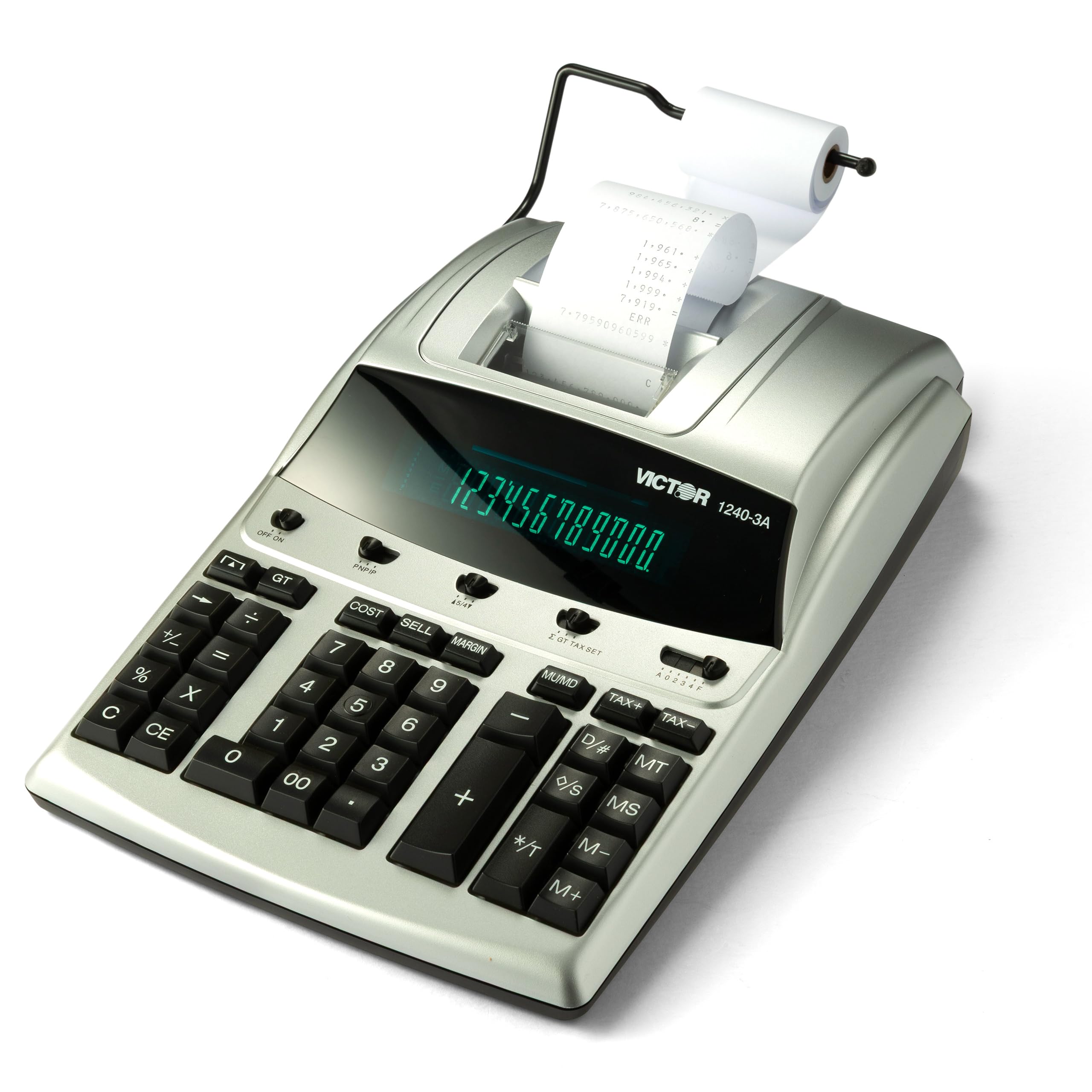
The Victor 1240-3A delivers 4.5 lines-per-second printing from a two-color ribbon spool that switches between black (positive values) and red (negative values). At this speed, the tape keeps pace with rapid number entry, and the ink spool system (Victor 7010) is widely available—no hunting for proprietary cartridges. The 45% recycled plastic chassis reduces weight without making the machine feel flimsy.
The Cost-Sell-Margin key cluster is laid out for easy access during retail pricing or tax preparation: enter any two variables and the third appears instantly. A dedicated backspace key lets you delete the last digit entered without restarting the entire string. Reviewers coming from 10-year-old machines report the key layout feels intuitive from day one, with quiet keys that reduce office noise.
At just under 2.5 pounds, the 1240-3A is light enough to shift between desks. The fluorescent display is bright but not quite as legible from extreme side angles as a VFD panel. Some users note the print head sits low, requiring a slight tilt to read the most recent lines without leaning forward. For a mid-range price, you get a genuine workhorse with standard ribbon refills.
Why it’s great
- 4.5 LPS two-color ribbon for fast, legible audit trails
- Uses standard Victor 7010 ribbon spools
- CSM key cluster simplifies margin calculations
- Lightweight build at 2.3 lbs for desk portability
Good to know
- Fluorescent display less wide-angle-friendly than VFD
- Print head sits lower than premium models
- No battery backup—AC power only
3. Sharp EL2360PIII
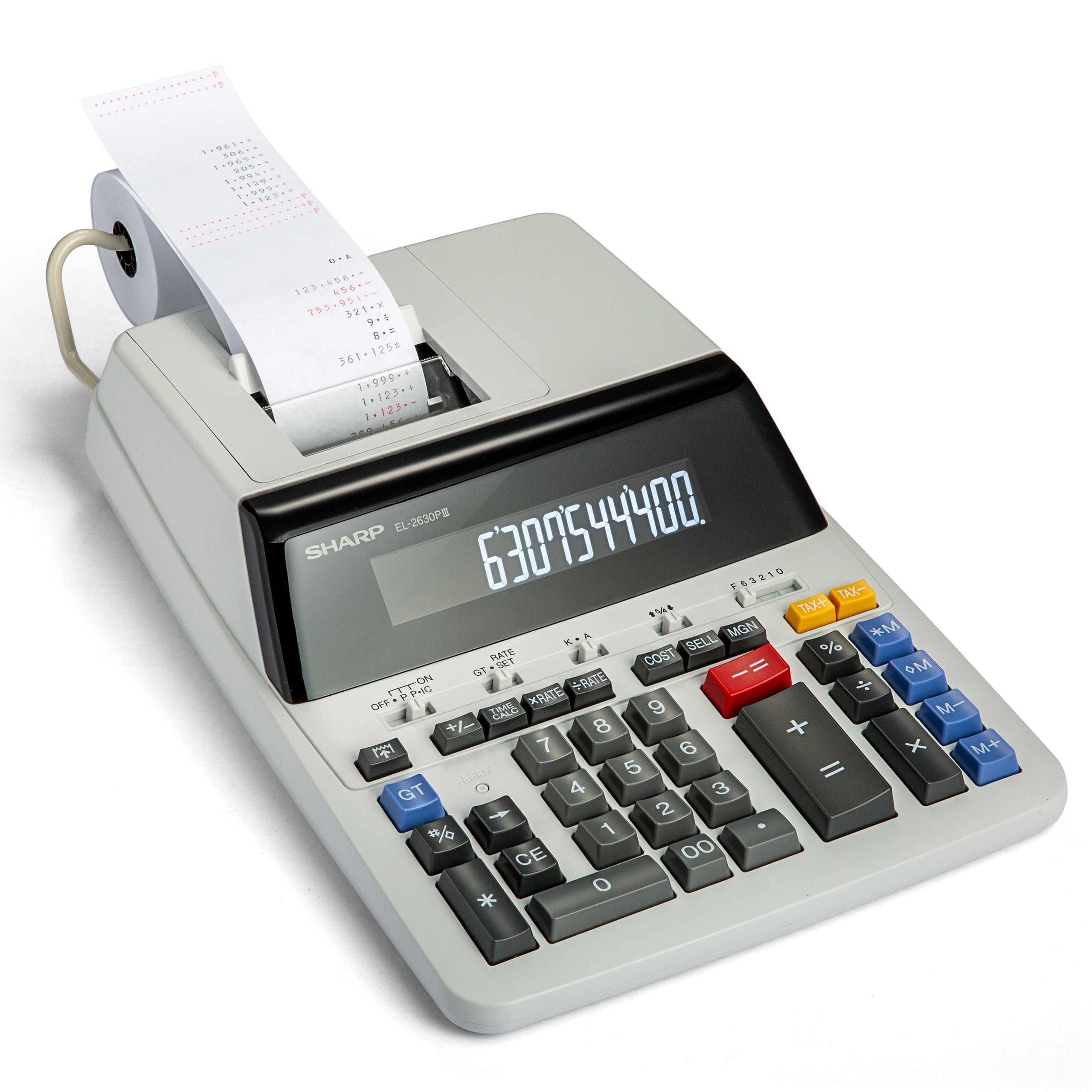
The Sharp EL2360PIII runs at 4.8 lines per second—as fast as any non-industrial printing calculator in this segment. At that speed, the tape advances almost instantly after the final digit, so you never wait for the print head to catch up. The two-color ribbon delivers red negatives and black positives, and the extra-large VFD display, with digits large enough to read from across a desk, reduces squinting during long sessions.
The automatic add-on/discount function streamlines invoice adjustments, and the time-calculation key (hours, minutes, seconds) is rare in this category—useful for payroll or billing by the hour. The CSM key cluster covers cost, sell, and margin in a dedicated row. Reviewers who replaced 13-year-old Texas Instruments units found the Sharp quieter and faster, though the printed tape sits low on the platen, requiring occasional repositioning to read the last total.
At 2.2 pounds, the EL2360PIII is lighter than the Victor 1460-4, but its plastic casing feels sturdy enough for daily commercial use. The downside is that the tape tears unevenly unless you rip it cleanly across the cutter bar; some users report crooked paper alignment after a hasty tear. If fast, reliable tape output is your priority, this Sharp is a top contender.
Why it’s great
- 4.8 LPS is among the fastest print speeds available
- VFD display is large and glare-resistant
- Time calculation function for hourly billing
- Quieter operation than predecessor models
Good to know
- Printed tape sits low; harder to read without leaning
- Tape tears unevenly unless pulled firmly
- Battery backup requires CR2032 coin cell
4. Victor 1460-4
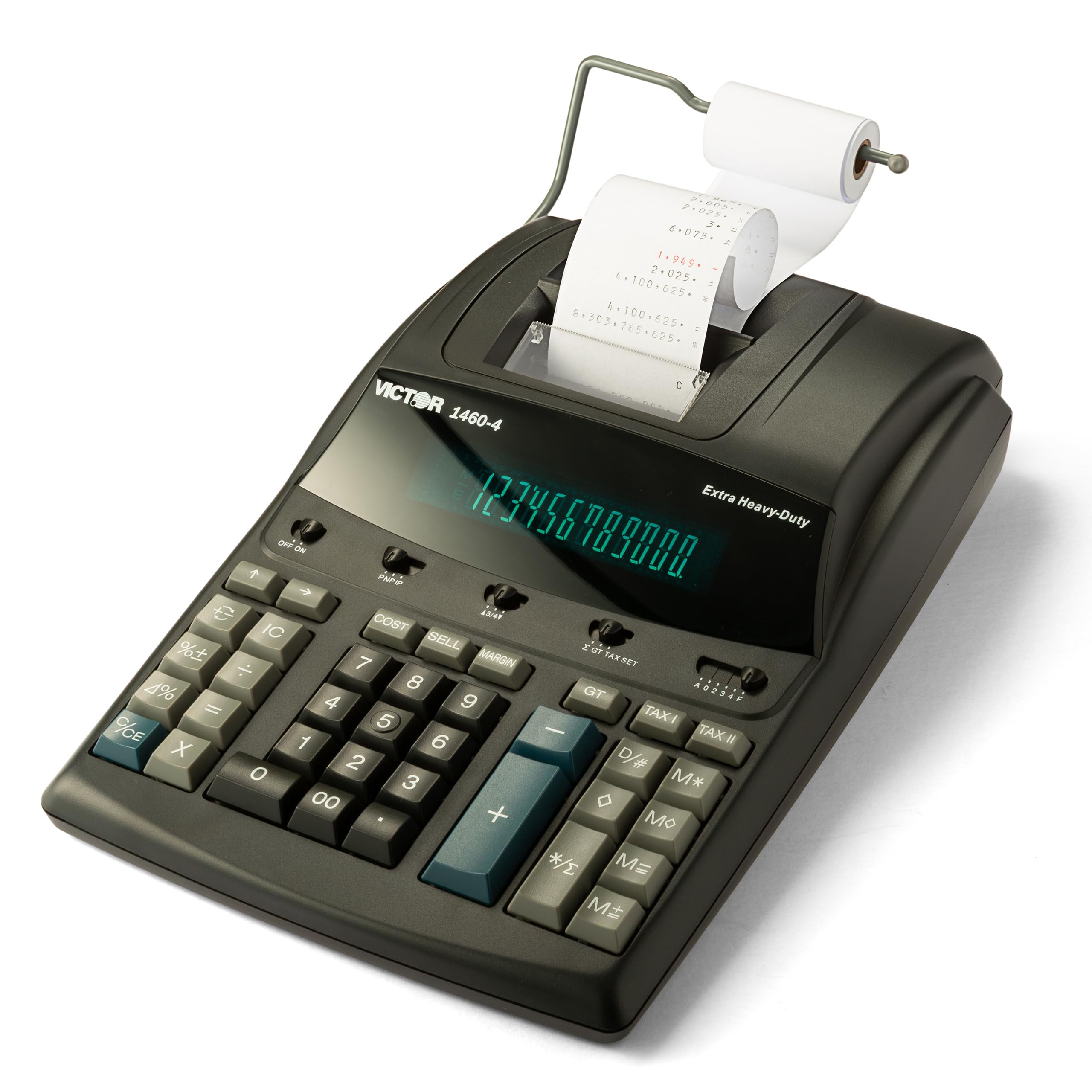
The Victor 1460-4 is an outlier in this category: a 3.7-pound printing calculator with a metal-and-plastic chassis that resists flexing under heavy key use. Its 4.6 LPS two-color printer uses the same Victor 7010 spool ribbon as the 1240-3A, keeping supply costs low. The 12-digit fluorescent display offers 17mm-tall numerals—the tallest in this lineup—making this the go-to machine for users who need to read totals from a standing position or shared workspace.
Designed for extra-heavy-duty commercial environments, the 1460-4 features a broad footprint (15.6 x 10.5 inches) that prevents tipping during rapid data entry. The keyboard layout places item count, rounding switches, and decimal selectors at the top edge where they stay out of the way but remain accessible. Multi-decade Victor users consistently rate this model as a long-term investment; several reviewers replaced units that ran for over 15 years.
The weight is the biggest practical constraint. At nearly 4 pounds, this isn’t a calculator you slide into a drawer or move between desks regularly. The black finish shows fingerprints readily, and the printer is not the quietest in its class—though it’s far from disruptive. If your workspace demands a machine that doesn’t budge when you type, the 1460-4 earns its premium price.
Why it’s great
- 3.7 lbs metal chassis stays planted during heavy use
- 17mm display digits are the largest among reviewed models
- Uses widely available Victor 7010 spool ribbons
- Durable enough for daily commercial or institutional use
Good to know
- Heavy and bulky; unsuitable for desk swapping
- Black finish shows dust and smudges quickly
- Printer is slightly noisier than the Sharp EL2360PIII
5. Sharp VX-2652H

The Sharp VX-2652H matches the EL2360PIII’s 4.8 LPS print speed but packages it in a more compact chassis that fits medium-sized desks without crowding. Its fluorescent display provides bright blue-white digits that hold up under fluorescent office lighting, though the panel is not quite as vivid as the VFD screens on the Canon MP25DV-3 or Sharp EL2360PIII. The two-color ribbon system uses the same Victor 7010 standard as the Victor machines, so refills are simple.
Sharp loaded this model with functions rarely bundled at this level: percent change, grand total, change sign, decimal settings, item count, average, rounding switches, plus two independent four-key memories. The quiet operation is a genuine differentiator—key presses produce a soft stroke rather than a clicky thud, and the print head hum is lower in pitch than rivals. Reviewers who have owned earlier VX-series models praise the consistent keyboard layout that transitions seamlessly between iterations.
The VX-2652H runs on AC power only; there is no battery backup. This means you lose your work during a power flicker unless you’re using the tape as a hard reference. At 2.2 pounds, it’s light enough to reposition but still feels solid. For a high-speed office calculator that won’t distract coworkers, this Sharp is a strong pick.
Why it’s great
- 4.8 LPS with quiet key and print-head operation
- Compact footprint for medium desktop spaces
- Advanced functions: percent change, grand total, dual four-key memories
- Uses standard Victor 7010 spool ribbon
Good to know
- No battery backup—AC cord required
- Fluorescent display slightly less bright than VFD
- Some users find the initial button layout unfamiliar
6. Canon P170-DH-3
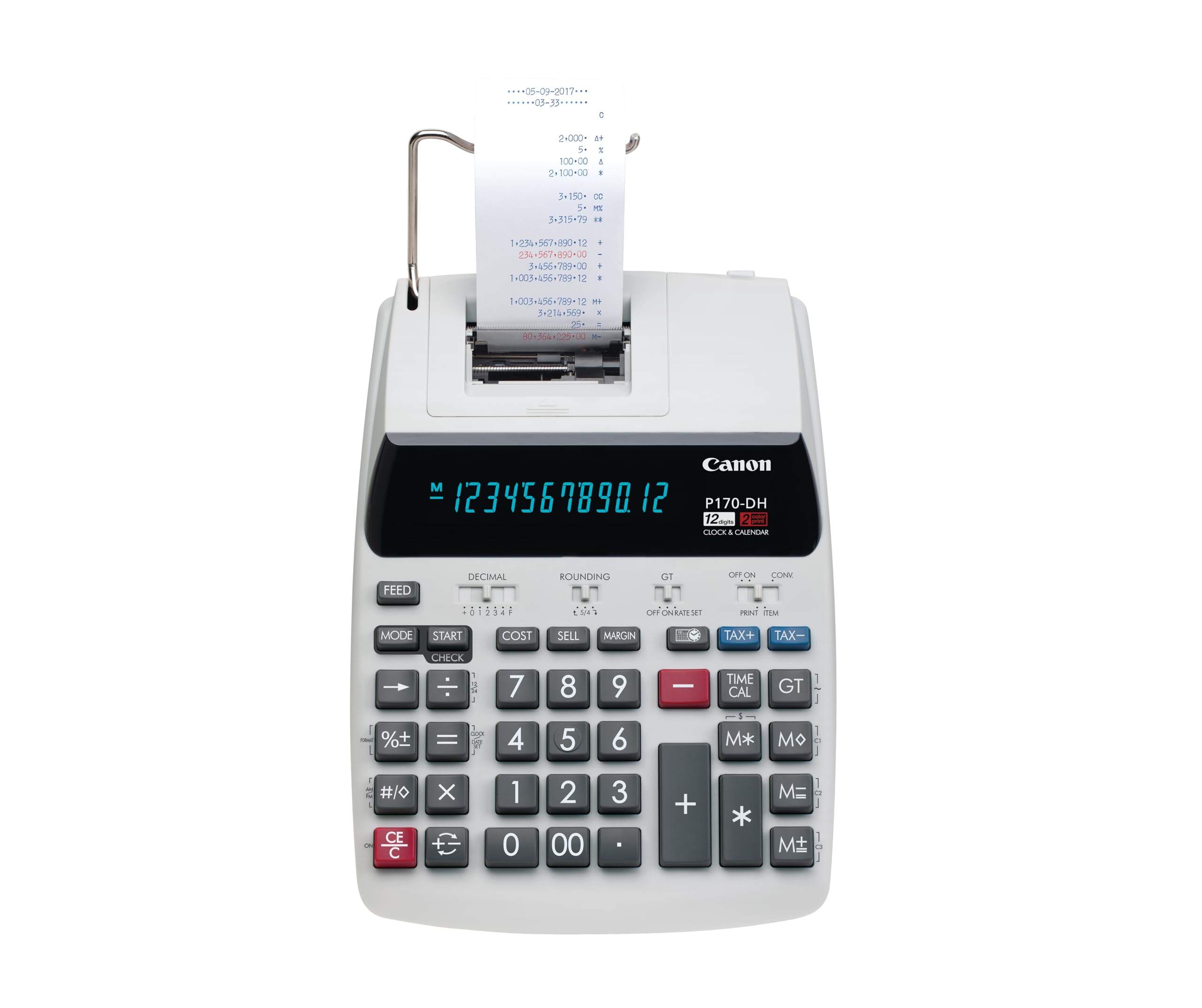
The Canon P170-DH-3 occupies a sweet spot for users who need a reliable printing calculator but have limited desk real estate. At 14.6 inches wide and just 1.8 pounds, it’s smaller and lighter than the Victor 1240-3A, yet retains a VFD display that punches above its size class—bright, crisp numerals that stay readable even when viewed from the side. The Double Check function automatically recalculates the last entry, catching transposition errors before they print.
Canon packed currency conversion, a clock and calendar that appear on the display, and time-calculation functions into a body that fits next to a keyboard and monitor. The backup battery (CR2032) preserves date and time settings during power loss. Reviewers consistently note that the P170-DH-3 is nearly identical to its discontinued predecessor, meaning you get a proven design without the design risks of a first-generation model.
The 2.1 LPS print speed is the slowest in this lineup by a wide margin. If your work involves running long columns of numbers, the tape will lag behind your typing pace. Some users also report that the sleep mode hides the clock display—annoying if you rely on the clock at a glance. For light to moderate printing volume in a constrained workspace, this Canon is a sensible mid-range option.
Why it’s great
- Compact 14.6″ footprint fits cluttered desks
- VFD display is bright and legible from wide angles
- Double Check function catches entry errors
- Backup battery preserves clock and date settings
Good to know
- Slow 2.1 LPS print speed lags behind data entry
- Sleep mode hides the clock display
- Fewer advanced business keys than larger competitors
7. Casio HR-300RC

The Casio HR-300RC stands out for its backlit LCD display—a rarity in the printing-calculator segment. This backlight lets you read digits clearly in dim bookkeeping rooms or late-night sessions, though the LCD itself has a narrower viewing angle than VFD or fluorescent panels. The two-color ribbon prints in black and red, and the Re-Print & Correct function stores up to 150 steps, allowing you to review, edit, and reprint sequences without starting over.
Cost, Sell, and Margin keys handle business math, while the built-in clock and calendar stamp the current date and time directly on the tape—a useful audit feature for expense records. Reviewers consistently praise the large, bold keyboard buttons that reduce mis-hits, and the auto-off sleep mode is adjustable via the CA/ON key. Several CPAs and long-time Casio users report that the HR-300RC is their favorite model for home offices.
The HR-300RC is AC-powered only; there is no battery backup option. This means any unplugged move resets the clock and memory. The print speed is adequate for light-to-moderate use but won’t match the 4.5-plus LPS of the Victor or Sharp machines. For a budget-friendly entry point with a bright screen and deep correction buffer, this Casio delivers solid value.
Why it’s great
- Backlit LCD display readable in low light
- 150-step reprint and correction function
- Large, well-spaced keys reduce typing errors
- Time and date stamp for audit trails
Good to know
- LCD viewing angle is narrower than VFD or fluorescent
- No battery backup—resets when unplugged
- Print speed slower than premium competitors
FAQ
What is the practical difference between 2.5 LPS and 4.8 LPS on a daily basis?
Can I use any 57mm paper roll, or do I need a specific brand for each model?
How often do I need to replace the ink ribbon on these machines?
Final Thoughts: The Verdict
For most users, the best adding machine with tape winner is the Sharp VX-2652H because it combines the fastest 4.8 LPS print speed with genuinely quiet operation and a compact footprint that fits real office desks. If you want a heavy-duty tank that won’t slide across your desk, grab the Victor 1460-4. And for a budget-friendly entry point with a backlit screen and 150-step correction buffer, nothing beats the Casio HR-300RC.