
Our readers keep the lights on and the weekend projects moving. As an Amazon Associate, I earn from qualifying purchases.
Advanced users know the real pain of a 3D printer: the machine that demands constant tinkering, bed re-leveling, and failed prototypes that eat days, not hours. The right 3D printer for advanced users eliminates that friction, delivering consistent, high-speed output with minimal intervention. This guide cuts through the noise to find the machines that respect your time and skill.
I’m Rikta — the co-founder and writer behind FitlyFast. I’ve spent countless hours analyzing motion systems, hotend designs, and enclosed chamber capabilities across dozens of models to identify the printers that truly serve an experienced user’s workflow.
Whether you need multi-color capability, a massive build volume for production runs, or the reliability of a closed-loop CoreXY system, this guide helps you select the best 3d printer for advanced users that matches your specific engineering or prototyping needs.
How To Choose The Best 3D Printer For Advanced Users
Choosing a printer for advanced use means looking beyond marketing speed claims. The real differentiators are motion system architecture, chamber temperature control, and the quality of the auto-calibration system. A beginner might overlook these; you cannot.
Motion System: Bed Slinger vs. CoreXY vs. CoreXZ
Bed slingers (traditional Cartesian) are noisy and slow; at high accelerations, the heavy print bed wobbles, introducing artifacts. CoreXY and CoreXZ systems keep the bed stationary and move only the print head, enabling speeds above 500 mm/s and accelerations up to 30,000 mm/s² with better layer consistency. For advanced users, CoreXY is the baseline preference for any serious production or prototyping work. The Creality Ender 5 Max uses a CoreXY setup, while the QIDI Max4 Combo adds closed-loop motors on X/Y axes for even tighter precision over long print runs.
Enclosed Chamber & Active Heating
Engineering filaments like ABS, PC, Nylon, and carbon-fiber blends require a stable, warm environment to prevent warping and layer separation. A passive enclosure (like many mid-range machines) helps but cannot match an active heating system that maintains a consistent 60–65°C chamber temperature. The QIDI Q1 Pro and the QIDI Max4 Combo both feature active chamber heating, making them ideal for users who frequently print with high-temperature materials. For PLA-only workflows, an enclosed printer is less critical, but for material versatility, it is essential.
Auto-Leveling & Calibration Depth
Not all auto-leveling systems are equal. A 16-point grid is vastly inferior to a 49-point or 64-point mesh that corrects for bed imperfections across the entire surface. Advanced users should look for printers that combine inductive or load-cell probes with automatic Z-offset adjustment and vibration compensation (input shaping). The Anycubic Kobra X’s LeviQ 3.0 system uses a 49-point calibration, while the Creality Ender 5 Max uses a 64-point grid. A robust leveling system directly translates to first-layer adhesion reliability, which is the root of most print failures.
Quick Comparison
On smaller screens, swipe sideways to see the full table.
| Model | Category | Best For | Key Spec | Amazon |
|---|---|---|---|---|
| Anycubic Kobra X | Mid-Range FDM | Multi-color entry | 600mm/s, 260mm³, 49-point leveling | Amazon |
| Creality Ender 3 V3 Plus | Mid-Range FDM | Large value prints | 600mm/s, 300mm³, CoreXZ | Amazon |
| ELEGOO Centauri Carbon | Mid-Range FDM | Plug-and-play speed | 500mm/s, CoreXY, 320°C hotend | Amazon |
| FLASHFORGE AD5M Pro | Mid-Range FDM | Quick-swap nozzles | 600mm/s, enclosed, 3s nozzle change | Amazon |
| Bambu Lab P1S | Mid-Range FDM | Multi-color & reliability | 500mm/s, enclosed, AMS ready | Amazon |
| QIDI Q1 Pro | Mid-Range FDM | Engineering filaments | 600mm/s, 60°C active chamber, 350°C nozzle | Amazon |
| ELEGOO Saturn 4 Ultra 16K | Premium Resin | Ultra-fine details | 16K LCD, 30°C tank heating, 150mm/h | Amazon |
| Creality Ender 5 Max | Premium FDM | Large production runs | 700mm/s, 400mm³, 64-point leveling | Amazon |
| ANYCUBIC Photon M7 Max | Premium Resin | Large-format resin | 7K LCD, 60mm/h, 298x164x300mm build | Amazon |
| Original Prusa MK4S | Premium FDM | Reliability & open-source | Input shaping, 9.84×8.3×8.6in, open-source | Amazon |
| QIDI Max4 Combo | Premium FDM | Massive multi-color builds | 800mm/s, 390mm³, 65°C chamber, 16-color | Amazon |
In‑Depth Reviews
1. Anycubic Kobra X
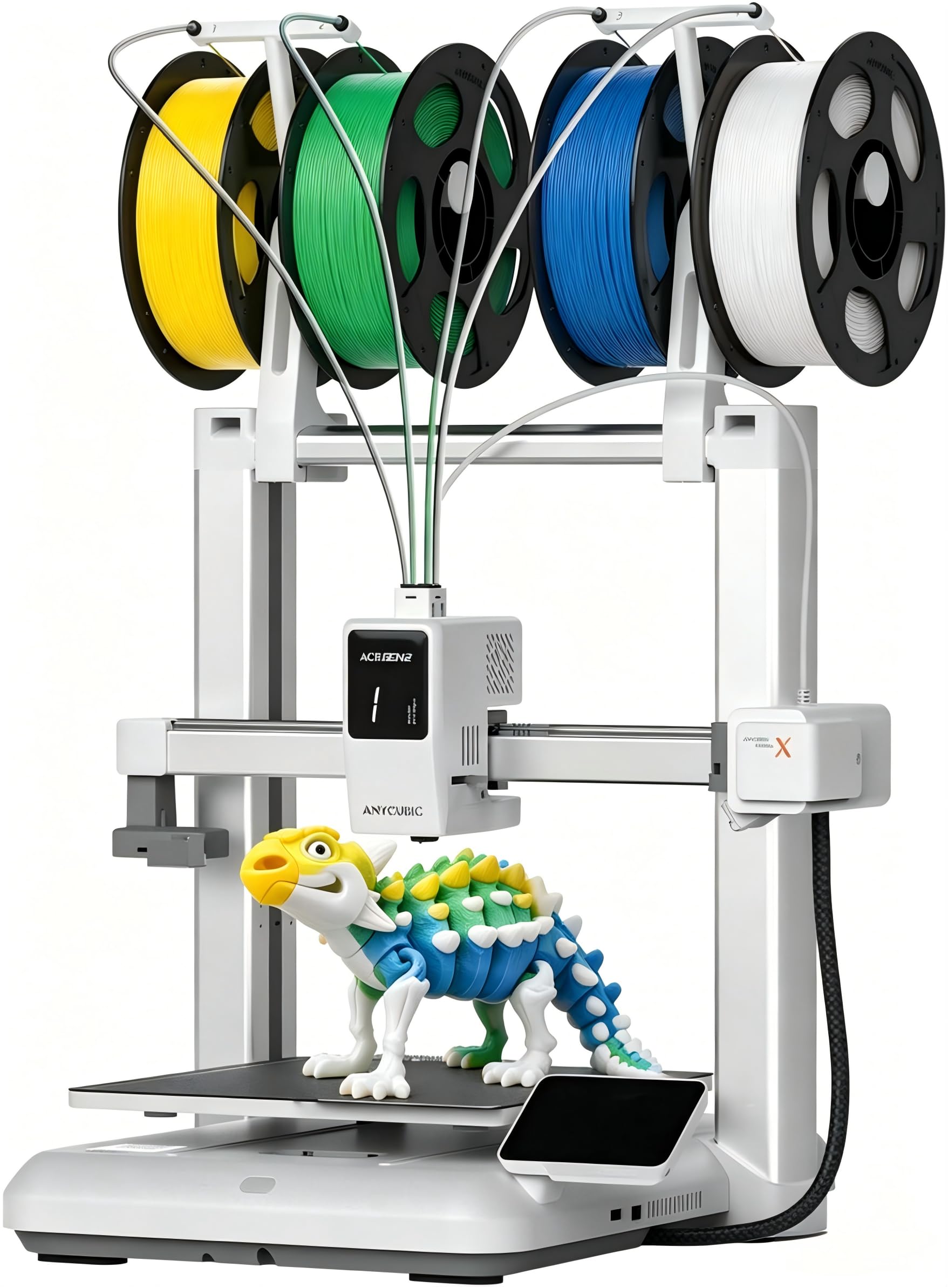
The Anycubic Kobra X is a standout in the mid-range segment because it brings native four-color printing without requiring an expensive add-on at the moment of purchase. The built-in ACE 2 Pro system supports up to 19 colors with additional units, making it one of the most accessible multi-color FDM platforms for users who want to move beyond single-filament work. The 260mm³ build volume is generous for its footprint, and the LeviQ 3.0 system with 49-point auto-leveling ensures strong first-layer adhesion right out of the box.
Print quality at the maximum 600 mm/s is impressive, with minimal ringing thanks to the vibration compensation algorithm. The hardened steel nozzle is a welcome addition for users experimenting with abrasive filaments like carbon-fiber blends, and the 300°C nozzle temperature provides enough headroom for PETG, TPU, and ASA. The built-in AI camera monitors for spaghetti failures and foreign objects, which is a practical safety net when running long prints unattended. Dual-band Wi-Fi and LAN connectivity make remote management through the Anycubic app straightforward and reliable.
The main trade-off is the proprietary ACE 2 Pro ecosystem — if you later want to expand to full 16-color capability, you need to invest in additional units that are not cross-compatible with the original ACE Pro. Some users reported that the phone app could be more polished, but the desktop slicer and cloud integration are solid. For an advanced user who wants a fast, quiet, and multi-color-ready printer without jumping to the premium tier, the Kobra X delivers exceptional value.
Why it’s great
- Native 4-color printing out of the box
- 600mm/s with vibration compensation
- 49-point auto-leveling and AI camera
Good to know
- ACE 2 Pro is not compatible with original ACE Pro
- Phone app could be more polished
2. Creality Ender 3 V3 Plus

The Ender 3 V3 Plus offers a 300x300x330mm build volume that pushes it close to the premium large-format territory while staying at a mid-range price point. Its CoreXZ motion system keeps the bed stable on the Y-axis and moves the gantry for Z, which reduces ringing compared to traditional bed slingers. The maximum 600 mm/s print speed and 20,000 mm/s² acceleration are competitive, and the tri-metal “Unicorn” hotend with a hardened steel nozzle tip ensures clog-free extrusion even after hundreds of hours of use.
Assembly is highly pre-assembled, so the time from unboxing to first print is short. The auto-calibration routine handles Z-offset, bed leveling, and input shaping in one tap — no paper-slip method needed. The direct-drive extruder uses a bolster spring and ball plunger to maintain consistent filament grip, which is especially helpful for TPU and other flexible materials. The Z-axis uses a precision optical shaft and synchronous belt to minimize layer line artifacts at speed.
Noise is a real concern here — the fans are loud, and the machine has no enclosure, so it’s not ideal for a quiet office or bedroom. Some units have had gantry alignment issues out of the box, requiring manual correction for tall prints. The power supply ships set to 235V, which needs to be switched before first use. For advanced users willing to invest a little setup time to fix these quirks, the V3 Plus is a powerful workhorse for large-scale prototyping on a budget.
Why it’s great
- Large build volume at mid-range cost
- CoreXZ reduces ringing
- Hardened steel nozzle for abrasives
Good to know
- Loud fans without enclosure
- Potential gantry alignment issues
3. ELEGOO Centauri Carbon

The ELEGOO Centauri Carbon arrives fully assembled and pre-calibrated, requiring only the removal of three shipping screws to start printing. Its CoreXY structure supports 500 mm/s print speeds and 20,000 mm/s² acceleration, which is more than sufficient for rapid prototyping. The 320°C brass-hardened steel nozzle and enclosed chamber with enhanced cooling mean it handles carbon-fiber reinforced filaments and other advanced materials straight out of the box, without any hardware mods.
The integrated die-cast aluminum frame minimizes vibration for consistent layer quality, and automatic vibration compensation plus pressure advance tuning smooth out first layers and tight corners. The built-in chamber camera with dual LED lighting supports real-time monitoring and time-lapse recording, accessible through the ELEGOO slicer. The dual-sided build plate features a PLA-specific surface that maintains excellent adhesion at lower bed temperatures, reducing energy use and warping.
The main drawback is the weight — at 38.5 pounds, it’s a heavy machine that needs a sturdy table. The slicer software, while functional, crashed on complex STL files when tested on older laptops. Some users reported initial hotend communication failures that required customer support intervention, though the replacement process was thorough. For an advanced user who values out-of-box speed and enclosure over tinkerability, the Centauri Carbon is an outstanding value proposition.
Why it’s great
- Fully assembled and pre-calibrated
- 320°C hotend handles advanced filaments
- Die-cast aluminum frame for stability
Good to know
- Very heavy at 38.5 pounds
- Slicer may struggle with complex files
4. FLASHFORGE AD5M Pro

The FLASHFORGE AD5M Pro targets users who need material versatility without downtime. The 3-second quick-swap nozzle system lets you transition from a 0.4mm nozzle for detailed PLA work to a 0.6mm nozzle for fast PETG or carbon-fiber prints in moments. The direct-drive extruder handles flexible TPU without jamming, and the fully enclosed chamber with dual-layer filtration makes it safe for studio and classroom environments where fumes are a concern.
The CoreXY motion system delivers speeds up to 600 mm/s, and the built-in vibration compensation keeps layer quality consistent. Setup is genuinely quick — about 10 minutes from unboxing to first print thanks to automatic bed leveling. The Maker app and Orca slicer integration allow full remote control, including real-time camera monitoring, filament runout detection, and power-loss recovery. The 220mm³ build volume is modest but sufficient for most prototyping and hobbyist work.
Some units have experienced extruder failures after a handful of prints, and customer support responses have been mixed. The build plate adhesion is strong but can be tricky to remove prints without reheating. The provided USB stick contains outdated software, so downloading the latest firmware from the website is a mandatory first step. For users who prioritize quick material swaps and a clean, enclosed workspace over absolute build volume, the AD5M Pro is a solid mid-range contender.
Why it’s great
- 3-second nozzle swap for different materials
- Enclosed with dual-layer filtration
- 600mm/s CoreXY with vibration compensation
Good to know
- Some extruder reliability concerns
- Old software on included USB stick
5. Bambu Lab P1S

The Bambu Lab P1S is a workhorse that has become an industry reference point for reliability and speed. With the Bambu Lab AMS (sold separately), it supports up to 16 colors or multi-material prints, which makes it a favorite among creators who produce detailed, multi-colored functional parts and artistic models. The fully enclosed design stabilizes chamber temperature for ABS and ASA, and the auto bed leveling routine runs before every single print to guarantee first-layer consistency.
Print speed peaks at 500 mm/s with 20,000 mm/s² acceleration, and the Bambu Studio slicer streamlines the entire workflow from model import to print management. The integrated camera enables remote monitoring through the Bambu Handy app, and network printing from a computer works seamlessly. The build volume of 256x256x256mm is a standard sweet spot that fits most projects. Users consistently report that the P1S outperforms printers costing three times as much in terms of out-of-box print quality.
The main limitation is filament compatibility — carbon-fiber and glass-fiber reinforced polymers are not officially recommended. The AMS system adds significant cost for multi-color capability. TPU can be tricky to feed through the AMS, and some users found that the hot end clogs when using third-party soft filaments. For an advanced user who wants a reliable, fast, and easy-to-manage enclosed system for PLA, PETG, and ABS printing, the P1S remains a top-tier choice.
Why it’s great
- Up to 16-color with AMS
- Auto-levels before every print
- Superior out-of-box print quality
Good to know
- AMS adds significant cost
- Not recommended for carbon/glass fiber filaments
6. QIDI Q1 Pro

The QIDI Q1 Pro is engineered for users who work with high-temperature engineering filaments. Its active heating chamber maintains a consistent 60°C (140°F) environment, which is critical for preventing warping in ABS, polycarbonate, and nylon. The 350°C bimetal nozzle handles carbon-fiber and glass-fiber reinforced materials with ease, and the direct-drive extruder is designed to be clog-free even during long prints.
The CoreXY system and independent dual Z-axis motors deliver 600 mm/s maximum speed and 20,000 mm/s² acceleration. Full-auto calibration includes dual sensors for precise leveling, plus smart filament tangle detection and a Hall-effect runout sensor that pauses prints immediately when filament issues are detected. The 1080P HD camera provides real-time monitoring and time-lapse photography, and the machine is based on Klipper firmware, making it completely open-source and customizable for advanced users who want to tune every parameter. The 32GB eMMC internal storage is generous.
One notable omission is the lack of a built-in carbon air filter — the optional filter box must be 3D printed from the wiki and installed separately. The side spool mount is somewhat flimsy, and there is no Ethernet port, relying solely on Wi-Fi. Some users reported that PETG quality requires additional tuning compared to the excellent PLA and ASA profiles. For an advanced user who prioritizes engineering-grade material capability over multi-color features, the Q1 Pro offers unmatched value for its price tier.
Why it’s great
- 60°C active heated chamber for warp-free prints
- 350°C nozzle for carbon fiber and PC
- Open-source Klipper firmware for full customization
Good to know
- No built-in carbon filter
- No Ethernet port, Wi-Fi only
7. ELEGOO Saturn 4 Ultra 16K

The ELEGOO Saturn 4 Ultra 16K sets a new standard for resin printing resolution. Its 10-inch 16K mono LCD delivers pixel dimensions small enough to capture hair textures, fabric weaves, and microscopic surface details without visible layer lines. The tilt-release peeling mechanism reduces peel forces, enabling faster print speeds up to 150 mm/h while maintaining exceptional precision. This makes it a top choice for jewelry designers, miniatures enthusiasts, and anyone producing highly detailed castable models.
The intelligent tank heating system maintains a stable 30°C resin temperature, reducing viscosity fluctuations and improving layer adhesion across the entire build. The AI camera monitors for empty build plates and warped models, sending alerts to your phone. The built-in chamber light and time-lapse feature make it easy to document and share your prints. The auto-leveling system is genuinely plug-and-play — no manual adjustment needed, and the large build plate (8.33 x 4.66 x 8.66 inches) accommodates multiple models in a single run.
The resin pooling on the build plate after prints is a minor annoyance that some users solved with a self-printed bracket. The build plate requires sanding for optimal adhesion, and base exposure times may need adjustment for different resin types. Firmware updates occasionally reset settings, requiring reconfiguration. The Saturn 4 Ultra is not a beginner’s toy — it demands an understanding of resin handling, ventilation, and post-processing — but for an advanced user chasing the finest possible detail, it is unmatched at its price.
Why it’s great
- 16K resolution for microscopic detail
- 150mm/h fast printing with tilt release
- 30°C active tank heating
Good to know
- Needs good ventilation for resin fumes
- Build plate may need sanding for best adhesion
8. Creality Ender 5 Max

The Creality Ender 5 Max is built for users who need to print large, one-piece models or run a small print farm. Its 400x400x400mm build volume dwarfs most competitors, and the CoreXY motion system with high-torque motors achieves 700 mm/s speeds while maintaining stability through a reinforced die-cast aluminum frame. The X-axis linear rail ensures consistent accuracy across the full width of the print bed, which is a common failure point in cheaper large-format machines.
The 64-point automatic leveling system with Z-offset adjustment is one of the most comprehensive in its class, dramatically reducing first-layer failures. The direct-drive dual-gear extruder is built for 24/7 reliability, with hardened gears that resist wear even with abrasive filaments. The 1000W rapid-heating bed reaches working temperature in minutes and supports PLA, PETG, ABS, ASA, and polyamide. WLAN multi-printer control and group management make it practical for scaling production across multiple units.
Quality control inconsistencies are a known issue — some units suffer from severe bed adhesion problems and loose parts right out of the box. The Creality AI failure detection is unreliable, with many users disabling it. The enclosure needs a riser to prevent the top panel from scuffing prints. Spare parts availability has been limited. For an advanced user willing to do some initial troubleshooting to unlock its massive potential, the Ender 5 Max is a powerful production tool, but buyer beware on consistency.
Why it’s great
- 400mm³ build volume for oversized models
- 700mm/s CoreXY with linear rail
- Multi-printer WLAN control
Good to know
- Quality control inconsistencies reported
- Enclosure needs modifications
9. ANYCUBIC Photon Mono M7 Max

The ANYCUBIC Photon Mono M7 Max is a large-format resin printer designed for users who need to produce full-scale prototypes or batch-print multiple parts without splitting models. The 13.6-inch 7K mono LCD delivers a 46μm XY pixel resolution, which is excellent for large prints but slightly lower than the Saturn 4 Ultra’s 16K for ultra-fine detail work. The 298x164x300mm build volume is among the largest in the consumer resin segment, making it ideal for helmet-sized props, automotive parts, and full-hand casts.
Intelligent Release 2.0 and dynamic light-off compensation boost print speed to 60 mm/h, which is 200% faster than the earlier M3 Max. The automatic resin management system monitors and maintains the resin level, adding more from a reservoir as needed, which is a huge time-saver for long overnight prints. The temperature-controlled resin vat improves fluidity and success rates, while the suspension drip setting allows the build platform to hang at an angle for resin to drain back into the tank, reducing waste.
The sheer weight of the machine (60.9 pounds) and the massive build plate make it a challenge to handle — removing finished prints from the plate requires significant effort, and a larger wash/cure station (not included) is necessary to accommodate the output. The flip-top lid design is convenient but the overall footprint is substantial. Some users reported poor quality control and lack of direct returns when purchased outside Amazon. For an advanced user who needs large-format resin production and has the workspace to manage it, the M7 Max is a powerful asset.
Why it’s great
- Massive 298x164x300mm build volume
- Auto resin level management
- 60mm/h speed with Intelligent Release 2.0
Good to know
- Very heavy and requires large workspace
- Needs bigger wash/cure station
10. Original Prusa MK4S

The Original Prusa MK4S represents the gold standard for reliability and open-source freedom. It is a fully assembled, tested desktop FDM printer with input shaping that reduces ringing for cleaner edges at high speeds. The 9.84 x 8.3 x 8.6-inch build volume is smaller than many competitors, but the consistency of the Prusa ecosystem — from the firmware to the slicer profiles — means that users spend their time designing, not troubleshooting. The included 1 kg spool of Prusament PLA Galaxy Black is a nice bonus that reflects the brand’s commitment to a complete out-of-box experience.
Print quality is exceptional out of the box, with the default PrusaSlicer settings delivering results that rival or exceed other printers that require hours of tuning. The self-cleaning nozzle and filament loading system are well thought out. The machine is open-source and fully upgradeable, with Prusa Research providing long-term firmware updates and hardware upgrade paths. The V6-style hotend ecosystem gives users access to a vast range of third-party nozzles. The 32-bit motherboard handles complex models without stuttering.
The main drawback is the price — this is a premium machine that commands a significant premium over Chinese competitors with similar nominal specs. The build volume is modest compared to large-format printers, and the MK4S is not particularly fast compared to 500-700 mm/s CoreXY machines. For an advanced user who values print reliability, community support, and open-source flexibility above all else, and who is willing to pay for it, the MK4S remains a benchmark that few rivals match in overall dependability.
Why it’s great
- Legendary out-of-box reliability
- Fully open-source with upgradeable design
- Excellent customer support and community
Good to know
- Premium price compared to Chinese alternatives
- Smaller build volume than many competitors
11. QIDI Max4 Combo

The QIDI Max4 Combo is a true production-grade machine designed for advanced users who need large-scale, multi-color engineering prints. The 390x390x340mm build volume is 55% larger than its predecessor, and the 65°C active heated chamber, combined with the self-developed Polar Cooler system, creates the ideal environment for high-temperature filaments like ABS-CF, PC, and PPS-CF. The maximum 800 mm/s speed and 30,000 mm/s² acceleration are among the fastest in its class, while the closed-loop motors on X/Y axes ensure precision over long print runs.
The QIDI BOX add-on enables seamless 16-color and multi-material printing with intelligent filament management, including real-time level monitoring and automatic pause on filament runout. The high-flow 40mm³/s hotend with hardened steel nozzle can handle abrasive carbon-fiber reinforced nylon without issue. The built-in AI camera detects printing abnormalities like spaghetti failures and pauses the job instantly. The large touchscreen interface is intuitive, and the machine ships with a 32GB internal storage for untethered operation.
The Max4 Combo is extremely heavy at 120 pounds, requiring a dedicated, sturdy table or stand. The pre-print process is relatively long due to the comprehensive calibration routine, and the initial power draw is high as the large chamber and bed heat up. The Polar Cooler is sold separately, which is a notable omission for a premium machine. Some users reported a warped bed on arrival, though QIDI’s support quickly sent replacement parts. For an advanced user running a small production shop or prototyping large industrial parts, the Max4 Combo is a formidable tool that justifies its premium cost.
Why it’s great
- Massive 390mm³ build with 65°C chamber
- 800mm/s with closed-loop motors
- 16-color multi-material with QIDI BOX
Good to know
- 120 pounds, requires heavy-duty table
- Polar Cooler sold separately
FAQ
How fast is fast enough for an advanced user?
Do I need a heated chamber for carbon fiber filaments?
What is the disadvantage of multi-color systems like ACE or AMS?
Should an advanced user buy a resin or FDM printer?
Final Thoughts: The Verdict
For most users, the 3d printer for advanced users winner is the Anycubic Kobra X because it delivers native multi-color printing, high-speed capability, and reliable auto-leveling at a price that leaves room for filament and upgrades. If you need an active heated chamber for engineering materials like ABS and carbon-fiber nylon, grab the QIDI Q1 Pro. And for large-scale production with 16-color capability and a 390mm³ build volume, nothing beats the QIDI Max4 Combo.