
Our readers keep the lights on and the weekend projects moving. As an Amazon Associate, I earn from qualifying purchases.
A true all-in-one photo printer must do more than scan and copy — it has to reproduce skin tones, gradient skies, and fine detail without banding or a hazy cast. Most home inkjets lay down four colors; real photo machines use six or more inks to capture the subtle transitions that separate a keepsake from a faded receipt. The difference shows instantly in a 4×6 borderless print: one machine delivers a crisp, saturated image you’d frame; the other leaves you wondering why the colors look flat.
I’m Rikta — the co-founder and writer behind FitlyFast. For this guide I spent weeks combing through real-user feedback and spec sheets across every major brand, ranking each printer by its photo output consistency, ink economics, and the practical daily experience of owning one.
The shortlist below cuts through the marketing noise and hands you the three models that actually justify their spot in your home or small office. Read on for the best aio photo printer that fits your workflow and your budget.
How To Choose The Best AIO Photo Printer
Selecting the right multi-function photo printer means balancing output quality, running costs, and the physical footprint on your desk. The wrong choice can leave you with muddy prints and expensive cartridges that run dry in a weekend. Focus on three factors before you buy.
Ink Architecture: Dye‑Sub vs. Pigment vs. Dye
Dye‑sublimation printers — like the compact HPRT and KODAK models — fuse dyes into a coated paper layer by layer, producing water‑ and fingerprint‑resistant prints with a smooth, continuous tone. They excel at 4×6 snapshots but max out at that size. Full‑size inkjets use either dye‑based inks (vibrant but fade faster) or pigment inks (archival but sometimes less punchy). The sweet spot for home photo enthusiasts is a printer with at least six color channels, such as the Epson Expression Photo XP‑970 with its Claria Photo HD six‑ink set, which adds light cyan and light magenta for smoother gradations.
Cost Per Print: Supertank vs. Cartridge vs. Bundle
A one‑time higher purchase price can save you significantly over time. Supertank models like the Canon MegaTank G3290 and the Epson EcoTank ET‑4950 ship with enough ink for thousands of pages, dropping the per‑print cost well under a dime. Cartridge‑based printers — the Canon TS7720 or the HP Envy Photo 7975 — offer a lower entry price but cost more per photo, especially if you use OEM cartridges. Dye‑sub printers bundle paper and ribbon in a single pack, making per‑print costs predictable but often higher than a high‑yield inkjet.
Paper Handling and Borderless Capabilities
Look for a dedicated photo tray or a rear feed slot that supports borderless 4×6, 5×7, and 8×10 media. The Epson XP‑970 includes a fold‑over scan lid and a rear paper path that handles card stock and 11×17, while the Canon G3290 has a top‑feed only — fine for standard prints but awkward for thicker photo paper. If you print mostly 4×6 snapshots, a dedicated dye‑sub printer with a paper cassette sized exactly for that format will save you time and paper waste.
Quick Comparison
On smaller screens, swipe sideways to see the full table.
| Model | Category | Best For | Key Spec | Amazon |
|---|---|---|---|---|
| Epson XP-970 | Premium Inkjet | Framing‑quality 8×10 prints | Six‑ink Claria Photo HD | Amazon |
| Canon G3290 | Supertank | High‑volume color at low cost | 6,000 B&W / 7,700 color pages | Amazon |
| HP Envy Photo 7975 | All‑In‑One | AI‑assisted prints & everyday documents | Separate photo tray + ADF | Amazon |
| KODAK Dock Plus | Dye‑Sub | Quick 4×6 snapshots from phone | 4PASS lamination layer | Amazon |
| Canon TS7720 | Entry Inkjet | Budget home printing with auto duplex | 15 B&W / 10 color PPM | Amazon |
| HPRT CP4100 | Portable Dye‑Sub | Travel‑ready 4×6 at low per‑print cost | 108 sheets + 2 ribbons included | Amazon |
| Epson EcoTank ET-4950 | Office Supertank | High‑volume home office + photo | 18 B&W / 9 color PPM + ADF | Amazon |
| HP Color LaserJet 3301fdw | Color Laser | Fast team printing with vivid documents | 26 PPM color with TerraJet toner | Amazon |
| Brother MFC-L8930CDW | Business Laser | High‑duty color printing with advanced security | 33 PPM + 7″ touchscreen | Amazon |
In‑Depth Reviews
1. Epson Expression Photo XP-970

The XP‑970 separates itself from the pack with a six‑color Claria Photo HD ink set that includes light cyan and light magenta. Those extra channels eliminate the banding and rough gradients that four‑ink printers produce on blue sky or skin tones. In real‑world testing, 8×10 glossy prints from an iPhone showed smooth tonal transitions and accurate flesh tones straight out of the box — no manual color tweaking needed.
The fold‑over scan lid holds thick books and magazine pages flat, and the rear paper path accepts card stock and 11×17 media for larger projects. Setup via the Epson website and WiFi connection took under fifteen minutes, and the eight‑inch print speed is competitive for its class. Users consistently praised the photo quality, with several noting it outperformed their previous Canon inkjet on both color vibrancy and detail.
The downsides are the standard‑yield ink cartridges, which run through light colors faster than expected. Some users reported that the photo tray is finicky to load, and the machine can be sensitive to non‑Epson paper profiles. For anyone who prioritizes framing‑worthy prints from a single device, however, the XP‑970 remains the most capable all‑in‑one photo printer at its price tier.
Why it’s great
- Six‑ink system delivers true photo‑grade color with no banding
- Fold‑over scan lid handles thick originals
- Borderless printing up to 11×17
Good to know
- Standard cartridges may run out quickly; XL replacements recommended
- Photo tray design is less intuitive than competitors
2. Canon MegaTank G3290

The G3290 flips the traditional cost model by shipping with enough bottled ink to produce up to 6,000 black‑and‑white and 7,700 color pages. That translates to roughly two years of normal home use before you need to buy a single refill bottle, and each replacement bottle set costs about what a single cartridge pack would run. For anyone printing school projects, craft patterns, and the occasional 4×6 photo, the total cost of ownership is dramatically lower than any cartridge‑based model.
Print quality for documents is sharp, with well‑saturated colors that hold up on matte photo paper. The 2.7‑inch color touchscreen makes menu navigation straightforward, and automatic duplex printing works reliably. Users praised the easy WiFi setup on both Windows and macOS, and several noted that the printer is quiet enough to sit on a kitchen counter without being intrusive.
The trade‑off is speed — the G3290 prints at about six color pages per minute, which feels slow when you have a batch of 4×6 photos to run. Black text output drew complaints of a muddy red‑gray tint, and the top‑feed paper path requires enough clearance that you can’t stack it on a low shelf. For high‑volume color documents where cost per page matters more than speed, this machine is hard to beat.
Why it’s great
- Extremely low running cost with included bottle ink for thousands of pages
- Reliable wireless connection through thick walls
- Compact footprint works on a kitchen counter
Good to know
- Slow color print speed — not ideal for bulk photo runs
- Black text can appear muddy; top‑feed only
3. HP Envy Photo 7975

HP’s premium home inkjet stands out with an AI feature that reformats web pages and emails before printing — removing ads, empty space, and awkward page breaks. For families who print recipes, DIY instructions, and online articles, this alone saves paper and frustration. The large color touchscreen and HP Smart app make navigation fluid, and the separate photo tray lets you keep plain paper loaded while switching to glossy 4×6 stock without manual tray swaps.
Print speeds of 15 pages per minute for black and 10 for color are respectable for a multi‑function unit, and the autodocument feeder handles multi‑page scan jobs. Users who set up the printer via the HP app reported a smooth process under ten minutes, and those who signed up for the three‑month Instant Ink trial saw their per‑print costs drop significantly. The overall build feels solid, and the white‑with‑portobello‑accent design blends into a home office.
The reliability complaints are impossible to ignore — several users reported the printer failing within four to six weeks, with false paper‑out errors and spontaneous jam rates over 75 percent. The “quiet print” mode cannot be disabled, making the machine louder than expected for a home device. If you buy the Envy 7975, test it thoroughly during the return window and consider an extended warranty or service plan. When it works, it’s excellent; when it doesn’t, it’s deeply frustrating.
Why it’s great
- AI reformatting eliminates wasted pages from web prints
- Dedicated photo tray for quick 4×6 switching
- Fast setup via HP Smart app
Good to know
- High early‑failure rate reported in user reviews
- Cannot disable “quiet print” mode, which adds noise
4. KODAK Dock Plus 4×6

The Dock Plus is built around one job: turning smartphone photos into dry‑to‑the‑touch 4×6 prints in about a minute. Its 4PASS dye‑sublimation process lays down three color layers and then a clear protective laminate, so prints resist fingerprints, water spots, and fading. The integrated phone dock charges your device while it prints, and the KODAK Photo Printer app includes editing, cropping, and filter options that make the process feel like a mini photo lab.
Users consistently describe the color as saturated and vibrant, with prints comparable to Walgreens or Walmart kiosk quality. The compact size and yellow chassis make it a cheerful desktop accessory, and setup is genuinely simple — power on, pair over Bluetooth, select photos in the app, and print. Several scrapbookers and travel memory‑keepers reported that the printer quickly became their go‑to for album‑ready prints.
Printing is where the simplicity ends. The four‑pass process means each print takes roughly 55 seconds, and the printer requires a cooling pause after every four prints, which drags out batch jobs. Paper jams are common if the single‑sheet tray isn’t loaded perfectly, and the Android app setup can be confusing when the Bluetooth icon turns yellow versus blue. Best for casual, on‑demand snapshots; not for framing or high‑volume work.
Why it’s great
- Laminated prints resist water, fingerprints, and fading
- Integrated phone dock charges while printing
- Simple Bluetooth setup for on‑demand 4×6 snapshots
Good to know
- Slow per‑print speed and cooling pauses between batches
- Paper jams easy if sheets aren’t loaded perfectly flat
5. Canon PIXMA TS7720

The TS7720 is a four‑ink cartridge‑based all‑in‑one that punches above its price for basic home printing. It prints 15 black‑and‑white pages per minute and 10 color pages, and the automatic duplex feature is a rarity at this price level. The 2.7‑inch LCD touchscreen simplifies navigation, and the compact white footprint fits easily on a narrow desk shelf.
For photo duty, results are mixed. Smaller 4×6 prints on glossy paper look decent, but 8×10 prints lack the color vibrancy and detail of a dedicated photo printer. Several users noted that colors appeared less vivid than a five‑ink tank Canon model, though the trial ink cartridges that ship with the unit may exaggerate that gap. The scanner works well for both documents and photos, though there is no autodocument feeder — you place each sheet manually.
The most common pain point is ink consumption. Users report the included starter cartridges running dry after as few as 30 to 40 full‑color pages, and replacement cartridges eat into the savings from the low purchase price. The WiFi setup can be finicky on iOS devices, and the printer defaults to a four‑hour auto‑power‑off that some users found annoying to disable. A good entry‑level machine for light duty, but photo‑centric households should budget for a higher‑yield option.
Why it’s great
- Automatic duplex printing at a budget‑friendly price
- Compact design with intuitive LCD touchscreen interface
- Good text quality for documents
Good to know
- Starter cartridges run out very quickly on color prints
- Photo color is less vibrant than higher‑ink‑count models
6. HPRT CP4100
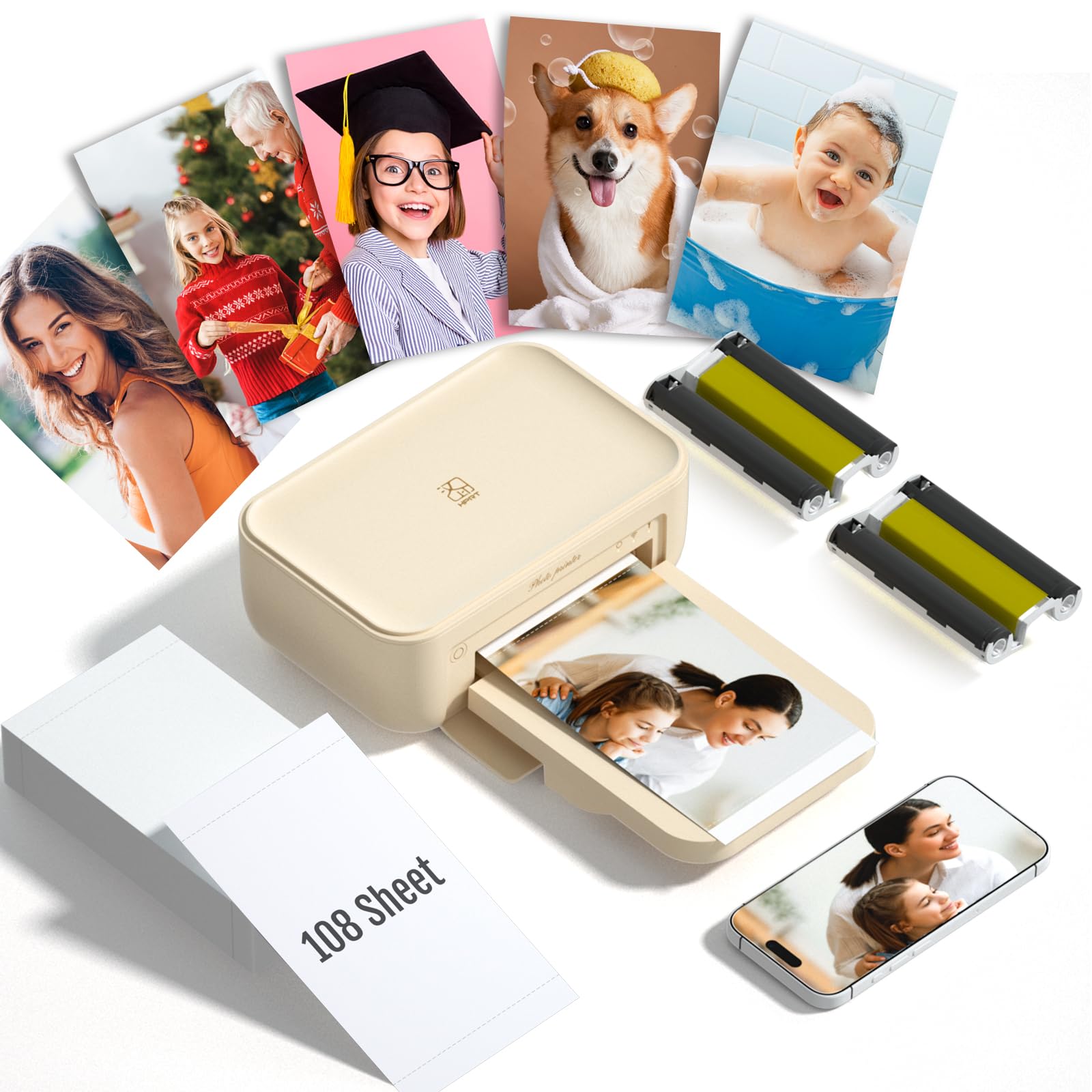
The HPRT CP4100 takes the dye‑sub model and makes it more portable — the whole unit weighs 5.6 pounds and fits in a medium tote bag. It connects via Bluetooth to the Heyphoto app, which offers a wide range of print sizes from 1‑inch up to 6‑inch, plus augmented reality video printing that lets you embed motion into a still print. The bundle includes 108 sheets of paper and two ribbons, good for 180 prints out of the box.
Print quality earns consistent praise for being vibrant and sharp, with dye‑sublimation’s characteristic water‑ and fingerprint‑resistant finish. Users describe the setup as nearly instant: power on, open the app, pick a photo, and the machine delivers a dry 4×6 print in about a minute. Scrapbookers and travel enthusiasts especially liked the compact size and the ability to print anywhere without a power outlet — though the CP4100 does need its wall adapter to run.
The biggest trade‑off is print speed — each photo takes roughly 60 seconds, and you cannot leave the app while it prints or the job stops. Colors come out slightly darker than the source image, a known quirk of dye‑sub that some users corrected by lightening the photo in the app before printing. For anyone who values portability and predictable bundle pricing over speed and color accuracy, the CP4100 is a capable companion for parties, trips, and memory‑keeping.
Why it’s great
- Portable 5.6‑lb design fits in a bag for on‑the‑go printing
- AR video printing adds a fun interactive layer to physical photos
- Bundle includes 108 sheets and 2 ribbons for a deep print run
Good to know
- Prints come out slightly darker than the source image
- Requires the app to remain open during the entire print job
7. Epson EcoTank ET-4950

Epson’s seventh‑generation EcoTank brings refillable ink tanks that hold enough fluid to print up to 6,600 black pages and 5,500 color pages right out of the box, eliminating cartridge changes for months. The ET‑4950 adds a 250‑sheet paper tray, a 2.4‑inch color touchscreen, and an auto document feeder — features that make it a true office‑grade multi‑function unit. Print speeds of 18 pages per minute black and 9 color are class‑leading for a supertank.
Photo output is solid for a four‑ink system: colors are accurate and well‑saturated on glossy paper, though it doesn’t match the smooth gradients of the six‑ink Epson XP‑970. Users praised the wireless connectivity, which reconnects reliably after power outages, and the ink level visibility through the semi‑transparent tanks. Setup through the iPhone app took some users under ten minutes, and long‑term ink savings are substantial — each bottle set replaces approximately 80 cartridge equivalents.
The ET‑4950 has a few quirks. The build feels slightly flimsy, with plastic panels that creak under pressure, and the default page orientation is reversed, which some users found irritating. The copying function tends to scale images incorrectly, cutting off edges unless you adjust settings. If your priority is a low‑cost, high‑volume workhorse for both documents and the occasional photo spread, this machine delivers — but serious photo enthusiasts should step up to the XP‑970.
Why it’s great
- Enough ink included for thousands of pages — no cartridges to buy
- Fast 18‑page‑per‑minute black printing with zero warm‑up time
- Auto document feeder and duplex for office‑grade workflows
Good to know
- Photo output lacks the smooth gradients of a six‑ink system
- Copy function may scale images incorrectly
8. HP Color LaserJet Pro MFP 3301fdw

The 3301fdw is a color laser that prioritizes speed and professional document quality over photo‑centric output. With print speeds of 26 pages per minute for both black and color, and HP’s next‑generation TerraJet toner for richer color saturation, it’s purpose‑built for small offices that produce reports, proposals, and marketing materials in volume. The single‑pass duplex scanning with an auto document feeder makes digital workflow integration fast and smooth.
Setup earns high marks even from non‑technical users — the clear touchscreen and HP Smart app guide you through networking in a few minutes. Print quality for text is razor‑sharp, and color graphics look vivid on plain office paper. Users consistently report reliable performance with no jamming, and the dual‑band WiFi with auto‑reset keeps the printer connected through network interruptions.
The photo limitations are clear: laser printers reproduce smooth gradients poorly, and the introductory toner cartridges ran out for some users after only 50 to 70 color pages. HP’s firmware‑based cartridge authentication blocks third‑party toner, forcing you to buy HP‑branded replacements. If your primary need is brilliant photo prints, a color laser is the wrong tool — but for a fast, efficient office all‑in‑one that handles occasional color documents, the 3301fdw is hard to beat.
Why it’s great
- Blazing 26‑page‑per‑minute color printing with TerraJet toner
- Fast, reliable setup with clear touchscreen interface
- Single‑pass duplex scanning for efficient document workflows
Good to know
- Not built for photo‑quality prints — gradients appear rough
- Blocks third‑party toner; introductory cartridges are small
9. Brother MFC‑L8930CDW

Brother’s latest business color laser is 25 percent smaller than its predecessor while maintaining print speeds of 33 pages per minute in both black and color. The included TN635 toner cartridges deliver 3,000 black and 1,800 color pages out of the box, and the super‑high‑yield TN635XXL replacements boost those numbers to 7,500 and 6,500 respectively — making the per‑page cost among the lowest in the color laser class. The 7‑inch color touchscreen provides a bright, responsive interface for navigation, scan previews, and up to 64 customizable shortcuts.
Print quality is superb for documents: text is laser‑sharp, graphics are bright, and color consistency across a multi‑page run is excellent. Users consistently praise the ease of WiFi setup and the reliability of the duplex scanning system — the 80‑page auto document feeder can process two‑sided sheets at up to 104 images per minute. The integrated NFC card reader for badge authentication adds a meaningful security layer for businesses handling sensitive information.
Photo reproduction is the predictable weak spot — color laser engines cannot match the gradient smoothness of an inkjet or dye‑sub. The printer is also heavy; at over 40 pounds, it requires two people to move into place. For a small team or home office that prints a high volume of color documents and needs advanced security features, the MFC‑L8930CDW delivers unmatched speed and low running costs — just don’t expect it to replace a dedicated photo printer.
Why it’s great
- Fast 33‑page‑per‑minute color printing with super‑high‑yield toner options
- Large 7‑inch touchscreen with customizable shortcuts
- Triple‑layer security with NFC badge authentication
Good to know
- Color laser output lacks the smooth gradients of inkjet or dye‑sub printers
- Very heavy unit requires two people for installation
FAQ
Can an all‑in‑one photo printer produce frame‑worthy 8×10 prints?
Is dye‑sublimation more expensive per print than inkjet?
How long does a typical inkjet photo last before fading?
Final Thoughts: The Verdict
For most users, the best aio photo printer winner is the Epson Expression Photo XP‑970 because its six‑ink Claria Photo HD system delivers true photo‑grade prints, borderless up to 11×17, with a capable scanner and copier in one machine. If you want extreme ink savings for high‑volume color documents plus occasional photos, grab the Canon MegaTank G3290. And for the purest quality in 4×6 snapshots, nothing beats the compact, laminated results of the HPRT CP4100 bundle.