
Our readers keep the lights on and the weekend projects moving. As an Amazon Associate, I earn from qualifying purchases.
The jump to 4K gaming isn’t just about more pixels — it’s about refresh rates that keep your crosshair on target and panel tech that makes dark corners deadly instead of muddy. Choosing wrong means stuck with motion blur on fast titles or washed-out HDR that kills immersion.
I’m Rikta — the co-founder and writer behind FitlyFast. I’ve spent hundreds of hours comparing 4K gaming monitor specs, poring over the nuances of QD-OLED vs WOLED panels, and dissecting customer feedback to find the real-world winners across every feature set and budget tier.
After deep research, the best 4k gaming monitor for most gamers balances a high refresh rate with vibrant HDR and competitive price, delivering a clear win for immersive single-player and fast-paced multiplayer alike.
How To Choose The Best 4K Gaming Monitor
Selecting a 4K gaming monitor requires balancing panel technology, refresh rate, response time, and HDR performance against your GPU and the types of games you play most. Understanding these core specs helps you avoid overpaying for features your setup cannot use, or underspending on a display that bottlenecks your gaming experience.
Panel Technology: OLED vs IPS vs VA vs QD-OLED
The panel type defines contrast, color accuracy, and response speed. OLED and QD-OLED deliver perfect blacks and near-instant 0.03ms response times, making them top-tier for HDR and motion clarity. Fast IPS panels offer superior brightness and wider viewing angles but cannot match the deep black levels of OLED. VA panels provide strong contrast (often 3000:1) but can suffer from slower pixel response in dark transitions, leading to black smearing in motion.
Refresh Rate and Adaptive Sync
At 4K, a 120Hz refresh rate ensures smooth visuals for console gaming, while 144Hz to 240Hz is ideal for PC gamers with capable GPUs. Adaptive Sync technologies like AMD FreeSync Premium Pro and NVIDIA G-SYNC Compatible eliminate screen tearing and stutter by synchronizing the monitor’s refresh rate with the GPU’s frame output.
HDR Performance and Brightness
True HDR requires high peak brightness (600 nits or more) and a wide color gamut (DCI-P3 95% or above). Look for VESA DisplayHDR certifications: True Black 400 is excellent for OLED panels, while HDR 600 or higher signals good brightness from IPS or VA displays. Real-world HDR performance depends more on the panel’s native contrast than the certification number alone.
Connectivity: HDMI 2.1 and DisplayPort
For 4K at 120Hz or higher, HDMI 2.1 with 48 Gbps bandwidth is essential for the latest consoles (PS5, Xbox Series X) and high-end GPUs. DisplayPort 1.4 with Display Stream Compression (DSC) can also drive 4K at 240Hz. USB-C with power delivery (90W is common) simplifies desk setups for laptops.
Quick Comparison
On smaller screens, swipe sideways to see the full table.
| Model | Category | Best For | Key Spec | Amazon |
|---|---|---|---|---|
| ASUS ROG Swift PG32UCDM | High-End OLED | Immersive HDR & fast FPS | 240Hz / QD-OLED / 99% DCI-P3 | Amazon |
| LG 32GX870A-B UltraGear | Dual-Mode OLED | Flexible 4K & competitive FPS | Dual 4K240Hz / FHD480Hz | Amazon |
| ASUS ROG Swift PG32UCDP | Dual-Mode WOLED | Dual-resolution & AI features | Dual 4K240Hz / FHD480Hz | Amazon |
| Samsung Odyssey G8 G81SF | QD-OLED Premium | Elite QD-OLED with anti-glare | 240Hz / QD-OLED / Glare Free | Amazon |
| MSI MPG 321URX QD-OLED | QD-OLED Pro | Work & gaming hybrid | 240Hz / QD-OLED / 90W USB-C | Amazon |
| MSI MAG 321UPX QD-OLED | QD-OLED Value | High-frame QD-OLED at a fair price | 240Hz / QD-OLED / 0.03ms | Amazon |
| Samsung Odyssey G7 G75F | Curved VA | Immersive cinema-style gaming | 165Hz / 1000R / HDR 600 | Amazon |
| Dell Plus S3225QC | QD-OLED Entry | Quality visuals & spatial audio | 120Hz / QD-OLED / 90W USB-C | Amazon |
| Alienware AW2725QF | Dual-Resolution IPS | Versatile 4K work and FHD gaming | Dual 4K180Hz / FHD360Hz | Amazon |
| KTC H32P22P | Mid-Range IPS | Budget 32-inch 4K gaming | 165Hz / Fast IPS / 121% sRGB | Amazon |
| CRUA 32 4K Curved | Budget Curved VA | Affordable high-refresh 4K | 240Hz / VA / 1500R / PIP | Amazon |
In‑Depth Reviews
1. ASUS ROG Swift 32” 4K OLED Gaming Monitor (PG32UCDM)

The PG32UCDM is the gold standard for 4K gaming in 2025. Its QD-OLED panel delivers perfect blacks, 240Hz fluidity, and 0.03ms response times that make even fast-paced shooters feel instantly responsive. The custom heatsink and graphene film mitigate burn-in risks, while VESA DisplayHDR True Black 400 ensures HDR content pops with true-to-life contrast.
Color coverage hits 99% DCI-P3 with Delta E under 2 straight out of the box, which eliminates the need for calibration for most users. The uniform brightness setting keeps luminance consistent during productivity work, bridging the gap between gaming and daily desktop use without washing out highlights.
Burn-in protection features are front and center via the DisplayWidget Center, and the three-year warranty with burn-in coverage provides long-term confidence. Some users note text fringing at close distances, but this is negligible at normal viewing positions on a 32-inch panel.
Why it’s great
- Top-tier QD-OLED image quality with true black levels
- 240Hz at 0.03ms response for ultra-smooth gaming
- Comprehensive 3-year warranty includes burn-in coverage
Good to know
- Glossy finish may reflect bright room light sources
- Requires occasional pixel refresh cycle for burn-in prevention
2. LG 32GX870A-B 32-inch Ultragear 4K UHD OLED Gaming Monitor

The LG 32GX870A-B redefines flexibility with VESA-certified Dual Mode: 4K at 240Hz for story-rich titles or FHD at 480Hz for esports-level responsiveness. The Micro Lens Array+ technology pushes peak brightness to 1300 nits, making HDR highlights searingly bright while maintaining OLED’s signature near-infinite contrast.
Response time sits at 0.03ms GTG with virtually no ghosting, and the matte anti-glare finish keeps reflections at bay in brightly lit rooms. LG includes a robust 2-year limited warranty and panel care tools like pixel cleaning, addressing the chief concern of OLED longevity. The Switch app adds smart multitasking with split-screen layouts for work and play.
Some users report slight graininess on static white backgrounds due to the matte coating, and the initial vertical banding typical of WOLED panels fades after a few hours of use. The trade-off is the high price tag, but for those who want a single monitor that doubles as a competitive 480Hz beast and a stunning 4K HDR display, this is unmatched.
Why it’s great
- Dual-mode switches between 4K 240Hz and FHD 480Hz seamlessly
- MLA+ technology delivers outstanding peak HDR brightness
- Matte finish handles reflections better than glossy OLEDs
Good to know
- Matte coating can look slightly grainy on bright static pages
- Premium price positions it as a high-end investment
3. ASUS ROG Swift 32” 4K OLED Gaming Monitor (PG32UCDP)

The PG32UCDP uses a WOLED panel to deliver a dual-mode experience: 4K at 240Hz or FHD at 480Hz. ROG’s proprietary OLED Anti-flicker technology reduces flicker during refresh-rate changes, and the AI Assistant adds dynamic crosshair, sniper, and visual enhancements that adapt to in-game conditions.
Color coverage hits 99% DCI-P3 with true 10-bit depth, and the matte anti-glare finish keeps the screen usable in bright conditions without washing out colors. Users report exceptional clarity at native 4K with 100% scaling — no text fringing — and the 3-year warranty includes burn-in coverage for peace of mind.
The uniform brightness setting ensures consistent luminance across the desktop, and the DisplayWidget Center allows simple toggle of OLED Care functions. A minority of users have reported OLED flicker in multi-monitor setups, which appears tied to specific GPU configurations rather than a universal defect.
Why it’s great
- Dual 4K240Hz / FHD480Hz for flexible gaming
- OLED Anti-flicker and AI features enhance the experience
- Excellent text clarity at native 4K scaling
Good to know
- OLED flicker reported in some multi-monitor setups
- Aggressive brightness management dims static images
4. Samsung 32” Odyssey QD-OLED G8 (G81SF)

Samsung’s Odyssey G8 G81SF is a 32-inch QD-OLED with a 240Hz refresh rate and 0.03ms response time. Its standout feature is Glare Free technology, which reduces reflections by 54% compared to conventional anti-reflection coatings, making it ideal for rooms with uncontrolled ambient light.
The panel delivers rich, saturated colors with 99% DCI-P3 coverage, and VESA DisplayHDR True Black 400 ensures deep blacks without blooming. The dynamic cooling system uses a pulsating heat pipe — a first in monitors — to dissipate heat five times faster than graphite, reducing burn-in risk. CoreSync lighting projects on-screen colors into the real world for extra immersion.
Users praise the sturdy adjustable stand and crisp text rendering, though some have reported dead pixel clusters appearing after the return window, and the warranty paperwork can be confusing (1-year vs the advertised 3-year). These quality-control concerns temper the overall recommendation, but the image quality is undeniably excellent.
Why it’s great
- Glare Free coating dramatically reduces reflections
- Pulsating heat pipe cooling system lowers burn-in risk
- CoreSync lighting enhances gaming immersion
Good to know
- Quality-control reports of early dead pixels
- Warranty terms may not match advertised 3-year coverage
5. MSI MPG 321URX QD-OLED

The MSI MPG 321URX is a 32-inch QD-OLED monitor that hits 240Hz with a 0.03ms GTG response time, making it a formidable competitor to the ASUS PG32UCDM. It includes KVM support with PiP/PbP, a 90W USB-C port for laptop convenience, and VESA DisplayHDR True Black 400 certification.
Color accuracy is outstanding with Delta E under 2 and 99% DCI-P3 coverage. The OLED Care 2.0 suite provides pixel shift and panel refresh to protect against burn-in. The 4-way adjustable stand includes height, tilt, swivel, and pivot, giving ergonomic versatility for mixed work-gaming setups.
Users transitioning from IPS/LCD panels note the massive upgrade in contrast and HDR vibrancy, though the chunky base takes significant desk space. Mac users report a slight workaround needed for dual-monitor configurations (disabling DSC and capping at 120Hz), but the core gaming performance is faultless.
Why it’s great
- Top QD-OLED image quality with 240Hz speed
- KVM and 90W USB-C enhance productivity
- Excellent color accuracy out of the box
Good to know
- Large stand base consumes desk space
- Mac dual-monitor setup requires configuration workaround
6. MSI MAG 321UPX QD-OLED

The MAG 321UPX brings MSI’s third-generation QD-OLED panel to a more accessible price point, maintaining the 240Hz refresh rate and 0.03ms response time that make OLED gaming so compelling. The color coverage hits 99% DCI-P3 and QD Premium Color ensures Delta E under 2 for accurate out-of-box calibration.
Console gamers benefit from HDMI 2.1 at full 48 Gbps bandwidth, supporting 4K at 240Hz. The glossy screen produces exceptional clarity and vibrancy but reflects bright room light more than matte alternatives. MSI OLED Care 2.0 includes pixel shift and panel refresh to combat burn-in.
Users highlight the incredible visual quality for immersive gaming and media consumption, but some note the lower peak brightness compared to premium LCD panels, and the glossy finish can be distracting under direct sunlight. The 1.5M:1 contrast ratio delivers perfect blacks that transform dark game scenes.
Why it’s great
- Affordable entry into high-refresh QD-OLED gaming
- 240Hz with 0.03ms response for uncompromising fluidity
- Full HDMI 2.1 bandwidth for next-gen consoles
Good to know
- Glossy finish shows reflections in bright rooms
- Peak HDR brightness lower than high-end LCD panels
7. Samsung 37” Odyssey G7 (G75F) 4K UHD Curved Gaming Monitor

The 37-inch Odyssey G7 uses a 1000R VA panel to wrap around your field of view, creating a cinematic immersion that flat panels cannot match. The 165Hz refresh rate and 1ms (GTG) response time keep motion smooth, while VESA DisplayHDR 600 provides brighter highlights than typical mid-range HDR monitors.
At 4K resolution on a 37-inch screen, the pixel density is sufficient for sharp text and detailed game environments. The 3000:1 native contrast ratio produces good black levels for a VA panel, and AMD FreeSync Premium Pro ensures tear-free gameplay across a wide variable refresh rate range.
Console users find it ideal for PS5 and Xbox Series X, with large text being more readable than on smaller 4K screens. The aggressive 1000R curve is polarizing — some love the immersion while others find it extreme for productivity work. It’s a specialist choice for those who prioritize wraparound visuals.
Why it’s great
- 1000R curve delivers deep immersion for gaming
- HDR 600 performance with solid 3000:1 VA contrast
- Generous 37-inch size with great console compatibility
Good to know
- Aggressive curve may feel unnatural for productivity tasks
- VA panel can show black smearing in dark transitions
8. Dell 32 Plus 4K QD-OLED Monitor S3225QC
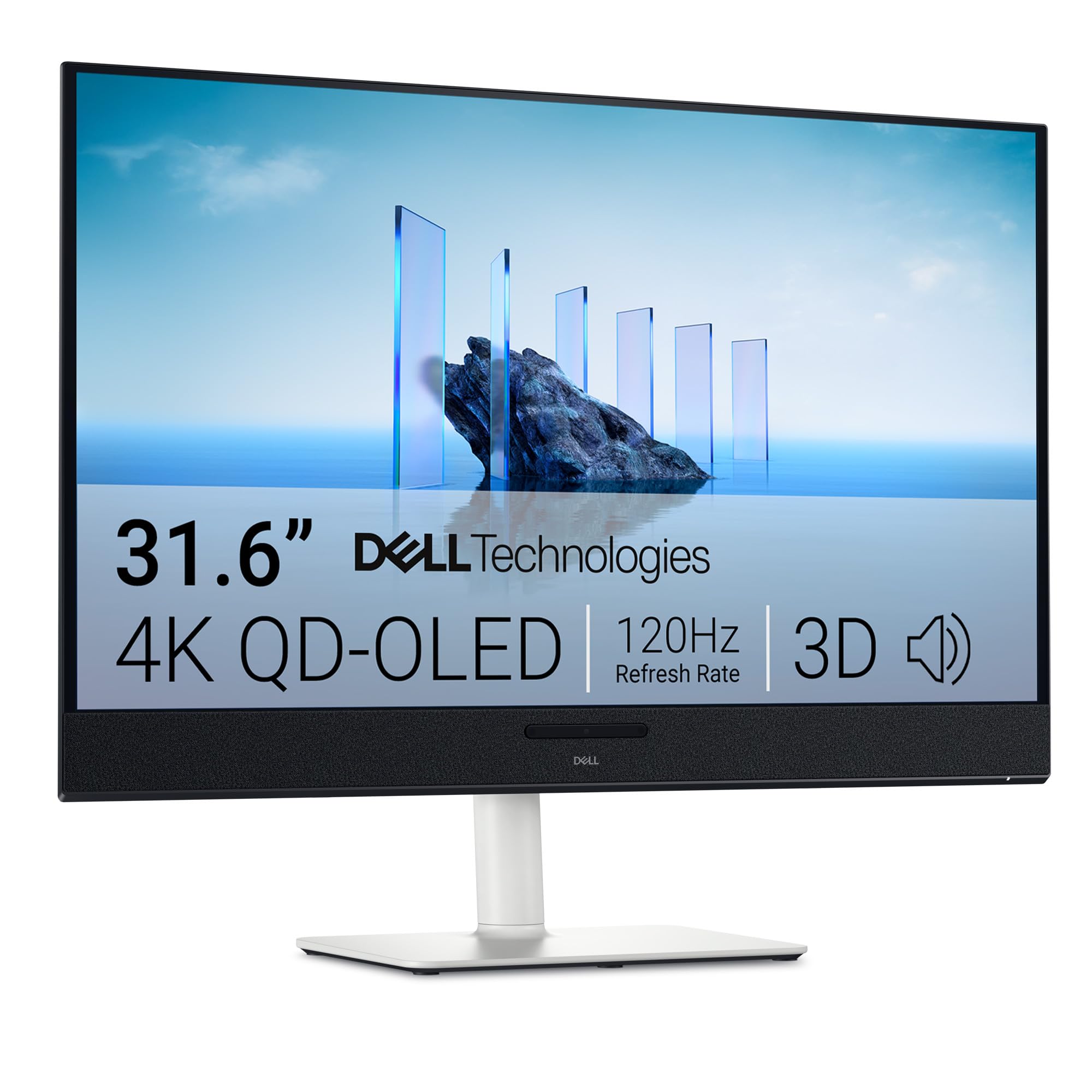
The Dell S3225QC makes QD-OLED more accessible with a 120Hz panel at 4K resolution. The QD-OLED delivers infinite contrast with VESA DisplayHDR True Black 400, and the 99% DCI-P3 gamut produces vivid, accurate colors. Built-in spatial audio from five 5W speakers with AI-driven head-tracking creates a full-sensory experience uncommon in monitors.
Single USB-C with 90W power delivery keeps the desk clean, and Dell’s ComfortView Plus reduces blue light without washing out colors. The ergonomic stand offers height, tilt, swivel, and slant adjustments. It’s a strong choice for those who want OLED quality for both gaming and media consumption but do not need ultra-high refresh rates.
Firmware quirks are a known issue — some users report Windows 11 sleep/wake problems and manual pixel refresh requirements. The single HDMI port limits connectivity for multiple consoles, and the 120Hz ceiling means PC gamers with high-end GPUs will want faster options. For console gaming and streaming, it’s a fantastic value proposition.
Why it’s great
- QD-OLED quality at a lower refresh rate keeps cost down
- Impressive built-in spatial audio system
- USB-C with 90W PD for clean desk setups
Good to know
- 120Hz cap limits PC gaming potential
- Firmware bugs with sleep mode reported
9. Alienware 27 4K Dual-Resolution Gaming Monitor AW2725QF

Alienware’s AW2725QF is a 27-inch IPS monitor that natively supports two resolutions: 4K at 180Hz for visually rich titles and FHD at 360Hz for esports-level responsiveness. The switch between modes is seamless, and the 0.5ms GTG response time (Extreme Mode) ensures minimal motion blur in both states.
Dolby Vision and VESA DisplayHDR 600 certification provide improved dynamic range, while 95% DCI-P3 coverage delivers vibrant colors. NVIDIA G-SYNC Compatible and VESA AdaptiveSync certification eliminate tearing across the full refresh range. The 27-inch size keeps pixel density high for sharp text during productivity.
Reliability is a concern based on user reports — several units suffer from black screen flickering and total lockups that require unplugging to reset, with no user-upgradeable firmware fix. The dual-resolution gimmick is useful, but the quality-control issues make it a riskier pick than more established 4K gaming monitors.
Why it’s great
- Native dual-resolution switching for competitive versatility
- 165Hz 4K and 360Hz FHD with G-SYNC
- Dolby Vision and HDR 600 support
Good to know
- Multiple reports of black screen flickering defects
- No user-upgradeable firmware for known issues
10. KTC 32 Inch 4K Gaming Monitor H32P22P

The KTC H32P22P uses a Fast IPS panel at 32 inches with a 165Hz refresh rate and 1ms MPRT response time. It covers 121% sRGB with 1.07 billion colors and a 3000:1 contrast ratio — unusually high for an IPS panel — which helps deliver punchy, vibrant images for gaming and content consumption.
Adaptive Sync support works with both FreeSync and G-SYNC, reducing screen tearing across PC and console inputs. The monitor includes HDMI 2.1 and DP 1.4 ports, plus a height-adjustable stand with VESA 100x100mm compatibility, offering solid ergonomic flexibility for a budget-friendly price point.
User feedback is generally positive, with many praising the build quality and bright picture. Some units show backlight bleeding in dark scenes, and the built-in speakers are typical of most monitors — functional but thin. The 121% sRGB gamut oversaturates some content, but gamers looking for a vibrant, high-refresh 32-inch 4K experience on a budget will find this hard to beat.
Why it’s great
- Fast IPS with 165Hz and low input lag
- Unusually high 3000:1 contrast for an IPS panel
- Full HDMI 2.1 support for console gaming
Good to know
- Some units exhibit backlight bleeding in dark scenes
- Built-in speakers are mediocre
11. CRUA 32” 4K Curved Gaming Monitor

The CRUA 32-inch curved VA monitor packs a 240Hz refresh rate and 4K resolution at an aggressively low price point. The 1500R curvature provides mild immersion, and the 3000:1 VA contrast ratio delivers deep blacks and rich colors with 120% sRGB coverage. AMD FreeSync keeps tearing at bay during fast gameplay.
Its Picture-in-Picture (PIP) and Picture-by-Picture (PBP) modes allow simultaneous input display, useful for streamers or multitaskers. Two HDMI 2.1 and two DP 1.4 ports provide flexible connectivity. Rear RGB lighting adds aesthetic appeal for late-night sessions, and the stand offers tilt adjustment (-5° to 15°).
Users consistently praise the value, with the monitor delivering excellent color and fluid refresh for the cost. The lack of height adjustment requires a separate monitor arm or riser, and the built-in speakers are functional but limited. Some units show minor backlight uniformity issues, but for a 240Hz 4K panel at this price, the compromises are minor.
Why it’s great
- 240Hz native refresh rate at a budget price
- VA panel delivers strong 3000:1 contrast
- Dual HDMI 2.1 and DP 1.4 for flexible connectivity
Good to know
- Stand lacks height adjustment
- Minor backlight uniformity variance reported
FAQ
Is QD-OLED better than traditional OLED for 4K gaming?
Do I need HDMI 2.1 for 4K gaming at 120Hz?
What is OLED burn-in and how do I prevent it with a gaming monitor?
Can I use a 4K 240Hz monitor with a mid-range GPU?
Final Thoughts: The Verdict
For most users, the best 4k gaming monitor winner is the ASUS ROG Swift PG32UCDM because it combines QD-OLED’s stunning HDR with a 240Hz refresh rate and comprehensive 3-year burn-in warranty, making it the ultimate no-compromise choice. If you want the flexibility of a dual-mode display that switches between 4K 240Hz and FHD 480Hz, the LG 32GX870A-B Ultragear is unmatched. And for a budget-friendly high-refresh 4K entry point, nothing beats the CRUA 32-inch 4K Curved Monitor. Each tier delivers exactly what its target buyer needs.