
Our readers keep the lights on and the weekend projects moving. As an Amazon Associate, I earn from qualifying purchases.
Finding a mouse that feels natural in either hand shouldn’t be a compromise, yet most designs force a right-handed bias, leaving lefties and dual-hand users with awkward grips and misplaced side buttons. The right ambidextrous mouse delivers symmetrical comfort without sacrificing sensor precision or button count.
I’m Rikta — the co-founder and writer behind FitlyFast. For this guide, I’ve analyzed sensor specs, switch durability ratings, wireless polling rates, and ergonomic shapes across seven models to identify which ambidextrous designs actually deliver balanced performance for both hands.
Whether you need a wired competitor for esports or a wireless daily driver with long battery life, this analysis of the best ambidextrous mouse options covers the key specs and real-world trade-offs to help you choose wisely.
How To Choose The Best Ambidextrous Mouse
Choosing an ambidextrous mouse goes beyond simply picking a symmetrical shape. The real question is whether the side buttons, sensor performance, and overall weight work equally well for your grip style and hand size — regardless of which hand you use.
Symmetry vs. Button Access
A truly ambidextrous mouse offers programmable buttons on both sides, not just a mirrored shape. Some models ship with extra button covers so you can deactivate unused side buttons, preventing accidental presses. Check the button count and whether the layout is customizable for left-handed use without software workarounds.
Sensor Specs That Matter
Look for an optical sensor with at least 12,000 DPI for responsive tracking. Higher DPI isn’t always better, but a wide adjustment range lets you dial in sensitivity. Polling rate (1,000 Hz minimum, 4,000 Hz or 8,000 Hz for competitive gaming) determines how often the mouse reports position — higher rates mean smoother cursor movement but can demand more system resources.
Weight and Cable Considerations
Ultralight mice (under 70g) offer faster flicks for gaming but can feel insubstantial for productivity. Heavier mice (around 100g) provide more controlled movement. For wired models, a flexible paracord-like cable reduces drag. For wireless, low-latency 2.4 GHz is essential for gaming, while Bluetooth works well for office use.
Quick Comparison
On smaller screens, swipe sideways to see the full table.
| Model | Category | Best For | Key Spec | Amazon |
|---|---|---|---|---|
| Logitech G903 | Wireless Premium | Dual-hand & daily driver | 25,600 DPI, 140h battery | Amazon |
| 8Bitdo Retro R8 | Wireless Value | Retro aesthetics & versatility | 26K DPI, up to 8K polling | Amazon |
| Logitech G PRO 2 | Wireless Esports | Pro competitive play | 44K DPI, 8K polling | Amazon |
| Glorious Model O 2 Wireless | Wireless Ultralight | Speed & weight balance | 68g, 26K BAMF 2.0 sensor | Amazon |
| Razer Viper | Wired Ultralight | Fast optical switches | 71g, 20K DPI optical sensor | Amazon |
| Bloody J90s | Wired Budget | High button count | 8K CPI, 12 buttons | Amazon |
| Glorious Model O Eternal | Wired Budget | Lightweight on a budget | 55g, 12K DPI sensor | Amazon |
In‑Depth Reviews
1. Logitech G903 Lightspeed

The Logitech G903 remains a benchmark for ambidextrous wireless mice thanks to its Hero 25K sensor delivering 1:1 tracking at up to 25,600 DPI with zero smoothing. The 140-hour battery life via LIGHTSYNC RGB is exceptional for a daily driver, and the optional 10g weight lets you adjust feel. The modular side button design allows full left- or right-handed configuration, making it one of the few truly ambidextrous options on the market.
Its LIGHTSPEED wireless technology delivers a pro-grade 1 ms report rate, so there’s no noticeable difference from a wired connection. The free-spinning scroll wheel is a productivity bonus, and the overall build feels solid with a matte plastic finish that resists fingerprints well. The micro-USB charging port is the only dated element here.
For left-handed users with medium to large hands, this is the most complete package. The metal-spring button tensioning provides consistent, crisp clicks, and the ability to store onboard profiles means you can unplug the software after setup. If you prioritize versatility and battery endurance, the G903 is hard to beat.
Why it’s great
- True ambidextrous modular side buttons with magnetic covers
- Hero 25K sensor with excellent power efficiency
- Free-spinning scroll wheel and optional weight tuning
Good to know
- Micro-USB instead of USB-C
- Scroll wheel may over-scroll in free-spin mode over time
- G Hub software can be buggy for profile saving
2. 8Bitdo Retro R8 Mouse with Charging Dock
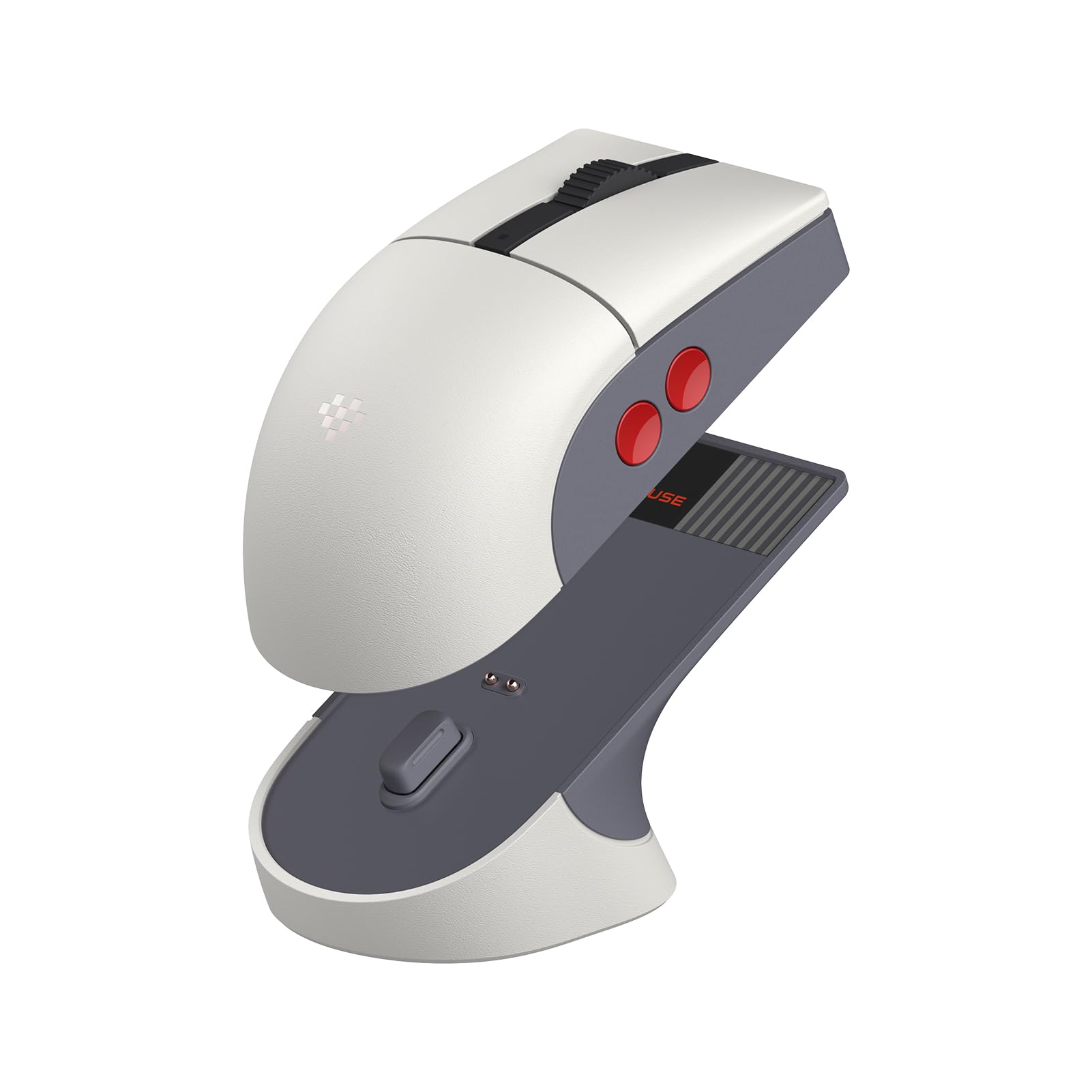
The 8Bitdo Retro R8 stands out for its nostalgic NES-inspired design paired with modern internals. It features a PAW 3395 optical sensor supporting 50 to 26,000 DPI and polling rates up to 8,000 Hz when wired — specs that rival much pricier gaming mice. The package includes a magnetic charging dock that extends the 2.4G signal, keeping connectivity stable across rooms.
Three connection modes (Bluetooth, 2.4G, and wired USB-C) make it exceptionally flexible for different setups. The nine programmable buttons include four side buttons that are customizable via 8BitDo Ultimate Software, though the software itself has some limitations with macro timing. The Kailh Sword GM X micro switches deliver crisp, tactile feedback with minimal pre-travel.
Its symmetrical shape is slightly smaller than the Logitech G903, which may feel cramped for larger hands. Build quality is impressive for the price point, with a sturdy plastic shell and satisfying magnetic dock connection. For anyone who wants a distinctive look without sacrificing sensor performance, this is a compelling contender.
Why it’s great
- High-end PAW 3395 sensor at a competitive price
- Magnetic charging dock with signal extension
- Triple connectivity (BT, 2.4G, wired)
Good to know
- Small shape may not suit large hands
- Software macro implementation is unreliable
- No Bluetooth-only polling beyond 125 Hz
3. Logitech G PRO 2 Lightspeed

The Logitech G PRO 2 is built for professional competition with a Hero 2 sensor capable of 44,000 DPI and tracking up to 88 g-force acceleration. Its 80g weight is slightly heavier than the ultralight trend, but the trade-off is a solid, stable feel that many pros prefer. USB-C charging and an 8 kHz polling rate (with optional receiver) make this future-proofed for high-refresh-rate monitors.
The modular magnetic side buttons are a standout feature: the mouse ships with four extra button caps and two blank covers, so you can configure it for right-handed, left-handed, or minimal-button use without tools. LIGHTFORCE hybrid switches combine optical speed with mechanical feel, offering crisp actuation and rapid response. Battery life is rated at 95 hours with default settings.
Some users note the smooth sides can feel slippery with dry hands, and there are no top-mounted DPI buttons, which may require software adjustments mid-game. Despite the premium price, its build quality, sensor accuracy, and true ambidextrous support make it a top-tier option for serious gamers who need symmetrical performance.
Why it’s great
- Hero 2 sensor with 44K DPI and 8K polling capable
- Modular magnetic side buttons for true ambidextrous use
- USB-C charging and LIGHTFORCE hybrid switches
Good to know
- Smooth sides can be slippery for some grip styles
- No on-board DPI button above the scroll wheel
- Highest price in this comparison
4. Glorious Model O 2 Wireless

The Glorious Model O 2 Wireless hits a sweet spot at 68g with a refined honeycomb shell that improves structural strength over the original. Its BAMF 2.0 sensor offers up to 26,000 DPI, 650 IPS tracking, and 50G acceleration, making it suitable for fast-paced shooters. Hybrid connectivity (2.4 GHz and Bluetooth 5.2 LE) provides flexibility, with 110 hours of battery life in 2.4 GHz mode and up to 210 hours on Bluetooth with RGB turned off.
The split-button design combined with 80-million-rated Glorious Switches delivers consistent clicks with minimal pre- or post-travel. The grippy surface texture helps maintain control during intense sessions, and the PTFE feet glide smoothly out of the box. RGB lighting can be adjusted via hardware shortcuts or the Glorious CORE software, though the software’s macro features are limited.
Its symmetrical shape suits claw, palm, and fingertip grips for medium to large hands, though some users report instability with the 2.4 GHz connection and inaccurate battery percentage in the software. For the weight and feature set, the Model O 2 Wireless offers strong value for gamers who want wireless freedom without the weight penalty.
Why it’s great
- 68g superlight with robust honeycomb shell
- Excellent battery life in Bluetooth mode
- Grippy surface texture and smooth PTFE feet
Good to know
- 2.4 GHz connection can be inconsistent for some users
- Battery percentage reading in software is inaccurate
- Limited macro customization compared to competitors
5. Razer Viper Ultralight

The Razer Viper (wired version) continues to be a popular choice for its 71g weight and second-generation optical mouse switches that use light-based actuation for near-instant response. The 5G optical sensor delivers 20,000 DPI with reliable tracking across various surfaces, and the Speedflex cable offers low-drag performance that rivals some paracord cables. Its symmetrical design includes two side buttons on each side, giving left-handed users full access.
The Mercury White finish has a slightly rougher, more durable texture than the original black model, which improves grip. The DPI indicator is cleverly placed on the bottom of the mouse, keeping the top clean. Users note that the main buttons are quite sensitive, so resting your fingers may trigger accidental clicks — a design trade-off for ultralight responsiveness.
RGB lighting is single-zone only, and it requires Razer Synapse software to turn off if desired. The cable is less flexible than a true paracord, but still better than standard rubber cables. For a wired ambidextrous mouse that balances weight, responsiveness, and build quality, the Viper remains a strong contender, especially if you find it on sale.
Why it’s great
- Optical switches for fast, durable clicks
- 71g lightweight with low-drag Speedflex cable
- True ambidextrous button layout
Good to know
- Main buttons are very sensitive, prone to accidental clicks
- Only single-zone RGB lighting
- Requires software to disable RGB, no on-board save
6. Bloody J90s RGB Gaming Mouse

The Bloody J90s packs 12 customizable buttons into an ambidextrous shell at a budget-friendly price point. Its 8,000 CPI optical sensor supports 150 IPS tracking and 25G acceleration, which is adequate for mid-level gaming, and the 2,000 Hz report rate delivers 1ms key response — better than many competitors in this tier. The six sniping modes can be toggled for enhanced precision in specific situations.
15-zone RGB lighting offers 16.8 million colors for those who want full customization, though the brightness and color accuracy aren’t top-tier. The plastic build is utilitarian but functional, with a balanced weight that doesn’t feel overly cheap. Left-handed users will appreciate the symmetrical layout and dual-side button placement, but the button shape itself isn’t as refined as pricier mice.
The software is the weakest link: it looks dated, the button mapping process is confusing, and it’s not necessary for basic functionality since profiles can be stored on the device. Some users report the scroll wheel is hard to reach due to placement. For the price, the J90s offers a high button count and decent specs, but expect compromises in ergonomics and software polish.
Why it’s great
- 12 programmable buttons for MMO or productivity macros
- 8,000 CPI with 2,000 Hz polling for responsive tracking
- On-board profile storage, no software required after setup
Good to know
- Software interface is dated and confusing
- Scroll wheel placement feels awkward
- Build quality is entry-level plastic
7. Glorious Model O Eternal
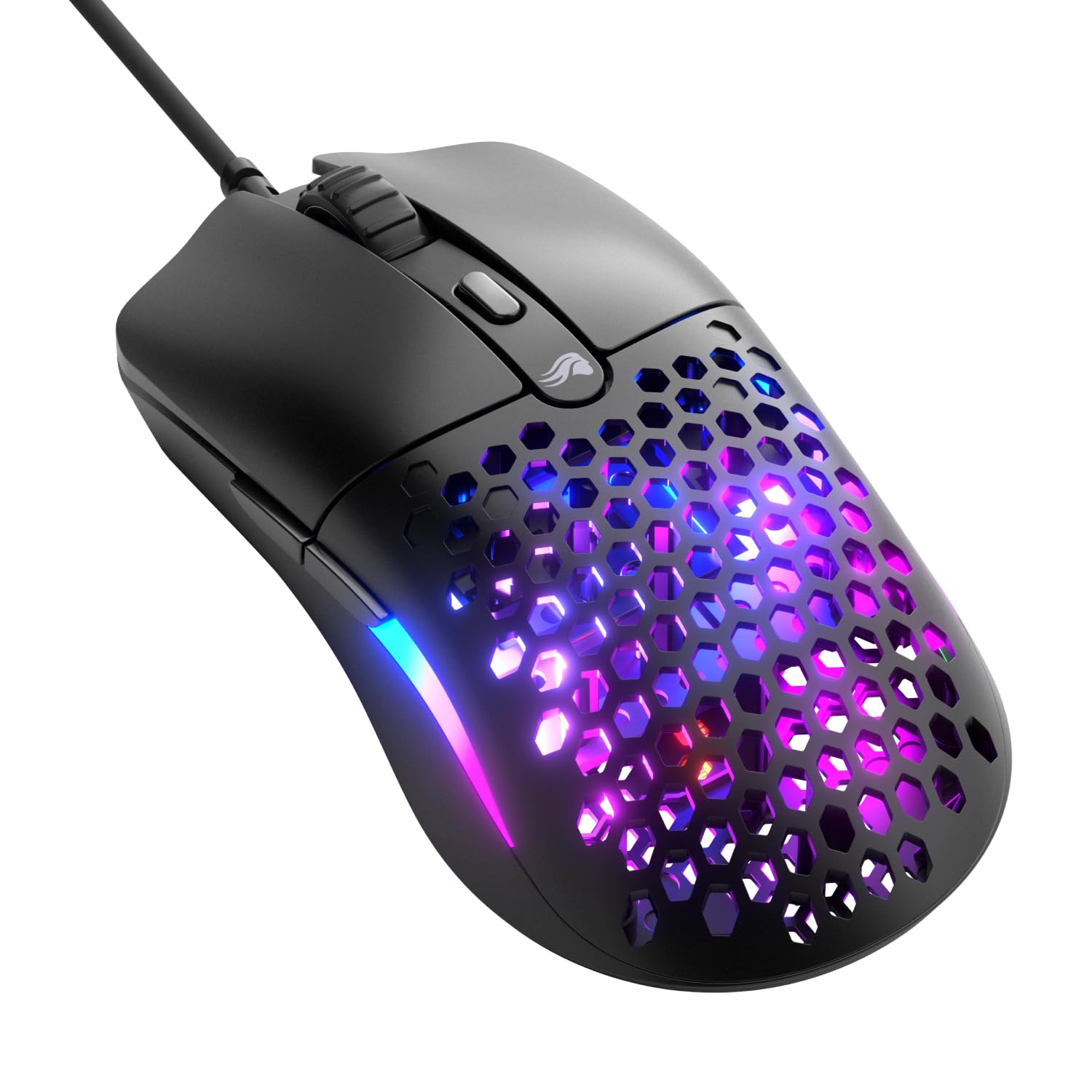
The Glorious Model O Eternal is the lightest mouse in this lineup at 55g, thanks to its signature honeycomb shell that cuts weight without sacrificing structural integrity. Its 12,000 DPI optical sensor is paired with 80-million-rated mechanical switches that deliver crisp, consistent clicks. The symmetrical design supports both hands, though it’s marketed as right-handed due to the dual-side button placement favoring right-hand usage by default.
Dual-zone RGB lighting floods the side panels with vibrant color, controllable via hardware shortcuts or Glorious CORE software. The flexible USB cable reduces drag on the desk, and the PTFE feet provide smooth gliding on most surfaces. The honeycomb pattern also offers airflow, which can help reduce sweaty palms during extended sessions.
Some users note that the LED strips can display slight color inconsistency (e.g., one side showing blue while the other shows white on the same setting). The software is relatively basic, offering DPI, debounce, and limited LED control. For an ultralight budget-friendly wired option, the Model O Eternal delivers excellent speed and weight, but be aware of its limitations in software depth and QA consistency.
Why it’s great
- Extremely lightweight at 55g for fast flicks
- Durable 80M-rated mechanical switches
- Honeycomb shell provides airflow and weight savings
Good to know
- Side buttons are default right-hand oriented
- RGB zones may show color mismatch on some units
- Software customization is basic with limited macro support
FAQ
Are ambidextrous mice only for left-handed users?
Can I disable the side buttons on one side to avoid accidental presses?
What is the difference between symmetrical and truly ambidextrous mice?
Final Thoughts: The Verdict
For most users, the best ambidextrous mouse winner is the Logitech G903 Lightspeed because it combines true modular ambidextrous buttons, a premium Hero 25K sensor, and excellent battery life in a durable wireless package. If you want a retro-styled high-performance option, grab the 8Bitdo Retro R8. And for esports-focused lefties who demand the highest sensor performance, nothing beats the Logitech G PRO 2 Lightspeed.