
Our readers keep the lights on and the weekend projects moving. As an Amazon Associate, I earn from qualifying purchases.
Finding a Bluetooth mouse that travels well, connects instantly, and doesn’t cramp your hand after a full workday is harder than it sounds. Most models cut corners on sensor quality or battery life, leaving you tethered to a desk or swapping batteries mid-meeting.
I’m Rikta — the co-founder and writer behind FitlyFast. I’ve spent months analyzing sensor precision, ergonomic contours, battery recharge cycles, and multi-device switching speeds to separate the office-ready from the ones you’ll regret buying.
Whether you’re a remote worker or a road warrior, this guide cuts through the noise to help you find the right best bluetooth mouse for your setup.
How To Choose The Best Bluetooth Mouse
A Bluetooth mouse is a daily-driver accessory — the wrong choice means reconnecting every hour, a sore wrist, or a dead cursor at the worst moment. Focus on fit, connectivity, and battery system to avoid buyer’s remorse.
Ergonomic Shape vs. Portability
A vertical grip relieves forearm strain but is bulkier in a bag. A flat, foldable design slides into a laptop sleeve but may lack palm support for extended use. Decide which trade-off matters more for your daily routine before considering any other feature.
Multi-Device Pairing and Connection Type
Many Bluetooth mice let you pair with up to three devices and switch with a button. If you juggle a desktop, laptop, and tablet, this is essential. Also check which Bluetooth version it uses — 5.0 and above offer better range and less interference than 4.0.
Battery System and Recharging
Rechargeable models with USB-C are convenient and eco-friendly, but built-in batteries eventually degrade. AA-powered mice last months on a single set and never need a charging cable, though you’ll buy batteries. Some premium models offer quick-charge features that give hours of use from a few minutes of charging.
Quick Comparison
On smaller screens, swipe sideways to see the full table.
| Model | Category | Best For | Key Spec | Amazon |
|---|---|---|---|---|
| Logitech MX Anywhere 2S | Premium | Travel & multi-device | 4000 DPI, 70-day battery | Amazon |
| Logitech Ergo M575S | Premium | Thumb-controlled ergonomics | Trackball, 18-month battery | Amazon |
| PHILIPS Ergonomic Wireless | Mid-Range | All-day comfort | 4000 DPI, USB-A/C receiver | Amazon |
| Dell MS700 Travel Mouse | Mid-Range | Ultra-portable travel | 4000 DPI, 56.9g weight | Amazon |
| XBG B15pro Tri-Mode | Mid-Range | LED status display | 500 mAh, 2400 DPI max | Amazon |
| AOC Vertical Ergonomic | Mid-Range | Wrist relief for righties | 4800 DPI, 800 mAh | Amazon |
| NYIEFADA Arc Travel Mouse | Budget | Foldable pocket carry | Tri-mode, 60-hour battery | Amazon |
In‑Depth Reviews
1. Logitech MX Anywhere 2S

The MX Anywhere 2S sets the standard for compact Bluetooth mice with its Darkfield sensor that tracks on glass — a rare capability. Its Hyper-Fast scroll wheel switches between free-spin and click-to-click, making long document navigation effortless. A full charge delivers up to 70 days of use, and a three-minute micro-USB top-up grants an entire day of power.
Logitech Flow lets you control up to three computers with one cursor, copying files between them. This Bluetooth-only model omits the USB receiver, keeping the design clean and travel-friendly. At 4000 DPI, the cursor remains precise across dual monitors without noticeable lag.
The compact shape fits smaller hands well, though larger palms may prefer a fuller profile. The micro-USB port is a dated choice, but the overall build quality and reliable connectivity justify its premium standing. It’s the go-to pick for multi-device professionals who demand consistent performance anywhere.
Why it’s great
- Darkfield sensor tracks on glass surfaces
- Hyper-Fast scroll for rapid document navigation
- 70-day battery life with quick-charge support
Good to know
- Uses micro-USB instead of USB-C
- Compact shape may not suit larger hands
2. Logitech Ergo M575S

The M575S replaces arm movement with thumb-driven cursor control, reducing forearm muscle strain by a claimed 25%. Its sculpted right-handed shape keeps the wrist aligned, and the trackball never needs a mousepad — it works on any surface. The Logi Bolt USB receiver offers a secure encrypted connection alongside standard Bluetooth pairing.
Battery life is extraordinary: a single AA alkaline cell lasts up to 18 months under typical office use. Three customizable buttons and Smart Actions in the Logi Options+ app let you assign shortcuts or launch apps per program. The trackball is easy to pop out for cleaning when dust accumulates.
New users will need a few days to adapt to thumb control, but once mastered, the precision and reduced desk space requirements are liberating. The receiver is incompatible with older Logitech Unifying devices, so you may need two USB ports. For anyone fighting wrist fatigue, this is the most effective ergonomic upgrade.
Why it’s great
- Trackball eliminates arm movement for wrist relief
- 18-month battery life on a single AA battery
- Works on any surface without a mousepad
Good to know
- Thumb control requires a short learning curve
- Bolt receiver not compatible with older Unifying gear
3. PHILIPS Ergonomic Wireless

The PHILIPS ergonomic mouse prioritizes all-day comfort with a contoured right-handed shell, anti-slip thumb rest, and library-quiet clicks. It includes both USB-A and USB-C receivers in one dongle, so you don’t need an adapter for modern laptops. The 500mAh battery lasts 25 days of heavy use, and a five-minute charge delivers one hour of emergency power.
Dual scroll wheels set this model apart: the main wheel handles vertical navigation, while a thumb-side wheel lets you scroll horizontally through spreadsheets or timelines without dragging the cursor. Five DPI levels from 800 to 4000 are adjustable on the fly, and the sensor tracks reliably on bare desks.
Some users report the scroll wheel texture feels odd, with small dots instead of ridges. The connector cable is charging-only, so wired mode isn’t possible. Still, for professionals who spend hours in Excel or design software, the dual-wheel workflow is a genuine productivity boost.
Why it’s great
- Thumb-side horizontal scroll wheel for spreadsheets
- USB-A and USB-C dual receiver included
- Quick-charge provides one hour from five minutes
Good to know
- Scroll wheel texture may feel unusual
- Charging cable does not support wired operation
4. Dell MS700 Bluetooth Travel Mouse

At just 56.9 grams, the Dell MS700 is one of the lightest Bluetooth mice available, making it nearly unnoticeable in a laptop bag. Its twistable design lets you snap it flat for storage and twist it open for use — the same motion turns the mouse off, saving battery. Bluetooth 5.0 pairing is fast, and Dell Pair offers one-click secure connection on Windows 10 and 11.
The optical LED sensor reaches up to 4000 DPI for smooth tracking on most surfaces. Touch scrolling on the flat top is responsive, though some users find it slightly erratic. The ambidextrous shape works for both left and right hands, and the matte finish resists fingerprints well.
It runs on two AAA batteries rather than a rechargeable cell, so you’ll need spares on long trips. The design does not track on glass surfaces, which limits some coffee-shop desks. For minimalist travelers who prioritize weight and foldability, the MS700 is a refined, reliable companion.
Why it’s great
- Ultra-light at 56.9g for effortless travel
- Twist mechanism turns off and flattens instantly
- Touch scroll and 4000 DPI sensor
Good to know
- Uses AAA batteries, not rechargeable
- Does not track on glass surfaces
5. XBG B15pro Tri-Mode

The XBG B15pro stands out with a built-in LED display that shows real-time battery percentage, DPI level, and connection mode — no more guessing whether your mouse is about to die. It connects via Bluetooth 5.0, 4.0, or 2.4GHz dongle, switching between three paired devices in under a second.
Silent buttons retain a tactile click feel under 35dB, making this ideal for libraries and shared offices. The 500mAh rechargeable battery charges via USB-C, and the mouse enters sleep mode after five minutes of inactivity to conserve power. DPI ranges from 800 up to 2400, suitable for most productivity tasks.
The ambidextrous shape includes a contoured thumb rest and matte finish that resists smudges. It lacks button remapping, and the sleep timeout is not adjustable. For users who want clear status feedback and tri-mode flexibility at a reasonable cost, the B15pro delivers strong everyday value.
Why it’s great
- LED display shows battery and DPI in real time
- Tri-mode connectivity (2.4G + BT 4.0/5.0)
- USB-C rechargeable with 500mAh capacity
Good to know
- Buttons cannot be remapped
- Sleep timeout is not user-adjustable
6. AOC Vertical Ergonomic
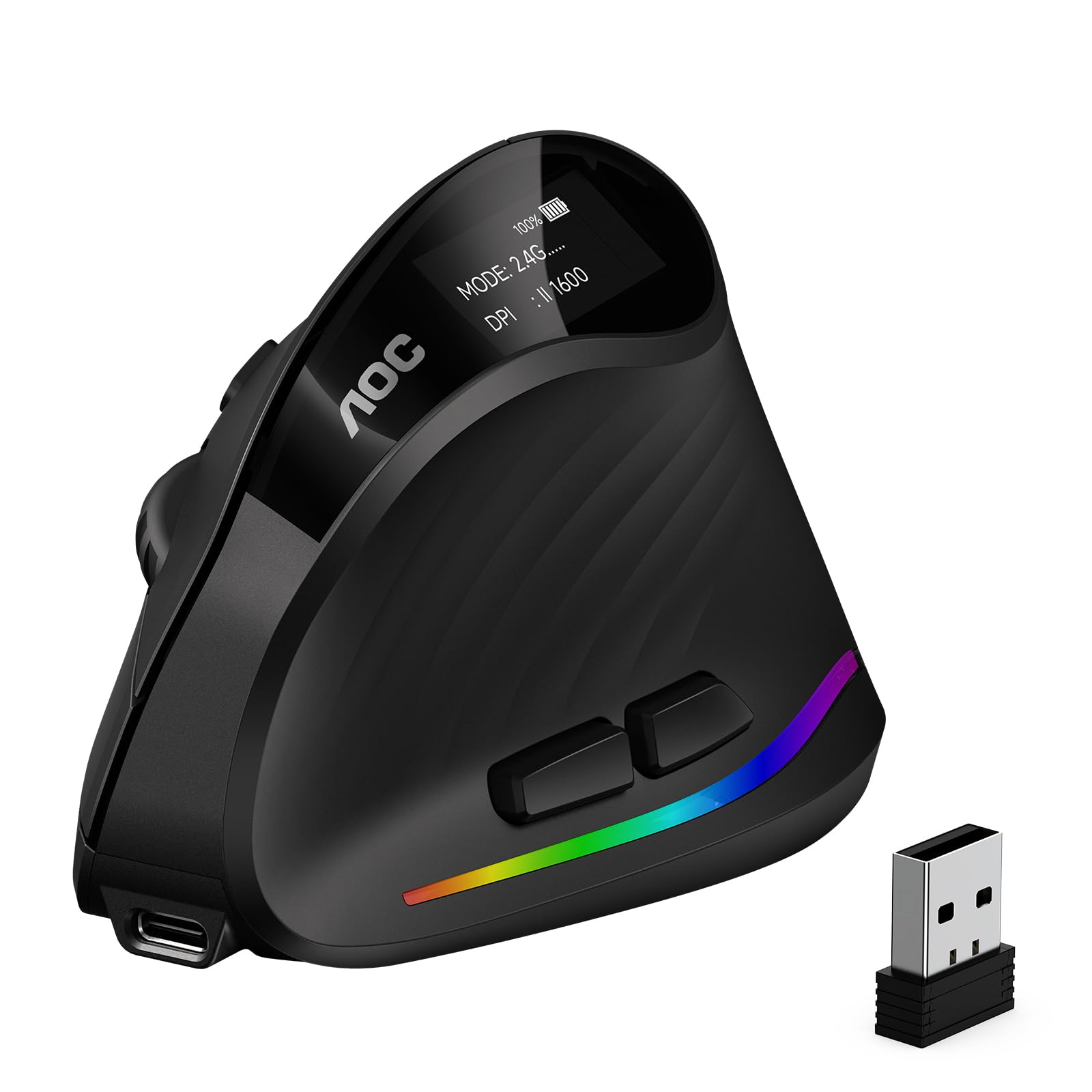
The AOC vertical mouse positions your right hand at a natural 52° handshake angle, reducing wrist twisting and forearm tension during extended use. Seven programmable buttons let you assign macros and shortcuts, while RGB lighting can be customized via software. The 800mAh rechargeable battery provides up to 200 hours of use without RGB, or 40 hours with lighting active.
Triple-mode connectivity — Bluetooth 5.4, 2.4GHz wireless, or USB wired — ensures flexibility across devices. The silent left and right clicks operate under 35dB, though the other buttons produce normal click sounds. DPI adjusts across five levels from 1000 to 4800, offering pixel-precise control for design work.
The sculpted grip is designed for medium to large right hands; left-handed users are out of luck. Some units have reported inconsistent battery life with RGB enabled, but the vertical ergonomics consistently relieve wrist strain. For righties battling carpal tunnel symptoms, this is a strong, customizable solution.
Why it’s great
- 52° vertical angle reduces wrist and forearm strain
- 4800 DPI sensor for high-precision tracking
- Triple-mode with Bluetooth 5.4 and USB wired option
Good to know
- Right-hand only — no left-handed version
- Battery life drops significantly with RGB active
7. NYIEFADA Arc Travel Mouse
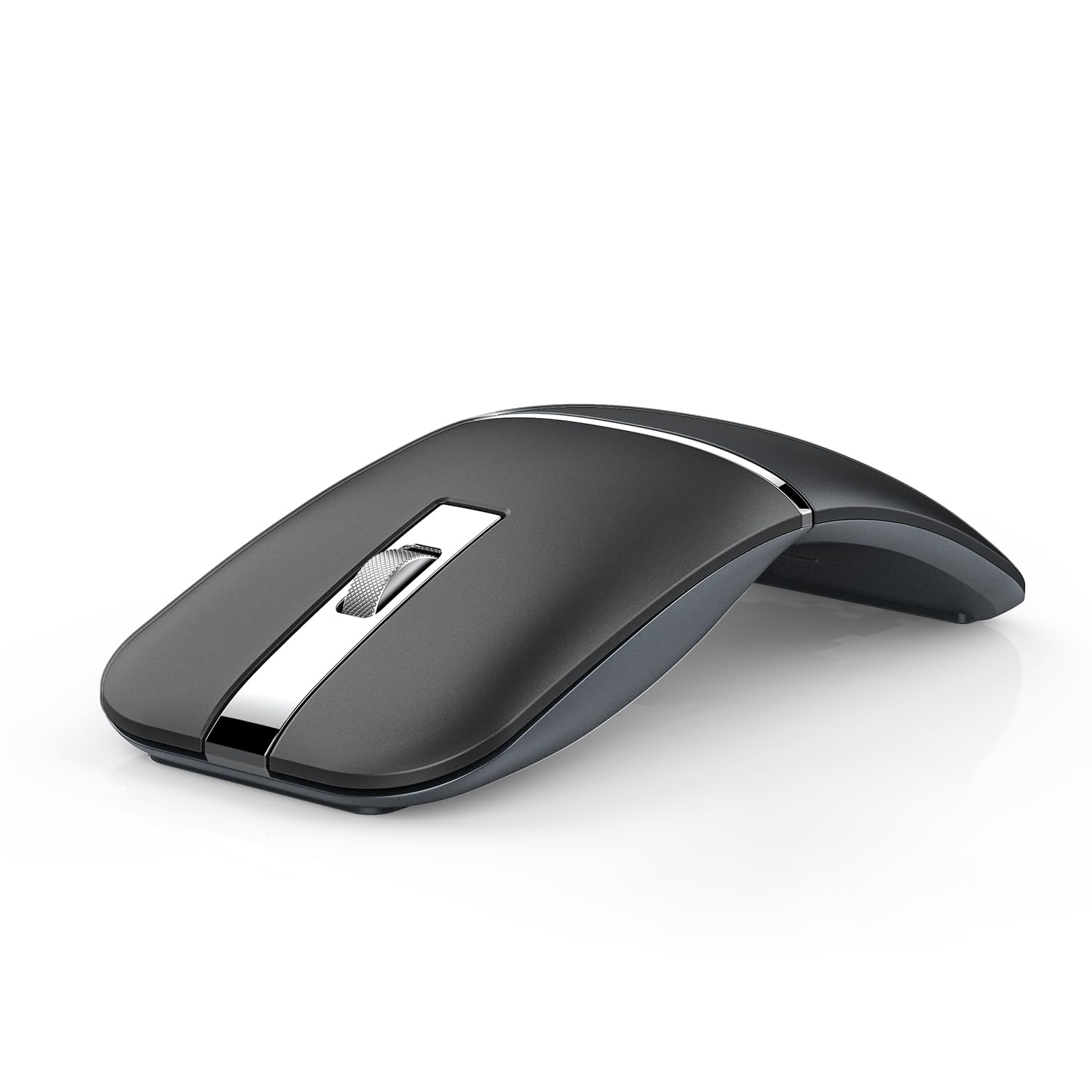
The NYIEFADA Arc folds flat with a 360° rotation, slipping into a pocket or laptop sleeve like a slim card. It connects to three devices simultaneously — two via Bluetooth 5.0 and 4.0, and a third through the 2.4GHz dongle stored inside the body. Silent soft clicks keep noise minimal in shared spaces.
A built-in rechargeable battery lasts roughly 30 days on a single charge under typical office use, charging via micro-USB. The mouse automatically powers off when the nano receiver is disconnected or the PC shuts down. The glossy finish looks sleek but picks up fingerprints quickly.
Button count is limited to three, and the flat profile offers less palm support than traditional designs. For travelers who need the smallest possible footprint without sacrificing Bluetooth and 2.4G dual-mode, the Arc delivers a unique form factor at a budget-friendly price point.
Why it’s great
- Folds flat to pocket-sized for maximum portability
- Tri-mode connects three devices simultaneously
- Silent clicks and auto power-off save battery
Good to know
- Limited to three buttons for input options
- Glossy finish attracts visible fingerprints
FAQ
Will a Bluetooth mouse work with my tablet or phone?
Can I use Bluetooth and a dongle at the same time?
How do I clean a trackball mouse like the Logitech M575S?
Final Thoughts: The Verdict
For most users, the best bluetooth mouse winner is the Logitech MX Anywhere 2S because it combines any-surface tracking, hyper-fast scrolling, and excellent battery life in a compact, multi-device design. If you want wrist-saving ergonomics, grab the Logitech Ergo M575S. And for portable, foldable travel, nothing beats the Dell MS700.