
Our readers keep the lights on and the weekend projects moving. As an Amazon Associate, I earn from qualifying purchases.
Specs are compiled from manufacturer listings and verified buyer reviews and can change over time — please confirm the key details on the product page before buying.
The single biggest decision you face with a business calculator is if you need a printing model that spits out a paper trail for tax prep or a compact unit you can slip into a laptop bag for meetings. A printing calculator on a paperless desk wastes space, while a pocket model leaves you without a tape when a client asks for one. These nine picks cover both camps — from the exam-approved financial workhorses to the desktop printers that survive a decade of daily punches.
I’m Rikta — the founder and writer behind FitlyFast. This guide is built by comparing the manufacturers’ published specifications and the patterns across verified customer reviews, so you get each pick’s real strengths and trade-offs instead of marketing spin.
You might be crunching NPVs (Net Present Values — a way to measure if an investment is worth it) for an exam, running cost-sell-margin at a retail counter, or simply want a ten-key that lasts your whole career. These nine business calculator options are ranked by real-world owner experience.
Our Picks at a Glance


How To Choose The Best Business Calculator
Picking the right one starts with a single question: do you need a printed tape? If you handle payroll, inventory counts, or tax prep where a paper record is required, skip the pocket calculators and head straight for a printing model. If you are taking exams or doing portable financial analysis, a non-printing financial calculator with NPV and IRR is the smarter buy.
Financial Functions vs. Basic Business Math
A true financial calculator offers Time-Value-of-Money (TVM), Net Present Value (NPV), and Internal Rate of Return (IRR). The Texas Instruments BA II Plus and the HP 12C are the gold standards here. Basic business calculators — like the Canon HS-1200TS — focus on cost/sell/margin, tax, and percentage keys. They are faster for everyday markup math but cannot handle loan amortization or bond pricing.
Printing vs. Non-Printing
A printing calculator gives you a physical paper tape for auditing your steps and handing to clients or accountants. The downside is size, weight, and the need for paper rolls. Non-printing models are lighter, quieter, and fit in a bag. The Sharp QS-2130 mimics a ten-key layout without the paper roll, giving you fast touch-typing in a portable shell.
Key Feel and Layout
You will enter thousands of numbers. Look for well-spaced, responsive keys. The Canon HS-1200TS owners praise the soft, silent keys that prevent mis-hits. The Sharp QS-2130 uses a full-size keypad that matches an adding machine, so touch-typists can fly. Mushy or cramped keys in a demo will feel worse after hours of use.
Quick Comparison
| Model | Best For | Key Functions | Power Source | Weight | Amazon |
|---|---|---|---|---|---|
| Texas Instruments BA II Plus★ Best Overall | Finance exams & analysis | TVM, NPV, IRR, Amortization | Battery | 3.68 oz | Amazon |
| Canon HS-1200TSTop Performer | Everyday office math | Profit margin, tax, memory | Solar + battery | 0.16 kg | Amazon |
| HP 10bII+Best Value | CFP & MBA coursework | 100+ functions, probability | Battery | 3.04 oz | Amazon |
| Casio HR-170RC | Budget printing at home | 2-color print, 150-step check | AC + 4 AAA | 1.1 lb | Amazon |
| Amazon Basics Printing | Entry-level thermal printing | Cost-sell-margin, tax | AC | 15.36 oz | Amazon |
| HP 12C | Banking & real estate pros | TVM, NPV, IRR, Bond, programmable | Battery | 0.15 kg | Amazon |
| Casio HR-300RC | Desktop printing with large display | Backlit, 2-color print, 150-step | AC | 1.4 lb | Amazon |
| Sharp QS-2130 | Portable ten-key feel | Markup, memory, 12-digit | Solar + battery | 9.12 oz | Amazon |
| Canon MP25DV-3 | Full-featured desktop printing | Cost-sell-margin, double-check | AC + backup battery | 3.3 lb | Amazon |
In‑Depth Reviews
1. Texas Instruments BA II Plus Financial Calculator
Our pick — over 4.5★ from 22,000+ verified ratings; the strongest balance of quality and price.
The exam-permitted workhorse that dominates finance classrooms and CFA testing centers alike.
You will see this calculator in almost every business school lecture hall for a reason: it is officially approved for the Chartered Financial Analyst exam, the GARP Financial Risk Manager exam, and the Certified Management Accountants exam. That means you can train on one device and walk into the test room with exactly the same tool. The core strength is the cash flow function that calculates NPV and IRR for uneven cash flows, plus dedicated time-value-of-money and amortization keys for loans, mortgages, and pension math.
Functionality is what owners praise most — well over a thousand of them single it out. The consensus is that it works great for finance classes and is easy to use, particularly for time-value-of-money functions. Build quality holds up: buyers report using one for two years with zero issues. The recurring gripes are button responsiveness — some find the keypress confirmation a bit vague — and the confusing CPT/IRR logic that takes a few hours to learn. A handful of owners note the on/off placement is awkward and the battery change is fiddly.
The 28,000+ owners who have rated it push the average to 4.6 stars, making it the undisputed crowd favorite. Given its moderate weight of 3.68 ounces, it is light enough to toss in any bag — heavier than the HP 10bII+ at 3.04 ounces, but still pocketable.
Why students & analysts buy it
- Approved for CFA, FRM, and CMA exams — no worries at test check-in
- NPV and IRR handle uneven cash flow problems that basic calculators cannot touch
- Durable: owners mention years of daily use with no decline
The quirks to learn
- CPT/IRR logic is not intuitive — budget a few hours to learn the sequence
- Double-entry fails occasionally if you punch too fast
- On/off placement on the face is easy to accidentally hit in a bag
Reach for this if: you are a finance student sitting for the CFA, an analyst running daily IRR calculations, or anyone who needs a single machine that covers every financial curriculum requirement.
Think twice if: you only need basic markup and margin math — a simpler desktop model saves you the learning curve.
2. Canon Office Products HS-1200TS Business Calculator
The desktop legend that accountants reach for when they want a decade of silent, solar-powered daily use.
This is the calculator buyers buy multiple times — for themselves, for clients, for the home office. And they keep buying it because it simply lasts. One owner reported a unit that survived eight years of daily use before dying (possibly from a nearby wireless charger), and another user had theirs running strong after six years. It uses a 12-digit angled LCD display that is easy to read from above, plus soft, well-spaced keys that prevent mis-hits during rapid entry. The keys are silent too, so you are not annoying cube-mates.
Quality is the single most-discussed aspect, with 113 owners calling it out as a strength. The dual solar-and-battery power means you rarely think about batteries — many customers note never needing a replacement. Dedicated keys for profit margin, tax calculation, square root, and sign change cover the everyday business math that a counter or bookkeeper actually does. The design is an attractive metallic plastic shell that resists scuffs. Reliability and value for money round out the top-praised traits, and the display is large enough that the review pages sum it up: “no more squinting.”
The trade-off is the battery compartment. If the unit ever fails, opening it requires prying the case apart after removing screws, and there are no instructions in the manual. Several owners simply replace the whole calculator every few years — cheap enough that it’s worth it. This is not a calculator for amortization schedules or NPV; it excels at the thousand small calculations of a retail or bookkeeping day.
The long-haul strengths
- Angled screen and large display reduce eye strain during long work sessions
- Solar power with battery backup — one owner never changed a battery in years
- Quality build with 113 owners specifically praising its toughness
Know before you buy
- Battery replacement requires prying the shell open — no official guide provided
- No advanced financial functions (no TVM, no IRR)
- Plastic body feels lighter than a premium office unit
Grab it for: a reliable, low-cost office companion for margin, tax, and percentage math — especially if you want a paperless desktop calculator that just works.
Pass if: you need bond calculations, amortization, or exam-approved functions for finance certification prep.
3. HP 10bII+ Financial Calculator – 12-Digit LCD
The 3.04-ounce featherweight that passed one owner’s CFP exam and still does daily financial planning work.
This HP packs over 100 built-in functions including probability distributions, which means it goes beyond simple TVM into statistics that a BA II Plus cannot touch. It is permitted on the SAT, PSAT/NMSQT, and College Board AP tests, so a high schooler can use it through a college finance degree. The adjustable contrast display and on-screen labels help you navigate the menus, which is important because there is a real learning curve — a consistent theme across reviews is that you should look up a how-to guide first. Once you learn it, it becomes faster than Excel for client discussions.
Reliability is the most-discussed strength here — 19 owners specifically call it out. The build quality also stands out at 15 mentions. One owner said it is “very lightweight and durable” and does not anticipate buying another. For context, at 3.04 ounces versus the BA II Plus at 3.68 ounces, it is the lightest financial calculator on this list. The keys have a satisfying click that owners enjoy pressing, and the portability means it slips into any pocket. The battery-powered design keeps things simple.
The main friction is the learning curve. This is not as intuitive as the Canon desktop calculators for pure addition. A few owners find the keystroke logic requires memorization. But the 4.7-star average across the ratings is the highest on this list, and the practical verdict from a CFP (Certified Financial Planner) professional is clear: “once you learn to use it, it is very useful for calculations and discussions with clients.”
What wins owners over
- Over 100 functions including probability distributions — rare in this class
- Permitted on SAT, PSAT, and AP exams — a single device from high school through MBA
- Featherlight at 3.04 ounces; one owner calls it durable and likely the last they will buy
The learning hurdle
- Intuitive layout requires a quick-start guide — not pick-up-and-go
- No solar backup — battery-only
- Display is 12-digit but smaller than desktop models
Best fit for: CFP candidates, accounting majors, and anyone who wants a single lightweight calculator that handles advanced statistics and financial math.
Skip if: you want a zero-learning-curve machine for basic business addition — a Canon desktop is simpler and faster.
4. Amazon Basics Printing Calculator with 12-Digit LCD
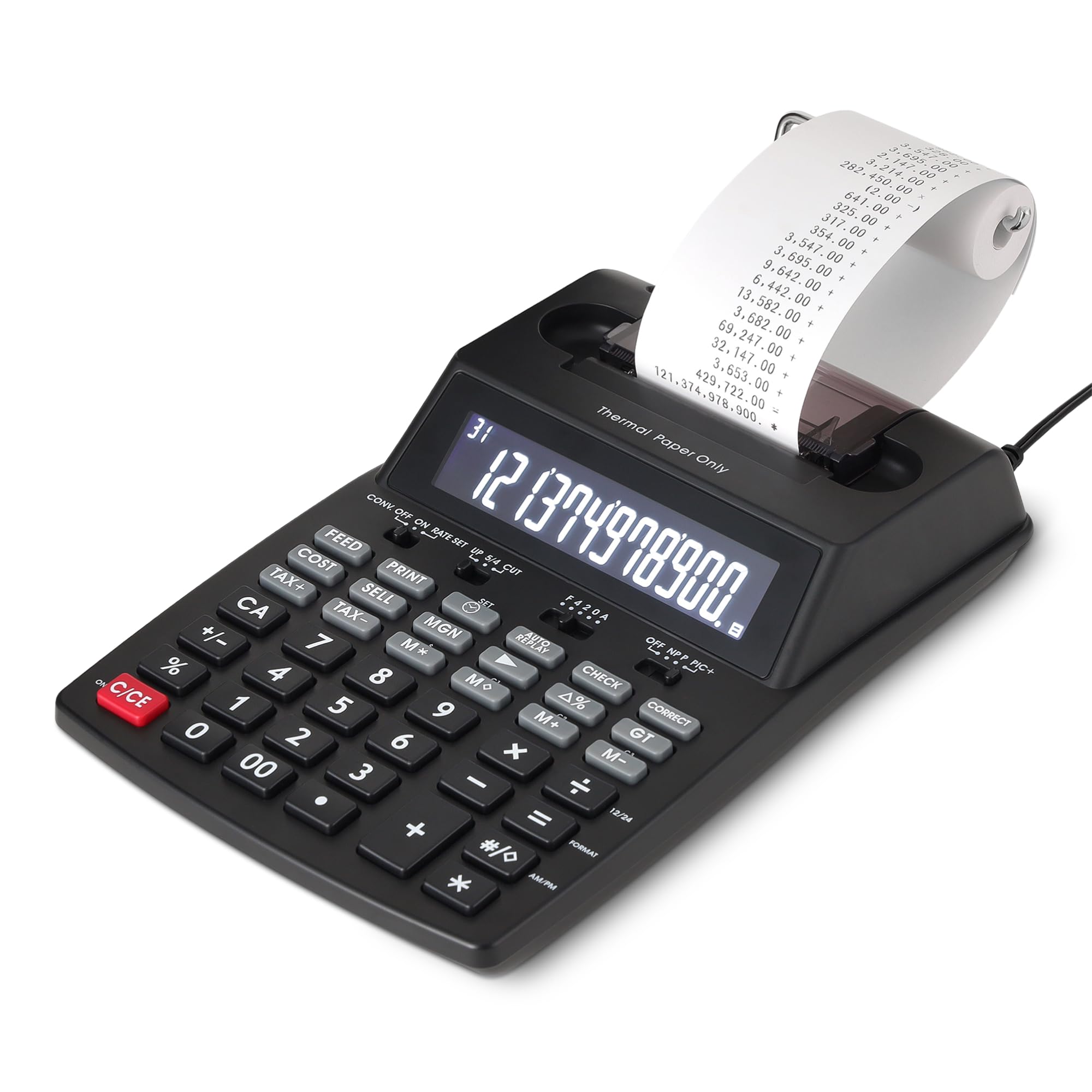
The entry-level thermal printer that eliminates ink costs — if you can get it to stop jamming.
This is the most affordable way to get a printed tape without buying ink cartridges. The thermal printing technology means zero recurring expense on toner, ink, or ribbons — you just feed the paper. The bright 12-digit LCD is easy on the eyes, and the classic 10-key layout is comfortable for error-free entry. It prints at 6 lines per second, which is fast enough for a busy retail counter or home office. The Cost-Sell-Margin and tax calculation keys cover the core needs of a small business owner.
Owners who received a properly working unit love it. One called it the best calculator they have ever had and said it took only 10 minutes to learn. Another praised the simple reliability and the ability to plug it in or use batteries. The functionality gets the most mentions, with 5 owners calling it a positive.
Reliability feedback is mixed: the paper path appears too narrow for standard 2 1/4-inch rolls. Several reviewers point out constant jamming with both the included paper and standard replacements. One described it as a design flaw or unit defect and returned it. If you get a good unit, it is a steal. If you get a paper-jamming unit, it is a frustration. The 4.1-star average reflects this split.
Why it is worth a look
- Thermal printing saves you from buying ink or toner ribbons forever
- Fast print speed at 6 lines per second
- Cost-sell-margin and tax keys streamline basic business calculations
The reliability question
- Paper jamming is a recurring complaint — some units seem to have a narrow paper path
- Only 77 ratings so far — a small sample suggests the quality control is not fully baked
- No dual-power option — AC adapter only
Consider it if: your budget is tight and you want a thermal printer for occasional home-office use — just make sure you test the paper path immediately for returns.
Avoid if: you rely on a daily paper trail for work and cannot tolerate a jam mid-shift.
5. Casio HR-170RC Printing Calculator – 12-Digit Display

The mini desktop printer that fits a shoebox but prints a full 150-step audit trail.
At just 6.5 inches wide, this Casio is one of the smallest printing calculators on the market — yet it still prints in black and red to help you catch errors before they cost you money. The two-color ink ribbon clearly separates positive and negative values, and the check-and-correct function lets you review and edit up to 150 steps before printing. That means you can re-enter a wrong line without retyping the entire column. Dedicated cost/sell/margin and tax keys streamline the business math that a bookkeeper does hourly.
Functionality is what owners praise most: 33 call it out specifically. Quality comes second at 30 mentions. Owners say it takes standard 2 1/4-inch paper rolls and the paper is very easy to load. It works plugged into AC power without batteries, though 4 AAA batteries are included if you need portability. The clock and calendar printing feature time-stamps your tapes, which is a specific help during tax prep and accounting — the tape now tells you not just the numbers but when you ran them. One owner owned their previous Casio for over 20 years and said the new one is almost the same.
Battery life gets mixed reviews, with 12 mentions. The unit can run on AC only — the batteries serve as a backup if the power flickers. A few owners found the print quality light on some paper brands. Still, the 4.6-star average and 573 ratings make this the most popular printing calculator in the list. It is louder than a non-printing Canon desktop, but that is the nature of a ribbon-based printer.
The compact advantage
- Smallest footprint in the printing category at 6.5 inches wide
- 2-color printing helps prevent costly reading errors on the tape
- 150-step memory lets you edit mistakes before committing to paper
Space-saving trade-offs
- Battery life is mixed; best used as an AC-powered unit
- Print quality can vary with off-brand paper rolls
- No backlit display — fine in good office light but harder in dim rooms
Ideal for: a cluttered desk where space is tight but you still need a printed tape for bookkeeping or tax records.
Not for: anyone who works on the go — the AC cord limits you to a fixed desk.
6. HP 12C Financial Calculator – Industry Standard Since 1981

The gold-plated classic that banking pros have trusted for four decades — if you can stomach the RPN logic.
If there is one calculator that defines “industry standard,” it is the HP 12C. Since 1981, it has been the go-to financial calculator in real estate, banking, and finance for fast and accurate calculations. It packs over 120 functions including TVM, NPV, IRR, amortization, and bond calculations, plus programmable keys so you can store your own routines. The current model uses an ARM chip that makes it much faster than the original — no more waiting for the IRR “running” indicator. The metal enclosure gives it a weight and feel that the plastic TI BA II Plus cannot match.
The defining feature — and the barrier for most buyers — is Reverse Polish Notation (RPN). Instead of typing “1 + 1 =”, you type “1 Enter 1 +”. RPN fans say it is faster because you never use parentheses; you just stack operations. The learning curve is real, but graduates say RPN is more efficient once you internalize it. The keyboard layout is unchanged since 1981, which means decades of muscle memory transfer between machines. The 4.5-star average across 451 ratings reflects that this is a specialized tool loved by its niche.
A handful of shoppers say quality issues with newer units — one described sticky, unreliable keys that required restarting every calculation. This is a minority report, but the fact that a few units arrived with defective keyboards is worth noting. Also, the left-arrow key erases the entire entry rather than a single digit, which is different from most calculators. It uses AAA batteries rather than the old button cells, which is a genuine upgrade for availability. No manual is included in the box — you must download it.
Why pros pick it
- 120+ financial functions including programmable keystroke routines
- Metal enclosure feels indestructible compared to plastic competitors
- RPN eliminates parentheses once learned — faster for complex chains
The RPN barrier
- RPN is a genuine learning curve — plan on spending hours to get fluent
- Some newer units have had sticky key issues, per a minority of owners
- No manual included; you need to download a PDF
Pick this if: you work in banking, real estate, or corporate finance and want the tool that every seasoned pro in the room uses.
skip it if: you are not willing to commit to the RPN learning curve — the TI BA II Plus or HP 10bII+ offer standard algebraic entry.
7. Casio HR-300RC – Printing Calculator with Backlit LCD

The CPA-approved desktop that lights up its display so you can see numbers clearly in dim office light.
This is the printing calculator you want when you spend eight hours at a desk and want to save your eyes. The backlit LCD display is the standout feature — owners with poor eyesight say “no more squinting” and one CPA reported the large, clear numbers are exactly what they needed. It prints in black and red like the HR-170RC, and the 150-step check-and-correct function works the same way, letting you reprint corrected tapes. The difference is the larger footprint: 10.2 inches wide versus 6.5 inches for the HR-170RC, which means larger keys and more space between them.
Functionality is the most-discussed strength at 48 mentions, followed by ease of use at 19 mentions. The key size is noted by 18 owners as being particularly good — larger than average, which helps reduce mis-hits during rapid data entry. The 30-minute auto shut-off saves power, though this model does not have a battery power option. It is AC-only, which is a hard limit if you work in a truck, a trade show booth, or anywhere without a wall outlet. Several owners flagged this as the single biggest limitation.
The 4.4-star average across 726 ratings is solid. Owners say it is lightweight, sturdy, and good value. The LED (light-emitting diode) display is bright enough that one owner described it as “easier to read than my computer screen.” The 30-minute sleep mode is a minor annoyance if you step away for lunch — you have to tap a key to wake it up, but that also saves the AC cord from being jostled all day.
What makes it stand out
- Backlit LCD display — rare in this category and a real benefit for long sessions
- Larger keys reduce input errors during fast data entry
- 726 ratings with a 4.4-star average means strong owner satisfaction
The AC-only catch
- No battery option — you must be plugged into an outlet
- Heavier at 1.4 lb — not portable for meetings
- Auto shut-off after 30 minutes requires a key press to resume
Best for: an accountant, bookkeeper, or tax preparer who works a full shift at a fixed desk and values screen readability above all else.
Not for: anyone who needs to take a printing calculator to a client site or work from a trade show table without AC power.
8. Sharp QS-2130 Commercial Desktop Calculator – 12-Digit
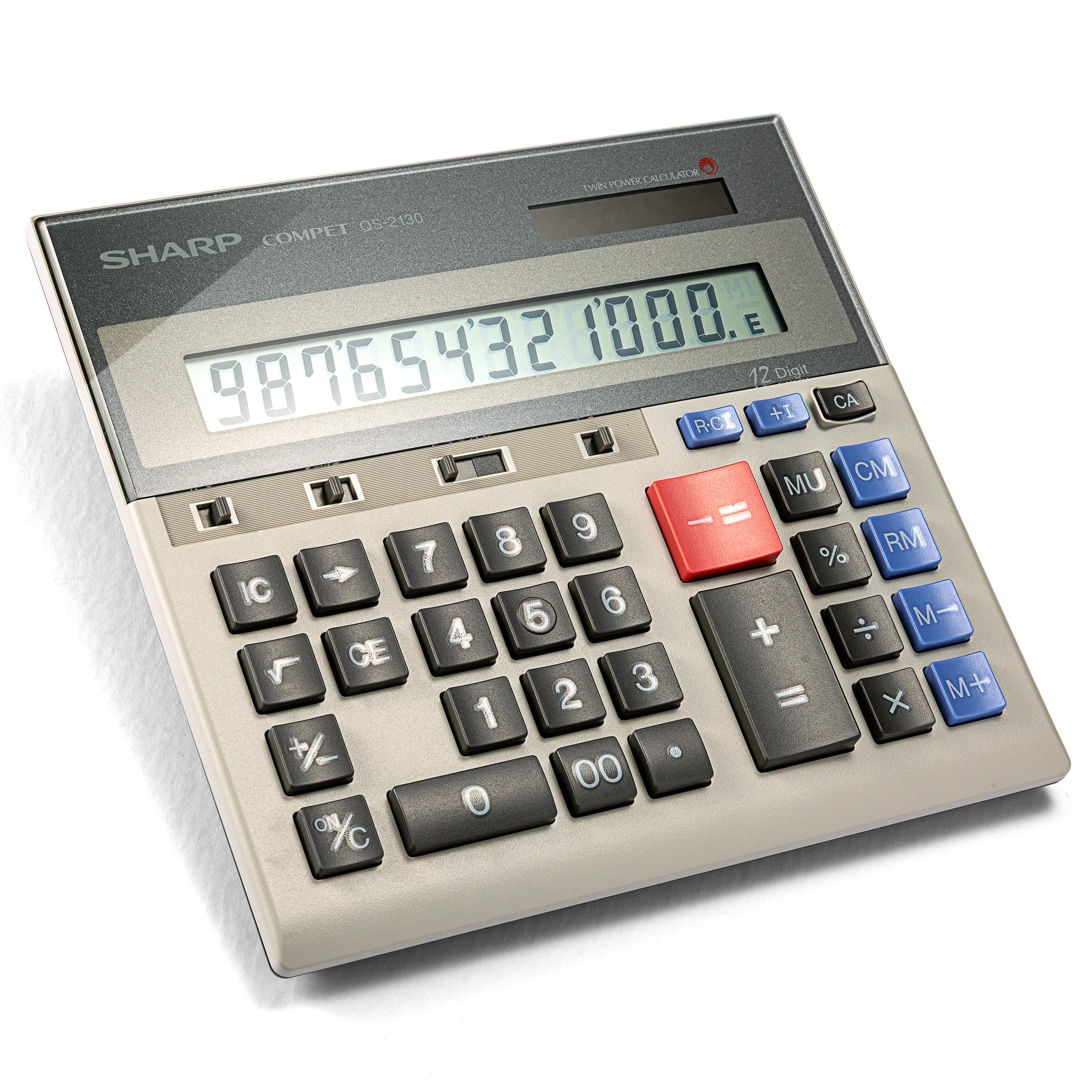
The portable ten-key that mimics an adding machine without the paper roll — and survives 25 years on a desk.
If you want the speed of an adding machine but cannot stand the bulk of a printing calculator, this Sharp is the answer. It uses a full-size 10-key layout with well-spaced keys that let touch-typists fly without missing a beat. One CPA-owner reported owning theirs since 1997 — that is over 25 years — and currently owns three. The unit is slim enough to toss in a briefcase for client meetings and includes a pouch for protection. The dual solar-and-battery power means it is always ready; you never worry about dead batteries at a crucial moment.
Functionality earns the most mentions at 32, and size comes second at 14. The keys are described as “perfect sized” for rapid input, and the 12-digit LCD is large enough to read across a desk. It includes memory keys and a markup key for common business calculations. The battery life is so good that owners call it “lasts forever” — the solar panel keeps the internal battery topped off in normal office light. Durability is also a strong point, with owners noting it lasts 10+ years easily.
Value-for-money feedback is mixed: some see it as a one-time purchase that pays for itself over decades, others find it expensive compared to basic calculators. The key thing to know is that it has no printer or paper roll, so if your boss or accountant demands a paper audit trail, you still need a separate printing model. At 9.12 ounces it is significantly heavier than a pocket financial calculator like the HP 10bII+ at 3.04 ounces, but far lighter than any printing unit.
Why touch-typists love it
- Full-size ten-key layout matches an adding machine — zero adaptation for trained users
- Dual solar + battery power means virtually no battery changes
- Buyers report 10 to 25 years of daily use without failure
The no-printer limit
- No paper tape — you must record totals manually or use a secondary device for audit
- Mixed value perception: some find it pricey for a non-printing desktop
- Thicker than a pocket calculator — will not fit in a shirt pocket
Reach for it if: you are a CPA, bookkeeper, or anyone who can touch-type on a ten-key and wants a portable desktop that lasts longer than your office chair.
Look elsewhere if: you need a printed tape for tax records or a financial calculator with NPV and IRR.
9. Canon MP25DV-3 Desktop Printing Calculator – VFD Display

The heavyweight desktop that prints at high speed and uses a VFD display for razor-sharp clarity.
This is the most full-featured printing calculator on the list, weighing 3.3 pounds and spanning 15.7 inches across. It uses a VFD (Vacuum Fluorescent Display) rather than a standard LCD, which means the digits are sharper, brighter, and more readable from an angle. The high-speed ink ribbon printing system churns through calculations quickly, and the Double Check Function gives you an extra layer of verification before you finalize a tape. Dedicated cost/sell/margin keys cover the primary business use cases, and it includes currency conversion — a specific edge for anyone who deals with international suppliers or clients.
Quality is the top positive aspect with 18 mentions. Owners who have owned Canon printing calculators for 30+ years say the new model is identical to the old one they loved. Ease of use comes second at 7 mentions — owners find it simple to just tap a button and get results. The backup battery (CR2032) preserves memory settings when unplugged.
Reliability feedback is mixed — 21 owners mention it as a concern. The specific pattern is that the monitor (VFD display) turns itself off after a period of inactivity, which some find annoying. One owner notes the auto-power-down kicks in after about 7 minutes, and you need to press CE/C to restart. Noise also gets mixed feedback, with 8 owners reporting a high-pitched sound from the unit. The design is silver and plastic, which looks office-appropriate but does not match the metal build of premium competitors. At this price it is the most expensive pick here, so hesitate if you only use a calculator twice a month.
The premium additions
- VFD display is noticeably sharper and brighter than standard LCD screens
- Double Check Function gives a second layer of auditing on important tapes
- Currency conversion is a rare and useful extra for international work
The quirks to know
- Auto power-down after 7 minutes — requires CE/C to restart, which interrupts flow
- A few owners mention a high-pitched noise from the unit
- Heaviest pick at 3.3 lb — this is a fixed-desk machine, not portable
Choose this if: you want the most fully-loaded printing calculator with a vivid VFD screen, currency conversion, and a double-check verification feature.
Think twice if: your budget is limited or you need a quiet printer — the noise and auto-shutoff may annoy in a shared office.
Understanding the Specs
Financial Functions (TVM, NPV, IRR)
These three acronyms define a true financial calculator. Time-Value-of-Money (TVM) tells you what a future dollar is worth today — essential for loans, mortgages, and pension planning. Net Present Value (NPV) compares an investment’s upfront cost against its projected returns, and Internal Rate of Return (IRR) tells you the break-even interest rate. If your work involves any of these, you need a model like the TI BA II Plus or HP 12C. Desktop “business” calculators with margin keys simply cannot do this math.
RPN vs. Algebraic Entry
Almost every calculator you have ever used works in algebraic logic: you type “1 + 1 =”. Reverse Polish Notation (RPN), used by the HP 12C, changes the order: you type “1 Enter 1 +”. The advantage is that you never need parentheses — you stack operations on a register. It is faster for complex chains of calculations once you learn it, but it feels completely alien for the first few hours. If you are buying an affordable finance tool for a class that requires one, check whether your syllabus specifies algebraic or RPN. Most schools teach algebraic.
Thermal vs. Ink Ribbon Printing
Printing calculators use one of two technologies. Thermal printers burn numbers onto special heat-sensitive paper — they need no ink, but the paper can fade over time and is often more expensive per roll. The Amazon Basics pick uses thermal. Ink ribbon printers use a physical ribbon that stamps ink onto standard paper — the print lasts indefinitely, but you need to replace the ribbon every few months. The Casio and Canon printing models on this list use ink ribbons. For a permanent tax or legal record, ink ribbon is the safer choice.
Dual Power (Solar + Battery)
A dual-power calculator runs on solar cells in normal office light and switches to battery when the light drops. This means you almost never change the battery — the solar trickle keeps it topped up. The Canon HS-1200TS and Sharp QS-2130 use dual power and customers note them lasting years on the same battery. Pure battery-only units like the HP 10bII+ and HP 12C eventually need cell swaps, but they also work in dim exam halls where solar units struggle.
FAQ
Can I use the TI BA II Plus on the CFA exam?
What is the difference between the HP 10bII+ and the HP 12C?
Does the Casio HR-300RC run on batteries?
How long does the Canon HS-1200TS last with daily use?
Will the Sharp QS-2130 fit in a briefcase or laptop bag?
Can I replace the ink ribbon on the Canon MP25DV-3?
What size paper does the Amazon Basics printing calculator use?
Is the HP 10bII+ allowed on the SAT and AP tests?
Which calculator has the largest display for poor eyesight?
Which business calculator is most durable according to owners?
Final Thoughts: The Verdict
For most buyers, the best business calculator is the Texas Instruments BA II Plus because it is the most versatile financial tool that is also approved for the CFA, FRM, and CMA exams. If you want a printing desktop for an office desk, the Canon HS-1200TS is the one owners keep buying again — it lasts 8 years and the solar power means you never think about batteries. And if you need an exam-allowed financial calculator that is lighter than any competitor, the HP 10bII+ packs 100+ functions into a 3.04-ounce frame that is permitted from the SAT through your MBA.
How We Picked
We do not accept paid placement. Every pick is matched to a real buyer and a real use-case; we do not hands-on test units.
Sources & Methodology
Specifications: manufacturer listings and product documentation. Review insights: verified customer reviews, as of July 2026. Pricing: not shown on this page (it changes often); check the current price via the retailer link.
As an Amazon Associate, FitlyFast earns from qualifying purchases. This does not affect which products we feature.